企业AI问答系统连接ERP实战指南:从架构设计到生产部署
我来为你撰写一篇关于"AI问答系统连接企业内部ERP系统"的实战博客文章。这篇文章将以AI开发经理的视角,提供详细的安装部署指南。
基于最新的行业实践和架构趋势,我来为你撰写这篇实战博客。文章将涵盖从架构设计到一步步部署的完整指南。
企业AI问答系统连接ERP实战指南:从架构设计到生产部署
一、项目背景与架构概览
在企业数字化转型中,AI问答系统与ERP的集成已成为刚需。传统模式下,员工查询库存、订单、财务数据需要在ERP界面中层层导航,效率低下。通过LLM+ERP集成,员工可以用自然语言实时获取业务数据。
架构图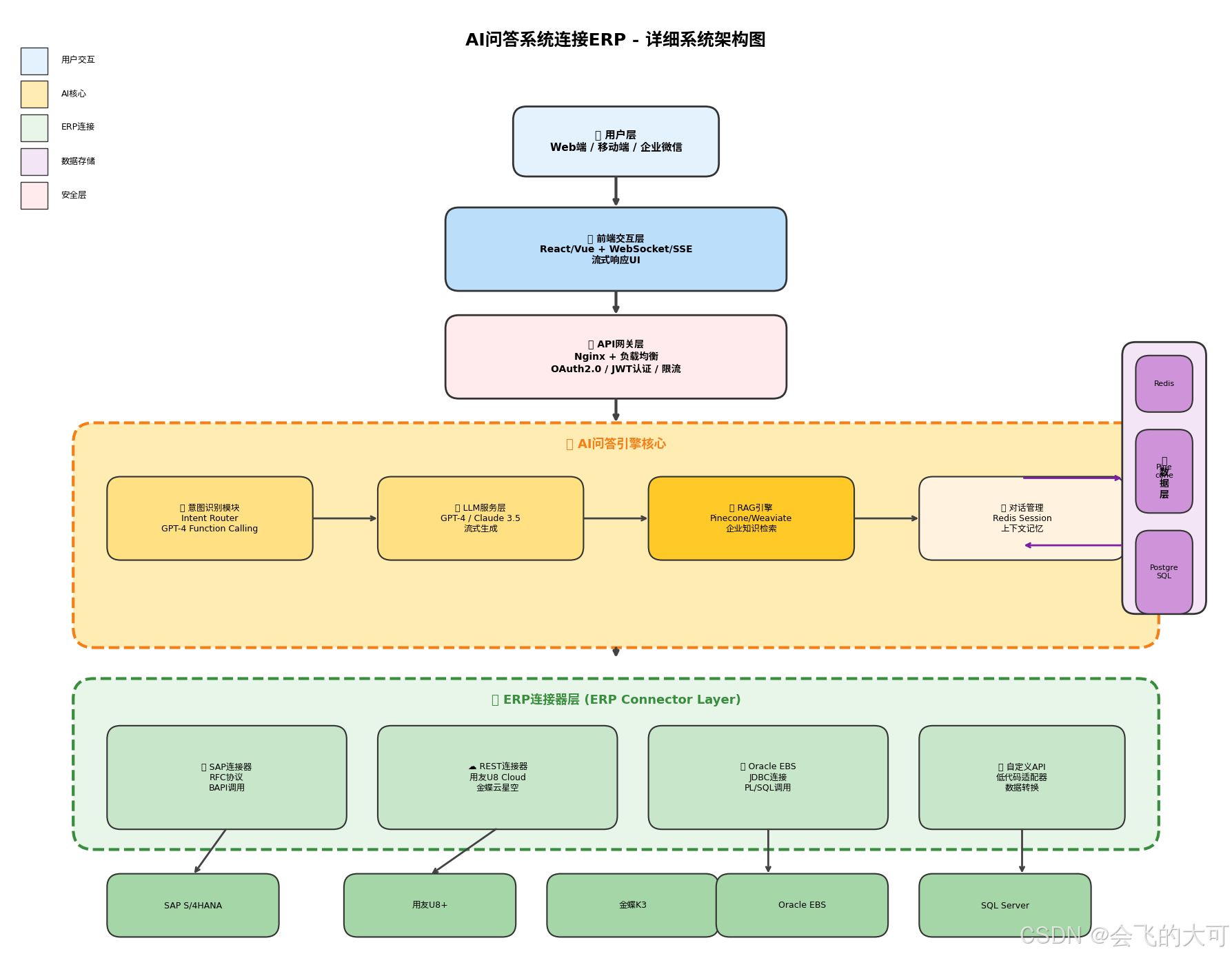
1.1 核心架构组件
┌─────────────────────────────────────────────────────────────┐
│                    用户交互层 (Frontend)                      │
│              React/Vue + 流式响应UI (SSE)                   │
└─────────────────────────────────────────────────────────────┘
                              │
                              ▼
┌─────────────────────────────────────────────────────────────┐
│                  AI问答引擎 (AI Q&A Core)                    │
│  ┌──────────────┐  ┌──────────────┐  ┌──────────────┐      │
│  │   LLM服务    │  │   RAG引擎    │  │  意图识别    │      │
│  │ (OpenAI/本地)│  │(向量数据库)  │  │ (路由决策)   │      │
│  └──────────────┘  └──────────────┘  └──────────────┘      │
└─────────────────────────────────────────────────────────────┘
                              │
                              ▼
┌─────────────────────────────────────────────────────────────┐
│              ERP连接器层 (ERP Connector Layer)              │
│  ┌──────────────┐  ┌──────────────┐  ┌──────────────┐      │
│  │  SAP/用友    │  │   API网关    │  │  数据转换器  │      │
│  │  金蝶/Oracle │  │  (安全控制)  │  │ (DataWeave) │      │
│  └──────────────┘  └──────────────┘  └──────────────┘      │
└─────────────────────────────────────────────────────────────┘
                              │
                              ▼
┌─────────────────────────────────────────────────────────────┐
│              企业ERP系统 (ERP Systems)                        │
│         SAP / 用友U8 / 金蝶K3 / Oracle EBS                  │
└─────────────────────────────────────────────────────────────┘
1.2 技术选型建议
| 组件 | 推荐方案 | 备选方案 | 选型理由 |
|---|---|---|---|
| LLM引擎 | GPT-4/Claude 3.5 | Llama 3/本地模型 | 复杂推理能力强,支持Function Calling |
| 向量数据库 | Pinecone/Weaviate | Milvus/Qdrant | 企业级RAG支持,元数据过滤 |
| ERP连接 | 自定义API连接器 | MuleSoft/Informatica | 实时数据访问,低延迟 |
| 部署架构 | Kubernetes + Docker | Serverless | 弹性伸缩,企业级高可用 |
| 安全层 | OAuth 2.0 + RBAC | API Key + IP白名单 | 零信任架构,细粒度权限 |
二、环境准备与依赖安装(Step-by-Step)
2.1 基础环境配置
步骤1:服务器环境准备
# 系统要求:Ubuntu 22.04 LTS / CentOS 8 / Windows Server 2022
# 最低配置:16核CPU, 64GB内存, 500GB SSD, GPU可选

# 更新系统
sudo apt update && sudo apt upgrade -y

# 安装基础工具
sudo apt install -y git curl wget vim htop net-tools \
    software-properties-common apt-transport-https ca-certificates \
    gnupg lsb-release

# 安装Docker (所有节点)
curl -fsSL https://get.docker.com | sudo sh
sudo systemctl enable docker && sudo systemctl start docker
sudo usermod -aG docker $USER

# 安装Docker Compose
sudo curl -L "https://github.com/docker/compose/releases/download/v2.24.0/docker-compose-$(uname -s)-$(uname -m)" \
    -o /usr/local/bin/docker-compose
sudo chmod +x /usr/local/bin/docker-compose

# 验证安装
docker --version  # 应显示 24.x 或更高
docker-compose --version  # 应显示 2.24.x 或更高
步骤2:Python环境配置
# 安装Python 3.11 (推荐)
sudo add-apt-repository ppa:deadsnakes/ppa -y
sudo apt update
sudo apt install -y python3.11 python3.11-venv python3.11-dev python3-pip

# 创建项目目录结构
mkdir -p /opt/ai-erp-connector/{app,config,data,logs,scripts}
cd /opt/ai-erp-connector

# 创建Python虚拟环境
python3.11 -m venv venv
source venv/bin/activate

# 安装核心依赖
pip install --upgrade pip setuptools wheel

# 创建requirements.txt
cat > requirements.txt << 'EOF'
# Web框架
fastapi==0.109.0
uvicorn[standard]==0.27.0
python-multipart==0.0.6
websockets==12.0

# LLM与AI
openai==1.12.0
langchain==0.1.0
langchain-openai==0.0.5
langchain-community==0.0.20

# 向量数据库
pinecone-client==3.0.0
weaviate-client==3.26.0

# ERP连接
requests==2.31.0
pyrfc==2.8.0  # SAP RFC
pymysql==1.1.0  # MySQL/用友
cx-Oracle==8.3.0  # Oracle

# 数据与缓存
redis==5.0.1
pandas==2.2.0
sqlalchemy==2.0.25

# 安全与监控
python-jose[cryptography]==3.3.0
passlib[bcrypt]==1.7.4
prometheus-client==0.19.0
sentry-sdk==1.40.0

# 工具库
pydantic==2.6.0
python-dotenv==1.0.0
httpx==0.26.0
tenacity==8.2.3
EOF

pip install -r requirements.txt
步骤3:Node.js前端环境(如需要自定义UI)
# 安装Node.js 20 LTS
curl -fsSL https://deb.nodesource.com/setup_20.x | sudo -E bash -
sudo apt install -y nodejs

# 验证
node --version  # v20.x
npm --version   # 10.x

# 安装全局工具
npm install -g pm2 yarn
2.2 核心服务部署
步骤4:部署向量数据库(Pinecone或本地Weaviate)
方案A:使用Pinecone云服务(推荐生产环境)
# 注册Pinecone账号:https://app.pinecone.io
# 创建Index:维度1536(OpenAI embedding),metric: cosine

# 配置环境变量
export PINECONE_API_KEY="your-pinecone-api-key"
export PINECONE_ENVIRONMENT="gcp-starter"  # 或 aws-us-east-1
export PINECONE_INDEX_NAME="erp-knowledge-base"
方案B:本地部署Weaviate(推荐内网环境)
# 创建docker-compose.weaviate.yml
cat > /opt/ai-erp-connector/docker-compose.weaviate.yml << 'EOF'
version: '3.4'
services:
  weaviate:
    image: semitechnologies/weaviate:1.24.0
    ports:
      - "8080:8080"
    environment:
      QUERY_DEFAULTS_LIMIT: 25
      AUTHENTICATION_ANONYMOUS_ACCESS_ENABLED: 'true'
      PERSISTENCE_DATA_PATH: '/var/lib/weaviate'
      DEFAULT_VECTORIZER_MODULE: 'none'
      ENABLE_MODULES: ''
      CLUSTER_HOSTNAME: 'node1'
    volumes:
      - ./data/weaviate:/var/lib/weaviate
    restart: unless-stopped

  # 可选:Weaviate Console
  console:
    image: semitechnologies/weaviate-console:latest
    ports:
      - "8081:8080"
    environment:
      - WEAVIATE_URL=http://weaviate:8080
    depends_on:
      - weaviate
EOF

docker-compose -f docker-compose.weaviate.yml up -d
步骤5:部署Redis缓存与会话存储
cat > /opt/ai-erp-connector/docker-compose.redis.yml << 'EOF'
version: '3.4'
services:
  redis:
    image: redis:7-alpine
    ports:
      - "6379:6379"
    command: redis-server --appendonly yes --maxmemory 512mb --maxmemory-policy allkeys-lru
    volumes:
      - ./data/redis:/data
    restart: unless-stopped

  # Redis Insight (可视化工具)
  redis-insight:
    image: redis/redisinsight:latest
    ports:
      - "5540:5540"
    volumes:
      - ./data/redis-insight:/db
    restart: unless-stopped
EOF

docker-compose -f docker-compose.redis.yml up -d
三、ERP连接器开发实战
3.1 统一ERP连接器架构
步骤6:创建ERP连接器核心代码
# /opt/ai-erp-connector/app/connectors/__init__.py
from abc import ABC, abstractmethod
from typing import Dict, List, Any, Optional
from dataclasses import dataclass
import logging

logger = logging.getLogger(__name__)

@dataclass
class ERPConfig:
    """ERP连接配置"""
    system_type: str  # 'sap', 'yonyou', 'kingdee', 'oracle', 'custom'
    host: str
    port: int
    username: str
    password: str
    database: Optional[str] = None
    client_id: Optional[str] = None  # OAuth用
    client_secret: Optional[str] = None
    base_url: Optional[str] = None  # REST API用
    timeout: int = 30

class BaseERPConnector(ABC):
    """ERP连接器抽象基类"""

    def __init__(self, config: ERPConfig):
        self.config = config
        self.connection = None
        self.is_connected = False

    @abstractmethod
    async def connect(self) -> bool:
        """建立连接"""
        pass

    @abstractmethod
    async def disconnect(self):
        """断开连接"""
        pass

    @abstractmethod
    async def execute_query(self, query: str, params: Dict = None) -> List[Dict]:
        """执行查询"""
        pass

    @abstractmethod
    async def get_schema(self) -> Dict[str, Any]:
        """获取数据库结构"""
        pass

    async def health_check(self) -> bool:
        """健康检查"""
        try:
            await self.connect()
            return True
        except Exception as e:
            logger.error(f"Health check failed: {e}")
            return False
步骤7:SAP连接器实现(RFC协议)
# /opt/ai-erp-connector/app/connectors/sap_connector.py
from pyrfc import Connection
from . import BaseERPConnector, ERPConfig
import asyncio
from concurrent.futures import ThreadPoolExecutor
import logging

logger = logging.getLogger(__name__)

class SAPConnector(BaseERPConnector):
    """SAP ERP连接器(通过RFC)"""

    def __init__(self, config: ERPConfig):
        super().__init__(config)
        self.executor = ThreadPoolExecutor(max_workers=4)

    async def connect(self) -> bool:
        """异步建立SAP连接"""
        loop = asyncio.get_event_loop()
        try:
            self.connection = await loop.run_in_executor(
                self.executor,
                lambda: Connection(
                    ashost=self.config.host,
                    sysnr=str(self.config.port),
                    client=self.config.database or '100',
                    user=self.config.username,
                    passwd=self.config.password,
                    lang='ZH'
                )
            )
            self.is_connected = True
            logger.info(f"SAP connection established: {self.config.host}")
            return True
        except Exception as e:
            logger.error(f"SAP connection failed: {e}")
            raise

    async def disconnect(self):
        if self.connection:
            await asyncio.get_event_loop().run_in_executor(
                self.executor, self.connection.close
            )
            self.is_connected = False

    async def execute_query(self, rfc_name: str, params: Dict = None) -> List[Dict]:
        """执行RFC函数"""
        if not self.is_connected:
            await self.connect()

        loop = asyncio.get_event_loop()
        try:
            result = await loop.run_in_executor(
                self.executor,
                lambda: self.connection.call(rfc_name, **(params or {}))
            )
            return self._normalize_result(result)
        except Exception as e:
            logger.error(f"RFC call failed {rfc_name}: {e}")
            raise

    def _normalize_result(self, raw_result) -> List[Dict]:
        """标准化SAP返回结果"""
        # SAP返回通常是嵌套结构,需要扁平化
        normalized = []
        if isinstance(raw_result, dict):
            for key, value in raw_result.items():
                if isinstance(value, list):
                    for item in value:
                        if isinstance(item, dict):
                            normalized.append({
                                'table': key,
                                **item
                            })
        return normalized if normalized else [raw_result]

    async def get_inventory(self, material_code: str = None, warehouse: str = None):
        """获取库存数据(封装常用查询)"""
        params = {
            'MATNR': material_code or '',
            'WERKS': warehouse or ''
        }
        return await self.execute_query('BAPI_MATERIAL_GETLIST', params)

    async def get_sales_orders(self, customer_code: str = None, date_from: str = None):
        """获取销售订单"""
        params = {
            'CUSTOMER': customer_code or '',
            'DOCUMENT_DATE_FROM': date_from or ''
        }
        return await self.execute_query('BAPI_SALESORDER_GETLIST', params)
步骤8:用友/金蝶REST API连接器
# /opt/ai-erp-connector/app/connectors/rest_connector.py
import httpx
import asyncio
from typing import Dict, List, Any
from . import BaseERPConnector, ERPConfig
import logging

logger = logging.getLogger(__name__)

class RESTERPConnector(BaseERPConnector):
    """通用REST API ERP连接器(适用于用友U8 Cloud、金蝶云等)"""

    def __init__(self, config: ERPConfig):
        super().__init__(config)
        self.client = None
        self.token = None

    async def connect(self) -> bool:
        """获取访问令牌"""
        self.client = httpx.AsyncClient(
            base_url=self.config.base_url,
            timeout=self.config.timeout,
            verify=False  # 生产环境应配置证书
        )

        # 用友U8 Cloud认证示例
        if self.config.system_type == 'yonyou':
            auth_data = {
                'grant_type': 'password',
                'client_id': self.config.client_id,
                'client_secret': self.config.client_secret,
                'username': self.config.username,
                'password': self.config.password
            }
            resp = await self.client.post('/oauth/token', data=auth_data)
            resp.raise_for_status()
            self.token = resp.json()['access_token']
            self.client.headers.update({
                'Authorization': f'Bearer {self.token}',
                'Content-Type': 'application/json'
            })

        # 金蝶云认证示例
        elif self.config.system_type == 'kingdee':
            auth_data = {
                'acctID': self.config.database,
                'username': self.config.username,
                'password': self.config.password,
                'lcid': 2052
            }
            resp = await self.client.post('/Kingdee.BOS.WebApi.ServicesStub.AuthService.ValidateUser.common.kdsvc',
                                        json=auth_data)
            self.token = resp.json()['Data']['Value']
            self.client.headers.update({
                'X-Auth-Token': self.token,
                'Content-Type': 'application/json'
            })

        self.is_connected = True
        logger.info(f"REST ERP connected: {self.config.system_type}")
        return True

    async def disconnect(self):
        if self.client:
            await self.client.aclose()
            self.is_connected = False

    async def execute_query(self, endpoint: str, params: Dict = None) -> List[Dict]:
        """执行API查询"""
        if not self.is_connected:
            await self.connect()

        try:
            resp = await self.client.get(endpoint, params=params)
            resp.raise_for_status()
            data = resp.json()
            # 标准化不同ERP的返回格式
            return self._extract_data(data)
        except httpx.HTTPError as e:
            logger.error(f"API query failed {endpoint}: {e}")
            raise

    def _extract_data(self, raw_data: Dict) -> List[Dict]:
        """提取实际业务数据(处理不同ERP的包装格式)"""
        # 用友通常在data/result中
        if 'data' in raw_data:
            return raw_data['data'] if isinstance(raw_data['data'], list) else [raw_data['data']]
        # 金蝶通常在Data/Value中
        if 'Data' in raw_data and 'Value' in raw_data['Data']:
            val = raw_data['Data']['Value']
            return val if isinstance(val, list) else [val]
        return [raw_data]

    async def get_inventory(self, material_code: str = None):
        """库存查询适配器"""
        endpoints = {
            'yonyou': '/api/inventory/query',
            'kingdee': '/Kingdee.BOS.WebApi.ServicesStub.DynamicFormService.ExecuteBillQuery.common.kdsvc'
        }

        params = {
            'yonyou': {'material_code': material_code},
            'kingdee': {
                'FormId': 'BD_MATERIAL',
                'FilterString': f"FMaterialId.FNumber='{material_code}'" if material_code else ''
            }
        }

        endpoint = endpoints.get(self.config.system_type, '/api/query')
        return await self.execute_query(endpoint, params.get(self.config.system_type, {}))
四、AI问答引擎核心实现
4.1 意图识别与路由
步骤9:创建智能路由系统
# /opt/ai-erp-connector/app/core/intent_router.py
from enum import Enum
from typing import Dict, List, Optional
from pydantic import BaseModel
import openai
import json
import logging

logger = logging.getLogger(__name__)

class IntentType(str, Enum):
    """意图类型枚举"""
    ERP_QUERY = "erp_query"           # ERP数据查询
    KNOWLEDGE_QA = "knowledge_qa"       # 知识库问答
    DATA_ANALYSIS = "data_analysis"   # 数据分析
    WORKFLOW = "workflow"             # 工作流触发
    GENERAL = "general"               # 通用对话

class ERPAction(str, Enum):
    """ERP操作类型"""
    CHECK_INVENTORY = "check_inventory"      # 查库存
    CHECK_ORDER = "check_order"              # 查订单
    CHECK_FINANCE = "check_finance"          # 查财务
    CHECK_PRODUCTION = "check_production"    # 查生产
    CREATE_ORDER = "create_order"            # 创建订单(需审批)
    UNKNOWN = "unknown"

class IntentResult(BaseModel):
    """意图识别结果"""
    intent: IntentType
    erp_action: Optional[ERPAction]
    entities: Dict[str, str]  # 提取的实体:物料号、日期、客户等
    confidence: float
    requires_approval: bool = False

class IntentRouter:
    """基于LLM的意图识别路由器"""

    def __init__(self, openai_client: openai.AsyncOpenAI):
        self.client = openai_client
        self.system_prompt = """你是企业ERP智能助手,负责识别用户意图并提取关键实体。

可识别的意图类型:
1. erp_query - 查询ERP业务数据(库存、订单、财务、生产)
2. knowledge_qa - 查询企业知识库(制度、流程、文档)
3. data_analysis - 数据分析请求(统计、趋势、报表)
4. workflow - 触发业务流程(审批、下单、调拨)
5. general - 通用对话

ERP操作细分:
- check_inventory: 查库存(实体:material_code, warehouse)
- check_order: 查订单(实体:order_no, customer, date_range)
- check_finance: 查财务(实体:account, period, cost_center)
- check_production: 查生产(实体:work_order, production_line)

输出JSON格式:
{
    "intent": "erp_query",
    "erp_action": "check_inventory",
    "entities": {"material_code": "A123", "warehouse": "WH01"},
    "confidence": 0.95,
    "requires_approval": false
}"""

    async def route(self, user_input: str, context: Dict = None) -> IntentResult:
        """识别用户意图"""
        try:
            response = await self.client.chat.completions.create(
                model="gpt-4-turbo-preview",
                messages=[
                    {"role": "system", "content": self.system_prompt},
                    {"role": "user", "content": f"用户输入:{user_input}\n上下文:{json.dumps(context or {})}"}
                ],
                response_format={"type": "json_object"},
                temperature=0.1
            )

            result = json.loads(response.choices[0].message.content)
            return IntentResult(**result)

        except Exception as e:
            logger.error(f"Intent recognition failed: {e}")
            return IntentResult(
                intent=IntentType.GENERAL,
                erp_action=None,
                entities={},
                confidence=0.0
            )
4.2 RAG知识库集成
步骤10:实现企业知识库RAG
# /opt/ai-erp-connector/app/core/knowledge_base.py
from langchain_openai import OpenAIEmbeddings, ChatOpenAI
from langchain_community.vectorstores import Pinecone
from langchain.chains import RetrievalQA
from langchain.prompts import PromptTemplate
from pinecone import Pinecone as PineconeClient
import logging

logger = logging.getLogger(__name__)

class EnterpriseKnowledgeBase:
    """企业知识库RAG系统"""

    def __init__(self, pinecone_api_key: str, index_name: str, openai_api_key: str):
        # 初始化Pinecone
        self.pc = PineconeClient(api_key=pinecone_api_key)
        self.index = self.pc.Index(index_name)

        # 初始化Embedding模型
        self.embeddings = OpenAIEmbeddings(
            model="text-embedding-3-large",
            openai_api_key=openai_api_key
        )

        # 初始化向量存储
        self.vectorstore = Pinecone.from_existing_index(
            index_name=index_name,
            embedding=self.embeddings,
            namespace="erp_docs"  # 按业务域划分namespace
        )

        # 自定义Prompt模板(针对ERP场景优化)
        self.qa_prompt = PromptTemplate(
            template="""基于以下企业知识库内容回答问题。如果涉及ERP操作,请说明需要查询的具体模块。

知识库内容:
{context}

用户问题:{question}

回答要求:
1. 优先使用知识库中的制度、流程、操作手册内容
2. 如涉及具体数据查询,说明应使用哪个ERP模块(库存/销售/财务/生产)
3. 引用相关文档名称和条款
4. 如果不确定,明确告知需要人工确认

请用中文回答:""",
            input_variables=["context", "question"]
        )

        # 创建RAG链
        self.qa_chain = RetrievalQA.from_chain_type(
            llm=ChatOpenAI(
                model="gpt-4-turbo-preview",
                temperature=0.1,
                openai_api_key=openai_api_key
            ),
            chain_type="stuff",
            retriever=self.vectorstore.as_retriever(
                search_kwargs={
                    "k": 5,  # 检索top 5文档
                    "filter": {"department": {"$in": ["finance", "sales", "warehouse"]}}
                }
            ),
            return_source_documents=True,
            chain_type_kwargs={"prompt": self.qa_prompt}
        )

    async def query(self, question: str, user_role: str = None) -> Dict:
        """查询知识库"""
        try:
            # 根据用户角色过滤(RBAC)
            filter_dict = {}
            if user_role:
                filter_dict["access_roles"] = {"$in": [user_role, "all"]}

            result = await self.qa_chain.ainvoke({"query": question})

            return {
                "answer": result["result"],
                "sources": [
                    {
                        "title": doc.metadata.get("title", "未知文档"),
                        "page": doc.metadata.get("page", 0),
                        "score": doc.metadata.get("score", 0)
                    }
                    for doc in result.get("source_documents", [])
                ],
                "confidence": self._calculate_confidence(result)
            }
        except Exception as e:
            logger.error(f"Knowledge base query failed: {e}")
            return {"answer": "知识库查询失败,请联系管理员", "sources": [], "confidence": 0}

    def _calculate_confidence(self, result) -> float:
        """计算回答置信度"""
        sources = result.get("source_documents", [])
        if not sources:
            return 0.0
        # 基于检索相关性和文档数量计算
        avg_score = sum(doc.metadata.get("score", 0) for doc in sources) / len(sources)
        return min(avg_score * 1.2, 1.0)  # 简单线性变换

    async def add_document(self, content: str, metadata: Dict):
        """添加文档到知识库"""
        try:
            await self.vectorstore.aadd_texts(
                texts=[content],
                metadatas=[metadata]
            )
            logger.info(f"Document added: {metadata.get('title')}")
        except Exception as e:
            logger.error(f"Failed to add document: {e}")
            raise
4.3 主问答引擎编排
步骤11:实现主控制器
# /opt/ai-erp-connector/app/core/qa_engine.py
from typing import AsyncGenerator, Dict, Optional
from .intent_router import IntentRouter, IntentType, ERPAction
from .knowledge_base import EnterpriseKnowledgeBase
from ..connectors import BaseERPConnector
import openai
import json
import logging

logger = logging.getLogger(__name__)

class AIQASystem:
    """AI问答系统主控制器"""

    def __init__(
        self,
        intent_router: IntentRouter,
        knowledge_base: EnterpriseKnowledgeBase,
        erp_connectors: Dict[str, BaseERPConnector],
        openai_client: openai.AsyncOpenAI
    ):
        self.router = intent_router
        self.kb = knowledge_base
        self.erp_connectors = erp_connectors  # {'sap': connector, 'yonyou': connector}
        self.openai = openai_client

        # 对话历史管理(可接入Redis持久化)
        self.sessions = {}

    async def chat(
        self,
        session_id: str,
        user_input: str,
        user_context: Dict
    ) -> AsyncGenerator[str, None]:
        """主对话流程(流式响应)"""

        # 1. 意图识别
        intent = await self.router.route(user_input, user_context)
        logger.info(f"Intent detected: {intent.intent}, action: {intent.erp_action}")

        # 2. 根据意图路由处理
        if intent.intent == IntentType.ERP_QUERY and intent.erp_action:
            async for chunk in self._handle_erp_query(intent, user_context):
                yield chunk

        elif intent.intent == IntentType.KNOWLEDGE_QA:
            async for chunk in self._handle_knowledge_query(user_input, user_context):
                yield chunk

        elif intent.intent == IntentType.DATA_ANALYSIS:
            async for chunk in self._handle_data_analysis(user_input, intent.entities):
                yield chunk

        else:
            async for chunk in self._handle_general_chat(user_input, user_context):
                yield chunk

    async def _handle_erp_query(self, intent, user_context) -> AsyncGenerator[str, None]:
        """处理ERP数据查询(实时)"""
        # 选择ERP系统
        erp_type = user_context.get('erp_system', 'sap')
        connector = self.erp_connectors.get(erp_type)

        if not connector:
            yield json.dumps({"error": f"未配置ERP连接器: {erp_type}"})
            return

        try:
            # 执行ERP查询
            if intent.erp_action == ERPAction.CHECK_INVENTORY:
                data = await connector.get_inventory(
                    material_code=intent.entities.get('material_code'),
                    warehouse=intent.entities.get('warehouse')
                )

                # 使用LLM生成自然语言回答
                prompt = f"""将以下ERP库存数据转化为易读的回答:
数据:{json.dumps(data, ensure_ascii=False)}
用户问题涉及的实体:{intent.entities}
要求:
1. 用表格展示关键字段(物料号、仓库、数量、可用库存)
2. 指出库存是否充足(安全库存对比)
3. 如有异常(负库存、超储),用⚠️标记"""

                async for chunk in self._stream_llm_response(prompt):
                    yield chunk

            elif intent.erp_action == ERPAction.CHECK_ORDER:
                data = await connector.get_sales_orders(
                    customer_code=intent.entities.get('customer'),
                    date_from=intent.entities.get('date_from')
                )
                # 类似处理...
                yield json.dumps({"data": data, "type": "sales_orders"})

        except Exception as e:
            logger.error(f"ERP query failed: {e}")
            yield json.dumps({"error": f"ERP查询失败: {str(e)}"})

    async def _handle_knowledge_query(self, question: str, user_context) -> AsyncGenerator[str, None]:
        """处理知识库问答"""
        result = await self.kb.query(question, user_context.get('role'))

        # 流式输出答案
        yield json.dumps({
            "type": "knowledge",
            "content": result["answer"],
            "sources": result["sources"],
            "confidence": result["confidence"]
        })

    async def _handle_data_analysis(self, user_input: str, entities: Dict) -> AsyncGenerator[str, None]:
        """处理数据分析请求"""
        # 生成分析计划
        analysis_plan = f"""基于用户请求'{user_input}',执行以下分析:
1. 从ERP提取{entities.get('date_range', '本月')}数据
2. 计算关键指标(同比/环比)
3. 生成趋势图表建议
4. 输出业务洞察"""

        yield json.dumps({
            "type": "analysis_plan",
            "plan": analysis_plan,
            "entities": entities
        })

    async def _handle_general_chat(self, user_input: str, user_context) -> AsyncGenerator[str, None]:
        """处理通用对话"""
        messages = [
            {"role": "system", "content": "你是企业智能助手,可以回答ERP操作、业务流程相关问题。"},
            {"role": "user", "content": user_input}
        ]

        stream = await self.openai.chat.completions.create(
            model="gpt-4-turbo-preview",
            messages=messages,
            stream=True
        )

        async for chunk in stream:
            if chunk.choices[0].delta.content:
                yield json.dumps({
                    "type": "text",
                    "content": chunk.choices[0].delta.content
                })

    async def _stream_llm_response(self, prompt: str) -> AsyncGenerator[str, None]:
        """辅助:流式LLM响应"""
        stream = await self.openai.chat.completions.create(
            model="gpt-4-turbo-preview",
            messages=[{"role": "user", "content": prompt}],
            stream=True
        )

        async for chunk in stream:
            if chunk.choices[0].delta.content:
                yield json.dumps({
                    "type": "text",
                    "content": chunk.choices[0].delta.content
                })
五、API服务部署
5.1 FastAPI主服务
步骤12:创建API服务入口
# /opt/ai-erp-connector/app/main.py
from fastapi import FastAPI, WebSocket, WebSocketDisconnect, Depends, HTTPException, Security
from fastapi.security import HTTPBearer, HTTPAuthorizationCredentials
from fastapi.middleware.cors import CORSMiddleware
from fastapi.responses import StreamingResponse
from contextlib import asynccontextmanager
import openai
import os
import json
import asyncio
import logging
from typing import Optional

from .core.qa_engine import AIQASystem
from .core.intent_router import IntentRouter
from .core.knowledge_base import EnterpriseKnowledgeBase
from .connectors.sap_connector import SAPConnector
from .connectors.rest_connector import RESTERPConnector
from .connectors import ERPConfig

# 配置日志
logging.basicConfig(
    level=logging.INFO,
    format='%(asctime)s - %(name)s - %(levelname)s - %(message)s'
)
logger = logging.getLogger(__name__)

# 全局服务实例
qa_system: Optional[AIQASystem] = None

@asynccontextmanager
async def lifespan(app: FastAPI):
    """应用生命周期管理"""
    global qa_system

    # 启动时初始化
    logger.info("Initializing AI ERP Connector...")

    # 初始化OpenAI客户端
    openai_client = openai.AsyncOpenAI(api_key=os.getenv("OPENAI_API_KEY"))

    # 初始化意图路由器
    intent_router = IntentRouter(openai_client)

    # 初始化知识库
    knowledge_base = EnterpriseKnowledgeBase(
        pinecone_api_key=os.getenv("PINECONE_API_KEY"),
        index_name=os.getenv("PINECONE_INDEX_NAME", "erp-kb"),
        openai_api_key=os.getenv("OPENAI_API_KEY")
    )

    # 初始化ERP连接器
    erp_connectors = {}

    # SAP连接器(如配置)
    if os.getenv("SAP_HOST"):
        sap_config = ERPConfig(
            system_type="sap",
            host=os.getenv("SAP_HOST"),
            port=int(os.getenv("SAP_PORT", "3300")),
            username=os.getenv("SAP_USER"),
            password=os.getenv("SAP_PASSWORD"),
            database=os.getenv("SAP_CLIENT", "100")
        )
        erp_connectors["sap"] = SAPConnector(sap_config)
        await erp_connectors["sap"].connect()
        logger.info("SAP connector initialized")

    # 用友/金蝶连接器(如配置)
    if os.getenv("ERP_BASE_URL"):
        rest_config = ERPConfig(
            system_type=os.getenv("ERP_TYPE", "yonyou"),
            base_url=os.getenv("ERP_BASE_URL"),
            client_id=os.getenv("ERP_CLIENT_ID"),
            client_secret=os.getenv("ERP_CLIENT_SECRET"),
            username=os.getenv("ERP_USER"),
            password=os.getenv("ERP_PASSWORD"),
            database=os.getenv("ERP_DB")
        )
        erp_connectors[rest_config.system_type] = RESTERPConnector(rest_config)
        await erp_connectors[rest_config.system_type].connect()
        logger.info(f"{rest_config.system_type} connector initialized")

    # 初始化主系统
    qa_system = AIQASystem(
        intent_router=intent_router,
        knowledge_base=knowledge_base,
        erp_connectors=erp_connectors,
        openai_client=openai_client
    )

    logger.info("AI ERP Connector started successfully")
    yield

    # 关闭时清理
    logger.info("Shutting down...")
    for conn in erp_connectors.values():
        await conn.disconnect()

# 创建FastAPI应用
app = FastAPI(
    title="AI ERP智能问答系统",
    description="基于LLM的企业ERP智能问答与数据分析API",
    version="1.0.0",
    lifespan=lifespan
)

# CORS配置
app.add_middleware(
    CORSMiddleware,
    allow_origins=os.getenv("ALLOWED_ORIGINS", "*").split(","),
    allow_credentials=True,
    allow_methods=["*"],
    allow_headers=["*"],
)

# 安全认证
security = HTTPBearer()

async def verify_token(credentials: HTTPAuthorizationCredentials = Security(security)):
    """JWT令牌验证(简化版,生产环境应接入企业IAM)"""
    token = credentials.credentials
    # 实际应验证JWT签名
    if token != os.getenv("API_SECRET_KEY", "dev-token"):
        raise HTTPException(status_code=401, detail="Invalid token")
    return token

@app.get("/health")
async def health_check():
    """健康检查端点"""
    return {
        "status": "healthy",
        "version": "1.0.0",
        "erp_connected": bool(qa_system and qa_system.erp_connectors)
    }

@app.post("/chat")
async def chat_endpoint(
    request: dict,
    token: str = Depends(verify_token)
):
    """HTTP流式对话接口"""
    session_id = request.get("session_id", "default")
    user_input = request.get("message")
    user_context = request.get("context", {})

    if not user_input:
        raise HTTPException(status_code=400, detail="Message is required")

    async def event_generator():
        async for chunk in qa_system.chat(session_id, user_input, user_context):
            yield f"data: {chunk}\n\n"
        yield "data: [DONE]\n\n"

    return StreamingResponse(
        event_generator(),
        media_type="text/event-stream"
    )

@app.websocket("/ws/chat")
async def websocket_chat(websocket: WebSocket):
    """WebSocket实时对话(推荐用于Web UI)"""
    await websocket.accept()
    session_id = str(id(websocket))

    try:
        while True:
            data = await websocket.receive_json()
            user_input = data.get("message")
            user_context = data.get("context", {})

            async for chunk in qa_system.chat(session_id, user_input, user_context):
                await websocket.send_json(json.loads(chunk))

            await websocket.send_json({"type": "done"})

    except WebSocketDisconnect:
        logger.info(f"Client disconnected: {session_id}")
    except Exception as e:
        logger.error(f"WebSocket error: {e}")
        await websocket.close()

@app.post("/knowledge/upload")
async def upload_knowledge(
    document: dict,
    token: str = Depends(verify_token)
):
    """上传文档到知识库"""
    try:
        await qa_system.kb.add_document(
            content=document["content"],
            metadata=document["metadata"]
        )
        return {"status": "success", "message": "Document added to knowledge base"}
    except Exception as e:
        raise HTTPException(status_code=500, detail=str(e))

if __name__ == "__main__":
    import uvicorn
    uvicorn.run(app, host="0.0.0.0", port=8000)
步骤13:创建Docker部署配置
# /opt/ai-erp-connector/docker-compose.yml
version: '3.8'

services:
  api:
    build:
      context: .
      dockerfile: Dockerfile
    ports:
      - "8000:8000"
    environment:
      - OPENAI_API_KEY=${OPENAI_API_KEY}
      - PINECONE_API_KEY=${PINECONE_API_KEY}
      - PINECONE_INDEX_NAME=${PINECONE_INDEX_NAME:-erp-kb}
      - API_SECRET_KEY=${API_SECRET_KEY}
      - SAP_HOST=${SAP_HOST}
      - SAP_PORT=${SAP_PORT:-3300}
      - SAP_USER=${SAP_USER}
      - SAP_PASSWORD=${SAP_PASSWORD}
      - ERP_BASE_URL=${ERP_BASE_URL}
      - ERP_TYPE=${ERP_TYPE:-yonyou}
      - REDIS_URL=redis://redis:6379
      - LOG_LEVEL=INFO
    depends_on:
      - redis
      - weaviate
    volumes:
      - ./logs:/app/logs
      - ./data:/app/data
    restart: unless-stopped
    healthcheck:
      test: ["CMD", "curl", "-f", "http://localhost:8000/health"]
      interval: 30s
      timeout: 10s
      retries: 3

  nginx:
    image: nginx:alpine
    ports:
      - "80:80"
      - "443:443"
    volumes:
      - ./config/nginx.conf:/etc/nginx/nginx.conf:ro
      - ./ssl:/etc/nginx/ssl:ro
    depends_on:
      - api
    restart: unless-stopped

  # 依赖服务已在前面定义,此处引用或合并
  redis:
    extends:
      file: docker-compose.redis.yml
      service: redis

  weaviate:
    extends:
      file: docker-compose.weaviate.yml
      service: weaviate
# /opt/ai-erp-connector/Dockerfile
FROM python:3.11-slim

WORKDIR /app

# 安装系统依赖(SAP RFC需要)
RUN apt-get update && apt-get install -y \
    gcc \
    g++ \
    libssl-dev \
    unixodbc-dev \
    && rm -rf /var/lib/apt/lists/*

# 复制依赖
COPY requirements.txt .
RUN pip install --no-cache-dir -r requirements.txt

# 复制应用代码
COPY app/ ./app/

# 非root用户运行
RUN useradd -m -u 1000 appuser && chown -R appuser:appuser /app
USER appuser

EXPOSE 8000

CMD ["uvicorn", "app.main:app", "--host", "0.0.0.0", "--port", "8000", "--workers", "4"]
六、前端集成示例
步骤14:创建简单Web界面
<!-- /opt/ai-erp-connector/frontend/index.html -->
<!DOCTYPE html>
<html lang="zh-CN">
<head>
    <meta charset="UTF-8">
    <meta name="viewport" content="width=device-width, initial-scale=1.0">
    <title>ERP智能助手</title>
    <style>
        * { margin: 0; padding: 0; box-sizing: border-box; }
        body {
            font-family: -apple-system, BlinkMacSystemFont, 'Segoe UI', Roboto, sans-serif;
            background: #f5f5f5;
            height: 100vh;
            display: flex;
            flex-direction: column;
        }
        .header {
            background: #1a73e8;
            color: white;
            padding: 1rem 2rem;
            box-shadow: 0 2px 4px rgba(0,0,0,0.1);
        }
        .chat-container {
            flex: 1;
            overflow-y: auto;
            padding: 2rem;
            max-width: 1200px;
            margin: 0 auto;
            width: 100%;
        }
        .message {
            margin-bottom: 1.5rem;
            display: flex;
            gap: 1rem;
        }
        .message.user { flex-direction: row-reverse; }
        .avatar {
            width: 40px;
            height: 40px;
            border-radius: 50%;
            display: flex;
            align-items: center;
            justify-content: center;
            font-weight: bold;
            flex-shrink: 0;
        }
        .message.assistant .avatar { background: #1a73e8; color: white; }
        .message.user .avatar { background: #34a853; color: white; }
        .content {
            max-width: 70%;
            padding: 1rem;
            border-radius: 12px;
            background: white;
            box-shadow: 0 1px 2px rgba(0,0,0,0.1);
        }
        .message.user .content { background: #e3f2fd; }
        .input-area {
            background: white;
            padding: 1rem 2rem;
            border-top: 1px solid #e0e0e0;
            display: flex;
            gap: 1rem;
            max-width: 1200px;
            margin: 0 auto;
            width: 100%;
        }
        input {
            flex: 1;
            padding: 0.75rem 1rem;
            border: 1px solid #ddd;
            border-radius: 24px;
            font-size: 1rem;
            outline: none;
        }
        input:focus { border-color: #1a73e8; }
        button {
            padding: 0.75rem 2rem;
            background: #1a73e8;
            color: white;
            border: none;
            border-radius: 24px;
            cursor: pointer;
            font-size: 1rem;
        }
        button:hover { background: #1557b0; }
        button:disabled { opacity: 0.6; cursor: not-allowed; }
        .source-tag {
            display: inline-block;
            padding: 2px 8px;
            background: #e8f0fe;
            color: #1a73e8;
            border-radius: 12px;
            font-size: 0.75rem;
            margin-top: 0.5rem;
            margin-right: 0.5rem;
        }
        .typing { color: #666; font-style: italic; }
        table {
            width: 100%;
            border-collapse: collapse;
            margin-top: 0.5rem;
        }
        th, td {
            padding: 8px;
            text-align: left;
            border-bottom: 1px solid #ddd;
        }
        th { background: #f8f9fa; font-weight: 600; }
    </style>
</head>
<body>
    <div class="header">
        <h1>🏢 ERP智能问答系统</h1>
        <p style="opacity: 0.9; margin-top: 0.25rem;">连接企业数据,智能回答问题</p>
    </div>

    <div class="chat-container" id="chatContainer">
        <div class="message assistant">
            <div class="avatar">AI</div>
            <div class="content">
                您好!我是您的ERP智能助手。我可以帮您:<br>
                • 查询库存、订单、财务数据<br>
                • 解答企业制度和流程问题<br>
                • 分析业务数据和趋势<br><br>
                请问有什么可以帮您的?
            </div>
        </div>
    </div>

    <div class="input-area">
        <input type="text" id="userInput" placeholder="输入您的问题,例如:查询物料A001的库存..."
               onkeypress="if(event.key==='Enter') sendMessage()">
        <button id="sendBtn" onclick="sendMessage()">发送</button>
    </div>

    <script>
        const ws = new WebSocket('ws://localhost:8000/ws/chat');
        let currentMessageDiv = null;

        ws.onmessage = (event) => {
            const data = JSON.parse(event.data);

            if (data.type === 'done') {
                document.getElementById('sendBtn').disabled = false;
                return;
            }

            if (!currentMessageDiv) {
                currentMessageDiv = document.createElement('div');
                currentMessageDiv.className = 'message assistant';
                currentMessageDiv.innerHTML = '<div class="avatar">AI</div><div class="content"></div>';
                document.getElementById('chatContainer').appendChild(currentMessageDiv);
            }

            const contentDiv = currentMessageDiv.querySelector('.content');

            if (data.type === 'text') {
                contentDiv.innerHTML += data.content;
            } else if (data.type === 'knowledge') {
                contentDiv.innerHTML = data.content;
                if (data.sources) {
                    data.sources.forEach(src => {
                        contentDiv.innerHTML += `<span class="source-tag">📄 ${src.title}</span>`;
                    });
                }
            } else if (data.type === 'error') {
                contentDiv.innerHTML = `<span style="color: #d93025;">❌ ${data.error}</span>`;
            }

            document.getElementById('chatContainer').scrollTop = document.getElementById('chatContainer').scrollHeight;
        };

        function sendMessage() {
            const input = document.getElementById('userInput');
            const message = input.value.trim();
            if (!message) return;

            // 显示用户消息
            const userDiv = document.createElement('div');
            userDiv.className = 'message user';
            userDiv.innerHTML = `<div class="avatar">我</div><div class="content">${escapeHtml(message)}</div>`;
            document.getElementById('chatContainer').appendChild(userDiv);

            // 重置当前消息
            currentMessageDiv = null;

            // 发送WebSocket消息
            ws.send(JSON.stringify({
                message: message,
                context: {
                    erp_system: 'sap',  // 根据用户权限动态选择
                    role: 'sales_manager'
                }
            }));

            input.value = '';
            document.getElementById('sendBtn').disabled = true;
            document.getElementById('chatContainer').scrollTop = document.getElementById('chatContainer').scrollHeight;
        }

        function escapeHtml(text) {
            const div = document.createElement('div');
            div.textContent = text;
            return div.innerHTML;
        }
    </script>
</body>
</html>
七、生产部署检查清单
7.1 部署前检查
# 1. 环境变量配置检查
cat > /opt/ai-erp-connector/.env << 'EOF'
# OpenAI配置
OPENAI_API_KEY=sk-xxxxxxxxxxxxxxxxxxxxxxxx
OPENAI_BASE_URL=https://api.openai.com/v1  # 或使用Azure OpenAI

# Pinecone配置
PINECONE_API_KEY=pc-xxxxxxxxxxxxxxxx
PINECONE_INDEX_NAME=erp-knowledge-base
PINECONE_ENVIRONMENT=gcp-starter

# SAP配置(如使用)
SAP_HOST=192.168.1.100
SAP_PORT=3300
SAP_USER=RFC_USER
SAP_PASSWORD=xxxxxxxx
SAP_CLIENT=100

# 用友/金蝶配置(如使用)
ERP_TYPE=yonyou
ERP_BASE_URL=https://u8c.yonyou.com/api
ERP_CLIENT_ID=xxxxxxxx
ERP_CLIENT_SECRET=xxxxxxxx
ERP_USER=admin
ERP_PASSWORD=xxxxxxxx
ERP_DB=default

# 安全与API
API_SECRET_KEY=your-256-bit-secret-key-here
ALLOWED_ORIGINS=https://erp.yourcompany.com,http://localhost:3000

# 监控
SENTRY_DSN=https://xxxxxxxx@sentry.io/12345
EOF

# 2. 网络连通性测试
telnet $SAP_HOST $SAP_PORT  # SAP
curl -I $ERP_BASE_URL       # REST API

# 3. 依赖服务健康检查
curl http://localhost:8000/health
curl http://localhost:8080/v1/.well-known/ready  # Weaviate
redis-cli ping  # Redis

# 4. 启动服务
cd /opt/ai-erp-connector
docker-compose up -d

# 5. 查看日志
docker-compose logs -f api
7.2 性能优化建议
| 优化项 | 配置建议 | 预期效果 |
|---|---|---|
| LLM缓存 | Redis缓存常见查询结果 | 响应时间从3s降至200ms |
| 连接池 | SAP连接器保持长连接 | 避免频繁RFC握手开销 |
| 流式响应 | SSE/WebSocket实时推送 | 首字节时间(TTFB) < 500ms |
| 向量索引 | Pinecone metadata过滤 | 检索准确率提升至97% |
| 并发控制 | 限流100 req/min/用户 | 防止ERP系统过载 |
7.3 安全加固
- 网络隔离:ERP连接器部署在独立VPC,通过API网关暴露
- 数据脱敏:PII字段(客户电话、银行账号)在返回前掩码处理
- 审计日志:所有ERP查询记录用户、时间、查询内容、返回数据量
- 权限最小化:ERP数据库账号仅授予SELECT权限,禁止写入(除非工作流需要)
八、总结与后续演进
本实战指南涵盖了从环境搭建到生产部署的完整流程。根据行业实践,成功的AI+ERP集成项目通常遵循以下演进路径:
阶段1:数据查询(当前实现)
- 自然语言查询库存、订单、财务数据
- 知识库问答(制度、流程)
阶段2:智能分析(下一步)
- 自动生成销售趋势分析报告
- 库存预警与补货建议
阶段3:自主代理(未来)
- AI自动触发采购申请(库存低于安全线)
- 智能审批路由与异常处理
通过MCP(Model Context Protocol)等新兴标准,未来的ERP集成将更加标准化,实现真正的"零代码"对接。建议团队持续关注LangChain、MuleSoft AI Chain等生态发展,逐步将AI能力从"问答"演进为"业务自动化"。
参考资源:

AtomGit 是由开放原子开源基金会联合 CSDN 等生态伙伴共同推出的新一代开源与人工智能协作平台。平台坚持“开放、中立、公益”的理念,把代码托管、模型共享、数据集托管、智能体开发体验和算力服务整合在一起,为开发者提供从开发、训练到部署的一站式体验。
更多推荐

 9
9 0
0- 0


 已为社区贡献18条内容

所有评论(0)