【由浅入深探究langchain】第十八集-别让 AI 乱跑之Human-in-the-loop (审批模式) 深度实战
前情提要
在开发智能代理(AI Agent)时,我们最担心的就是 AI “自作主张”地执行敏感操作。比如:
-
没经过确认就给老板发了一封邮件。
-
误判了条件,导致调用高成本工具。
-
访问了不该访问的用户隐私。
Human-in-the-loop (HITL) 技术就是为了解决这个问题。今天,我们将通过 LangChain 1.0 的新特性,拆解一个具有“中断审批”功能的冷笑话天气预报员。
核心架构
在 LangGraph/LangChain 的最新体系中,实现人机协作主要靠三个组件:
-
Checkpointer (持久化层):负责保存对话状态。即便程序运行中断,AI 的记忆也会存在磁盘或内存里。
-
Middleware (中间件):定义哪些工具需要拦截。
-
Command (指令对象):由人工发出,决定是
approve(批准)还是reject(拒绝)。
代码实现
先展示全部代码,其中agent创建的内容,我们使用之前课程中所教的内容。
from langchain.agents import create_agent
from langgraph.checkpoint.memory import InMemorySaver
from langchain.tools import tool,ToolRuntime
from langchain_openai import ChatOpenAI

from langchain.agents.middleware import HumanInTheLoopMiddleware
from langgraph.types import Command

from dataclasses import dataclass

kimi_model = ChatOpenAI(
    model="kimi-k2.5",
    api_key="sk-uQp****",
    base_url="https://api.moonshot.cn/v1",
     # 重点:这里严格对应 Kimi 的 API 结构
    extra_body={
        "thinking": {"type": "disabled"}
    }
)

SYSTEM_PROMPT = """You are an expert weather forecaster, who speaks in puns.

You have access to two tools:

- get_weather_for_location: use this to get the weather for a specific location
- get_user_location: use this to get the user's location

If a user asks you for the weather, make sure you know the location. If you can tell from the question that they mean wherever they are, use the get_user_location tool to find their location.

用中文回答
"""

@tool
def get_weather_for_location(city:str)->str:
    """" Get weather for a given city."""
    return f"It's sunny in {city}"

@dataclass
class Context:
    """ Custom runtime context schema."""
    user_id: str

@tool
def get_user_location(runtime:ToolRuntime[Context])->str:
    """ Retrieve user information based on user ID."""
    user_id = runtime.context.user_id
    return "Shanghai" if user_id == "1" else "Beijing"

@dataclass
class ResponseFormat:
    """ Response schema for the agent."""
    punny_response:str
    weather_conditions:str |None = None

checkpointer =InMemorySaver()

agent = create_agent(
    model=kimi_model,
    system_prompt=SYSTEM_PROMPT,
    tools=[get_weather_for_location,get_user_location],
    middleware=[
        HumanInTheLoopMiddleware(
            # 1. 工具名称和它们的配置放在这里
            interrupt_on={
                "get_user_location": True, # 所有决策都允许 等价于"allowed_decisions": ["approve", "reject", "edit", "respond"],而不是说随便输入什么
                "get_weather_for_location": {
                    "allowed_decisions": ["approve", "reject"]
                }
            },
            # 2. 描述前缀是中间件的直接参数,移出花括号
            description_prefix="工具执行挂起等待决策:"
        )
    ],
    context_schema=Context,
    response_format=ResponseFormat,
    checkpointer=checkpointer
)

config = {"configurable":{"thread_id":"1"}}

print("\n================ 第1轮:用户提问 ================")
response = agent.invoke(
    {"messages":[{"role":"user","content":"what is weather outside?"}]},
    config=config,
    context=Context(user_id="1")
)

print("\n【当前消息状态】")
messages = response["messages"]
for message in messages :
    message.pretty_print()

if "_interrupt_" in response: #判断response是否有key _interrupt_
    print("\n 发生中断(等待人工决策)")
    interrupt = response["_interrupt_"][0]
    for request in interrupt.value["action_request"]:
        print(f"👉 待审批工具{i+1}: {request['name']}")
        print(f"   描述: {request['description']}")
        print(f"   参数: {request.get('args')}")

print("\n================ 第2轮:审批第一个工具 ================")
print("决策:approve get_user_location")
response = agent.invoke(
    Command(
        resume={
            "decisions":[
                {"type":"approve"}
            ]
        }
    ),
    config=config,
    context=Context(user_id="1")
)

print("\n【当前消息状态】")
messages = response["messages"]
for message in messages :
    message.pretty_print()


if "_interrupt_" in response: #判断response是否有key _interrupt_
    print("\n再次发生中断(等待人工决策)")
    interrupt = response["_interrupt_"][0]
    for i, request in enumerate(interrupt.value["action_request"]):
        print(f"👉 待审批工具{i+1}: {request['name']}")
        print(f"   描述: {request['description']}")
        print(f"   参数: {request.get('args')}")

# 第二个指令
print("\n================ 第3轮:审批第二个工具 ================")
print("决策:approve get_weather_for_location")
response = agent.invoke(
    Command(
        resume={
            "decisions":[
                {"type":"approve"}
            ]
        }
    ),
    config=config,
    context=Context(user_id="1")
)

print("\n【最终消息状态】")
messages = response["messages"]
for message in messages :
    message.pretty_print()
代码详解
1.定义模型和提示词
kimi_model = ChatOpenAI(
    model="kimi-k2.5",
    api_key="sk-uQ***",
    base_url="https://api.moonshot.cn/v1",
     # 重点:这里严格对应 Kimi 的 API 结构
    extra_body={
        "thinking": {"type": "disabled"}
    }
)

SYSTEM_PROMPT = """You are an expert weather forecaster, who speaks in puns.

You have access to two tools:

- get_weather_for_location: use this to get the weather for a specific location
- get_user_location: use this to get the user's location

If a user asks you for the weather, make sure you know the location. If you can tell from the question that they mean wherever they are, use the get_user_location tool to find their location.

用中文回答
"""
2.定义工具、数据结构、持久化存储
@tool
def get_weather_for_location(city:str)->str:
    """" Get weather for a given city."""
    return f"It's sunny in {city}"

@dataclass
class Context:
    """ Custom runtime context schema."""
    user_id: str

@tool
def get_user_location(runtime:ToolRuntime[Context])->str:
    """ Retrieve user information based on user ID."""
    user_id = runtime.context.user_id
    return "Shanghai" if user_id == "1" else "Beijing"

@dataclass
class ResponseFormat:
    """ Response schema for the agent."""
    punny_response:str
    weather_conditions:str |None = None

checkpointer =InMemorySaver()
通常工具(Tool)是孤立的函数,它们不知道当前是谁在提问。如果在代码里硬编码 user_id,那这个 Agent 只能给一个人用。但是我们使用ToolRuntime[Context] , 它像是一个“秘密通道”。当我们调用 agent.invoke(..., context=Context(user_id="1")) 时,这个 user_id 会被静默传递到工具内部。
ResponseFormat则是定义了 Agent 最终给用户回话的“模板”。当我们在 create_agent 中传入这个类时,LangChain 会利用 OpenAI/Kimi 的 Function Calling (Structured Output) 能力。AI 不再乱说话,而是强制返回一个包含 punny_response(双关语回复)和 weather_conditions(天气状况)的 JSON 对象。
最后则是持久化存储。它会根据 config={"configurable":{"thread_id":"1"}} 里的 thread_id 来存取数据。每次 AI 想要调工具但被拦截时,InMemorySaver 会把当前的整个对话列表、AI 的思考状态、还没跑的工具参数全序列化保存起来。第二次 invoke 时,它会根据 ID 把这些状态“反序列化”加载回来。
3.创建agent
model=kimi_model: 指定了执行推理的底座。
system_prompt: 注入了灵魂(冷笑话专家)。注意,这里的 Prompt 会告诉 AI 它有哪两个工具可以调用。
tools: 赋予了 Agent 手脚。注意,这里传入的是函数列表,LangGraph 会自动解析函数的 Docstring(如 """" Get weather for a given city.")来生成工具描述发送给 Kimi。
核心拦截层 (middleware) 这是之前没有讲过的新知识
HumanInTheLoopMiddleware 就像是一个防火墙,它安插在 AI 的“决策”和“执行”之间。
interrupt_on 的精细化控制:使用了两种不同的拦截粒度
"get_user_location": True (全权委托/标准拦截),只要 AI 想调这个工具,系统就必须停下来,它默认开启了所有的决策权限:["approve", "reject", "edit", "respond"]。这意味着在这一步,你可以批准它、拒绝它、修改它的参数(比如把 user_id 从 1 改成 2),或者直接代替工具给 AI 回话。
"get_weather_for_location": {"allowed_decisions": ["approve", "reject"]} (受限拦截),这是一种白名单控制,由于天气信息相对简单且重要,你只允许人工进行“批准”或“拒绝”。你不希望人工在这里随意篡改参数(edit)或者跳过工具直接写回话(respond)。这在企业级应用中非常重要,用于规范人工操作的权限。
description_prefix (UI 友好性):这个参数决定了当 _interrupt_ 发生时,返回的描述文字前缀。这对于前端展示非常有用,比如你可以直接把这个字符串显示在管理员的审批弹窗标题上。
数据契约层:context_schema, response_format,定义了 Agent 的输入和输出协议
记忆枢纽 (checkpointer):将前面实例化的 InMemorySaver 挂载到 Agent 上。
4.三轮交互
手动给InMemorySaver设置一个ID
config = {"configurable":{"thread_id":"1"}}第一轮:初始化请求 与 “初次拦截”
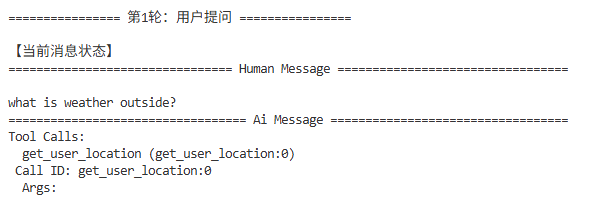
代码动作:1.用户通过 messages 发送问题,询问AI-现在外面的天气怎么样?
背后逻辑:由于它不知道位置,根据 SYSTEM_PROMPT,它决定调用 get_user_location方法。中间件发现该工具在 interrupt_on 列表中,于是立刻中止后续代码执行。你会看到 AI 打印了想调工具的意图,但 messages 里还没有工具的执行结果。
print("\n================ 第1轮:用户提问 ================")
response = agent.invoke(
    {"messages":[{"role":"user","content":"what is weather outside?"}]},
    config=config,
    context=Context(user_id="1")
)

print("\n【当前消息状态】")
messages = response["messages"]
for message in messages :
    message.pretty_print()

if "_interrupt_" in response: #判断response是否有key _interrupt_
    print("\n 发生中断(等待人工决策)")
    interrupt = response["_interrupt_"][0]
    for request in interrupt.value["action_request"]:
        print(f" 待审批工具{i+1}: {request['name']}")
        print(f"   描述: {request['description']}")
        print(f"   参数: {request.get('args')}")
第二轮:第一次 Resume (批准位置获取)
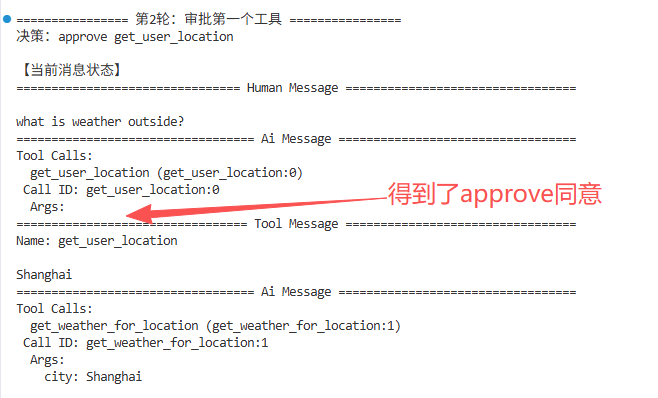
上一步停住了等待我们的批准,所以我们传了 approve,Agent 真正去运行了 get_user_location,工具返回了我们写死的"Shanghai"。Agent 拿到上海后,认为可以查天气了,于是准备调用 get_weather_for_location(city="Shanghai") 。因为天气工具也被设置了拦截,Agent 再次挂起。查看日志你会发现 messages 多了两条:一条是上海的位置结果,一条是 AI 想要查天气的请求。
print("\n================ 第2轮:审批第一个工具 ================")
print("决策:approve get_user_location")
response = agent.invoke(
    Command(
        resume={
            "decisions":[
                {"type":"approve"}
            ]
        }
    ),
    config=config,
    context=Context(user_id="1")
)

print("\n【当前消息状态】")
messages = response["messages"]
for message in messages :
    message.pretty_print()


if "_interrupt_" in response: #判断response是否有key _interrupt_
    print("\n再次发生中断(等待人工决策)")
    interrupt = response["_interrupt_"][0]
    for i, request in enumerate(interrupt.value["action_request"]):
        print(f"👉 待审批工具{i+1}: {request['name']}")
        print(f"   描述: {request['description']}")
        print(f"   参数: {request.get('args')}")
3.第三轮:第二次 Resume (批准天气查询)
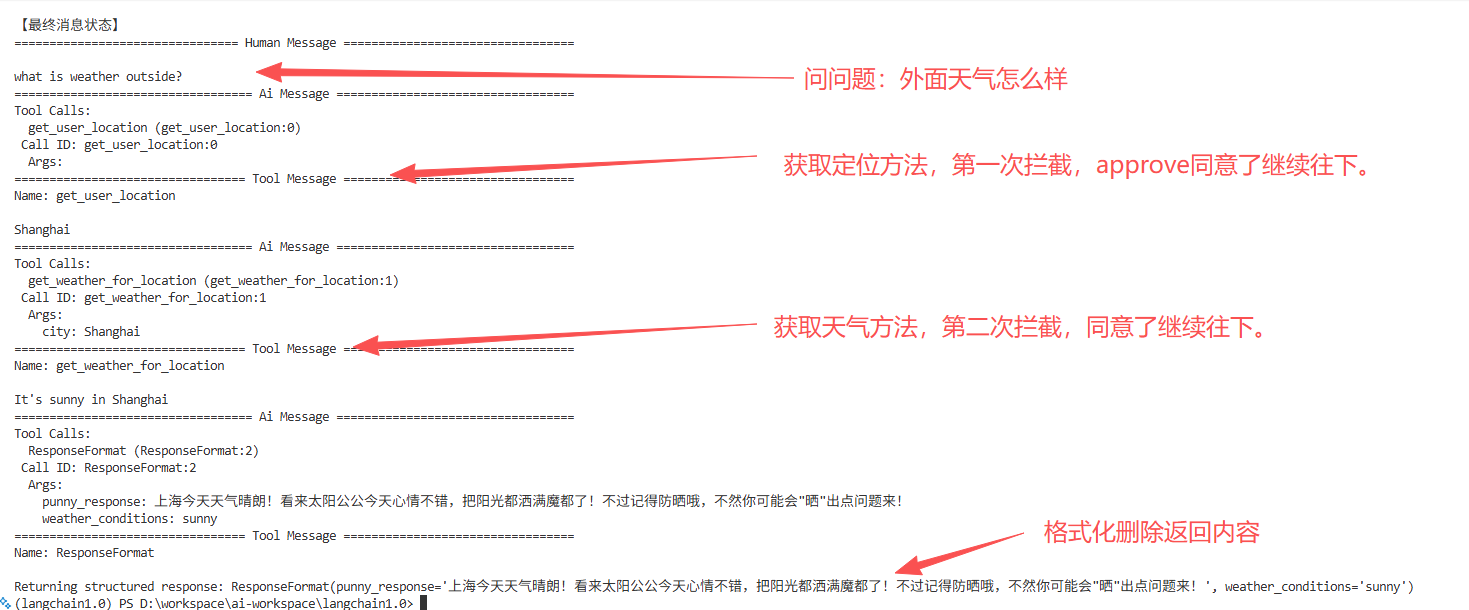
同样发送一个approve给到当前挂起的工具,Agent 执行 get_weather_for_location,得到我们写死的 "It's sunny in Shanghai"。结合我们结构化的模版,给出输出。
print("\n================ 第3轮:审批第二个工具 ================")
print("决策:approve get_weather_for_location")
response = agent.invoke(
    Command(
        resume={
            "decisions":[
                {"type":"approve"}
            ]
        }
    ),
    config=config,
    context=Context(user_id="1")
)

print("\n【最终消息状态】")
messages = response["messages"]
for message in messages :
    message.pretty_print()
运行结果详解
第一步:
人问天气,AI意识到不知道地点,去调用获得位置的方法,被拦截住
第二步:
得到了同意之后,使用方法获得了地点:上海,继续调用获取天气的方法,再次被拦住
第三步:
同意了获取天气的方法,输出结果。
我们看最终消息状态
总结
通过本课对 LangChain 1.0 与 LangGraph Human-in-the-loop 的实战,核心可以用一句话总结:“给 AI 代理装上刹车和方向盘”。
在 LangChain 1.0 的体系下,Human-in-the-loop (HITL) 不再是一个简单的 input() 暂停,而是一套基于状态机的工业级交互方案。
自动化赋予 AI 效率,而 Human-in-the-loop 赋予 AI 责任。在 Agent 迈向生产环境的路上,最强的大脑也需要最可靠的刹车。

AtomGit 是由开放原子开源基金会联合 CSDN 等生态伙伴共同推出的新一代开源与人工智能协作平台。平台坚持“开放、中立、公益”的理念,把代码托管、模型共享、数据集托管、智能体开发体验和算力服务整合在一起,为开发者提供从开发、训练到部署的一站式体验。
更多推荐


 15
15 0
0- 0


 已为社区贡献12条内容

所有评论(0)