[AIAgent-MCP]学了半天MCP,原来核心就这条调用链
MCP (Model Context Protocol) 模型上下文协议, 一种用于将 AI 应用程序连接到外部系统的标准协议。
可以将 MCP 视为人工智能应用的 USB-C 接口, 提供了一种连接电子设备的标准化方式一样,MCP 也提供了一种将人工智能应用连接到外部系统的标准化方式。
各类AI应用 通过 MCP 去操作数据、文件、开发工具、其他应用能力(搜索、地图等)。
MCP不是"某个工具集合",而是"连接规范 + 交互语义"。
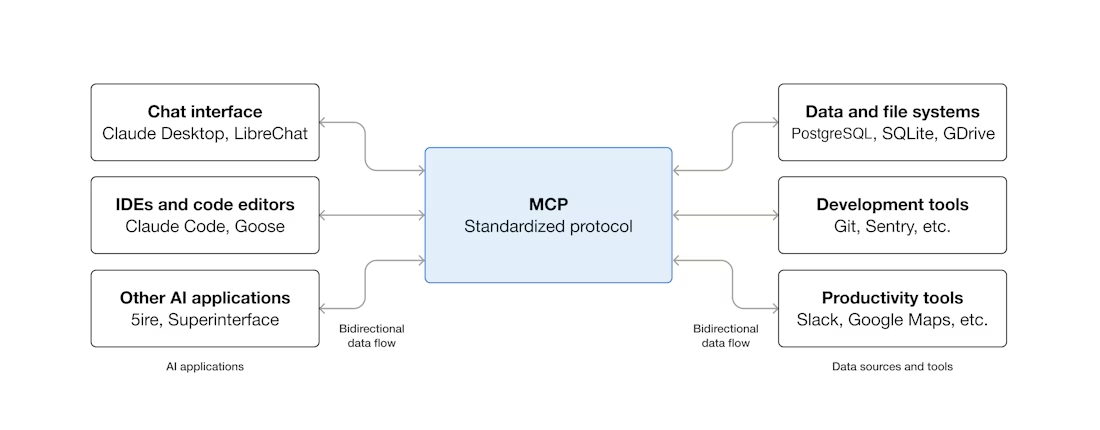
MCP 架构
MCP 采用客户端-服务器架构, 包含三部分:
- MCP Host: 用于协调和管理一个或多个 MCP 客户端的
AI 应用程序 - MCP Client: 一个维护与 MCP 服务器连接并从 MCP 服务器获取上下文以供 MCP 主机(AI应用程序)使用的组件
- MCP Server: 一个为 MCP 客户端提供上下文信息的程序, 工具能力集中站。
其中 MCP 主机( Claude Code 或 Claude Desktop 等 AI 应用)通过一个或多个Mcp Client与一个或多个 MCP 服务器建立连接。每个 MCP 客户端与其对应的 MCP 服务器保持专用连接。
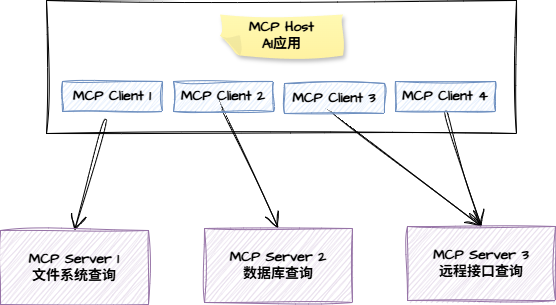
MCP 分层
数据层和传输层
传输层
定义MCP Client和MCP Server之间进行数据交换的通信机制和通道,包括特定于传输的连接建立、消息帧和授权。
MCP Server 可以在远端(远程MCP服务器),也可以在本地(本地MCP服务器)。
所以 MCP Client 与 MCP Server 交互方式(传输机制)也分为两种:
- STDIO 传输: 本地MCP服务器使用, 通过标准**
输入/输出流**在同一台机器上的本地进程之间进行直接进程通信,提供最佳性能,且无网络开销。 - Streamable HTTP 传输: 远程MCP服务器使用,使用
HTTP POST请求进行消息通信,并可选地使用服务器发送事件 (SENT) 来实现流式传输功能。支持包括持有者令牌、API 密钥和自定义标头在内的标准 HTTP 身份验证方法。推荐使用 OAuth 获取身份验证令牌。
数据层
定义了基于JSON-RPC 的客户端-服务器通信协议,包括
生命周期管理:处理客户端和服务器之间的连接初始化、能力协商和连接终止。核心原语****(能力):使服务器能够提供核心功能- 工具**
Tool**: 以调用执行操作的可执行函数(例如,文件操作、API 调用、数据库查询) - 资源**
Resource**:提供上下文信息的数据源(例如,文件内容、数据库记录、API 响应) - 提示词**
Prompts**: 可重用的模板,有助于构建与语言模型的交互(例如,系统提示、少样本示例)
- 工具**
以上即大致了解了MCP的主要架构、数据组成及数据传输的方式。接下来就是通过实际的例子来深化理解了。
MCP = 用统一协议把 AI 应用与外部能力对接起来;
核心是 Host/Client/Server + Data/Transport 两层 + 初始化协商
一个例子看看他们如何交互
初始化 initialize
客户端通过 **session.initialize()**向服务端发起初始化请求
async with stdio_client(server_config) as (read, write):
    async with ClientSession(read, write) as session:
        init_response = await session.initialize()
        if init_response.capabilities.tools:
            app.register_mcp_server(session, supports_tools=True)
        app.set_server_ready(session)
客户端发送的 jsonrpc 协议数据样式:
{
  "jsonrpc": "2.0",
  "id": 1,
  "method": "initialize",
  "params": {
    "protocolVersion": "2025-06-18",
    "capabilities": {
      "elicitation": {}
    },
    "clientInfo": {
      "name": "example-client",
      "version": "1.0.0"
    }
  }
}
protocolVersion** **: 协议版本号协商,确保客户端和服务器使用兼容的协议版本。防止不同版本尝试交互时可能发生的通信错误。如果无法协商出相互兼容的版本,则应终止连接。capabilities****: 能力发现,声明客户端有哪些能力,这里的elicitation表示**“向用户追问/确认”**
的通道能力。即:服务端在执行过程中,如果信息不够或动作有风险,可以通过客户端向用户发起补充请求; 否则服务端就用默认行为执行或者报错解决clientInfo** : 客户端身份信息**
服务端返回的 jsonrpc 协议数据样式:
{
  "jsonrpc": "2.0",
  "id": 1,
  "result": {
    "protocolVersion": "2025-06-18",
    "capabilities": {
      "tools": {
        "listChanged": true
      },
      "resources": {}
    },
    "serverInfo": {
      "name": "example-server",
      "version": "1.0.0"
    }
  }
}
protocolVersion** **: **协议版本号协商, **作用同上capabilities****: 能力发现,声明服务端有哪些能力,这里表示支持- tools:工具能力支持,
"listChanged": true表示支持当工具列表发生变化时会向客户端发送通知请求notifications/tools/list_changed - **resources:**resource资源能力发现/读取能力支持,
{}表示能力开启,但是没有其他额外配置
- tools:工具能力支持,
初始化完成后,Client 会向 Server 发送初始化完成请求,内容如下
{
  "jsonrpc": "2.0",
  "method": "notifications/initialized"
}
发现可用工具
连接建立后,客户端可以通过发送 tools/list 请求来发现可用工具。此请求是 MCP 工具发现机制的基础——它允许客户端在尝试使用工具之前了解服务器上有哪些工具可用。
# Pseudo-code using MCP Python SDK patterns
available_tools = []
for session in app.mcp_server_sessions():
    tools_response = await session.list_tools()
    available_tools.extend(tools_response.tools)
conversation.register_available_tools(available_tools)
客户端发送协议内容, tools/list 请求发现工具列表
{
  "jsonrpc": "2.0",
  "id": 2,
  "method": "tools/list"
}
服务端返回协议内容
{
  "jsonrpc": "2.0",
  "id": 2,
  "result": {
    "tools": [
      {
        "name": "calculator_arithmetic",
        "title": "Calculator",
        "description": "Perform mathematical calculations including basic arithmetic, trigonometric functions, and algebraic operations",
        "inputSchema": {
          "type": "object",
          "properties": {
            "expression": {
              "type": "string",
              "description": "Mathematical expression to evaluate (e.g., '2 + 3 * 4', 'sin(30)', 'sqrt(16)')"
            }
          },
          "required": ["expression"]
        }
      },
      {
        "name": "weather_current",
        "title": "Weather Information",
        "description": "Get current weather information for any location worldwide",
        "inputSchema": {
          "type": "object",
          "properties": {
            "location": {
              "type": "string",
              "description": "City name, address, or coordinates (latitude,longitude)"
            },
            "units": {
              "type": "string",
              "enum": ["metric", "imperial", "kelvin"],
              "description": "Temperature units to use in response",
              "default": "metric"
            }
          },
          "required": ["location"]
        }
      }
    ]
  }
}
**返回tools数组:**服务端可用的工具列表
每个 **tool **包含:
- name :工具名称, 工具在服务器命名空间中的唯一标识符。作为工具执行的主键,应遵循清晰的命名模式(例如,
calculator_arithmetic而不是calculate)。 - title:客户端用于展示的工具名称
- **description:工具描述,**详细说明该工具的功能以及何时使用该工具。
- **inputSchema:工具输入参数的结构,**一个 JSON Schema,用于定义预期的输入参数,支持类型验证,并提供关于必需参数和可选参数的清晰文档。示例说明:
- type : 参数类型
Object对象 - properties:参数对象包含的属性
- Type: 属性类型,
String或者其他 - enum:表示参数的可选值范围,枚举
- description:参数字段的含义具体描述
- default:默认值
- Type: 属性类型,
- required:必填参数数组,这里表示
location为必填参数
- type : 参数类型
拿到工具列表后接下来就可以调用执行了。
工具调用
# Pseudo-code for AI application tool execution
async def handle_tool_call(conversation, tool_name, arguments):
    session = app.find_mcp_session_for_tool(tool_name)
    result = await session.call_tool(tool_name, arguments)
    conversation.add_tool_result(result.content)
先根据tool name 获取对应的工具,再使用 tool name 和 参数 进行调用
客户端请求发送的协议数据, 方法名 tools/call
{
  "jsonrpc": "2.0",
  "id": 3,
  "method": "tools/call",
  "params": {
    "name": "weather_current",
    "arguments": {
      "location": "San Francisco",
      "units": "imperial"
    }
  }
}
主要参数:
- **name : **调用的工具名称
- arguments:工具需要的参数
服务端返回协议数据:
{
  "jsonrpc": "2.0",
  "id": 3,
  "result": {
    "content": [
      {
        "type": "text",
        "text": "Current weather in San Francisco: 68°F, partly cloudy with light winds from the west at 8 mph. Humidity: 65%"
      }
    ]
  }
}
content:返回内容数组
- type:内容类型,每个内容对象都有一个
type”字段。"type": "text"表示纯文本内容,但 MCP 支持多种内容类型(文本、图像、资源等),以满足不同的使用场景。 - **text:**本例中的返回结果内容,不同
type可能不同
以上即为注册->工具发现->工具调用的基本流程,同时 MCPServer还会提供工具变动的**主动通知请求**
实时更新(通知)
MCP 支持实时通知,服务器能够下发通知客户端资源变更。典型场景
工具列表变更
当服务器的可用工具发生变化时, 例如当有新功能可用、现有工具被修改或工具暂时不可用, 服务器可以主动通知已连接的客户端:
# Pseudo-code for AI application notification handling
async def handle_tools_changed_notification(session):
    tools_response = await session.list_tools()
    app.update_available_tools(session, tools_response.tools)
    if app.conversation.is_active():
        app.conversation.notify_llm_of_new_capabilities()
基于服务端事件驱动,根据内部状态变化决定何时发送通知,使 MCP 连接具有动态性和响应性。
服务端发送的协议请求内容
{
  "jsonrpc": "2.0",
  "method": "notifications/tools/list_changed"
}
客户端收到通知后会发起新的请求,去更新工具列表 tools/list
{
  "jsonrpc": "2.0",
  "id": 4,
  "method": "tools/list"
}
通知的必要性:
- 动态环境 :工具可能会根据服务器状态、外部依赖项或用户权限而随时启用或禁用。
- 效率 :客户端无需轮询更改;更新发生时会收到通知。
- 一致性 :确保客户始终获得有关可用服务器功能的准确信息
- 实时协作 :支持能够适应不断变化的环境的响应式人工智能应用
这种通知模式不仅限于工具,还扩展到其他 MCP 原语,从而实现了客户端和服务器之间的全面实时同步。
我是小C,每天学一点 Agent 也拆一点 Agent;尽量把原理弄懂,框架每天都在迭代,不只看用法,更看实现思路。框架会变,原理不变。后续继续分享Agent相关知识笔记~

AtomGit 是由开放原子开源基金会联合 CSDN 等生态伙伴共同推出的新一代开源与人工智能协作平台。平台坚持“开放、中立、公益”的理念,把代码托管、模型共享、数据集托管、智能体开发体验和算力服务整合在一起,为开发者提供从开发、训练到部署的一站式体验。
更多推荐
 8
8 0
0- 0


 已为社区贡献5条内容

所有评论(0)