【由浅入深探究langchain】第十五集-Agent 结构化输出、运行时参数、系统提示词综合应用开发
前言
展示了 LangChain 近期非常核心的 “强约束型 Agent” 开发模式。它集成了结构化输出(Structured Output)、运行时上下文(Runtime Context)以及多轮对话持久化(LangGraph Checkpointer)三大高级特性。
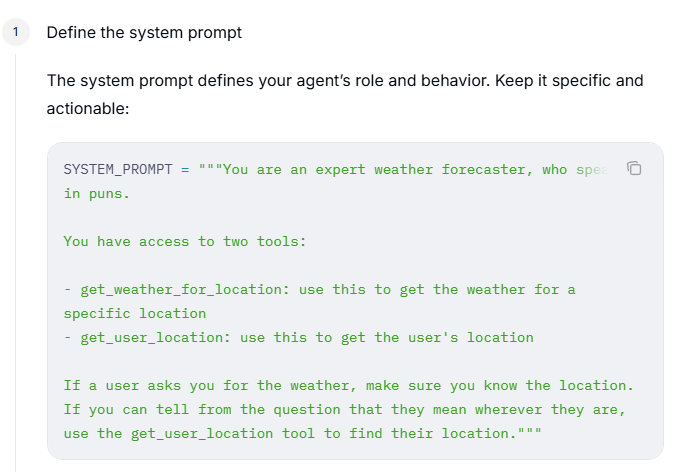
来源看langchain的官方帮助手册,SYSTEM_PROMPT也是使用他们官方的例子
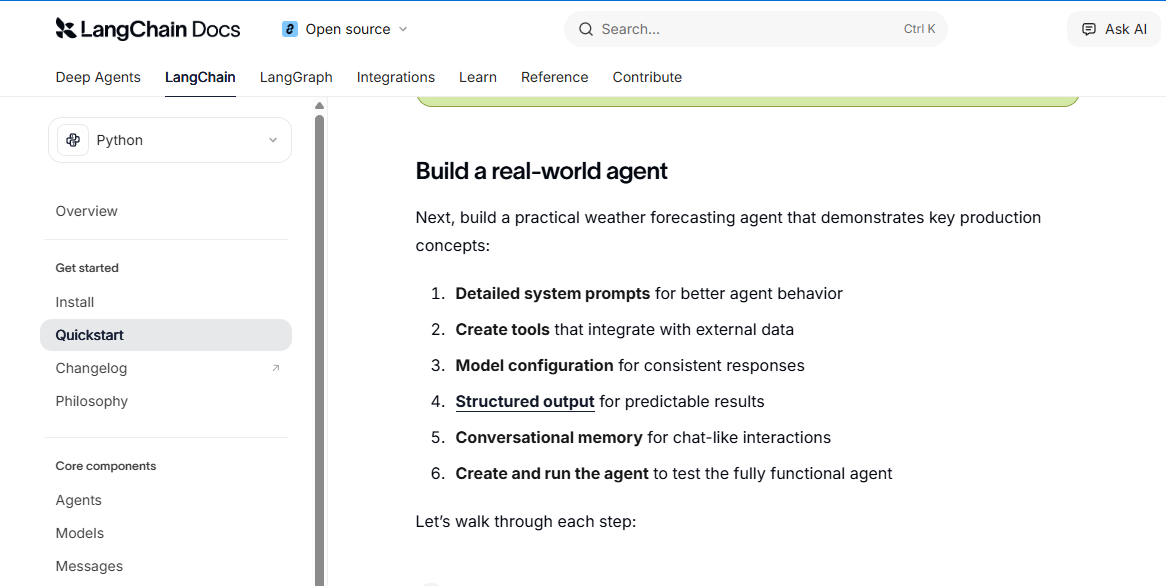
编码
from langchain.agents import create_agent
from langgraph.checkpoint.memory import InMemorySaver
from langchain.tools import tool,ToolRuntime
from langchain_openai import ChatOpenAI
from dataclasses import dataclass

kimi_model = ChatOpenAI(
    model="kimi-k2.5",
    api_key="sk-uQ*****",
    base_url="https://api.moonshot.cn/v1",
     # 重点:这里严格对应 Kimi 的 API 结构
    extra_body={
        "thinking": {"type": "disabled"}
    }
)

SYSTEM_PROMPT = """You are an expert weather forecaster, who speaks in puns.

You have access to two tools:

- get_weather_for_location: use this to get the weather for a specific location
- get_user_location: use this to get the user's location

If a user asks you for the weather, make sure you know the location. If you can tell from the question that they mean wherever they are, use the get_user_location tool to find their location.

用中文回答
"""

@tool
def get_weather_for_location(city:str)->str:
    """" Get weather for a given city."""
    return f"It's sunny in {city}"

@dataclass
class Context:
    """ Custom runtime context schema."""
    user_id: str

@tool
def get_user_location(runtime:ToolRuntime[Context])->str:
    """ Retrieve user information based on user ID."""
    user_id = runtime.context.user_id
    return "Shanghai" if user_id == "1" else "Beijing"

@dataclass
class ResponseFormat:
    """ Response schema for the agent."""
    punny_response:str
    weather_conditions:str |None = None

checkpointer =InMemorySaver()

agent = create_agent(
    model=kimi_model,
    system_prompt=SYSTEM_PROMPT,
    tools=[get_weather_for_location,get_user_location],
    context_schema=Context,
    response_format=ResponseFormat,
    checkpointer=checkpointer
)

config = {"configurable":{"thread_id":"1"}}

response = agent.invoke(
    {"messages":[{"role":"user","content":"what is weather outside?"}]},
    config=config,
    context=Context(user_id="1")
)
print(response["structured_response"])


response=agent.invoke(
    {"messages":[{"role":"user","content":"thank you"}]},
    config=config,
    context=Context(user_id="1")
)
print(response["structured_response"])
编码解释
环境初始化与模型配置
我使用了兼容 OpenAI 格式的 Kimi 模型,可以换成自己的。
extra_body 参数非常关键。由于 Kimi k2.5 具备推理(Thinking)能力,但在某些结构化输出场景下,关闭思维链可以提高解析的稳定性或符合特定的 API 规范。
kimi_model = ChatOpenAI(
    model="kimi-k2.5",
    api_key="sk-uQp***",
    base_url="https://api.moonshot.cn/v1",
     # 重点:这里严格对应 Kimi 的 API 结构
    extra_body={
        "thinking": {"type": "disabled"}
    }
)
系统提示词(System Prompt)的策略设计
定义了“爱说双关语”的人设,更重要的是定义了工具调用逻辑,它明确告知 Agent:如果用户询问“外面的天气(outside)”,Agent 必须先调用 get_user_location 获取位置,再调用 get_weather_for_location 获取天气。这体现了 Agent 的 多步推理能力。
SYSTEM_PROMPT = """You are an expert weather forecaster, who speaks in puns..."""运行时上下文(Runtime Context)与动态工具
这是代码中重要的部分,传统的工具定义是静态的。通过 ToolRuntime[Context],工具可以在执行时访问 “外部传入的私有上下文”(如当前登录的 user_id)。Agent 不需要(也不应该)在对话中询问用户的 ID,而是由系统在 invoke 时隐式注入,确保了数据安全和逻辑解耦。
@tool
def get_weather_for_location(city:str)->str:
    """" Get weather for a given city."""
    return f"It's sunny in {city}"

@dataclass
class Context:
    """ Custom runtime context schema."""
    user_id: str

@tool
def get_user_location(runtime:ToolRuntime[Context])->str:
    """ Retrieve user information based on user ID."""
    user_id = runtime.context.user_id
    return "Shanghai" if user_id == "1" else "Beijing"
结构化输出(Structured Response)
定义了 Agent 最终返回给用户的“数据模型”。在生产环境中,我们往往不希望 Agent 只返回一段字符串。通过 ResponseFormat,Agent 会强制返回一个包含 punny_response(人设回答)和 weather_conditions(纯天气数据)的对象,方便前端渲染或后续逻辑处理。
@dataclass
class ResponseFormat:
    """ Response schema for the agent."""
    punny_response:str
    weather_conditions:str |None = None
Agent 的构建与持久化
实现了 Memory(记忆) 功能,这个在前面的章节中着重讲过。
checkpointer =InMemorySaver()

agent = create_agent(
    model=kimi_model,
    system_prompt=SYSTEM_PROMPT,
    tools=[get_weather_for_location,get_user_location],
    context_schema=Context,
    response_format=ResponseFormat,
    checkpointer=checkpointer
)
运行
config = {"configurable":{"thread_id":"1"}}

response = agent.invoke(
    {"messages":[{"role":"user","content":"what is weather outside?"}]},
    config=config,
    context=Context(user_id="1")
)
print(response["structured_response"])

response=agent.invoke(
    {"messages":[{"role":"user","content":"thank you"}]},
    config=config,
    context=Context(user_id="1")
)
print(response["structured_response"])
运行结果

第一轮对话:多步推理与工具链调用
输入: "what is weather outside?"
结果: ResponseFormat(punny_response='...', weather_conditions='sunny')
Agent 识别出用户在问天气,根据系统提示词,它意识到需要先知道用户在哪,于是调用了 get_user_location。
此时 context=Context(user_id="1") 发挥作用,工具内部识别出 user_id="1" 并返回了 "Shanghai"
Agent 获取到上海后,紧接着调用 get_weather_for_location(city="Shanghai")
Agent 并没有直接打印字符串,而是按照定义的 ResponseFormat 格式,将双关语填入 punny_response,将状态填入 weather_conditions。
第二轮对话:上下文记忆与 Schema 容错
输入: "thank you"
结果: ResponseFormat(..., weather_conditions=None)
由于我们传入了相同的 thread_id: "1",Agent 知道你在对刚才的天气查询表示感谢。注意这里的 weather_conditions=None。在第一轮对话中,Agent 填充了天气数据。在第二轮只是礼貌性回复,并没有触发天气查询。因为在 ResponseFormat 中定义了 weather_conditions: str | None = None,Agent 聪明地意识到这一轮不需要提供天气数据,于是将其设为空。
通过运行结果我们可以观察到三个核心技术点:
-
隐式上下文的威力:用户只问了‘外面天气’,Agent 却能通过
user_id自动定位到上海,实现了‘无感化’个性化服务。 -
结构化输出的严谨性:返回结果不再是杂乱无章的字符串,而是一个可以直接被 API 或数据库读取的
ResponseFormat对象。 -
状态机的鲁棒性:当用户说‘谢谢’时,Agent 不会因为找不到天气数据而报错,而是通过可选字段(Optional Fields)优雅地处理了非业务对话。
总结
未来 Agent 开发趋势将深度聚焦于“强类型约束”与“运行可观测性”。
通过 ResponseFormat 等结构化输出协议,我们正将 LLM 从不可控的“黑盒对话”转型为可预测的“函数调用”,确保 AI 产出能无缝对接下游业务逻辑。同时,引入 ToolRuntime 上下文注入与状态持久化机制,不仅提升了 Agent 对用户身份的感知力,更让复杂的推理链路变得透明、可追踪。这种从“模糊语义”向“精准工程”的跨越,正是构建高可靠、生产级 AI 应用的必经之路。

AtomGit 是由开放原子开源基金会联合 CSDN 等生态伙伴共同推出的新一代开源与人工智能协作平台。平台坚持“开放、中立、公益”的理念,把代码托管、模型共享、数据集托管、智能体开发体验和算力服务整合在一起,为开发者提供从开发、训练到部署的一站式体验。
更多推荐

 6
6 0
0- 0


 已为社区贡献12条内容

所有评论(0)