03. Pytorch实现天气识别
- 🍨 本文为🔗365天深度学习训练营中的学习记录博客
- 🍖 原作者:K同学啊
🏡 我的环境:使用01中创建的虚拟环境mnist
- 虚拟环境:mnist
Python 3.10.19
Name: torch, Version: 2.10.0+cu130
Name: torchvision,Version: 0.25.0+cu130
- 编译器:Positron
- 深度学习环境:Pytorch
整体流程:
- 导入库,设置GPU
- 读取数据集,查看类别和图片
- 对图像做预处理
- 构建卷积神经网络
- 定义损失函数和优化器
- 训练模型,并画出准确率/损失曲线
你可以把它类比成病理AI里的流程:
- 图像 = 病理切片/patch
- 类别 = 肿瘤分型/良恶性/亚型
- 网络 = 自动提取图像特征的模型
- 训练 = 用标注数据让模型学会分类
一、 前期准备
1. 设置GPU
如果设备上支持GPU就使用GPU,否则使用CPU
import torch
import torch.nn as nn
import torchvision.transforms as transforms
import torchvision
from torchvision import transforms, datasets
import os,PIL,pathlib,random
device = torch.device("cuda" if torch.cuda.is_available() else "cpu")
devicetorch:PyTorch核心库torch.nn:神经网络模块torchvision:计算机视觉常用工具transforms:图像预处理datasets:常用数据集读取接口os、pathlib:路径和文件操作PIL:处理图像文件random:随机操作
2. 导入数据
天气数据集需要手动下载并解压缩到data文件夹下
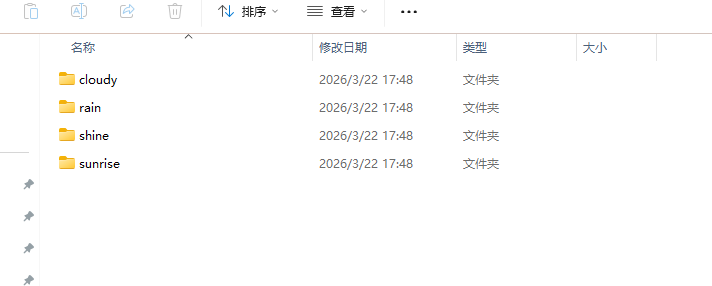
# 导入数据集,数据集需要手动下载并放在data文件夹下
os.getcwd() # 获取当前工作目录,确认工作路径在P3文件夹下
data_dir = './data/'  # 定义数据集的路径(字符串形式)
data_dir = pathlib.Path(data_dir)  # 将字符串路径转换为Path对象,方便后续操作
data_paths = list(data_dir.glob('*'))
classeNames = [str(path).split("\\")[1] for path in data_paths]
classeNames
返回结果:['cloudy', 'rainy', 'shine', 'sunrise']
str(path).split("\\")[1]这写法依赖 Windows 路径分隔符 \。
如果你在 Linux / Mac / Jupyter 某些环境中跑,路径分隔符通常是 /,这里就可能报错。
写成下面的方式可以跨平台使用
classeNames = [path.name for path in data_paths]显示某个类别中的图片 这里是cloud
import matplotlib.pyplot as plt
from PIL import Image
# 指定图像文件夹路径
image_folder = './data/cloudy/'
# 获取文件夹中的所有图像文件
image_files = [f for f in os.listdir(image_folder) if f.endswith((".jpg", ".png", ".jpeg"))]
# 创建Matplotlib图像
fig, axes = plt.subplots(3, 8, figsize=(16, 6))
# 使用列表推导式加载和显示图像
for ax, img_file in zip(axes.flat, image_files):
    img_path = os.path.join(image_folder, img_file)
    img = Image.open(img_path)
    ax.imshow(img)
    ax.axis('off')
# 显示图像
plt.tight_layout()
plt.show()
把 cloudy 类别中的一些图片显示出来,看一下数据长什么样。
代码含义
os.listdir(image_folder):列出文件夹下所有文件f.endswith(...):只保留图片格式plt.subplots(3, 8):创建 3×8 的画布Image.open(img_path):读图片ax.imshow(img):显示图片ax.axis('off'):隐藏坐标轴
定义图像的预处理流程
total_datadir = './data/'

train_transforms = transforms.Compose([
    transforms.Resize([224, 224]),  # 将输入图片resize成统一尺寸
    transforms.ToTensor(),          # 将PIL Image或numpy.ndarray转换为tensor,并归一化到[0,1]之间
    transforms.Normalize(
        mean=[0.485, 0.456, 0.406],
        std=[0.229, 0.224, 0.225])
])

total_data = datasets.ImageFolder(total_datadir,transform=train_transforms)
total_data
把原始图片变成可以送进神经网络的数据格式。
transforms.Resize([224, 224])
把所有图片统一缩放到 224×224。
为什么要统一?
因为神经网络的输入尺寸通常需要一致。
这和你做病理 patch 分类时,把 patch 统一成 224×224、256×256 类似。
transforms.ToTensor()
把图片变成 PyTorch tensor,并把像素值从 0~255 变成 0~1。
例如:
- 原来一个像素值是 128
- 转 tensor 后变成
128/255 ≈ 0.502
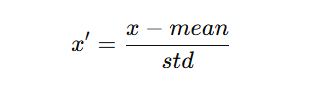
transforms.Normalize(mean=..., std=...)
做标准化,让每个通道的数据分布更稳定,帮助模型更容易训练。
公式可以理解为:
🌟 mean与std数值是怎么来的?
这些均值和标准差是通过计算ImageNet数据集中所有训练图像的RGB通道均值和标准差得出的。具体计算过程如下:
- 获取ImageNet数据集:ImageNet包含120万张训练图像,每张图像通常具有RGB三个通道。
- 计算均值(Mean):
-
- 遍历所有图像,分别计算每个通道(R、G、B)的像素值平均值,得到:
-
-
- Red 通道均值 ≈ 0.485
- Green 通道均值 ≈ 0.456
- Blue 通道均值 ≈ 0.406
-
- 计算标准差(Standard Deviation):
-
- 遍历所有图像,计算每个通道的像素值标准差,得到:
-
-
- Red 通道标准差 ≈ 0.229
- Green 通道标准差 ≈ 0.224
- Blue 通道标准差 ≈ 0.225
-
total_data=datasets.ImageFolder(total_datadir,transform=train_transforms)
自动读取 ./data/ 下按类别文件夹组织的图像数据。
ImageFolder 的要求
目录必须是:
data/
    类别1/
        img1.jpg
        img2.jpg
    类别2/
        img3.jpg
        img4.jpg
它会自动做什么
- 每张图片读取出来
- 根据所在文件夹自动赋标签
- 应用
train_transforms - 形成一个可被 DataLoader 使用的数据集对象
比如:
cloudy可能被编码为0rainy可能被编码为1
3. 划分数据集
train_size = int(0.8 * len(total_data))
test_size  = len(total_data) - train_size
train_dataset, test_dataset = torch.utils.data.random_split(total_data, [train_size, test_size])
train_dataset, test_dataset
作用
把整个数据集按 8:2 随机分成:
- 训练集 80%
- 测试集 20%
说明
- 训练集:模型学习参数
- 测试集:评估模型效果
这里要注意
这里是随机划分,但没有固定随机种子,所以每次运行的划分都可能不一样,结果也会有波动。
更规范的写法是:
构建 DataLoader
batch_size = 32
train_dl = torch.utils.data.DataLoader(train_dataset,
                                       batch_size=batch_size,
                                       shuffle=True)
test_dl = torch.utils.data.DataLoader(test_dataset,
                                      batch_size=batch_size,
                                      shuffle=True)
前面已经详细解释过
作用
把数据一批一批送入模型。
解释
batch_size=32:每次喂 32 张图
shuffle=True:每个 epoch 打乱顺序
为什么用 batch
因为不可能每次把所有图片一次性送进显存。
分批训练更节省内存,也更利于优化。
’ 查看一个 batch 的形状
for X, y in test_dl:
    print("Shape of X [N, C, H, W]: ", X.shape)
    print("Shape of y: ", y.shape, y.dtype)
    break
作用
检查数据输入格式是否正确。
返回结果
Shape of X [N, C, H, W]: torch.Size([32, 3, 224, 224])
Shape of y: torch.Size([32]) torch.int64
解释
N=32:batch大小C=3:RGB三通道H=224, W=224y是 32 个标签
二、构建简单的CNN网络
import torch.nn.functional as F

class Network_bn(nn.Module):
    def __init__(self):
        super(Network_bn, self).__init__()
        """
        nn.Conv2d()函数:
        第一个参数(in_channels)是输入的channel数量
        第二个参数(out_channels)是输出的channel数量
        第三个参数(kernel_size)是卷积核大小
        第四个参数(stride)是步长,默认为1
        第五个参数(padding)是填充大小,默认为0
        """
        self.conv1 = nn.Conv2d(in_channels=3, out_channels=12, kernel_size=5, stride=1, padding=0)
        self.bn1 = nn.BatchNorm2d(12)
        self.conv2 = nn.Conv2d(in_channels=12, out_channels=12, kernel_size=5, stride=1, padding=0)
        self.bn2 = nn.BatchNorm2d(12)
        self.pool1 = nn.MaxPool2d(2,2)
        self.conv4 = nn.Conv2d(in_channels=12, out_channels=24, kernel_size=5, stride=1, padding=0)
        self.bn4 = nn.BatchNorm2d(24)
        self.conv5 = nn.Conv2d(in_channels=24, out_channels=24, kernel_size=5, stride=1, padding=0)
        self.bn5 = nn.BatchNorm2d(24)
        self.pool2 = nn.MaxPool2d(2,2)
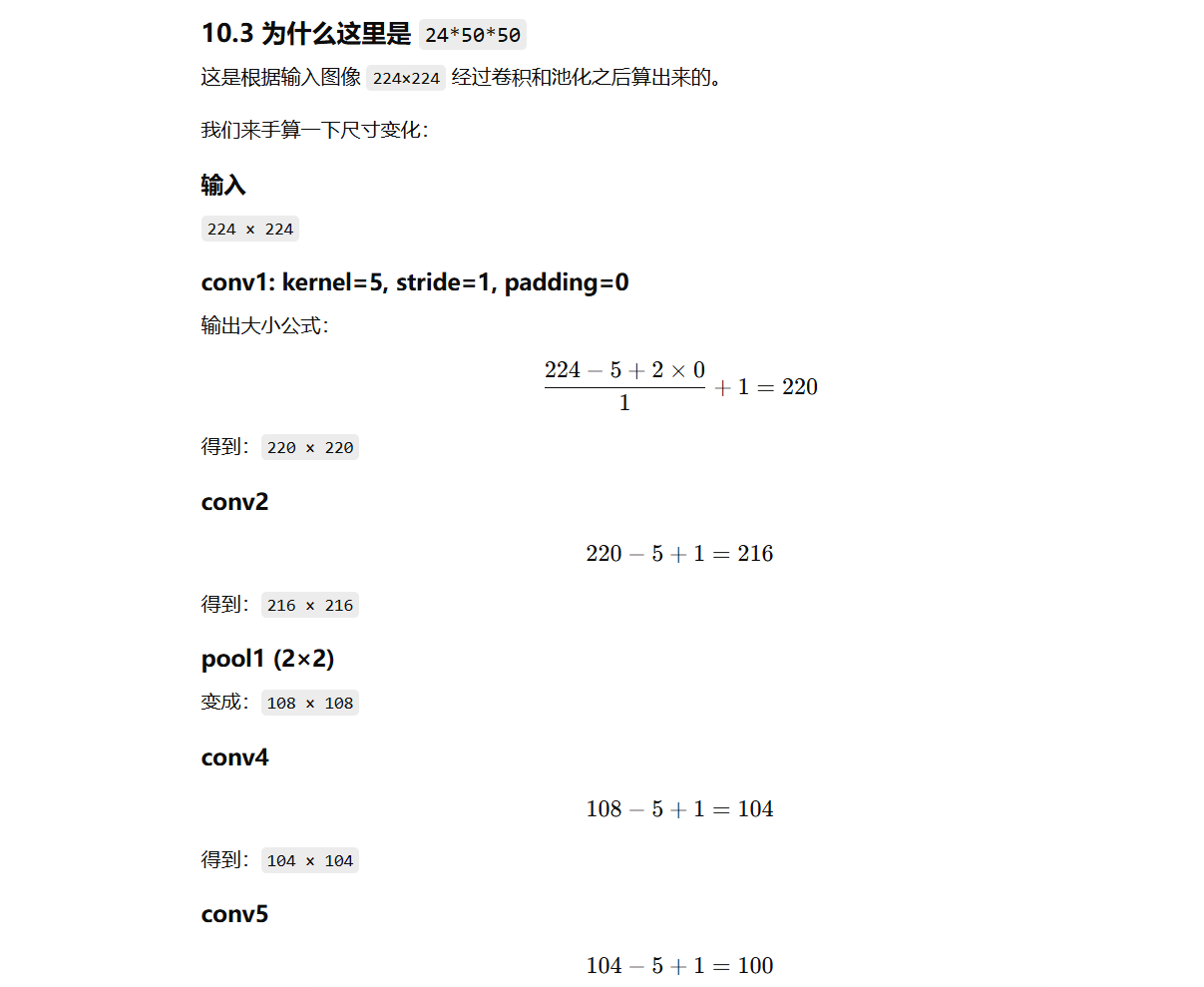
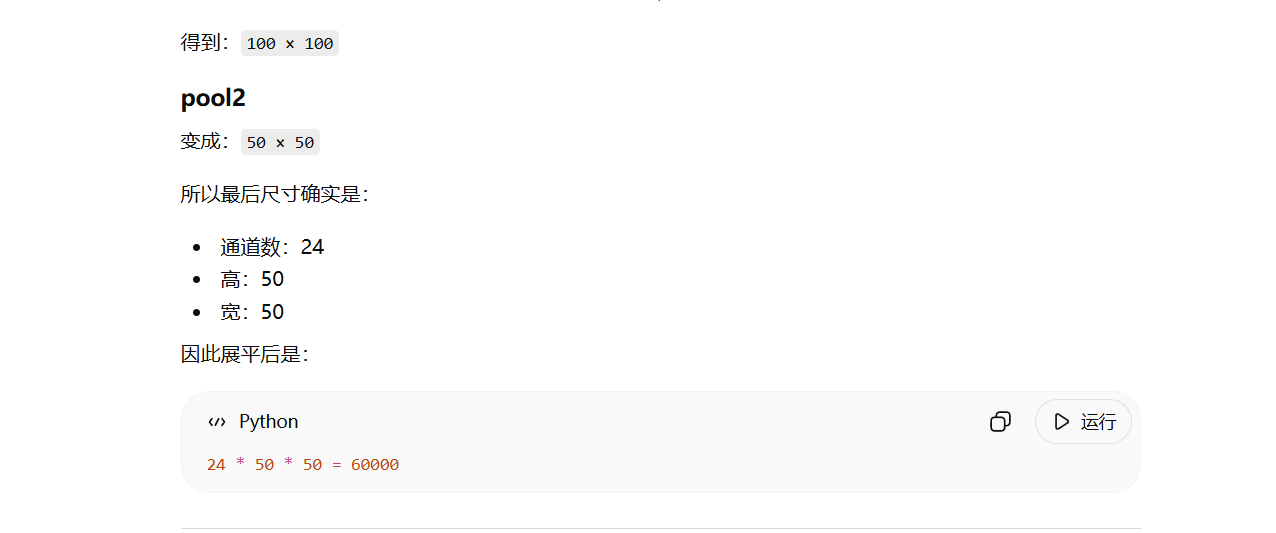
        self.fc1 = nn.Linear(24*50*50, len(classeNames))

    def forward(self, x):
        x = F.relu(self.bn1(self.conv1(x)))
        x = F.relu(self.bn2(self.conv2(x)))
        x = self.pool1(x)
        x = F.relu(self.bn4(self.conv4(x)))
        x = F.relu(self.bn5(self.conv5(x)))
        x = self.pool2(x)
        x = x.view(-1, 24*50*50)
        x = self.fc1(x)

        return x

device = "cuda" if torch.cuda.is_available() else "cpu"
print("Using {} device".format(device))

model = Network_bn().to(device)
model
网络层结构
self.conv1 = nn.Conv2d(in_channels=3, out_channels=12, kernel_size=5, stride=1, padding=0)
self.bn1 = nn.BatchNorm2d(12)
self.conv2 = nn.Conv2d(in_channels=12, out_channels=12, kernel_size=5, stride=1, padding=0)
self.bn2 = nn.BatchNorm2d(12)
self.pool1 = nn.MaxPool2d(2,2)
self.conv4 = nn.Conv2d(in_channels=12, out_channels=24, kernel_size=5, stride=1, padding=0)
self.bn4 = nn.BatchNorm2d(24)
self.conv5 = nn.Conv2d(in_channels=24, out_channels=24, kernel_size=5, stride=1, padding=0)
self.bn5 = nn.BatchNorm2d(24)
self.pool2 = nn.MaxPool2d(2,2)
self.fc1 = nn.Linear(24*50*50, len(classeNames))
第一层卷积
self.conv1 = nn.Conv2d(3, 12, 5, 1, 0)表示:
- 输入通道数:3(RGB)
- 输出通道数:12
- 卷积核大小:5×5
- 步长:1
- padding:0
作用:从原始图像中提取初级特征,如边缘、纹理。
BatchNorm
self.bn1 = nn.BatchNorm2d(12)作用:对每个 batch 的特征做归一化,帮助训练更稳定、收敛更快。
第二层卷积
self.conv2 = nn.Conv2d(12, 12, 5, 1, 0)继续提取更复杂一点的特征。
最大池化
self.pool1 = nn.MaxPool2d(2,2)作用:把特征图长宽缩小一半,同时保留最强响应。
比如:
- 从
216×216变成108×108
这有点像把图像信息压缩成更紧凑的表示。
后面两层卷积 + BN + 池化
self.conv4 ...
self.conv5 ...
self.pool2 ...
进一步提取更高层次的特征,并继续下采样。
全连接层
self.fc1 = nn.Linear(24*50*50, len(classeNames))把最终提取出的特征映射到类别数。
如果类别数是 4,那么输出就是长度为 4 的向量,例如:
[2.1, -0.3, 1.7, 0.5]这个向量叫 logits,表示每个类别的“得分”。
forward 前向传播
def forward(self, x):
x = F.relu(self.bn1(self.conv1(x)))
x = F.relu(self.bn2(self.conv2(x)))
x = self.pool1(x)
x = F.relu(self.bn4(self.conv4(x)))
x = F.relu(self.bn5(self.conv5(x)))
x = self.pool2(x)
x = x.view(-1, 24*50*50)
x = self.fc1(x)
return x
这几步的顺序
- 卷积
- BN
- ReLU激活
- 池化
- 再卷积
- 展平
- 全连接分类
三、 训练模型
1. 设置超参数
定义损失函数和优化器
loss_fn    = nn.CrossEntropyLoss() # 创建损失函数
learn_rate = 1e-4 # 学习率
opt        = torch.optim.SGD(model.parameters(),lr=learn_rate)
2. 编写训练函数
# 训练循环
def train(dataloader, model, loss_fn, optimizer):
    size = len(dataloader.dataset)  # 训练集的大小,一共60000张图片
    num_batches = len(dataloader)   # 批次数目,1875(60000/32)

    train_loss, train_acc = 0, 0  # 初始化训练损失和正确率

    for X, y in dataloader:  # 获取图片及其标签
        X, y = X.to(device), y.to(device)

        # 计算预测误差
        pred = model(X)          # 网络输出
        loss = loss_fn(pred, y)  # 计算网络输出和真实值之间的差距,targets为真实值,计算二者差值即为损失

        # 反向传播
        optimizer.zero_grad()  # grad属性归零
        loss.backward()        # 反向传播
        optimizer.step()       # 每一步自动更新

        # 记录acc与loss
        train_acc  += (pred.argmax(1) == y).type(torch.float).sum().item()
        train_loss += loss.item()

    train_acc  /= size
    train_loss /= num_batches

    return train_acc, train_loss
3. 编写测试函数
def test (dataloader, model, loss_fn):
    size        = len(dataloader.dataset)  # 测试集的大小,一共10000张图片
    num_batches = len(dataloader)          # 批次数目,313(10000/32=312.5,向上取整)
    test_loss, test_acc = 0, 0

    # 当不进行训练时,停止梯度更新,节省计算内存消耗
    with torch.no_grad():
        for imgs, target in dataloader:
            imgs, target = imgs.to(device), target.to(device)

            # 计算loss
            target_pred = model(imgs)
            loss        = loss_fn(target_pred, target)

            test_loss += loss.item()
            test_acc  += (target_pred.argmax(1) == target).type(torch.float).sum().item()

    test_acc  /= size
    test_loss /= num_batches

    return test_acc, test_loss
4. 正式训练
epochs     = 20
train_loss = []
train_acc  = []
test_loss  = []
test_acc   = []

for epoch in range(epochs):
    model.train()
    epoch_train_acc, epoch_train_loss = train(train_dl, model, loss_fn, opt)

    model.eval()
    epoch_test_acc, epoch_test_loss = test(test_dl, model, loss_fn)

    train_acc.append(epoch_train_acc)
    train_loss.append(epoch_train_loss)
    test_acc.append(epoch_test_acc)
    test_loss.append(epoch_test_loss)

    template = ('Epoch:{:2d}, Train_acc:{:.1f}%, Train_loss:{:.3f}, Test_acc:{:.1f}%,Test_loss:{:.3f}')
    print(template.format(epoch+1, epoch_train_acc*100, epoch_train_loss, epoch_test_acc*100, epoch_test_loss))
print('Done')
四、 结果可视化
import matplotlib.pyplot as plt
#隐藏警告
import warnings
warnings.filterwarnings("ignore")               #忽略警告信息
plt.rcParams['font.sans-serif']    = ['SimHei'] # 用来正常显示中文标签
plt.rcParams['axes.unicode_minus'] = False      # 用来正常显示负号
plt.rcParams['figure.dpi']         = 100        #分辨率

from datetime import datetime
current_time = datetime.now() # 获取当前时间

epochs_range = range(epochs)

plt.figure(figsize=(12, 3))
plt.subplot(1, 2, 1)

plt.plot(epochs_range, train_acc, label='Training Accuracy')
plt.plot(epochs_range, test_acc, label='Test Accuracy')
plt.legend(loc='lower right')
plt.title('Training and Validation Accuracy')
plt.xlabel(current_time) # 打卡请带上时间戳,否则代码截图无效

plt.subplot(1, 2, 2)
plt.plot(epochs_range, train_loss, label='Training Loss')
plt.plot(epochs_range, test_loss, label='Test Loss')
plt.legend(loc='upper right')
plt.title('Training and Validation Loss')
plt.show()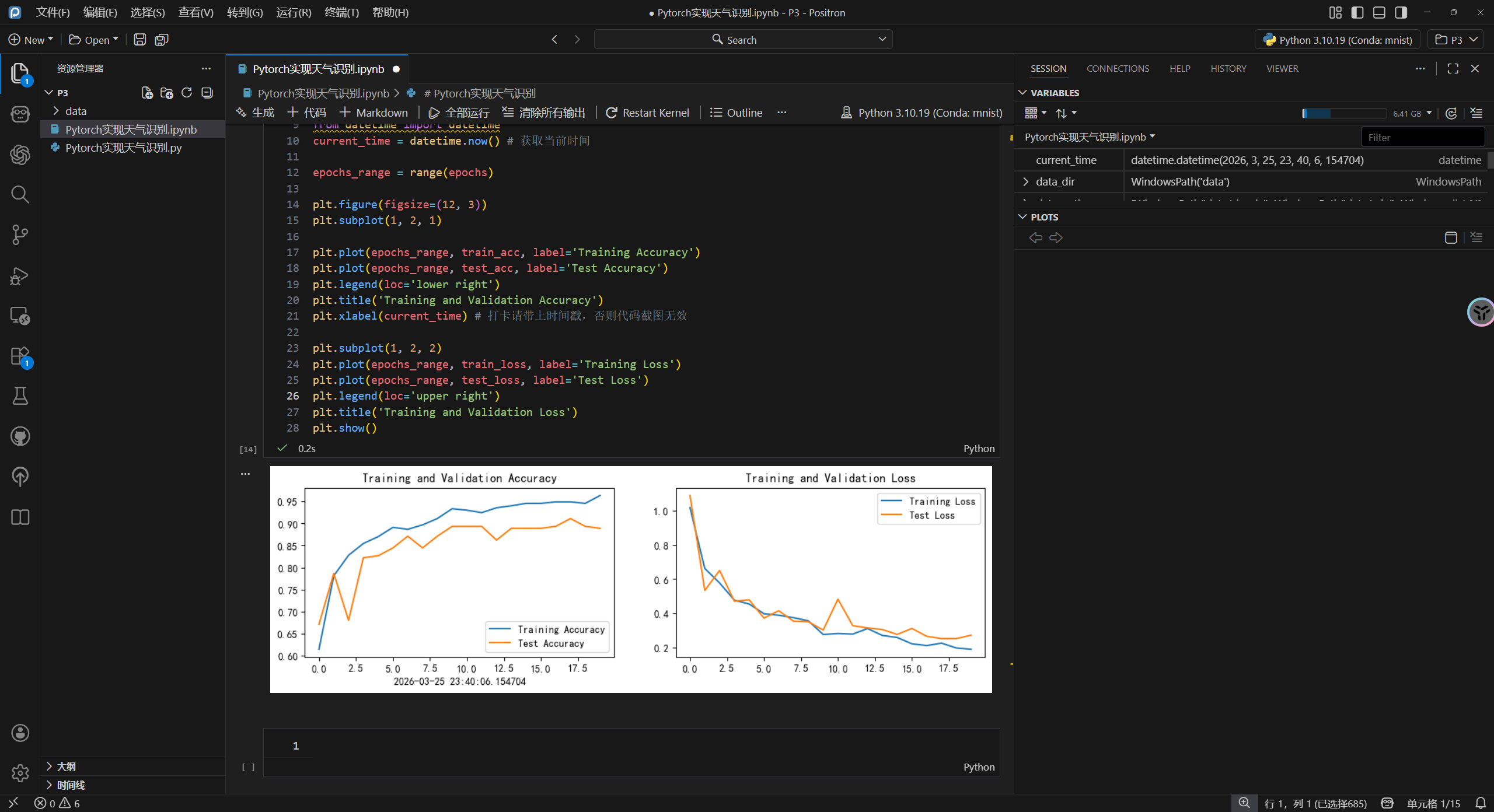
五、总结
第1步:准备电脑环境
看看能不能用GPU。
第2步:准备数据
确认数据文件夹里每个子目录就是一个类别。
第3步:先人工看看图
确认图片没问题。
第4步:统一图像尺寸并标准化
把所有图片变成模型能吃的数据格式。
第5步:随机分训练集和测试集
让模型一部分拿来学,一部分拿来考试。
第6步:搭一个卷积网络
让它自己从图像中提取特征。
第7步:定义误差怎么计算
用交叉熵衡量分类对不对。
第8步:反复训练20轮
每轮:
- 学习训练集
- 在测试集上看效果
第9步:把训练过程画出来
看模型有没有收敛、有没有过拟合。

AtomGit 是由开放原子开源基金会联合 CSDN 等生态伙伴共同推出的新一代开源与人工智能协作平台。平台坚持“开放、中立、公益”的理念,把代码托管、模型共享、数据集托管、智能体开发体验和算力服务整合在一起,为开发者提供从开发、训练到部署的一站式体验。
更多推荐

 11
11 0
0- 0


 已为社区贡献5条内容

所有评论(0)