【安卓】一加13降级+开源内核编译刷写文档
请注意刷机有风险,强烈建议备份字库。一加 13 刷 AOSP GSI 教程
若您不完全理解相关操作原理或潜在风险,请勿轻易尝试。建议优先选择官方提供的系统更新与维护方式。
继续阅读或操作即视为您已充分理解并同意本文责声明的全部内容。
一、一加13 ColorOS降级
本文档不涉及大版本的降级,即如 ColorOS 15 -> ColorOS 14
有时候我们需要将手机进行系统降级,例如系统版本过高与开源内核不匹配。
首先我们到如下网站下载历史版本的ColorOS:
 https://yun.daxiaamu.com/OnePlus_Roms/%E4%B8%80%E5%8A%A0OnePlus%2013/
请注意选择正确的版本,我这里是需要降级到ColorOS 15.0.0.851,所以选择下载ColorOS PJZ110_15.0.0.851(CN01) A.77。
下载完后解压出payload.bin文件。
然后下载payload.bin提取工具:https://github.com/ssut/payload-dumper-go
将payload.bin和payload-dumper-go放到同一个文件夹下,执行
chmod +x ./payload-dumper-go mkdir output
./payload-dumper-go -o ./output ./payload.bin
然后在output文件夹下就可以看到提取出的img镜像文件:
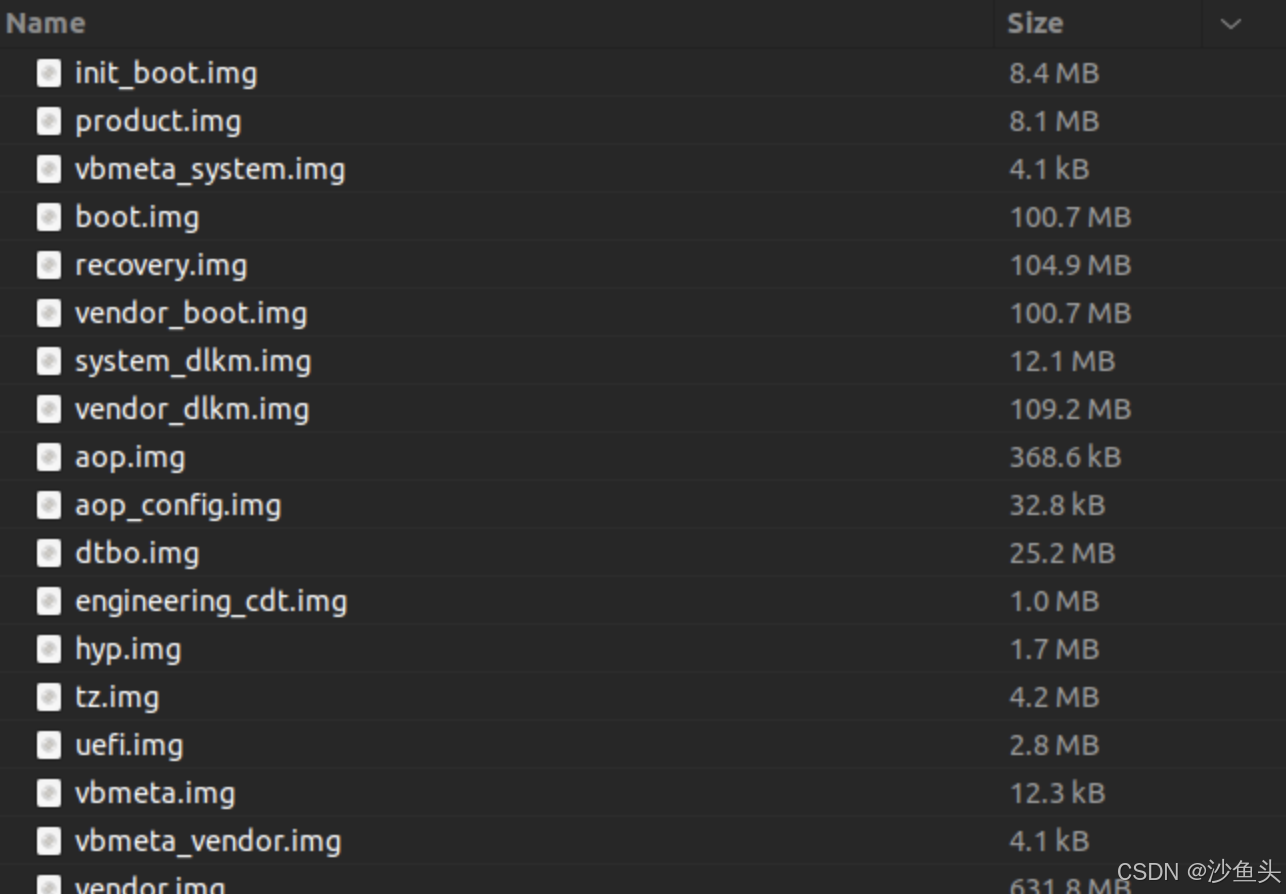
接下来只需要将这些镜像全部使用fastbootd刷入到指定分区就行了。fastboot、adb驱动可自行CSDN查询安装方法。这里提供一个刷机脚本,可以自动将这些镜像批量刷入:
#!/usr/bin/env python3
# -*- coding: utf-8 -*-

import subprocess
import sys
import os
import re
import time


def run_cmd_safe(cmd, timeout=30):
    return subprocess.run(
        cmd,
        stdin=subprocess.DEVNULL,
        stdout=subprocess.PIPE,
        stderr=subprocess.PIPE,
        text=True,
        timeout=timeout
    )


def wait_fastboot_ready(max_wait=20):
    start = time.time()
    while time.time() - start < max_wait:
        try:
            result = run_cmd_safe(["fastboot", "devices"], timeout=10)
            output = (result.stdout or "").strip()
            if output:
                return True
        except subprocess.TimeoutExpired:
            pass
        time.sleep(1)
    return False


# ========================= Step 1 =========================
def check_fastboot():
    print("==== [1] 检查 fastboot 连接 ====")
    try:
        result = run_cmd_safe(
            ["fastboot", "devices"],
            timeout=15
        )
        output = result.stdout.strip()

        if not output:
            print("❌ 未检测到 fastboot 设备")
            sys.exit(1)

        print("✅ fastboot 设备:")
        print(output)

    except FileNotFoundError:
        print("❌ 未找到 fastboot,请安装 platform-tools")
        sys.exit(1)
    except subprocess.TimeoutExpired:
        print("❌ fastboot devices 执行超时")
        sys.exit(1)


# ========================= Step 2 =========================
def dump_partition_file(outfile="partition"):
    print("\n==== [2] 获取分区信息 ====")

    if os.path.exists('./partition'):
        print('使用已有的partition文件')
        return

    with open(outfile, "w") as f:
        try:
            result = run_cmd_safe(
                ["fastboot", "getvar", "all"],
                timeout=10
            )
        except subprocess.TimeoutExpired:
            print("❌ fastboot getvar all 执行超时")
            sys.exit(1)

        # fastboot 输出通常在 stderr
        f.write(result.stdout)
        f.write(result.stderr)

    print(f"✅ 已写入 {outfile}")


# ========================= Step 3 =========================
def parse_partitions(file):
    print("\n==== [3] 解析分区 ====")

    partitions = set()

    with open(file, "r", encoding="utf-8", errors="ignore") as f:
        for line in f:
            line = line.strip()

            # 匹配 partition-size
            m1 = re.search(r'partition-size:([^:\s]+)', line)
            if m1:
                partitions.add(m1.group(1))
                continue

            # 匹配 partition-type
            m2 = re.search(r'partition-type:([^:\s]+)', line)
            if m2:
                partitions.add(m2.group(1))
                continue

    print(f"✅ 提取到 {len(partitions)} 个分区")

    return partitions


# ========================= Step 4 =========================
def match_images(img_dir, partitions):
    print("\n==== [4] 镜像匹配 ====")

    if not os.path.isdir(img_dir):
        print("❌ 镜像目录不存在")
        sys.exit(1)

    # 目录下的所有.img文件名
    imgs = [f for f in os.listdir(img_dir) if f.endswith(".img")]

    if not imgs:
        print("❌ 没有找到 .img 文件")
        sys.exit(1)

    print("\n--- 匹配结果 ---")

    # 有对应分区的.img文件名
    hit_imgs = []
    for img in sorted(imgs):
        part = img.replace(".img", "")

        if part in partitions:
            print(f"✅ {img}  →  {part}")
            hit_imgs.append(img)
        elif part+'_a' in partitions:
            print(f"✅ {img}  →  {part}_a")
            hit_imgs.append(img)
        else:
            print(f"❌ {img}")

    print(imgs)
    print(hit_imgs)
    return imgs, hit_imgs

# ========================= Step 6 =========================
def choose_flash_list(all_imgs, hit_imgs):
    print("\n==== [6] 选择刷机镜像集合 ====")
    print("1. 刷 all_imgs(目录下所有 .img)")
    print("2. 刷 hit_imgs(仅匹配成功的 .img)")

    while True:
        choice = input("请输入选项 (1/2): ").strip()
        if choice == "1":
            print("✅ 已选择 all_imgs")
            return all_imgs
        elif choice == "2":
            print("✅ 已选择 hit_imgs")
            return hit_imgs
        else:
            print("❌ 输入无效,请输入 1 或 2")

# ========================= Step 5 =========================
def choose_slot_and_set_active():

    print("\n==== [5] 选择刷入槽位并切换 A/B ====")

    while True:
        slot = input("请输入要刷入的槽位 (a/b): ").strip().lower()
        if slot in ("a", "b"):
            break
        print("❌ 输入无效,请输入 a 或 b")

    print(f"\n正在切换到槽位 {slot} ...")
    try:
        result = run_cmd_safe(
            ["fastboot", "set_active", slot],
            timeout=20
        )
    except subprocess.TimeoutExpired:
        print("❌ fastboot set_active 执行超时")
        sys.exit(1)

    output = (result.stdout or "") + (result.stderr or "")
    print(output.strip())

    if result.returncode != 0:
        print("❌ fastboot set_active 执行失败")
        sys.exit(1)

    if not wait_fastboot_ready(max_wait=20):
        print("❌ 切换槽位后,fastboot 设备未重新就绪")
        sys.exit(1)

    print(f"✅ 已切换到槽位 {slot}")
    return slot

# ========================= Step 6 =========================
def flash_images(img_dir, img_targets, slot):
    print("\n==== [7] 开始刷机 ====")

    if not img_targets:
        print("❌ 待刷入镜像列表为空")
        return

    print("\n即将刷入以下镜像:")
    final_targets = []
    for img in img_targets:
        # 默认不刷入recovery分区
        if img == 'recovery.img':
            print('  跳过recovery.img!!')
            continue
        real_part = img.replace('.img', '')
        img_path = os.path.join(img_dir, img)
        final_targets.append((img, img_path, real_part))
        print(f"  {img}  ->  {real_part}")

    confirm = input("\n确认开始刷机?(yes/no): ").strip().lower()
    if confirm != "yes":
        print("已取消刷机")
        return

    err_imgs = [] # 在fastbootd模式未能成功刷入的镜像、需要到bootloader刷写
    for img, img_path, real_part in final_targets:
        print(f"\n[FLASH] fastboot flash {real_part} {img_path}")
        try:
            result = run_cmd_safe(
                ["fastboot", "flash", real_part, img_path],
                timeout=600
            )
        except subprocess.TimeoutExpired:
            print(f"❌ 刷入超时: {img} -> {real_part}")
            continue

        output = (result.stdout or "") + (result.stderr or "")
        print(output.strip())

        if result.returncode != 0:
            print(f"❌ 刷入失败: {img} -> {real_part}")
            err_imgs.append(img)
        else:
            print(f"✅ 刷入成功: {img} -> {real_part}")

    return err_imgs

# ========================= main =========================
def main():
    if len(sys.argv) != 2:
        print("用法: python3 tool.py <镜像目录>")
        sys.exit(1)

    img_dir = sys.argv[1]
    partition_file = "partition"

    # 进入fastbootd
    result = run_cmd_safe(
        ["adb", "reboot", "fastboot"],
        timeout=60
    )
    confirm = input("\n请确认手机已经重启并进入fastbootd后重新插拔数据线!!(yes/no): ").strip().lower()
    if confirm != "yes":
        print("已取消刷机")
        return

    # 检查fastbootd是否成功进入
    check_fastboot()

    # 查询分区,导出partition文件
    dump_partition_file(partition_file)

    # 读取partition文件分区数据
    parts = parse_partitions(partition_file)

    # 检查刷机包中的img是否有相应的分区对应
    all_imgs, hit_imgs = match_images(img_dir, parts)

    # 选择刷入的Slot
    slot = choose_slot_and_set_active()

    # 选择全量刷入还是只刷入有对应分区的img
    selected_targets = choose_flash_list(all_imgs, hit_imgs)

    # 刷机
    err_imgs = flash_images(img_dir, selected_targets, slot)

    # 清除用户信息,不然可能开不了机
    result = run_cmd_safe(
        ["fastboot", "-w"],
        timeout=60
    )

    # 如果有未刷入的镜像,则进入bootloader刷写
    if len(err_imgs):
        # 进入bootloader
        result = run_cmd_safe(
            ["fastboot", "reboot", "bootloader"],
            timeout=60
        )

        confirm = input("\n请确认手机已经重启并进入bootloader后重新插拔数据线!!(yes/no): ").strip().lower()
        if confirm != "yes":
            print("已取消刷机")
            return

        # 刷写
        flash_images(img_dir, err_imgs, slot)

    result = run_cmd_safe(
        ["fastboot", "reboot"],
        timeout=60
    )

if __name__ == "__main__":
    main()
有时候会报错说没有相应分区:FAILED (remote: '(product_a) No such partition') 这可能是分区之前被删掉了或者没有,我们需要创建对应的分区:fastboot create-logical-partition product_a 0
二、开源内核编译
首先从官方github仓库将内核的repo拉取下来:
# 拉取仓库
repo init --depth=1 -u https://github.com/OnePlusOSS/kernel_manifest.git -b oneplus/sm8750 -m oneplus_13.xml
# 同步
repo sync -c -j8
编译源码:
./kernel_platform/oplus/build/oplus_build_kernel.sh sun perf三、开源内核刷入
这里我们需要关闭avb验证后刷入三个文件:
-
boot.img位于 ./out/dist -
system_dlkm.flatten.erofs.img位于 ./out/dist -
dodge-23895-23893-23894-23821-dtbo.img位于device/qcom/sun-kernel/dtbs
具体原因请看这里:https://github.com/OnePlusOSS/kernel_manifest/issues/38。其实就是本来官方说刷boot.img、system_dlkm.flatten.erofs.img这两个就行,但是有人说设备树有问题后官方进行了更新,需要额外刷入dodge-23895-23893-23894-23821-dtbo.img。
# 关闭avb验证
adb reboot bootloader
fastboot --disable-verity --disable-verification flash vbmeta vbmeta.img(刷机包中提取的img中有)
fastboot reboot

# 刷入镜像
adb reboot fastboot
fastboot flash boot 你的boot.img
fastboot flash system_dlkm 你的system_dlkm.flatten.erofs.img
fastboot flash dtbo 你的dodge-23895-23893-23894-23821-dtbo.img
fastboot -w
fastboot reboot
免责声明
本文档仅供技术交流与学习研究之用,不构成任何形式的操作指导保证或安全承诺。在您继续阅读或尝试相关操作前,请务必仔细阅读并理解以下条款:
1. 用途限制
本内容仅限用于个人学习、技术研究与合法用途,严禁用于任何商业用途、非法用途或破坏设备及系统安全的行为。因违反相关法律法规或不当使用所产生的一切后果,均由使用者自行承担,与作者及发布方无关。2. 风险自负
系统降级、内核编译及刷写属于高风险操作,可能导致设备变砖、系统不稳定、数据丢失、功能异常等不可逆后果。所有操作风险均由用户自行承担。3. 保修与服务影响
非官方刷机或修改系统行为可能导致设备失去官方保修资格,亦可能影响后续系统更新与售后服务。4. 数据安全责任
在进行任何刷写或降级操作前,请务必自行备份重要数据。本内容不对因操作导致的数据丢失或损坏承担任何责任。5. 技术门槛提示
本内容涉及Linux基础、Android系统结构及编译环境配置等技术要求。不具备相关经验的用户请谨慎操作。6. 资源与代码来源
涉及的开源内核、工具链及相关资源均来自公开渠道,其合法性、安全性及合规性需用户自行甄别。本内容不对第三方资源的可靠性作任何保证。7. 不可控因素
不同批次设备、系统版本及硬件差异可能导致操作结果存在差异,本内容无法覆盖所有情况。8. 免责范围
对因参考或使用本内容进行任何操作所引发的直接或间接损失,包括但不限于设备损坏、数据丢失、隐私泄露或经济损失等,作者及发布方均不承担任何责任。

AtomGit 是由开放原子开源基金会联合 CSDN 等生态伙伴共同推出的新一代开源与人工智能协作平台。平台坚持“开放、中立、公益”的理念,把代码托管、模型共享、数据集托管、智能体开发体验和算力服务整合在一起,为开发者提供从开发、训练到部署的一站式体验。
更多推荐
 5
5 0
0- 0


 已为社区贡献1条内容

所有评论(0)