深度学习实战-基于MobileNetV2与VGG16的植物病害图像识别模型

🤵♂️ 个人主页:@艾派森的个人主页
✍🏻作者简介:Python学习者
🐋 希望大家多多支持,我们一起进步!😄
如果文章对你有帮助的话,
欢迎评论 💬点赞👍🏻 收藏 📂加关注+
目录
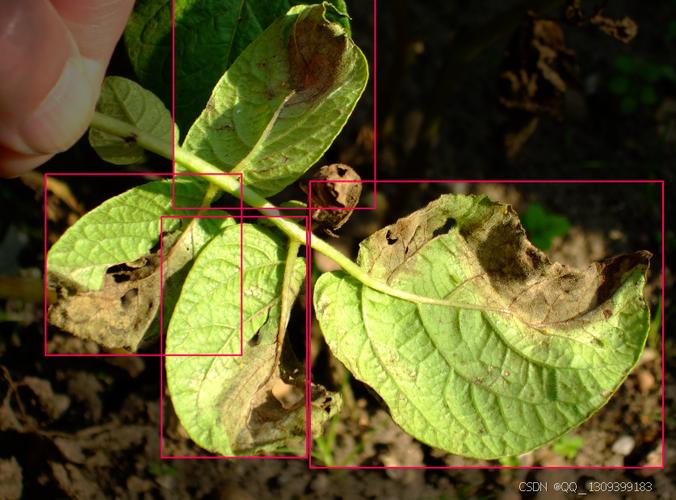
1.项目背景
植物病害的早期识别与准确诊断对保障农业生产安全至关重要,白粉病与锈病作为两种广泛发生的真菌性病害,在多种作物上均可造成显著减产。传统病害诊断依赖植保人员田间观察和经验判断,这种方法不仅效率有限,且诊断一致性容易受到主观因素影响。随着规模化种植的普及,对快速、标准化病害识别技术的需求日益凸显。
近年来,智能手机和无人机等移动设备在农业领域的应用逐渐增多,使得田间作物图像的大规模采集成为可能。这些数字图像中蕴含着叶片颜色、纹理、斑点形态等关键诊断信息,但不同病害的视觉特征有时较为相似,例如白粉病的白色菌丝层与某些生理性白化现象容易混淆,锈病的橙黄色孢子堆与自然衰老叶片也存在区分难度。这些细微差异对人眼识别构成挑战,却为基于计算机视觉的自动识别技术提供了应用空间。
当前已有多种卷积神经网络架构在通用图像识别任务中表现出色,但这些模型在植物病害特定场景下的性能差异尚未得到系统评估。不同网络设计在特征提取能力、计算效率和泛化性能上各有特点,需要在实际应用场景中进行验证比较。本研究通过系统对比六种主流网络架构在植物病害图像识别中的表现,探索适合农业实际需求的模型选择方案,为开发实用化的作物病害智能诊断工具提供技术参考。
2.数据集介绍
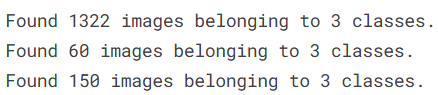
本实验数据集来源于Kaggle,该数据集包含三个标签:“健康”、“粉状”和“锈病”,分别指代植物的生长状况。数据集共包含1530张图像,分为训练集、测试集和验证集。
3.技术工具
Python版本:3.9
代码编辑器:jupyter notebook
4.实验过程
4.1导入数据
首先主要完成实验环境的搭建工作,导入构建植物病害识别模型所需的各种工具库。
import os  # 操作系统接口,用于文件和目录操作

# 导入数据操作和分析库
import numpy as np  # 数值计算库,用于数组和矩阵运算
import pandas as pd  # 数据分析库,用于处理表格数据

# 导入数据可视化库
import matplotlib.pyplot as plt  # 基础绘图库
import seaborn as sns  # 统计图形库,提供更美观的可视化效果

# 导入TensorFlow和Keras库,用于构建深度学习模型
import tensorflow as tf  # TensorFlow深度学习框架
from tensorflow.keras.models import Sequential  # 顺序模型容器
from tensorflow.keras.layers import Conv2D, MaxPooling2D, Flatten, Dense, Dropout  # 常用神经网络层
from tensorflow.keras.preprocessing.image import ImageDataGenerator  # 图像数据生成器

# 导入额外的Keras层和回调函数
from tensorflow.keras.layers import BatchNormalization  # 批归一化层
from tensorflow.keras.callbacks import EarlyStopping, ReduceLROnPlateau  # 训练回调函数
from tensorflow.keras.layers import GlobalAveragePooling2D  # 全局平均池化层
from tensorflow.keras.models import Model  # 函数式模型
from tensorflow.keras.optimizers import Adam  # Adam优化器

# 导入预训练CNN架构用于迁移学习
from tensorflow.keras.applications import MobileNetV2, VGG16  # MobileNetV2和VGG16预训练模型

# 导入Scikit-learn评估指标
from sklearn.metrics import classification_report, confusion_matrix  # 分类报告和混淆矩阵
from sklearn.metrics import roc_curve, auc  # ROC曲线和AUC计算
from sklearn.preprocessing import label_binarize  # 标签二值化

# 导入计算机视觉工具和图像预处理
import cv2  # OpenCV计算机视觉库
from tensorflow.keras.preprocessing import image  # Keras图像预处理工具
接着定义了数据集的存储路径,并配置了数据增强和预处理流程。针对植物病害图像的特点,我们为训练集设计了适当的数据增强策略,以提高模型的泛化能力。
# 定义数据集目录路径
train_dir = "./plant-disease-recognition-dataset/Train/Train"  # 训练集目录
val_dir = "./plant-disease-recognition-dataset/Validation/Validation"  # 验证集目录
test_dir = "./plant-disease-recognition-dataset/Test/Test"  # 测试集目录

# 训练集的数据增强配置
# 训练时应用多种数据增强技术,提高模型泛化能力
train_datagen = ImageDataGenerator(
    rescale=1./255,  # 像素值归一化到0-1范围
    rotation_range=30,  # 随机旋转角度范围:±30度,模拟不同拍摄角度
    zoom_range=0.2,  # 随机缩放范围:80%-120%,模拟不同拍摄距离
    horizontal_flip=True  # 随机水平翻转,概率50%
)

# 验证集和测试集的预处理配置(只进行归一化,不进行数据增强)
# 验证和测试时需要保持数据一致性,以便准确评估模型性能
val_test_datagen = ImageDataGenerator(rescale=1./255)

# 创建数据生成器

# 训练数据生成器
train_generator = train_datagen.flow_from_directory(
    train_dir,  # 训练集目录
    target_size=(128, 128),  # 将图像调整到128x128像素
    batch_size=32,  # 每批32张图像
    class_mode='categorical'  # 分类模式:多分类,生成one-hot编码标签
)

# 验证数据生成器
val_generator = val_test_datagen.flow_from_directory(
    val_dir,  # 验证集目录
    target_size=(128, 128),
    batch_size=32,
    class_mode='categorical'
)

# 测试数据生成器(不打乱顺序以保持标签顺序)
test_generator = val_test_datagen.flow_from_directory(
    test_dir,  # 测试集目录
    target_size=(128, 128),
    batch_size=32,
    class_mode='categorical',
    shuffle=False  # 测试集不需要打乱,便于分析具体样本
)
4.2数据可视化

首先从训练数据生成器中抽取一批图像进行展示,让我们能够直观看到不同病害类别的实际外观特征。
# 从训练数据生成器中获取一个批次的图像和标签
# next()函数从生成器中获取下一批数据
images, labels = next(train_generator)

# 获取类别名称列表
# train_generator.class_indices包含了类别名称到数字索引的映射
class_names = list(train_generator.class_indices.keys())

# 设置要显示的图像数量
num_images = 12  # 例如,显示12张图像

# 创建新的图形窗口
plt.figure(figsize=(15, 8))

# 循环显示指定数量的图像
for i in range(num_images):
    # 创建子图网格:3行4列,共12个子图位置
    # i+1表示当前子图的位置索引(从1开始)
    plt.subplot(3, 4, i + 1)

    # 显示当前图像
    # images[i]是第i张图像,像素值已在0-1范围内(经过了rescale=1./255处理)
    plt.imshow(images[i])

    # 获取当前图像的标签索引
    # labels[i]是one-hot编码格式,使用argmax找到值为1的位置
    label_index = np.argmax(labels[i])

    # 设置子图标题,显示对应的类别名称
    plt.title(f"Label: {class_names[label_index]}")

    # 关闭坐标轴,让图像显示更清晰
    plt.axis('off')

# 自动调整子图布局,避免重叠
plt.tight_layout()

# 显示完整图形
plt.show()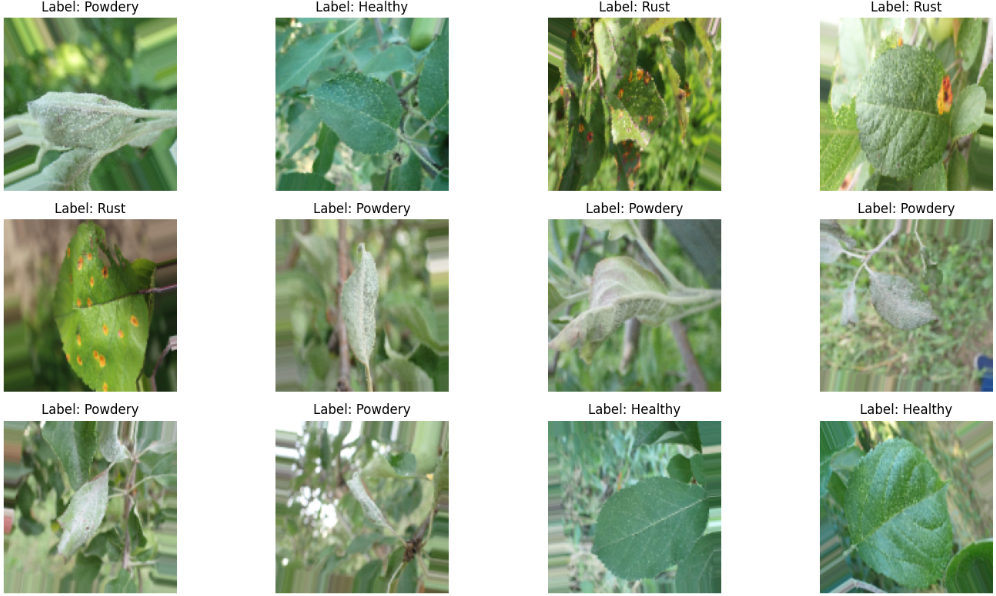
统计训练集中各个类别的样本数量,并通过柱状图展示类别分布情况,帮助我们了解数据集是否平衡。
# 统计每个类别的图像数量
labels = []  # 初始化标签列表

# 遍历训练目录中的每个类别文件夹
for class_name in os.listdir(train_dir):
    class_path = os.path.join(train_dir, class_name)  # 构建完整路径

    # 检查是否为目录(跳过文件,只处理类别文件夹)
    if os.path.isdir(class_path):
        # 统计该类别文件夹中的图像文件数量
        num_images = len(os.listdir(class_path))

        # 将类别名称重复对应次数,添加到标签列表中
        # 例如:如果有50张健康叶片图像,就添加50个"Healthy"字符串
        labels.extend([class_name] * num_images)

# 创建DataFrame用于统计分析
df = pd.DataFrame({'Class': labels})  # 创建包含类别列的DataFrame

# 使用Seaborn绘制统计图
plt.figure(figsize=(8, 5))  # 设置图形大小

# 绘制计数图(柱状图),显示每个类别的样本数量
# palette='Set2':使用Set2调色板,颜色区分明显
sns.countplot(x='Class', data=df, palette='Set2')

# 设置图表标题和坐标轴标签
plt.title('Number of Images per Class (Train Set)')
plt.xlabel('Class')  # x轴:类别名称
plt.ylabel('Count')  # y轴:样本数量

# 关闭网格线,使图表更简洁
plt.grid(False)

# 显示图形
plt.show()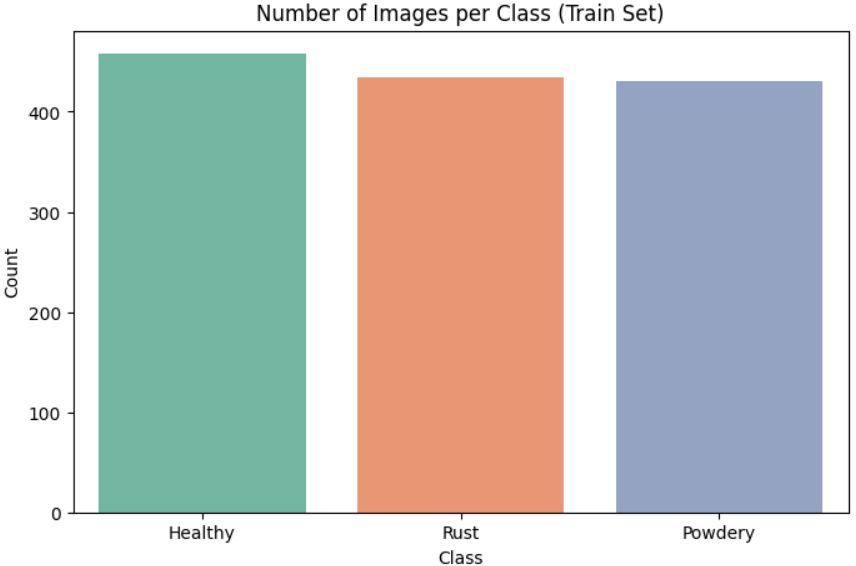
4.3构建模型
这里主要定义了多种不同的卷积神经网络架构配置,并为模型训练准备了必要的回调函数。我们不仅考虑基本的MobileNetV2和VGG16,还扩展了其他几种流行的预训练模型,以便进行更全面的比较研究。
# 导入额外的预训练模型架构
from tensorflow.keras.applications import ResNet50, InceptionV3, EfficientNetB0, DenseNet121

# 获取类别名称列表(从训练数据生成器中提取)
class_names = list(train_generator.class_indices.keys())

# 模型配置列表:包含模型名称、基础架构和用于微调或Grad-CAM的最后一层卷积层
model_configs = [
    # ------------------- MobileNetV2 配置 -------------------
    # 轻量级模型,适合移动端部署
    {
        "name": "MobileNetV2",      # 模型名称
        "base": MobileNetV2,        # 基础模型类
        "layer": "Conv_1"           # 用于Grad-CAM可视化的关键层
    },

    # ------------------- VGG16 配置 -------------------
    # 经典CNN架构,结构简单但特征提取能力强
    {
        "name": "VGG16",
        "base": VGG16,
        "layer": "block5_conv3"     # VGG16最后一个卷积块的第3个卷积层
    },

    # ------------------- ResNet50 配置 -------------------
    # 引入残差连接,解决深度网络梯度消失问题
    {
        "name": "ResNet50",
        "base": ResNet50,
        "layer": "conv5_block3_out"  # 第5个残差块的第3个卷积层输出
    },

    # ------------------- InceptionV3 配置 -------------------
    # 使用多尺度卷积核并行处理不同大小的特征
    {
        "name": "InceptionV3",
        "base": InceptionV3,
        "layer": "mixed10"           # Inception模块的混合层
    },

    # ------------------- EfficientNetB0 配置 -------------------
    # 通过复合缩放平衡深度、宽度和分辨率
    {
        "name": "EfficientNetB0",
        "base": EfficientNetB0,
        "layer": "top_activation"    # 顶层激活层
    },

    # ------------------- DenseNet121 配置 -------------------
    # 密集连接架构,特征重用效率高
    {
        "name": "DenseNet121",
        "base": DenseNet121,
        "layer": "relu"              # 最后的ReLU激活层
    }
]

# 定义训练回调函数
# 早停回调:监控验证损失,防止过拟合
early_stop = EarlyStopping(
    monitor='val_loss',      # 监控验证损失
    patience=5,              # 容忍验证损失连续5个epoch没有改善
    restore_best_weights=True  # 训练结束后恢复最佳模型权重
)

# 学习率衰减回调:当模型性能停滞时降低学习率
reduce_lr = ReduceLROnPlateau(
    monitor='val_loss',      # 监控验证损失
    factor=0.5,              # 学习率衰减因子:每次降低50%
    patience=3               # 等待3个epoch,如果验证损失没有改善则降低学习率
)说明:这里我们构建了一个全面的模型比较框架。我们定义了六种不同的预训练CNN架构,每种架构都有其独特的设计特点和适用场景。MobileNetV2注重计算效率和模型轻量化,适合在计算资源有限的设备上部署;VGG16作为经典架构,结构简单但特征提取能力稳定;ResNet50通过残差连接解决了深度网络的梯度消失问题;InceptionV3使用多尺度卷积核来捕捉不同大小的特征;EfficientNetB0通过复合缩放实现了精度和效率的良好平衡;DenseNet121采用密集连接设计,促进了特征重用。
每个模型配置中都指定了一个关键层(layer字段),这个设计为后续的可视化分析(如Grad-CAM)做了准备。Grad-CAM技术能够可视化模型关注图像中的哪些区域进行决策,对于植物病害识别任务特别有意义,因为它能帮助我们理解模型是否真的关注到了病害特征区域,而不是无关的背景。
两个回调函数是训练过程中的重要组件:早停回调防止模型在训练集上过度拟合,当验证损失连续5个epoch没有改善时停止训练;学习率衰减回调则能帮助模型在训练后期进行更精细的参数调整,当验证损失停滞时自动降低学习率。这些回调函数的组合使用能够显著提高训练效率和模型性能。
4.4训练模型
这里实现了多种预训练模型的迁移学习训练流程。我们采用统一的方式对六种不同的CNN架构进行训练和比较,每种模型都使用相同的训练策略和评估标准,确保比较的公平性和科学性。
# 创建列表用于存储训练好的模型及其训练历史
trained_models = []

# 遍历每个模型配置
for config in model_configs:
    print(f"\nTraining model: {config['name']}\n")

    # ------------------- 加载基础模型 -------------------
    # 加载预训练模型,不包括顶部分类层(include_top=False)
    base_model = config['base'](
        weights='imagenet',  # 使用ImageNet预训练权重
        include_top=False,   # 不包含原始分类头,我们将自定义
        input_shape=(224, 224, 3)  # 输入图像尺寸:224x224像素,RGB三通道
    )

    # 冻结基础模型的所有层,在初始阶段只训练自定义的分类头
    # 这是迁移学习的标准做法,防止破坏预训练模型学到的良好特征
    base_model.trainable = False

    # ------------------- 构建自定义分类头 -------------------
    # 获取基础模型的输出特征
    x = base_model.output

    # 添加全局平均池化层:将特征图的空间维度压缩为1x1
    # 每个特征通道的激活值被平均化,得到一个固定长度的特征向量
    x = GlobalAveragePooling2D()(x)

    # 添加全连接层:512个神经元,ReLU激活函数
    x = Dense(512, activation='relu')(x)

    # 添加Dropout层:50%丢弃率,防止过拟合
    x = Dropout(0.5)(x)

    # ------------------- 输出层 -------------------
    # 输出层:3个神经元对应3个植物病害类别,softmax激活函数输出概率分布
    output = Dense(3, activation='softmax')(x)

    # ------------------- 创建完整模型 -------------------
    # 使用函数式API构建模型,指定输入和输出
    model = Model(inputs=base_model.input, outputs=output)

    # ------------------- 编译模型 -------------------
    # 配置模型训练过程
    model.compile(
        optimizer=Adam(1e-4),  # 使用Adam优化器,学习率0.0001
        loss='categorical_crossentropy',  # 分类交叉熵损失函数
        metrics=['accuracy']  # 评估指标:准确率
    )

    # ------------------- 训练模型 -------------------
    # 开始模型训练
    history = model.fit(
        train_generator,  # 训练数据生成器
        validation_data=val_generator,  # 验证数据生成器
        epochs=100,  # 最大训练轮数(实际可能因早停而提前结束)
        callbacks=[early_stop, reduce_lr]  # 训练回调函数
    )

    # ------------------- 保存模型 -------------------
    # 将训练好的模型保存到文件,便于后续加载和使用
    model.save(f"{config['name']}_model.keras")

    # ------------------- 存储模型信息 -------------------
    # 将模型、训练历史和元数据保存到列表中,用于后续评估和比较
    trained_models.append({
        "name": config["name"],  # 模型名称
        "model": model,  # 训练好的模型对象
        "history": history,  # 训练历史(包含每个epoch的指标)
        "layer": config["layer"]  # 用于可视化的关键层名称
    })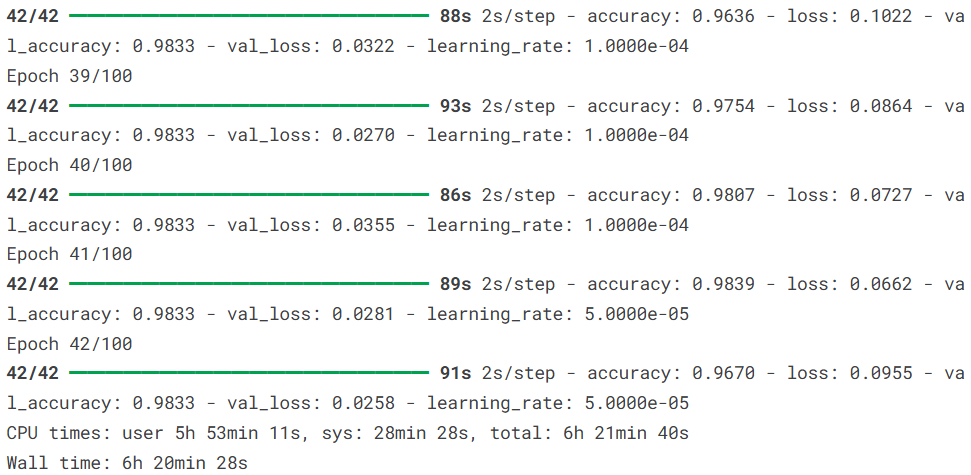
说明:对于六种不同的预训练CNN架构,我们采用统一的迁移学习策略:冻结预训练的特征提取层,只训练自定义的分类头。这种方法既能利用预训练模型在ImageNet上学到的通用视觉特征,又能针对植物病害识别任务进行专门调整。
每个模型都使用相同的训练配置:学习率设为0.0001,采用Adam优化器,训练时使用早停和学习率衰减回调。早停回调监控验证损失,如果连续5个epoch没有改善就停止训练,防止过拟合;学习率衰减回调在验证损失停滞3个epoch后自动将学习率降低一半,帮助模型跳出局部最优。
训练过程中,每个模型的进度都会被实时输出,包括训练损失、训练准确率、验证损失和验证准确率的变化。训练完成后,模型会被保存到磁盘文件,文件名称包含模型名称,便于后续加载和使用。所有模型的相关信息(模型对象、训练历史、关键层信息)都被存储在一个列表中,为后续的性能比较和可视化分析做好准备。
这种系统化的训练方式确保了不同模型之间的可比性,因为它们在数据预处理、训练策略、评估标准等方面都保持一致。通过这种方式,我们可以客观地比较不同CNN架构在植物病害识别任务上的表现差异,为实际应用中的模型选择提供可靠的依据。
4.5模型评估
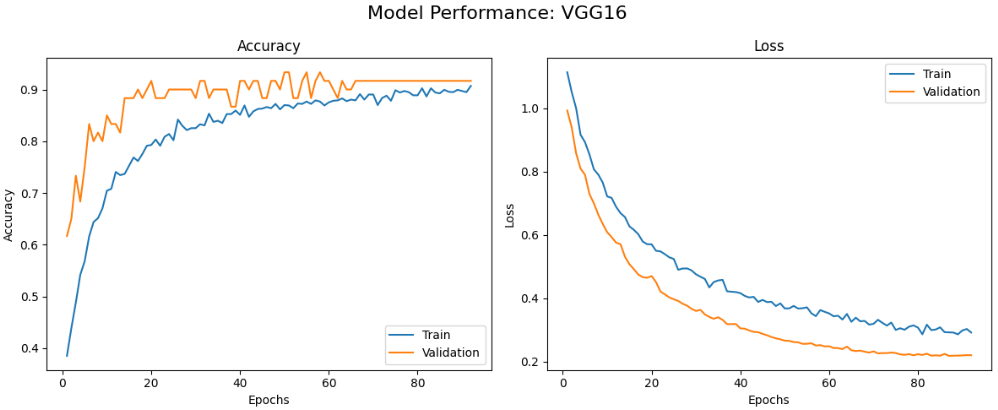
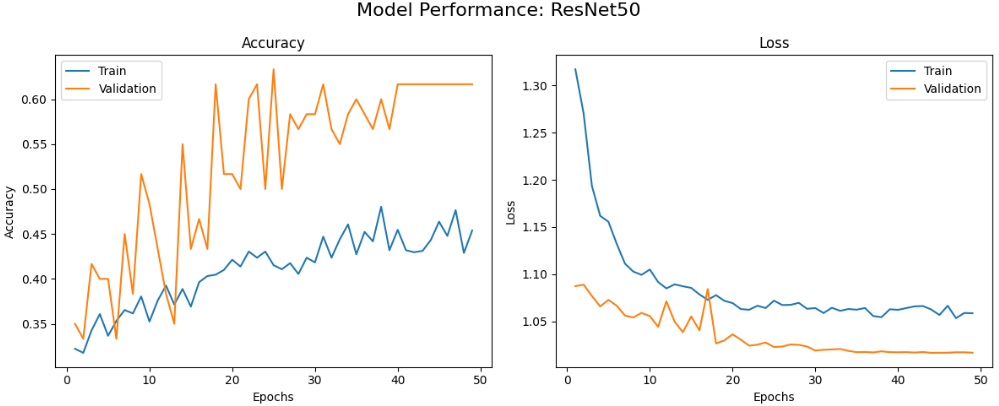
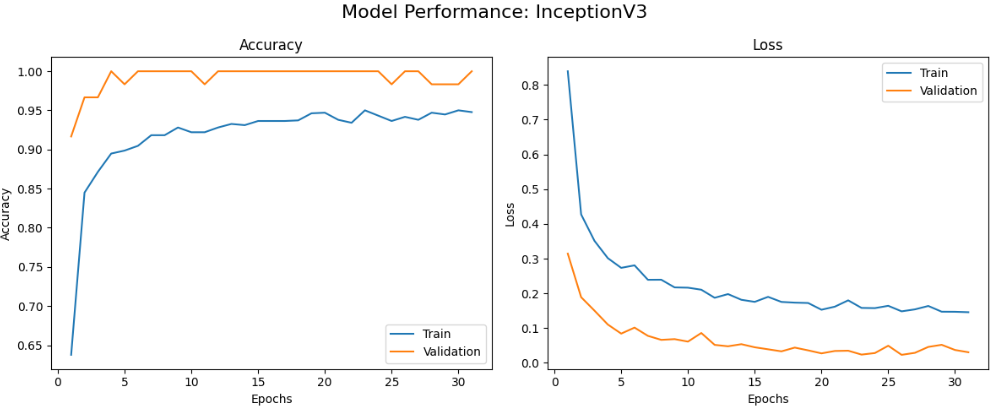
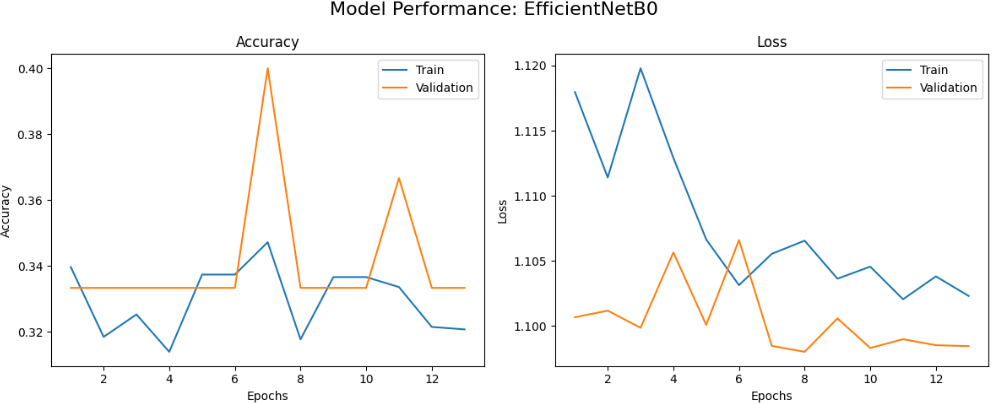
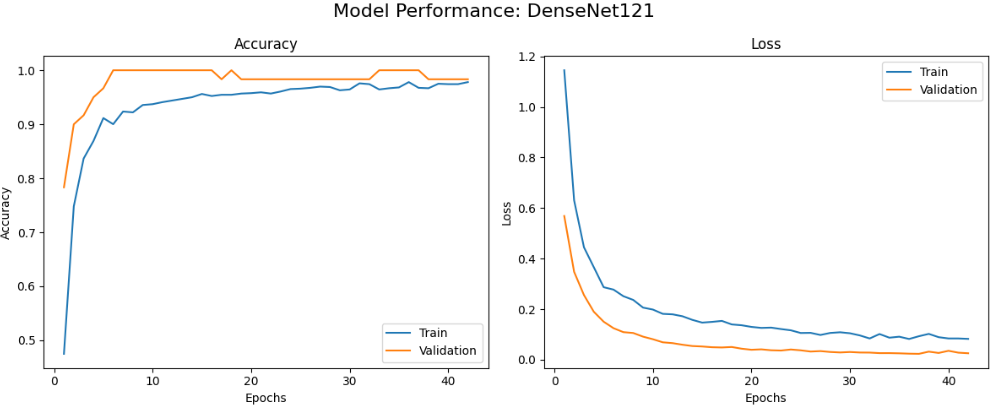
首先绘制每个模型的训练曲线,包括准确率和损失随epoch变化的情况,帮助我们了解模型的学习动态和收敛情况。
# 绘制每个训练模型的性能曲线(准确率和损失)
print("\nPerformance Curves (Accuracy and Loss)\n")

# 遍历所有训练好的模型
for result in trained_models:
    model_name = result["name"]  # 获取模型名称
    history = result["history"]  # 获取训练历史对象

    # 从历史对象中提取训练和验证指标
    acc = history.history['accuracy']  # 训练准确率
    val_acc = history.history['val_accuracy']  # 验证准确率
    loss = history.history['loss']  # 训练损失
    val_loss = history.history['val_loss']  # 验证损失

    # 生成epoch范围(从1到实际训练的epoch数)
    epochs_range = range(1, len(acc) + 1)

    # 为每个模型创建新的图形窗口
    plt.figure(figsize=(12, 5))
    plt.suptitle(f"Model Performance: {model_name}", fontsize=16)  # 设置总标题

    # ------------------- 准确率曲线 -------------------
    plt.subplot(1, 2, 1)  # 左图:准确率
    plt.plot(epochs_range, acc, label='Train')  # 训练准确率曲线
    plt.plot(epochs_range, val_acc, label='Validation')  # 验证准确率曲线
    plt.title('Accuracy')  # 子图标题
    plt.xlabel('Epochs')  # x轴标签
    plt.ylabel('Accuracy')  # y轴标签
    plt.legend()  # 显示图例
    plt.grid(False)  # 不显示网格线

    # ------------------- 损失曲线 -------------------
    plt.subplot(1, 2, 2)  # 右图:损失
    plt.plot(epochs_range, loss, label='Train')  # 训练损失曲线
    plt.plot(epochs_range, val_loss, label='Validation')  # 验证损失曲线
    plt.title('Loss')  # 子图标题
    plt.xlabel('Epochs')  # x轴标签
    plt.ylabel('Loss')  # y轴标签
    plt.legend()  # 显示图例
    plt.grid(False)  # 不显示网格线

    plt.tight_layout()  # 调整子图布局
    plt.show()  # 显示图形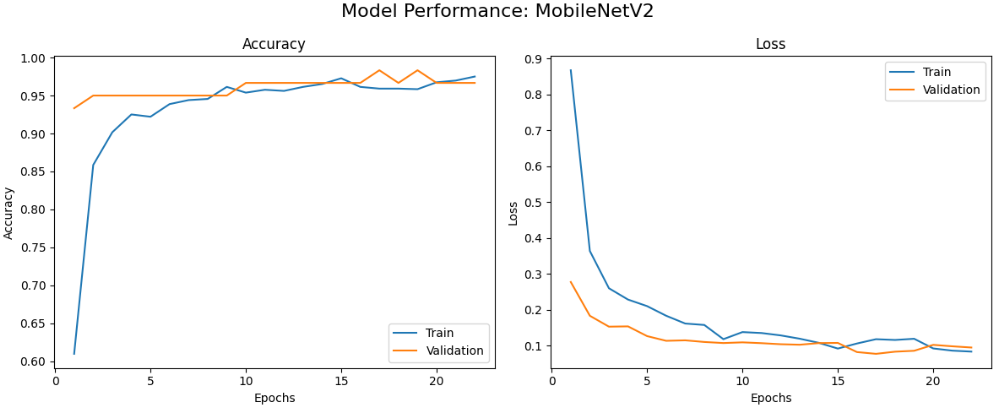
接着在独立的测试集上评估所有模型,并生成详细的分类报告,包括精确率、召回率和F1分数等指标。
# 初始化列表存储测试图像和对应标签
X_test, y_test = [], []

# 遍历测试生成器,提取所有批次的数据
# len(test_generator)返回测试集的批次数
for i in range(len(test_generator)):
    imgs, labels = test_generator[i]  # 获取第i批图像和标签
    X_test.extend(imgs)  # 添加图像到列表
    # 将one-hot编码标签转换为类别索引
    y_test.extend(np.argmax(labels, axis=1))

# 将列表转换为NumPy数组,便于后续评估
X_test = np.array(X_test)
y_test = np.array(y_test)

# 遍历每个训练好的模型,在测试集上进行评估
for result in trained_models:
    model = result["model"]  # 获取模型对象
    model_name = result["name"]  # 获取模型名称

    # 预测类别概率,并转换为类别标签
    y_pred_prob = model.predict(X_test)  # 预测概率分布
    y_pred = np.argmax(y_pred_prob, axis=1)  # 取最大概率对应的类别

    # 打印分类报告,包含精确率、召回率、F1分数等详细指标
    print(f"\n=== Classification Report - {model_name} ===")
    print(classification_report(y_test, y_pred, target_names=class_names))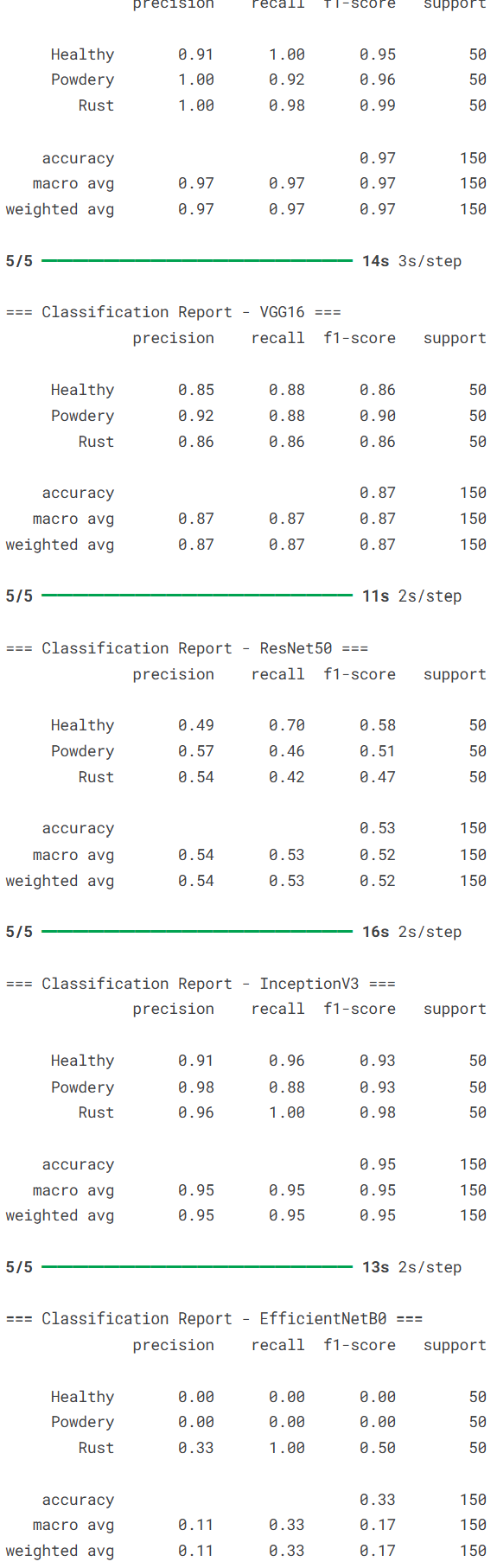
接着绘制所有模型的ROC曲线,通过AUC值(曲线下面积)比较它们的分类性能。
from sklearn.preprocessing import label_binarize  # 标签二值化工具

# 设置Seaborn绘图风格
sns.set(style="whitegrid")

# 将真实标签二值化,用于ROC计算
# classes参数指定类别索引顺序
y_test_bin = label_binarize(y_test, classes=[0, 1, 2])
n_classes = y_test_bin.shape[1]  # 类别数量(3)

# 创建绘图窗口
fig, ax = plt.subplots(figsize=(10, 7))

# 遍历所有模型
for result in trained_models:
    model = result["model"]
    name = result["name"]

    # 在测试集上预测概率
    y_pred_prob = model.predict(X_test)

    # 为每个类别计算ROC曲线和AUC
    fpr = dict()  # 假正率字典
    tpr = dict()  # 真正率字典
    roc_auc = dict()  # AUC字典
    for i in range(n_classes):
        # 计算第i个类别的ROC曲线
        fpr[i], tpr[i], _ = roc_curve(y_test_bin[:, i], y_pred_prob[:, i])
        # 计算第i个类别的AUC
        roc_auc[i] = auc(fpr[i], tpr[i])

    # 计算宏平均ROC
    # 合并所有类别的假正率
    all_fpr = np.unique(np.concatenate([fpr[i] for i in range(n_classes)]))
    # 初始化平均真正率
    mean_tpr = np.zeros_like(all_fpr)
    for i in range(n_classes):
        # 插值计算每个类别的真正率
        mean_tpr += np.interp(all_fpr, fpr[i], tpr[i])
    mean_tpr /= n_classes  # 取平均
    roc_auc["macro"] = auc(all_fpr, mean_tpr)  # 计算宏平均AUC

    # 绘制宏平均ROC曲线
    ax.plot(all_fpr, mean_tpr, label=f"{name} (AUC = {roc_auc['macro']:.2f})")

# 参考线:随机分类器(对角线)
ax.plot([0, 1], [0, 1], 'k--', lw=1)

# 格式化图形
ax.set_xlim([0.0, 1.0])  # x轴范围
ax.set_ylim([0.0, 1.05])  # y轴范围
ax.set_xlabel('False Positive Rate', fontsize=12)  # x轴标签
ax.set_ylabel('True Positive Rate', fontsize=12)  # y轴标签
ax.set_title('Macro-Averaged ROC Curve by Model', fontsize=14)  # 标题
# 将图例放在图形右侧
ax.legend(loc='center left', bbox_to_anchor=(1, 0.5), title="Models")
plt.tight_layout()  # 调整布局
plt.grid(False)  # 不显示网格线
plt.show()  # 显示图形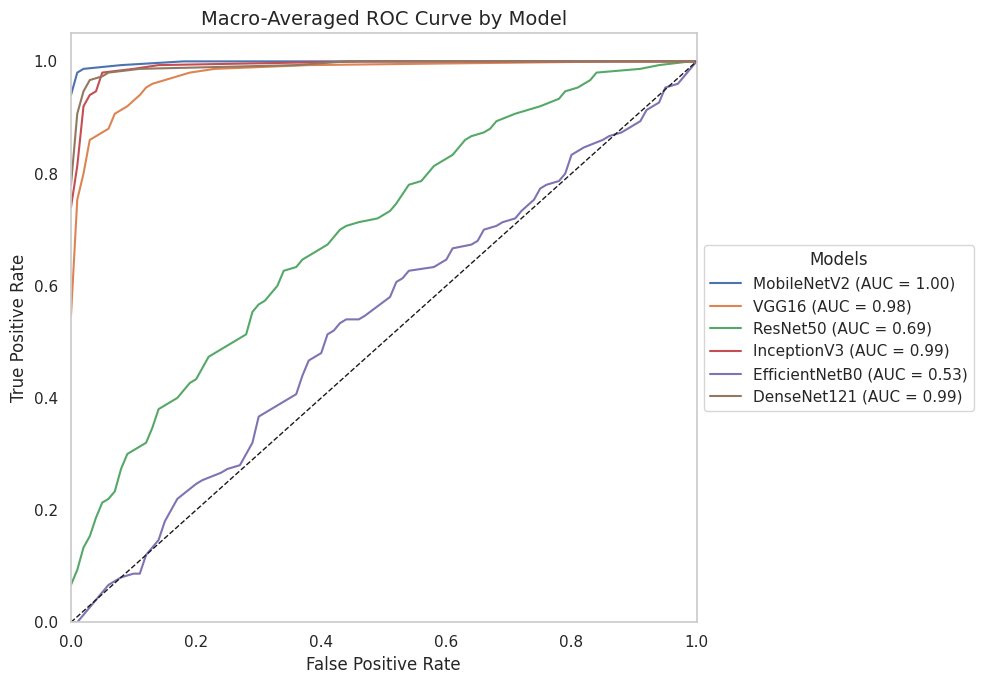
接着生成混淆矩阵来分析模型的错误模式,还使用Grad-CAM技术可视化模型关注的图像区域,帮助我们理解模型的决策依据。
# 混淆矩阵 + Grad-CAM可视化

# 定义计算Grad-CAM热图的函数
def get_gradcam_heatmap(model, img_array, class_index, layer_name):
    """
    计算指定类别的Grad-CAM热图
    参数:
        model: 目标模型
        img_array: 输入图像数组
        class_index: 目标类别索引
        layer_name: 目标层名称
    返回:
        heatmap: 热图数组
    """
    # 创建输出目标层激活和模型预测的新模型
    grad_model = Model([model.inputs], [model.get_layer(layer_name).output, model.output])

    # 使用梯度带记录操作以便自动微分
    with tf.GradientTape() as tape:
        conv_outputs, predictions = grad_model(img_array)  # 前向传播
        loss = predictions[:, class_index]  # 聚焦特定类别的预测分数

    # 计算目标类别分数相对于特征图的梯度
    grads = tape.gradient(loss, conv_outputs)[0]
    pooled_grads = tf.reduce_mean(grads, axis=(0, 1, 2))  # 全局平均池化

    conv_outputs = conv_outputs[0]  # 移除批次维度

    # 计算特征图的加权和
    heatmap = tf.reduce_sum(tf.multiply(pooled_grads, conv_outputs), axis=-1)
    heatmap = np.maximum(heatmap, 0)  # 应用ReLU,只保留正梯度
    heatmap /= tf.math.reduce_max(heatmap)  # 归一化到[0, 1]
    return heatmap.numpy()

# 定义将Grad-CAM热图叠加到原始图像上的函数
def overlay_gradcam(img, heatmap, alpha=0.4):
    """
    将热图叠加到原始图像上
    参数:
        img: 原始图像
        heatmap: 热图数组
        alpha: 叠加透明度
    返回:
        叠加后的图像
    """
    # 调整热图尺寸与图像匹配
    heatmap = cv2.resize(heatmap, (img.shape[1], img.shape[0]))
    # 应用颜色映射(JET色系)
    heatmap_color = cv2.applyColorMap(np.uint8(255 * heatmap), cv2.COLORMAP_JET)
    # 将热图叠加到原始图像上
    superimposed_img = heatmap_color * alpha + img * 255
    return np.uint8(superimposed_img)

# 遍历所有训练好的模型
for result in trained_models:
    model = result["model"]
    model_name = result["name"]
    layer_name = result["layer"]

    # 在测试集上预测概率
    y_pred_prob = model.predict(X_test)
    y_pred = np.argmax(y_pred_prob, axis=1)

    # 绘制混淆矩阵
    cm = confusion_matrix(y_test, y_pred)
    plt.figure(figsize=(6, 5))
    sns.heatmap(cm, annot=True, fmt='d', cmap='Blues',
                xticklabels=class_names, yticklabels=class_names)
    plt.title(f'Confusion Matrix - {model_name}')
    plt.xlabel('Predicted Label')
    plt.ylabel('True Label')
    plt.tight_layout()
    plt.show()
汇总所有模型的训练结果,生成一个清晰的对比表格,并将结果导出到CSV文件,便于后续分析和报告。
# 从训练历史中创建汇总DataFrame
summary_data = []  # 初始化汇总数据列表

# 遍历所有训练结果
for result in trained_models:
    name = result['name']  # 模型名称
    history = result['history'].history  # 训练历史数据

    # 提取各项指标
    val_acc = history['val_accuracy']  # 验证准确率
    val_loss = history['val_loss']  # 验证损失
    train_acc = history['accuracy']  # 训练准确率
    train_loss = history['loss']  # 训练损失

    # 将模型信息添加到汇总数据
    summary_data.append({
        "Model": name,  # 模型名称
        "Epochs Trained": len(val_acc),  # 实际训练轮数
        "Final Val Accuracy": val_acc[-1],  # 最终验证准确率
        "Best Val Accuracy": max(val_acc),  # 最佳验证准确率
        "Final Val Loss": val_loss[-1],  # 最终验证损失
        "Min Val Loss": min(val_loss),  # 最小验证损失
        "Final Train Accuracy": train_acc[-1],  # 最终训练准确率
        "Final Train Loss": train_loss[-1]  # 最终训练损失
    })

# 创建DataFrame并按照最佳验证准确率降序排序
df_summary = pd.DataFrame(summary_data)
df_summary = df_summary.sort_values(by="Best Val Accuracy", ascending=False).reset_index(drop=True)

# 将模型结果导出到CSV文件
df_summary.to_csv("model_training_summary.csv", index=False)

# 显示汇总表格
df_summary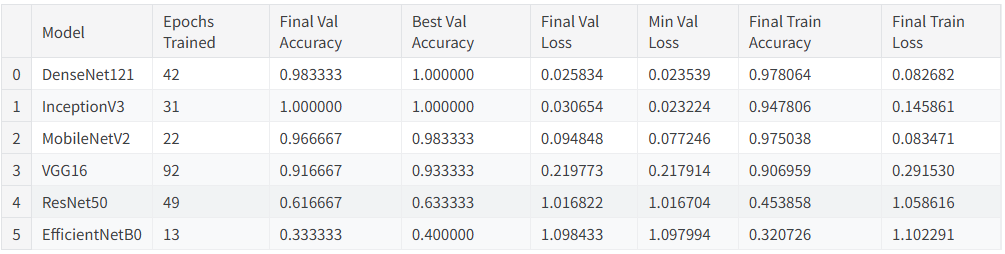
5.总结
本文系统对比了六种基于迁移学习的卷积神经网络在植物病害图像识别任务上的性能表现,包括MobileNetV2、VGG16、ResNet50、InceptionV3、EfficientNetB0和DenseNet121。实验结果表明,不同网络架构在该任务上存在显著性能差异,其中DenseNet121和InceptionV3表现最为优异,在验证集上均达到了100%的最佳准确率,且训练过程收敛稳定。MobileNetV2在保持较高识别准确率的同时展现出良好的训练效率,仅需22个epoch即达到接近最优性能。相比之下,经典架构VGG16虽取得可接受的识别效果,但训练时间较长且收敛相对缓慢,而ResNet50与EfficientNetB0在本实验配置下未能充分发挥潜力,可能存在特定优化需求。整体而言,深度互连架构(DenseNet)和多尺度特征融合设计(Inception)更适应植物病害图像的细粒度特征识别需求,为农业病害智能检测的模型选择提供了实践参考。
源代码
import os

# Libraries for data manipulation and analysis
import numpy as np
import pandas as pd

# Libraries for data visualization
import matplotlib.pyplot as plt
import seaborn as sns

# TensorFlow and Keras libraries for building deep learning models
import tensorflow as tf
from tensorflow.keras.models import Sequential
from tensorflow.keras.layers import Conv2D, MaxPooling2D, Flatten, Dense, Dropout
from tensorflow.keras.preprocessing.image import ImageDataGenerator

# Additional Keras layers and callbacks for regularization and training control
from tensorflow.keras.layers import BatchNormalization
from tensorflow.keras.callbacks import EarlyStopping, ReduceLROnPlateau
from tensorflow.keras.layers import GlobalAveragePooling2D
from tensorflow.keras.models import Model
from tensorflow.keras.optimizers import Adam

# Pre-trained CNN architectures for Transfer Learning
from tensorflow.keras.applications import MobileNetV2, VGG16

# Scikit-learn metrics for evaluation
from sklearn.metrics import classification_report, confusion_matrix
from sklearn.metrics import roc_curve, auc
from sklearn.preprocessing import label_binarize

# Computer vision utilities and image preprocessing
import cv2
from tensorflow.keras.preprocessing import image
# Directory Paths
train_dir = "./plant-disease-recognition-dataset/Train/Train"
val_dir = "./plant-disease-recognition-dataset/Validation/Validation"
test_dir = "./plant-disease-recognition-dataset/Test/Test"
# Data augmentation applied to the training set
train_datagen = ImageDataGenerator(rescale=1./255,
                                   rotation_range=30,
                                   zoom_range=0.2,
                                   horizontal_flip=True)

# Only normalization applied to validation and test sets
val_test_datagen = ImageDataGenerator(rescale=1./255)
# Creating the data generators

# Training data generator
train_generator = train_datagen.flow_from_directory(train_dir,
                                                    target_size=(128, 128),
                                                    batch_size=32,
                                                    class_mode='categorical')

# Validation data generator
val_generator = val_test_datagen.flow_from_directory(val_dir,
                                                     target_size=(128, 128),
                                                     batch_size=32,
                                                     class_mode='categorical')

# Test data generator (no shuffling to preserve label order)
test_generator = val_test_datagen.flow_from_directory(test_dir,
                                                      target_size=(128, 128),
                                                      batch_size=32,
                                                      class_mode='categorical',
                                                      shuffle=False)
# Get a batch of images and labels
images, labels = next(train_generator)

# Class names
class_names = list(train_generator.class_indices.keys())

# Number of images to display
num_images = 12  # For example, display 12 images

plt.figure(figsize=(15, 8))

for i in range(num_images):
    plt.subplot(3, 4, i + 1)  # Grid of 3 rows x 4 columns
    plt.imshow(images[i])
    label_index = np.argmax(labels[i])
    plt.title(f"Label: {class_names[label_index]}")
    plt.axis('off')

plt.tight_layout()
plt.show()
# List the number of images per class
labels = []
for class_name in os.listdir(train_dir):
    class_path = os.path.join(train_dir, class_name)
    if os.path.isdir(class_path):
        num_images = len(os.listdir(class_path))
        labels.extend([class_name] * num_images)

# Create a DataFrame
df = pd.DataFrame({'Class': labels})

# Plot using Seaborn
plt.figure(figsize=(8, 5))
sns.countplot(x='Class', data=df, palette='Set2')
plt.title('Number of Images per Class (Train Set)')
plt.xlabel('Class')
plt.ylabel('Count')
plt.grid(False)
plt.show()

from tensorflow.keras.applications import ResNet50, InceptionV3, EfficientNetB0, DenseNet121

class_names = list(train_generator.class_indices.keys())
# Model configuration list: model name, base architecture, and last convolutional layer for fine-tuning or Grad-CAM
model_configs = [

    # CNN MobileNetV2
    {
        "name": "MobileNetV2",
        "base": MobileNetV2,
        "layer": "Conv_1"
    },

    # CNN VGG16
    {
        "name": "VGG16",
        "base": VGG16,
        "layer": "block5_conv3"
    },

    # CNN ResNet50
    {
        "name": "ResNet50",
        "base": ResNet50,
        "layer": "conv5_block3_out"
    },

    # CNN InceptionV3
    {
        "name": "InceptionV3",
        "base": InceptionV3,
        "layer": "mixed10"
    },

    # CNN EfficientNetB0
    {
        "name": "EfficientNetB0",
        "base": EfficientNetB0,
        "layer": "top_activation"
    },

    # CNN DenseNet121
    {
        "name": "DenseNet121",
        "base": DenseNet121,
        "layer": "relu"
    }
]

# Callbacks
early_stop = EarlyStopping(monitor='val_loss', patience=5, restore_best_weights=True)
reduce_lr = ReduceLROnPlateau(monitor='val_loss', factor=0.5, patience=3)
# List to store trained models and their histories
trained_models = []

# Loop through each model configuration
for config in model_configs:
    print(f"\nTraining model: {config['name']}\n")

    # Load the base model without the top classification layers
    base_model = config['base'](weights='imagenet', include_top=False, input_shape=(224, 224, 3))
    base_model.trainable = False  # Freeze the convolutional base

    # Add custom classification head
    x = base_model.output
    x = GlobalAveragePooling2D()(x)      # Global average pooling to reduce feature maps
    x = Dense(512, activation='relu')(x) # Fully connected layer
    x = Dropout(0.5)(x)                  # Dropout for regularization

    # Output layer with 3 classes and softmax activation
    output = Dense(3, activation='softmax')(x)

    # Create the final model
    model = Model(inputs=base_model.input, outputs=output)

    # Compile the model with Adam optimizer and categorical cross-entropy loss
    model.compile(optimizer=Adam(1e-4),
                  loss='categorical_crossentropy',
                  metrics=['accuracy'])

    # Train the model with early stopping and learning rate reduction
    history = model.fit(train_generator,
                        validation_data=val_generator,
                        epochs=100,
                        callbacks=[early_stop, reduce_lr])

    # Save the trained model to file
    model.save(f"{config['name']}_model.keras")

    # Append model, history, and metadata to the list for later evaluation
    trained_models.append({"name": config["name"],
                           "model": model,
                           "history": history,
                           "layer": config["layer"]})
# Plot performance curves (accuracy and loss) for each trained model
print("\nPerformance Curves (Accuracy and Loss)\n")

for result in trained_models:
    model_name = result["name"]
    history = result["history"]

    # Extract training and validation metrics from the history object
    acc = history.history['accuracy']
    val_acc = history.history['val_accuracy']
    loss = history.history['loss']
    val_loss = history.history['val_loss']

    epochs_range = range(1, len(acc) + 1)

    # Create a new figure for each model
    plt.figure(figsize=(12, 5))
    plt.suptitle(f"Model Performance: {model_name}", fontsize=16)

    # Accuracy plot
    plt.subplot(1, 2, 1)
    plt.plot(epochs_range, acc, label='Train')
    plt.plot(epochs_range, val_acc, label='Validation')
    plt.title('Accuracy')
    plt.xlabel('Epochs')
    plt.ylabel('Accuracy')
    plt.legend()
    plt.grid(False)

    # Loss plot
    plt.subplot(1, 2, 2)
    plt.plot(epochs_range, loss, label='Train')
    plt.plot(epochs_range, val_loss, label='Validation')
    plt.title('Loss')
    plt.xlabel('Epochs')
    plt.ylabel('Loss')
    plt.legend()
    plt.grid(False)

    plt.tight_layout()
    plt.show()
# Initialize lists to store test images and corresponding labels
X_test, y_test = [], []

# Iterate through the test generator to extract all batches
for i in range(len(test_generator)):
    imgs, labels = test_generator[i]
    X_test.extend(imgs)                                # Append images
    y_test.extend(np.argmax(labels, axis=1))           # Convert one-hot labels to class indices

# Convert lists to NumPy arrays for evaluation
X_test = np.array(X_test)
y_test = np.array(y_test)
# Loop through each trained model to evaluate on the test set
for result in trained_models:
    model = result["model"]
    model_name = result["name"]

    # Predict class probabilities and convert to class labels
    y_pred_prob = model.predict(X_test)
    y_pred = np.argmax(y_pred_prob, axis=1)

    # Print the classification report with precision, recall, F1-score
    print(f"\n=== Classification Report - {model_name} ===")
    print(classification_report(y_test, y_pred, target_names=class_names))
from sklearn.preprocessing import label_binarize

# Set Seaborn style
sns.set(style="whitegrid")

# Binarize true labels for ROC
y_test_bin = label_binarize(y_test, classes=[0, 1, 2])
n_classes = y_test_bin.shape[1]

# Create plot
fig, ax = plt.subplots(figsize=(10, 7))

# Loop over models
for result in trained_models:
    model = result["model"]
    name = result["name"]

    # Predict probabilities on test set
    y_pred_prob = model.predict(X_test)

    # Compute ROC curve and AUC for each class
    fpr = dict()
    tpr = dict()
    roc_auc = dict()
    for i in range(n_classes):
        fpr[i], tpr[i], _ = roc_curve(y_test_bin[:, i], y_pred_prob[:, i])
        roc_auc[i] = auc(fpr[i], tpr[i])

    # Compute macro-average ROC
    all_fpr = np.unique(np.concatenate([fpr[i] for i in range(n_classes)]))
    mean_tpr = np.zeros_like(all_fpr)
    for i in range(n_classes):
        mean_tpr += np.interp(all_fpr, fpr[i], tpr[i])
    mean_tpr /= n_classes
    roc_auc["macro"] = auc(all_fpr, mean_tpr)

    # Plot macro-average ROC
    ax.plot(all_fpr, mean_tpr, label=f"{name} (AUC = {roc_auc['macro']:.2f})")

# Reference line (random classifier)
ax.plot([0, 1], [0, 1], 'k--', lw=1)

# Formatting
ax.set_xlim([0.0, 1.0])
ax.set_ylim([0.0, 1.05])
ax.set_xlabel('False Positive Rate', fontsize=12)
ax.set_ylabel('True Positive Rate', fontsize=12)
ax.set_title('Macro-Averaged ROC Curve by Model', fontsize=14)
ax.legend(loc='center left', bbox_to_anchor=(1, 0.5), title="Models")
plt.tight_layout()
plt.grid(False)
plt.show()
# CONFUSION MATRIX + GRAD-CAM VISUALIZATION

# Function to compute Grad-CAM heatmap for a given class index
def get_gradcam_heatmap(model, img_array, class_index, layer_name):
    # Create a model that outputs the activations of the target layer and the predictions
    grad_model = Model([model.inputs], [model.get_layer(layer_name).output, model.output])

    # Record operations for automatic differentiation
    with tf.GradientTape() as tape:
        conv_outputs, predictions = grad_model(img_array)
        loss = predictions[:, class_index]  # Focus on the specific class

    # Compute gradients of the target class score with respect to the feature map
    grads = tape.gradient(loss, conv_outputs)[0]
    pooled_grads = tf.reduce_mean(grads, axis=(0, 1, 2))  # Global average pooling

    conv_outputs = conv_outputs[0]  # Remove batch dimension

    # Compute the weighted sum of the feature maps
    heatmap = tf.reduce_sum(tf.multiply(pooled_grads, conv_outputs), axis=-1)
    heatmap = np.maximum(heatmap, 0)  # Apply ReLU
    heatmap /= tf.math.reduce_max(heatmap)  # Normalize to [0, 1]
    return heatmap.numpy()

# Function to overlay the Grad-CAM heatmap on top of the original image
def overlay_gradcam(img, heatmap, alpha=0.4):
    heatmap = cv2.resize(heatmap, (img.shape[1], img.shape[0]))  # Resize heatmap to match image
    heatmap_color = cv2.applyColorMap(np.uint8(255 * heatmap), cv2.COLORMAP_JET)  # Apply colormap
    superimposed_img = heatmap_color * alpha + img * 255  # Overlay heatmap on original image
    return np.uint8(superimposed_img)

# Loop through all trained models
for result in trained_models:
    model = result["model"]
    model_name = result["name"]
    layer_name = result["layer"]

    # Predict probabilities on test set
    y_pred_prob = model.predict(X_test)
    y_pred = np.argmax(y_pred_prob, axis=1)

    # Plot confusion matrix
    cm = confusion_matrix(y_test, y_pred)
    plt.figure(figsize=(6, 5))
    sns.heatmap(cm, annot=True, fmt='d', cmap='Blues',
                xticklabels=class_names, yticklabels=class_names)
    plt.title(f'Confusion Matrix - {model_name}')
    plt.xlabel('Predicted Label')
    plt.ylabel('True Label')
    plt.tight_layout()
    plt.show()
# Create a summary DataFrame from training histories
summary_data = []

for result in trained_models:
    name = result['name']
    history = result['history'].history

    val_acc = history['val_accuracy']
    val_loss = history['val_loss']
    train_acc = history['accuracy']
    train_loss = history['loss']

    summary_data.append({"Model": name,
                         "Epochs Trained": len(val_acc),
                         "Final Val Accuracy": val_acc[-1],
                         "Best Val Accuracy": max(val_acc),
                         "Final Val Loss": val_loss[-1],
                         "Min Val Loss": min(val_loss),
                         "Final Train Accuracy": train_acc[-1],
                         "Final Train Loss": train_loss[-1]})

# Create DataFrame
df_summary = pd.DataFrame(summary_data)
df_summary = df_summary.sort_values(by="Best Val Accuracy", ascending=False).reset_index(drop=True)

# Export the models results to a CSV file
df_summary.to_csv("model_training_summary.csv", index=False)

# Display summary
df_summary
资料获取,更多粉丝福利,关注下方公众号获取


AtomGit 是由开放原子开源基金会联合 CSDN 等生态伙伴共同推出的新一代开源与人工智能协作平台。平台坚持“开放、中立、公益”的理念,把代码托管、模型共享、数据集托管、智能体开发体验和算力服务整合在一起,为开发者提供从开发、训练到部署的一站式体验。
更多推荐

 26
26 0
0- 0



 已为社区贡献4条内容

所有评论(0)