偷懒工具1:拒绝手动计算!我用 PySide6 撸了一个 OpenCV ROI 坐标提取“神器”
·
在搞工业视觉或者 OpenCV 开发时,最痛苦的时刻莫过于:为了提取一个 ROI 区域,得先用截图工具量像素,或者在代码里反复修改参数、运行、查看结果。
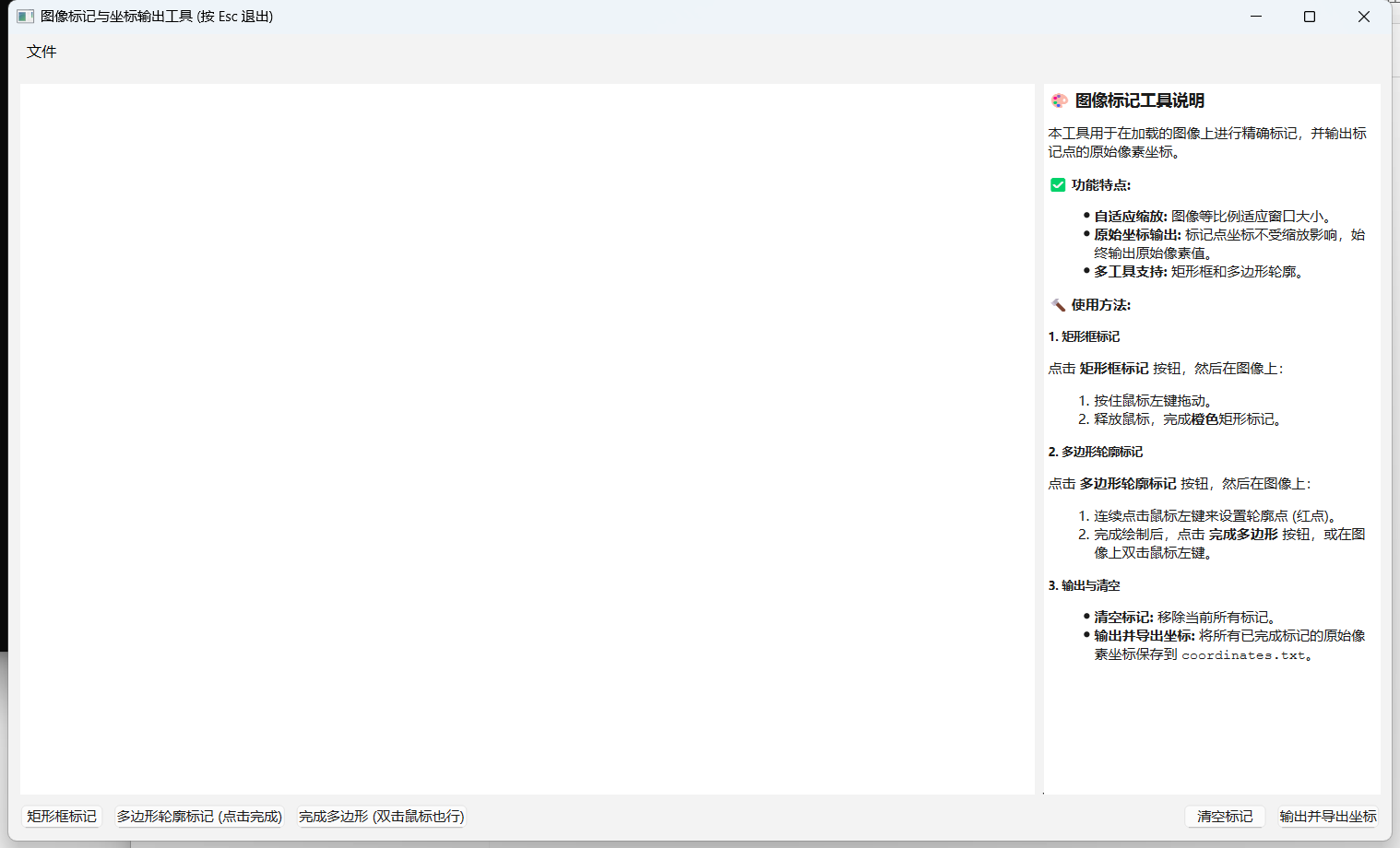
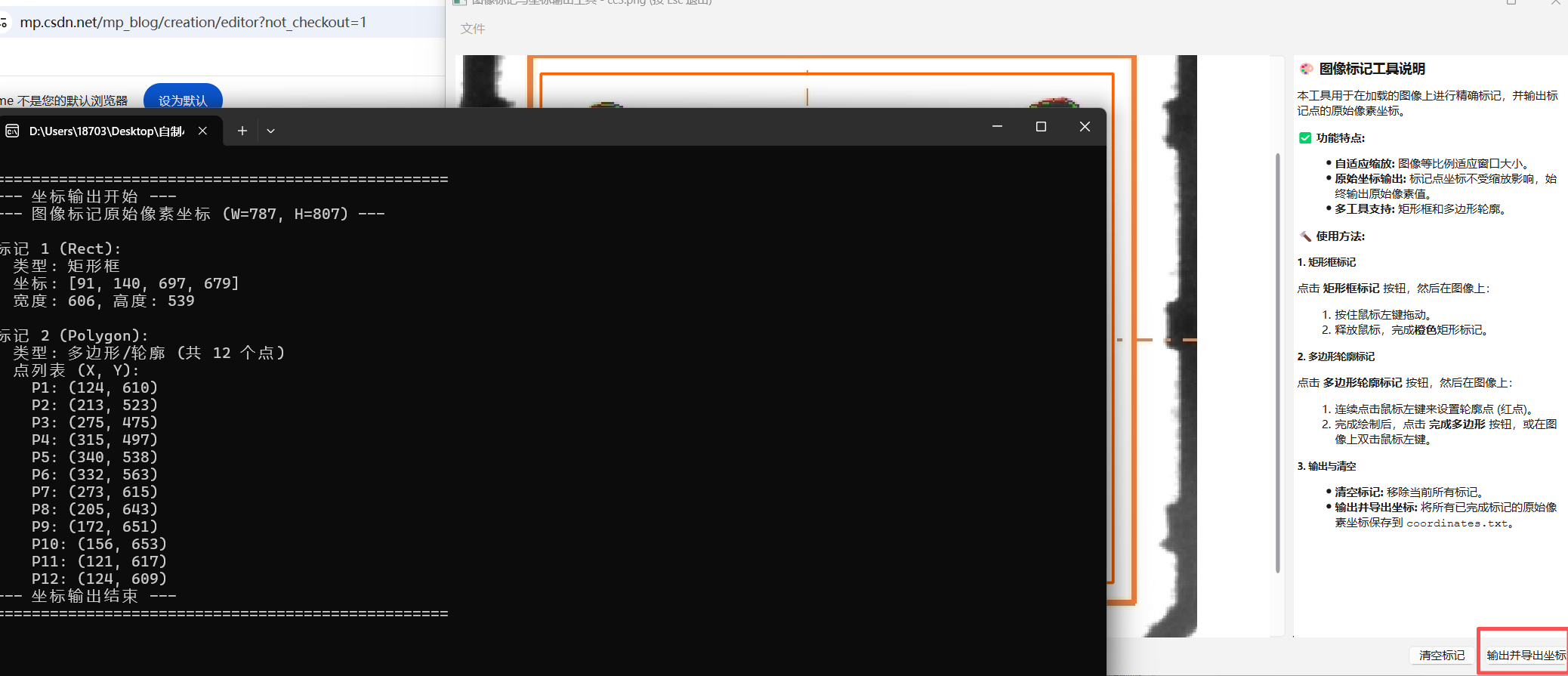
为了彻底告别“肉眼测距”,我基于 PySide6 开发了一个轻量化的图像标记工具。它能自动处理图像缩放、保持原始像素坐标,并支持矩形和多边形标注。最重要的是,拿到的坐标可以直接丢给 AI(如 Gemini 或 ChatGPT),让它一键生成 OpenCV 裁剪代码,生产力瞬间拉满!
结语
这个小工具虽然简单,但它解决了 CV 工程师每天都要面对的“微小琐事”。如果你也厌倦了手动去 OpenCV 里试坐标,不妨试试这个思路。
代码:
import sys
import os
from PySide6.QtWidgets import (
    QApplication, QMainWindow, QWidget, QVBoxLayout, QHBoxLayout,
    QPushButton, QFileDialog, QLabel, QScrollArea, QMessageBox, QSizePolicy,
    QTextBrowser
)
from PySide6.QtGui import QPixmap, QPainter, QPen, QColor, QBrush, QPolygon
from PySide6.QtCore import Qt, QPoint, QRectF, QEvent, QPointF


class ImageWidget(QLabel):
    def __init__(self, parent=None):
        super().__init__(parent)
        self.setBackgroundRole(self.parent().backgroundRole())
        self.setSizePolicy(QSizePolicy.Ignored, QSizePolicy.Ignored)
        self.setScaledContents(False)

        self.image_pixmap = QPixmap()
        self.original_size = None

        # ========== 新增:缩放控制参数 ==========
        self.scale_factor = 1.0
        self.min_scale = 0.3
        self.max_scale = 5.0
        self.offset_x = 0
        self.offset_y = 0
        # ======================================

        self.current_tool = "None"
        self.annotations = []
        self.current_polygon = []
        self.temp_rect_start = None
        self.temp_rect_end = None

        self.setMouseTracking(True)

    def set_image(self, pixmap):
        self.image_pixmap = pixmap
        self.original_size = pixmap.size()
        self.scale_factor = 1.0
        self.update_display()
        self.clear_annotations()

    def update_display(self):
        if self.image_pixmap.isNull():
            return
        w = int(self.original_size.width() * self.scale_factor)
        h = int(self.original_size.height() * self.scale_factor)
        self.setFixedSize(w, h)
        self.update()

    def zoom(self, delta, center_pos=None):
        old_scale = self.scale_factor
        if delta > 0:
            self.scale_factor *= 1.15
        else:
            self.scale_factor /= 1.15

        self.scale_factor = max(self.min_scale, min(self.scale_factor, self.max_scale))

        if center_pos:
            self.offset_x = center_pos.x() - (center_pos.x() - self.offset_x) * self.scale_factor / old_scale
            self.offset_y = center_pos.y() - (center_pos.y() - self.offset_y) * self.scale_factor / old_scale

        self.update_display()

    def set_tool(self, tool_name):
        if self.current_tool == "Polygon" and self.current_polygon:
            self.complete_polygon()
        self.current_tool = tool_name
        self.current_polygon = []
        self.temp_rect_start = None
        self.temp_rect_end = None
        self.update()

    def clear_annotations(self):
        self.annotations = []
        self.current_polygon = []
        self.temp_rect_start = None
        self.temp_rect_end = None
        self.update()

    def get_original_coords(self, x_screen, y_screen):
        if not self.original_size:
            return None
        x_mapped = x_screen - self.offset_x
        y_mapped = y_screen - self.offset_y
        x_orig = x_mapped / self.scale_factor
        y_orig = y_mapped / self.scale_factor
        x_orig = max(0, min(int(x_orig), self.original_size.width()))
        y_orig = max(0, min(int(y_orig), self.original_size.height()))
        return x_orig, y_orig

    def get_screen_point(self, x_orig, y_orig):
        x_screen = int(x_orig * self.scale_factor + self.offset_x)
        y_screen = int(y_orig * self.scale_factor + self.offset_y)
        return QPoint(x_screen, y_screen)

    def wheelEvent(self, event):
        if self.image_pixmap.isNull():
            return
        delta = event.angleDelta().y()
        pos = event.position()
        self.zoom(delta, pos)

    def mousePressEvent(self, event):
        if self.image_pixmap.isNull() or event.button() != Qt.LeftButton:
            return
        if event.type() == QEvent.Type.MouseButtonDblClick and len(self.current_polygon) >= 1:
            self.complete_polygon()
            return

        point = event.position()
        x_orig, y_orig = self.get_original_coords(point.x(), point.y())
        if x_orig is None:
            return

        if self.current_tool == "Rect":
            self.temp_rect_start = point
            self.temp_rect_end = point
        elif self.current_tool == "Polygon":
            self.current_polygon.append((x_orig, y_orig))
            self.update()

    def mouseMoveEvent(self, event):
        if self.image_pixmap.isNull():
            return
        pos = event.position()
        if self.current_tool == "Rect" and self.temp_rect_start:
            self.temp_rect_end = pos
            self.update()
        elif self.current_tool == "Polygon" and self.current_polygon:
            self.update()

    def mouseReleaseEvent(self, event):
        if self.image_pixmap.isNull() or event.button() != Qt.LeftButton:
            return
        if self.current_tool == "Rect" and self.temp_rect_start:
            if self.temp_rect_start == self.temp_rect_end:
                self.temp_rect_start = None
                self.temp_rect_end = None
                return
            x1_orig, y1_orig = self.get_original_coords(self.temp_rect_start.x(), self.temp_rect_start.y())
            x2_orig, y2_orig = self.get_original_coords(self.temp_rect_end.x(), self.temp_rect_end.y())
            coords = [min(x1_orig, x2_orig), min(y1_orig, y2_orig),
                      max(x1_orig, x2_orig), max(y1_orig, y2_orig)]
            self.annotations.append({'type': 'Rect', 'coords': coords})
            self.temp_rect_start = None
            self.temp_rect_end = None
            self.update()

    def complete_polygon(self):
        if len(self.current_polygon) >= 3:
            self.annotations.append({'type': 'Polygon', 'coords': self.current_polygon})
        self.current_polygon = []
        self.update()
        self.current_tool = "None"
        self.window().update_tool_buttons()

    def paintEvent(self, event):
        if self.image_pixmap.isNull():
            return
        painter = QPainter(self)
        painter.setRenderHint(QPainter.Antialiasing)
        target_rect = QRectF(self.offset_x, self.offset_y,
                             self.original_size.width() * self.scale_factor,
                             self.original_size.height() * self.scale_factor)
        painter.drawPixmap(target_rect.toRect(), self.image_pixmap, self.image_pixmap.rect())

        for ann in self.annotations:
            if ann['type'] == 'Rect':
                x1, y1, x2, y2 = ann['coords']
                p1 = self.get_screen_point(x1, y1)
                p2 = self.get_screen_point(x2, y2)
                painter.setPen(QPen(QColor(255, 100, 0), 3))
                painter.setBrush(Qt.NoBrush)
                painter.drawRect(p1.x(), p1.y(), p2.x() - p1.x(), p2.y() - p1.y())

            elif ann['type'] == 'Polygon':
                poly = QPolygon()
                for x_orig, y_orig in ann['coords']:
                    poly.append(self.get_screen_point(x_orig, y_orig))
                painter.setPen(QPen(QColor(0, 255, 255), 3))
                painter.setBrush(QBrush(QColor(0, 255, 255, 50)))
                painter.drawPolygon(poly)

        painter.setPen(QPen(QColor(255, 255, 0), 2, Qt.DashLine))
        if self.current_tool == "Rect" and self.temp_rect_start:
            painter.setBrush(Qt.NoBrush)
            painter.drawRect(self.temp_rect_start.x(), self.temp_rect_start.y(),
                             self.temp_rect_end.x() - self.temp_rect_start.x(),
                             self.temp_rect_end.y() - self.temp_rect_start.y())

        elif self.current_tool == "Polygon" and len(self.current_polygon) > 0:
            poly = QPolygon()
            for x_orig, y_orig in self.current_polygon:
                p = self.get_screen_point(x_orig, y_orig)
                poly.append(p)
                painter.setBrush(QColor(255, 0, 0))
                painter.drawEllipse(p, 5, 5)
            if len(poly) > 1:
                painter.setBrush(Qt.NoBrush)
                painter.drawPolyline(poly)
                painter.drawLine(poly.last(), self.mapFromGlobal(self.cursor().pos()))
        painter.end()

    def _create_description_box(self):
        description_text = """
        <h3>🎨 图像标记工具说明</h3>
        <p>本工具用于在加载的图像上进行精确标记,并输出标记点的原始像素坐标。</p>
        <h4>✅ 功能特点:</h4>
        <ul>
            <li><strong>鼠标滚轮缩放</strong>:以鼠标为中心放大/缩小</li>
            <li><strong>原始坐标输出</strong>:不受缩放影响</li>
            <li><strong>矩形 + 多边形标记</strong></li>
        </ul>
        <h4>🔨 使用方法:</h4>
        <ul>
            <li><strong>滚轮</strong>:放大/缩小图像</li>
            <li><strong>矩形</strong>:拖动绘制</li>
            <li><strong>多边形</strong>:点击加点 → 双击完成</li>
        </ul>
        """
        text_browser = QTextBrowser()
        text_browser.setHtml(description_text)
        text_browser.setMaximumWidth(350)
        return text_browser


class MainWindow(QMainWindow):
    def __init__(self):
        super().__init__()
        self.setWindowTitle("图像标记与坐标输出工具 (滚轮缩放 / Esc退出)")
        self.setGeometry(100, 100, 1200, 700)

        self.central_widget = QWidget()
        self.setCentralWidget(self.central_widget)
        self.main_layout = QVBoxLayout(self.central_widget)

        self.content_layout = QHBoxLayout()
        self.image_widget = ImageWidget(self)
        self.scroll_area = QScrollArea()
        self.scroll_area.setWidgetResizable(True)
        self.scroll_area.setWidget(self.image_widget)
        self.description_widget = self.image_widget._create_description_box()
        self.content_layout.addWidget(self.scroll_area, 3)
        self.content_layout.addWidget(self.description_widget, 1)
        self.main_layout.addLayout(self.content_layout)

        self.control_layout = QHBoxLayout()
        self.main_layout.addLayout(self.control_layout)

        self.setup_menu()
        self.setup_buttons()
        self.update_tool_buttons()

    def keyPressEvent(self, event):
        if event.key() == Qt.Key_Escape:
            self.close()
        else:
            super().keyPressEvent(event)

    def setup_menu(self):
        menu_bar = self.menuBar()
        file_menu = menu_bar.addMenu("文件")
        open_action = file_menu.addAction("打开图像")
        open_action.triggered.connect(self.open_image)

    def setup_buttons(self):
        # ========== 新增:缩放按钮 ==========
        self.btn_zoom_in = QPushButton("放大(+)")
        self.btn_zoom_in.clicked.connect(lambda: self.image_widget.zoom(1))
        self.control_layout.addWidget(self.btn_zoom_in)

        self.btn_zoom_out = QPushButton("缩小(-)")
        self.btn_zoom_out.clicked.connect(lambda: self.image_widget.zoom(-1))
        self.control_layout.addWidget(self.btn_zoom_out)

        self.btn_reset = QPushButton("重置大小")
        self.btn_reset.clicked.connect(lambda: self.image_widget.set_image(self.image_widget.image_pixmap))
        self.control_layout.addWidget(self.btn_reset)
        # ===================================

        self.btn_rect = QPushButton("矩形框标记")
        self.btn_rect.clicked.connect(lambda: self.set_tool("Rect"))
        self.control_layout.addWidget(self.btn_rect)

        self.btn_polygon = QPushButton("多边形轮廓标记")
        self.btn_polygon.clicked.connect(lambda: self.set_tool("Polygon"))
        self.control_layout.addWidget(self.btn_polygon)

        self.btn_complete_polygon = QPushButton("完成多边形")
        self.btn_complete_polygon.clicked.connect(self.image_widget.complete_polygon)
        self.control_layout.addWidget(self.btn_complete_polygon)

        self.control_layout.addStretch(1)

        self.btn_clear = QPushButton("清空标记")
        self.btn_clear.clicked.connect(self.image_widget.clear_annotations)
        self.control_layout.addWidget(self.btn_clear)

        self.btn_export = QPushButton("输出并导出坐标")
        self.btn_export.clicked.connect(self.export_coordinates)
        self.control_layout.addWidget(self.btn_export)

    def update_tool_buttons(self):
        tool = self.image_widget.current_tool
        self.btn_rect.setStyleSheet("background-color: lightgreen;" if tool == "Rect" else "")
        self.btn_polygon.setStyleSheet("background-color: lightgreen;" if tool == "Polygon" else "")
        self.btn_complete_polygon.setEnabled(tool == "Polygon" or len(self.image_widget.current_polygon) >= 2)

    def set_tool(self, tool_name):
        self.image_widget.set_tool(tool_name)
        self.update_tool_buttons()

    def open_image(self):
        file_name, _ = QFileDialog.getOpenFileName(self, "打开图像文件", "",
                                                   "Image Files (*.png *.jpg *.jpeg);;All Files (*)")
        if file_name:
            pixmap = QPixmap(file_name)
            if pixmap.isNull():
                QMessageBox.critical(self, "错误", f"无法加载图像:\n{file_name}")
                return
            self.image_widget.set_image(pixmap)
            self.setWindowTitle(f"图像标记工具 - {os.path.basename(file_name)} (滚轮缩放 / Esc退出)")

    def export_coordinates(self):
        annotations = self.image_widget.annotations
        if not annotations:
            QMessageBox.information(self, "提示", "没有检测到任何标记")
            return
        output = ["--- 原始像素坐标 (W={}, H={}) ---".format(
            self.image_widget.original_size.width(), self.image_widget.original_size.height()
        )]
        for i, ann in enumerate(annotations):
            ann_type = ann['type']
            coords = ann['coords']
            output.append(f"\n标记 {i + 1} ({ann_type}):")
            if ann_type == 'Rect':
                x_min, y_min, x_max, y_max = [int(c) for c in coords]
                output.append(f"  坐标: [{x_min}, {y_min}, {x_max}, {y_max}]")
            elif ann_type == 'Polygon':
                output.append(f"  多边形点集:")
                for j, (x, y) in enumerate(coords):
                    output.append(f"    P{j + 1}: ({int(x)}, {int(y)})")
        output_text = "\n".join(output)
        print(output_text)
        with open("coordinates.txt", "w", encoding="utf-8") as f:
            f.write(output_text)
        QMessageBox.information(self, "成功", "坐标已导出到 coordinates.txt")


if __name__ == '__main__':
    app = QApplication(sys.argv)
    window = MainWindow()
    window.show()
    sys.exit(app.exec())
备注:只要用的话,我有封装好的通过网盘分享的文件:ROI原图标记工具.zip
链接: https://pan.baidu.com/s/1pQcRiRstkLDKImDTfo1L4Q?pwd=3h2e 提取码: 3h2e
--来自百度网盘超级会员v5的分享

AtomGit 是由开放原子开源基金会联合 CSDN 等生态伙伴共同推出的新一代开源与人工智能协作平台。平台坚持“开放、中立、公益”的理念,把代码托管、模型共享、数据集托管、智能体开发体验和算力服务整合在一起,为开发者提供从开发、训练到部署的一站式体验。
更多推荐


 17
17 0
0- 0


 已为社区贡献1条内容

所有评论(0)