JAVA摄影约拍线上预约系统源码支持小程序+公众号+H5
JAVA摄影约拍线上预约系统:重构影像服务数字化生态
行业痛点与系统优势
在视觉经济与社交网络深度融合的时代,摄影约拍服务需求呈现爆发式增长。个人写真、婚纱摄影、商业拍摄、活动跟拍等细分场景持续升温。然而,传统摄影约拍行业长期面临四大核心痛点:摄影师与用户信息不对称、档期管理混乱低效、服务标准难以量化、交易信任机制缺失。用户难以精准找到符合风格偏好的摄影师,摄影师则面临获客渠道狭窄、档期安排冲突、沟通成本高昂的困境。
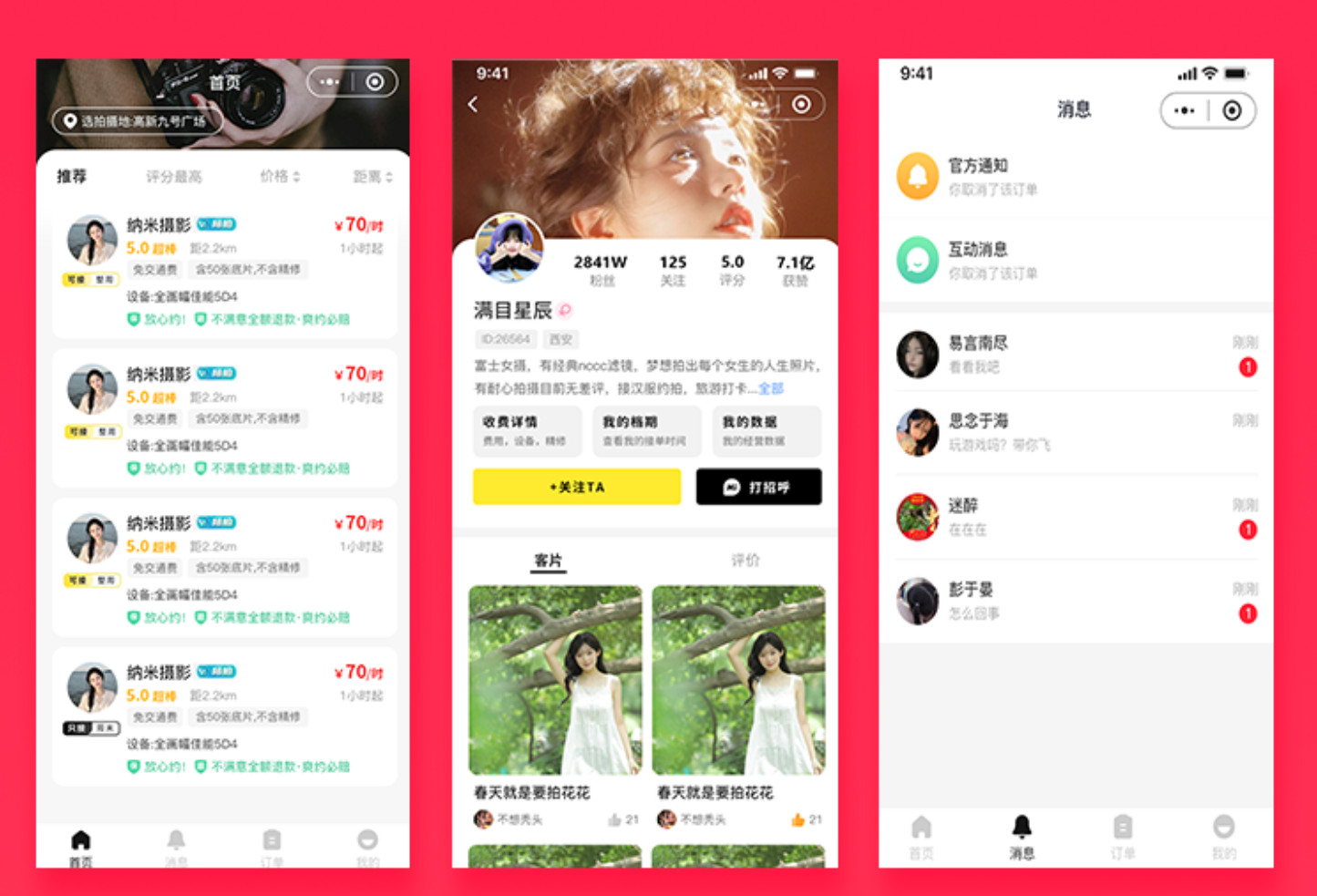
JAVA摄影约拍线上预约系统源码以数字化手段重构影像服务交易链路,构建了一个集摄影师入驻、样片展示、档期管理、线上预约、动态管理于一体的全流程服务平台。系统采用springboot+mybatisplus+mysql构建稳健的后端服务,通过uniapp(vue语法)实现用户端多端统一,依托vue+elementUi开发功能完善的管理后台,全面支持小程序+公众号+H5的多端触达,为摄影爱好者和专业摄影师搭建了一个透明、高效、可信的数字化预约平台。
这套系统的核心价值在于建立了标准化的线上预约机制,通过精准分类实现摄影师与用户需求的精准匹配,借助摄影师管理和摄影师评价构建完善的信任体系,通过档期管理和摄影师接单设置实现服务资源的数字化管控,依托样片展示和关注打招呼功能打通供需双方的沟通壁垒。系统深度融合用户订单管理和动态管理功能,形成从需求触达到服务完成的完整闭环。
系统架构与技术实现
后端服务架构设计
后台服务基于springboot框架构建,采用mybatisplus作为数据访问层框架,简化数据库操作复杂度。mysql作为主数据库,支撑摄影师信息、样片数据、订单记录、档期安排等核心业务数据存储。系统采用模块化分层设计,确保各业务模块的高内聚低耦合。
// SpringBoot启动类
@SpringBootApplication
@MapperScan("com.photography.mapper")
@EnableScheduling
@EnableTransactionManagement
public class PhotographyApplication {
    public static void main(String[] args) {
        SpringApplication.run(PhotographyApplication.class, args);
    }
}

// 摄影师入驻服务层核心代码
@Service
@Slf4j
public class PhotographerService {
    @Autowired
    private PhotographerMapper photographerMapper;
    @Autowired
    private UserMapper userMapper;

    @Transactional(rollbackFor = Exception.class)
    public Result registerPhotographer(PhotographerRegisterRequest request, Long userId) {
        // 校验用户状态
        User user = userMapper.selectById(userId);
        if(user.getRole() != UserRole.NORMAL) {
            return Result.error("当前账号已注册摄影师");
        }
        // 创建摄影师档案
        Photographer photographer = new Photographer();
        photographer.setUserId(userId);
        photographer.setName(request.getName());
        photographer.setCategory(request.getCategory()); // 摄影类型:人像/婚纱/商业/活动
        photographer.setStyleTags(request.getStyleTags()); // 风格标签:日系/复古/ins风等
        photographer.setCity(request.getCity());
        photographer.setPricePerHour(request.getPricePerHour());
        photographer.setIntroduction(request.getIntroduction());
        photographer.setStatus(PhotographerStatus.PENDING_VERIFY);
        photographerMapper.insert(photographer);
        // 更新用户角色
        user.setRole(UserRole.PHOTOGRAPHER);
        userMapper.updateById(user);
        return Result.success("入驻申请提交成功,请等待审核");
    }
}
摄影师档期管理核心引擎
档期管理是系统的核心功能模块。摄影师可灵活设置每日可接单时段、休息日期、预约提前量等参数,系统自动检测档期冲突,确保预约安排合理有序。
// 档期管理服务
@Service
public class ScheduleService {
    @Autowired
    private ScheduleMapper scheduleMapper;
    @Autowired
    private OrderMapper orderMapper;

    // 设置摄影师档期
    @Transactional(rollbackFor = Exception.class)
    public Result setSchedule(ScheduleSettingRequest request, Long photographerId) {
        // 清除原有档期设置
        scheduleMapper.deleteByPhotographerId(photographerId);
        // 批量插入新档期
        List<Schedule> scheduleList = new ArrayList<>();
        for(ScheduleItem item : request.getScheduleItems()) {
            Schedule schedule = new Schedule();
            schedule.setPhotographerId(photographerId);
            schedule.setDate(item.getDate());
            schedule.setStartTime(item.getStartTime());
            schedule.setEndTime(item.getEndTime());
            schedule.setStatus(ScheduleStatus.AVAILABLE);
            scheduleList.add(schedule);
        }
        scheduleMapper.batchInsert(scheduleList);
        return Result.success("档期设置成功");
    }

    // 查询摄影师可用时段
    public List<TimeSlot> getAvailableSlots(Long photographerId, String date) {
        // 获取当日档期
        Schedule schedule = scheduleMapper.selectByPhotographerIdAndDate(photographerId, date);
        if(schedule == null) {
            return Collections.emptyList();
        }
        // 获取已预约订单
        List<Order> bookedOrders = orderMapper.selectByPhotographerIdAndDate(photographerId, date);
        // 计算可用时段
        return calculateAvailableSlots(schedule, bookedOrders);
    }

    // 锁定档期
    @Transactional(rollbackFor = Exception.class)
    public void lockSchedule(Long scheduleId, Long orderId) {
        Schedule schedule = scheduleMapper.selectById(scheduleId);
        schedule.setStatus(ScheduleStatus.BOOKED);
        schedule.setCurrentOrderId(orderId);
        scheduleMapper.updateById(schedule);
    }
}
用户端多端统一实现
用户端采用**uniapp(vue语法)**开发,一套代码编译生成微信小程序、公众号H5和普通H5页面,实现多端全覆盖。用户端提供摄影师浏览、精准分类筛选、样片查看、在线预约、订单管理、评价互动等完整功能。
<!-- 摄影师详情页面核心代码 -->
<template>
  <view class="photographer-detail">
    <view class="cover">
      <image :src="photographer.coverUrl" mode="aspectFill"></image>
    </view>
    <view class="info">
      <view class="name">{{ photographer.name }}</view>
      <view class="tags">
        <text v-for="tag in photographer.styleTags" :key="tag" class="tag">{{ tag }}</text>
      </view>
      <view class="stats">
        <text>评分 {{ photographer.rating }}</text>
        <text>已完成 {{ photographer.completedOrders }} 单</text>
        <text>粉丝 {{ photographer.fansCount }}</text>
      </view>
      <view class="price">¥{{ photographer.pricePerHour }}/小时</view>
      <view class="intro">{{ photographer.introduction }}</view>
    </view>

    <!-- 样片展示 -->
    <view class="gallery">
      <text class="section-title">作品展示</text>
      <scroll-view scroll-x class="gallery-scroll">
        <view v-for="item in photographer.portfolio" :key="item.id" class="gallery-item" @click="previewImage(item.url)">
          <image :src="item.url" mode="aspectFill"></image>
        </view>
      </scroll-view>
    </view>

    <!-- 档期预约 -->
    <view class="booking">
      <text class="section-title">预约拍摄</text>
      <picker mode="date" @change="onDateChange" :value="selectedDate">
        <view class="date-picker">选择日期:{{ selectedDate || '请选择' }}</view>
      </picker>
      <view class="time-slots" v-if="timeSlots.length">
        <text>可选时段:</text>
        <view class="slot-list">
          <view v-for="slot in timeSlots" :key="slot.id"
                :class="['slot', selectedSlotId === slot.id ? 'active' : '']"
                @click="selectSlot(slot)">
            {{ slot.startTime }} - {{ slot.endTime }}
          </view>
        </view>
      </view>
      <button type="primary" @click="bookNow" :disabled="!selectedSlotId">立即预约</button>
    </view>

    <!-- 用户评价 -->
    <view class="reviews">
      <text class="section-title">客户评价</text>
      <view v-for="review in reviews" :key="review.id" class="review-item">
        <view class="user">{{ review.userName }}</view>
        <view class="rating">{{ review.rating }}分</view>
        <view class="content">{{ review.content }}</view>
      </view>
    </view>

    <!-- 打招呼按钮 -->
    <view class="chat-btn" @click="sayHello">
      <text>打个招呼</text>
    </view>
  </view>
</template>

<script>
export default {
  data() {
    return {
      photographer: {},
      selectedDate: '',
      selectedSlotId: null,
      timeSlots: [],
      reviews: []
    }
  },
  onLoad(options) {
    this.loadPhotographer(options.id);
  },
  methods: {
    async loadPhotographer(id) {
      const res = await this.$api.getPhotographerDetail(id);
      this.photographer = res.data;
      this.reviews = res.data.reviews;
    },
    async onDateChange(e) {
      this.selectedDate = e.detail.value;
      const res = await this.$api.getAvailableSlots(this.photographer.id, this.selectedDate);
      this.timeSlots = res.data;
      this.selectedSlotId = null;
    },
    selectSlot(slot) {
      this.selectedSlotId = slot.id;
    },
    async bookNow() {
      uni.showLoading({ title: '提交中' });
      const res = await this.$api.createOrder({
        photographerId: this.photographer.id,
        scheduleId: this.selectedSlotId,
        date: this.selectedDate
      });
      if(res.code === 200) {
        uni.showToast({ title: '预约成功' });
        setTimeout(() => {
          uni.navigateTo({ url: `/pages/order/detail?id=${res.data.orderId}` });
        }, 1500);
      } else {
        uni.showToast({ title: res.message, icon: 'none' });
      }
      uni.hideLoading();
    },
    sayHello() {
      this.$api.sendGreeting(this.photographer.id);
      uni.showToast({ title: '已向摄影师打招呼' });
    }
  }
}
</script>
管理后台功能模块
管理后台采用vue+elementUi开发,提供平台运营所需的全部管理功能,包括摄影师审核、订单监管、用户管理、数据统计、系统配置等。
<!-- 摄影师管理页面核心代码 -->
<template>
  <div class="photographer-manage">
    <el-card>
      <div slot="header">
        <span>摄影师审核管理</span>
        <el-input v-model="searchKey" placeholder="搜索摄影师姓名" style="width:200px;margin-left:20px"></el-input>
        <el-button type="primary" @click="search">搜索</el-button>
      </div>
      <el-table :data="photographerList" border>
        <el-table-column prop="name" label="姓名" width="120"></el-table-column>
        <el-table-column prop="category" label="摄影类型" width="100"></el-table-column>
        <el-table-column prop="city" label="所在城市" width="120"></el-table-column>
        <el-table-column prop="pricePerHour" label="时薪(元)" width="100"></el-table-column>
        <el-table-column label="风格标签" width="150">
          <template slot-scope="scope">
            <el-tag v-for="tag in scope.row.styleTags" :key="tag" size="small">{{ tag }}</el-tag>
          </template>
        </el-table-column>
        <el-table-column prop="completedOrders" label="完成订单" width="100"></el-table-column>
        <el-table-column prop="rating" label="评分" width="80"></el-table-column>
        <el-table-column label="认证状态" width="100">
          <template slot-scope="scope">
            <el-tag :type="scope.row.status === 0 ? 'warning' : (scope.row.status === 1 ? 'success' : 'danger')">
              {{ scope.row.status === 0 ? '待审核' : (scope.row.status === 1 ? '已认证' : '已拒绝') }}
            </el-tag>
          </template>
        </el-table-column>
        <el-table-column label="操作" width="180" fixed="right">
          <template slot-scope="scope">
            <el-button v-if="scope.row.status === 0" type="success" size="small" @click="approve(scope.row.id)">通过</el-button>
            <el-button v-if="scope.row.status === 0" type="danger" size="small" @click="reject(scope.row.id)">拒绝</el-button>
            <el-button type="primary" size="small" @click="viewDetail(scope.row.id)">详情</el-button>
          </template>
        </el-table-column>
      </el-table>
      <el-pagination @current-change="handlePageChange" :current-page="page" :page-size="pageSize" :total="total" layout="prev, pager, next"></el-pagination>
    </el-card>
  </div>
</template>

<script>
export default {
  data() {
    return {
      photographerList: [],
      searchKey: '',
      page: 1,
      pageSize: 10,
      total: 0
    }
  },
  mounted() {
    this.fetchList();
  },
  methods: {
    async fetchList() {
      const res = await this.$api.getPhotographerList({
        keyword: this.searchKey,
        page: this.page,
        size: this.pageSize
      });
      this.photographerList = res.data.list;
      this.total = res.data.total;
    },
    async approve(id) {
      await this.$api.approvePhotographer(id);
      this.$message.success('审核通过');
      this.fetchList();
    },
    async reject(id) {
      await this.$api.rejectPhotographer(id);
      this.$message.success('已拒绝');
      this.fetchList();
    },
    search() {
      this.page = 1;
      this.fetchList();
    }
  }
}
</script>
核心业务功能详解
精准分类与摄影师管理
系统提供强大的精准分类功能,支持用户按摄影类型(人像、婚纱、商业、活动)、风格标签(日系、复古、ins风、胶片感)、城市、价格区间等多维度筛选摄影师。摄影师管理模块支持摄影师入驻申请、资质审核、资料维护、服务状态切换等全流程管理。
// 摄影师筛选服务
@Service
public class PhotographerSearchService {
    @Autowired
    private PhotographerMapper photographerMapper;

    public PageResult searchPhotographers(PhotographerSearchRequest request) {
        LambdaQueryWrapper<Photographer> wrapper = new LambdaQueryWrapper<>();
        wrapper.eq(Photographer::getStatus, PhotographerStatus.VERIFIED);
        if(StringUtils.isNotBlank(request.getCategory())) {
            wrapper.eq(Photographer::getCategory, request.getCategory());
        }
        if(StringUtils.isNotBlank(request.getCity())) {
            wrapper.eq(Photographer::getCity, request.getCity());
        }
        if(CollectionUtils.isNotEmpty(request.getStyleTags())) {
            // JSON字段风格标签匹配
            wrapper.apply("JSON_CONTAINS(style_tags, {0})", JSON.toJSONString(request.getStyleTags()));
        }
        if(request.getMinPrice() != null) {
            wrapper.ge(Photographer::getPricePerHour, request.getMinPrice());
        }
        if(request.getMaxPrice() != null) {
            wrapper.le(Photographer::getPricePerHour, request.getMaxPrice());
        }
        wrapper.orderByDesc(Photographer::getRating);
        Page<Photographer> page = new Page<>(request.getPage(), request.getSize());
        return photographerMapper.selectPage(page, wrapper);
    }
}
摄影师评价与动态管理
摄影师评价系统支持用户在服务完成后对摄影师进行评分和文字评价,评分维度可涵盖技术能力、服务态度、准时性、沟通效率等。动态管理模块支持摄影师发布工作动态、拍摄花絮、作品更新等内容,增强与粉丝的互动粘性。
// 评价服务
@Service
public class ReviewService {
    @Autowired
    private ReviewMapper reviewMapper;
    @Autowired
    private PhotographerMapper photographerMapper;

    @Transactional(rollbackFor = Exception.class)
    public Result addReview(ReviewRequest request, Long userId) {
        // 校验用户是否有权评价(订单已完成)
        Order order = orderMapper.selectById(request.getOrderId());
        if(!order.getUserId().equals(userId) || order.getStatus() != OrderStatus.COMPLETED) {
            return Result.error("无权评价此订单");
        }
        // 创建评价记录
        Review review = new Review();
        review.setOrderId(request.getOrderId());
        review.setPhotographerId(order.getPhotographerId());
        review.setUserId(userId);
        review.setRating(request.getRating());
        review.setContent(request.getContent());
        reviewMapper.insert(review);
        // 更新摄影师综合评分
        updatePhotographerRating(order.getPhotographerId());
        return Result.success("评价成功");
    }

    private void updatePhotographerRating(Long photographerId) {
        // 计算平均评分
        Double avgRating = reviewMapper.selectAvgRatingByPhotographerId(photographerId);
        Photographer photographer = photographerMapper.selectById(photographerId);
        photographer.setRating(avgRating);
        photographerMapper.updateById(photographer);
    }
}
摄影师接单设置与用户订单管理
摄影师接单设置功能支持摄影师自主配置接单开关、每日最大接单量、预约提前通知时间等参数。用户订单管理模块覆盖从预约下单、支付定金、档期确认、服务完成到评价结算的全流程。
// 订单管理服务
@Service
public class OrderService {
    @Autowired
    private OrderMapper orderMapper;
    @Autowired
    private ScheduleService scheduleService;

    @Transactional(rollbackFor = Exception.class)
    public Order createOrder(OrderCreateRequest request, Long userId) {
        // 检查档期是否可用
        Schedule schedule = scheduleService.checkAndLockSchedule(request.getScheduleId());
        if(schedule == null) {
            throw new BusinessException("档期已被预约");
        }
        // 创建订单
        Order order = new Order();
        order.setOrderNo(generateOrderNo());
        order.setUserId(userId);
        order.setPhotographerId(request.getPhotographerId());
        order.setScheduleId(request.getScheduleId());
        order.setDate(schedule.getDate());
        order.setStartTime(schedule.getStartTime());
        order.setEndTime(schedule.getEndTime());
        order.setAmount(request.getAmount());
        order.setStatus(OrderStatus.PENDING_PAYMENT);
        orderMapper.insert(order);
        // 锁定档期
        scheduleService.lockSchedule(request.getScheduleId(), order.getId());
        return order;
    }

    // 完成订单
    @Transactional(rollbackFor = Exception.class)
    public void completeOrder(Long orderId, Long photographerId) {
        Order order = orderMapper.selectById(orderId);
        if(!order.getPhotographerId().equals(photographerId)) {
            throw new BusinessException("无权操作此订单");
        }
        order.setStatus(OrderStatus.COMPLETED);
        order.setCompleteTime(new Date());
        orderMapper.updateById(order);
        // 释放资金给摄影师
        paymentService.releaseToPhotographer(order);
    }
}
市场前景与发展趋势
随着社交媒体的普及和年轻人对个性化影像需求的增长,摄影约拍市场持续扩大。JAVA摄影约拍线上预约系统源码精准切入这一蓝海市场,通过数字化手段解决行业痛点,具有广阔的应用前景。
系统通过小程序+公众号+H5的全渠道覆盖,降低用户触达门槛;精准分类功能让用户快速找到心仪的摄影师;样片展示和摄影师评价构建透明化信任机制;关注打招呼功能打通供需双方沟通壁垒;摄影师接单设置和档期管理实现服务资源的数字化管控;动态管理增强摄影师与粉丝的互动粘性;用户订单管理规范交易流程,保障双方权益。
这套系统可广泛应用于独立摄影师服务平台、摄影机构数字化转型、校园约拍社区、旅游景区跟拍服务等多个场景。未来,随着AI技术在影像领域的深入应用,系统可进一步整合AI风格推荐、智能修图预览、虚拟试拍等功能,构建更加完善的摄影服务生态,为影像服务行业数字化升级提供强大动力。

AtomGit 是由开放原子开源基金会联合 CSDN 等生态伙伴共同推出的新一代开源与人工智能协作平台。平台坚持“开放、中立、公益”的理念,把代码托管、模型共享、数据集托管、智能体开发体验和算力服务整合在一起,为开发者提供从开发、训练到部署的一站式体验。
更多推荐
 6
6 0
0- 0


 已为社区贡献1条内容

所有评论(0)