【NotebookLM 使用教程】 NotebookLM 的PPT风格搬运指南:让AI生成符合你审美模板的简易流程
前言
-
适合谁:已经会用 NotebookLM 生成 Slides,但想“控制风格”,让输出更像你想要的模板。
-
你会获得什么:一套可复用的“风格搬运”流程(参考图 → 提取英文风格指令 → 填入自定义描述)。
-
建议阅读顺序:建议先读
NL-03学会提取风格指令,再配合NL-04的风格库直接套用。
如果你在 NotebookLM 里生成 PPT 时,找不到满意的模板/风格,可以用这一套「风格搬运」的方法:
看到喜欢的 PPT / 海报 / 信息图 -> 让 AI 把风格拆解成一段英文 steering prompt -> 粘贴到 NotebookLM 的 Slides 自定义描述里 -> 生成同款“感觉”的演示文稿。
适用场景
-
你已经有参考图(PPT 截图、海报、品牌手册页面),但不知道怎么描述风格
-
你想要“像某类风格”,但不想写一堆抽象形容词
-
你希望输出更稳定(同一套风格可反复复用)
核心思路
NotebookLM 的 Slides 自定义,本质是吃一段「steering prompt(引导提示)」。
你要做的不是让它“随便好看”,而是把风格描述写到足够具体:
-
视觉调性
-
配色方向
-
版式规则(留白、对齐、信息密度)
-
元素语言(图标、插画、线条、形状)
-
文案语气与层级
第一步:风格搬运(从图片提取英文风格指令)
-
打开并使用这段提示词:提示词:提取PPT风格
-
把你要模仿的 风格参考图 发给 Gemini(或任何支持识图的 AI)。
-
让 AI 输出一段 200 字以内的英文 prompt(直接可用)。
你会得到什么(示例)
Create a modern minimalist presentation with a deep navy and white color palette accented by warm gold. Use generous white space with left-aligned content and clear visual hierarchy. Feature clean geometric shapes and subtle shadows. Text should use bold headlines with clean readable body copy. The overall mood should feel professional, calm, and premium.第二步:填入 NotebookLM(Slides 自定义描述)
把上一步得到的英文 prompt 复制,粘贴到 NotebookLM 的 Slides 自定义描述位置:
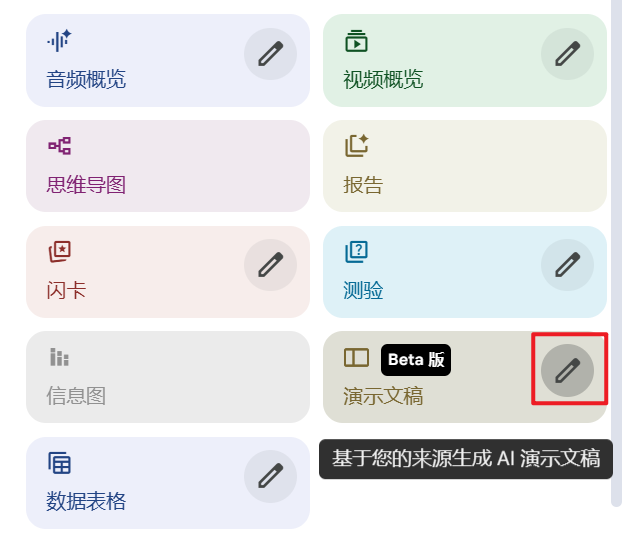
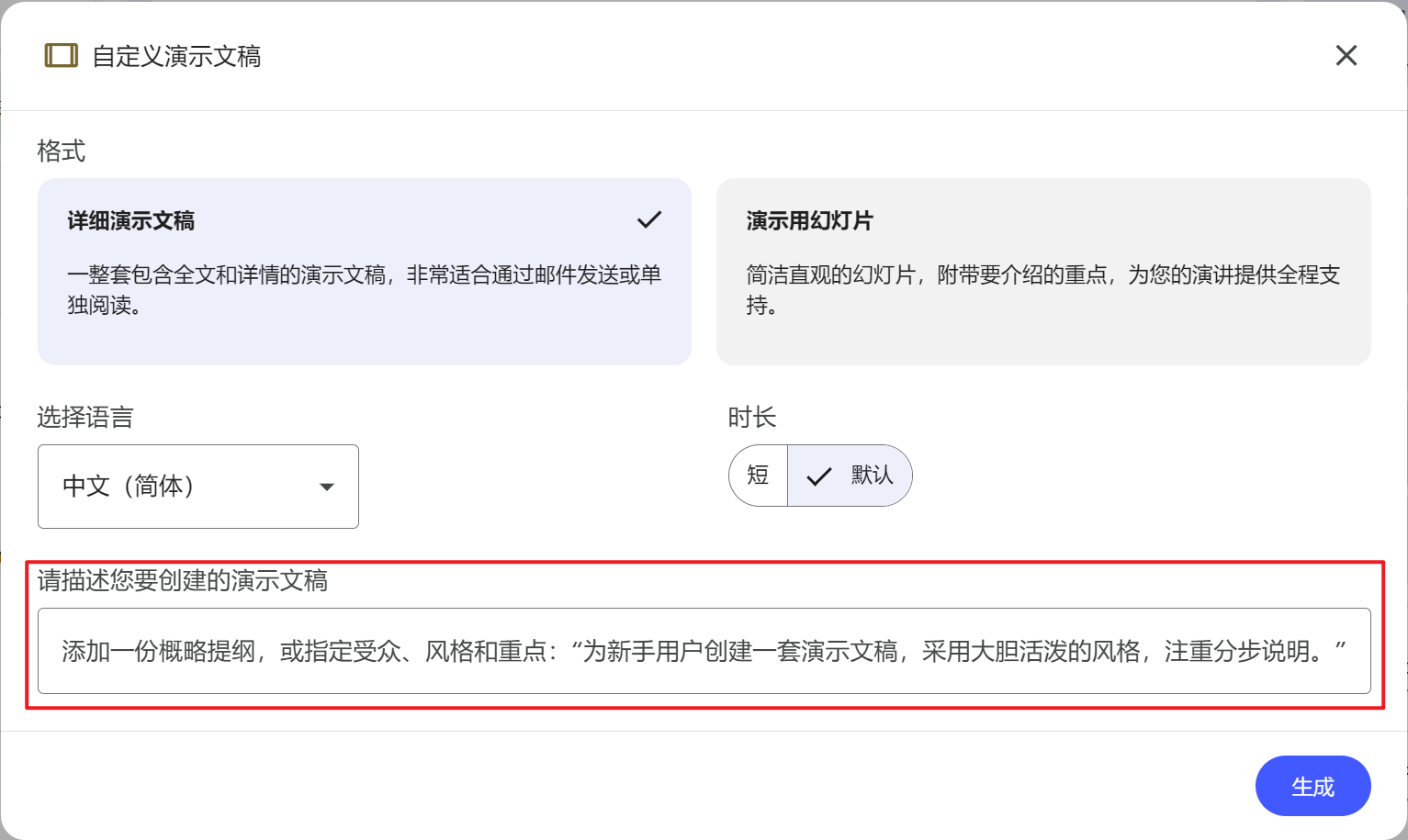
然后点击“生成”。
第三步:把“风格 prompt”变成可复用模板(推荐)
如果你经常要做同一类 PPT,建议把 prompt 按下面结构固定下来:
Goal: Create a slide deck for [audience] about [topic].
Style: [overall tone]. Inspired by [reference style - optional].
Color palette: [3-4 descriptive colors].
Layout rules: [grid/alignment/white space/info density].
Visual elements: [icon/illustration/photo style], [shapes], [textures].
Typography feel: [headline vs body contrast], [mood], [no font names].
Slide rules:
- 12-16 slides
- One key idea per slide
- Keep text concise; prefer bullets over paragraphs
- Include a clear agenda and a closing summary你只要替换 [audience] / [topic] 就能复用。
直接可抄的 4 套场景模板
模板 1:老板汇报(商务稳重)
Create a clean corporate presentation for executives.
Color palette: deep navy, white, subtle gray, with a restrained accent color.
Layout: strong grid, left-aligned text, generous white space, consistent margins.
Visuals: simple line icons, minimal charts, subtle dividers; avoid decorative elements.
Typography feel: confident bold headlines + highly readable body text.
Slides: 10-12 slides; include agenda, 3 key insights, recommendations, and next steps.
模板 2:课程/教学(可读性优先)
Create a teaching-friendly slide deck for beginners.
Color palette: warm light background with 2-3 soft accent colors.
Layout: high readability, larger text, clear hierarchy, consistent section headers.
Visuals: diagrams, simple illustrations, callout boxes for key takeaways.
Tone: friendly, clear, step-by-step.
Slides: include examples and a recap slide every 4-5 slides.
模板 3:小红书/短视频脚本(强节奏、强视觉)
Create a bold, social-media-friendly presentation with punchy headlines.
Color palette: high-contrast with a bright accent.
Layout: big titles, minimal text, strong visual rhythm, full-bleed blocks.
Visuals: stickers/callouts, simple icons, strong emphasis highlights.
Tone: energetic, conversational.
Slides: 6-8 slides, each slide one hook/one point; end with a call-to-action.
模板 4:产品介绍/路演(讲故事)
Create a story-driven product pitch deck.
Layout: narrative flow (problem → insight → solution → proof → pricing/plan → CTA).
Visuals: clean product mockups, simple charts, evidence highlights.
Tone: confident, concise, persuasive.
Slides: 12-15 slides; limit bullets; emphasize visuals and key numbers.
常见问题与避坑
1) 风格不稳定、每次都长得不一样
-
把 prompt 里“版式规则(Layout rules)”写得更明确:对齐方式、留白、信息密度、是否允许插画/照片
-
加一条硬约束:
Keep a consistent style across all slides.
2) 内容太长、像文章不是 PPT
-
加规则:
Prefer bullets; avoid paragraphs; one key idea per slide. -
限制页数:10-16 页之间更稳定
3) 生成后导出 PowerPoint 打不开
-
这属于“最后一公里”的兼容问题,建议按你的 WPS 清洗流程处理:

AtomGit 是由开放原子开源基金会联合 CSDN 等生态伙伴共同推出的新一代开源与人工智能协作平台。平台坚持“开放、中立、公益”的理念,把代码托管、模型共享、数据集托管、智能体开发体验和算力服务整合在一起,为开发者提供从开发、训练到部署的一站式体验。
更多推荐
 5
5 0
0- 0


 已为社区贡献7条内容

所有评论(0)