基于深度学习的老师课堂行为识别检测系统(最新web界面+YOLOv8/YOLOv10/YOLOv11/YOLOv12+DeepSeek智能分析 +前后端分离)
摘要
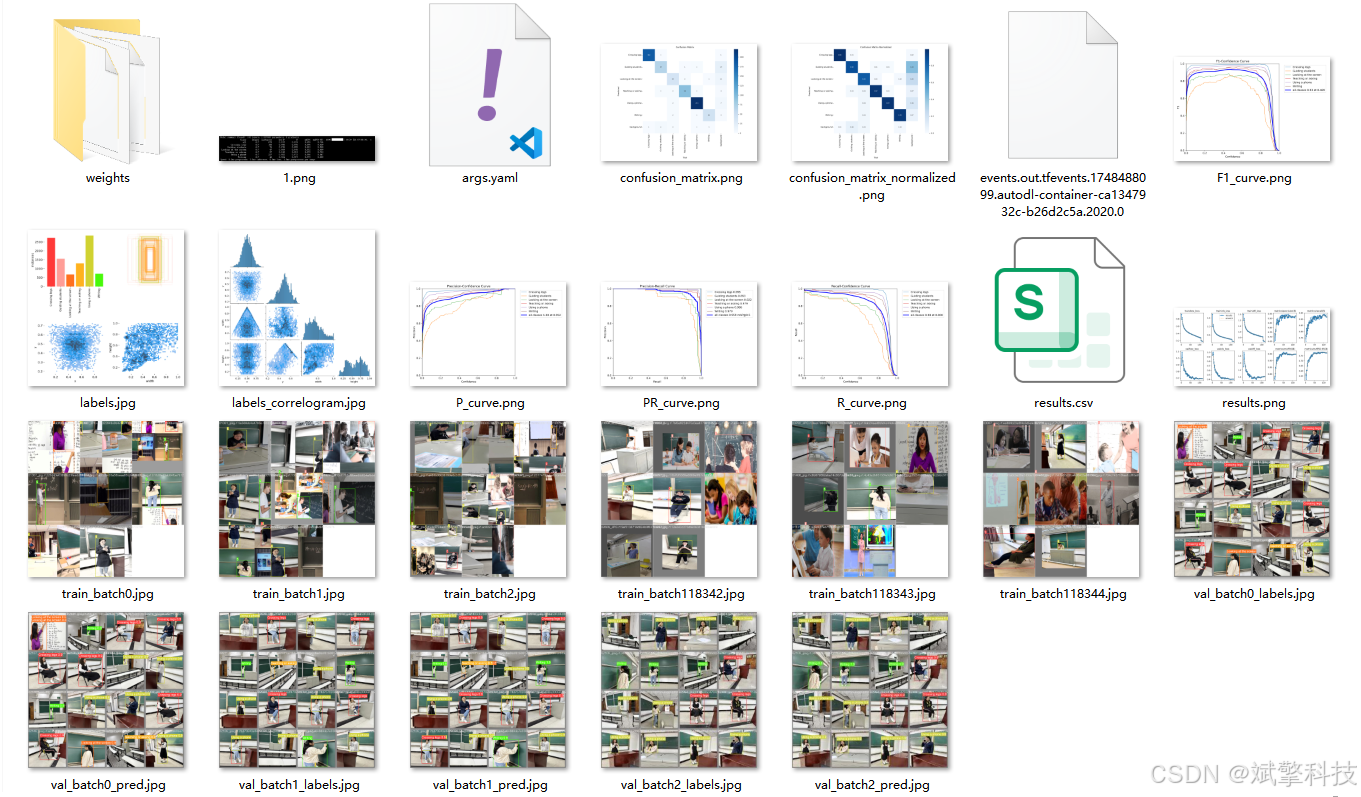
本文介绍了一个集成了最新计算机视觉技术与现代Web开发框架的综合性教师课堂行为识别与分析系统。该系统旨在通过非侵入式手段,自动识别和记录教师在课堂教学中的关键行为模式,为教学评估、教师专业发展与教育研究提供客观、量化的数据支持。系统的核心采用以YOLOv8为基准,并兼容至前沿的YOLOv12系列模型的目标检测算法,确保了对“翘腿”、“指导学生”、“看屏幕”、“讲授/提问”、“使用手机”、“书写”等六类典型课堂行为的高精度、实时识别。创新性地,系统集成了DeepSeek大型语言模型的智能分析功能,能够对检测结果进行语义层面的解读与总结,生成结构化的教学行为分析报告。系统架构采用前后端分离模式,后端基于spring boot框架,前端使用Vue.js构建了响应式Web界面,数据库选用MySQL进行结构化数据存储。系统功能模块完备,包括多模态输入源(图像、视频、实时摄像头)检测、多模型切换、全方位的数据可视化、用户与识别记录管理以及个人中心等。实验表明,本系统在近万张标注图像的数据集上表现优异,验证集平均精度均值(mAP)超过95.9%,具备良好的鲁棒性与实用性,是推动智慧课堂与精准教研落地的有效工具。
关键词:教师行为识别;深度学习;YOLO系列模型;智能教育分析;Web应用;前后端分离
目录
项目源码+数据集下载链接
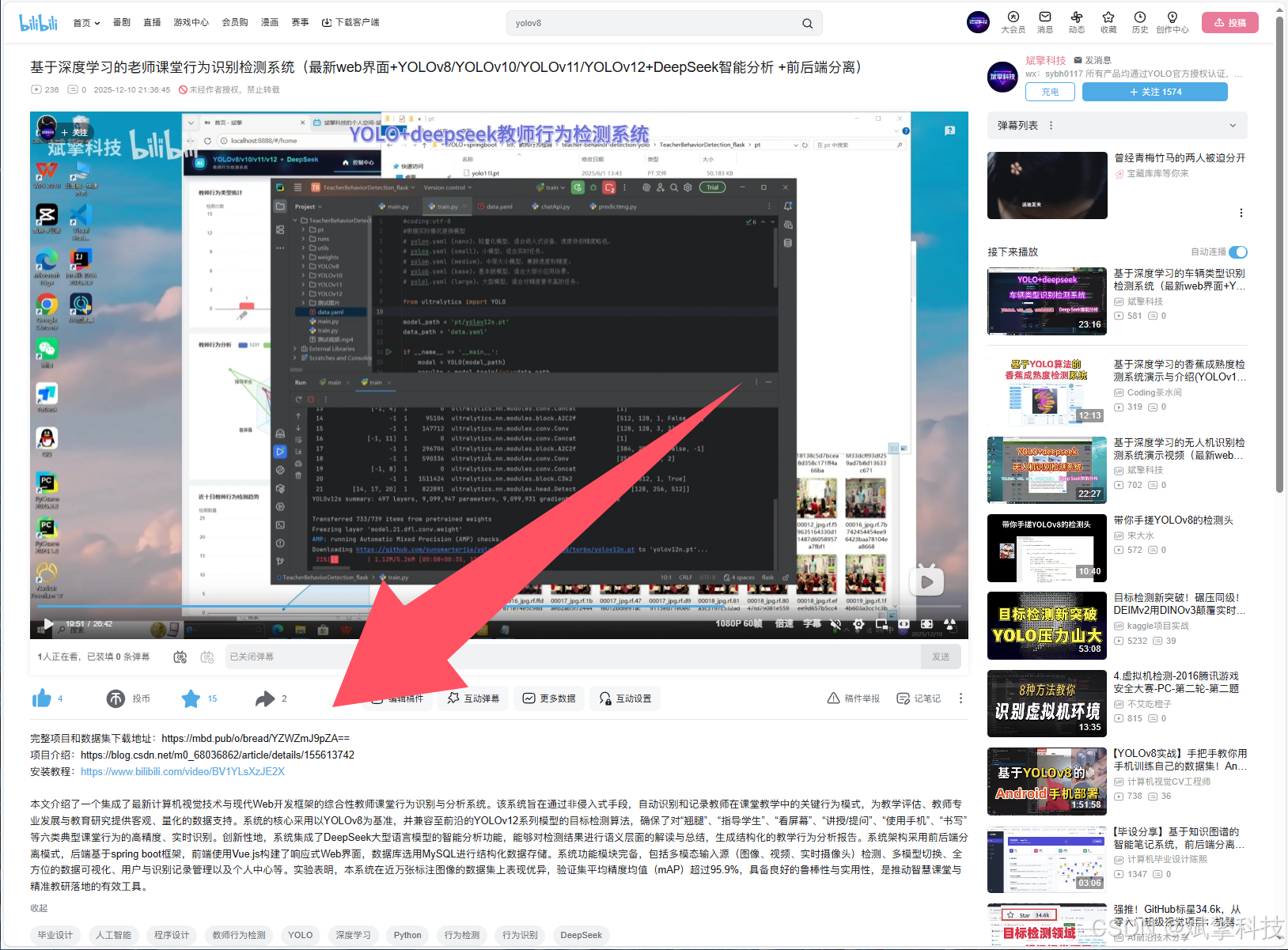
完整代码在哔哩哔哩视频下方简介内获取:
基于深度学习的老师课堂行为识别检测系统(最新web界面+YOLOv8/YOLOv10/YOLOv11/YOLOv12+DeepSeek智能分析 +前后端分离)_哔哩哔哩_bilibili
 https://www.bilibili.com/video/BV1rVmtBPE6V/?spm_id_from=333.999.0.0&vd_source=549d0b4e2b8999929a61a037fcce3b0f
https://www.bilibili.com/video/BV1rVmtBPE6V
引言
课堂教学质量是教育过程的核心,而教师行为是影响教学质量的关键因素。传统的课堂观察与评估方法主要依赖人工听课和记录,存在主观性强、效率低下、难以量化分析等固有缺陷。随着人工智能,特别是深度学习在计算机视觉领域的突破,为自动化、智能化地分析课堂教学行为带来了革命性的可能性。
当前,虽然已有一些关于学生行为识别或通用人体姿态分析的研究,但专门针对教师这一特定角色的、细粒度的、面向真实课堂场景的行为识别系统仍然相对匮乏。教师行为不仅包括简单的姿态,更蕴含了复杂的教学意图(如“讲授”与“提问”的结合、“指导学生”的互动过程)。因此,开发一个能够精准识别、长期追踪并深度分析教师课堂行为的系统,具有重要的理论价值与现实意义。
本文提出的系统,正是为了填补这一空白。我们不仅实现了基于最先进YOLO系列模型的实时检测引擎,还创造性地将大型语言模型的认知能力引入分析环节,使系统从“看得见”升级到“看得懂”。同时,通过构建一个功能完整、用户体验良好的Web应用,我们极大地降低了该技术的使用门槛,使其能够被教育管理者、教研员乃至教师本人便捷地应用于日常教学反思与改进中。
背景与研究现状
1. 课堂行为分析的发展: 早期的课堂行为分析依赖于编码系统(如FIAS),由经过训练的分析员手动编码,耗时耗力。随着技术的发展,基于传感器和可穿戴设备的方法出现,但侵入性强,干扰正常教学。近年来,基于视觉的方法成为主流,利用监控摄像头采集视频,通过算法自动分析。
2. 目标检测技术的演进: 卷积神经网络(CNN)的出现极大地推动了目标检测的发展。从两阶段的R-CNN系列到单阶段的YOLO、SSD系列,检测速度与精度不断提升。YOLO系列因其在速度与精度间的卓越平衡而广受欢迎。YOLOv8在灵活性、速度和精度上设定了新标杆,而后续的v10, v11, v12等版本在模型架构、训练策略和轻量化方面持续优化。本系统支持多版本YOLO模型的切换,旨在利用社区的最新成果,并方便进行性能比较与迭代升级。
3. 多模态与智能化分析趋势: 单纯的行为检测输出的是离散的标签和框,缺乏对行为序列、上下文和教学意义的理解。集成自然语言处理(NLP)技术,特别是像DeepSeek这样的强大LLM,可以将视觉检测结果转化为富有洞察力的文本报告,实现从“感知”到“认知”的跨越,这是本系统的一大创新点。
4. 系统化应用的缺失: 多数研究停留在算法层面,缺少一个集数据管理、算法应用、结果展示与用户交互于一体的完整产品。本系统采用前后端分离的现代化Web架构,将先进的算法封装成易于访问的服务,解决了“最后一公里”的应用问题。
数据集介绍
本系统的开发与性能验证依赖于一个精心构建的、专注于教师课堂行为的数据集。
-
类别定义: 我们定义了6个具有代表性和区分度的教师课堂行为类别:
-
Crossing legs (翘腿): 教师坐着时双腿交叉的姿态,可能反映教师的放松状态或习惯。
-
Guiding students (指导学生): 教师走近学生、俯身、用手指引或查看学生作业等互动行为。
-
Looking at the screen (看屏幕): 教师注视投影屏幕或交互白板,通常发生在使用多媒体教学时。
-
Teaching or asking (讲授或提问): 教师面向学生进行讲解、阐述,或做出提问手势(如抬手、指向学生)。该类合并了两种核心的言语性教学行为。
-
Using a phone (使用手机): 教师操作手机,此行为在课堂中通常被视为需要注意的非教学行为。
-
Writing (书写): 教师在黑板、白板或纸上进行书写。
-
-
数据规模与划分:
-
训练集: 8,843张图像。这是模型学习行为特征的主要来源,涵盖了不同光照、教室布局、教师着装、拍摄角度的多样性场景。
-
验证集: 617张图像。用于在训练过程中调整超参数、监控模型性能并防止过拟合。
-
测试集: 360张图像。作为最终评估模型泛化性能和精度的独立数据集,不参与任何训练或调参过程。
-
总计: 9,820张高质量标注图像。所有图像均使用边界框(Bounding Box)对目标行为进行了精确标注,格式兼容YOLO系列(归一化的中心坐标x,y,宽度w,高度h)。
-
该数据集的构建为专门化的教师行为识别模型训练提供了坚实基础。
系统核心功能模块详述
-
用户身份与权限管理模块
-
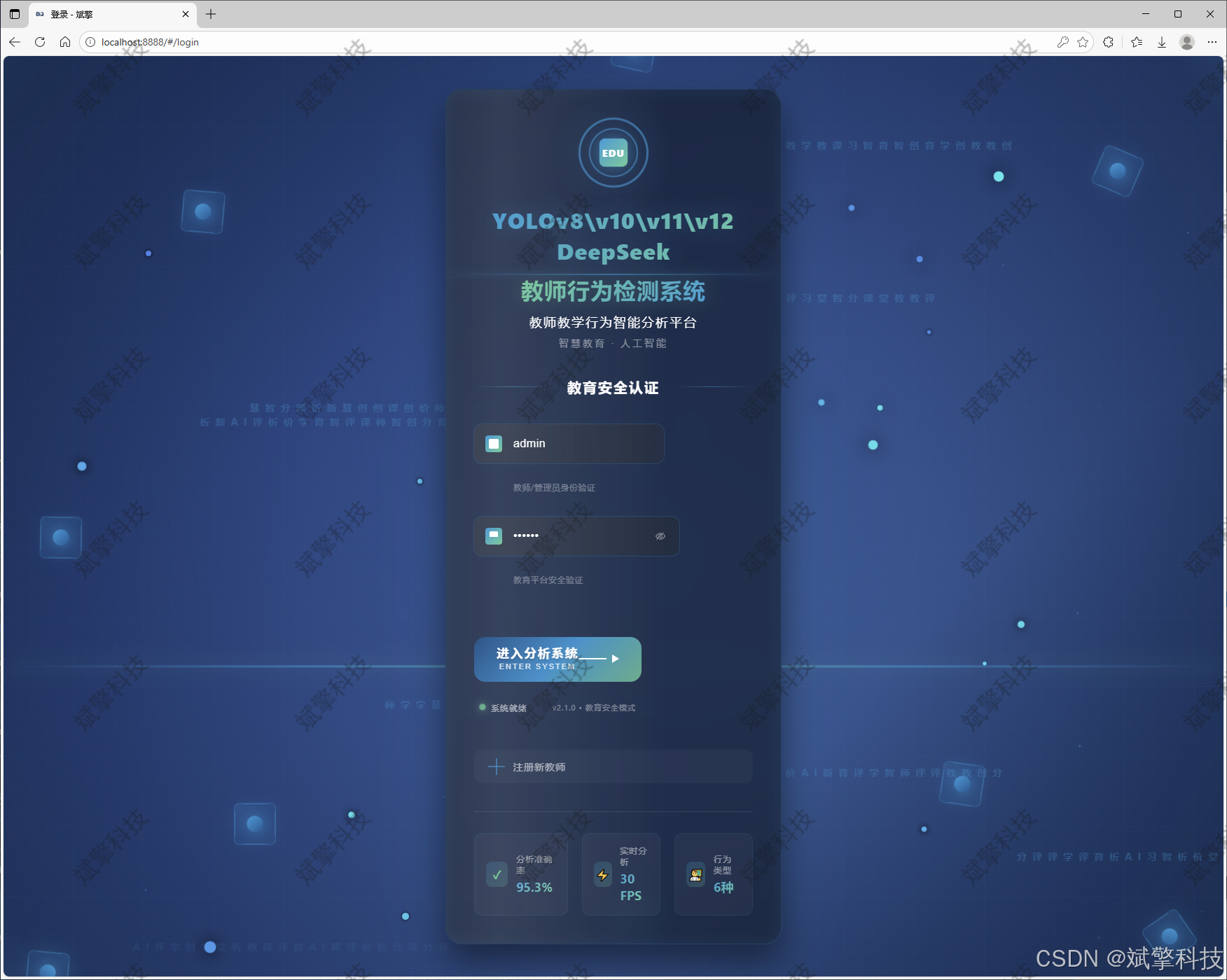
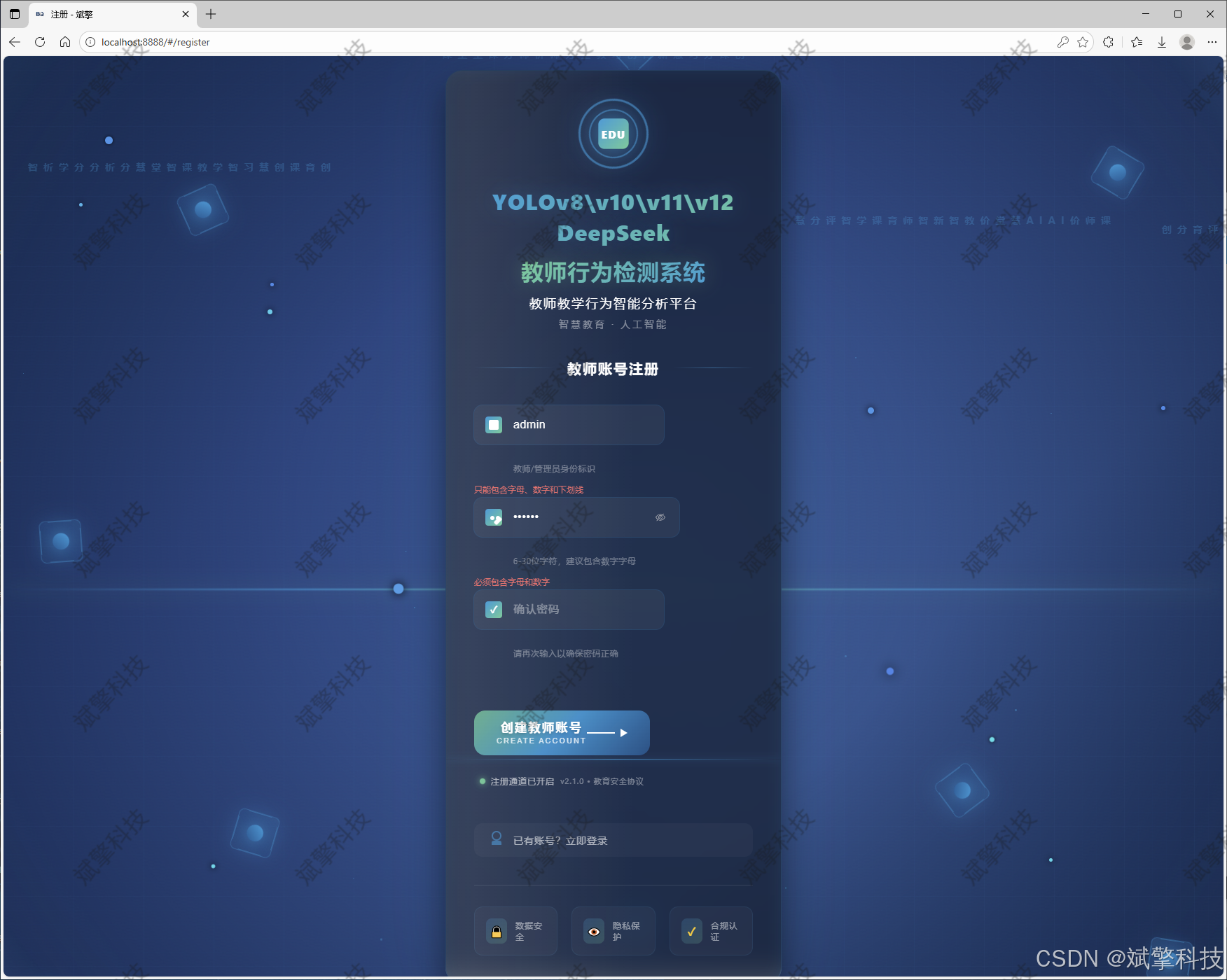
用户登录/注册: 提供安全的注册与登录界面。
-
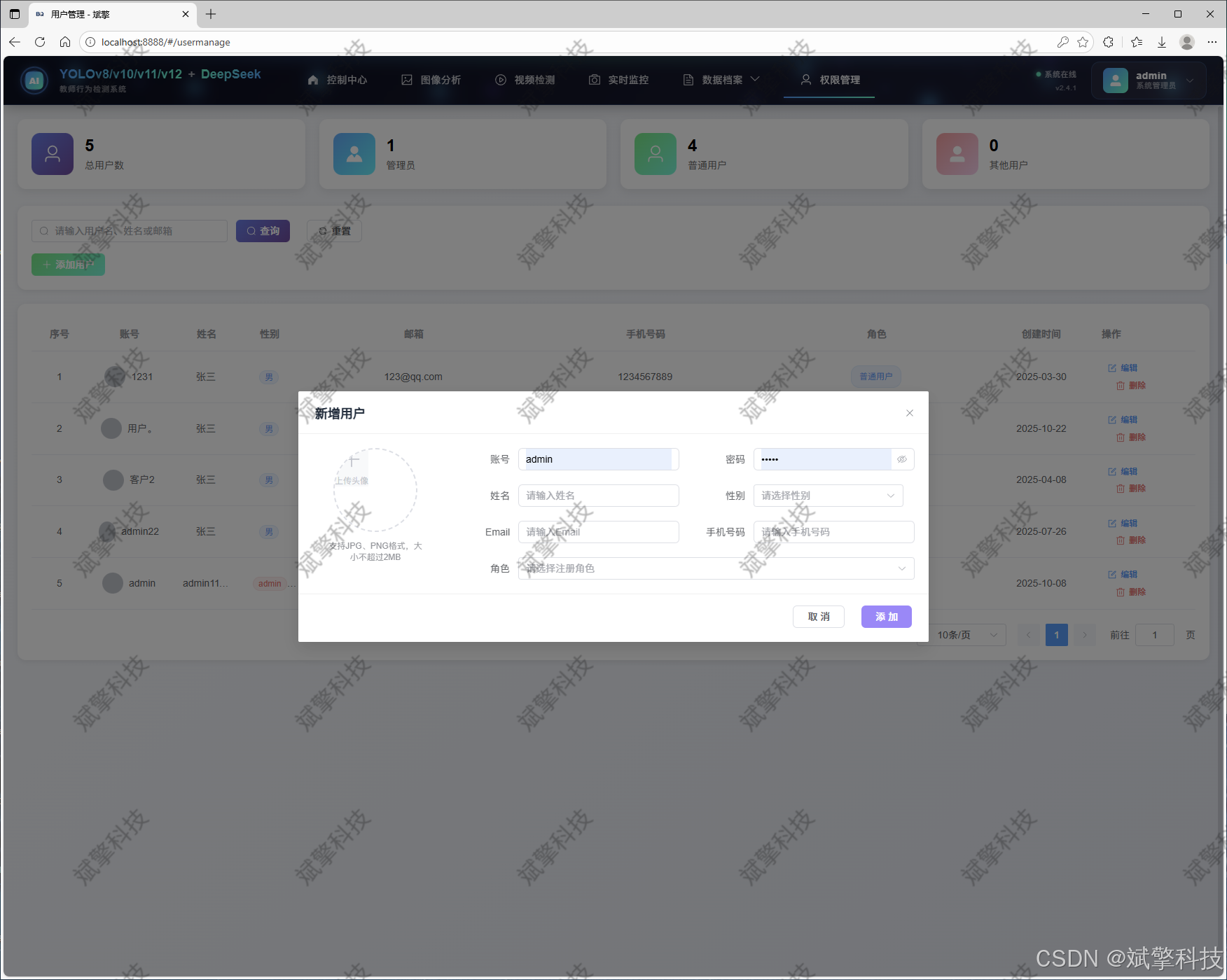
用户管理(管理员权限): 管理员拥有专属后台,可对系统所有用户进行增、删、改、查操作,并分配不同角色权限(如普通教师、教研员、管理员)。
-
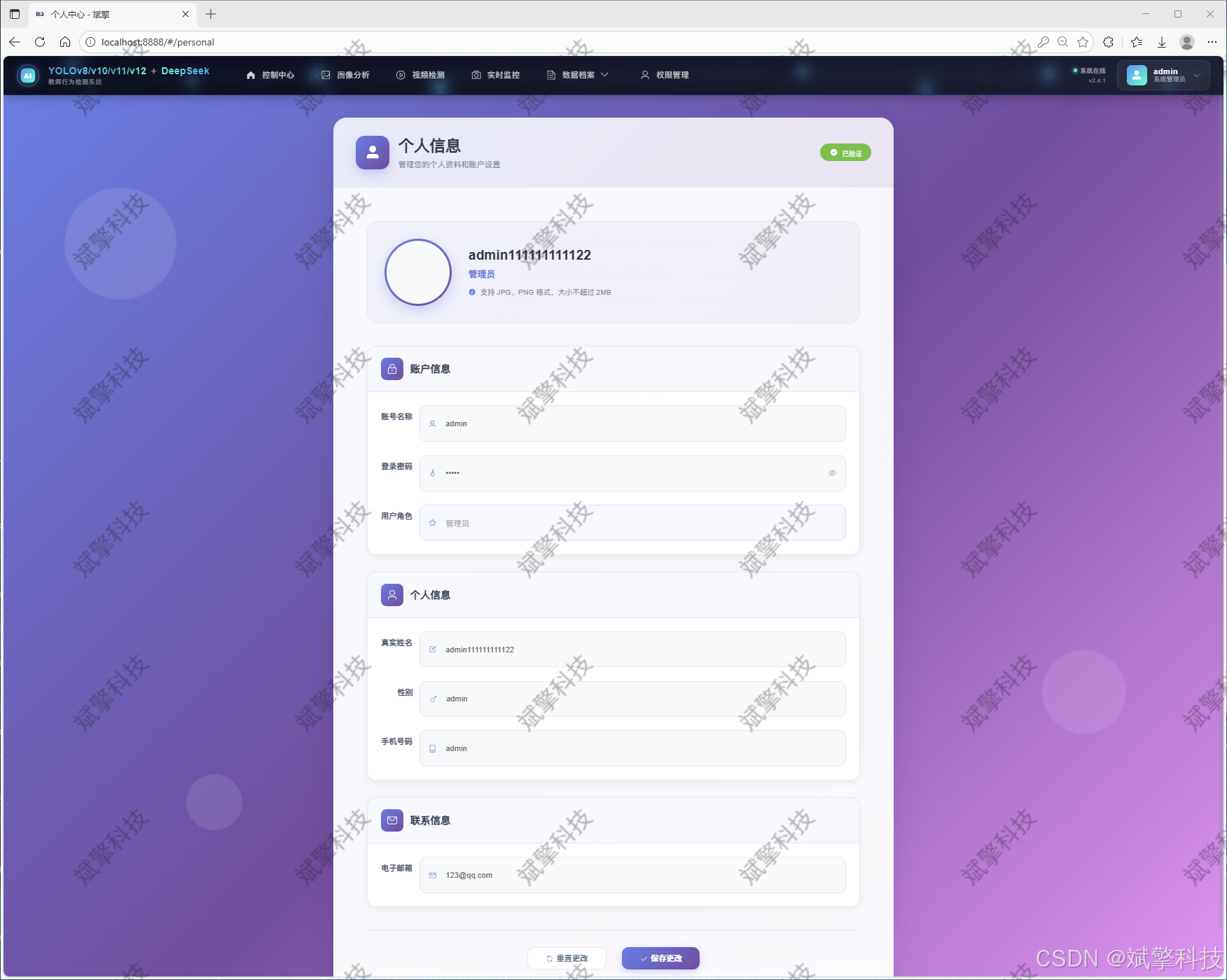
个人中心: 用户可修改个人资料,包括姓名、头像上传、密码修改等,提供个性化的使用体验。
-
-
多模型检测引擎模块(系统核心)
-
多模型支持: 系统后台集成YOLOv8, YOLOv10, YOLOv11, YOLOv12等多个版本的预训练及微调模型。用户可通过前端界面一键切换,便于比较不同模型在相同任务上的速度与精度表现。
-
多源输入检测:
-
图像检测: 上传单张或多张课堂图片,系统即时识别并标注其中的教师行为。
-
视频检测: 上传完整的课堂录像,系统进行逐帧或关键帧分析,输出带有行为标签和时间戳的视频文件。
-
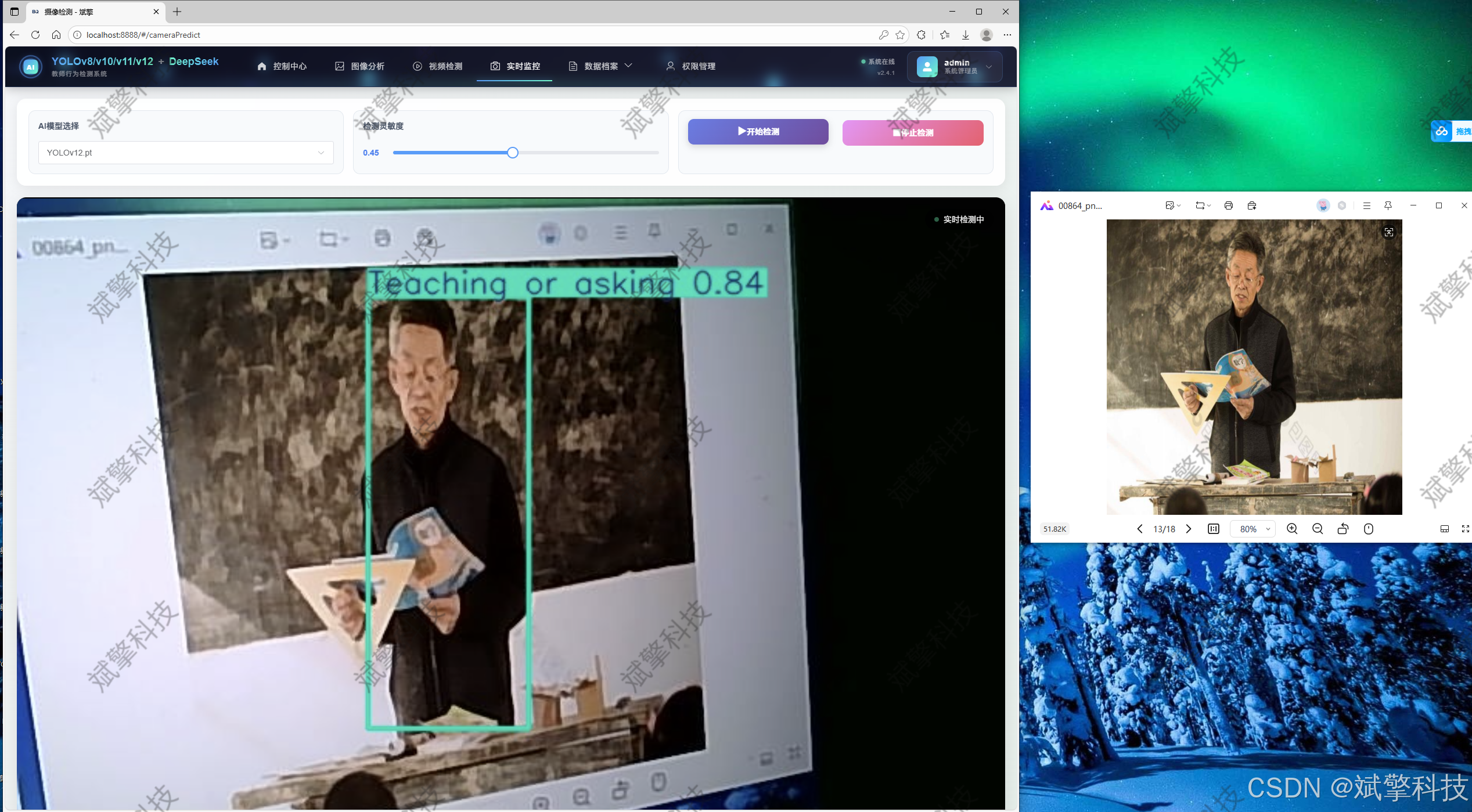
摄像头实时检测: 连接教室摄像头,实现低延迟的实时行为检测与流式展示,适用于公开课、直播课等场景。
-
-
结果保存: 所有检测任务的元数据(如文件名、检测时间、使用模型)及统计结果均自动保存至MySQL数据库,形成可追溯的记录。
-
-
DeepSeek智能分析模块(创新功能)
-
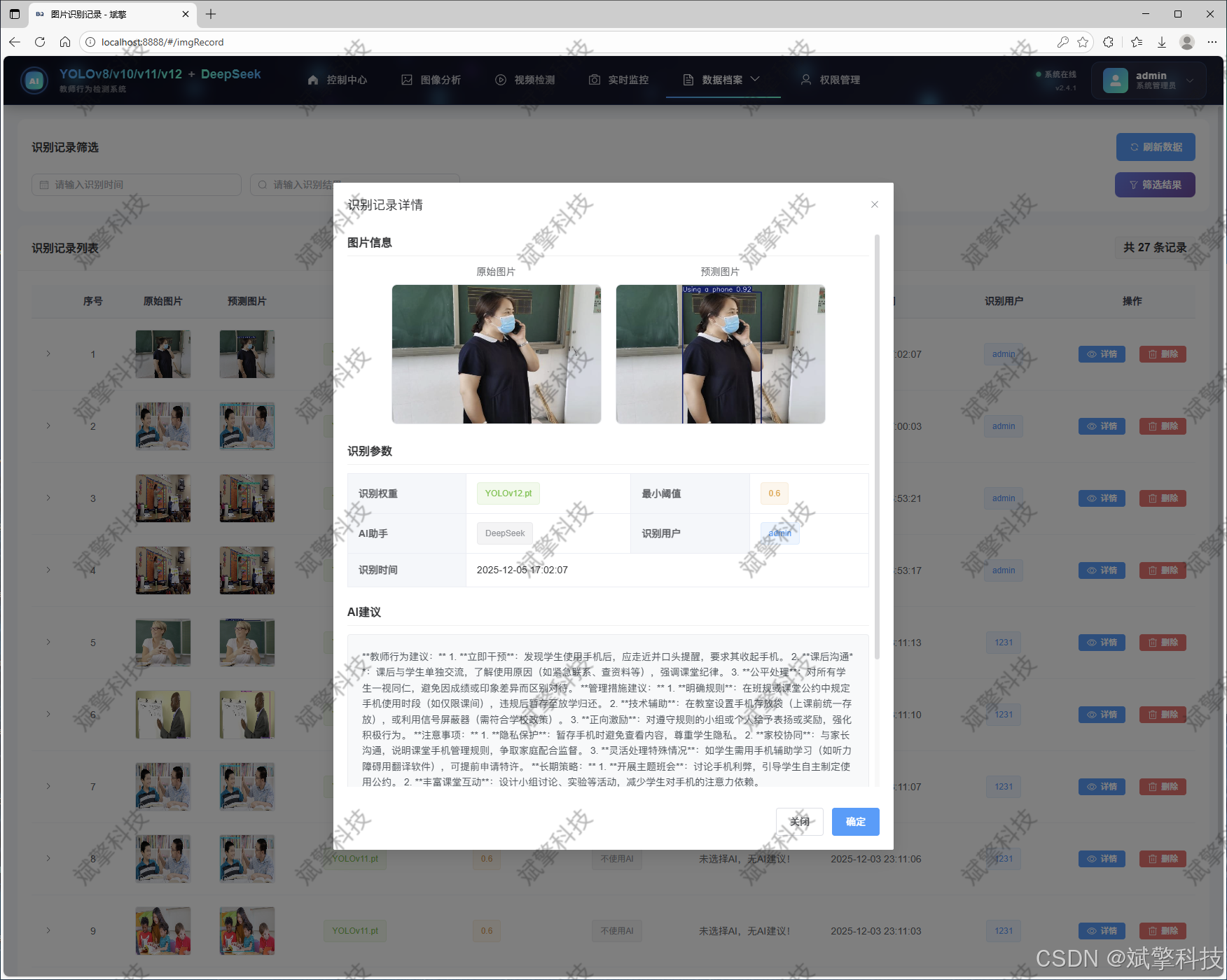
在完成图片检测后,用户可触发“AI分析”功能。系统将检测到的行为类别、空间位置、置信度等信息组织成结构化提示词,调用DeepSeek API。
-
DeepSeek模型基于这些信息,生成一段自然语言的分析报告。例如:“在这张图片中,教师正在专注于书写板书,同时其姿态表明他可能正在向学生解释书写内容。未发现使用手机等无关教学行为,整体教学状态专注。” 这极大地提升了系统的解释性和实用性。
-
-
数据可视化与记录管理模块
-
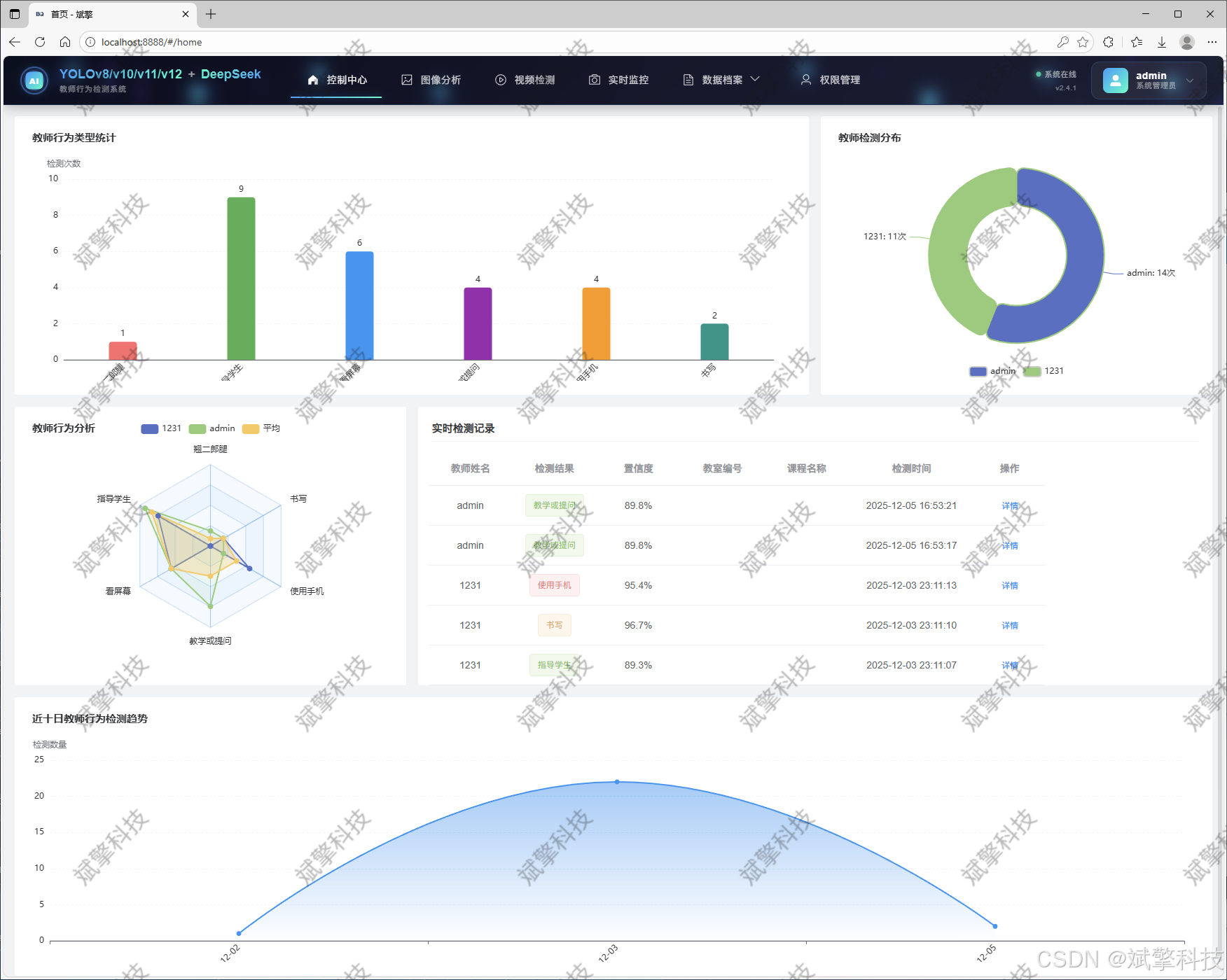
信息可视化: 系统提供丰富的图表(如柱状图、饼图、时间序列图)。
-
记录管理:
-
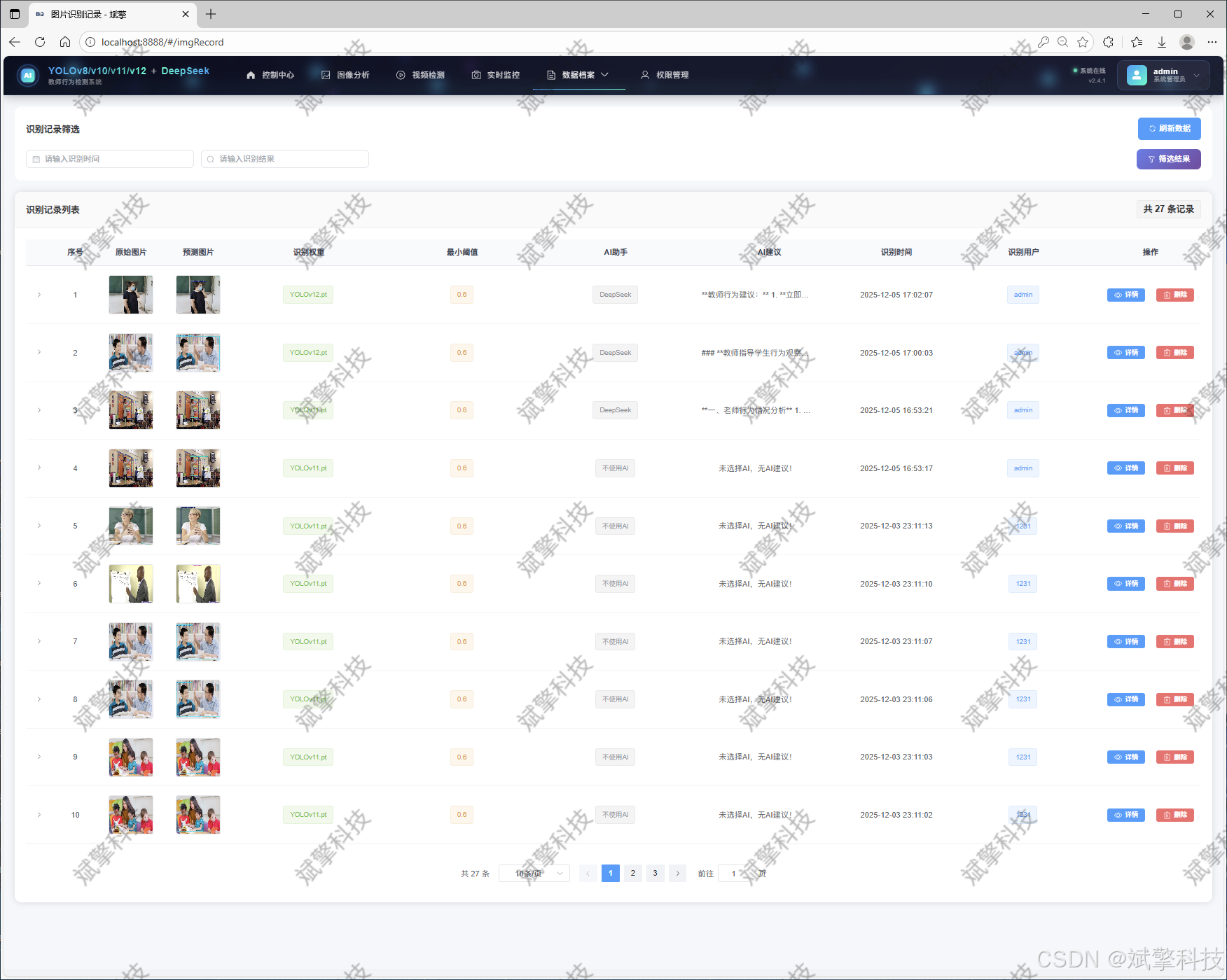
图片识别记录管理: 查看历史图片检测结果,可进行回看、下载标注图、查看AI分析报告等操作。
-
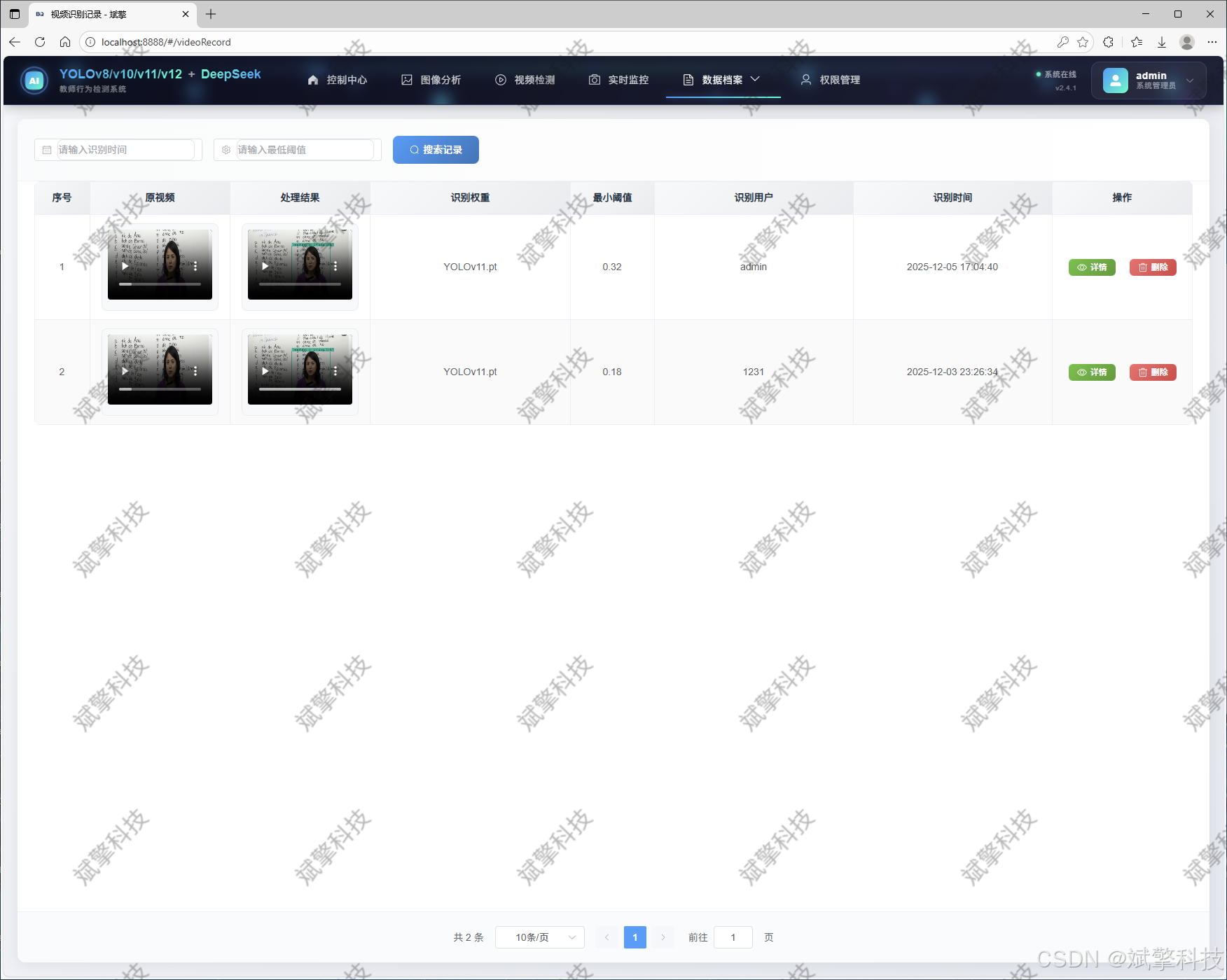
视频识别记录管理: 管理已分析视频,查看整体行为统计报告,播放分析后的视频。
-
摄像头识别记录管理。
-
-
-
系统架构与技术栈
-
前端: 采用Vue.js框架构建动态、响应式的单页面应用(SPA),使用Ant Design或Element UI等组件库保证界面美观与一致性。通过Axios与后端API通信。
-
后端: 使用spring boot框架构建RESTful API。负责用户认证、模型推理、数据库操作、文件处理以及调用DeepSeek API等核心业务逻辑。
-
算法端: 基于Ultralytics框架的YOLO系列模型。使用OpenCV进行图像/视频处理。
-
数据库: MySQL,用于存储用户信息、行为记录、系统日志等结构化数据。
-
通信: 前后端通过HTTP/HTTPS协议进行JSON数据交换,完全分离,便于独立开发和部署。
-
功能模块
✅ 用户登录注册:支持密码检测,保存到MySQL数据库。
✅ 支持四种YOLO模型切换,YOLOv8、YOLOv10、YOLOv11、YOLOv12。
✅ 信息可视化,数据可视化。
✅ 图片检测支持AI分析功能,deepseek
✅ 支持图像检测、视频检测和摄像头实时检测,检测结果保存到MySQL数据库。
✅ 图片识别记录管理、视频识别记录管理和摄像头识别记录管理。
✅ 用户管理模块,管理员可以对用户进行增删改查。
✅ 个人中心,可以修改自己的信息,密码姓名头像等等。
登录注册模块
可视化模块
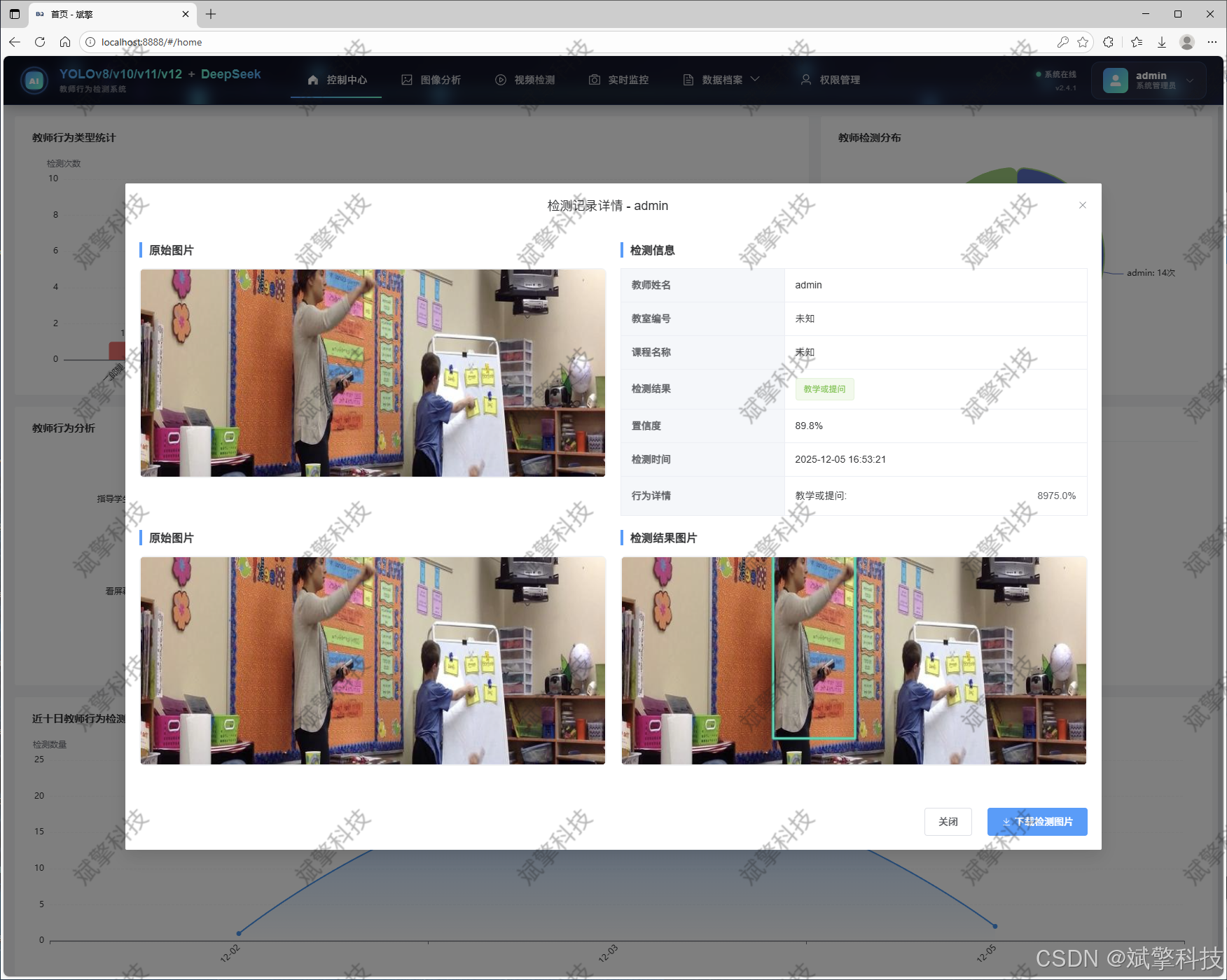
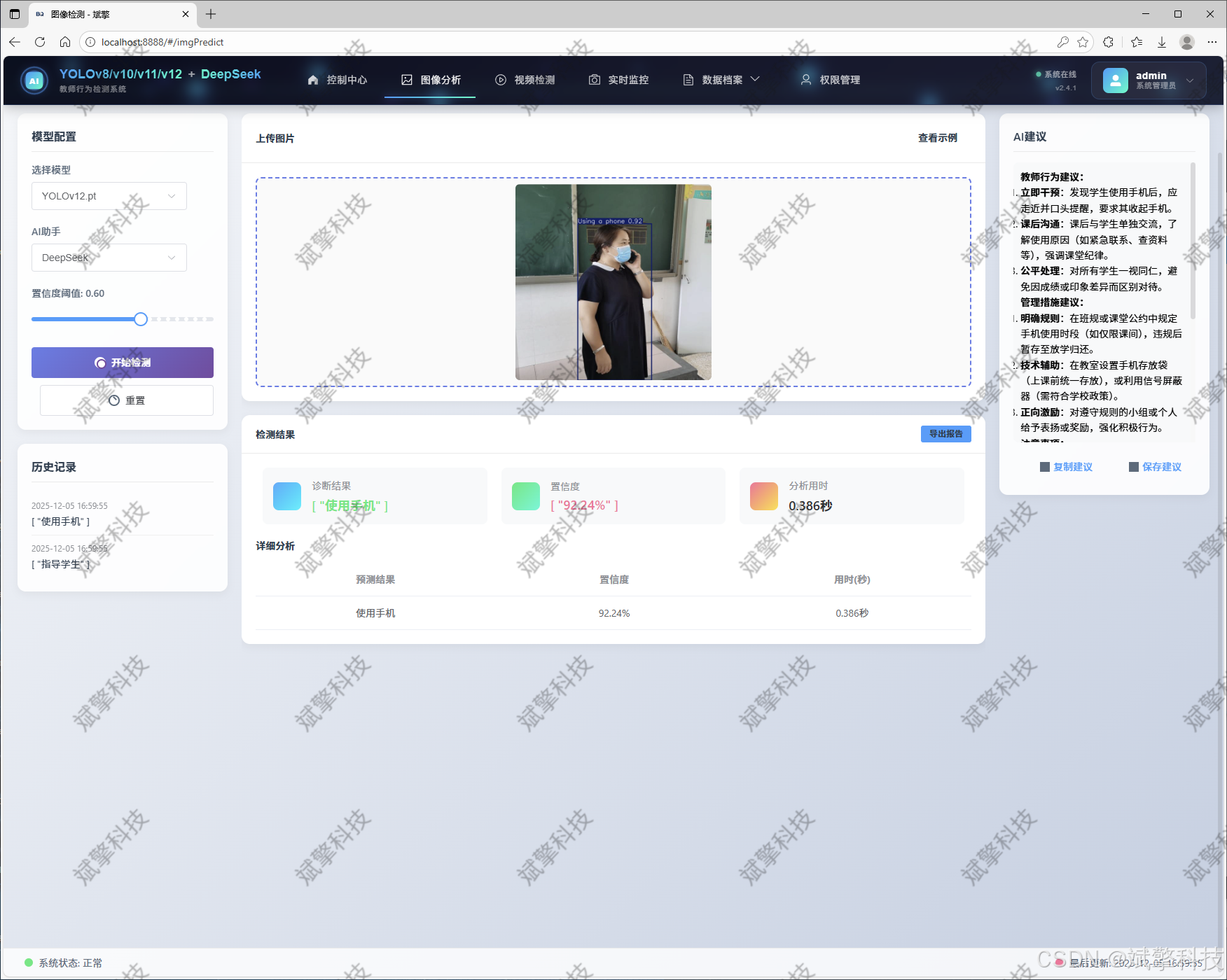
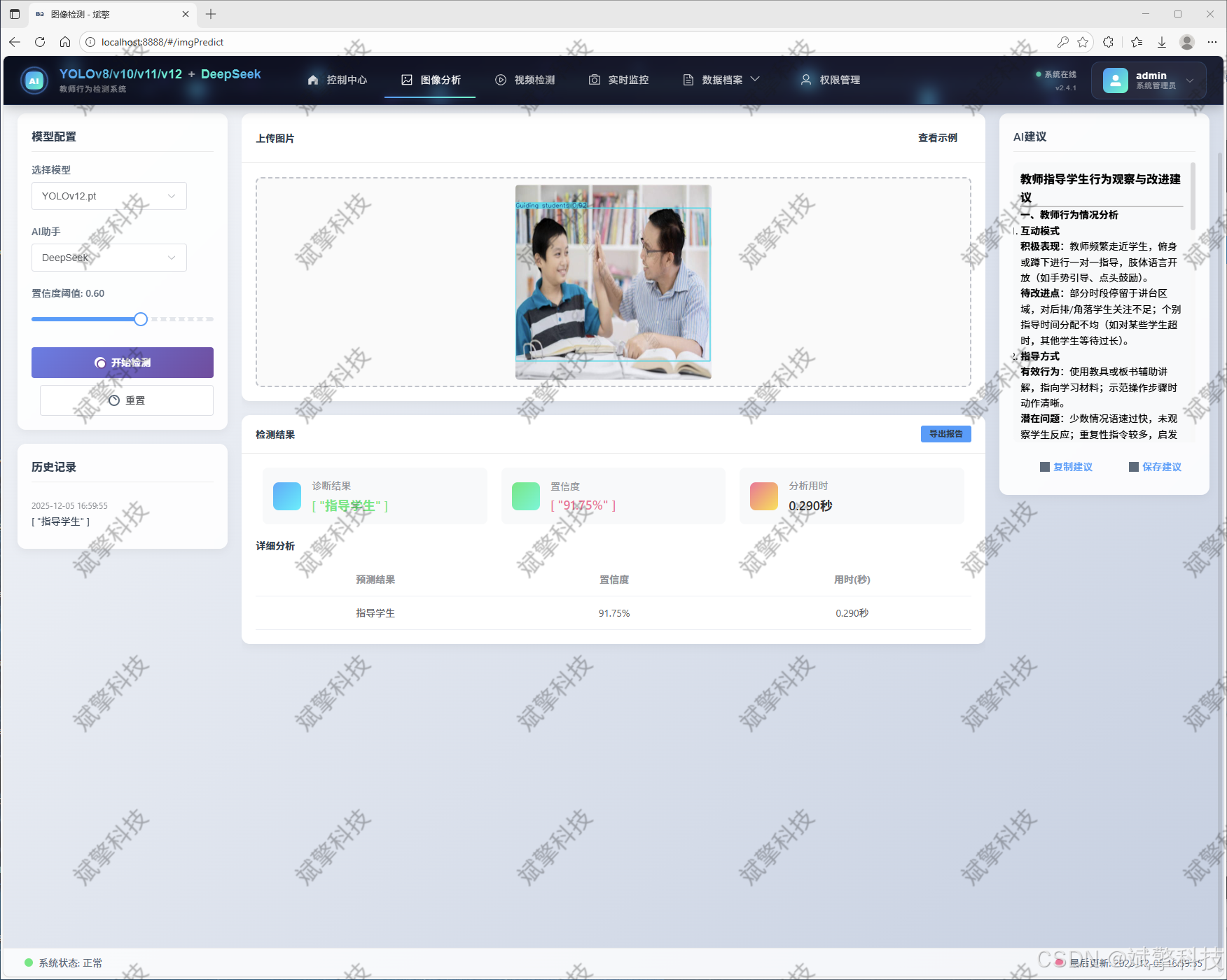
图像检测模块
-
YOLO模型集成 (v8/v10/v11/v12)
-
DeepSeek多模态分析
-
支持格式:JPG/PNG/MP4/RTSP
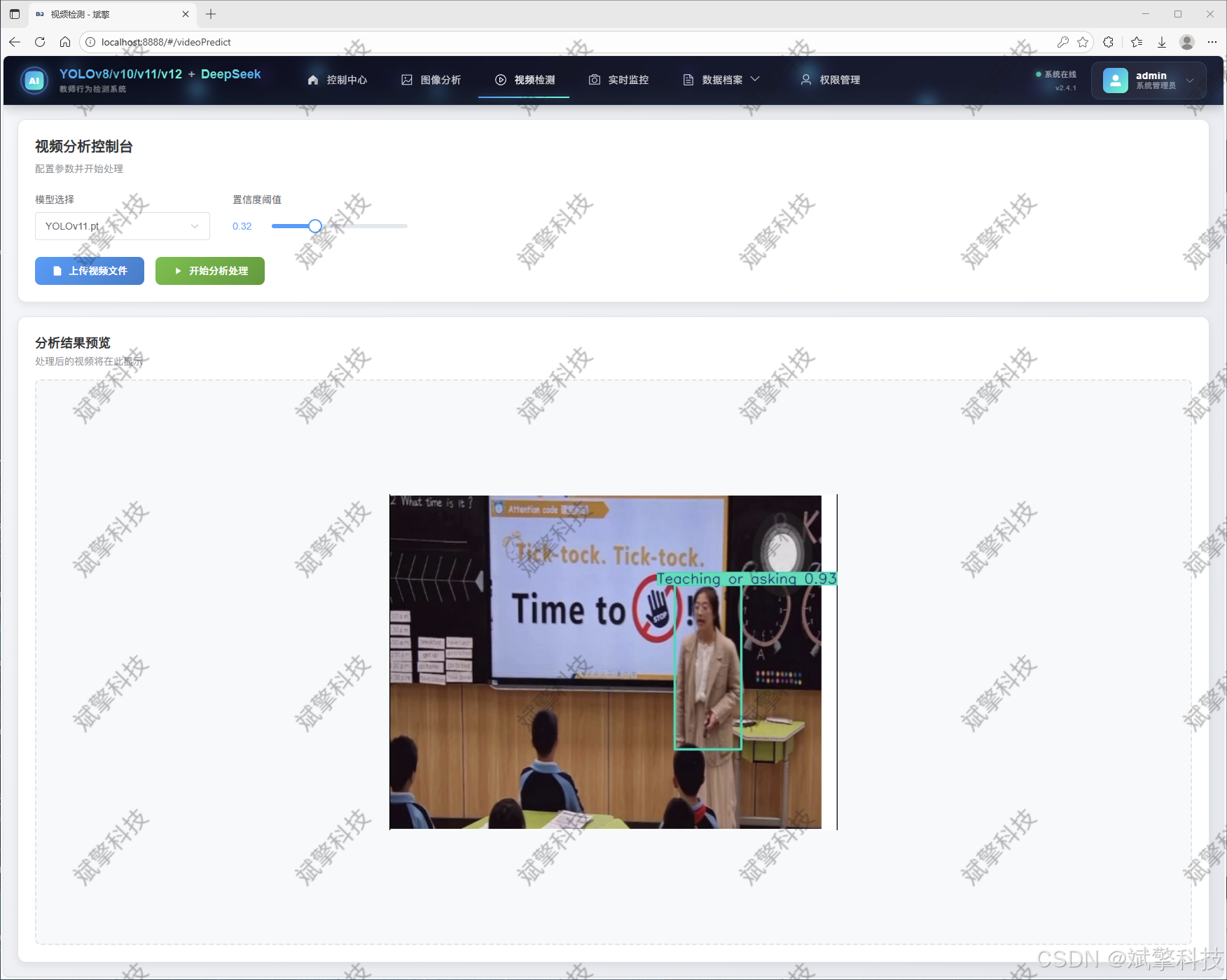
视频检测模块
实时检测模块
图片识别记录管理
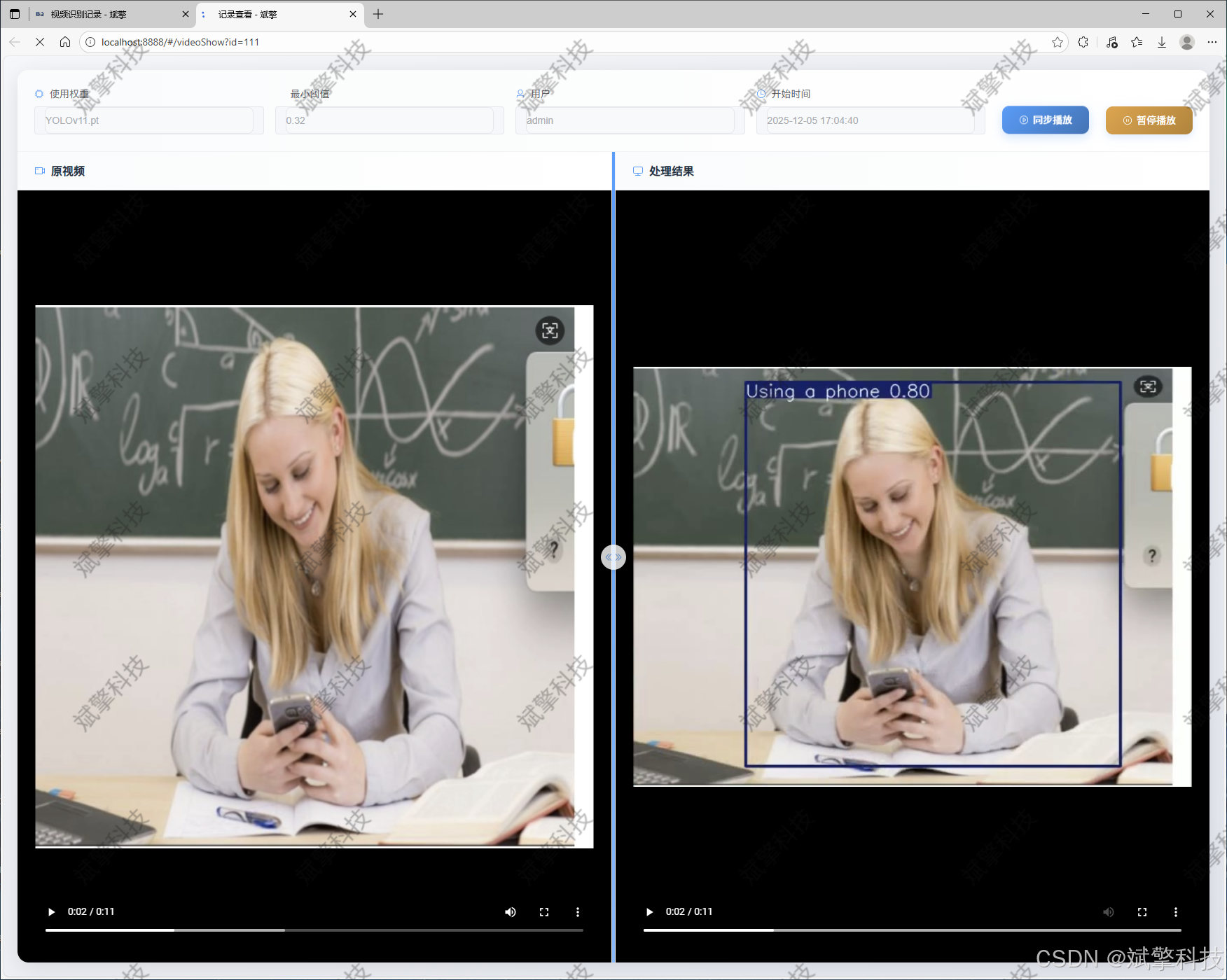
视频识别记录管理
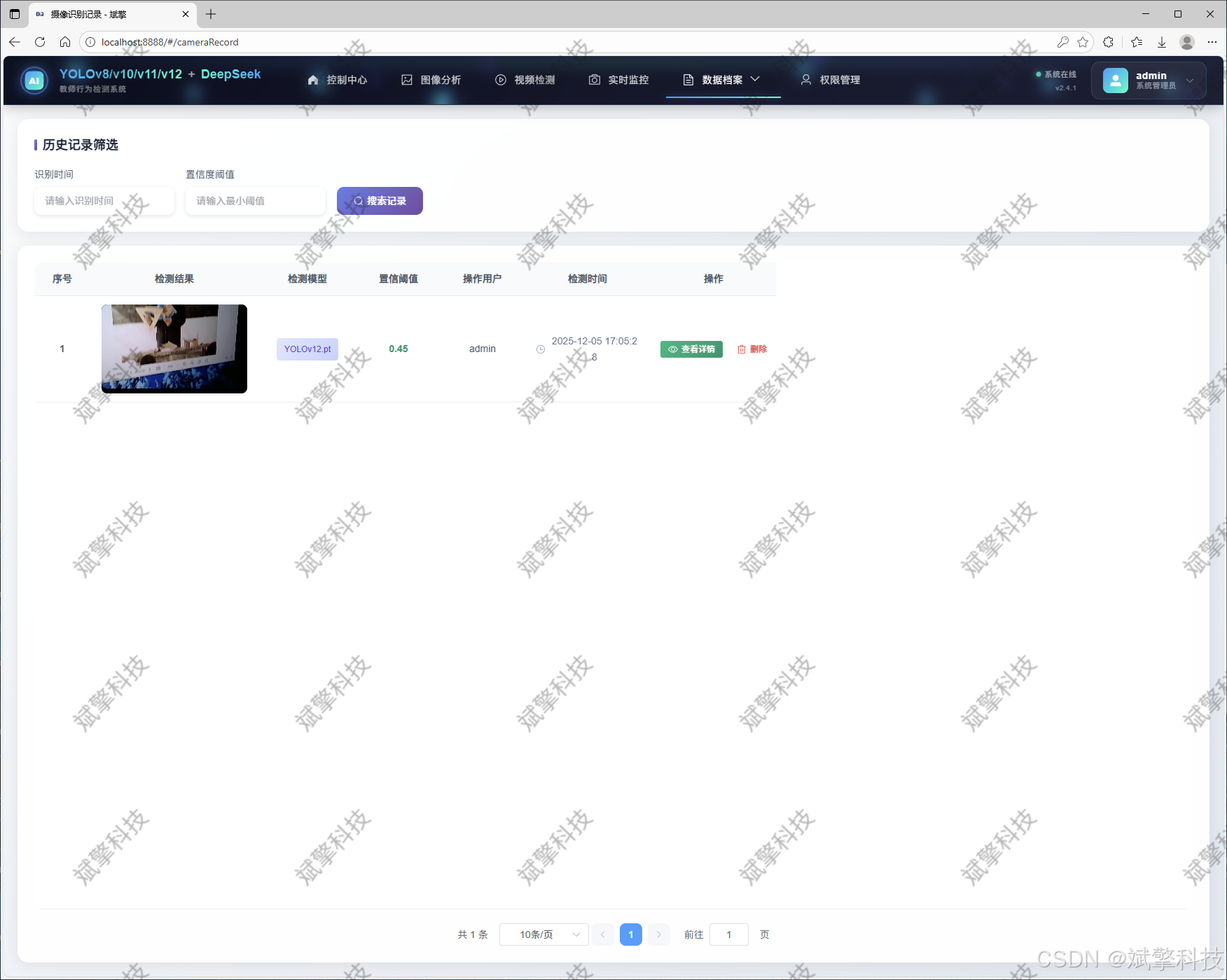
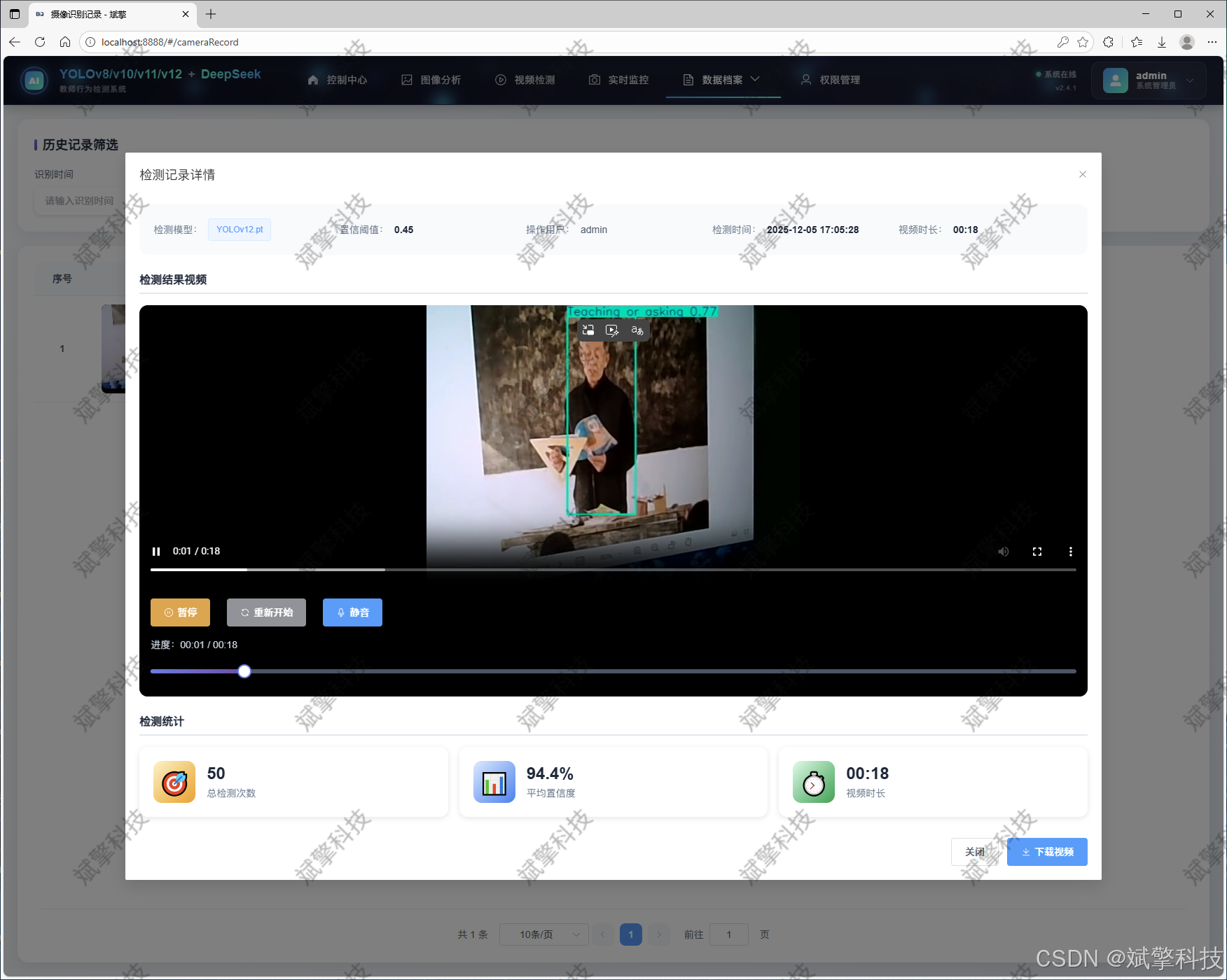
摄像头识别记录管理
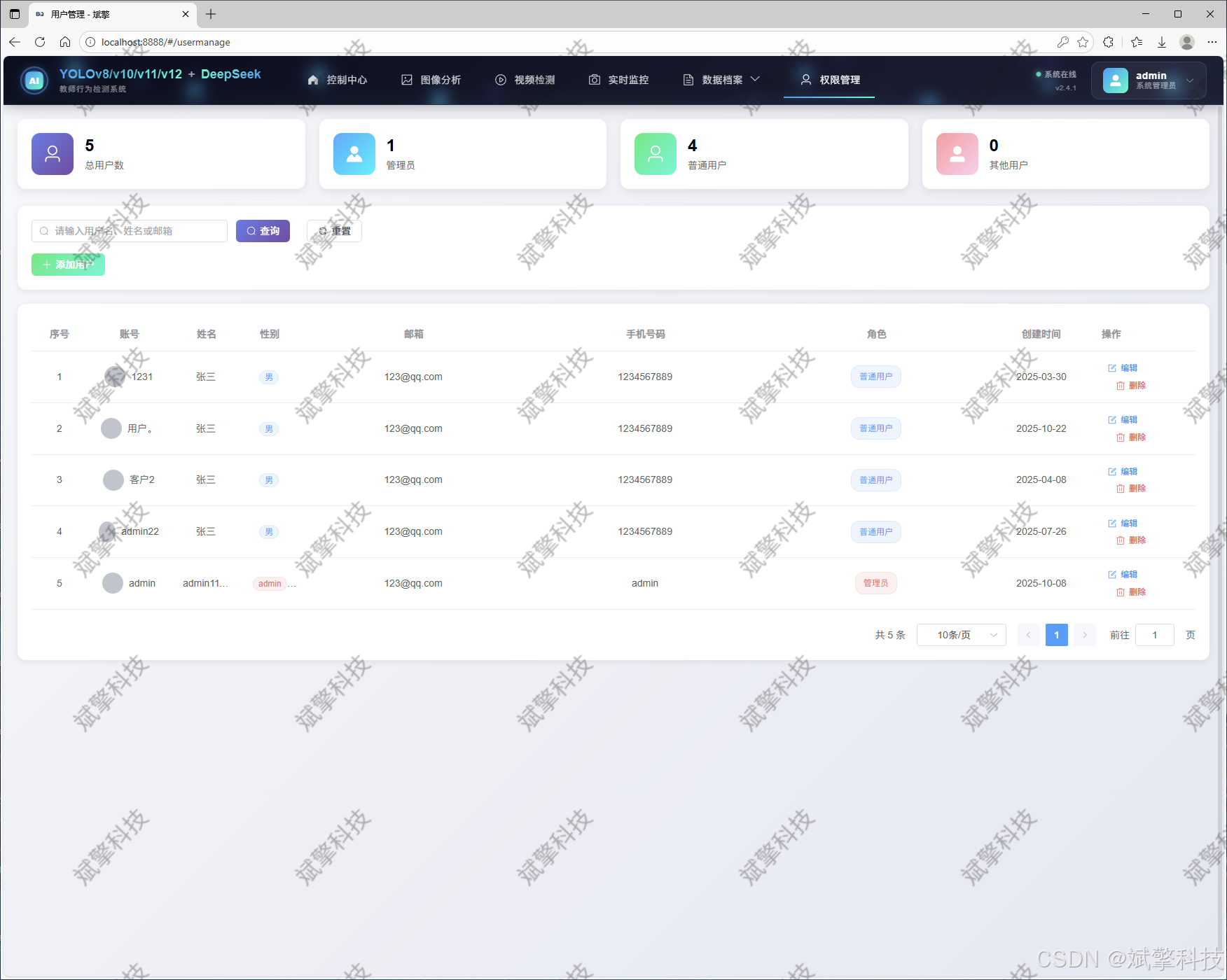
用户管理模块
数据管理模块(MySQL表设计)
-
users- 用户信息表

-
imgrecords- 图片检测记录表
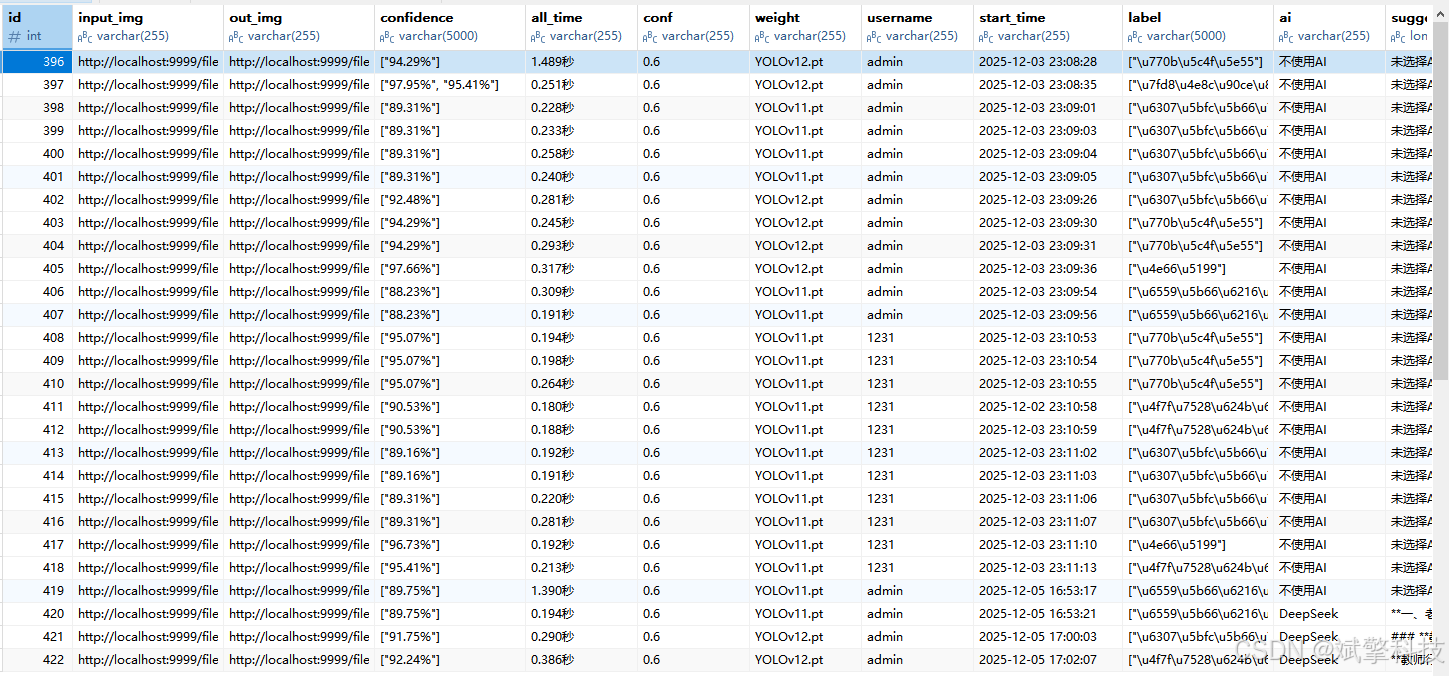
-
videorecords- 视频检测记录表

-
camerarecords- 摄像头检测记录表

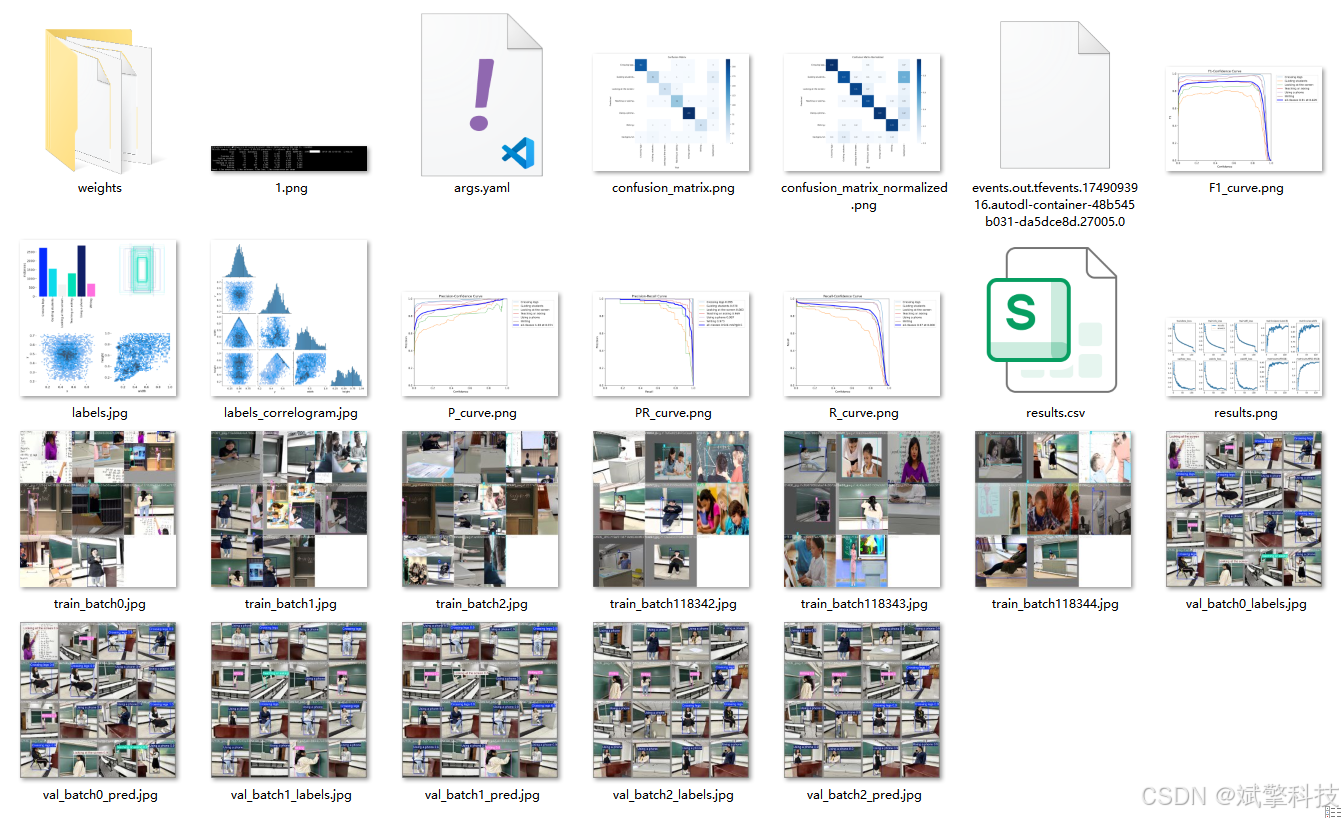
模型训练结果
#coding:utf-8
#根据实际情况更换模型
# yolon.yaml (nano):轻量化模型,适合嵌入式设备,速度快但精度略低。
# yolos.yaml (small):小模型,适合实时任务。
# yolom.yaml (medium):中等大小模型,兼顾速度和精度。
# yolob.yaml (base):基本版模型,适合大部分应用场景。
# yolol.yaml (large):大型模型,适合对精度要求高的任务。

from ultralytics import YOLO

model_path = 'pt/yolo12s.pt'
data_path = 'data.yaml'

if __name__ == '__main__':
    model = YOLO(model_path)
    results = model.train(data=data_path,
                          epochs=500,
                          batch=64,
                          device='0',
                          workers=0,
                          project='runs',
                          name='exp',
                          )
YOLOv8

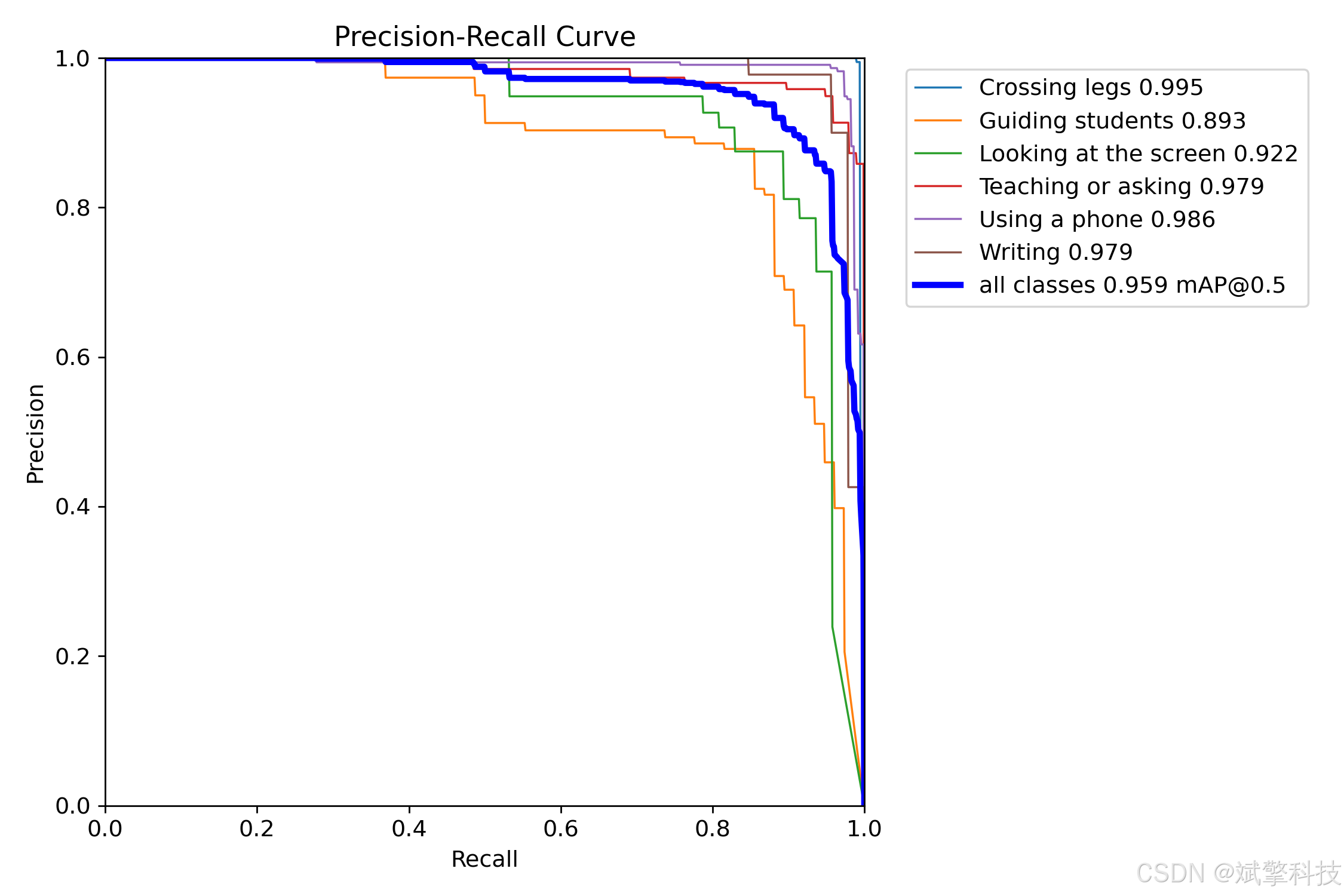
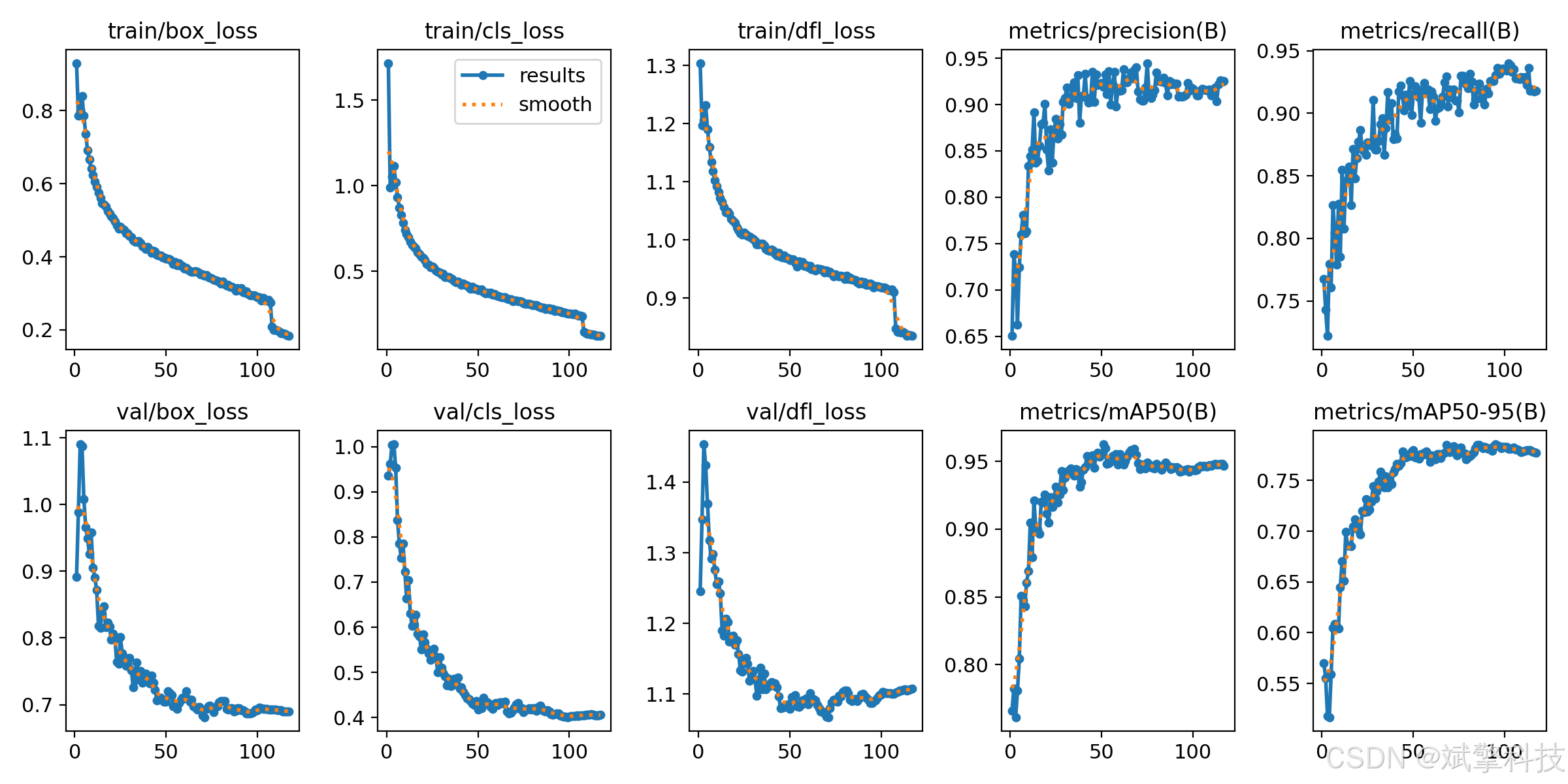
YOLOv10
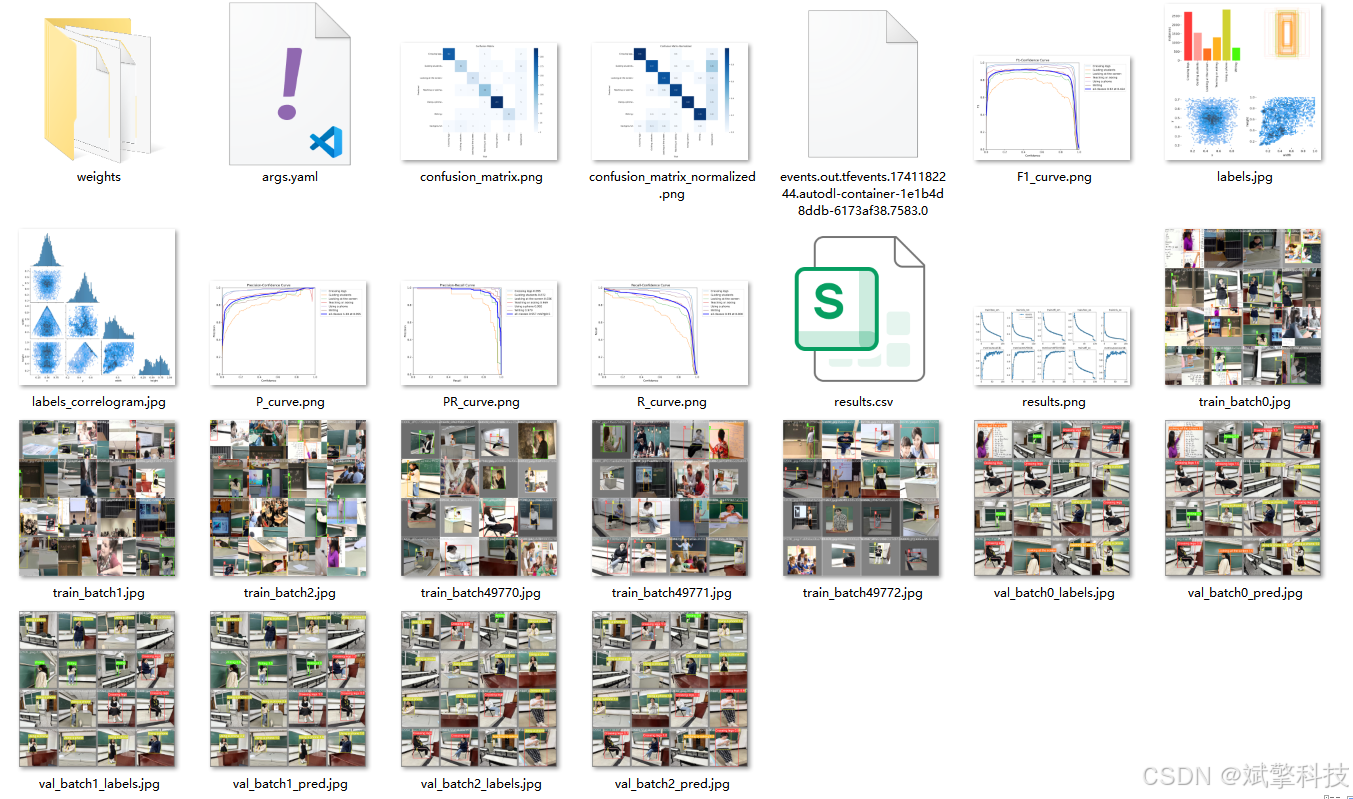
YOLOv11
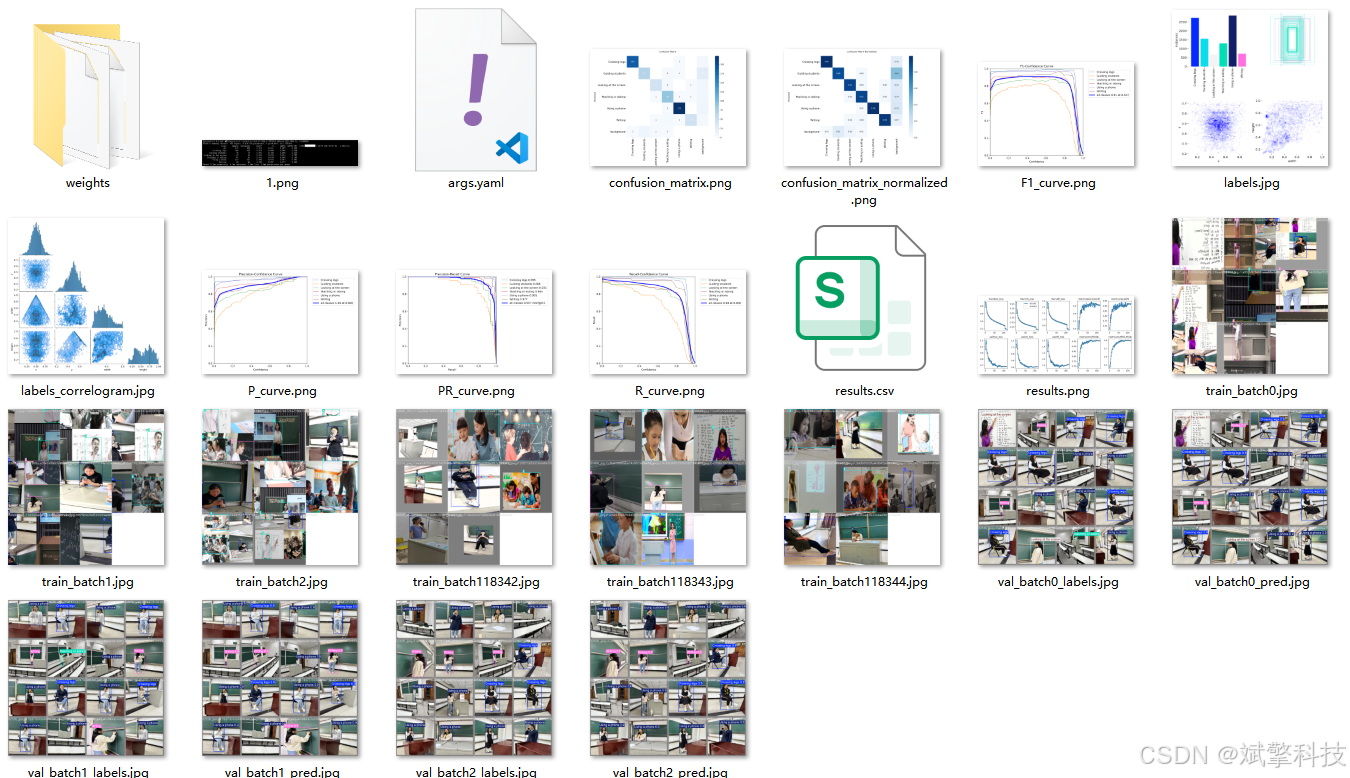
YOLOv12
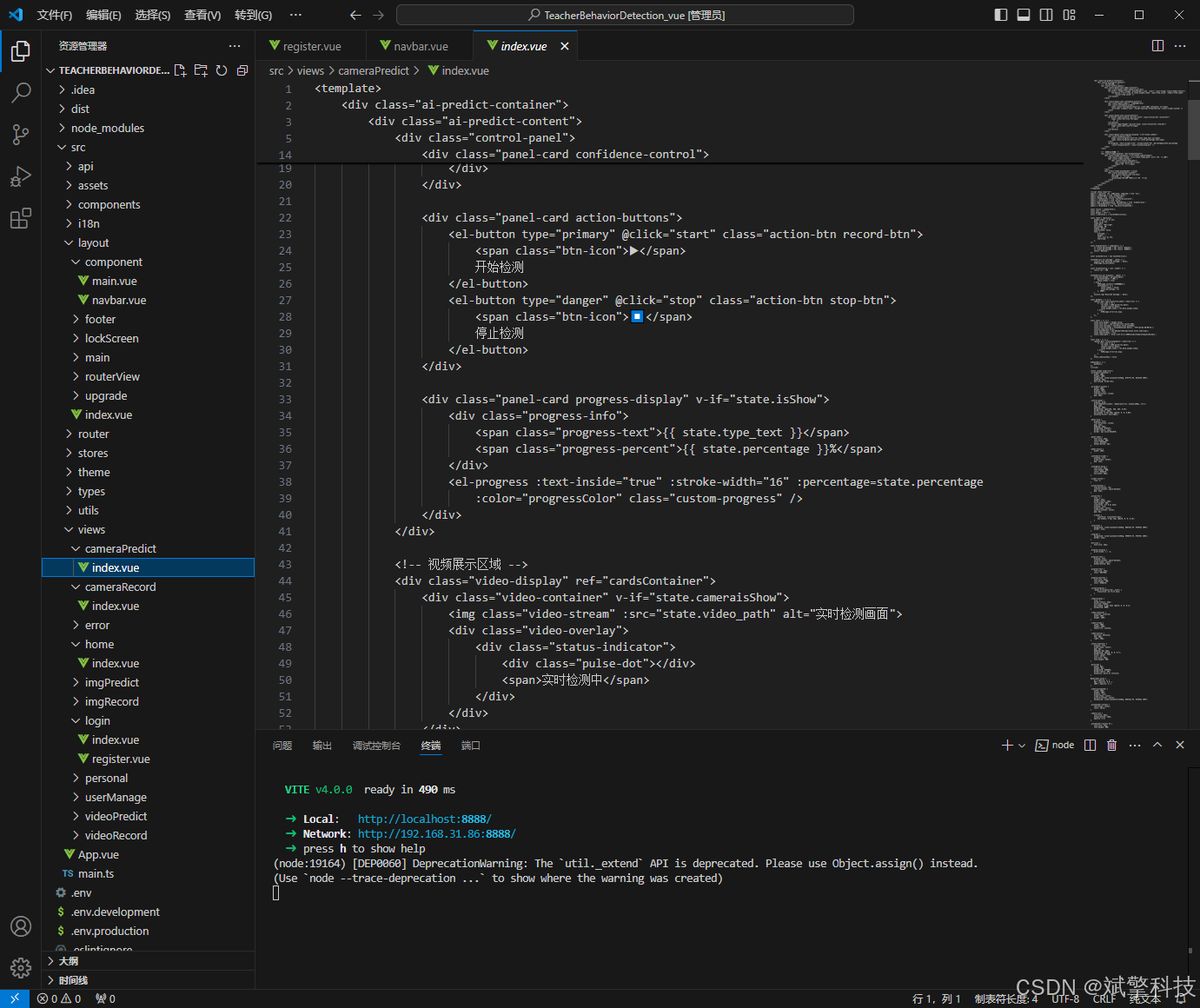
前端代码展示
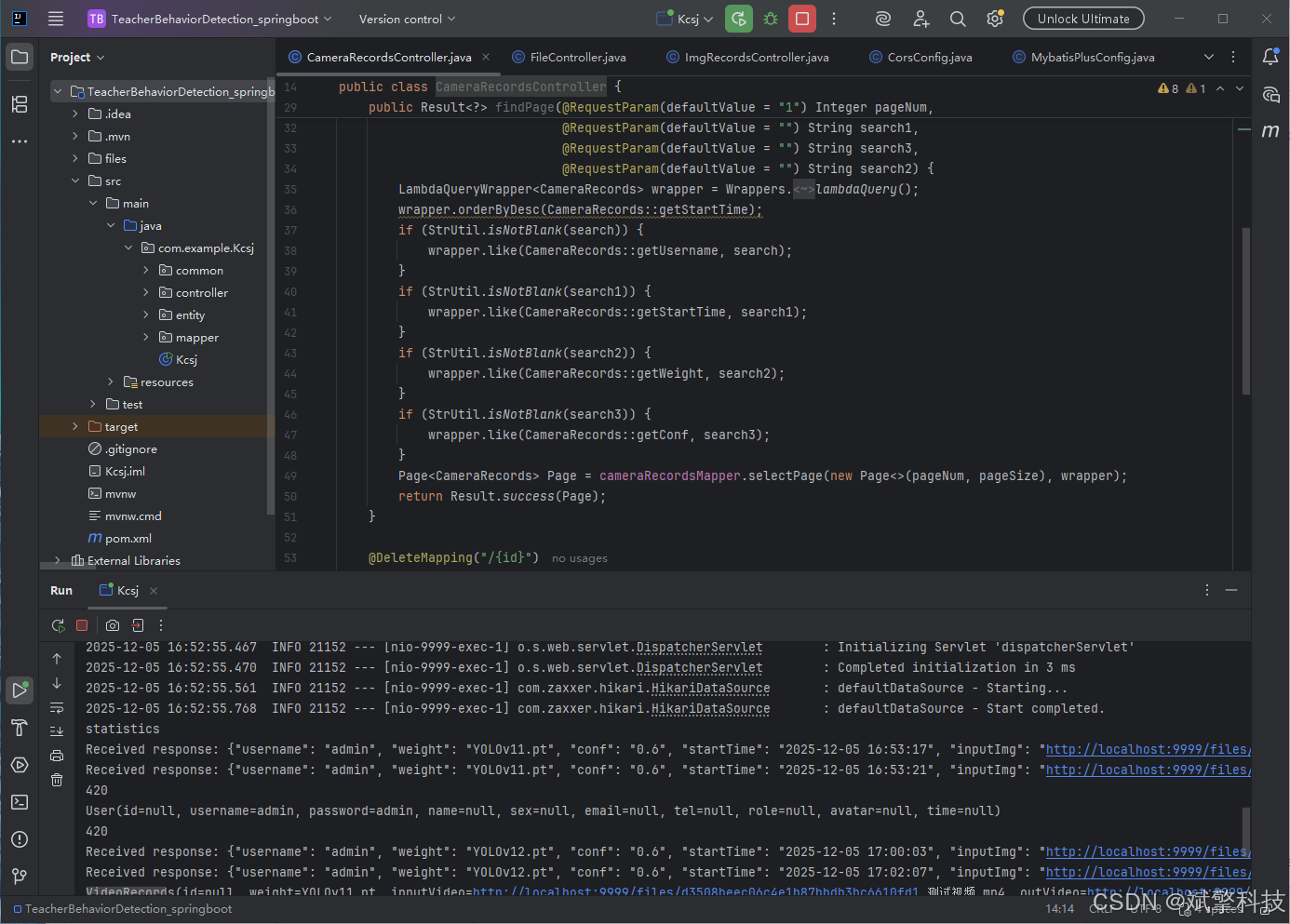
部分代码
<template>
<div class="login-container">
<!-- 教育动态背景 -->
<div class="education-background">
<!-- 知识网络基底 -->
<div class="knowledge-base"></div>
<!-- 动态教育网格 -->
<div class="education-grid"></div>
<!-- 教室层 -->
<div class="classroom-layer">
<div class="classroom-item" v-for="n in 12" :key="`class-${n}`" :style="getClassStyle(n)">
<div class="class-core"></div>
<div class="class-connections">
<div class="connection" v-for="conn in 4" :key="`conn-${n}-${conn}`"></div>
</div>
</div>
</div>
<!-- 行为分析扫描 -->
<div class="behavior-scanner">
<div class="scanner-beam"></div>
<div class="scanning-grid"></div>
</div>
<!-- 教育网络效果 -->
<div class="education-network">
<div class="network-node" v-for="n in 20" :key="`node-${n}`" :style="getNodeStyle(n)"></div>
<div class="network-connections">
<svg class="connections-svg" width="100%" height="100%">
<path v-for="(path, index) in networkPaths" :key="`path-${index}`"
:d="path.d"
:stroke="path.color"
stroke-width="0.5"
fill="none"
opacity="0.3">
<animate attributeName="stroke-dashoffset"
from="100"
to="0"
:duration="path.duration"
repeatCount="indefinite"/>
</path>
</svg>
</div>
</div>
<!-- 数据流粒子 -->
<div class="data-particles">
<div class="data-particle" v-for="n in 30" :key="`particle-${n}`" :style="getParticleStyle(n)"></div>
</div>
</div>
<!-- 登录主容器 -->
<div class="login-main">
<!-- 全息投影效果容器 -->
<div class="hologram-container">
<div class="hologram-effect">
<div class="hologram-glare"></div>
<div class="hologram-scan"></div>
</div>
<!-- 系统标志 -->
<div class="system-brand">
<div class="brand-icon">
<div class="edu-icon">
<div class="edu-layers">
<div class="layer-1"></div>
<div class="layer-2"></div>
<div class="layer-3"></div>
</div>
<div class="teach-core">
<span>EDU</span>
</div>
</div>
<div class="icon-glow"></div>
</div>
<div class="brand-text">
<h1 class="system-title">
<span class="behavior-text">YOLOv8\v10\v11\v12 DeepSeek</span>
<span class="system-text">教师行为检测系统</span>
</h1>
<p class="system-subtitle">教师教学行为智能分析平台</p>
<p class="company-tag">智慧教育 · 人工智能</p>
</div>
</div>
<!-- 登录面板 -->
<div class="login-panel">
<div class="panel-header">
<div class="header-line"></div>
<h2>教育安全认证</h2>
<div class="header-line"></div>
</div>
<div class="panel-content">
<el-form :model="ruleForm" :rules="registerRules" ref="ruleFormRef">
<!-- 用户名输入 -->
<el-form-item prop="username">
<div class="input-field">
<div class="field-icon">
<div class="teacher-icon"></div>
</div>
<el-input
v-model="ruleForm.username"
placeholder="请输入教师工号"
class="edu-input"
size="large"
@focus="onInputFocus"
@blur="onInputBlur"
/>
<div class="field-glow"></div>
</div>
<div class="input-hint">教师/管理员身份验证</div>
</el-form-item>
<!-- 密码输入 -->
<el-form-item prop="password">
<div class="input-field">
<div class="field-icon">
<div class="lock-icon"></div>
</div>
<el-input
v-model="ruleForm.password"
type="password"
placeholder="请输入密码"
show-password
class="edu-input"
size="large"
@focus="onInputFocus"
@blur="onInputBlur"
/>
<div class="field-glow"></div>
</div>
<div class="input-hint">教育平台安全验证</div>
</el-form-item>
<!-- 登录按钮 -->
<el-form-item>
<div class="login-action">
<el-button
type="primary"
class="edu-btn"
@click="submitForm(ruleFormRef)"
@mouseenter="onBtnHover"
@mouseleave="onBtnLeave"
>
<div class="btn-content">
<div class="btn-text">
<span class="text-main">进入分析系统</span>
<span class="text-sub">ENTER SYSTEM</span>
</div>
<div class="btn-arrow">
<div class="arrow-line"></div>
<div class="arrow-head"></div>
</div>
</div>
<div class="btn-energy"></div>
<div class="btn-particles">
<div class="particle" v-for="n in 3" :key="`btn-particle-${n}`"></div>
</div>
</el-button>
<div class="system-status">
<div class="status-indicator">
<div class="status-dot active"></div>
<span>系统就绪</span>
</div>
<div class="status-info">
<span>v2.1.0 • 教育安全模式</span>
</div>
</div>
</div>
</el-form-item>
</el-form>
<!-- 辅助选项 -->
<div class="panel-options">
<router-link to="/register" class="option-link">
<div class="link-icon">
<div class="plus-icon"></div>
</div>
<span>注册新教师</span>
<div class="link-trail"></div>
</router-link>
</div>
</div>
</div>
<!-- 系统信息 -->
<div class="system-info">
<div class="info-grid">
<div class="info-item">
<div class="info-icon detect-icon"></div>
<div class="info-content">
<span class="info-label">分析准确率</span>
<span class="info-value">95.3%</span>
</div>
</div>
<div class="info-item">
<div class="info-icon speed-icon"></div>
<div class="info-content">
<span class="info-label">实时分析</span>
<span class="info-value">30 FPS</span>
</div>
</div>
<div class="info-item">
<div class="info-icon behavior-icon"></div>
<div class="info-content">
<span class="info-label">行为类型</span>
<span class="info-value">6种</span>
</div>
</div>
</div>
</div>
</div>
</div>
<!-- 背景装饰元素 -->
<div class="background-elements">
<div class="edu-rain">
<div class="edu-stream" v-for="n in 8" :key="`stream-${n}`" :style="getStreamStyle(n)">
<span v-for="i in 20" :key="`char-${n}-${i}`">{{ getEduChar() }}</span>
</div>
</div>
</div>
</div>
</template>
<script lang="ts" setup>
import { reactive, ref, computed, onMounted } from 'vue';
import { useRoute, useRouter } from 'vue-router';
import { ElMessage } from 'element-plus';
import { useI18n } from 'vue-i18n';
import Cookies from 'js-cookie';
import { storeToRefs } from 'pinia';
import { useThemeConfig } from '/@/stores/themeConfig';
import { initFrontEndControlRoutes } from '/@/router/frontEnd';
import { initBackEndControlRoutes } from '/@/router/backEnd';
import { Session } from '/@/utils/storage';
import { formatAxis } from '/@/utils/formatTime';
import { NextLoading } from '/@/utils/loading';
import type { FormInstance, FormRules } from 'element-plus';
import request from '/@/utils/request';
// 定义变量内容
const { t } = useI18n();
const storesThemeConfig = useThemeConfig();
const { themeConfig } = storeToRefs(storesThemeConfig);
const route = useRoute();
const router = useRouter();
const formSize = ref('default');
const ruleFormRef = ref<FormInstance>();
// 定义表单数据
const ruleForm = reactive({
username: '',
password: '',
});
// 校验规则
const registerRules = reactive<FormRules>({
username: [
{ required: true, message: '请输入教师工号', trigger: 'blur' },
{ min: 3, max: 20, message: '长度在3-20个字符', trigger: 'blur' },
],
password: [
{ required: true, message: '请输入密码', trigger: 'blur' },
{ min: 5, max: 30, message: '长度在5-30个字符', trigger: 'blur' },
],
});
// 网络路径数据
const networkPaths = ref<Array<{d: string, color: string, duration: string}>>([]);
// 教育相关字符
const eduChars = ['教', '育', '智', '慧', 'AI', '学', '习', '师', '课', '堂', '分', '析', '评', '价', '创', '新'];
// 初始化网络路径
const initNetworkPaths = () => {
const paths = [];
for (let i = 0; i < 15; i++) {
const startX = Math.random() * 100;
const startY = Math.random() * 100;
const endX = Math.random() * 100;
const endY = Math.random() * 100;
const control1X = startX + (endX - startX) * 0.3 + (Math.random() - 0.5) * 20;
const control1Y = startY + (endY - startY) * 0.3 + (Math.random() - 0.5) * 20;
const control2X = startX + (endX - startX) * 0.7 + (Math.random() - 0.5) * 20;
const control2Y = startY + (endY - startY) * 0.7 + (Math.random() - 0.5) * 20;
paths.push({
d: `M ${startX}% ${startY}% C ${control1X}% ${control1Y}%, ${control2X}% ${control2Y}%, ${endX}% ${endY}%`,
color: `hsl(${180 + Math.random() * 40}, 70%, 60%)`, // 改为青色系
duration: `${3 + Math.random() * 4}s`
});
}
networkPaths.value = paths;
};
// 教室样式
const getClassStyle = (index: number) => {
const angles = [0, 45, 90, 135, 180, 225, 270, 315];
const radius = 35 + index * 3;
const angle = angles[index % angles.length];
const x = 50 + radius * Math.cos(angle * Math.PI / 180);
const y = 50 + radius * Math.sin(angle * Math.PI / 180);
return {
left: `${x}%`,
top: `${y}%`,
transform: `rotate(${angle}deg)`,
animationDelay: `${index * 0.2}s`
};
};
// 网络节点样式
const getNodeStyle = (index: number) => {
const left = Math.random() * 100;
const top = Math.random() * 100;
const size = 4 + Math.random() * 8;
const hue = 180 + Math.random() * 40; // 青色系
return {
left: `${left}%`,
top: `${top}%`,
width: `${size}px`,
height: `${size}px`,
backgroundColor: `hsl(${hue}, 80%, 60%)`,
animationDelay: `${index * 0.3}s`
};
};
// 粒子样式
const getParticleStyle = (index: number) => {
const left = Math.random() * 100;
const top = Math.random() * 100;
const size = 1 + Math.random() * 2;
const duration = 2 + Math.random() * 3;
return {
left: `${left}%`,
top: `${top}%`,
width: `${size}px`,
height: `${size}px`,
animationDuration: `${duration}s`,
animationDelay: `${index * 0.1}s`
};
};
// 字符流样式
const getStreamStyle = (index: number) => {
const left = Math.random() * 100;
const duration = 8 + Math.random() * 12;
const delay = Math.random() * 5;
return {
left: `${left}%`,
animationDuration: `${duration}s`,
animationDelay: `${delay}s`
};
};
// 获取教育字符
const getEduChar = () => {
return eduChars[Math.floor(Math.random() * eduChars.length)];
};
// 事件处理
const onInputFocus = (event: Event) => {
const target = event.target as HTMLElement;
target.parentElement?.classList.add('focused');
};
const onInputBlur = (event: Event) => {
const target = event.target as HTMLElement;
target.parentElement?.classList.remove('focused');
};
const onBtnHover = (event: Event) => {
const btn = event.currentTarget as HTMLElement;
btn.classList.add('hover');
};
const onBtnLeave = (event: Event) => {
const btn = event.currentTarget as HTMLElement;
btn.classList.remove('hover');
};
// 原有的登录逻辑保持不变
const currentTime = computed(() => {
return formatAxis(new Date());
});
const onSignIn = async () => {
Session.set('token', Math.random().toString(36).substr(0));
Cookies.set('userName', ruleForm.username);
if (!themeConfig.value.isRequestRoutes) {
const isNoPower = await initFrontEndControlRoutes();
signInSuccess(isNoPower);
} else {
const isNoPower = await initBackEndControlRoutes();
signInSuccess(isNoPower);
}
};
const signInSuccess = (isNoPower: boolean | undefined) => {
if (isNoPower) {
ElMessage.warning('抱歉,您没有登录权限');
Session.clear();
} else {
let currentTimeInfo = currentTime.value;
if (route.query?.redirect) {
router.push({
path: <string>route.query?.redirect,
query: Object.keys(<string>route.query?.params).length > 0 ? JSON.parse(<string>route.query?.params) : '',
});
} else {
router.push('/');
}
const signInText = t('message.signInText');
ElMessage.success(`${currentTimeInfo},${signInText}`);
NextLoading.start();
}
};
const submitForm = (formEl: FormInstance | undefined) => {
if (!formEl) return;
formEl.validate((valid) => {
if (valid) {
request.post('/api/user/login', ruleForm).then((res) => {
console.log(res);
if (res.code == 0) {
Cookies.set('role', res.data.role);
onSignIn();
} else {
ElMessage({
type: 'error',
message: res.msg,
});
}
});
} else {
console.log('error submit!');
return false;
}
});
};
// 初始化
onMounted(() => {
initNetworkPaths();
});
</script>
<style scoped>
.login-container {
min-height: 100vh;
display: flex;
align-items: center;
justify-content: center;
background: linear-gradient(135deg, #1a365d 0%, #2d4a8a 30%, #3a5f9e 70%, #1e3a5f 100%);
padding: 20px;
position: relative;
overflow: hidden;
font-family: 'Inter', 'Segoe UI', system-ui, sans-serif;
}
/* 教育背景 */
.education-background {
position: absolute;
top: 0;
left: 0;
width: 100%;
height: 100%;
z-index: 1;
overflow: hidden;
}
.knowledge-base {
position: absolute;
top: 50%;
left: 50%;
width: 120vmax;
height: 120vmax;
background: radial-gradient(
circle at center,
rgba(45, 156, 219, 0.1) 0%,
rgba(30, 60, 114, 0.3) 30%,
rgba(20, 40, 80, 0.8) 70%,
transparent 100%
);
transform: translate(-50%, -50%);
animation: knowledgeRotate 120s linear infinite;
}
@keyframes knowledgeRotate {
from { transform: translate(-50%, -50%) rotate(0deg); }
to { transform: translate(-50%, -50%) rotate(360deg); }
}
/* 教育网格 */
.education-grid {
position: absolute;
top: 0;
left: 0;
width: 100%;
height: 100%;
background-image:
linear-gradient(rgba(45, 156, 219, 0.05) 1px, transparent 1px),
linear-gradient(90deg, rgba(45, 156, 219, 0.05) 1px, transparent 1px),
linear-gradient(rgba(45, 156, 219, 0.03) 1px, transparent 1px),
linear-gradient(90deg, rgba(45, 156, 219, 0.03) 1px, transparent 1px);
background-size: 100px 100px, 100px 100px, 20px 20px, 20px 20px;
animation: gridPulse 8s ease-in-out infinite alternate;
}
@keyframes gridPulse {
0%, 100% { opacity: 0.3; }
50% { opacity: 0.6; }
}
/* 教室层 */
.classroom-layer {
position: absolute;
top: 0;
left: 0;
width: 100%;
height: 100%;
}
.classroom-item {
position: absolute;
width: 60px;
height: 60px;
background: linear-gradient(135deg,
rgba(45, 156, 219, 0.2) 0%,
rgba(30, 90, 150, 0.4) 50%,
rgba(45, 156, 219, 0.1) 100%);
border-radius: 8px;
transform-origin: center;
animation: classFloat 6s ease-in-out infinite alternate;
border: 1px solid rgba(45, 156, 219, 0.3);
box-shadow:
0 0 20px rgba(45, 156, 219, 0.1),
inset 0 0 20px rgba(45, 156, 219, 0.1);
}
@keyframes classFloat {
0%, 100% {
transform: translateY(0) rotate(0deg);
box-shadow: 0 0 20px rgba(45, 156, 219, 0.1);
}
50% {
transform: translateY(-20px) rotate(180deg);
box-shadow: 0 0 40px rgba(45, 156, 219, 0.3);
}
}
.class-core {
position: absolute;
top: 50%;
left: 50%;
width: 20px;
height: 20px;
background: linear-gradient(135deg, #2d9cdb, #1e5a96);
border-radius: 50%;
transform: translate(-50%, -50%);
animation: corePulse 2s ease-in-out infinite alternate;
}
@keyframes corePulse {
0% {
transform: translate(-50%, -50%) scale(1);
box-shadow: 0 0 10px rgba(45, 156, 219, 0.5);
}
100% {
transform: translate(-50%, -50%) scale(1.2);
box-shadow: 0 0 20px rgba(45, 156, 219, 0.8);
}
}
.class-connections {
position: absolute;
width: 100%;
height: 100%;
}
.connection {
position: absolute;
background: rgba(45, 156, 219, 0.6);
animation: connectionFlow 3s ease-in-out infinite;
}
.connection:nth-child(1) { top: 0; left: 20%; width: 60%; height: 1px; }
.connection:nth-child(2) { top: 20%; right: 0; width: 1px; height: 60%; }
.connection:nth-child(3) { bottom: 0; left: 20%; width: 60%; height: 1px; }
.connection:nth-child(4) { top: 20%; left: 0; width: 1px; height: 60%; }
@keyframes connectionFlow {
0%, 100% { opacity: 0.3; }
50% { opacity: 1; }
}
/* 行为分析扫描 */
.behavior-scanner {
position: absolute;
top: 0;
left: 0;
width: 100%;
height: 100%;
}
.scanner-beam {
position: absolute;
top: 0;
left: 0;
width: 100%;
height: 2px;
background: linear-gradient(90deg,
transparent,
rgba(45, 156, 219, 0.8),
rgba(102, 204, 153, 0.8),
rgba(45, 156, 219, 0.8),
transparent
);
box-shadow: 0 0 30px rgba(102, 204, 153, 0.6);
filter: blur(1px);
animation: scannerScan 4s linear infinite;
}
@keyframes scannerScan {
0% {
top: 0%;
opacity: 0;
}
10% {
opacity: 1;
}
90% {
opacity: 1;
}
100% {
top: 100%;
opacity: 0;
}
}
.scanning-grid {
position: absolute;
top: 0;
left: 0;
width: 100%;
height: 100%;
background-image:
radial-gradient(circle at center, transparent 0%, transparent 70%, rgba(102, 204, 153, 0.1) 100%);
animation: gridScan 2s ease-in-out infinite alternate;
}
@keyframes gridScan {
0% { transform: scale(1); opacity: 0.3; }
100% { transform: scale(1.2); opacity: 0.6; }
}
/* 教育网络 */
.education-network {
position: absolute;
top: 0;
left: 0;
width: 100%;
height: 100%;
}
.network-node {
position: absolute;
border-radius: 50%;
background: rgba(45, 156, 219, 0.6);
animation: nodePulse 3s ease-in-out infinite alternate;
box-shadow: 0 0 10px currentColor;
}
@keyframes nodePulse {
0% {
transform: scale(1);
box-shadow: 0 0 5px currentColor;
}
100% {
transform: scale(1.5);
box-shadow: 0 0 20px currentColor;
}
}
.network-connections {
position: absolute;
top: 0;
left: 0;
width: 100%;
height: 100%;
}
.connections-svg path {
stroke-dasharray: 10;
stroke-dashoffset: 100;
}
/* 数据粒子 */
.data-particles {
position: absolute;
top: 0;
left: 0;
width: 100%;
height: 100%;
}
.data-particle {
position: absolute;
background: rgba(45, 156, 219, 0.4);
border-radius: 50%;
animation: particleFloat linear infinite;
}
@keyframes particleFloat {
0% {
transform: translateY(100vh) translateX(0);
opacity: 0;
}
10% {
opacity: 1;
}
90% {
opacity: 1;
}
100% {
transform: translateY(-100px) translateX(100px);
opacity: 0;
}
}
/* 主登录容器 */
.login-main {
position: relative;
z-index: 2;
width: 100%;
max-width: 480px;
margin: 0 auto;
}
/* 全息投影效果 */
.hologram-container {
position: relative;
background: rgba(20, 30, 48, 0.7);
border-radius: 24px;
padding: 40px;
backdrop-filter: blur(20px);
border: 1px solid rgba(45, 156, 219, 0.2);
box-shadow:
0 25px 50px rgba(0, 0, 0, 0.5),
0 0 100px rgba(45, 156, 219, 0.1),
inset 0 0 20px rgba(45, 156, 219, 0.1);
animation: hologramAppear 1s ease-out;
overflow: hidden;
}
@keyframes hologramAppear {
from {
opacity: 0;
transform: translateY(40px) scale(0.95);
}
to {
opacity: 1;
transform: translateY(0) scale(1);
}
}
.hologram-effect {
position: absolute;
top: 0;
left: 0;
width: 100%;
height: 100%;
pointer-events: none;
}
.hologram-glare {
position: absolute;
top: 0;
left: -100%;
width: 100%;
height: 100%;
background: linear-gradient(90deg,
transparent,
rgba(255, 255, 255, 0.1),
transparent
);
animation: glareSweep 8s linear infinite;
}
@keyframes glareSweep {
0% { left: -100%; }
100% { left: 100%; }
}
.hologram-scan {
position: absolute;
top: 0;
left: 0;
width: 100%;
height: 2px;
background: linear-gradient(90deg,
transparent,
rgba(45, 156, 219, 0.5),
transparent
);
box-shadow: 0 0 10px rgba(45, 156, 219, 0.3);
animation: scanSweep 3s linear infinite;
}
@keyframes scanSweep {
0% { top: 0; opacity: 0; }
10% { opacity: 1; }
90% { opacity: 1; }
100% { top: 100%; opacity: 0; }
}
/* 系统品牌 */
.system-brand {
text-align: center;
margin-bottom: 40px;
}
.brand-icon {
display: flex;
justify-content: center;
margin-bottom: 24px;
position: relative;
}
.edu-icon {
width: 100px;
height: 100px;
position: relative;
z-index: 2;
}
.edu-layers {
position: absolute;
width: 100%;
height: 100%;
}
.layer-1, .layer-2, .layer-3 {
position: absolute;
top: 50%;
left: 50%;
border: 2px solid rgba(45, 156, 219, 0.6);
border-radius: 50%;
transform: translate(-50%, -50%);
animation: layerRotate 20s linear infinite reverse;
}
.layer-1 {
width: 100%;
height: 100%;
border-width: 3px;
animation-delay: 0s;
}
.layer-2 {
width: 70%;
height: 70%;
border-width: 2px;
animation-delay: -5s;
}
.layer-3 {
width: 40%;
height: 40%;
border-width: 1px;
animation-delay: -10s;
}
@keyframes layerRotate {
from { transform: translate(-50%, -50%) rotate(0deg); }
to { transform: translate(-50%, -50%) rotate(360deg); }
}
.teach-core {
position: absolute;
top: 50%;
left: 50%;
transform: translate(-50%, -50%);
width: 40px;
height: 40px;
background: linear-gradient(135deg, #2d9cdb, #66cc99);
border-radius: 8px;
display: flex;
align-items: center;
justify-content: center;
z-index: 3;
animation: teachPulse 3s ease-in-out infinite alternate;
box-shadow:
0 0 20px rgba(45, 156, 219, 0.5),
inset 0 0 10px rgba(255, 255, 255, 0.2);
}
.teach-core span {
color: white;
font-size: 14px;
font-weight: 800;
letter-spacing: 1px;
}
@keyframes teachPulse {
0% {
transform: translate(-50%, -50%) scale(1);
box-shadow: 0 0 20px rgba(45, 156, 219, 0.5);
}
100% {
transform: translate(-50%, -50%) scale(1.1);
box-shadow: 0 0 40px rgba(45, 156, 219, 0.8);
}
}
.icon-glow {
position: absolute;
top: 50%;
left: 50%;
transform: translate(-50%, -50%);
width: 150px;
height: 150px;
background: radial-gradient(circle, rgba(45, 156, 219, 0.2) 0%, transparent 70%);
z-index: 1;
animation: glowPulse 4s ease-in-out infinite alternate;
}
@keyframes glowPulse {
0% { opacity: 0.3; transform: translate(-50%, -50%) scale(1); }
100% { opacity: 0.6; transform: translate(-50%, -50%) scale(1.2); }
}
.brand-text {
position: relative;
z-index: 2;
}
.system-title {
display: flex;
align-items: center;
justify-content: center;
gap: 12px;
margin-bottom: 12px;
flex-wrap: wrap;
}
.behavior-text {
font-size: 32px;
font-weight: 900;
background: linear-gradient(135deg, #2d9cdb, #66cc99);
-webkit-background-clip: text;
-webkit-text-fill-color: transparent;
text-shadow: 0 0 30px rgba(45, 156, 219, 0.3);
letter-spacing: 1px;
}
.system-text {
font-size: 32px;
font-weight: 900;
background: linear-gradient(135deg, #66cc99, #2d9cdb);
-webkit-background-clip: text;
-webkit-text-fill-color: transparent;
text-shadow: 0 0 30px rgba(102, 204, 153, 0.3);
letter-spacing: 1px;
}
.system-subtitle {
font-size: 18px;
color: #ffffff;
margin-bottom: 8px;
font-weight: 500;
letter-spacing: 2px;
}
.company-tag {
font-size: 14px;
color: rgba(255, 255, 255, 0.5);
letter-spacing: 3px;
font-weight: 300;
text-transform: uppercase;
}
/* 登录面板 */
.panel-header {
display: flex;
align-items: center;
justify-content: center;
gap: 20px;
margin-bottom: 40px;
}
.header-line {
flex: 1;
height: 1px;
background: linear-gradient(90deg, transparent, rgba(45, 156, 219, 0.5), transparent);
}
.panel-header h2 {
color: #ffffff;
font-size: 20px;
font-weight: 600;
letter-spacing: 2px;
text-transform: uppercase;
}
/* 输入字段 */
.input-field {
position: relative;
margin-bottom: 8px;
}
.field-icon {
position: absolute;
left: 16px;
top: 50%;
transform: translateY(-50%);
z-index: 2;
width: 24px;
height: 24px;
}
.teacher-icon, .lock-icon {
width: 100%;
height: 100%;
background: linear-gradient(135deg, #2d9cdb, #66cc99);
border-radius: 4px;
position: relative;
}
.teacher-icon::before {
content: '';
position: absolute;
top: 50%;
left: 50%;
transform: translate(-50%, -50%);
width: 14px;
height: 14px;
background: white;
border-radius: 2px;
}
.teacher-icon::after {
content: '';
position: absolute;
top: 25%;
left: 50%;
transform: translateX(-50%);
width: 8px;
height: 8px;
background: white;
border-radius: 50%;
}
.lock-icon::after {
content: '';
position: absolute;
top: 40%;
left: 50%;
transform: translate(-50%, -50%);
width: 12px;
height: 8px;
background: white;
border-radius: 2px 2px 0 0;
}
.lock-icon::before {
content: '';
position: absolute;
top: 30%;
left: 50%;
transform: translate(-50%, -50%);
width: 8px;
height: 6px;
border: 2px solid white;
border-radius: 50%;
border-top-color: transparent;
border-left-color: transparent;
border-right-color: transparent;
}
.field-glow {
position: absolute;
top: 0;
left: 0;
width: 100%;
height: 100%;
border-radius: 12px;
background: linear-gradient(135deg, rgba(45, 156, 219, 0.1), rgba(102, 204, 153, 0.1));
opacity: 0;
transition: opacity 0.3s ease;
pointer-events: none;
}
:deep(.edu-input .el-input__wrapper) {
box-shadow: 0 0 0 1px rgba(45, 156, 219, 0.2) !important;
border-radius: 12px !important;
padding: 0 20px 0 56px !important;
background: rgba(255, 255, 255, 0.05) !important;
backdrop-filter: blur(10px);
border: none;
height: 56px;
transition: all 0.3s ease;
}
:deep(.edu-input .el-input__inner) {
color: #ffffff !important;
font-size: 16px !important;
font-weight: 400;
letter-spacing: 0.5px;
background: transparent !important;
}
:deep(.edu-input .el-input__inner::placeholder) {
color: rgba(255, 255, 255, 0.4) !important;
}
:deep(.edu-input .el-input__wrapper:hover) {
box-shadow: 0 0 0 2px rgba(45, 156, 219, 0.4) !important;
background: rgba(255, 255, 255, 0.08) !important;
}
:deep(.edu-input .el-input__wrapper.is-focus) {
box-shadow: 0 0 0 2px #2d9cdb, 0 0 20px rgba(45, 156, 219, 0.4) !important;
background: rgba(255, 255, 255, 0.1) !important;
}
:deep(.edu-input.focused .el-input__wrapper) {
box-shadow: 0 0 0 2px #2d9cdb, 0 0 20px rgba(45, 156, 219, 0.4) !important;
background: rgba(255, 255, 255, 0.1) !important;
}
:deep(.edu-input.focused .field-glow) {
opacity: 1;
}
.input-hint {
font-size: 12px;
color: rgba(255, 255, 255, 0.4);
margin-top: 6px;
margin-left: 56px;
font-weight: 300;
letter-spacing: 0.5px;
}
/* 教育按钮 */
.login-action {
margin-top: 40px;
}
.edu-btn {
width: 100%;
height: 64px;
padding: 0;
border: none;
border-radius: 16px;
background: linear-gradient(135deg,
rgba(30, 90, 150, 0.8) 0%,
rgba(45, 156, 219, 0.9) 50%,
rgba(102, 204, 153, 0.8) 100%);
position: relative;
overflow: hidden;
transition: all 0.3s ease;
transform-style: preserve-3d;
perspective: 1000px;
}
.btn-content {
position: relative;
z-index: 2;
display: flex;
align-items: center;
justify-content: space-between;
padding: 0 32px;
height: 100%;
transform: translateZ(20px);
}
.btn-text {
display: flex;
flex-direction: column;
gap: 4px;
}
.text-main {
color: white;
font-size: 18px;
font-weight: 700;
letter-spacing: 1.5px;
text-shadow: 0 2px 4px rgba(0, 0, 0, 0.2);
}
.text-sub {
color: rgba(255, 255, 255, 0.8);
font-size: 11px;
font-weight: 500;
letter-spacing: 2px;
text-transform: uppercase;
}
.btn-arrow {
display: flex;
align-items: center;
gap: 8px;
}
.arrow-line {
width: 40px;
height: 2px;
background: white;
position: relative;
}
.arrow-head {
width: 0;
height: 0;
border-top: 6px solid transparent;
border-bottom: 6px solid transparent;
border-left: 10px solid white;
}
.btn-energy {
position: absolute;
top: 0;
left: 0;
width: 100%;
height: 100%;
background: linear-gradient(90deg,
transparent,
rgba(255, 255, 255, 0.2),
transparent);
transform: translateX(-100%);
transition: transform 0.6s ease;
}
.btn-particles {
position: absolute;
top: 0;
left: 0;
width: 100%;
height: 100%;
pointer-events: none;
}
.particle {
position: absolute;
width: 4px;
height: 4px;
background: white;
border-radius: 50%;
opacity: 0;
}
.edu-btn:hover {
transform: translateY(-4px);
box-shadow:
0 15px 35px rgba(45, 156, 219, 0.4),
0 0 60px rgba(102, 204, 153, 0.3),
inset 0 0 20px rgba(255, 255, 255, 0.1);
}
.edu-btn.hover .btn-energy {
transform: translateX(100%);
}
.edu-btn.hover .particle:nth-child(1) {
top: 20%; left: 10%;
animation: particleFloatUp 1s ease-out 0.1s;
}
.edu-btn.hover .particle:nth-child(2) {
top: 50%; left: 30%;
animation: particleFloatUp 1s ease-out 0.2s;
}
.edu-btn.hover .particle:nth-child(3) {
top: 80%; left: 70%;
animation: particleFloatUp 1s ease-out 0.3s;
}
@keyframes particleFloatUp {
0% {
transform: translateY(0) scale(1);
opacity: 0;
}
20% {
opacity: 1;
}
100% {
transform: translateY(-50px) scale(0);
opacity: 0;
}
}
.edu-btn:active {
transform: translateY(-2px);
transition: transform 0.1s ease;
}
/* 系统状态 */
.system-status {
display: flex;
align-items: center;
justify-content: space-between;
margin-top: 16px;
padding: 0 8px;
}
.status-indicator {
display: flex;
align-items: center;
gap: 8px;
}
.status-dot {
width: 8px;
height: 8px;
border-radius: 50%;
background: rgba(255, 255, 255, 0.3);
position: relative;
}
.status-dot.active {
background: #66cc99;
box-shadow: 0 0 10px #66cc99;
animation: statusPulse 2s ease-in-out infinite;
}
@keyframes statusPulse {
0%, 100% { opacity: 1; transform: scale(1); }
50% { opacity: 0.7; transform: scale(1.2); }
}
.status-indicator span {
color: rgba(255, 255, 255, 0.6);
font-size: 12px;
font-weight: 500;
letter-spacing: 1px;
}
.status-info span {
color: rgba(255, 255, 255, 0.4);
font-size: 11px;
font-weight: 400;
letter-spacing: 1px;
}
/* 面板选项 */
.panel-options {
display: flex;
flex-direction: column;
gap: 20px;
margin-top: 40px;
}
.option-link {
display: flex;
align-items: center;
gap: 12px;
color: rgba(255, 255, 255, 0.6);
text-decoration: none;
font-size: 14px;
font-weight: 500;
letter-spacing: 1px;
padding: 12px 20px;
border-radius: 12px;
transition: all 0.3s ease;
position: relative;
overflow: hidden;
background: rgba(255, 255, 255, 0.03);
}
.link-icon {
width: 24px;
height: 24px;
position: relative;
}
.plus-icon {
width: 100%;
height: 100%;
position: relative;
}
.plus-icon::before, .plus-icon::after {
content: '';
position: absolute;
background: rgba(45, 156, 219, 0.6);
transition: all 0.3s ease;
}
.plus-icon::before {
top: 50%;
left: 0;
width: 100%;
height: 2px;
transform: translateY(-50%);
}
.plus-icon::after {
top: 0;
left: 50%;
width: 2px;
height: 100%;
transform: translateX(-50%);
}
.link-trail {
position: absolute;
bottom: 0;
left: 0;
width: 0;
height: 1px;
background: linear-gradient(90deg, #2d9cdb, #66cc99);
transition: width 0.3s ease;
}
.option-link:hover {
color: #ffffff;
background: rgba(45, 156, 219, 0.1);
transform: translateX(4px);
}
.option-link:hover .link-trail {
width: 100%;
}
.option-link:hover .plus-icon::before,
.option-link:hover .plus-icon::after {
background: #2d9cdb;
}
/* 系统信息 */
.system-info {
margin-top: 40px;
padding-top: 30px;
border-top: 1px solid rgba(255, 255, 255, 0.1);
}
.info-grid {
display: grid;
grid-template-columns: repeat(3, 1fr);
gap: 20px;
}
.info-item {
display: flex;
align-items: center;
gap: 12px;
padding: 16px;
background: rgba(255, 255, 255, 0.03);
border-radius: 12px;
border: 1px solid rgba(45, 156, 219, 0.1);
transition: all 0.3s ease;
}
.info-item:hover {
background: rgba(45, 156, 219, 0.1);
border-color: rgba(45, 156, 219, 0.3);
transform: translateY(-2px);
}
.info-icon {
width: 36px;
height: 36px;
border-radius: 8px;
background: linear-gradient(135deg, rgba(45, 156, 219, 0.2), rgba(102, 204, 153, 0.2));
display: flex;
align-items: center;
justify-content: center;
position: relative;
}
.detect-icon::before {
content: '✓';
color: #66cc99;
font-weight: bold;
font-size: 16px;
}
.speed-icon::before {
content: '⚡';
color: #2d9cdb;
font-size: 16px;
}
.behavior-icon::before {
content: '👨🏫';
color: #ffcc00;
font-size: 16px;
}
.info-content {
display: flex;
flex-direction: column;
gap: 4px;
}
.info-label {
font-size: 12px;
color: rgba(255, 255, 255, 0.5);
font-weight: 500;
letter-spacing: 1px;
}
.info-value {
font-size: 18px;
color: #ffffff;
font-weight: 700;
background: linear-gradient(135deg, #2d9cdb, #66cc99);
-webkit-background-clip: text;
-webkit-text-fill-color: transparent;
}
/* 背景装饰元素 */
.background-elements {
position: absolute;
top: 0;
left: 0;
width: 100%;
height: 100%;
pointer-events: none;
z-index: 1;
}
.edu-rain {
position: absolute;
top: 0;
left: 0;
width: 100%;
height: 100%;
}
.edu-stream {
position: absolute;
top: -100px;
color: rgba(45, 156, 219, 0.3);
font-family: 'Microsoft YaHei', sans-serif;
font-size: 14px;
font-weight: bold;
letter-spacing: 8px;
line-height: 20px;
animation: streamFall linear infinite;
white-space: nowrap;
}
@keyframes streamFall {
0% {
top: -100px;
opacity: 0;
}
10% {
opacity: 1;
}
90% {
opacity: 1;
}
100% {
top: 100vh;
opacity: 0;
}
}
/* 响应式设计 */
@media (max-width: 768px) {
.login-main {
max-width: 90%;
padding: 0;
}
.hologram-container {
padding: 30px 25px;
}
.system-title {
flex-direction: column;
gap: 8px;
}
.behavior-text, .system-text {
font-size: 28px;
}
.edu-icon {
width: 80px;
height: 80px;
}
.teach-core {
width: 32px;
height: 32px;
}
.teach-core span {
font-size: 12px;
}
.info-grid {
grid-template-columns: 1fr;
}
:deep(.edu-input .el-input__wrapper) {
height: 52px;
}
.edu-btn {
height: 56px;
}
.text-main {
font-size: 16px;
}
.text-sub {
font-size: 10px;
}
}
@media (max-width: 480px) {
.hologram-container {
padding: 24px 20px;
border-radius: 20px;
}
.system-subtitle {
font-size: 16px;
letter-spacing: 1px;
}
.company-tag {
font-size: 12px;
letter-spacing: 2px;
}
.panel-header h2 {
font-size: 18px;
}
}
</style>后端代码展示
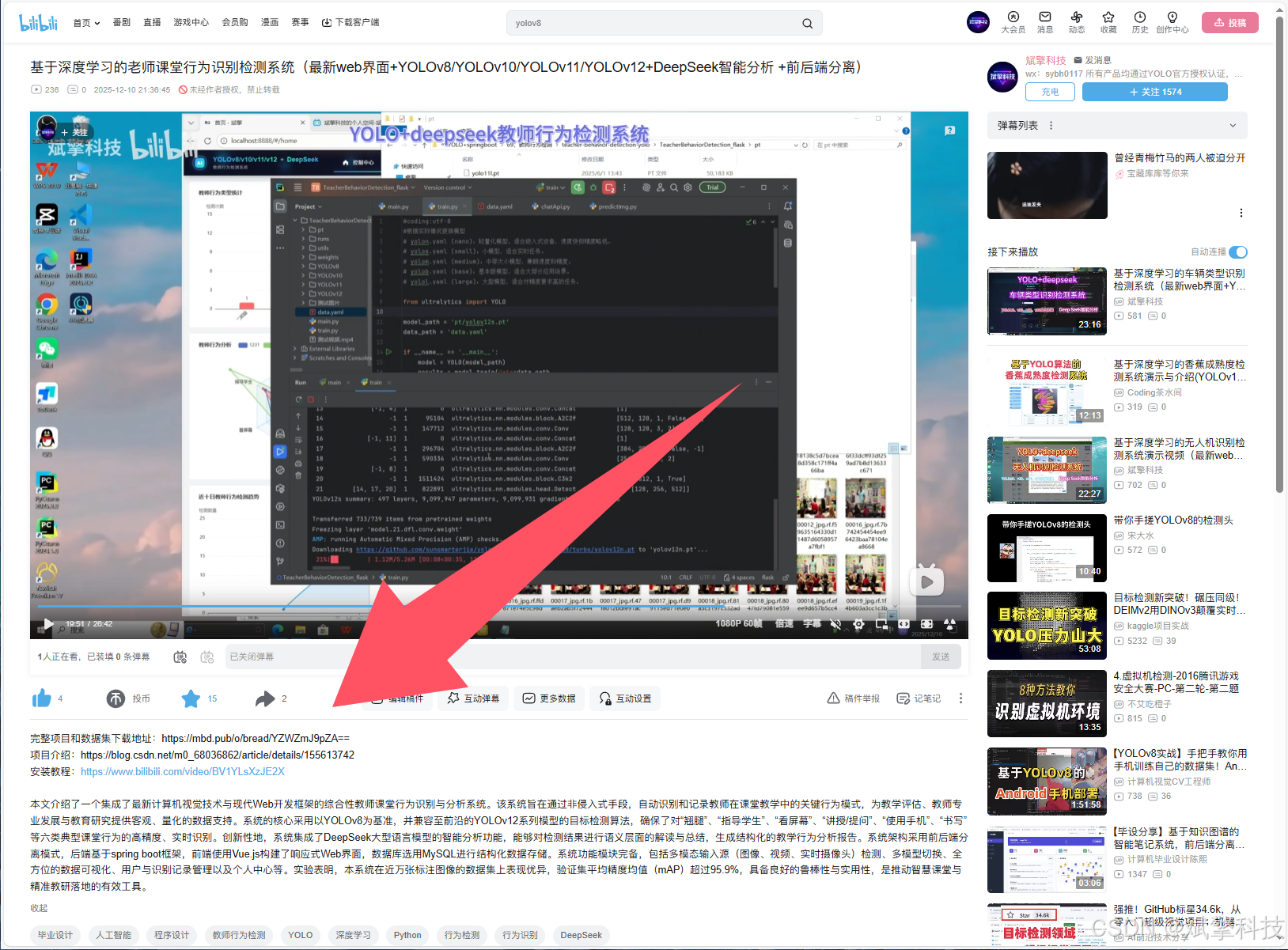
项目源码+数据集下载链接
完整代码在哔哩哔哩视频下方简介内获取:
基于深度学习的老师课堂行为识别检测系统(最新web界面+YOLOv8/YOLOv10/YOLOv11/YOLOv12+DeepSeek智能分析 +前后端分离)_哔哩哔哩_bilibili
https://www.bilibili.com/video/BV1rVmtBPE6V
项目安装教程
https://www.bilibili.com/video/BV1YLsXzJE2X/?spm_id_from=333.1387.homepage.video_card.click

AtomGit 是由开放原子开源基金会联合 CSDN 等生态伙伴共同推出的新一代开源与人工智能协作平台。平台坚持“开放、中立、公益”的理念,把代码托管、模型共享、数据集托管、智能体开发体验和算力服务整合在一起,为开发者提供从开发、训练到部署的一站式体验。
更多推荐

 0
0 0
0- 0



 已为社区贡献256条内容

所有评论(0)