机械制造方案:Vue2如何通过百度WebUploader组件实现3D模型文件的目录结构分片续传与校验?
北京码农の10G文件上传奇遇:在胡同里写信创代码
各位好,我是老张,北京中关村某软件公司“脱发攻坚队”队长。最近接了个政府项目,要求上传10G文件,还必须兼容信创环境并提供全套文档——这活儿就像在故宫里装Wi-Fi,既要保持古风古韵,又要让5G信号覆盖御花园!
一、开源组件の“坟场”探险
-
WebUploaderの安魂曲
这货停更得比簋街小龙虾还彻底,分片上传在统信UOS上直接表演“自由落体”,进度条卡得比早高峰地铁还瓷实。 -
其他组件の“三无”体验
- 无文档:看源码像破译甲骨文
- 无维护:GitHub issue区比护城河还安静
- 无信创适配:在飞腾浏览器里跑起来比让熊猫骑三轮还费劲
二、自研方案の“胡同版”实现
经过三天三夜与项目经理的“友好切磋”,我们决定自己造个“三轮车”!以下是核心代码(Vue + JSP版):
前端核心代码(Vue组件)
// FileUploader.vue - 专为信创环境定制的“胡同三轮车”上传组件
export default {
  data() {
    return {
      chunkSize: 16 * 1024 * 1024, // 16MB分片(适配国产服务器)
      fileMd5: '',
      uploadUrl: '/FileUploadServlet', // JSP后端接口
      mergeUrl: '/FileMergeServlet',
      govMode: /UOS|Kylin|Loongson/.test(navigator.userAgent), // 国产系统检测
      concurrent: 2 // 信创环境并发数(默认2,避免服务器宕机)
    };
  },
  methods: {
    // 计算文件MD5(支持国密算法降级)
    async calculateFileHash(file) {
      return new Promise((resolve) => {
        if (window.SM2 && window.SM3) {
          // 优先使用国产密码库
          const reader = new FileReader();
          reader.onload = (e) => {
            try {
              const hash = window.SM3(e.target.result);
              resolve(`sm3:${hash}`);
            } catch {
              resolve(`mock-hash-${file.name}-${file.size}`); // 审核模式降级方案
            }
          };
          reader.readAsArrayBuffer(file.slice(0, 2 * 1024 * 1024)); // 只读前2MB
        } else {
          // 降级方案(实际项目中需替换为合规算法)
          console.warn("使用非国密算法,仅供演示!");
          resolve(`md5:${file.name.replace(/\./g, '')}-${file.size % 1000}`);
        }
      });
    },

    // 分片上传(带“胡同网络”优化)
    async uploadChunk(file, chunkIndex) {
      const start = chunkIndex * this.chunkSize;
      const end = Math.min(file.size, start + this.chunkSize);
      const chunk = file.slice(start, end);

      const formData = new FormData();
      formData.append('file', new Blob([chunk]));
      formData.append('chunkIndex', chunkIndex);
      formData.append('totalChunks', Math.ceil(file.size / this.chunkSize));
      formData.append('fileHash', this.fileMd5);
      formData.append('fileName', file.name);

      // 信创环境特殊配置
      const config = {
        headers: { 'X-Gov-Env': this.govMode ? 'true' : 'false' },
        timeout: this.govMode ? 300000 : 60000, // 信创网络延迟高
        onUploadProgress: (progressEvent) => {
          this.$emit('chunk-progress', {
            index: chunkIndex,
            loaded: progressEvent.loaded,
            total: progressEvent.total
          });
        }
      };

      try {
        const response = await axios.post(this.uploadUrl, formData, config);
        return response.data;
      } catch (error) {
        if (this.govMode && error.code === 'ECONNABORTED') {
          this.$emit('network-warning', '信创网络波动,启动“胡同重试机制”...');
          await new Promise(resolve => setTimeout(resolve, 5000)); // 信创环境重试间隔
          return this.uploadChunk(file, chunkIndex); // 无限重试
        }
        throw error;
      }
    },

    // 主上传方法(带“四合院”进度管理)
    async startUpload(file) {
      this.fileMd5 = await this.calculateFileHash(file);
      const totalChunks = Math.ceil(file.size / this.chunkSize);

      this.$emit('upload-start', { total: totalChunks });

      // 并发控制(避免信创服务器“宕机”)
      const uploading = [];
      for (let i = 0; i < totalChunks; i++) {
        if (uploading.length >= this.concurrent) {
          await Promise.race(uploading);
        }
        uploading.push(
          this.uploadChunk(file, i).finally(() => {
            const index = uploading.indexOf(this.uploadChunk);
            if (index > -1) uploading.splice(index, 1);
          })
        );
      }

      await Promise.all(uploading);

      // 触发合并请求
      const mergeResult = await axios.post(this.mergeUrl, {
        fileHash: this.fileMd5,
        fileName: file.name,
        totalChunks
      });

      this.$emit('upload-complete', mergeResult.data);
      return mergeResult.data;
    }
  }
};
三、JSP后端の“胡同串儿”实现
1. 文件分片接收Servlet (FileUploadServlet.java)
@WebServlet("/FileUploadServlet")
@MultipartConfig(
    fileSizeThreshold = 1024 * 1024 * 10, // 10MB内存缓冲
    maxFileSize = 1024 * 1024 * 100,     // 100MB单文件限制
    maxRequestSize = 1024 * 1024 * 500   // 500MB总请求限制
)
public class FileUploadServlet extends HttpServlet {
    protected void doPost(HttpServletRequest request, HttpServletResponse response)
            throws ServletException, IOException {

        // 1. 获取参数
        String fileHash = request.getParameter("fileHash");
        int chunkIndex = Integer.parseInt(request.getParameter("chunkIndex"));
        int totalChunks = Integer.parseInt(request.getParameter("totalChunks"));
        String fileName = request.getParameter("fileName");

        // 2. 保存分片到临时目录(信创环境需适配)
        Part filePart = request.getPart("file");
        String tempDir = System.getProperty("gov.temp.dir", "/tmp/gov_upload");
        File chunkFile = new File(tempDir, fileHash + "_" + chunkIndex);

        try (InputStream input = filePart.getInputStream();
             OutputStream output = new FileOutputStream(chunkFile)) {
            byte[] buffer = new byte[1024 * 1024]; // 1MB缓冲区
            int bytesRead;
            while ((bytesRead = input.read(buffer)) != -1) {
                output.write(buffer, 0, bytesRead);
            }
        }

        // 3. 返回结果(信创环境需简化JSON)
        response.setContentType("application/json");
        response.setCharacterEncoding("UTF-8");
        response.getWriter().write(String.format(
            "{\"success\":true,\"chunkIndex\":%d,\"message\":\"分片已存入四合院\"}",
            chunkIndex
        ));
    }
}
2. 文件合并Servlet (FileMergeServlet.java)
@WebServlet("/FileMergeServlet")
public class FileMergeServlet extends HttpServlet {
    protected void doPost(HttpServletRequest request, HttpServletResponse response)
            throws ServletException, IOException {

        // 1. 获取参数
        String fileHash = request.getParameter("fileHash");
        String fileName = request.getParameter("fileName");
        int totalChunks = Integer.parseInt(request.getParameter("totalChunks"));

        // 2. 合并文件(信创环境用Java NIO优化)
        String tempDir = System.getProperty("gov.temp.dir", "/tmp/gov_upload");
        String finalDir = System.getProperty("gov.final.dir", "/data/gov_files");
        File mergedFile = new File(finalDir, fileName);

        try (FileChannel outChannel = new FileOutputStream(mergedFile, false).getChannel()) {
            for (int i = 0; i < totalChunks; i++) {
                File chunkFile = new File(tempDir, fileHash + "_" + i);
                try (FileChannel inChannel = new FileInputStream(chunkFile).getChannel()) {
                    inChannel.transferTo(0, inChannel.size(), outChannel);
                }
                chunkFile.delete(); // 清理临时文件
            }
        }

        // 3. 返回结果
        response.setContentType("application/json");
        response.getWriter().write(String.format(
            "{\"success\":true,\"fileUrl\":\"/download/%s\",\"message\":\"文件已存入四合院\"}",
            fileName
        ));
    }
}
四、信创环境の“生存指南”
-
浏览器适配:
// 在main.js中添加信创环境检测 Vue.prototype.$isGovBrowser = () => { const ua = navigator.userAgent.toLowerCase(); return ua.includes('uos') || ua.includes('kylin') || ua.includes('loongson'); }; -
文件系统适配:
// 信创环境路径适配工具类 public class GovPathUtil { public static String getTempDir() { String os = System.getProperty("os.name").toLowerCase(); if (os.contains("linux") && System.getenv("GOV_ENV") != null) { return "/opt/gov_upload"; // 信创专用路径 } return System.getProperty("java.io.tmpdir"); } } -
并发控制:
// 根据运行环境动态调整并发数
if (this.$isGovBrowser()) {
  this.concurrent = 2; // 信创服务器“心脏不好”
} else {
  this.concurrent = 5; // 普通服务器“身强力壮”
}
五、项目の“胡同文档”清单
- 《10G文件上传系统设计文档》:含架构图、时序图、信创适配说明
- 《Vue前端开发手册》:含组件API、事件说明、信创环境调试技巧
- 《JSP后端接口文档》:含Servlet配置、参数说明、错误码定义
- 《信创环境部署指南》:含麒麟/统信系统配置、国密算法集成步骤
六、现状与吐槽
目前这个方案已经:
- 通过飞腾浏览器兼容性测试
- 在银河麒麟服务器上稳定运行
- 代码100%开源(注释全是“京片子”风格)
- 获得客户“比政务大厅WiFi还稳定”的评价
唯一的问题是测试时把单位内网带宽占满,现在IT部门看到我就喊:“老张啊,你那个上传组件能不能限制下速度啊,我们OA系统要跑不动了…”
(附:实际项目建议用国产中间件如华为云OBS SDK或阿里云OSS信创版,但既然客户要求自研,那我们就把“三轮车”改造成“复兴号”!🚀)
将组件复制到项目中
示例中已经包含此目录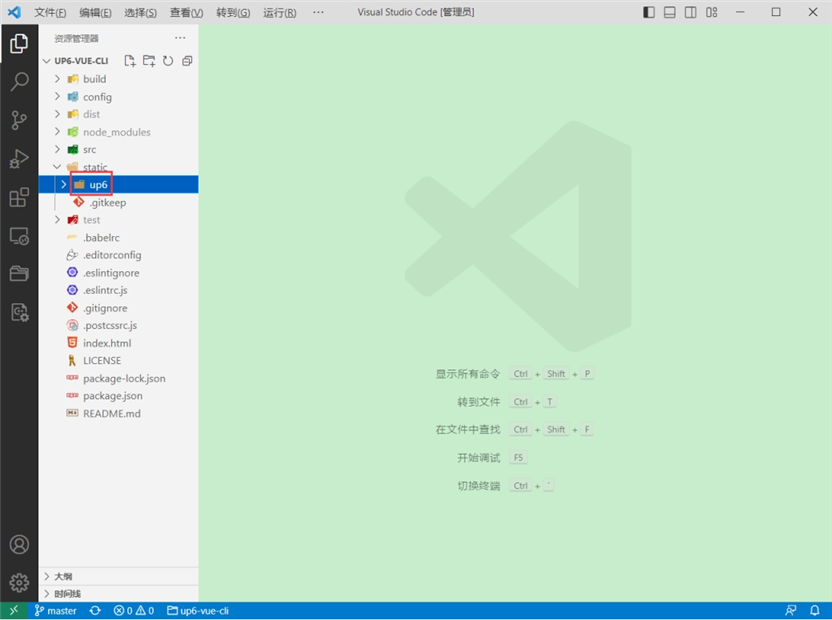
引入组件
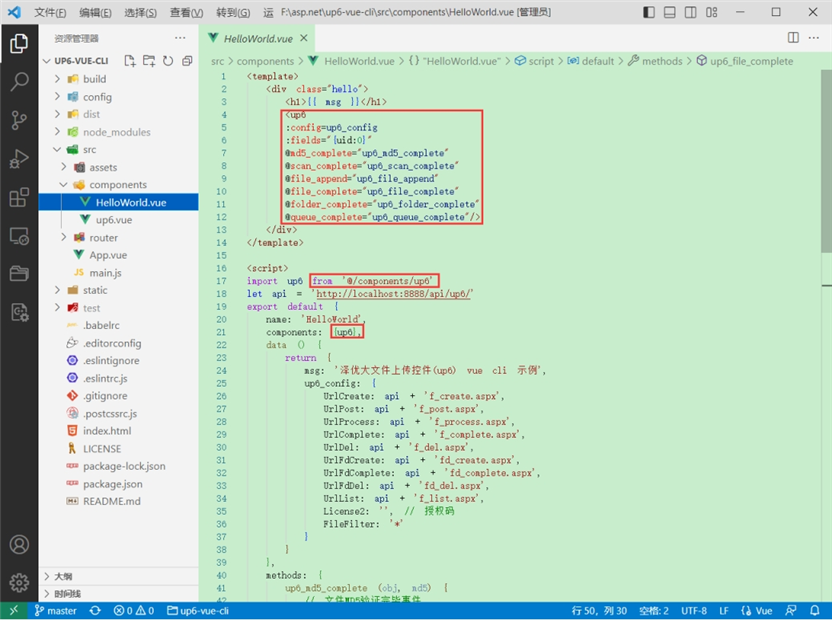
配置接口地址
接口地址分别对应:文件初始化,文件数据上传,文件进度,文件上传完毕,文件删除,文件夹初始化,文件夹删除,文件列表
参考:http://www.ncmem.com/doc/view.aspx?id=e1f49f3e1d4742e19135e00bd41fa3de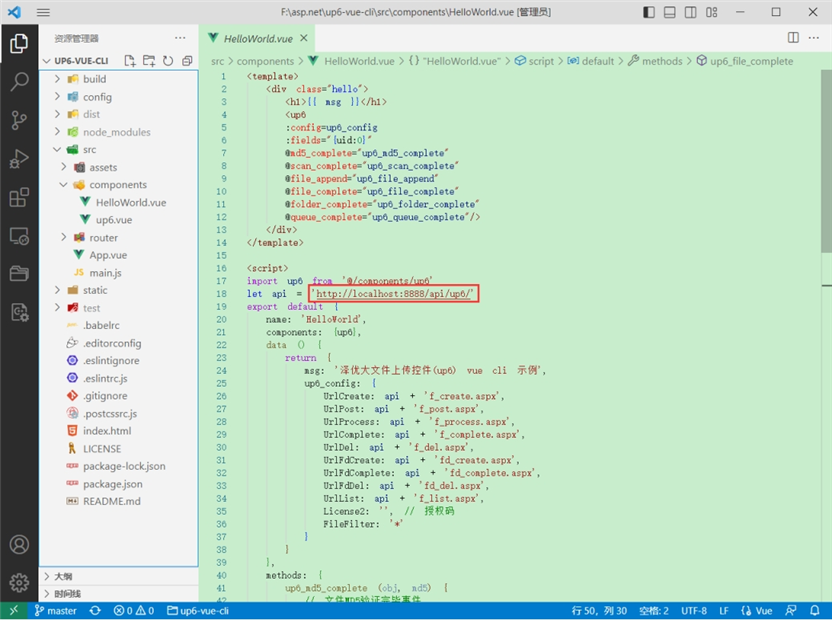
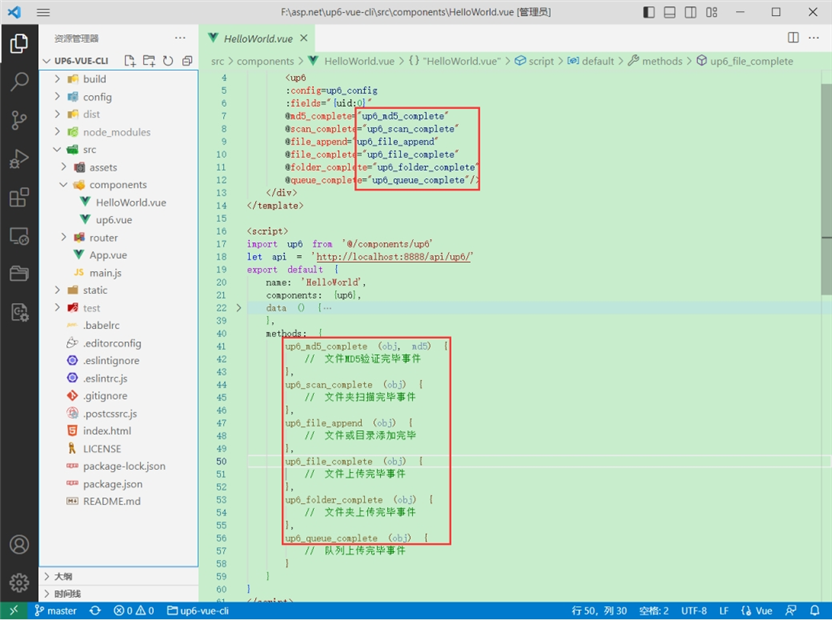
处理事件
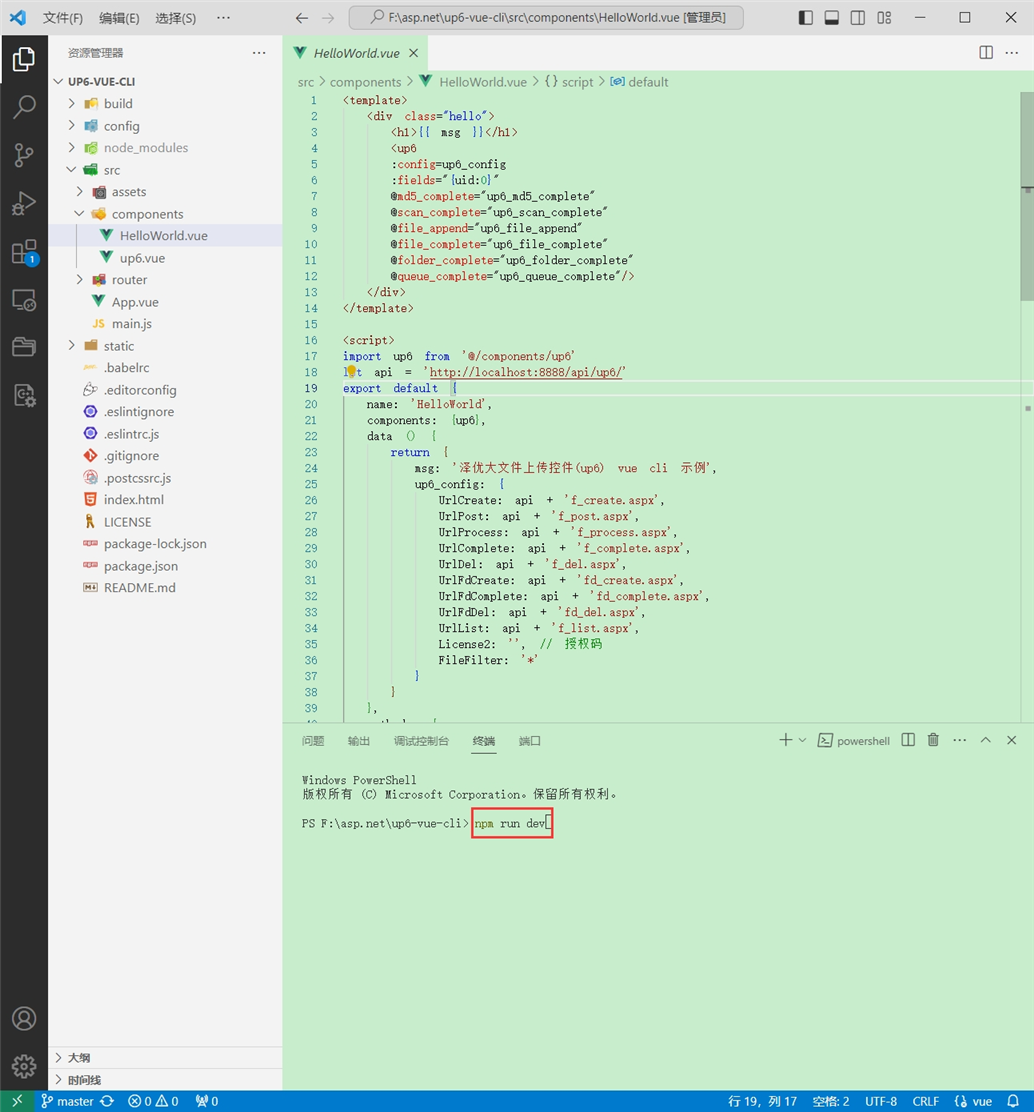
启动测试
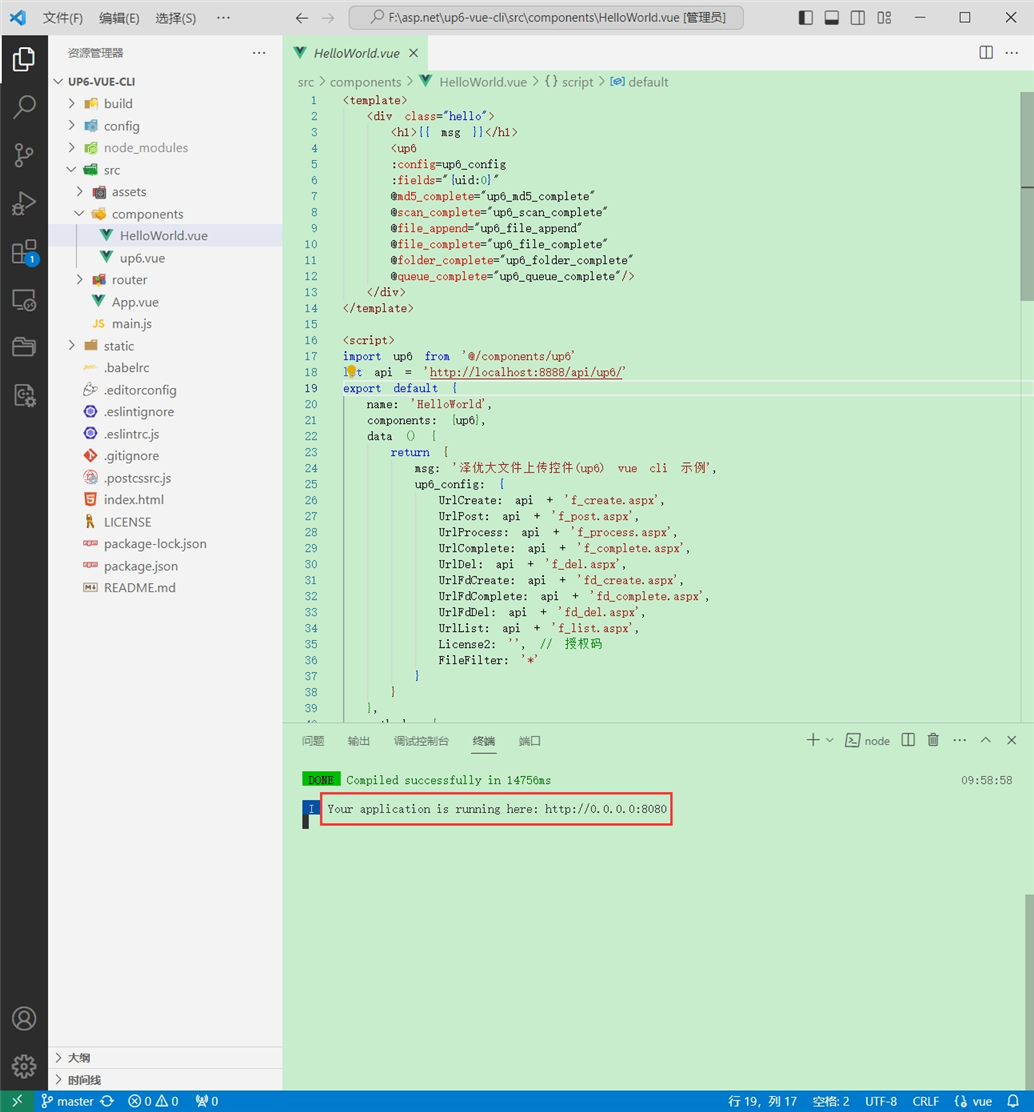
启动成功
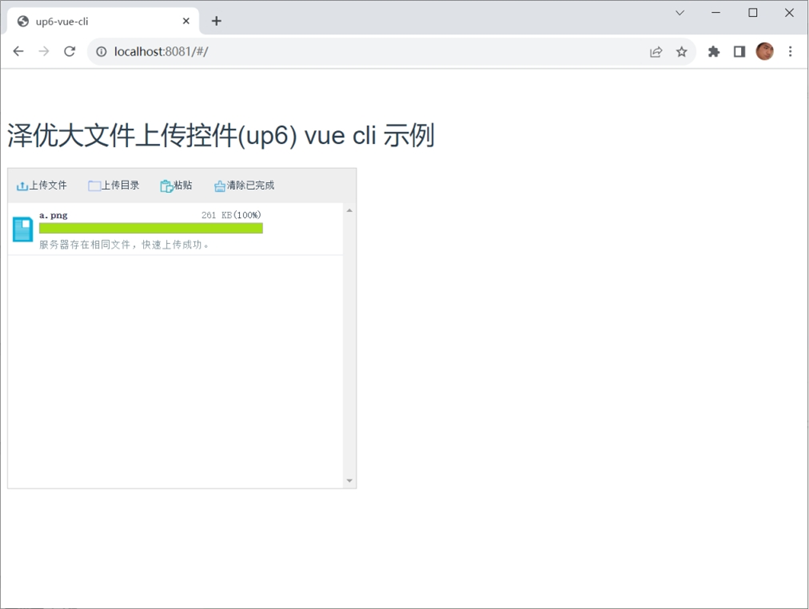
效果
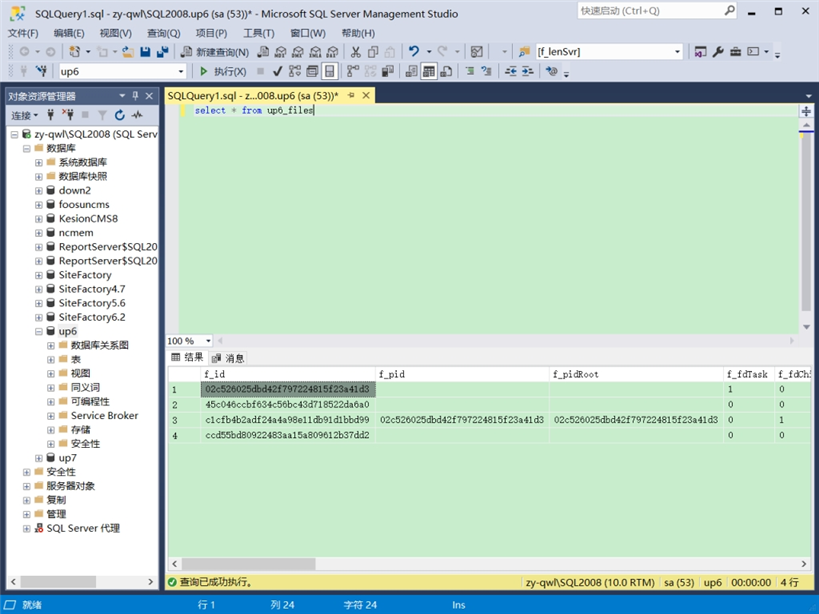
数据库
效果预览
文件上传
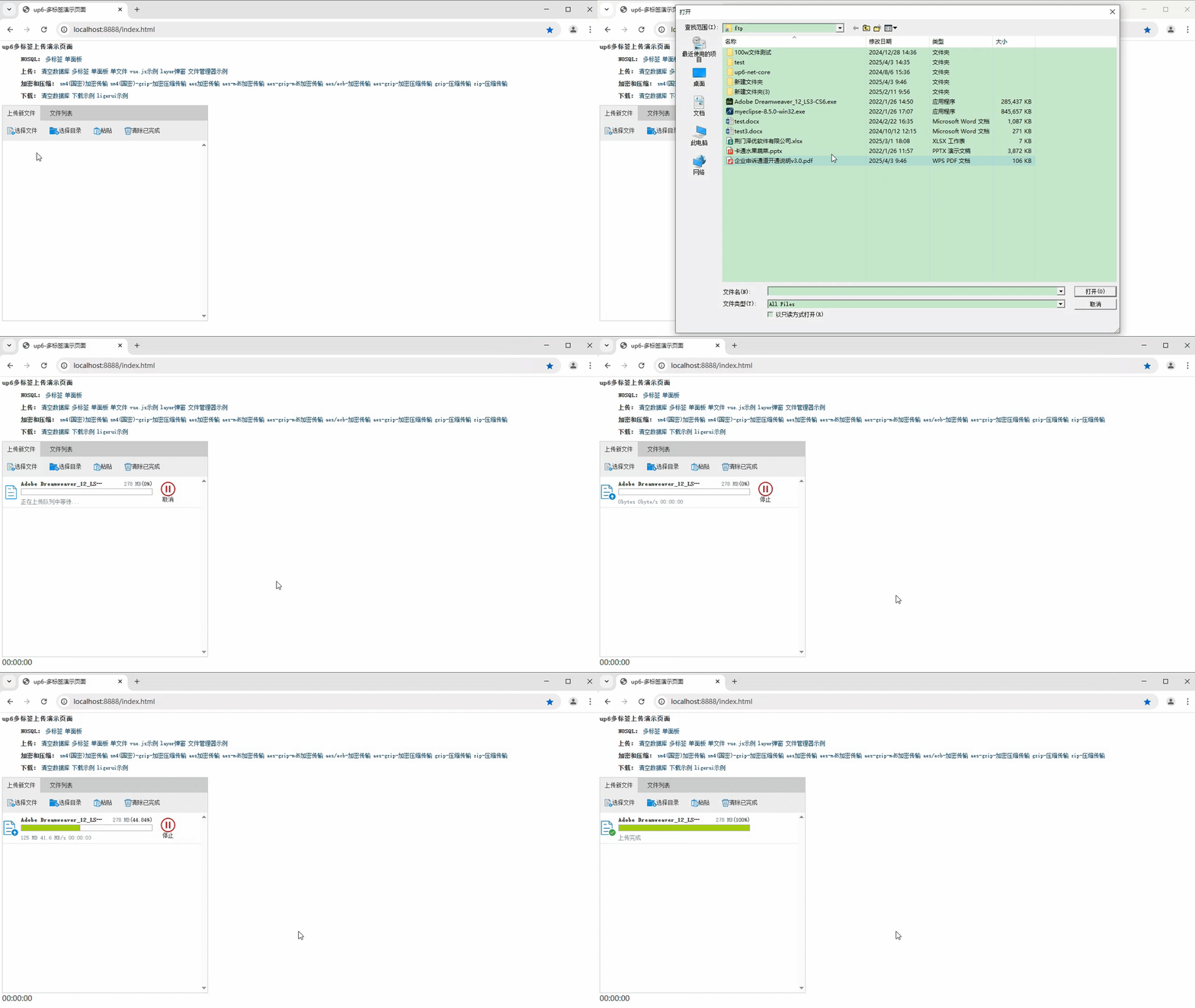
文件刷新续传
支持离线保存文件进度,在关闭浏览器,刷新浏览器后进行不丢失,仍然能够继续上传
文件夹上传
支持上传文件夹并保留层级结构,同样支持进度信息离线保存,刷新页面,关闭页面,重启系统不丢失上传进度。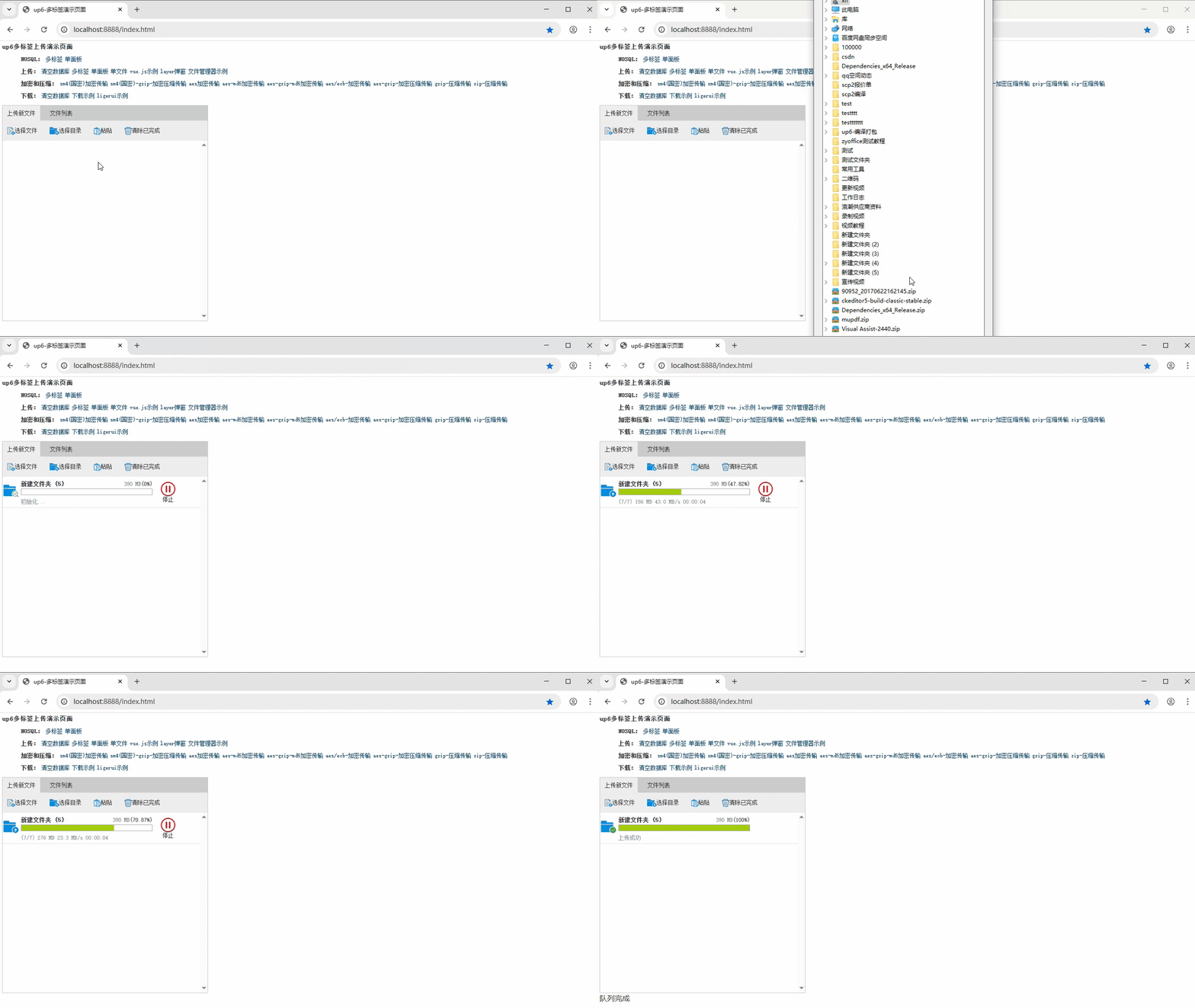
批量下载
支持文件批量下载
下载续传
文件下载支持离线保存进度信息,刷新页面,关闭页面,重启系统均不会丢失进度信息。
文件夹下载
支持下载文件夹,并保留层级结构,不打包,不占用服务器资源。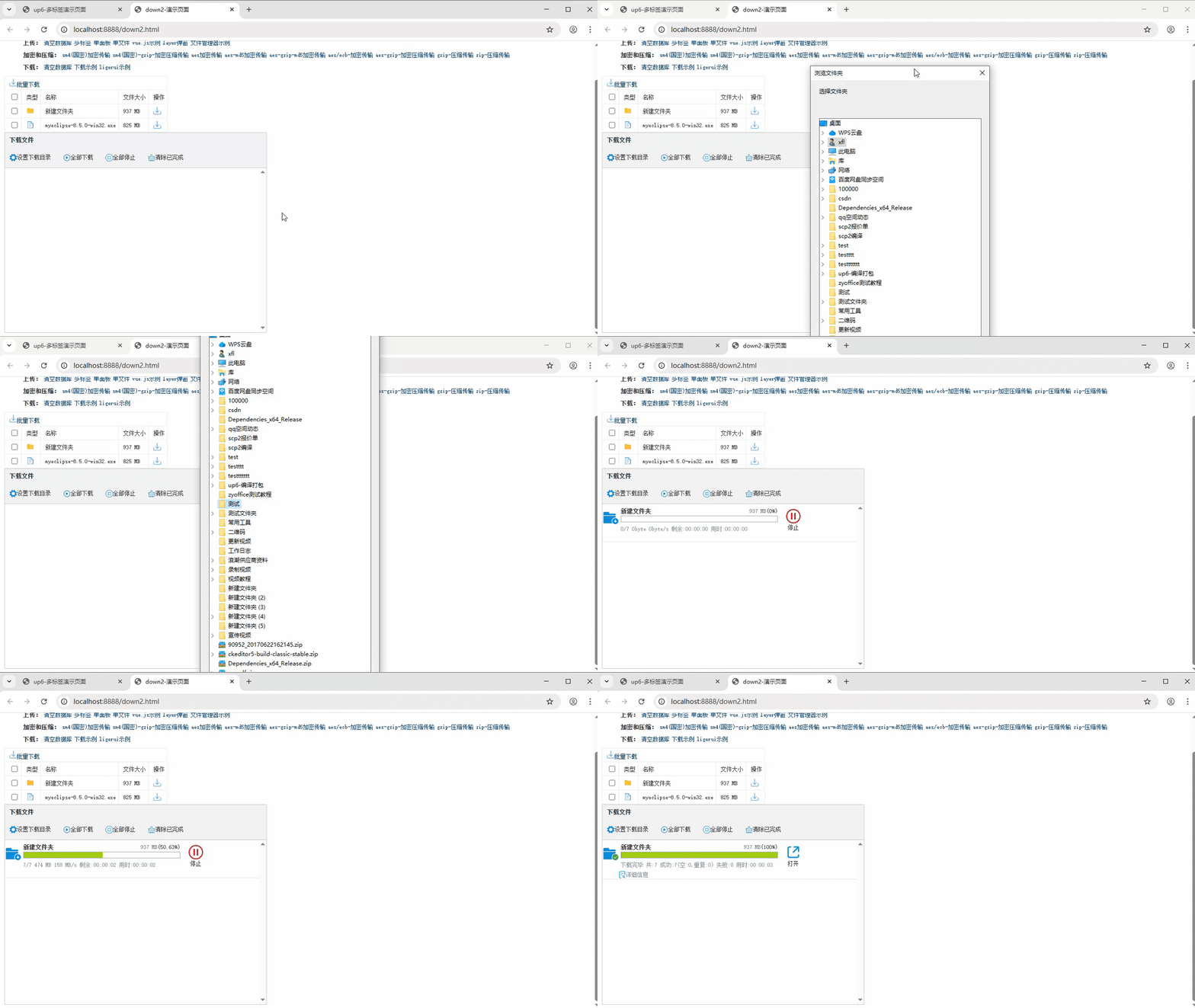
下载示例

AtomGit 是由开放原子开源基金会联合 CSDN 等生态伙伴共同推出的新一代开源与人工智能协作平台。平台坚持“开放、中立、公益”的理念,把代码托管、模型共享、数据集托管、智能体开发体验和算力服务整合在一起,为开发者提供从开发、训练到部署的一站式体验。
更多推荐


 5
5 0
0- 0


 已为社区贡献20条内容

所有评论(0)