项目1:学生课堂专注度分析系统-4人脸检测-insightface_package_SCRFD_10G
学生课堂专注度分析系统中人脸检测模块使用insightface的package测试人脸检测SCRFD_10G模型,代码免费下载链接如下:
https://download.csdn.net/download/hjm213/92716734
下载后务必将代码中的路径修改为自己的路径。
# 创建新的虚拟环境
conda create -n insightface_package python=3.10 -y
conda activate insightface_package
# 安装最新版 insightface 及其依赖
pip install -U insightface
可能提示安装Visual Studio Build Tools(推荐)
# 下载并安装Microsoft C++ Build Tools
# 访问:https://visualstudio.microsoft.com/visual-cpp-build-tools/
# 安装时选择:"使用C++的桌面开发" 工作负载
# 或者最小安装:勾选"MSVC v142 - VS 2019 C++ x64/x86 生成工具"和"Windows 10 SDK"
# 安装 onnxruntime(CPU 版本)
pip install onnxruntime
#安装 onnxruntime(GPU 版本)
#pip install onnxruntime-gpu
# 安装 cmake
pip install cmake
#添加excel打印
pip install pandas openpyxl
#查看是否有,有则卸载 headless 版本
pip uninstall opencv-python-headless -y
# 2. 安装完整版(带GUI)
pip install opencv-python==4.13.0.92
1 实现cpu、gpu环境,检测图像、视频及实时视频人脸,并保存标注信息;
2 使用insighace的package测试人脸检测SCRFD_10G模型;
3 输出设备、模型、推理时间信息,检测结果保存到excel;
以图像检测为例,核心代码:
# -------------------------- 核心配置项 --------------------------
# 检测模式:"camera"(摄像头) / "video"(视频) / "image"(图片)
DETECTION_MODE = "image"
# 各模式对应的文件路径
IMAGE_PATH = "test.jpg"  # 图片检测路径(支持jpg/png/bmp等)
VIDEO_PATH = "test.mp4"  # 视频检测路径
SAVE_RESULT = True  # 是否保存检测结果(图片/视频)
CONF_THRESHOLD = 0.5  # 人脸置信度阈值(过滤低精度结果)

# InsightFace 模型配置
MODEL_PATH = r"E:/FD_SCRFD/models/SCRFD-10GF.onnx"
INPUT_SIZE = (640, 640)  # 模型输入尺寸

# Excel 保存配置
SAVE_EXCEL = True  # 是否保存人脸信息到Excel
EXCEL_DIR = "insightface_results"  # Excel保存目录

# -------------------------- 全局变量仅占位 --------------------------
detector = None
device_name = None
ctx_id = None
excel_data = []  # 存储所有人脸信息


# -------------------------- 初始化环境 --------------------------
def init_environment():
    """
    初始化环境(仅运行时执行,避开PyCharm静态解析)
    包含:工作目录切换、设备判断、检测模型加载
    """
    global detector, device_name, ctx_id

    # 1. 切换工作目录
    os.chdir(r"E:/CSDN/Classroom_Focus_System_insightface_package_FD_SCRFD")

    # 2. 自动检测 GPU/CPU
    print(f"\n2. 硬件检测:")
    available_providers = ort.get_available_providers()
    print(f"   可用的执行提供程序: {available_providers}")

    if 'CUDAExecutionProvider' in available_providers:
        ctx_id = 0  # GPU
        device_name = "GPU (CUDA)"
        print(f"   ✓ 检测到 NVIDIA GPU,将使用 CUDA 加速")
    else:
        ctx_id = -1  # CPU
        device_name = "CPU"
        print(f"   ℹ 未检测到 GPU,将使用 CPU 运行")

    # 3. 创建Excel保存目录
    if SAVE_EXCEL:
        os.makedirs(EXCEL_DIR, exist_ok=True)

    # 4. 加载检测模型(核心高负载逻辑,仅运行时加载)
    if not os.path.exists(MODEL_PATH):
        print(f"❌ 错误:模型文件不存在 {MODEL_PATH}")
        return False

    detector = get_model(MODEL_PATH)
    detector.prepare(ctx_id=ctx_id, input_size=INPUT_SIZE)

    # 5. 打印环境信息
    print("=" * 60)
    print(f"工作目录:{os.getcwd()}")
    print(f"使用设备:{device_name}")
    print(f"检测模式:{DETECTION_MODE.upper()}")
    print(f"置信度阈值:{CONF_THRESHOLD}")
    print(f"模型路径:{os.path.basename(MODEL_PATH)}")
    print("=" * 60)

    return True


def _extract_face_info(bbox, kps, frame_idx=0, timestamp=None, inference_time=None):
    """提取人脸信息并返回字典"""
    info = {
        '时间戳': timestamp or datetime.now().strftime("%Y-%m-%d %H:%M:%S"),
        '帧序号': frame_idx,
        '人脸ID': 0,
        '位置_x1': int(bbox[0]),
        '位置_y1': int(bbox[1]),
        '位置_x2': int(bbox[2]),
        '位置_y2': int(bbox[3]),
        '置信度': round(float(bbox[4]), 4),
        '推理时间_ms': round(inference_time * 1000, 2) if inference_time else None,
        '关键点_左眼_x': int(kps[0][0]) if kps is not None else None,
        '关键点_左眼_y': int(kps[0][1]) if kps is not None else None,
        '关键点_右眼_x': int(kps[1][0]) if kps is not None else None,
        '关键点_右眼_y': int(kps[1][1]) if kps is not None else None,
        '关键点_鼻尖_x': int(kps[2][0]) if kps is not None else None,
        '关键点_鼻尖_y': int(kps[2][1]) if kps is not None else None,
        '关键点_左嘴角_x': int(kps[3][0]) if kps is not None else None,
        '关键点_左嘴角_y': int(kps[3][1]) if kps is not None else None,
        '关键点_右嘴角_x': int(kps[4][0]) if kps is not None else None,
        '关键点_右嘴角_y': int(kps[4][1]) if kps is not None else None,
    }
    return info


def _draw_detection(img, bboxes, kpss, inference_time=None):
    """在图像上绘制检测框和关键点"""
    annotated = img.copy()

    if bboxes is None or len(bboxes) == 0:
        return annotated

    for idx, (bbox, kps) in enumerate(zip(bboxes, kpss)):
        x1, y1, x2, y2 = bbox[:4].astype(int)
        score = bbox[4]

        # 绘制绿色检测框
        cv2.rectangle(annotated, (x1, y1), (x2, y2), (0, 255, 0), 2)

        # 绘制标签(置信度)
        label = f"ID:{idx + 1} {score:.2f}"
        cv2.putText(annotated, label, (x1, y1 - 10),
                    cv2.FONT_HERSHEY_SIMPLEX, 0.6, (0, 255, 0), 2)

        # 绘制红色关键点(前5个核心点)
        if kps is not None:
            for (x, y) in kps[:5]:
                cv2.circle(annotated, (int(x), int(y)), 3, (0, 0, 255), -1)

    # 如果有推理时间,显示在左上角
    if inference_time is not None:
        time_text = f"Inference: {inference_time * 1000:.1f}ms"
        cv2.putText(annotated, time_text, (10, 60),
                    cv2.FONT_HERSHEY_SIMPLEX, 0.6, (0, 255, 255), 2)

    return annotated


def _save_excel(source_path=None):
    """保存所有人脸信息到 Excel"""
    global excel_data
    if not SAVE_EXCEL or not excel_data:
        return

    timestamp = datetime.now().strftime("%Y%m%d_%H%M%S")
    source_name = os.path.splitext(os.path.basename(source_path or "camera"))[0]
    if (ctx_id == -1):  # CPU
        excel_path = os.path.join(EXCEL_DIR, f"faces_{source_name}_{timestamp}_cpu.xlsx")
    else:
        excel_path = os.path.join(EXCEL_DIR, f"faces_{source_name}_{timestamp}_gpu.xlsx")

    df = pd.DataFrame(excel_data)
    df.to_excel(excel_path, index=False, engine='openpyxl')
    print(f"📊 人脸信息已保存:{excel_path}(共 {len(excel_data)} 条记录)")
    excel_data = []  # 清空数据


def _detect_and_annotate(img, frame_idx=0, source_info="", timing=True):
    """
    核心检测函数:检测人脸、过滤、绘制标注、收集Excel数据
    返回:标注后的图像、检测到的人脸数量、人脸框列表、推理时间(秒)
    """
    global detector, excel_data

    # 1. 人脸检测(计时)
    start_time = time.time() if timing else 0
    bboxes, kpss = detector.detect(img)
    inference_time = time.time() - start_time if timing else None

    # 2. 过滤低置信度结果
    valid_faces = []
    valid_kps = []
    if bboxes is not None and len(bboxes) > 0:
        for bbox, kps in zip(bboxes, kpss):
            if bbox[4] >= CONF_THRESHOLD:
                valid_faces.append(bbox)
                valid_kps.append(kps)

    bboxes = np.array(valid_faces) if valid_faces else None
    kpss = np.array(valid_kps) if valid_kps else None
    face_count = len(valid_faces) if valid_faces else 0

    # 3. 绘制标注(显示推理时间)
    annotated_img = _draw_detection(img, bboxes, kpss, inference_time)

    # 4. 收集人脸信息到Excel
    if bboxes is not None and len(bboxes) > 0:
        for idx, (bbox, kps) in enumerate(zip(bboxes, kpss)):
            face_info = _extract_face_info(bbox, kps, frame_idx=frame_idx, inference_time=inference_time)
            face_info['人脸ID'] = idx + 1
            face_info['来源'] = source_info
            excel_data.append(face_info)

    return annotated_img, face_count, bboxes, inference_time


# -------------------------- 检测函数 --------------------------
def detect_image(image_path):
    """本地图片人脸检测"""
    global detector, device_name, excel_data

    # 1. 检查图片文件
    if not os.path.exists(image_path):
        print(f"❌ 错误:图片文件 {image_path} 不存在!")
        return

    # 2. 读取图片
    img = cv2.imread(image_path)
    if img is None:
        print(f"❌ 错误:无法读取图片 {image_path}(格式不支持/文件损坏)")
        return

    # 3. 人脸检测(计时)
    print(f"\n🔍 正在检测图片:{image_path}")
    print("-" * 60)

    annotated_img, face_count, bboxes, inference_time = _detect_and_annotate(
        img, frame_idx=0, source_info=image_path, timing=True
    )

    # 4. 添加检测信息文本
    info_text = f"Faces: {face_count} | Time: {inference_time:.3f}s ({inference_time * 1000:.1f}ms) | {device_name}"
    cv2.putText(annotated_img, info_text, (10, 30),
                cv2.FONT_HERSHEY_SIMPLEX, 0.7, (0, 255, 255), 2)

    # 5. 输出检测结果
    print(f"\n📊 检测结果:")
    print(f"   推理时间: {inference_time:.4f}s ({inference_time * 1000:.2f}ms)")
    print(f"   检测到人脸: {face_count} 个")

    if face_count > 0:
        for idx, bbox in enumerate(bboxes):
            print(f"   人脸 {idx + 1}: 置信度={bbox[4]:.4f}, "
                  f"位置=[{int(bbox[0])},{int(bbox[1])},{int(bbox[2])},{int(bbox[3])}]")
    else:
        print("   ❌ 未检测到任何人脸")

    # 6. 保存检测结果
    if SAVE_RESULT:
        save_path = f"output_{os.path.basename(image_path)}"
        cv2.imwrite(save_path, annotated_img)
        print(f"\n💾 标注图片已保存:{save_path}")

    # 7. 保存Excel
    _save_excel(image_path)

    # 8. 显示结果
    print("-" * 60)
    print(f"✅ 图片检测完成 | 总耗时:{inference_time:.3f}s | 人脸数:{face_count}")
    cv2.imshow('InsightFace Detection (Image)', annotated_img)
    print("\n💡 提示:按任意键关闭图片窗口...")
    cv2.waitKey(0)
    cv2.destroyAllWindows()
代码运行及excel保存截图:
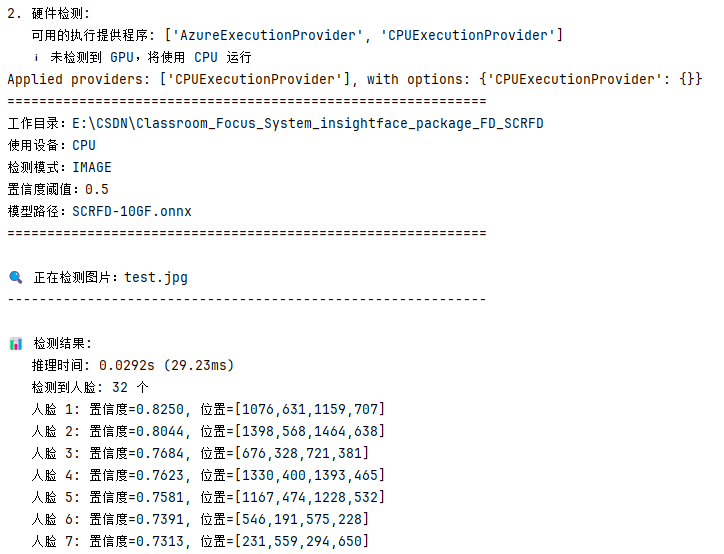
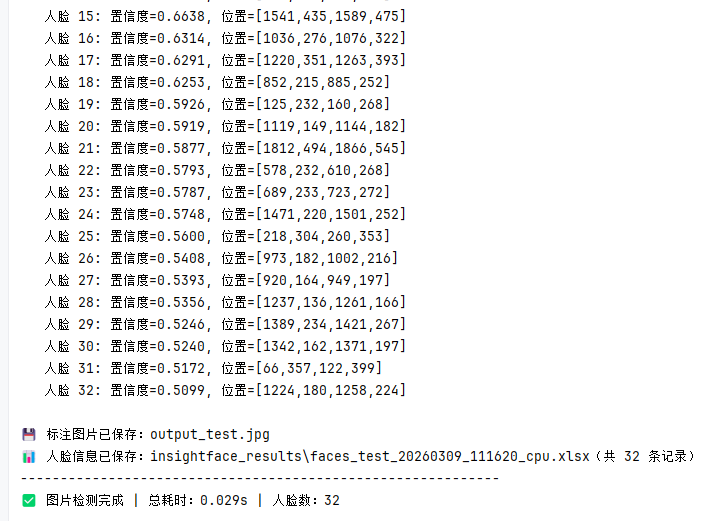
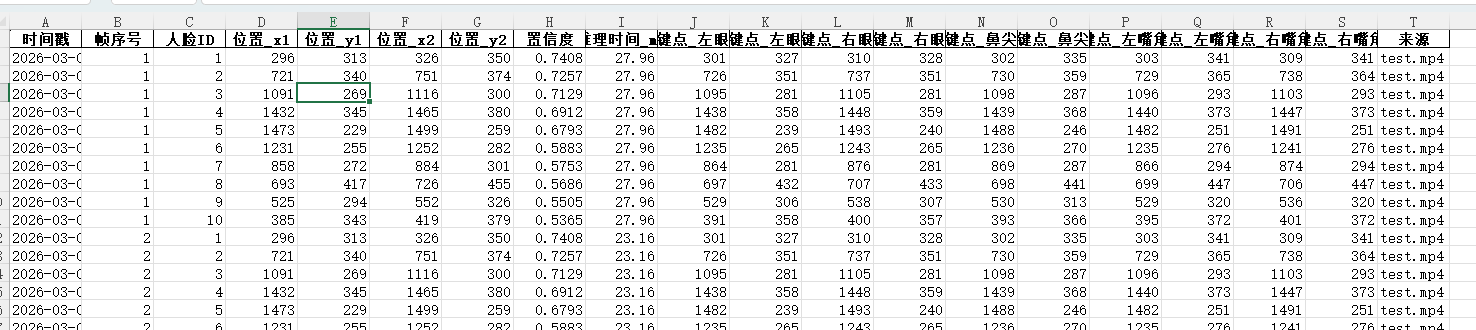
篇幅受限代码未完全展示,学生课堂专注度分析系统中人脸检测模块使用insightface的package测试人脸检测SCRFD模型代码免费下载链接如下:
https://download.csdn.net/download/hjm213/92716734
下载后务必将代码中的路径修改为自己的路径。

AtomGit 是由开放原子开源基金会联合 CSDN 等生态伙伴共同推出的新一代开源与人工智能协作平台。平台坚持“开放、中立、公益”的理念,把代码托管、模型共享、数据集托管、智能体开发体验和算力服务整合在一起,为开发者提供从开发、训练到部署的一站式体验。
更多推荐



 18
18 0
0- 0


 已为社区贡献3条内容

所有评论(0)