Openclaw 实践笔记
目录
说明
- 在我的香橙派上安装小龙虾,并在飞书上喊它为我做事情
- 模型切换
- 全流程测试
1 搭建Openclaw
1.1 预备工作
- 供应商模型及API Keys:
| 厂商/条项 | 百炼千问 | 智谱 | Kimi | 超算互联网 |
|---|---|---|---|---|
| 开放平台 | https://bailian.console.aliyun.com | https://open.bigmodel.cn | https://platform.moonshot.cn | https://www.scnet.cn/ui/mall/ |
| 模型 | qwen-turbo, qwen3.5-plus .... | glm-5 | kimi-k2.5 | MiniMax-M2.5 |
| Baseurl | https://dashscope.aliyuncs.com/compatible-mode/v1 | https://open.bigmodel.cn/api/paas/v4 | https://api.moonshot.cn/v1 | https://api.scnet.cn/api/llm/v1 |
| ApiKeys | -- | -- | -- | -- |
- Channel供应商
| 厂商/条项 | 飞书 | |
|---|---|---|
| 开放平台 | https://open.feishu.cn | |
| app id | 略,(一般为 cli_xxx, 平台里面建项目应用后获取) | |
| app secret | 略 |
- 系统配置
香橙派5B(8核8G+128TF卡),Ubuntu22.04
1.2 安装
注:用root登录,而不是其他用户登陆后用su,不然会安装服务失败,只能手动安装。
- 采用npm安装openclaw方式
注:安装channels时先略过不配置(目前安装有点小bug,会触发重复配置的错误),等装完系统后再通过chat交互界面来自动设置。
(https://docs.openclaw.ai/install#npm-pnpm)
1. Remove any existing Node.js installations (optional but recommended):
sudo apt purge nodejs npm -y
sudo apt autoremove -y

2. Install NVM (Node Version Manager):
sudo apt update
sudo apt install curl -y
curl -o- https://raw.githubusercontent.com/nvm-sh/nvm/v0.39.7/install.sh | bash

3. Activate NVM in your current session:
export NVM_DIR="$HOME/.nvm"
[ -s "$NVM_DIR/nvm.sh" ] && \. "$NVM_DIR/nvm.sh" # This loads nvm
[ -s "$NVM_DIR/bash_completion" ] && \. "$NVM_DIR/bash_completion" # This loads nvm bash_completion

4. Install Node.js v22 (or the latest version):
nvm install node
# Or to install a specific version, e.g., 22:
nvm install 22

npm install -g openclaw@latest
openclaw onboard --install-daemon

# 安装服务
systemctl start user@$(id -u)
systemctl --user daemon-reload
systemctl --user enable openclaw-gateway.service
systemctl --user start openclaw-gateway.service
- 局域网访问以及允许跨域
"bind": "lan",
"controlUi": {
      "allowedOrigins": [
        "http://172.16.1.20:18789",
        "http://localhost:18789",
        "http://127.0.0.1:18789"
      ],
      "allowInsecureAuth": true,
      "dangerouslyDisableDeviceAuth": true
安装完成后,管理后台可通过http://{ip}:18789/#token=xxx访问。
- 连接飞书
可在管理后台的聊天界面通过对话方式让小龙虾与你的飞书群连接,它会自动安装飞书扩展并让你提供对应的app id等信息帮助设置。
步骤:
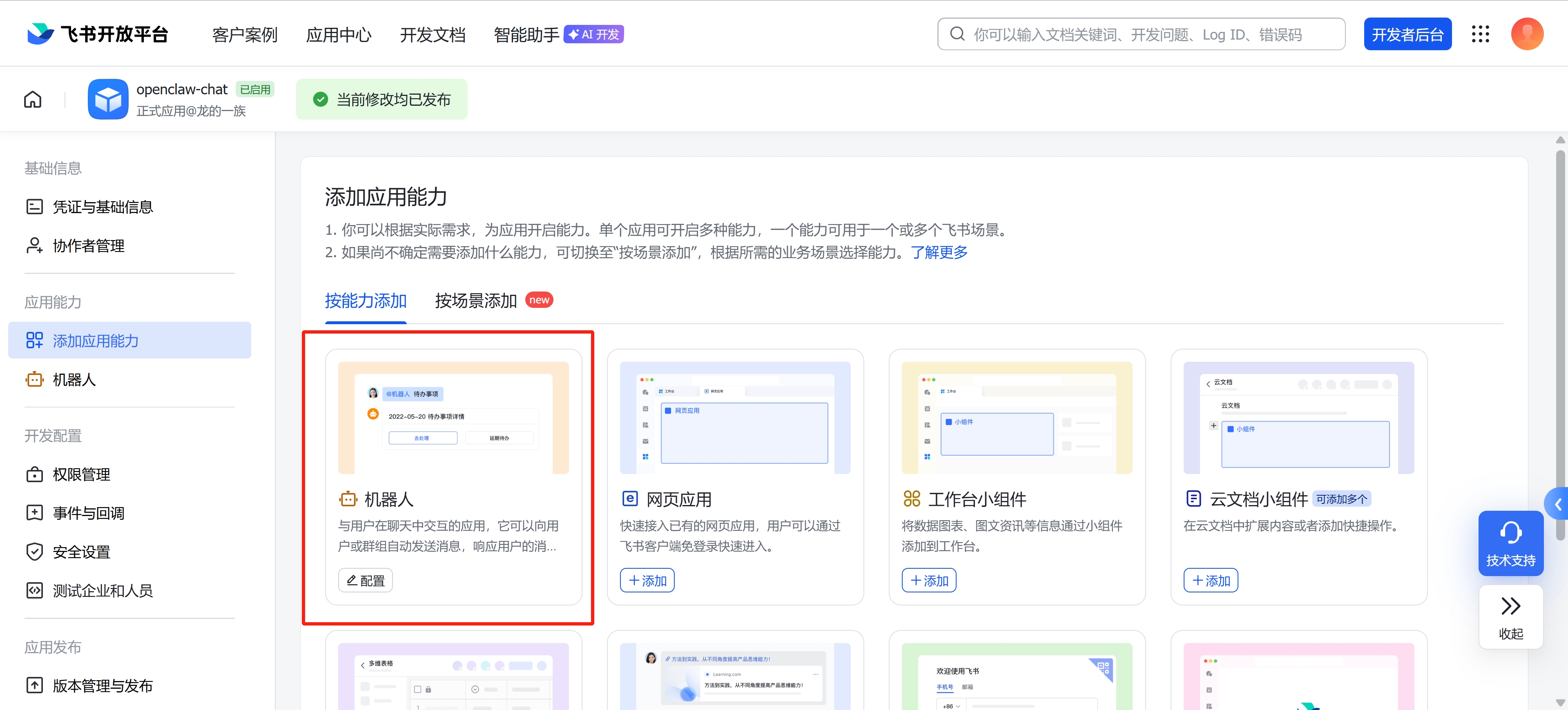
- 先在飞书建立应用openclaw-chat,然后添加机器人,添加相关权限
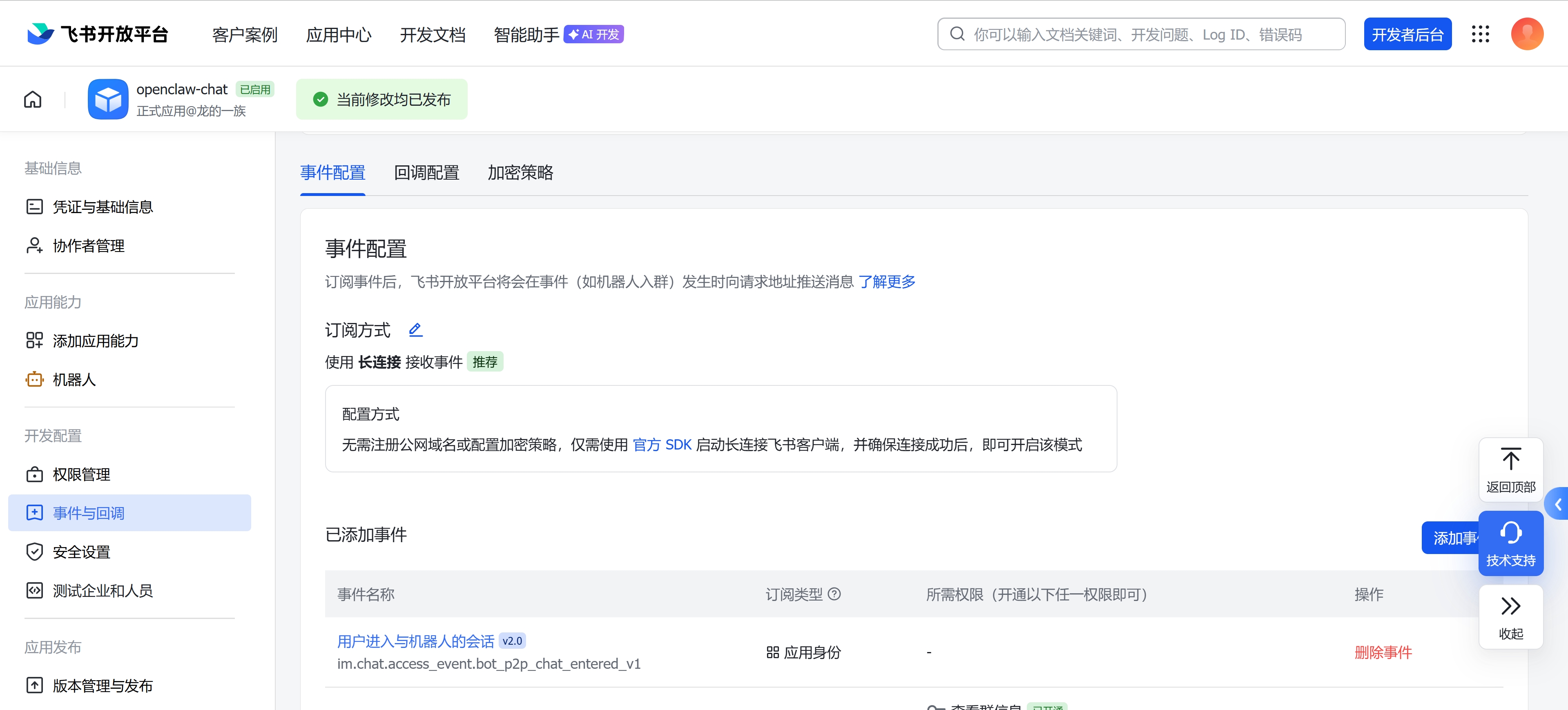
- 事件订阅方式采用长连接,添加相关事件
- 在飞书应用建群,在群配置-添加群机器人openclaw-chat
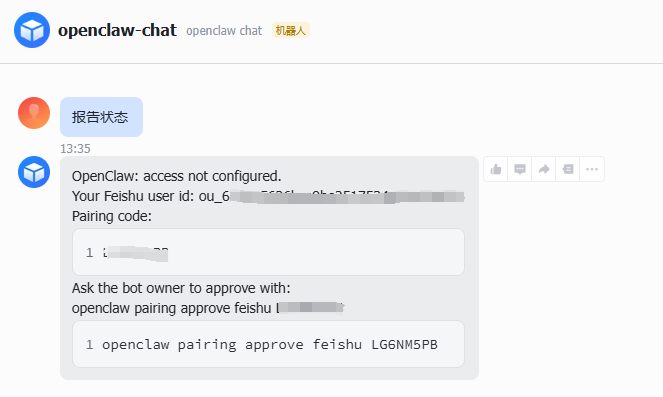
- 首次与飞书连接时,需要在飞书对话里获取验证码,然后在终端输入配对命令"openclaw pairing approve feishu {code}"审批通过,如图:
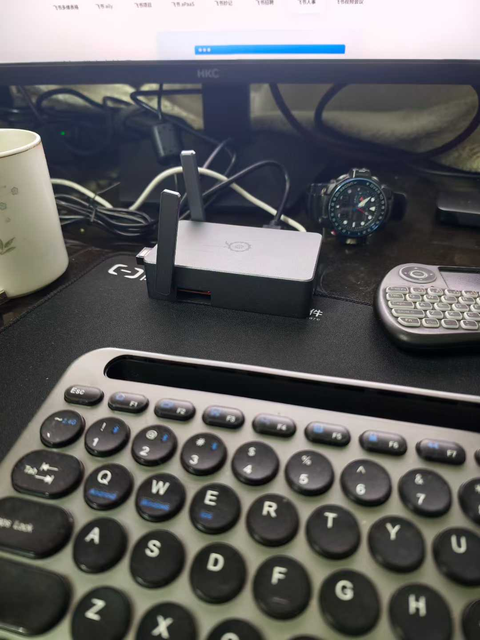
- 效果
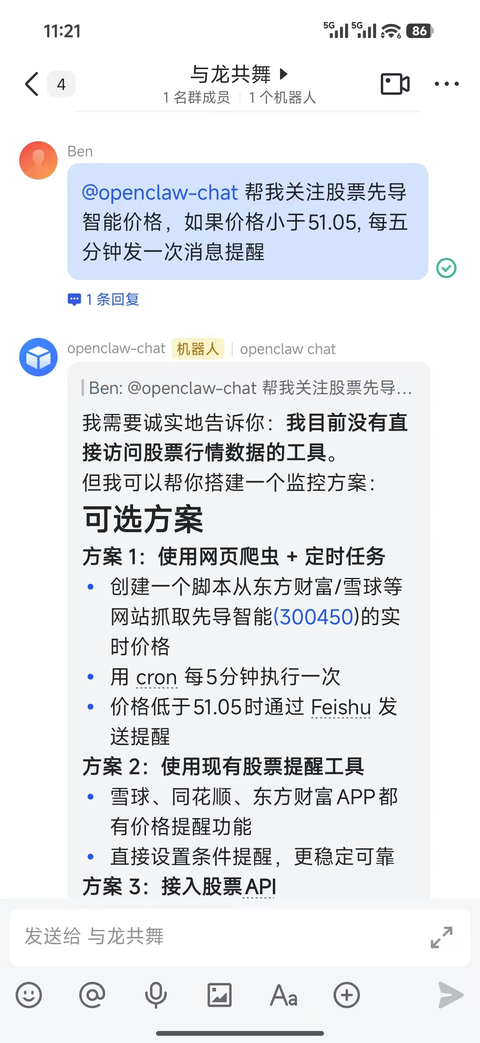
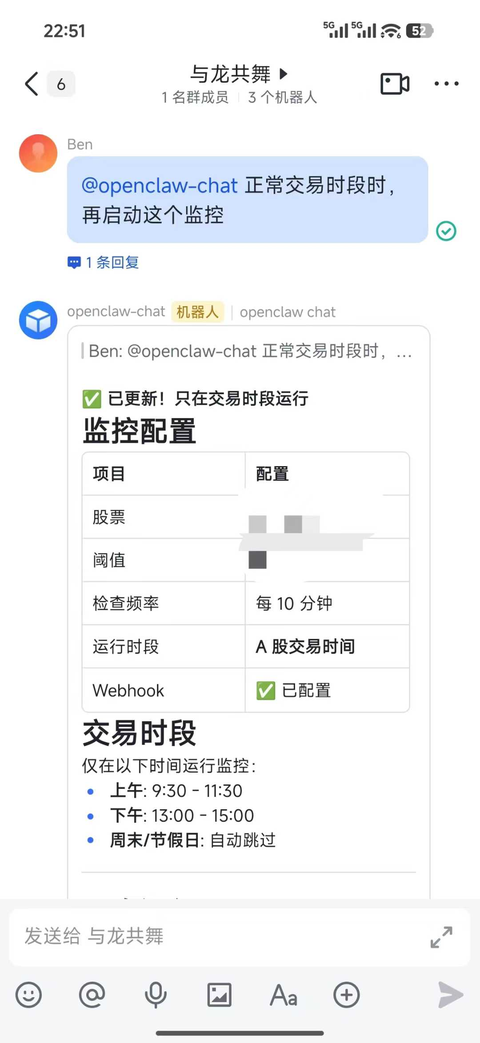
2 模型配置与切换
- 执行命令
openclaw models set <模型 ID>
注:有时修改后,有些会话所用的model并不能及时切换(即使restart gateway),这时候需要重启机器再观察。
- 配置主文件位于 ~/.openclaw/openclaw.json, 有两个需要定义的地方, 一个是models/provider节, 一个是agents/models节, 如:
# 配置模型供应详细
"models": {
    "providers": {
      "scnet": {
        "baseUrl": "https://api.scnet.cn/api/llm/v1",
        "apiKey": "...",
        "api": "openai-completions",
        "models": [
          {
            "id": "MiniMax-M2.5",
            "name": "MiniMax-M2.5",
            "api": "openai-completions",
            "reasoning": false,
            "input": [
              "text",
              "image"
            ],
            "cost": {
              "input": 0,
              "output": 0,
              "cacheRead": 0,
              "cacheWrite": 0
            },
            "contextWindow": 1000000,
            "maxTokens": 65536
          },
...
# 定义需要使用的models
"agents": {
    "defaults": {
      "model": {
        "primary": "bailian/qwen-turbo"
      },
      "models": {
        "scnet/MiniMax-M2.5": {},
        "scnet/DeepSeek-R1-0528": {},
        "qwen-portal/coder-model": {
          "alias": "qwen"
        },
- 完整参考:
{
  meta: {
    lastTouchedVersion: '2026.3.28',
    lastTouchedAt: '2026-04-01T03:36:31.935Z',
  },
  wizard: {
    lastRunAt: '2026-03-31T03:40:30.850Z',
    lastRunVersion: '2026.3.28',
    lastRunCommand: 'onboard',
    lastRunMode: 'local',
  },
  auth: {
    profiles: {
      'moonshot:default': {
        provider: 'moonshot',
        mode: 'api_key',
      },
    },
  },
  models: {
    mode: 'merge',
    providers: {
      moonshot: {
        baseUrl: 'https://api.moonshot.cn/v1',
        api: 'openai-completions',
        models: [
          {
            id: 'kimi-k2.5',
            name: 'Kimi K2.5',
            reasoning: false,
            input: [
              'text',
              'image',
            ],
            cost: {
              input: 0,
              output: 0,
              cacheRead: 0,
              cacheWrite: 0,
            },
            contextWindow: 262144,
            maxTokens: 262144,
          },
        ],
      },
      bailian: {
        baseUrl: 'https://dashscope.aliyuncs.com/compatible-mode/v1',
        apiKey: '__OPENCLAW_REDACTED__',
        api: 'openai-completions',
        models: [
          {
            id: 'qwen-turbo',
            name: 'qwen-turbo',
            api: 'openai-completions',
            reasoning: false,
            input: [
              'text',
              'image',
            ],
            cost: {
              input: 0,
              output: 0,
              cacheRead: 0,
              cacheWrite: 0,
            },
            contextWindow: 1000000,
            maxTokens: 65536,
          },
          {
            id: 'qwen3.5-plus',
            name: 'qwen3.5-plus',
            api: 'openai-completions',
            reasoning: false,
            input: [
              'text',
              'image',
            ],
            cost: {
              input: 0,
              output: 0,
              cacheRead: 0,
              cacheWrite: 0,
            },
            contextWindow: 1000000,
            maxTokens: 65536,
          },
          {
            id: 'qwen3-coder-next',
            name: 'qwen3-coder-next',
            api: 'openai-completions',
            reasoning: false,
            input: [
              'text',
            ],
            cost: {
              input: 0,
              output: 0,
              cacheRead: 0,
              cacheWrite: 0,
            },
            contextWindow: 262144,
            maxTokens: 65536,
          },
        ],
      },
      zhipu: {
        baseUrl: 'https://open.bigmodel.cn/api/paas/v4',
        apiKey: '__OPENCLAW_REDACTED__',
        api: 'openai-completions',
        models: [
          {
            id: 'glm-5',
            name: 'GLM 5.0',
            api: 'openai-completions',
            reasoning: true,
            input: [
              'text',
            ],
            cost: {
              input: 0,
              output: 0,
              cacheRead: 0,
              cacheWrite: 0,
            },
            contextWindow: 128000,
            maxTokens: 8192,
          },
          {
            id: 'glm-5-flash',
            name: 'GLM 5.0 Flash',
            api: 'openai-completions',
            reasoning: false,
            input: [
              'text',
            ],
            cost: {
              input: 0,
              output: 0,
              cacheRead: 0,
              cacheWrite: 0,
            },
            contextWindow: 128000,
            maxTokens: 8192,
          },
        ],
      },
      scnet: {
        baseUrl: 'https://api.scnet.cn/api/llm/v1',
        apiKey: '__OPENCLAW_REDACTED__',
        api: 'openai-completions',
        models: [
          {
            id: 'MiniMax-M2.5',
            name: 'MiniMax-M2.5',
            api: 'openai-completions',
            reasoning: false,
            input: [
              'text',
              'image',
            ],
            cost: {
              input: 0,
              output: 0,
              cacheRead: 0,
              cacheWrite: 0,
            },
            contextWindow: 128000,
            maxTokens: 65536,
          },
          {
            id: 'DeepSeek-R1-0528',
            name: 'DeepSeek-R1-0528',
            api: 'openai-completions',
            reasoning: false,
            input: [
              'text',
              'image',
            ],
            cost: {
              input: 0,
              output: 0,
              cacheRead: 0,
              cacheWrite: 0,
            },
            contextWindow: 128000,
            maxTokens: 65536,
          },
        ],
      },
    },
  },
  agents: {
    defaults: {
      model: {
        primary: 'moonshot/kimi-k2.5',
      },
      models: {
        'moonshot/kimi-k2.5': {
          alias: 'Kimi',
        },
        'bailian/qwen3.5-plus': {},
        'bailian/qwen-turbo': {},
        'bailian/qwen3-coder-next': {},
        'zhipu/glm-5': {},
        'zhipu/glm-5-flash': {},
        'scnet/MiniMax-M2.5': {
          alias: 'MiniMax',
        },
        'scnet/DeepSeek-R1-0528': {
          alias: 'DeepSeek-R1',
        },
      },
      workspace: '/root/.openclaw/workspace',
    },
  },
  tools: {
    profile: 'coding',
    web: {
      search: {
        provider: 'kimi',
      },
    },
  },
  commands: {
    native: 'auto',
    nativeSkills: 'auto',
    restart: true,
    ownerDisplay: 'raw',
  },
  session: {
    dmScope: 'per-channel-peer',
  },
  hooks: {
    internal: {
      enabled: true,
      entries: {
        'command-logger': {
          enabled: true,
        },
        'boot-md': {
          enabled: true,
        },
      },
    },
  },
  channels: {
    feishu: {
      enabled: true,
      appId: 'cli_a93bf33765f81bc0',
      appSecret: '__OPENCLAW_REDACTED__',
      connectionMode: 'websocket',
      domain: 'feishu',
      groupPolicy: 'open',
      webhookPath: '/feishu/events',
      dmPolicy: 'pairing',
      reactionNotifications: 'own',
      typingIndicator: true,
      resolveSenderNames: true,
    },
  },
  gateway: {
    port: 18789,
    mode: 'local',
    bind: 'lan',
    controlUi: {
      allowedOrigins: [
        'http://172.16.1.20:18789',
        'http://localhost:18789',
        'http://127.0.0.1:18789',
      ],
      allowInsecureAuth: true,
      dangerouslyDisableDeviceAuth: true,
    },
    auth: {
      mode: 'token',
      token: '__OPENCLAW_REDACTED__',
    },
    tailscale: {
      mode: 'off',
      resetOnExit: false,
    },
    nodes: {
      denyCommands: [
        'camera.snap',
        'camera.clip',
        'screen.record',
        'contacts.add',
        'calendar.add',
        'reminders.add',
        'sms.send',
      ],
    },
  },
  skills: {
    install: {
      nodeManager: 'pnpm',
    },
    entries: {
      'coding-agent': {
        enabled: true,
      },
      discord: {
        enabled: false,
      },
    },
  },
  plugins: {
    entries: {
      feishu: {
        enabled: true,
        config: {},
      },
    },
  },
}
3 Openclaw常用命令
# openclaw 医生
openclaw doctor

# 配置入口
openclaw configure --section gateway

# 重启入口网关
openclaw gateway restart

# 配置LLM访问验证
openclaw models auth login --provider qwen-portal

# 更改模型
openclaw models set <模型 ID>

# 查会话列表
openclaw sessions

# 查模型
openclaw models
openclaw models list

# channel或飞书相关
openclaw channels logs  # 实时查看日志,确认是否出现 "not in groupAllowFrom" 错误
openclaw config get channels.feishu.appId  # 获取飞书应用id
openclaw config get channels.feishu.appSecret
openclaw config get channels.feishu.groupPolicy
openclaw config get channels.feishu.groupAllowFrom
4 错误记录
- API rate limit reached. Please try again later.
A: 厂商模型API调用配额满
- "Gateway install failed: Error: systemctl enable failed: Failed to enable unit: Unit file openclaw-gateway.service does not exist."
A:
# 建立服务文件
cat > ~/.config/systemd/user/openclaw-gateway.service <<'EOF'
[Unit]
Description=OpenClaw Gateway
After=network-online.target
Wants=network-online.target

[Service]
Type=simple
ExecStart=/root/.nvm/versions/node/v25.8.2/bin/openclaw gateway --port 18789
Restart=always
RestartSec=5
Environment=HOME=/home/$USER
Environment=PATH=/home/$USER/.npm-global/bin:/usr/local/bin:/usr/bin:/bin

[Install]
WantedBy=default.target
EOF

# 安装服务
systemctl start user@$(id -u)
systemctl --user daemon-reload
systemctl --user enable openclaw-gateway.service
systemctl --user start openclaw-gateway.service
5 参考
- 官网 openclaw.ai
- 部署百炼千问 https://blog.csdn.net/qq_37212162/article/details/158890174

AtomGit 是由开放原子开源基金会联合 CSDN 等生态伙伴共同推出的新一代开源与人工智能协作平台。平台坚持“开放、中立、公益”的理念,把代码托管、模型共享、数据集托管、智能体开发体验和算力服务整合在一起,为开发者提供从开发、训练到部署的一站式体验。
更多推荐


 4
4 0
0- 0


 已为社区贡献1条内容

所有评论(0)