LangChain Deep Agents + Qwen 实战教程(非常详细),从零打造专属AI助手,收藏这一篇就够了!
一文掌握 Skills 开发,让你的 Agent 拥有超能力!
概述
想让你的 AI Agent 更智能、更强大?LangChain Deep Agents 是一个革命性的 AI Agent 框架,它能够:
✨ 自主规划:将复杂任务分解为可执行步骤
🧠 智能记忆:跨对话持久化上下文
🔧 灵活扩展:通过 Skills 机制无限扩展能力
🚀 开箱即用:完美适配阿里云 Qwen 系列模型
本文将手把手教你如何开发和使用 Skills(技能),让你的 Agent 从「能用」变成「好用」!
一、什么是 Skills?
Skills 是一种扩展 Deep Agent 能力的机制,它允许你将复杂的指令、上下文和资源打包成可复用的模块。
Skills 的组成部分
一个完整的 Skill 包含以下内容:
SKILL.md文件:包含技能的指令和元数据(必需)- 附加脚本:如 Python 脚本等(可选)
- 参考文档:如 API 文档、使用说明等(可选)
- 资源文件:如模板、配置文件等(可选)
Skills 目录结构示例
skills/├── langgraph-docs│ └── SKILL.md└── arxiv_search ├── SKILL.md └── arxiv_search.py # 用于搜索 arXiv 的代码
二、SKILL.md 文件格式
SKILL.md 文件是 Skill 的核心,它使用 YAML frontmatter 定义元数据,后面跟随 Markdown 格式的指令内容。
基础格式
---name: skill-namedescription: 技能描述,用于匹配用户请求---# 技能名称## Overview技能概述## Instructions详细的执行指令
完整示例
---name: langgraph-docsdescription: Use this skill for requests related to LangGraph in order to fetch relevant documentation to provide accurate, up-to-date guidance.license: MITcompatibility: Requires internet access for fetching documentation URLsmetadata: author: langchain version: "1.0" allowed-tools: fetch_url---# langgraph-docs## OverviewThis skill explains how to access LangGraph Python documentation to help answer questions and guide implementation.## Instructions### 1. Fetch the documentation indexUse the fetch_url tool to read the following URL:https://docs.langchain.com/llms.txtThis provides a structured list of all available documentation with descriptions.### 2. Select relevant documentationBased on the question, identify 2-4 most relevant documentation URLs from the index. Prioritize:- Specific how-to guides for implementation questions- Core concept pages for understanding questions- Tutorials for end-to-end examples- Reference docs for API details### 3. Fetch selected documentationUse the fetch_url tool to read the selected documentation URLs.### 4. Provide accurate guidanceAfter reading the documentation, complete the user's request.
元数据字段说明
| 字段 | 说明 | 是否必需 |
|---|---|---|
name |
技能名称,用于标识 | 是 |
description |
技能描述,Agent 用于匹配用户请求(最大 1024 字符) | 是 |
license |
许可证信息 | 否 |
compatibility |
兼容性要求说明 | 否 |
metadata |
自定义元数据(如 author、version、allowed-tools 等) | 否 |
限制条件
description字段超过 1024 字符会被截断SKILL.md文件大小不能超过 10 MB,超过会被跳过
三、Skills 的工作原理
Agent 使用 Skills 的流程如下:
- 匹配(Match):当用户请求到达时,Agent 检查是否有 Skill 的
description与任务匹配 - 读取(Read):如果匹配成功,Agent 读取完整的
SKILL.md文件 - 执行(Execute):Agent 按照 Skill 中的指令执行,并根据需要访问支持文件(脚本、模板、参考文档等)
四、在代码中使用 Skills
环境变量配置(使用阿里云 Qwen 模型):
export OPENAI_API_KEY="your-dashscope-api-key"export OPENAI_API_BASE="https://dashscope.aliyuncs.com/compatible-mode/v1"
import osfrom deepagents import create_deep_agentfrom langgraph.checkpoint.memory import MemorySaverfrom deepagents.backends.filesystem import FilesystemBackend# 配置阿里云 DashScope API(如果未设置环境变量)os.environ.setdefault("OPENAI_API_KEY", "your-dashscope-api-key")os.environ.setdefault("OPENAI_API_BASE", "https://dashscope.aliyuncs.com/compatible-mode/v1")# Checkpointer 是 human-in-the-loop 所必需的checkpointer = MemorySaver()# 使用 FilesystemBackend,Skills 需要存放在本地磁盘agent = create_deep_agent( model="openai:qwen3-max", # 使用阿里云 Qwen 模型 backend=FilesystemBackend(root_dir="/Users/user/project"), skills=["/Users/user/project/skills/"], interrupt_on={ "write_file": True, # 默认:approve, edit, reject "read_file": False, # 无需中断 "edit_file": True # 默认:approve, edit, reject }, checkpointer=checkpointer, # 必需!)result = agent.invoke( {"messages": [{"role": "user", "content": "What is langgraph?"}]}, config={"configurable": {"thread_id": "12345"}},)print(result)
使用说明:使用 FilesystemBackend 时,Skills 从本地磁盘相对于 root_dir 的路径加载,需要确保 SKILL.md 文件已存在于指定目录。
五、Skills 优先级
当在 skills 参数中指定多个路径时,后加载的 Skill 优先级更高:
# 如果两个路径都包含名为 "web-search" 的 Skill,# 来自 "/skills/project/" 的版本将生效(最后加载)agent = create_deep_agent( skills=["/skills/user/", "/skills/project/"], ...)
CLI 模式下的默认搜索顺序
[ "<user-home>/.deepagents/{agent}/skills/", "<user-home>/.agents/skills/", "<project-root>/.deepagents/skills/", "<project-root>/.agents/skills/",]
六、子代理(Subagents)中的 Skills
通用子代理
通用子代理会自动继承主 Agent 的 Skills,无需额外配置。
自定义子代理
自定义子代理不会继承主 Agent 的 Skills,需要单独指定:
from deepagents import create_deep_agent# 定义自定义子代理research_subagent = { "name": "researcher", "description": "Research assistant with specialized skills", "system_prompt": "You are a researcher.", "tools": [web_search], "skills": ["/skills/research/", "/skills/web-search/"], # 子代理专属 Skills}agent = create_deep_agent( model="openai:qwen3-max", # 使用阿里云 Qwen 模型 skills=["/skills/main/"], # 主 Agent 和通用子代理使用这些 Skills subagents=[research_subagent], # 研究员子代理只使用自己的 Skills)
七、Skills vs. Memory
| 特性 | Skills | Memory (AGENTS.md) |
|---|---|---|
| 用途 | 扩展能力、提供指令 | 存储偏好、记忆 |
| 触发方式 | 基于 description 匹配 | 持久化存储 |
| 内容类型 | 指令、脚本、模板 | 用户偏好、项目知识 |
八、何时使用 Skills vs. Tools
使用 Skills 的场景
- 需要大量上下文信息,以减少 system prompt 中的 token 数量
- 需要将多个能力打包成更大的操作,并提供超出单个工具描述的额外上下文
- 需要提供详细的分步指令
使用 Tools 的场景
- Agent 无法访问文件系统
- 只需要简单的函数调用
- 不需要复杂的上下文或指令
九、快速开始示例
安装依赖
pip install deepagents tavily-python
设置 API Keys
export OPENAI_API_KEY="your-dashscope-api-key"export OPENAI_API_BASE="https://dashscope.aliyuncs.com/compatible-mode/v1"export TAVILY_API_KEY="your-tavily-api-key"
完整代码示例
import osfrom typing import Literalfrom tavily import TavilyClientfrom deepagents import create_deep_agentfrom langgraph.checkpoint.memory import MemorySaverfrom deepagents.backends.filesystem import FilesystemBackend# 配置阿里云 DashScope API(如果未设置环境变量)os.environ.setdefault("OPENAI_API_KEY", "your-dashscope-api-key")os.environ.setdefault("OPENAI_API_BASE", "https://dashscope.aliyuncs.com/compatible-mode/v1")# 创建搜索工具tavily_client = TavilyClient(api_key=os.environ["TAVILY_API_KEY"])def internet_search( query: str, max_results: int = 5, topic: Literal["general", "news", "finance"] = "general", include_raw_content: bool = False,): """Run a web search""" return tavily_client.search( query, max_results=max_results, include_raw_content=include_raw_content, topic=topic, )# 定义 system promptresearch_instructions = """You are an expert researcher. Your job is to conduct thorough research and then write a polished report.You have access to an internet search tool as your primary means of gathering information.## `internet_search`Use this to run an internet search for a given query. You can specify the max number of results to return, the topic, and whether raw content should be included."""# Checkpointer 用于支持 human-in-the-loopcheckpointer = MemorySaver()# 创建 Deep Agent(带 Skills 支持)agent = create_deep_agent( model="openai:qwen3-max", # 使用阿里云 Qwen 模型 tools=[internet_search], system_prompt=research_instructions, backend=FilesystemBackend(root_dir="./project"), # 使用本地文件系统 skills=["./project/skills/"], # 指定 你自己的 Skills 目录 checkpointer=checkpointer,)# 运行 Agentresult = agent.invoke( {"messages": [{"role": "user", "content": "What is langgraph?"}]}, config={"configurable": {"thread_id": "12345"}},)# 打印结果print(result["messages"][-1].content)
说明:
- 使用
FilesystemBackend从本地文件系统加载 Skills - Skills 需要存放在
./project/skills/目录下 - 每个 Skill 是一个子目录,包含
SKILL.md文件 - 例如:
./project/skills/langgraph-docs/SKILL.md
十、Deep Agent 的核心能力
| 能力 | 说明 |
|---|---|
| 规划与任务分解 | 使用 write_todos 工具将复杂任务分解为可管理的步骤 |
| 上下文管理 | 通过 ls、read_file、write_file、edit_file 等工具管理大量上下文 |
| 可插拔后端 | 支持内存状态、本地磁盘、持久化存储、沙箱或自定义后端 |
| 子代理生成 | 使用 task 工具将复杂子任务委派给专门的子代理 |
| 长期记忆 | 通过 Memory Store 在对话和线程之间持久化记忆 |
十一、支持的模型
Deep Agents 支持多种 LLM 提供商,推荐使用阿里云 Qwen 系列模型(性价比高、中文友好):
| 提供商 | 模型示例 | 推荐度 |
|---|---|---|
| 阿里云 DashScope | openai:qwen3-max openai:qwen-turbo openai:qwen-plus |
⭐⭐⭐⭐⭐ |
| Anthropic | anthropic:claude-sonnet-4-6 |
⭐⭐⭐⭐ |
| OpenAI | openai:gpt-4o |
⭐⭐⭐⭐ |
google_genai:gemini-3.1-pro-preview |
⭐⭐⭐ | |
| Fireworks | fireworks:accounts/fireworks/models/qwen3p5-397b-a17b |
⭐⭐⭐ |
| Ollama | ollama:qwen2.5 |
⭐⭐⭐ |
配置阿里云 Qwen 模型:
export OPENAI_API_KEY="your-dashscope-api-key"export OPENAI_API_BASE="https://dashscope.aliyuncs.com/compatible-mode/v1"
学AI大模型的正确顺序,千万不要搞错了
🤔2026年AI风口已来!各行各业的AI渗透肉眼可见,超多公司要么转型做AI相关产品,要么高薪挖AI技术人才,机遇直接摆在眼前!
有往AI方向发展,或者本身有后端编程基础的朋友,直接冲AI大模型应用开发转岗超合适!
就算暂时不打算转岗,了解大模型、RAG、Prompt、Agent这些热门概念,能上手做简单项目,也绝对是求职加分王🔋
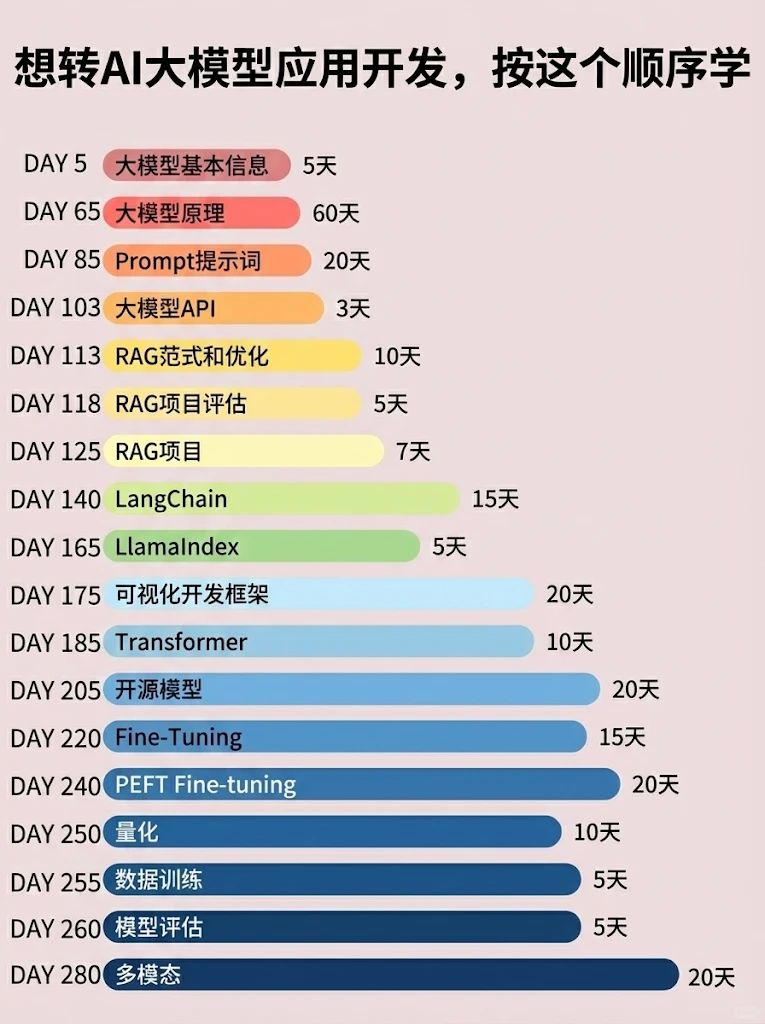
📝给大家整理了超全最新的AI大模型应用开发学习清单和资料,手把手帮你快速入门!👇👇
学习路线:
✅大模型基础认知—大模型核心原理、发展历程、主流模型(GPT、文心一言等)特点解析
✅核心技术模块—RAG检索增强生成、Prompt工程实战、Agent智能体开发逻辑
✅开发基础能力—Python进阶、API接口调用、大模型开发框架(LangChain等)实操
✅应用场景开发—智能问答系统、企业知识库、AIGC内容生成工具、行业定制化大模型应用
✅项目落地流程—需求拆解、技术选型、模型调优、测试上线、运维迭代
✅面试求职冲刺—岗位JD解析、简历AI项目包装、高频面试题汇总、模拟面经
以上6大模块,看似清晰好上手,实则每个部分都有扎实的核心内容需要吃透!
我把大模型的学习全流程已经整理📚好了!抓住AI时代风口,轻松解锁职业新可能,希望大家都能把握机遇,实现薪资/职业跃迁~
这份完整版的大模型 AI 学习资料已经上传CSDN,朋友们如果需要可以微信扫描下方CSDN官方认证二维码免费领取【保证100%免费】


AtomGit 是由开放原子开源基金会联合 CSDN 等生态伙伴共同推出的新一代开源与人工智能协作平台。平台坚持“开放、中立、公益”的理念,把代码托管、模型共享、数据集托管、智能体开发体验和算力服务整合在一起,为开发者提供从开发、训练到部署的一站式体验。
更多推荐
 8
8 0
0- 0


 已为社区贡献191条内容

所有评论(0)