腾讯云服务器安装OpenClaw并适配飞书
1. 买云服务器
1.1 寻找云服务器
轻量应用服务器官网添加链接描述
往下拉,选择
海外优选 | 稳定低延迟,OpenClaw畅连全球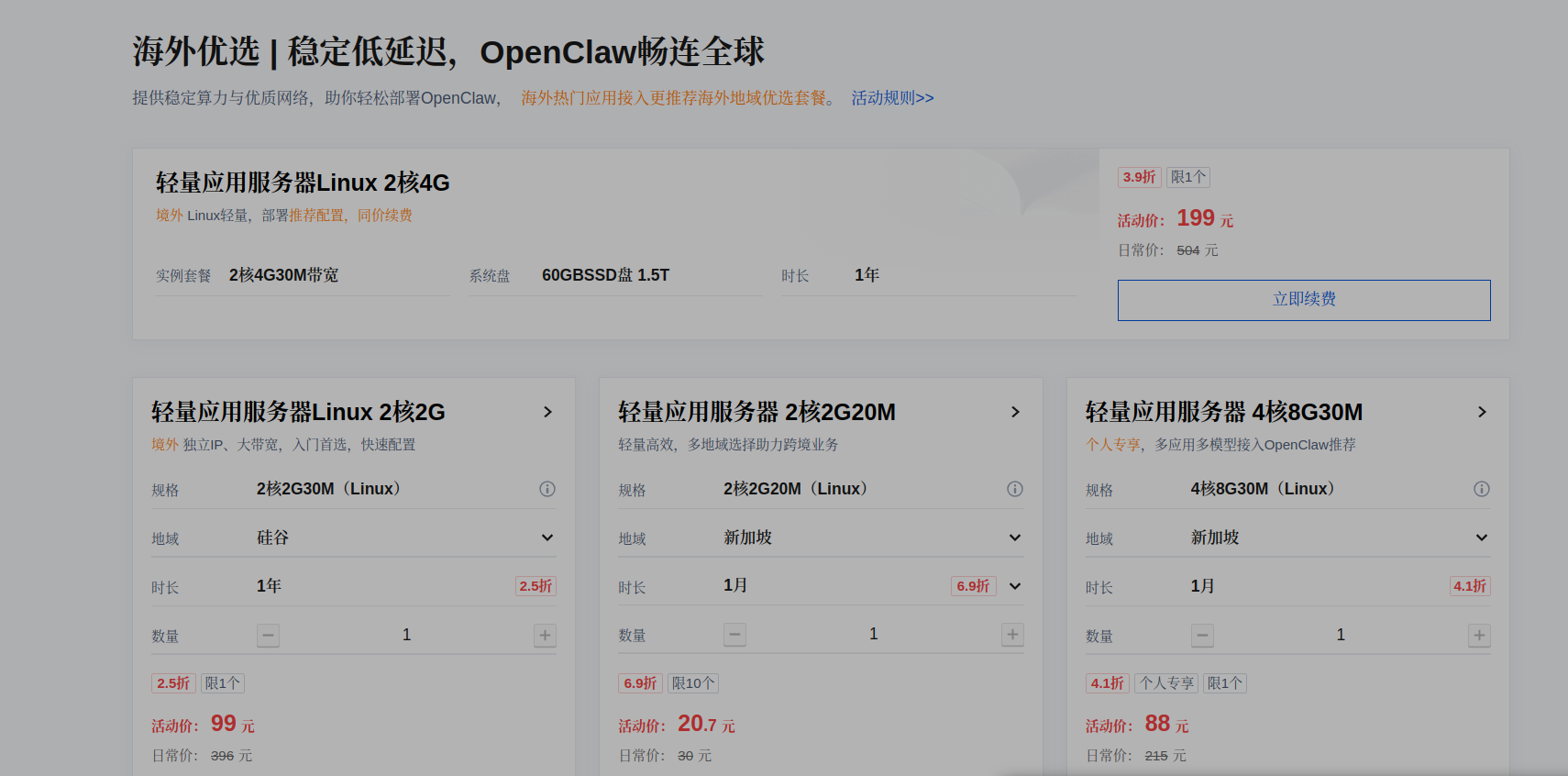
开发选 Linux 2核4G,全年 199元
选择 Ubantu 24.04 LTS 镜像,自己手动安装Openclaw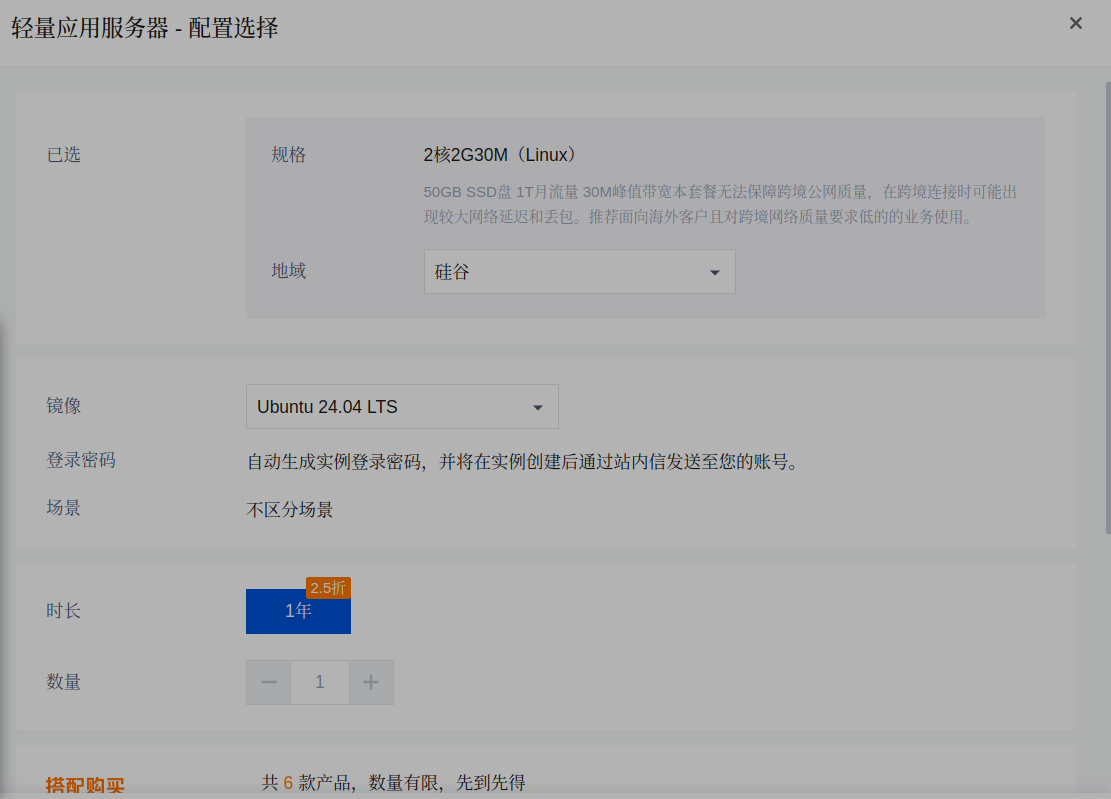
然后花钱购买
1.2 登录服务器
点击页面右上方的 控制台
点击 产品管理 --》 最近访问 --》轻量应用服务器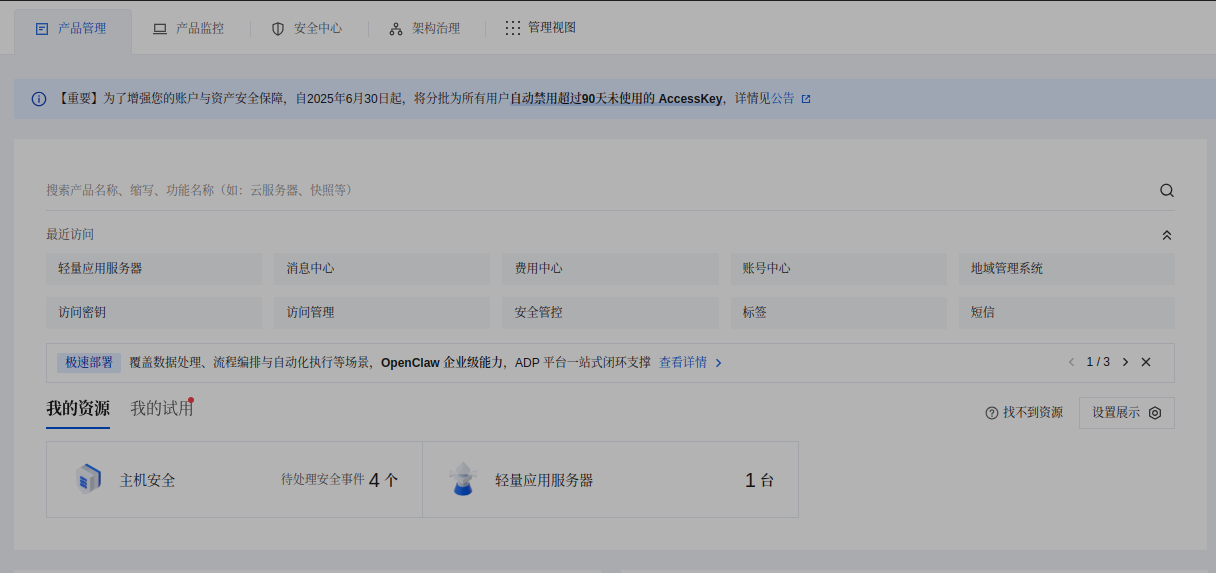
1.2.1 登录前的准备
出现服务器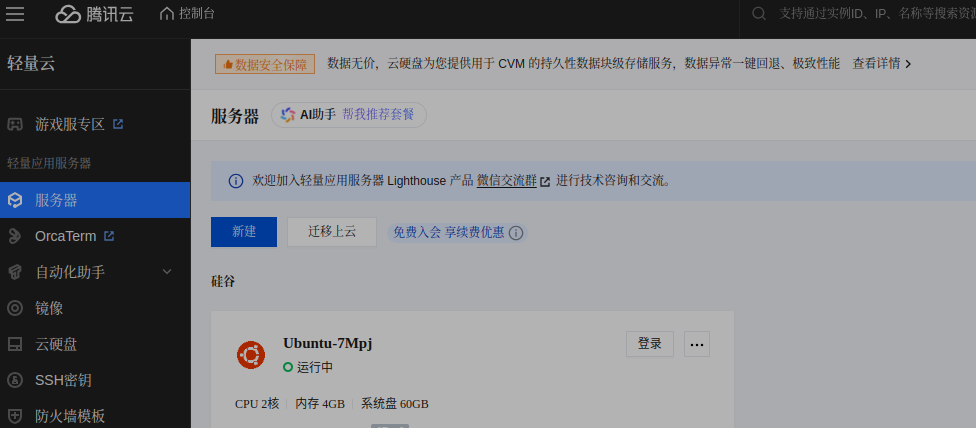
点击 … --> 管理实例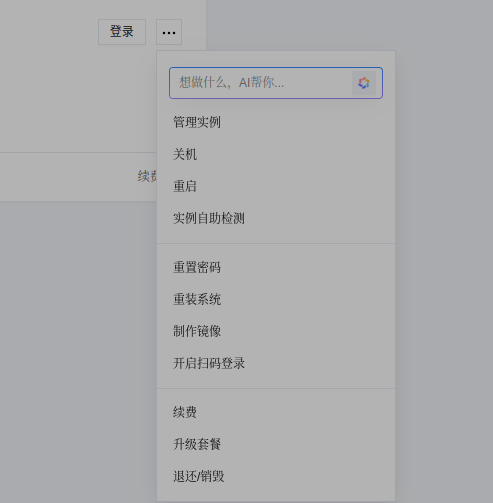
点击 防火墙,打开 18789 端口
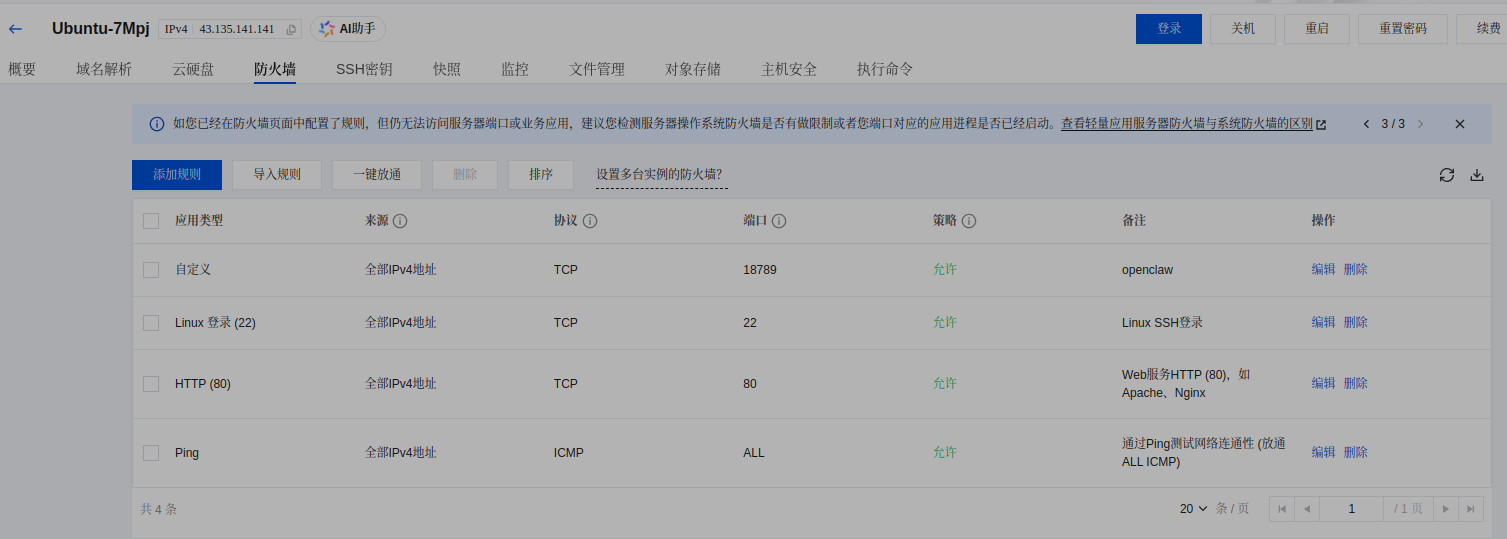
也可以根据需要 … --> 重装系统
1.2.2 登录
点击 登录:
微信扫码登录,选择用密码登录
2. 安装OpenClaw
参考:2026年OpenClaw Ubuntu本地安装+阿里云1分钟部署+模型优化+飞书集成实战指南
2.1 前置依赖准备
# 1. 系统更新(确保依赖兼容,避免安装失败)
sudo apt update
sudo apt upgrade -y

# 2. 安装nvm(Node版本管理工具,选择v0.40.4稳定版)
curl -o- https://raw.githubusercontent.com/nvm-sh/nvm/v0.40.4/install.sh | bash

# 3. 生效nvm(无需重启终端,执行命令即可加载)
source ~/.bashrc

# 4. 安装Node.js 24(官方推荐最低版本22)
nvm install 24

# 5. 设置Node.js 24为默认版本
nvm use 24

# 6. 验证安装结果(显示版本号≥22即为成功)
node --version
v24.14.0
npm --version
11.9.0

# 7. 安装pnpm(推荐包管理器,安装速度更快,依赖处理更优)
npm install -g pnpm
2.2 修改npm 配置
$ npm config list
; "user" config from /home/ubuntu/.npmrc

registry = "https://mirrors.tencentyun.com/npm"

; node bin location = /home/ubuntu/.nvm/versions/node/v24.14.0/bin/node
; node version = v24.14.0
; npm local prefix = /home/ubuntu
; npm version = 11.9.0
; cwd = /home/ubuntu
; HOME = /home/ubuntu
; Run `npm config ls -l` to show all defaults.
更新 Registry 地址:
npm config set registry https://registry.npmmirror.com
$ npm config get registry
https://mirrors.tencentyun.com/npm
$ npm config set registry https://registry.npmmirror.com
$ npm config get registry
https://registry.npmmirror.com
2.2 OpenClaw安装
OpenClaw提供脚本安装、npm/pnpm安装、源码安装3种方式:
使用 npm/pnpm全局安装
# npm安装(已安装Node.js默认自带npm)
npm install -g openclaw@latest

# 或pnpm安装(推荐,速度更快)
pnpm add -g openclaw@latest

# 验证安装
openclaw --version
$ pnpm add -g openclaw@latest
 ERR_PNPM_NO_GLOBAL_BIN_DIR  Unable to find the global bin directory

Run "pnpm setup" to create it automatically, or set the global-bin-dir setting, or the PNPM_HOME env variable. The global bin directory should be in the PATH.
报错:运行
$ pnpm setup
Appended new lines to /home/ubuntu/.bashrc

Next configuration changes were made:
export PNPM_HOME="/home/ubuntu/.local/share/pnpm"
case ":$PATH:" in
  *":$PNPM_HOME:"*) ;;
  *) export PATH="$PNPM_HOME:$PATH" ;;
esac

To start using pnpm, run:
source /home/ubuntu/.bashrc
再运行:
source ~/.bashrc
查看pnpm配置:
$ pnpm config list
@jsr:registry=https://npm.jsr.io/
globalconfig=/home/ubuntu/.config/pnpm/rc
npm-globalconfig=/home/ubuntu/.nvm/versions/node/v24.14.0/etc/npmrc
registry=https://registry.npmmirror.com
user-agent=pnpm/10.32.1 npm/? node/v24.14.0 linux x64
重新运行:
$ pnpm add -g openclaw@latest
查看版本:
$ openclaw --version
OpenClaw 2026.3.13 (61d171a)
3. 安装飞书
3.1 基础配置
# 启动新手引导向导,并安装后台守护进程(开机自启)
openclaw onboard --install-daemon
开始:
先配置 model --> MiniMax --> MiniMax OAuth(coding Plan)
点击出现的网页
https://platform.minimaxi.com/oauth-authorize?user_code=NMPCnlK9iC&client=OpenClaw
然后点击 授权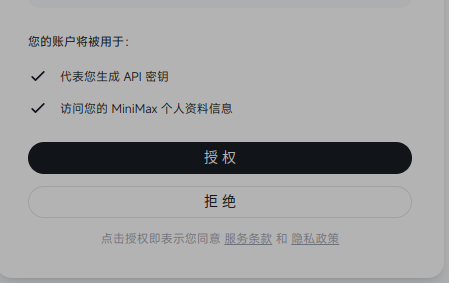
其他的 channels 、Search 、skills 、 Hooks、 Control UI 选择 Skip for now 或者 Do this later
$ openclaw onboard --install-daemon
🦞 OpenClaw 2026.3.13 (61d171a) — I'm like tmux: confusing at first, then suddenly you can't live without me.
▄▄▄▄▄▄▄▄▄▄▄▄▄▄▄▄▄▄▄▄▄▄▄▄▄▄▄▄▄▄▄▄▄▄▄▄▄▄▄▄▄▄▄▄▄▄▄▄▄▄▄▄
██░▄▄▄░██░▄▄░██░▄▄▄██░▀██░██░▄▄▀██░████░▄▄▀██░███░██
██░███░██░▀▀░██░▄▄▄██░█░█░██░█████░████░▀▀░██░█░█░██
██░▀▀▀░██░█████░▀▀▀██░██▄░██░▀▀▄██░▀▀░█░██░██▄▀▄▀▄██
▀▀▀▀▀▀▀▀▀▀▀▀▀▀▀▀▀▀▀▀▀▀▀▀▀▀▀▀▀▀▀▀▀▀▀▀▀▀▀▀▀▀▀▀▀▀▀▀▀▀▀▀
🦞 OPENCLAW 🦞
┌ OpenClaw onboarding
│
◇ Security ─────────────────────────────────────────────────────────────────────────────────╮
│ │
│ Security warning — please read. │
│ │
│ OpenClaw is a hobby project and still in beta. Expect sharp edges. │
│ By default, OpenClaw is a personal agent: one trusted operator boundary. │
│ This bot can read files and run actions if tools are enabled. │
│ A bad prompt can trick it into doing unsafe things. │
│ │
│ OpenClaw is not a hostile multi-tenant boundary by default. │
│ If multiple users can message one tool-enabled agent, they share that delegated tool │
│ authority. │
│ │
│ If you’re not comfortable with security hardening and access control, don’t run │
│ OpenClaw. │
│ Ask someone experienced to help before enabling tools or exposing it to the internet. │
│ │
│ Recommended baseline: │
│ - Pairing/allowlists + mention gating. │
│ - Multi-user/shared inbox: split trust boundaries (separate gateway/credentials, ideally │
│ separate OS users/hosts). │
│ - Sandbox + least-privilege tools. │
│ - Shared inboxes: isolate DM sessions (`session.dmScope: per-channel-peer`) and keep │
│ tool access minimal. │
│ - Keep secrets out of the agent’s reachable filesystem. │
│ - Use the strongest available model for any bot with tools or untrusted inboxes. │
│ │
│ Run regularly: │
│ openclaw security audit --deep │
│ openclaw security audit --fix │
│ │
│ Must read: https://docs.openclaw.ai/gateway/security │
│ │
├────────────────────────────────────────────────────────────────────────────────────────────╯
│
◇ I understand this is personal-by-default and shared/multi-user use requires lock-down. Continue?
│ Yes
│
◇ Onboarding mode
│ QuickStart
│
◇ QuickStart ─────────────────────────╮
│ │
│ Gateway port: 18789 │
│ Gateway bind: Loopback (127.0.0.1) │
│ Gateway auth: Token (default) │
│ Tailscale exposure: Off │
│ Direct to chat channels. │
│ │
├──────────────────────────────────────╯
│
◇ Model/auth provider
│ MiniMax
│
◇ MiniMax auth method
│ MiniMax CN — OAuth (minimaxi.com)
│
◐ Starting MiniMax OAuth (CN)….│
◇ MiniMax OAuth ───────────────────────────────────────────────────────────────────────────╮
│ │
│ Open https://platform.minimaxi.com/oauth-authorize?user_code=NMPCnlK9iC&client=OpenClaw │
│ to approve access. │
│ If prompted, enter the code NMPCnlK9iC. │
│ Interval: 1000, Expires at: 1773475544375 unix timestamp │
│ │
├───────────────────────────────────────────────────────────────────────────────────────────╯
◇ MiniMax OAuth complete
│
◇ MiniMax OAuth ──────────────╮
│ │
│ Current Plan: Trial 试用版 │
│ Valid until: 03/21/2026 │
│ │
├──────────────────────────────╯
│
◇ Provider notes ─────────────────────────────────────────────────────────────────────────╮
│ │
│ MiniMax OAuth tokens auto-refresh. Re-run login if refresh fails or access is revoked. │
│ Base URL defaults to https://api.minimaxi.com/anthropic. Override │
│ models.providers.minimax-portal.baseUrl if needed. │
│ Current Plan: Trial 试用版 │
│ Valid until: 03/21/2026 │
│ │
├──────────────────────────────────────────────────────────────────────────────────────────╯
│
◇ Model configured ─────────────────────────────────╮
│ │
│ Default model set to minimax-portal/MiniMax-M2.5 │
│ │
├────────────────────────────────────────────────────╯
│
◇ Default model
│ Keep current (minimax-portal/MiniMax-M2.5)
│
◇ Channel status ────────────────────────────╮
│ │
│ Telegram: needs token │
│ WhatsApp (default): not linked │
│ Discord: needs token │
│ Slack: needs tokens │
│ Signal: needs setup │
│ signal-cli: missing (signal-cli) │
│ iMessage: needs setup │
│ imsg: missing (imsg) │
│ IRC: not configured │
│ Google Chat: not configured │
│ LINE: not configured │
│ Feishu: install plugin to enable │
│ Google Chat: install plugin to enable │
│ Nostr: install plugin to enable │
│ Microsoft Teams: install plugin to enable │
│ Mattermost: install plugin to enable │
│ Nextcloud Talk: install plugin to enable │
│ Matrix: install plugin to enable │
│ BlueBubbles: install plugin to enable │
│ LINE: install plugin to enable │
│ Zalo: install plugin to enable │
│ Zalo Personal: install plugin to enable │
│ Synology Chat: install plugin to enable │
│ Tlon: install plugin to enable │
│ │
├─────────────────────────────────────────────╯
│
◇ How channels work ───────────────────────────────────────────────────────────────────────╮
│ │
│ DM security: default is pairing; unknown DMs get a pairing code. │
│ Approve with: openclaw pairing approve <channel> <code> │
│ Public DMs require dmPolicy="open" + allowFrom=["*"]. │
│ Multi-user DMs: run: openclaw config set session.dmScope "per-channel-peer" (or │
│ "per-account-channel-peer" for multi-account channels) to isolate sessions. │
│ Docs: channels/pairing │
│ │
│ Telegram: simplest way to get started — register a bot with @BotFather and get going. │
│ WhatsApp: works with your own number; recommend a separate phone + eSIM. │
│ Discord: very well supported right now. │
│ IRC: classic IRC networks with DM/channel routing and pairing controls. │
│ Google Chat: Google Workspace Chat app with HTTP webhook. │
│ Slack: supported (Socket Mode). │
│ Signal: signal-cli linked device; more setup (David Reagans: "Hop on Discord."). │
│ iMessage: this is still a work in progress. │
│ LINE: LINE Messaging API webhook bot. │
│ Feishu: 飞书/Lark enterprise messaging with doc/wiki/drive tools. │
│ Nostr: Decentralized protocol; encrypted DMs via NIP-04. │
│ Microsoft Teams: Bot Framework; enterprise support. │
│ Mattermost: self-hosted Slack-style chat; install the plugin to enable. │
│ Nextcloud Talk: Self-hosted chat via Nextcloud Talk webhook bots. │
│ Matrix: open protocol; install the plugin to enable. │
│ BlueBubbles: iMessage via the BlueBubbles mac app + REST API. │
│ Zalo: Vietnam-focused messaging platform with Bot API. │
│ Zalo Personal: Zalo personal account via QR code login. │
│ Synology Chat: Connect your Synology NAS Chat to OpenClaw with full agent capabilities. │
│ Tlon: decentralized messaging on Urbit; install the plugin to enable. │
│ │
├───────────────────────────────────────────────────────────────────────────────────────────╯
│
◇ Select channel (QuickStart)
│ Skip for now
Updated ~/.openclaw/openclaw.json
Workspace OK: ~/.openclaw/workspace
Sessions OK: ~/.openclaw/agents/main/sessions
│
◇ Web search ────────────────────────────────────────╮
│ │
│ Web search lets your agent look things up online. │
│ Choose a provider and paste your API key. │
│ Docs: https://docs.openclaw.ai/tools/web │
│ │
├─────────────────────────────────────────────────────╯
│
◇ Search provider
│ Skip for now
│
◇ Skills status ─────────────╮
│ │
│ Eligible: 5 │
│ Missing requirements: 40 │
│ Unsupported on this OS: 7 │
│ Blocked by allowlist: 0 │
│ │
├─────────────────────────────╯
│
◇ Configure skills now? (recommended)
│ No
│
◇ Hooks ──────────────────────────────────────────────────────────────────╮
│ │
│ Hooks let you automate actions when agent commands are issued. │
│ Example: Save session context to memory when you issue /new or /reset. │
│ │
│ Learn more: https://docs.openclaw.ai/automation/hooks │
│ │
├──────────────────────────────────────────────────────────────────────────╯
│
◇ No Hooks Available ─────────────────────────────────────────────────────╮
│ │
│ No eligible hooks found. You can configure hooks later in your config. │
│ │
├──────────────────────────────────────────────────────────────────────────╯
Config overwrite: /home/ubuntu/.openclaw/openclaw.json (sha256 04358999289dab9475b905b1e86035b5e77fed322dda17ef76db5b1947739d45 -> 10cf477be35fb9bae143fedb88373569a872457e3f70ecc3738cd771ecc980e5, backup=/home/ubuntu/.openclaw/openclaw.json.bak)
│
◇ Systemd ────────────────────────────────────────────────────────────────────────────────╮
│ │
│ Linux installs use a systemd user service by default. Without lingering, systemd stops │
│ the user session on logout/idle and kills the Gateway. │
│ Enabling lingering now (may require sudo; writes /var/lib/systemd/linger). │
│ │
├──────────────────────────────────────────────────────────────────────────────────────────╯
│
◇ Systemd ───────────────────────────────╮
│ │
│ Enabled systemd lingering for ubuntu. │
│ │
├─────────────────────────────────────────╯
│
◇ Gateway service runtime ────────────────────────────────────────────╮
│ │
│ QuickStart uses Node for the Gateway service (stable + supported). │
│ │
├──────────────────────────────────────────────────────────────────────╯
│
◓ Installing Gateway service…
Installed systemd service: /home/ubuntu/.config/systemd/user/openclaw-gateway.service
◇ Gateway service installed.
│
◇
Agents: main (default)
Heartbeat interval: 30m (main)
Session store (main): /home/ubuntu/.openclaw/agents/main/sessions/sessions.json (0 entries)
│
◇ Optional apps ────────────────────────╮
│ │
│ Add nodes for extra features: │
│ - macOS app (system + notifications) │
│ - iOS app (camera/canvas) │
│ - Android app (camera/canvas) │
│ │
├────────────────────────────────────────╯
│
◇ Control UI ─────────────────────────────────────────────────────────────────────╮
│ │
│ Web UI: http://127.0.0.1:18789/ │
│ Web UI (with token): │
│ http://127.0.0.1:18789/#token=f23fc9933a84482c0e7c693f7414242cb0b8360b387a03a9 │
│ Gateway WS: ws://127.0.0.1:18789 │
│ Gateway: reachable │
│ Docs: https://docs.openclaw.ai/web/control-ui │
│ │
├──────────────────────────────────────────────────────────────────────────────────╯
│
◇ Start TUI (best option!) ─────────────────────────────────╮
│ │
│ This is the defining action that makes your agent you. │
│ Please take your time. │
│ The more you tell it, the better the experience will be. │
│ We will send: "Wake up, my friend!" │
│ │
├────────────────────────────────────────────────────────────╯
│
◇ Token ────────────────────────────────────────────────────────────────────────────────────╮
│ │
│ Gateway token: shared auth for the Gateway + Control UI. │
│ Stored in: ~/.openclaw/openclaw.json (gateway.auth.token) or OPENCLAW_GATEWAY_TOKEN. │
│ View token: openclaw config get gateway.auth.token │
│ Generate token: openclaw doctor --generate-gateway-token │
│ Web UI keeps dashboard URL tokens in memory for the current tab and strips them from the │
│ URL after load. │
│ Open the dashboard anytime: openclaw dashboard --no-open │
│ If prompted: paste the token into Control UI settings (or use the tokenized dashboard │
│ URL). │
│ │
├────────────────────────────────────────────────────────────────────────────────────────────╯
│
◇ How do you want to hatch your bot?
│ Do this later
│
◇ Later ───────────────────────────────────────────╮
│ │
│ When you're ready: openclaw dashboard --no-open │
│ │
├───────────────────────────────────────────────────╯
│
◇ Workspace backup ────────────────────────────────────────╮
│ │
│ Back up your agent workspace. │
│ Docs: https://docs.openclaw.ai/concepts/agent-workspace │
│ │
├───────────────────────────────────────────────────────────╯
│
◇ Security ──────────────────────────────────────────────────────╮
│ │
│ Running agents on your computer is risky — harden your setup: │
│ https://docs.openclaw.ai/security │
│ │
├─────────────────────────────────────────────────────────────────╯
│
◇ Shell completion ────────────────────────────────────────────────────────╮
│ │
│ Shell completion installed. Restart your shell or run: source ~/.bashrc │
│ │
├───────────────────────────────────────────────────────────────────────────╯
│
◇ Web search ───────────────────────────────────────╮
│ │
│ Web search was skipped. You can enable it later: │
│ openclaw configure --section web │
│ │
│ Docs: https://docs.openclaw.ai/tools/web │
│ │
├────────────────────────────────────────────────────╯
│
◇ What now ─────────────────────────────────────────────────────────────╮
│ │
│ What now: https://openclaw.ai/showcase ("What People Are Building"). │
│ │
├────────────────────────────────────────────────────────────────────────╯
│
└ Onboarding complete. Use the dashboard link above to control OpenClaw.
3.2 添加飞书
openclaw channels add
Config warnings:\n- plugins.entries.feishu: plugin feishu: duplicate plugin id detected; later plugin may be overridden (/home/ubuntu/.openclaw/extensions/feishu/index.ts)
Config warnings:\n- plugins.entries.feishu: plugin feishu: duplicate plugin id detected; later plugin may be overridden (/home/ubuntu/.openclaw/extensions/feishu/index.ts)

🦞 OpenClaw 2026.3.13 (61d171a) — If you can describe it, I can probably automate it—or at least make it funnier.

│
◇  Config warnings ─────────────────────────────────────────────────────────────────────────╮
│                                                                                           │
│  - plugins.entries.feishu: plugin feishu: duplicate plugin id detected; later plugin may  │
│    be overridden (/home/ubuntu/.openclaw/extensions/feishu/index.ts)                      │
│                                                                                           │
├───────────────────────────────────────────────────────────────────────────────────────────╯
20:00:02 [plugins] plugins.allow is empty; discovered non-bundled plugins may auto-load: feishu (/home/ubuntu/.openclaw/extensions/feishu/index.ts). Set plugins.allow to explicit trusted ids.
20:00:05 [plugins] feishu_doc: Registered feishu_doc, feishu_app_scopes
20:00:05 [plugins] feishu_chat: Registered feishu_chat tool
20:00:05 [plugins] feishu_wiki: Registered feishu_wiki tool
20:00:05 [plugins] feishu_drive: Registered feishu_drive tool
20:00:05 [plugins] feishu_bitable: Registered bitable tools
┌  Channel setup
[info]: [ 'client ready' ]
20:00:05 [plugins] plugins.allow is empty; discovered non-bundled plugins may auto-load: feishu (/home/ubuntu/.openclaw/extensions/feishu/index.ts). Set plugins.allow to explicit trusted ids.
20:00:05 [plugins] feishu_doc: Registered feishu_doc, feishu_app_scopes
20:00:05 [plugins] feishu_chat: Registered feishu_chat tool
20:00:05 [plugins] feishu_wiki: Registered feishu_wiki tool
20:00:05 [plugins] feishu_drive: Registered feishu_drive tool
20:00:05 [plugins] feishu_bitable: Registered bitable tools
│
◇  Channel status ───────────────────────────────────────────╮
│                                                            │
│  Telegram: needs token                                     │
│  WhatsApp (default): not linked                            │
│  Discord: needs token                                      │
│  Slack: needs tokens                                       │
│  Signal: needs setup                                       │
│  signal-cli: missing (signal-cli)                          │
│  iMessage: needs setup                                     │
│  imsg: missing (imsg)                                      │
│  Feishu: connected as ou_2bba4cce89d3ec425a898540789c24c0  │
│  IRC: not configured                                       │
│  Google Chat: not configured                               │
│  LINE: not configured                                      │
│  Google Chat: install plugin to enable                     │
│  Nostr: install plugin to enable                           │
│  Microsoft Teams: install plugin to enable                 │
│  Mattermost: install plugin to enable                      │
│  Nextcloud Talk: install plugin to enable                  │
│  Matrix: install plugin to enable                          │
│  BlueBubbles: install plugin to enable                     │
│  LINE: install plugin to enable                            │
│  Zalo: install plugin to enable                            │
│  Zalo Personal: install plugin to enable                   │
│  Synology Chat: install plugin to enable                   │
│  Tlon: install plugin to enable                            │
│                                                            │
├────────────────────────────────────────────────────────────╯
│
◇  Configure chat channels now?
│  Yes
│
◇  How channels work ───────────────────────────────────────────────────────────────────────╮
│                                                                                           │
│  DM security: default is pairing; unknown DMs get a pairing code.                         │
│  Approve with: openclaw pairing approve <channel> <code>                                  │
│  Public DMs require dmPolicy="open" + allowFrom=["*"].                                    │
│  Multi-user DMs: run: openclaw config set session.dmScope "per-channel-peer" (or          │
│  "per-account-channel-peer" for multi-account channels) to isolate sessions.              │
│  Docs: channels/pairing              │
│                                                                                           │
│  Telegram: simplest way to get started — register a bot with @BotFather and get going.    │
│  WhatsApp: works with your own number; recommend a separate phone + eSIM.                 │
│  Discord: very well supported right now.                                                  │
│  IRC: classic IRC networks with DM/channel routing and pairing controls.                  │
│  Google Chat: Google Workspace Chat app with HTTP webhook.                                │
│  Slack: supported (Socket Mode).                                                          │
│  Signal: signal-cli linked device; more setup (David Reagans: "Hop on Discord.").         │
│  iMessage: this is still a work in progress.                                              │
│  LINE: LINE Messaging API webhook bot.                                                    │
│  Feishu: 飞书/Lark enterprise messaging.                                                  │
│  Nostr: Decentralized protocol; encrypted DMs via NIP-04.                                 │
│  Microsoft Teams: Bot Framework; enterprise support.                                      │
│  Mattermost: self-hosted Slack-style chat; install the plugin to enable.                  │
│  Nextcloud Talk: Self-hosted chat via Nextcloud Talk webhook bots.                        │
│  Matrix: open protocol; install the plugin to enable.                                     │
│  BlueBubbles: iMessage via the BlueBubbles mac app + REST API.                            │
│  Zalo: Vietnam-focused messaging platform with Bot API.                                   │
│  Zalo Personal: Zalo personal account via QR code login.                                  │
│  Synology Chat: Connect your Synology NAS Chat to OpenClaw with full agent capabilities.  │
│  Tlon: decentralized messaging on Urbit; install the plugin to enable.                    │
│                                                                                           │
├───────────────────────────────────────────────────────────────────────────────────────────╯
│
◇  Select a channel
│  Feishu/Lark (飞书)
此时打开飞书开发者后台
企业自建应用 --》创建企业自建应用
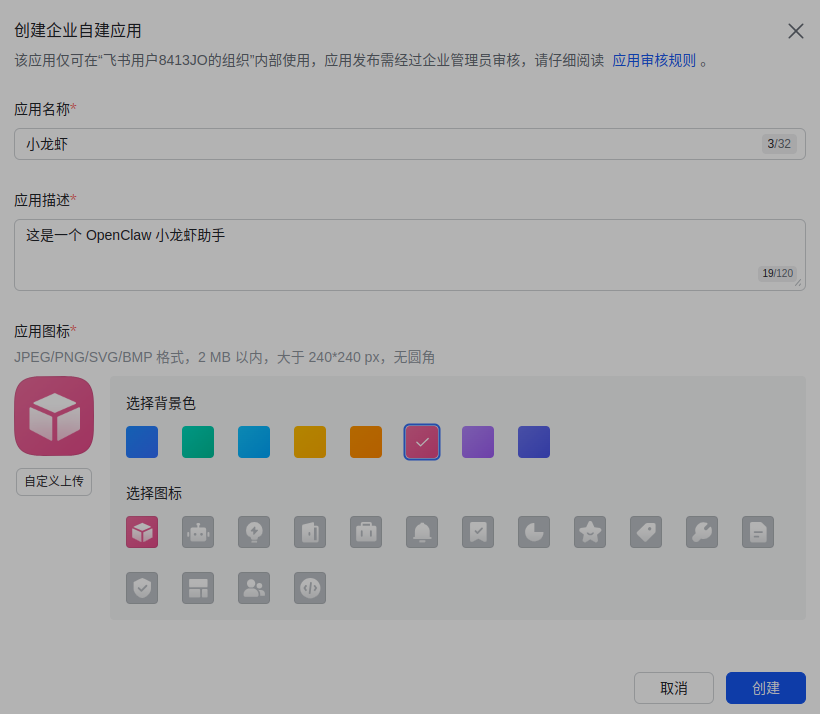
自定义上传图片 --》保存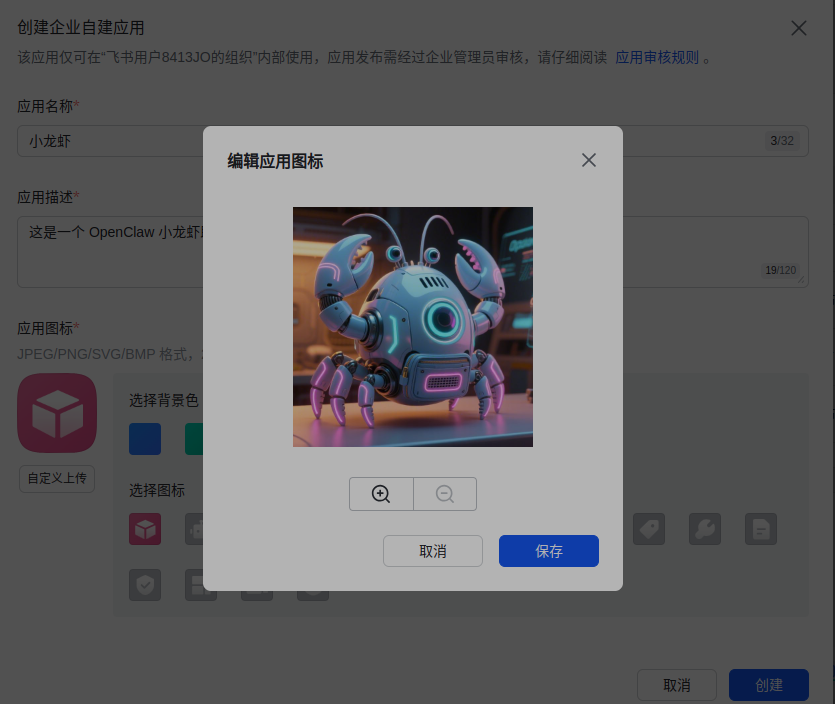
其中图片来自于: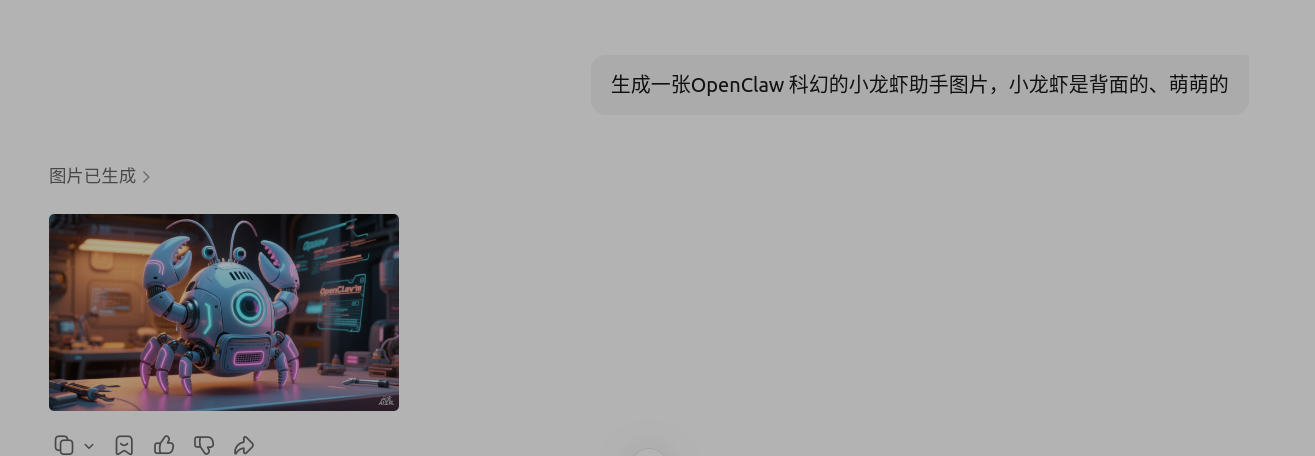
应用能力 --》 按能力添加 --》机器人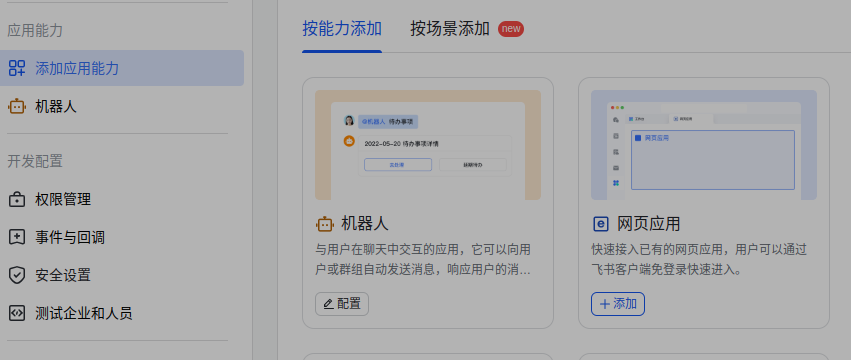
开发配置 --》权限管理 --》批量导入/导出权限
导入:
{
  "scopes": {
    "tenant": [
      "contact:user.base:readonly",
      "im:chat",
      "im:message",
      "im:message.group_at_msg:readonly",
      "im:message.p2p_msg:readonly",
      "im:message:send_as_bot",
      "im:resource"
    ],
    "user": []
  }
}
最后: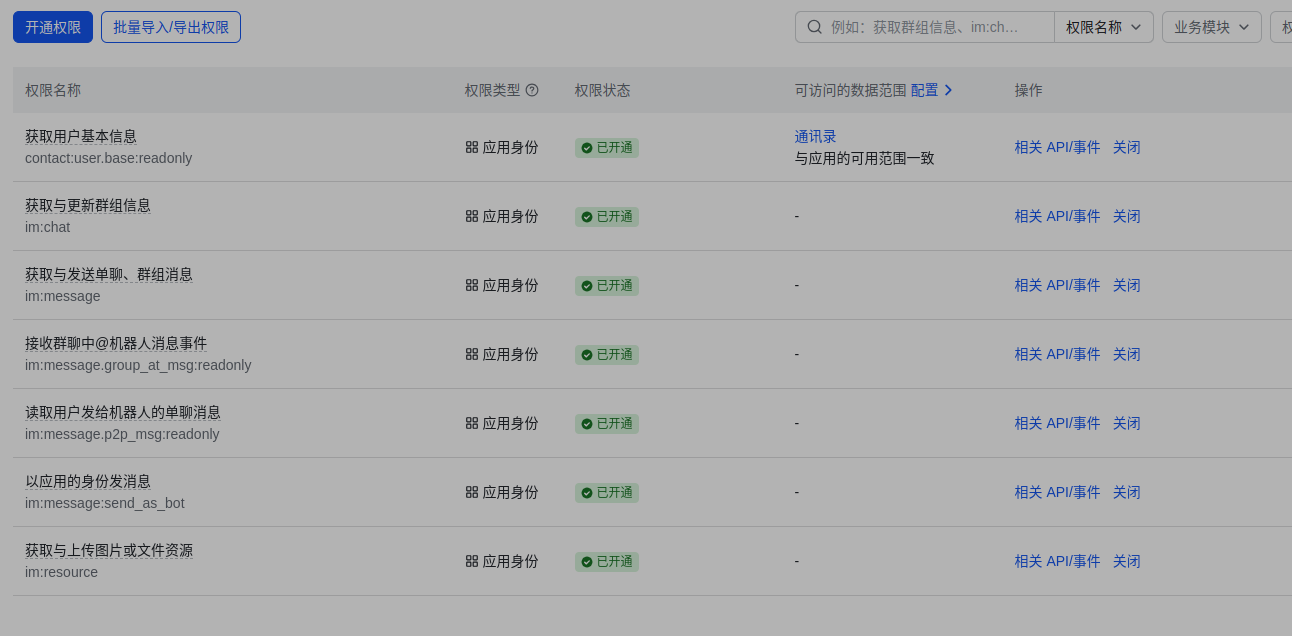
基础信息 --》凭证与基础信息 --》 应用凭证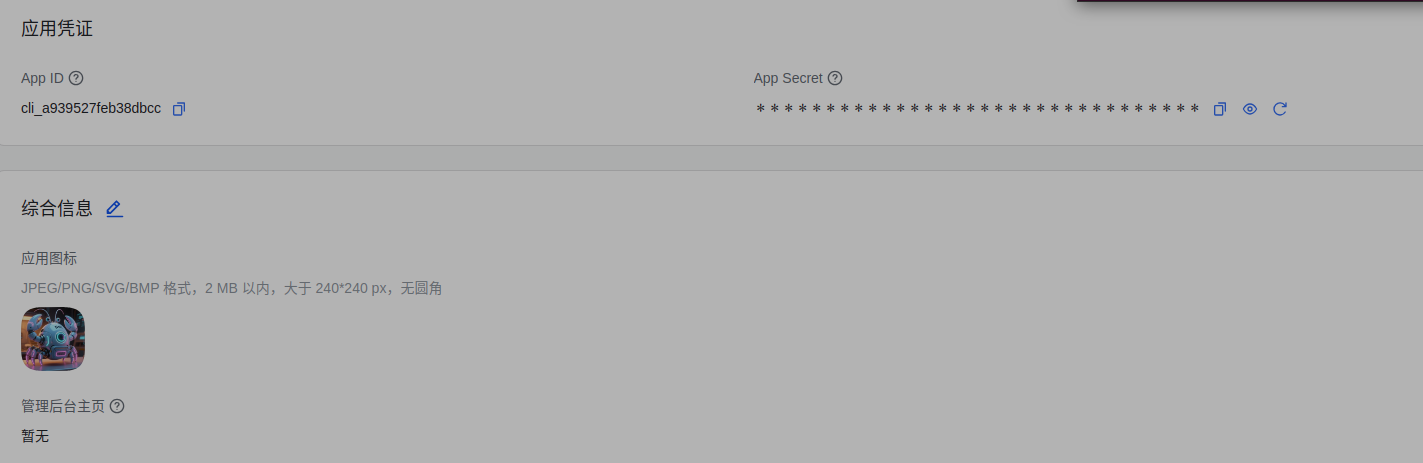
根据上面信息填入下面的配置:
◇  How do you want to provide this App Secret?
│  Enter App Secret
│
◇  Enter Feishu App Secret
│  EWExxxxxxxxxxxxxxXE5
│
◇  Enter Feishu App ID
│  cli_xxxxxxxxxxxxxxxxxcc
[info]: [ 'client ready' ]
│
◇  Feishu connection test ───────────────────────────╮
│                                                    │
│  Connected as ou_2bxxxxxxxxxxxxxxxx89c24c0  │
│                                                    │
├────────────────────────────────────────────────────╯
│
◇  Feishu connection mode
│  WebSocket (default)
│
◇  Which Feishu domain?
│  Feishu (feishu.cn) - China
│
◇  Group chat policy
│  Open - respond in all groups (requires mention)
│
◇  Selected channels ──────────────────────────────────────────╮
│                                                              │
│  Feishu — 飞书/Lark enterprise messaging. Docs:              │
│  feishu  │
│
配置成功后云服务器运行:
openclaw gateway restart
然后在飞书开发者后台继续进行
开发配置 --》事件与回调 --》事件配置 --》订阅方式 --》使用长连接接受事件 --》保存
然后点击 添加事件,搜索 接收信息,点击 添加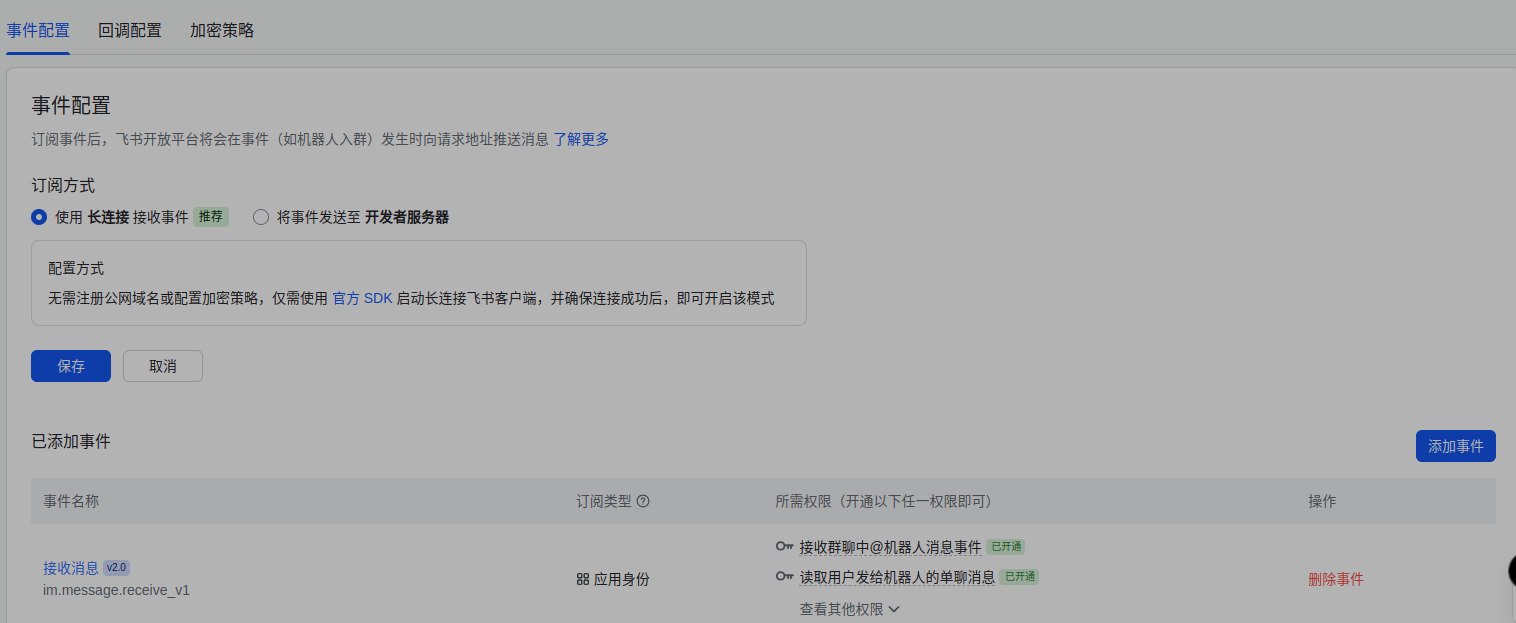
然后 应用发布 --》版本管理与发布 --》创建版本 --》保存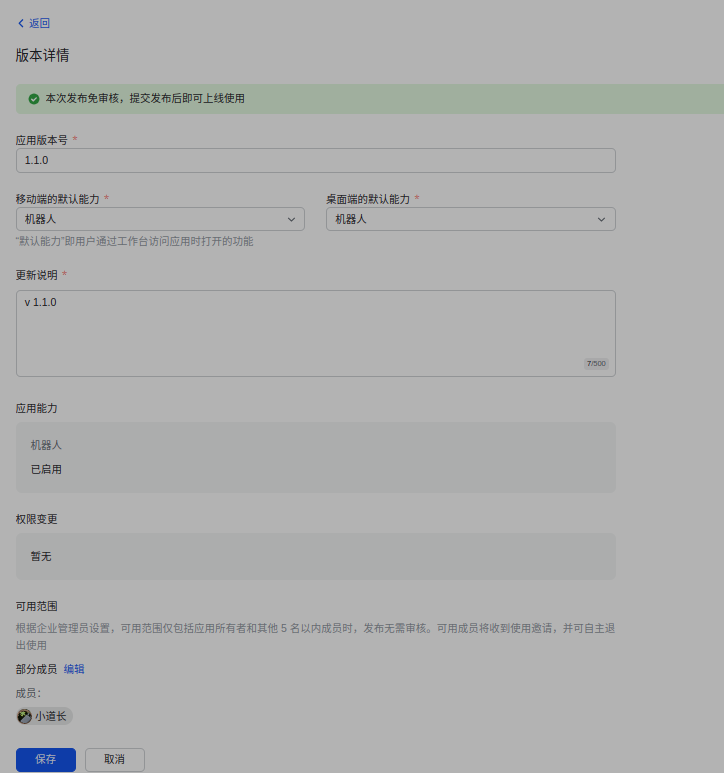
然后在 飞书app 操作 :
点击 : 消息 --》开发小助手 --》打开应用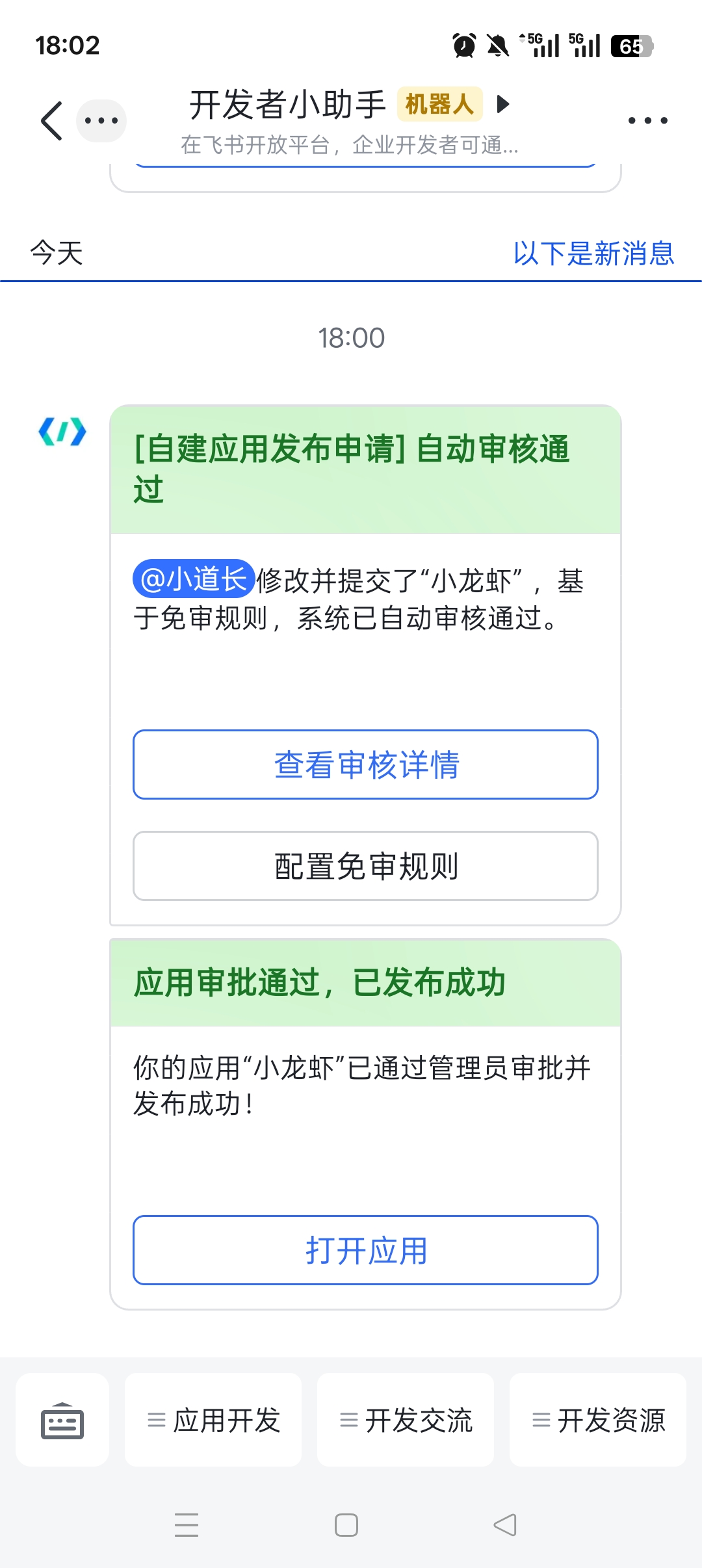
3.3 运行
随便说句话: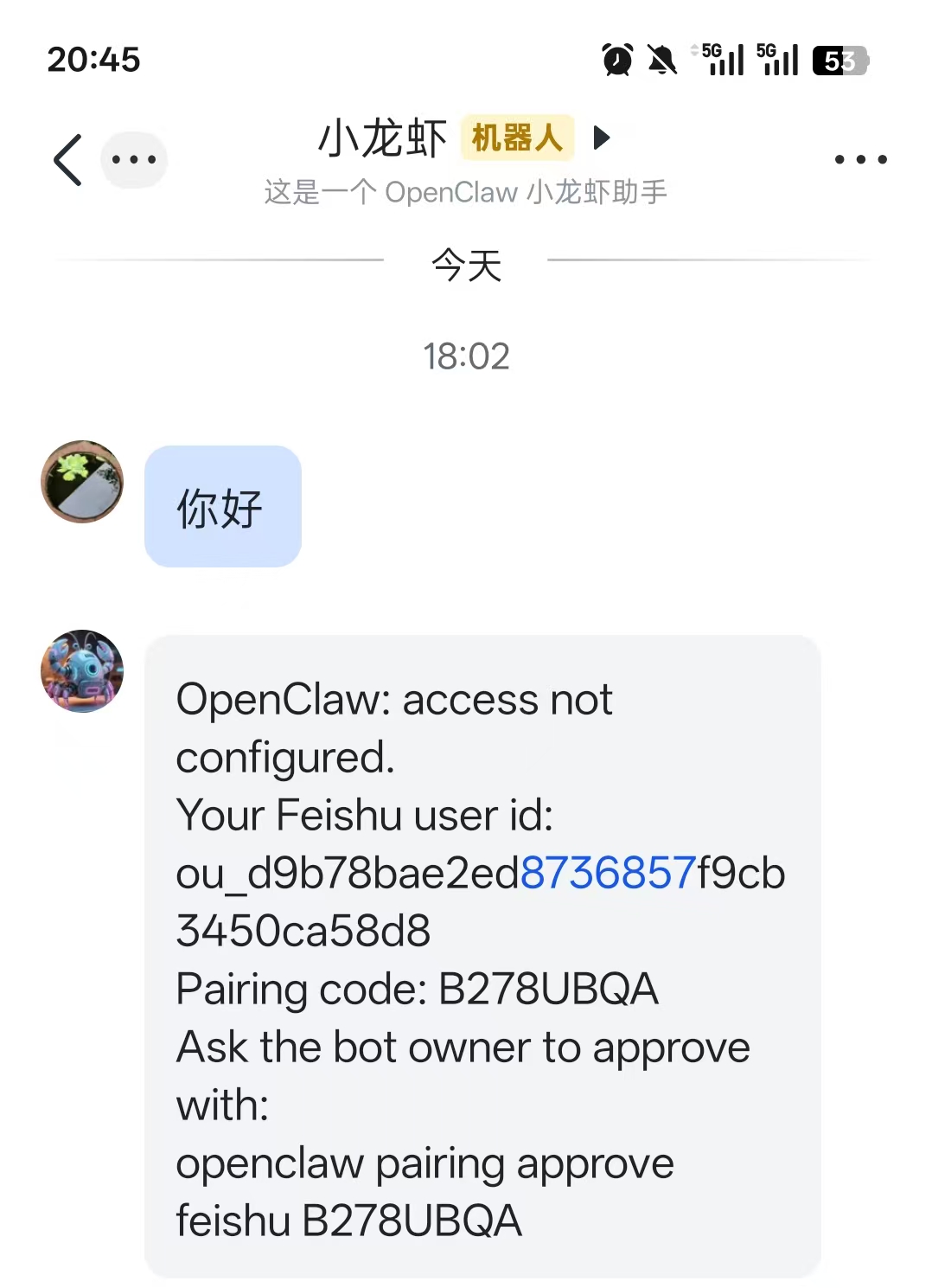
然后在云服务器平台运行:
$ openclaw pairing approve feishu B278UBQA
Config warnings:\n- plugins.entries.feishu: plugin feishu: duplicate plugin id detected; later plugin may be overridden (/home/ubuntu/.openclaw/extensions/feishu/index.ts)
18:04:32 [plugins] plugins.allow is empty; discovered non-bundled plugins may auto-load: feishu (/home/ubuntu/.openclaw/extensions/feishu/index.ts). Set plugins.allow to explicit trusted ids.
18:04:35 [plugins] feishu_doc: Registered feishu_doc, feishu_app_scopes
18:04:35 [plugins] feishu_chat: Registered feishu_chat tool
18:04:35 [plugins] feishu_wiki: Registered feishu_wiki tool
18:04:35 [plugins] feishu_drive: Registered feishu_drive tool
18:04:35 [plugins] feishu_bitable: Registered bitable tools
Config warnings:\n- plugins.entries.feishu: plugin feishu: duplicate plugin id detected; later plugin may be overridden (/home/ubuntu/.openclaw/extensions/feishu/index.ts)

🦞 OpenClaw 2026.3.13 (61d171a) — I'm the middleware between your ambition and your attention span.

│
◇  Config warnings ─────────────────────────────────────────────────────────────────────────╮
│                                                                                           │
│  - plugins.entries.feishu: plugin feishu: duplicate plugin id detected; later plugin may  │
│    be overridden (/home/ubuntu/.openclaw/extensions/feishu/index.ts)                      │
│                                                                                           │
├───────────────────────────────────────────────────────────────────────────────────────────╯
18:04:35 [plugins] plugins.allow is empty; discovered non-bundled plugins may auto-load: feishu (/home/ubuntu/.openclaw/extensions/feishu/index.ts). Set plugins.allow to explicit trusted ids.
18:04:35 [plugins] feishu_doc: Registered feishu_doc, feishu_app_scopes
18:04:35 [plugins] feishu_chat: Registered feishu_chat tool
18:04:35 [plugins] feishu_wiki: Registered feishu_wiki tool
18:04:35 [plugins] feishu_drive: Registered feishu_drive tool
18:04:35 [plugins] feishu_bitable: Registered bitable tools
Approved feishu sender ou_d9b78bae2ed8736857f9cb3450ca58d8.
对话如下:
可以在云服务器后台查看日志:
openclaw logs --follow
3.4 Gateway 网关启动与验证
Gateway是OpenClaw的控制中枢,负责管理插件、通道与模型调用,新手引导中已自动安装守护进程
# 验证Gateway状态(显示"running"即为正常运行)
openclaw gateway status

# 若未运行,执行以下命令启动
openclaw gateway start

# 前台运行并查看日志(便于排查问题,按Ctrl+C停止)
openclaw gateway --port 18789 --verbose

AtomGit 是由开放原子开源基金会联合 CSDN 等生态伙伴共同推出的新一代开源与人工智能协作平台。平台坚持“开放、中立、公益”的理念,把代码托管、模型共享、数据集托管、智能体开发体验和算力服务整合在一起,为开发者提供从开发、训练到部署的一站式体验。
更多推荐
 10
10 0
0- 0


 已为社区贡献2条内容

所有评论(0)