军工涉密方案:SpringMVC如何通过组件实现涉密图纸的HTTP分片加密断传?
·
大文件传输系统解决方案
作为广东某软件有限公司的项目负责人,针对贵司提出的政府级大文件传输系统需求,我司提供以下专业解决方案。
需求分析与痛点解决
核心需求匹配
- 超大文件传输:支持100G+单文件传输,文件夹传输保留层级结构
- 高可靠性:断点续传支持浏览器刷新和关闭后恢复
- 高安全性:SM4国密/AES加密传输与存储
- 全面兼容性:
- 浏览器:IE8+、Edge、Firefox、Chrome等及国产浏览器
- 操作系统:Linux各发行版及国产信创系统
- 数据库:主流及国产数据库
- 信创环境支持:全栈国产化适配
- 部署灵活性:支持公有云/私有云部署
市场痛点解决
- 开源组件问题:WebUploader等开源方案已停更且无技术支持
- 安全性不足:现有方案无法满足政府级安全要求
- 兼容性差:无法覆盖国产化环境和老旧系统(如Win7+IE8)
- 维护成本高:多项目单独采购导致重复商务流程和高成本
技术架构设计
系统架构图
[客户端] → [负载均衡] → [Web服务器集群] → [应用服务器集群] → [分布式文件存储]
       ↑           ↑               ↑
     [加密传输] [断点续传管理] [权限认证]
前端实现方案
文件上传组件核心代码(Vue2示例)
// FileUploader.vue


export default {
  data() {
    return {
      files: [],
      progress: 0,
      uploadId: '',
      chunkSize: 10 * 1024 * 1024, // 10MB分片
      concurrentLimit: 3
    }
  },
  methods: {
    handleFileSelect(e) {
      this.files = Array.from(e.target.files)
      this.prepareUpload()
    },
    async prepareUpload() {
      const res = await this.$http.post('/api/upload/prepare', {
        files: this.files.map(f => ({
          name: f.name,
          size: f.size,
          relativePath: f.webkitRelativePath || ''
        }))
      })
      this.uploadId = res.data.uploadId
    },
    async startUpload() {
      for (const file of this.files) {
        await this.uploadFile(file)
      }
    },
    async uploadFile(file) {
      const totalChunks = Math.ceil(file.size / this.chunkSize)
      const chunks = Array(totalChunks).fill().map((_, i) => ({
        index: i,
        start: i * this.chunkSize,
        end: Math.min((i + 1) * this.chunkSize, file.size)
      }))

      // 断点续传检查
      const { data } = await this.$http.get(`/api/upload/progress?uploadId=${this.uploadId}&file=${file.name}`)
      const uploadedChunks = data.chunks || []

      // 并行上传
      await Promise.all(chunks.map((chunk, i) => {
        if (!uploadedChunks.includes(i)) {
          return this.uploadChunk(file, chunk)
        }
        return Promise.resolve()
      }))
    },
    async uploadChunk(file, chunk) {
      const blob = file.slice(chunk.start, chunk.end)
      const formData = new FormData()
      formData.append('file', blob)
      formData.append('uploadId', this.uploadId)
      formData.append('chunkIndex', chunk.index)
      formData.append('fileName', file.name)
      formData.append('relativePath', file.webkitRelativePath || '')

      await this.$http.post('/api/upload/chunk', formData, {
        onUploadProgress: (progressEvent) => {
          this.progress = Math.round((progressEvent.loaded / progressEvent.total) * 100)
        }
      })
    }
  }
}
IE8兼容方案
后端实现方案
文件上传控制器(Spring Boot)
@RestController
@RequestMapping("/api/upload")
public class FileUploadController {

    @Autowired
    private FileStorageService storageService;

    @Autowired
    private CryptoService cryptoService;

    @PostMapping("/prepare")
    public ResponseEntity prepareUpload(@RequestBody UploadPrepareDTO dto) {
        String uploadId = UUID.randomUUID().toString();
        storageService.prepareUpload(uploadId, dto.getFiles());
        return ResponseEntity.ok(new UploadPrepareVO(uploadId));
    }

    @PostMapping(value = "/chunk", consumes = MediaType.MULTIPART_FORM_DATA_VALUE)
    public ResponseEntity uploadChunk(
            @RequestParam("file") MultipartFile file,
            @RequestParam("uploadId") String uploadId,
            @RequestParam("chunkIndex") int chunkIndex,
            @RequestParam("fileName") String fileName,
            @RequestParam(value = "relativePath", required = false) String relativePath) {

        try {
            // 加密存储
            byte[] encryptedData = cryptoService.encrypt(file.getBytes(), "SM4");

            storageService.saveChunk(
                uploadId,
                fileName,
                relativePath,
                chunkIndex,
                encryptedData
            );

            return ResponseEntity.ok().build();
        } catch (Exception e) {
            return ResponseEntity.status(HttpStatus.INTERNAL_SERVER_ERROR).build();
        }
    }

    @GetMapping("/progress")
    public ResponseEntity getUploadProgress(
            @RequestParam("uploadId") String uploadId,
            @RequestParam("file") String fileName) {

        UploadProgress progress = storageService.getUploadProgress(uploadId, fileName);
        return ResponseEntity.ok(progress);
    }
}
文件存储服务
@Service
public class DistributedFileStorageService implements FileStorageService {

    @Value("${storage.type:obs}")
    private String storageType;

    @Autowired
    private HuaweiObsService obsService;

    @Autowired
    private LocalFileService localFileService;

    @Override
    public void prepareUpload(String uploadId, List files) {
        // 根据配置选择存储方式
        if ("obs".equals(storageType)) {
            obsService.prepareUpload(uploadId, files);
        } else {
            localFileService.prepareUpload(uploadId, files);
        }
    }

    @Override
    public void saveChunk(String uploadId, String fileName, String relativePath,
                         int chunkIndex, byte[] data) {
        if ("obs".equals(storageType)) {
            obsService.saveChunk(uploadId, fileName, relativePath, chunkIndex, data);
        } else {
            localFileService.saveChunk(uploadId, fileName, relativePath, chunkIndex, data);
        }
    }
}
加密服务(SM4国密实现)
@Service
public class SM4CryptoService implements CryptoService {

    private static final String ALGORITHM_NAME = "SM4";
    private static final String DEFAULT_KEY = "defaultKey1234567"; // 实际应从配置读取

    @Override
    public byte[] encrypt(byte[] data, String algorithm) throws Exception {
        if ("SM4".equalsIgnoreCase(algorithm)) {
            return sm4Encrypt(data);
        } else {
            throw new UnsupportedOperationException("Unsupported algorithm: " + algorithm);
        }
    }

    private byte[] sm4Encrypt(byte[] data) throws Exception {
        Cipher cipher = Cipher.getInstance(ALGORITHM_NAME);
        SecretKeySpec keySpec = new SecretKeySpec(DEFAULT_KEY.getBytes(), ALGORITHM_NAME);
        cipher.init(Cipher.ENCRYPT_MODE, keySpec);
        return cipher.doFinal(data);
    }

    @Override
    public byte[] decrypt(byte[] encryptedData, String algorithm) throws Exception {
        if ("SM4".equalsIgnoreCase(algorithm)) {
            return sm4Decrypt(encryptedData);
        } else {
            throw new UnsupportedOperationException("Unsupported algorithm: " + algorithm);
        }
    }

    private byte[] sm4Decrypt(byte[] encryptedData) throws Exception {
        Cipher cipher = Cipher.getInstance(ALGORITHM_NAME);
        SecretKeySpec keySpec = new SecretKeySpec(DEFAULT_KEY.getBytes(), ALGORITHM_NAME);
        cipher.init(Cipher.DECRYPT_MODE, keySpec);
        return cipher.doFinal(encryptedData);
    }
}
商务方案
授权模式
-
源代码授权:一次性支付160万元,获得永久使用权
- 包含全部功能模块源代码
- 不限项目数和部署实例数
- 集团内自由使用和二次开发
-
服务内容:
- 5天现场技术培训(含源码解析、编译打包、部署配置)
- 1年免费源码同步更新
- 3个月免费技术支持(远程协助集成)
资质证明
我司可提供以下完整材料:
- 央企/国企项目合同原件(5份以上)
- 软件著作权证书
- 信创环境兼容性认证
- 银行转账凭证
- 营业执照副本
- 法人身份证复印件
技术优势
-
高性能传输:
- 智能分片技术(动态调整分片大小)
- 多线程并发传输
- 内存优化处理(零拷贝技术)
-
极致兼容性:
- 全浏览器兼容方案(含IE8 polyfill)
- 自适应前端框架(Vue2/3、JSP、.NET集成方案)
- 多数据库支持(配置驱动模式)
-
军工级安全:
- 国密SM4硬件加速
- 传输链路双重加密
- 存储数据加密
-
智能断点续传:
- 基于Redis的分布式进度管理
- 浏览器本地存储备份
- 服务端校验机制
实施计划
-
第一阶段(2周):环境适配与集成
- 信创环境适配测试
- 现有系统集成验证
- 安全渗透测试
-
第二阶段(1周):开发培训
- 源码架构讲解
- 编译打包指导
- 定制开发培训
-
第三阶段(1周):上线部署
- 生产环境部署
- 性能调优
- 运维培训
后续支持
- 源码更新:每年提供2次大版本更新
- 定制开发:提供付费定制开发服务
- 应急响应:7×24小时安全事件响应
结语
本方案完全满足贵司政府级大文件传输的所有技术要求,特别是在安全性、兼容性和稳定性方面远超现有开源方案。一次性源代码授权模式可大幅降低贵司的长期采购和维护成本,实现技术栈的统一管理。
我司期待与贵司建立长期合作关系,为贵司政府及企业客户提供安全可靠的文件传输解决方案。如需进一步演示或技术交流,请随时联系。
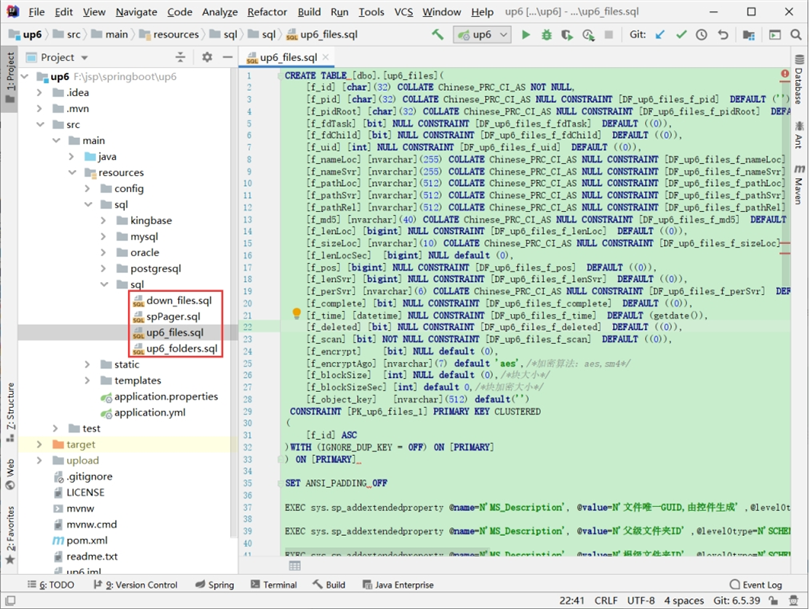
SQL示例
创建数据库
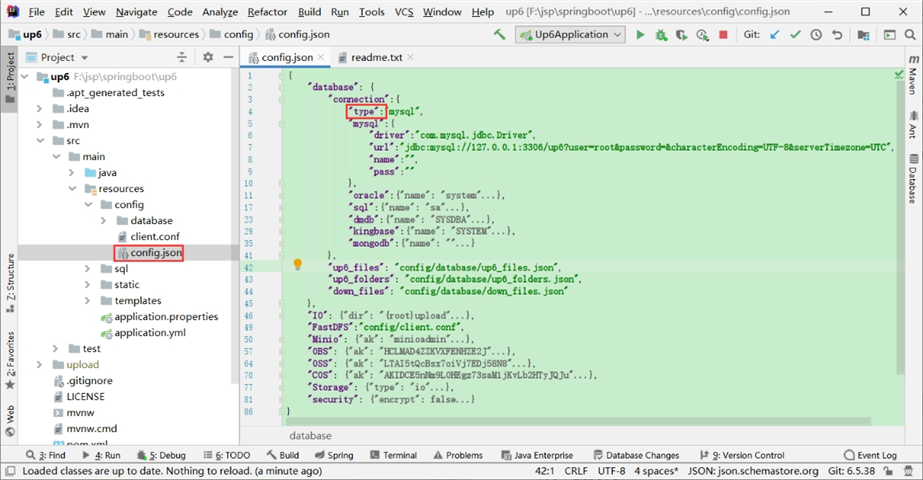
配置数据库连接
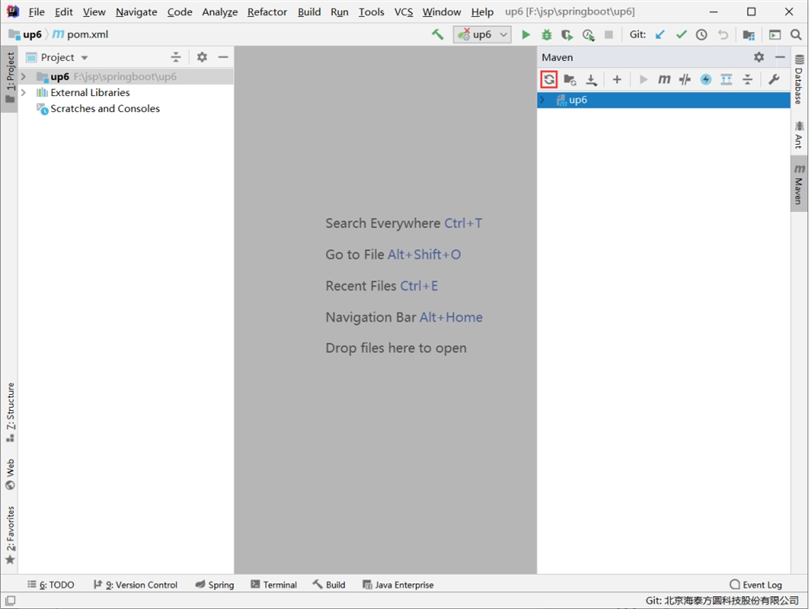
自动下载maven依赖
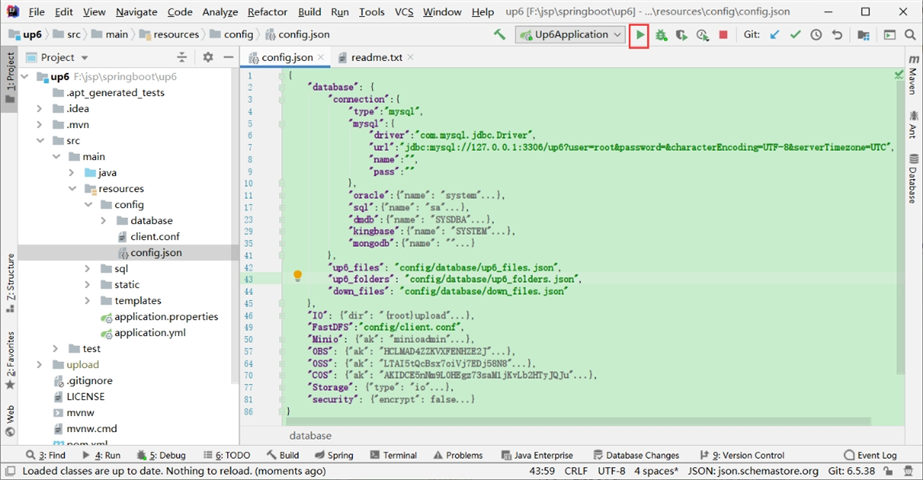
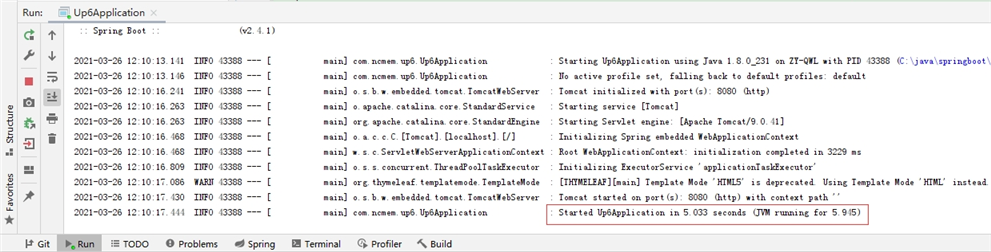
启动项目
启动成功
访问及测试
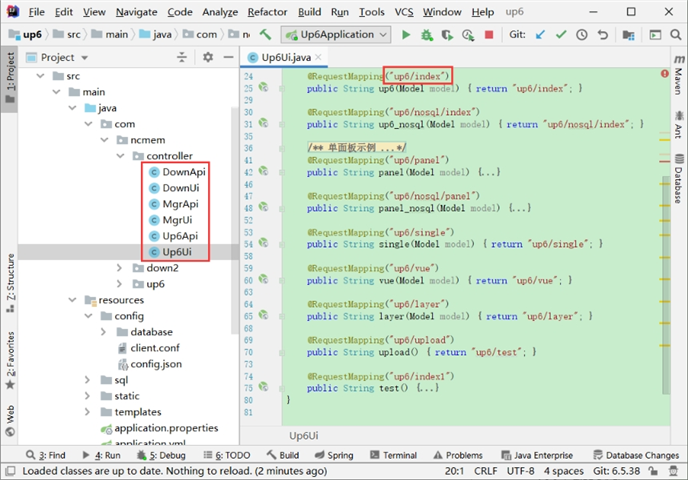
默认页面接口定义
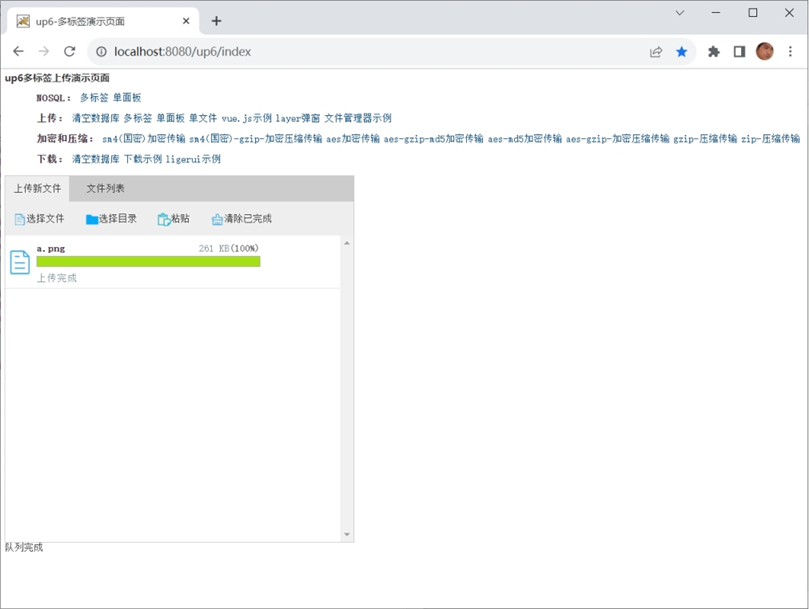
在浏览器中访问
数据表中的数据

效果预览
文件上传
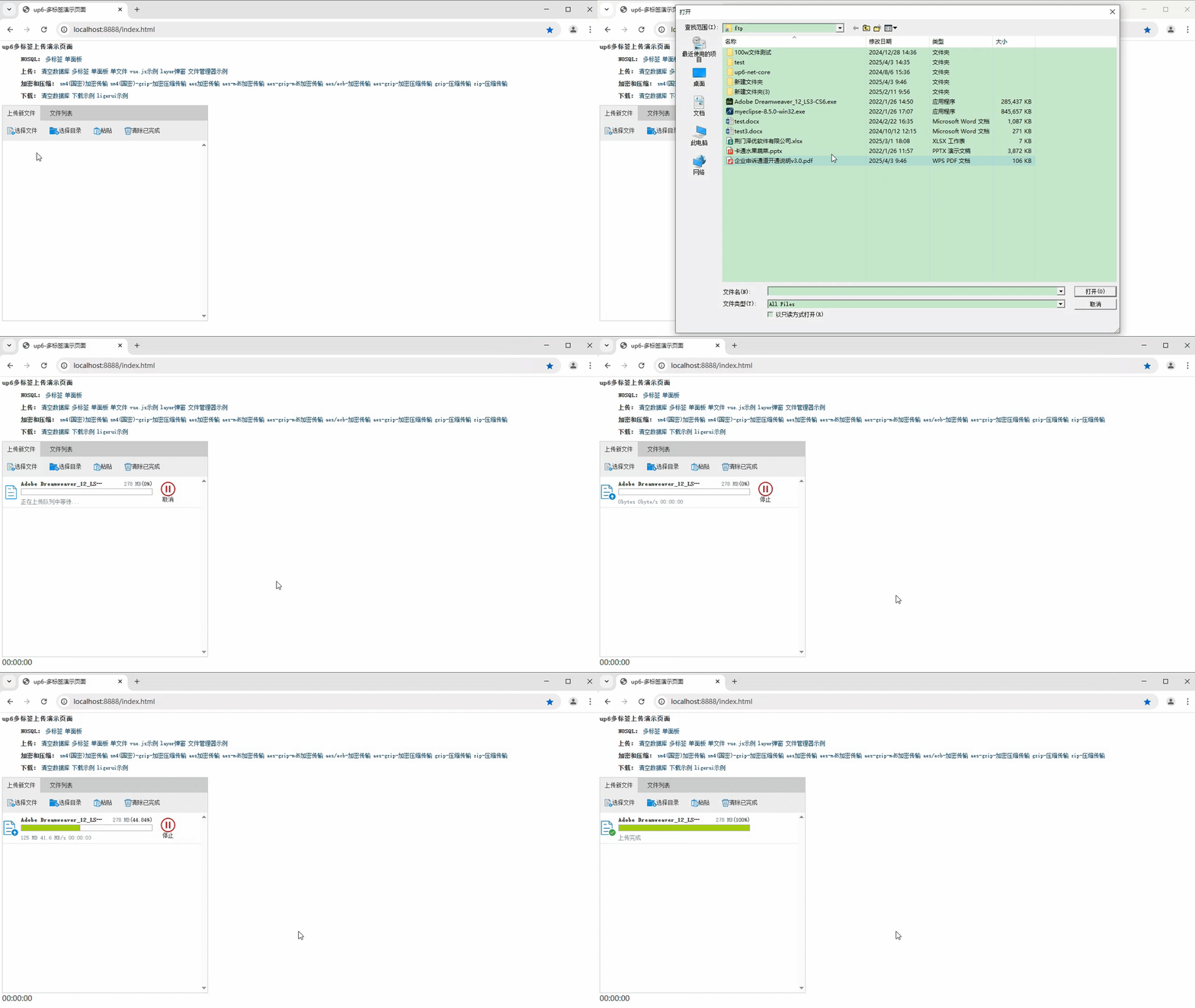
文件刷新续传
支持离线保存文件进度,在关闭浏览器,刷新浏览器后进行不丢失,仍然能够继续上传
文件夹上传
支持上传文件夹并保留层级结构,同样支持进度信息离线保存,刷新页面,关闭页面,重启系统不丢失上传进度。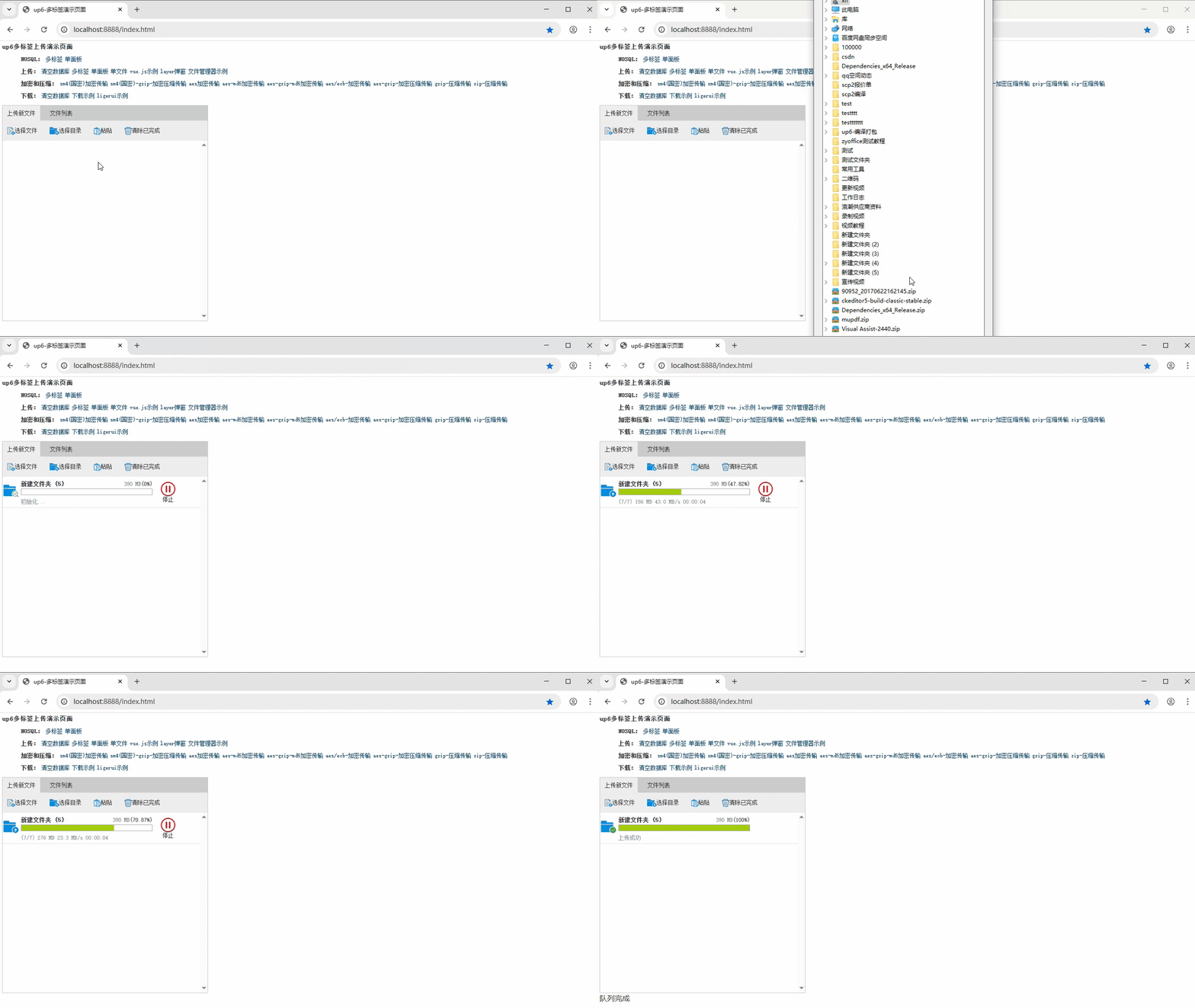
批量下载
支持文件批量下载
下载续传
文件下载支持离线保存进度信息,刷新页面,关闭页面,重启系统均不会丢失进度信息。
文件夹下载
支持下载文件夹,并保留层级结构,不打包,不占用服务器资源。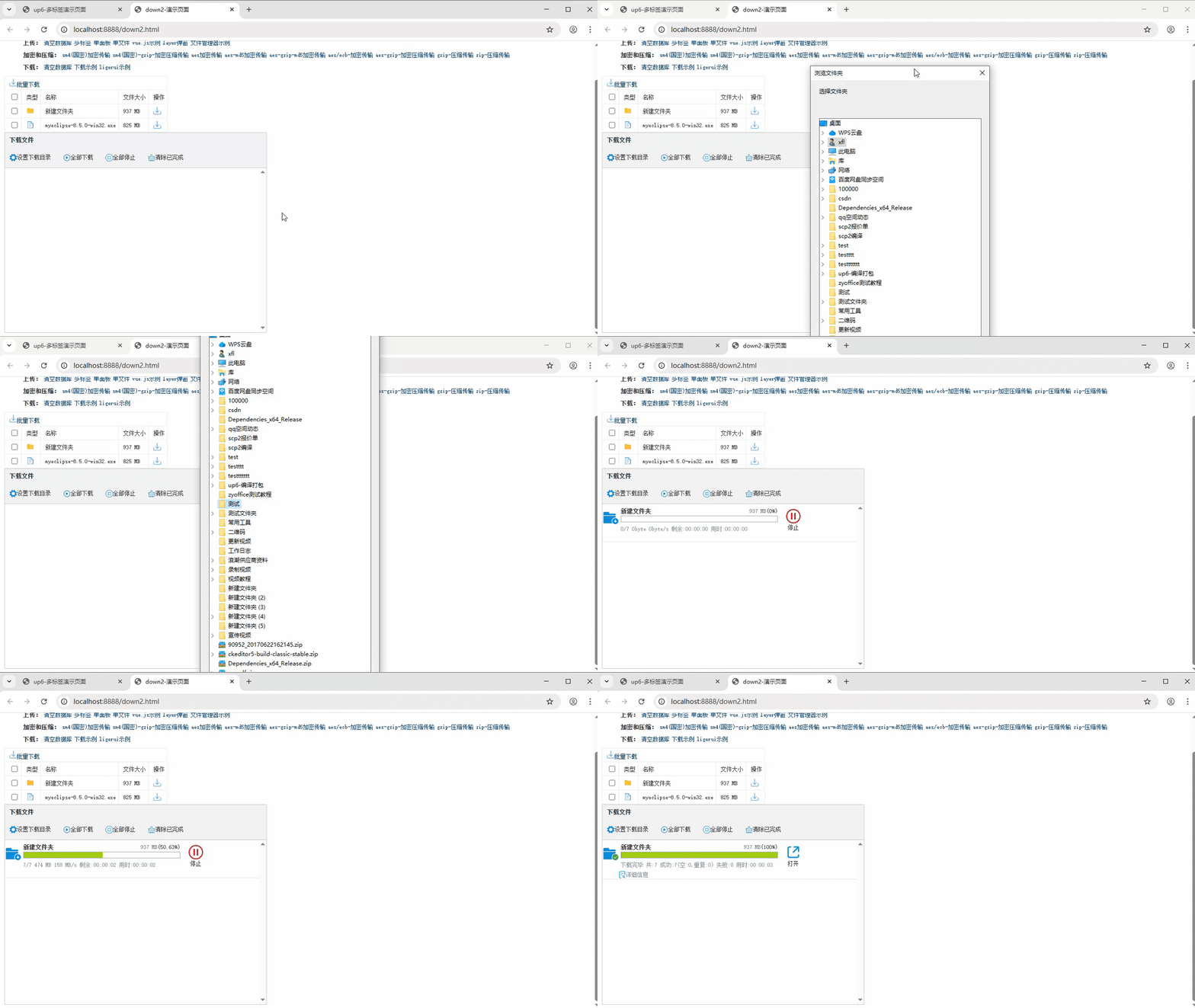
示例下载

AtomGit 是由开放原子开源基金会联合 CSDN 等生态伙伴共同推出的新一代开源与人工智能协作平台。平台坚持“开放、中立、公益”的理念,把代码托管、模型共享、数据集托管、智能体开发体验和算力服务整合在一起,为开发者提供从开发、训练到部署的一站式体验。
更多推荐


 10
10 0
0- 0


 已为社区贡献18条内容

所有评论(0)