
AI Agent 的本质是状态机

智能体Agent并非是用什么魔法实现的,它其实是以LLM交互为核心逻辑搭建的一个软件框架,因为LLM本身只会接收文本输入并给出文本预测,LLM并不能调用外部工具,也不会自己组织历史信息,这些都是外围精心设计的软件工程提供的能力。单纯站在数据结构和控制流的角度看,Agent本质就是一个状态机,是通过工程化手段对LLM的处理进行了流程编排。
在接下来的内容中,我试图把几种常见的Agent类型用状态机进行描述。这里的状态机指的是经典状态机结构,即:
状态机= 当前状态+ 触发事件+ 状态转移规则
用图表示的话,节点表示当前系统状态,箭头边表示状态的转移,边上的文字则描述了事件。
基本会话Agent
我们从最简单的LLM会话agent看起,即只有最基本的会话功能,不会调用什么工具,也没有什么复杂的流程控制。这种Agent其实就两个状态,WaitingInput,等待用户输入;CallingLLM,调用LLM接口。当用户输入新消息时,状态从WaitingInput转换为CallingLLM;当收到LLM的反馈时,重新转到WaitingInput。此外,我们会用history变量存放会话历史,history属于状态机里的扩展变量。
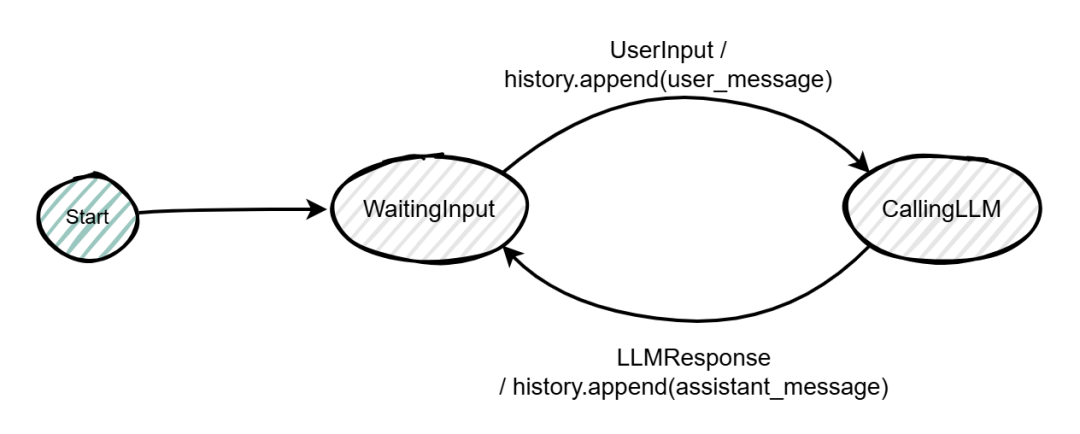
如下的python代码是这个状态机的实现,里面没有使用任何框架(例如LangGraph),也没有专门抽象出状态机对象,完全是用基本的if-else和while控制流实现的,状态机在这段代码中是隐式存在的。不过这不影响我们的分析,因为状态机本身就是一个抽象概念。
from openai import AzureOpenAI
import os

class SimpleChatAgent:
    def __init__(self,
                 endpoint: str,
                 api_key: str,
                 deployment_name: str,
                 api_version: str = "2024-12-01-preview"):
        self.client = AzureOpenAI(
            azure_endpoint=endpoint,
            api_key=api_key,
            api_version=api_version
        )
        self.deployment_name = deployment_name
        self.history = []

    def send(self, user_message: str) -> str:
        self.history.append({
            "role": "user",
            "content": user_message
        })
        response = self.client.chat.completions.create(
            model=self.deployment_name,
            messages=self.history
        )
        assistant_message = response.choices[0].message.content
        self.history.append({
            "role": "assistant",
            "content": assistant_message
        })
        return assistant_message


if __name__ == "__main__":
    endpoint = ""
    api_key = ""
    deployment_name = ""
    agent = SimpleChatAgent(
        endpoint=endpoint,
        api_key=api_key,
        deployment_name=deployment_name
    )

    while True:
        user_input = input("You: ")
        if user_input.lower() in ["exit", "quit"]:
            break

        reply = agent.send(user_input)
        print("Agent:", reply)
一个最基本的对话Agent说白了就是一个循环中不断请求LLM并追加LLM的回复。
意图识别Agent
一般我们设计一个agent是为了专门处理某类业务问题,我们不希望agent回复这个业务话题之外的问题,因此在基本会话状态机的基础上,我们一般会加入意图识别,即如果用户的输入跟预定的话题无关,系统直接拒绝回复。这会在原来的状态机上新增一个ClassifyingIntent的状态,根据识别出的意图,再转到对应的下一个状态(意图=当前话题,继续LLM交互;意图=其他,拒绝回复并重新等待用户输入;意图=离开,退出系统)
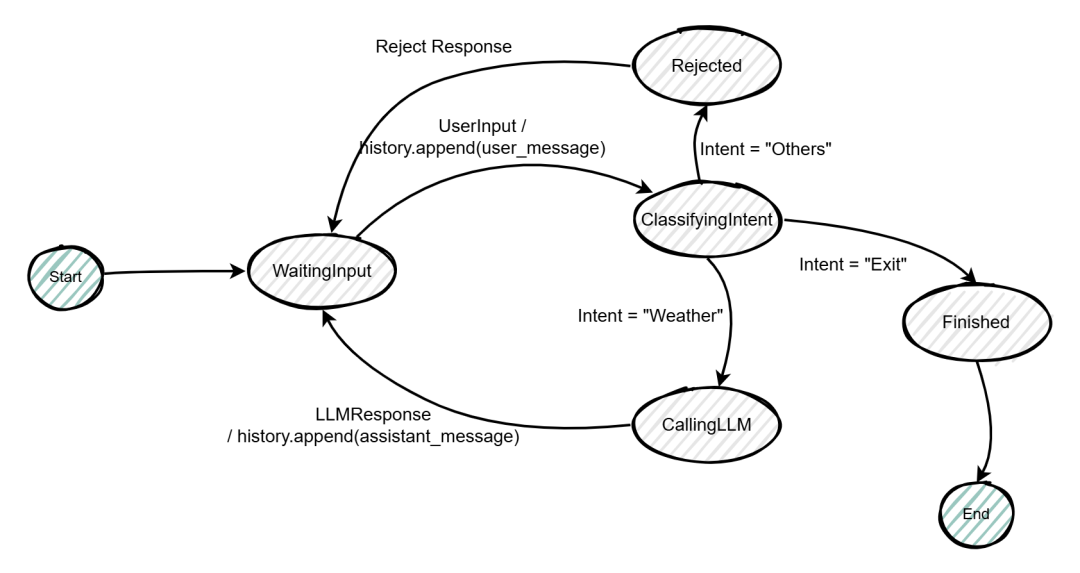
更新后的代码:
from openai import AzureOpenAI
import os

class SimpleWeatherChatAgent:
    def __init__(self,
                 endpoint: str,
                 api_key: str,
                 deployment_name: str,
                 api_version: str = "2024-12-01-preview"):
        self.client = AzureOpenAI(
            azure_endpoint=endpoint,
            api_key=api_key,
            api_version=api_version
        )
        self.deployment_name = deployment_name
        self.history = []

    def classify_intent(self, user_message: str) -> str:
        prompt = f"""
You are an intent classifier.

Classify the user message into one of the following categories:
- WEATHER
- OTHER
- EXIT

User message:
{user_message}

Only return one word: WEATHER, OTHER, or EXIT.
"""
        response = self.client.chat.completions.create(
            model=self.deployment_name,
            messages=[{"role": "user", "content": prompt}]
        )
        result = response.choices[0].message.content.strip().upper()
        return result

    def chat(self, user_message: str) -> str:
        self.history.append({
            "role": "user",
            "content": user_message
        })
        response = self.client.chat.completions.create(
            model=self.deployment_name,
            messages=self.history
        )
        assistant_message = response.choices[0].message.content
        self.history.append({
            "role": "assistant",
            "content": assistant_message
        })

        return assistant_message

    def send(self, user_message: str):
        intent = self.classify_intent(user_message)
        if intent == "EXIT":
            return "EXIT"
        if intent == "OTHER":
            return "抱歉,目前只支持天气相关问题。"
        if intent == "WEATHER":
            return self.chat(user_message)
        return "无法识别输入。"

if __name__ == "__main__":
    endpoint = ""
    api_key = ""
    deployment_name = ""

    agent = SimpleWeatherChatAgent(
        endpoint=endpoint,
        api_key=api_key,
        deployment_name=deployment_name
    )

    while True:
        user_input = input("You: ")

        result = agent.send(user_input)

        if result == "EXIT":
            print("Agent: 对话结束,再见!")
            break

        print("Agent:", result)
工具调用Agent
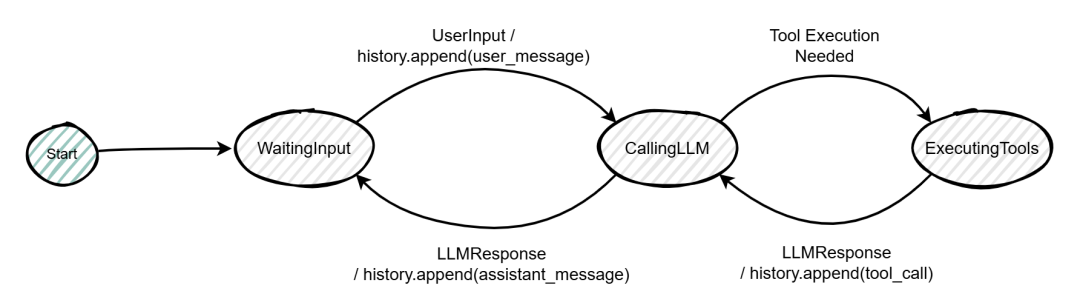
工具调用,尤其是调用本地自定义的工具,已经是目前Agent最基本的功能之一了。下面我们在基本的会话Agent之上添加自定义工具的调用,正如开头所说,LLM本身无法触发工具调用,是Agent根据LLM的回复判断是否要调用工具、调用什么工具和什么参数,调用完之后把结果追加到消息中再次喂给LLM,重复这个操作直到LLM回复出最终不带工具调用提示的答案。
从状态机角度看,多了一个ExecutingTools的状态,在CallingLLM之后,如果LLM回复中要求了工具调用,则进入ExecutingTools;ExecutingTools之后,把工具调用结果追加到会话历史中,再回到CallingLLM;这个循环一直持续到CallingLLM的结果中没有工具调用的提示,这时跳回到WaitingInput。
import os
import json
from openai import AzureOpenAI

def get_weather(location: str):
    return f"{location} 的天气是晴,25°C"

def add_numbers(a: int, b: int):
    return f"{a} + {b} = {a + b}"

class AzureToolAgent:
    def __init__(self, endpoint, api_key, deployment_name, api_version="2024-12-01-preview"):
        self.client = AzureOpenAI(
            azure_endpoint=endpoint,
            api_key=api_key,
            api_version=api_version
        )
        self.deployment_name = deployment_name
        self.history = []
        self.tools = [
            {
                "type": "function",
                "function": {
                    "name": "get_weather",
                    "description": "获取指定城市的天气",
                    "parameters": {
                        "type": "object",
                        "properties": {
                            "location": {
                                "type": "string",
                                "description": "城市名称"
                            }
                        },
                        "required": ["location"]
                    }
                }
            },
            {
                "type": "function",
                "function": {
                    "name": "add_numbers",
                    "description": "计算两个整数的和",
                    "parameters": {
                        "type": "object",
                        "properties": {
                            "a": {"type": "integer"},
                            "b": {"type": "integer"}
                        },
                        "required": ["a", "b"]
                    }
                }
            }
        ]

    def run_turn(self, user_input: str):
        self.history.append({
            "role": "user",
            "content": user_input
        })
        response = self.client.chat.completions.create(
            model=self.deployment_name,
            messages=self.history,
            tools=self.tools,
            tool_choice="auto"
        )

        message = response.choices[0].message

        if message.tool_calls:
            self.history.append(message)
            for tool_call in message.tool_calls:
                tool_name = tool_call.function.name
                arguments = json.loads(tool_call.function.arguments)

                if tool_name == "get_weather":
                    result = get_weather(**arguments)
                elif tool_name == "add_numbers":
                    result = add_numbers(**arguments)
                else:
                    result = "未知工具"

                self.history.append({
                    "role": "tool",
                    "tool_call_id": tool_call.id,
                    "content": result
                })

            # 再次调用 LLM 生成最终自然语言回复
            second_response = self.client.chat.completions.create(
                model=self.deployment_name,
                messages=self.history
            )

            final_message = second_response.choices[0].message
            self.history.append(final_message)

            return final_message.content

        #如果没有工具调用,直接返回文本
        else:
            self.history.append(message)
            return message.content

if __name__ == "__main__":
    endpoint = ""
    api_key = ""
    deployment_name = ""
    agent = AzureToolAgent(endpoint, api_key, deployment_name)
    print("Agent 启动,输入 exit 退出")

    while True:
        user_input = input("You: ")
        if user_input.lower() in ["exit", "quit"]:
            print("Agent: 再见!")
            break

        reply = agent.run_turn(user_input)
        print("Agent:", reply)
计划生成Agent
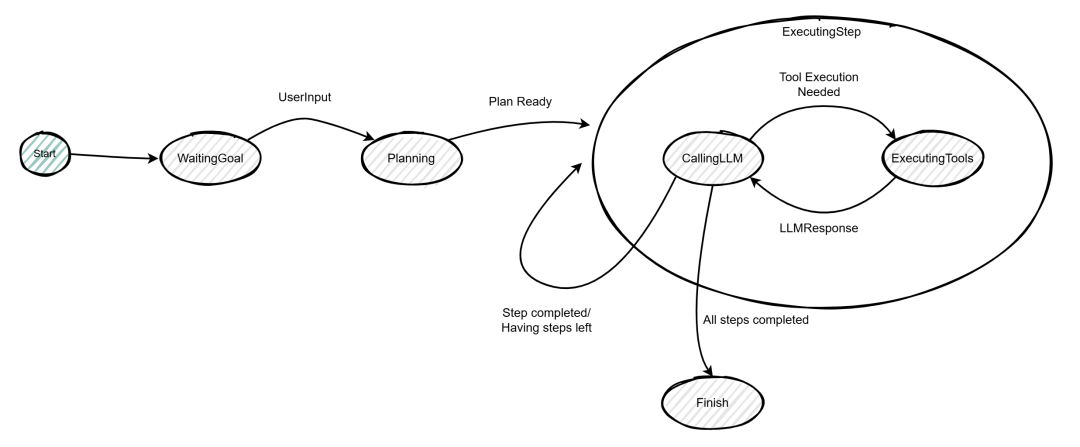
在一些重流程的业务场景中,仅仅一个支持多轮对话和工具调用的Agent是不足够的,我们往往需要用流程规则来限制LLM的发散性,Agent应该根据实际的业务场景和规范,生成工作计划,然后逐次执行计划里的每个步骤,每个步骤里支持运行的其实是个支持工具调用的子Agent。这种模式在一些对流程规范要求较高,涉及审计要求以及异常回滚处理的场景里比较常见。当然理论上,仅仅通过和LLM的多轮对话和修正,也可以去完成一个期望的流程处理,但是其不确定性和黑盒性大大增加。
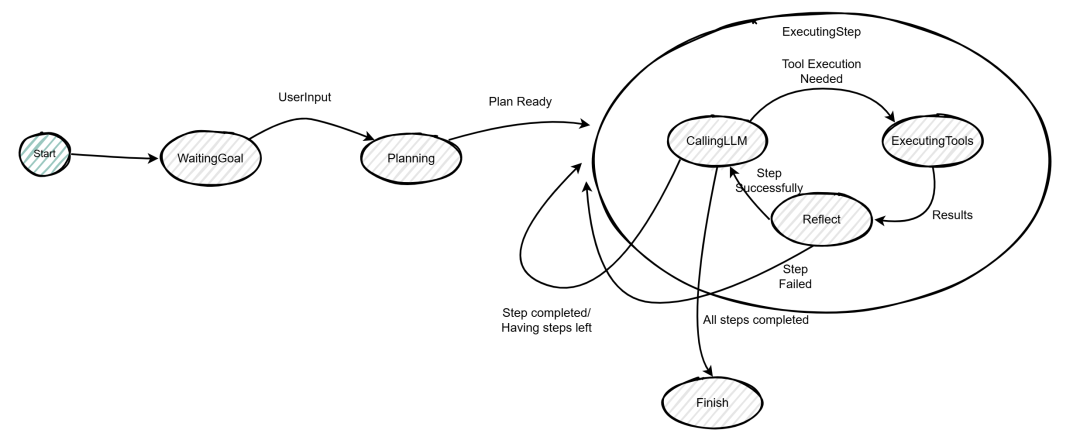
我们先不考虑异常回滚,只考虑正常的运行流程,从状态机的角度看,该Agent会变成一个双层状态机。Planning状态表示让LLM根据用户目标和业务上下文生成若干步骤的执行计划,然后进入ExecutingStep的子状态机;ExecutingStep里基本上就是上面提到的工具调用Agent的状态机结构,通过LLM交互和可能的工具调用,运行计划里的每个步骤;完成当前步骤后进行一次判断,如果有下个步骤就继续执行,没有的话完成计划。
import os
import json
from openai import AzureOpenAI

def get_weather(location: str):
    return f"{location} 的天气是晴,25°C"

def add_numbers(a: int, b: int):
    return f"{a} + {b} = {a + b}"

class PlanningAgent:
    def __init__(self, endpoint, api_key, deployment_name, api_version="2024-12-01-preview"):
        self.client = AzureOpenAI(
            azure_endpoint=endpoint,
            api_key=api_key,
            api_version=api_version
        )
        self.deployment_name = deployment_name
        self.history = []
        self.goal = None
        self.plan = []
        self.current_step_idx = 0
        self.step_results = []
        self.tools = [
            {
                "type": "function",
                "function": {
                    "name": "get_weather",
                    "description": "获取指定城市的天气",
                    "parameters": {
                        "type": "object",
                        "properties": {
                            "location": {"type": "string"}
                        },
                        "required": ["location"]
                    }
                }
            },
            {
                "type": "function",
                "function": {
                    "name": "add_numbers",
                    "description": "计算两个整数的和",
                    "parameters": {
                        "type": "object",
                        "properties": {
                            "a": {"type": "integer"},
                            "b": {"type": "integer"}
                        },
                        "required": ["a", "b"]
                    }
                }
            }
        ]

    # -------------------------
    # Planning 阶段
    # -------------------------
    def generate_plan(self, goal: str):
        planning_prompt = f"""
你是一个任务规划助手。
请把用户目标拆分为有序步骤。
必须返回 JSON 格式:

{{
  "steps": ["step1", "step2", "..."]
}}

用户目标:
{goal}
"""
        response = self.client.chat.completions.create(
            model=self.deployment_name,
            messages=[{"role": "user", "content": planning_prompt}]
        )
        content = response.choices[0].message.content
        plan_json = json.loads(content)
        return plan_json["steps"]

    # -------------------------
    # 执行单个步骤
    # -------------------------
    def execute_step(self, step: str):
        step_messages = self.history + [
            {"role": "system", "content": f"当前执行步骤:{step}"}
        ]
        response = self.client.chat.completions.create(
            model=self.deployment_name,
            messages=step_messages,
            tools=self.tools,
            tool_choice="auto"
        )
        message = response.choices[0].message
        if message.tool_calls:
            step_messages.append(message)

            for tool_call in message.tool_calls:
                tool_name = tool_call.function.name
                args = json.loads(tool_call.function.arguments)

                if tool_name == "get_weather":
                    result = get_weather(**args)
                elif tool_name == "add_numbers":
                    result = add_numbers(**args)
                else:
                    result = "未知工具"
                step_messages.append({
                    "role": "tool",
                    "tool_call_id": tool_call.id,
                    "content": result
                })
            second_response = self.client.chat.completions.create(
                model=self.deployment_name,
                messages=step_messages
            )
            final_message = second_response.choices[0].message
            return final_message.content
        else:
            return message.content

    def run_goal(self, goal: str):
        print("=== Planning 阶段 ===")
        self.goal = goal
        self.plan = self.generate_plan(goal)
        self.current_step_idx = 0
        print("生成计划:")
        for idx, step in enumerate(self.plan):
            print(f"{idx+1}. {step}")

        print("\n=== 执行阶段 ===")
        while self.current_step_idx < len(self.plan):
            step = self.plan[self.current_step_idx]
            print(f"\n执行步骤 {self.current_step_idx+1}: {step}")
            result = self.execute_step(step)
            print("步骤结果:", result)
            self.step_results.append(result)
            self.current_step_idx += 1
        print("\n=== 全部完成 ===")
        # 汇总结果
        summary_prompt = f"""
用户目标:{self.goal}

步骤执行结果:
{self.step_results}

请给出最终汇总结果。
"""
        response = self.client.chat.completions.create(
            model=self.deployment_name,
            messages=[{"role": "user", "content": summary_prompt}]
        )
        return response.choices[0].message.content

if __name__ == "__main__":
    endpoint = ""
    api_key = ""
    deployment_name = ""
    agent = PlanningAgent(endpoint, api_key, deployment_name)

    goal = input("请输入目标:")
    final_answer = agent.run_goal(goal)

    print("\n最终结果:")
    print(final_answer)
基于这个最基本的Planning Agent,可以进一步扩展状态机结构来支持更加复杂的需求。例如出现异常后的重试机制,也就是某个步骤如果调用工具发生异常,可以尝试重试该步骤,直到成功或者达到最大重试次数后退出。在原来的状态机上,新增了一个Reflect的状态用来评估ExecutingTools的结果,如果成功,则继续回到CallingLLM执行步骤;如果失败,则重试当前步骤(当前步骤的扩展状态变量重新初始化)。
分析Agent状态的意义
设计和分析Agent的状态机,就等同于传统软件项目的业务流建模,是让Agent的工作能够符合实际的业务需求。虽然目前LLM的确已经强大到具备足够的理解和推理能力,通过需求描述加反馈修正,它已经能够完成任务目标,这事实上或多或少已经改变了传统认知上的软件项目活动了。但是软件工程领域那句经典的“没有银弹”至少可见的未来应该还是生效的,在很多对重追溯、高透明度和低成本要求较高的业务上,LLM的高自主性反而是种劣势,因而我们才需要设计合理的Agent状态机来控制LLM在业务流里的参与度,可靠性和稳定性在这时具备更大的权重。
最后
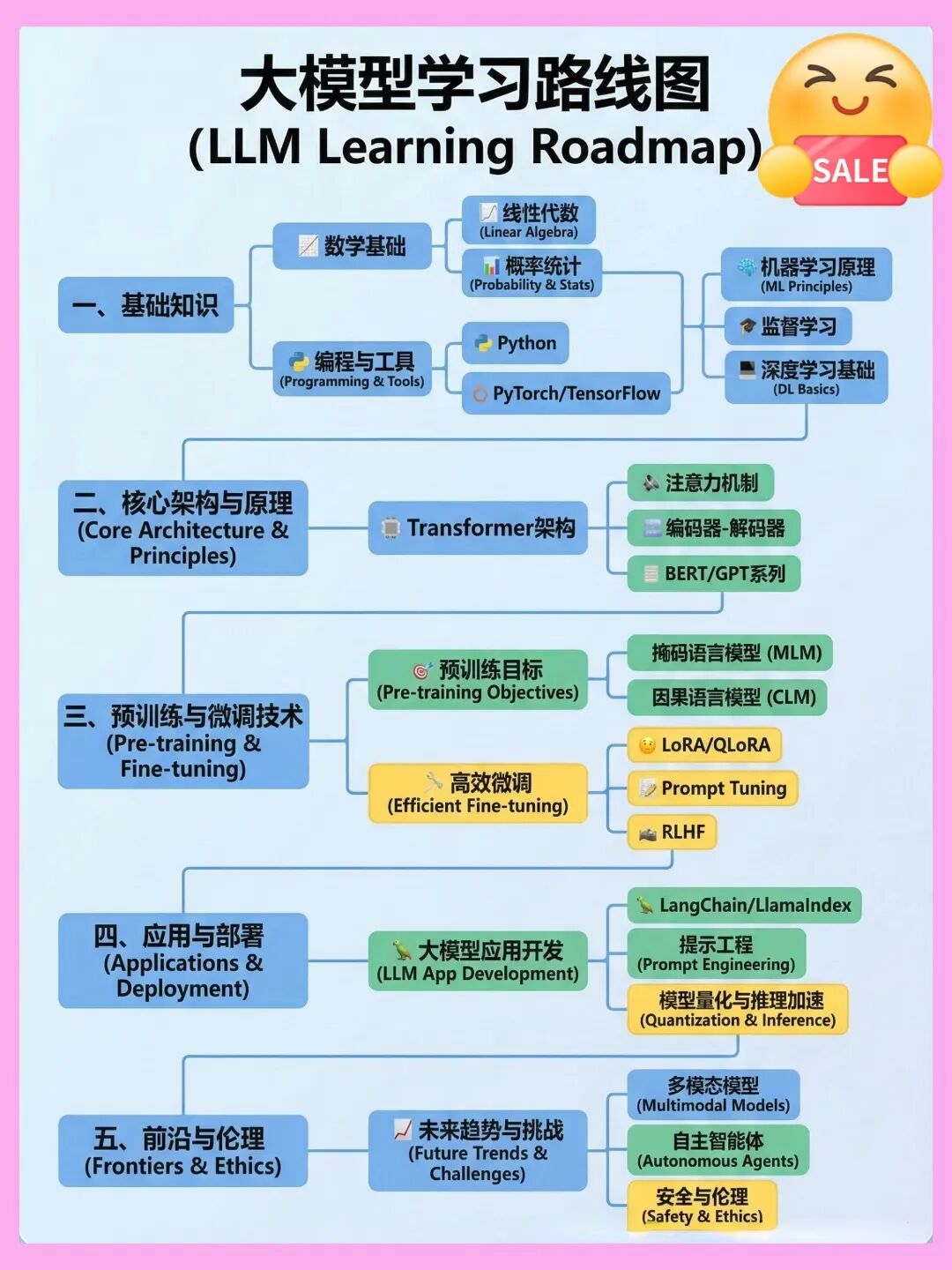
从0到1!大模型(LLM)最全学习路线图,建议收藏!
想入门大模型(LLM)却不知道从哪开始? 我根据最新的技术栈和我自己的经历&理解,帮大家整理了一份LLM学习路线图,涵盖从理论基础到落地应用的全流程!拒绝焦虑,按图索骥~~
因篇幅有限,仅展示部分资料,需要点击下方链接即可前往获取