第T8周:猫狗识别
- 🍨 本文为🔗365天深度学习训练营 中的学习记录博客
- 🍖 原作者:K同学啊
前言
- 实验环境
python 3.9.2
tensorflow 2.10.0
Jupyter Notebook: 7.4.5
代码实现
设置gpu
import tensorflow as tf

gpus = tf.config.list_physical_devices("GPU")
  #设置GPU显存用量按需使用
if gpus:
    tf.config.experimental.set_memory_growth(gpus[0], True)
    tf.config.set_visible_devices([gpus[0]],"GPU")

# 打印出检测到的 GPU 列表
print(gpus)

导入数据
import matplotlib.pyplot as plt

plt.rcParams['font.sans-serif'] = ['SimHei']  # 用来正常显示中文标签
plt.rcParams['axes.unicode_minus'] = False  # 用来正常显示负号
import warnings, pathlib

# 隐藏警告
warnings.filterwarnings('ignore')

data_dir = "./data"
data_dir = pathlib.Path(data_dir)

image_count = len(list(data_dir.glob('*/*')))

print("图片总数为:{}".format(image_count))

数据加载
# 基本参数设置
batch_size = 8
img_height = 224
img_width = 224

# 数据加载
# 加载数据集,自动完成:调整尺寸、打乱数据、划分验证集
train_ds = tf.keras.preprocessing.image_dataset_from_directory(
    data_dir,
    validation_split=0.2,
    subset="training",
    seed=12,
    image_size=(img_height, img_width),
    batch_size=batch_size)

val_ds = tf.keras.preprocessing.image_dataset_from_directory(
    data_dir,
    validation_split=0.2,
    subset="validation",
    seed=12,
    image_size=(img_height, img_width),
    batch_size=batch_size)

输出标签
class_names = train_ds.class_names
print(class_names)

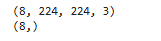
再次检查数据
for image_batch, labels_batch in train_ds:
    print(image_batch.shape)
    print(labels_batch.shape)
    break
处理数据集以及优化数据加载效率
AUTOTUNE = tf.data.AUTOTUNE

# 将图像像素值从 [0, 255](通常是 uint8 类型)缩放到 [0, 1] 的浮点范围。
def preprocess_image(image,label):
    return (image/255.0,label)

# 归一化处理,.map(func)表示对数据集中的每个元素应用 func。num_parallel_calls=AUTOTUNE表示并行执行预处理操作。
train_ds = train_ds.map(preprocess_image, num_parallel_calls=AUTOTUNE)
val_ds = val_ds.map(preprocess_image, num_parallel_calls=AUTOTUNE)

train_ds = train_ds.cache().shuffle(1000).prefetch(buffer_size=AUTOTUNE)
val_ds = val_ds.cache().prefetch(buffer_size=AUTOTUNE)
数据可视化
plt.figure(figsize=(15, 10))  # 图形的宽为15高为10

for images, labels in train_ds.take(1):
    for i in range(8):

        ax = plt.subplot(5, 8, i + 1)
        plt.imshow(images[i])
        plt.title(class_names[labels[i]])

        plt.axis("off")

构建模型
-
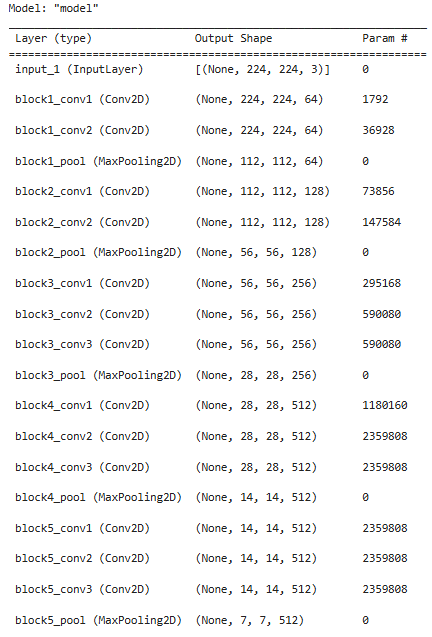
各层的作用:
-
前五层卷积块(Block 1 - Block 5)
- Block 1 & 2: 通过双卷积层堆叠提取基础纹理与中级形状。
- Block 3, 4 & 5: 采用三卷积层堆叠,通道数由 256 提升至 512。随着层数加深,感受野扩大,模型开始理解复杂的语义信息(如猫的耳朵、狗的鼻子等)。
- 最大池化层 (MaxPooling2D):在每个 Block 结束处进行下采样,在保留关键特征的同时,将空间维度从 224 × 224 224 \times 224 224×224 逐步压缩至 7 × 7 7 \times 7 7×7。
-
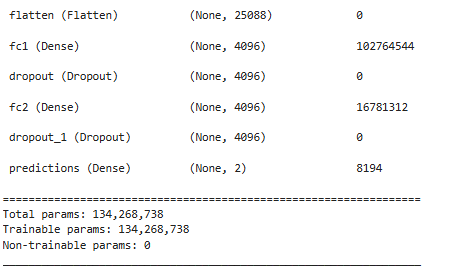
全连接分类层(针对二分类优化)
- Flatten 层: 将末端卷积特征展平为 25,088 维向量。
- 全连接层 1 & 2 (Dense 4096):进行全局特征的非线性组合与变换。
- Dropout 层 (Dropout(0.5)) :
- 作用:在训练过程中随机断开 50% 的神经元连接。
- 原理:防止模型过度依赖某些特定特征。
- 输出层 (Dense(2, activation=‘softmax’)) :
- 作用:输出一个二维概率向量,分别表示输入图像属于“猫”和“狗”两个类别的预测概率。Softmax 激活函数确保这两个概率之和为 1,模型通过选择概率较高的类别作为最终预测结果。
-
为什么引入 Dropout 层?
- VGG16 是一个拥有超过 1.3 亿参数的巨大模型。而使用的数据集(几千张图片)相对模型容量来说太小了,就会导致模型找捷径记住图片,就好比一个老师给了学生四五百道题,而这个学生是个记忆天才可以记忆上千甚至上万道题,所以他就会直接去记住这些题而不是总结解题规律,这就导致遇到新题还是不会做。
-
from tensorflow import keras
from tensorflow.keras import layers, models, Input
from tensorflow.keras.models import Model
from tensorflow.keras.layers import Conv2D, MaxPooling2D, Dense, Flatten, Dropout

def VGG16(num_classes, input_shape):
    input_tensor = Input(shape=input_shape)

    # Block 1
    x = Conv2D(64, (3,3), activation='relu', padding='same', name='block1_conv1')(input_tensor)
    x = Conv2D(64, (3,3), activation='relu', padding='same', name='block1_conv2')(x)
    x = MaxPooling2D((2,2), strides=2, name='block1_pool')(x)

    # Block 2
    x = Conv2D(128, (3,3), activation='relu', padding='same', name='block2_conv1')(x)
    x = Conv2D(128, (3,3), activation='relu', padding='same', name='block2_conv2')(x)
    x = MaxPooling2D((2,2), strides=2, name='block2_pool')(x)

    # Block 3
    x = Conv2D(256, (3,3), activation='relu', padding='same', name='block3_conv1')(x)
    x = Conv2D(256, (3,3), activation='relu', padding='same', name='block3_conv2')(x)
    x = Conv2D(256, (3,3), activation='relu', padding='same', name='block3_conv3')(x)
    x = MaxPooling2D((2,2), strides=2, name='block3_pool')(x)

    # Block 4
    x = Conv2D(512, (3,3), activation='relu', padding='same', name='block4_conv1')(x)
    x = Conv2D(512, (3,3), activation='relu', padding='same', name='block4_conv2')(x)
    x = Conv2D(512, (3,3), activation='relu', padding='same', name='block4_conv3')(x)
    x = MaxPooling2D((2,2), strides=2, name='block4_pool')(x)

    # Block 5
    x = Conv2D(512, (3,3), activation='relu', padding='same', name='block5_conv1')(x)
    x = Conv2D(512, (3,3), activation='relu', padding='same', name='block5_conv2')(x)
    x = Conv2D(512, (3,3), activation='relu', padding='same', name='block5_conv3')(x)
    x = MaxPooling2D((2,2), strides=2, name='block5_pool')(x)

    # 全连接分类
    x = Flatten()(x)
    x = Dense(4096, activation='relu', name='fc1')(x)
    x = Dropout(0.5)(x) # 训练时,随机将 50% 的神经元输出置零,提高泛化能力
    x = Dense(4096, activation='relu', name='fc2')(x)
    x = Dropout(0.5)(x)
    output_tensor = Dense(2, activation='softmax', name='predictions')(x)

    model = Model(input_tensor, output_tensor)
    return model

num_classes = len(class_names)
model = VGG16(num_classes, (img_height, img_width, 3))
model.summary()
编译模型
model.compile(optimizer="adam",
              loss ='sparse_categorical_crossentropy',
              metrics  =['accuracy'])
训练模型
-
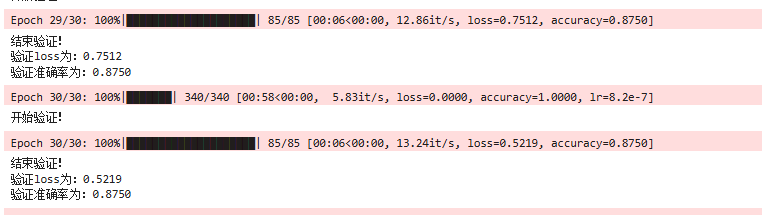
model.train_on_batch(x, y)是 对单个 batch 的数据执行一次前向传播、损失计算、反向传播和参数更新。相比model.fit()(自动处理整个数据集、epoch、batch 等),train_on_batch可以自定义训练循环。 -
tqdm是一个 Python 进度条库,能为可迭代对象添加进度条。- 参数说明:
total: 总步数(用于计算百分比)desc: 前缀描述(如 “Epoch 1/10”)mininterval: 最小更新间隔ncols: 进度条总宽度(字符数)set_postfix(): 在进度条末尾动态显示额外信息(如 loss、acc)update(n): 手动推进 n 步
- 参数说明:
-
可能的BUG:
- 由于
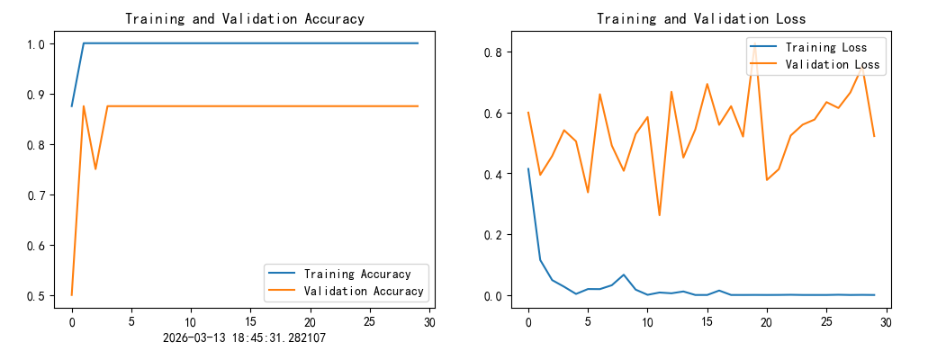
model.train_on_batch(x, y)是 对单个 batch 的数据执行一次前向传播、损失计算、反向传播和参数更新,而loss/accuracy是在循环结束后才记录的,这就导致每个epoch中的各个batch的记录会逐次被后一个batch的记录所覆盖,最终只记录了每个 epoch 的最后一个 batch 的值,而不是整个 epoch 的平均值。
- 由于
from tqdm import tqdm
import tensorflow.keras.backend as K

epochs = 10
lr = 1e-4

# 记录训练数据
history_train_loss = []
history_train_accuracy = []
history_val_loss = []
history_val_accuracy = []

for epoch in range(epochs):
    train_total = len(train_ds)
    val_total = len(val_ds)
    """
    total:预期的迭代数目
    ncols:控制进度条宽度
    mininterval:进度更新最小间隔,以秒为单位(默认值:0.1)
    """
    with tqdm(total=train_total, desc=f'Epoch {epoch + 1}/{epochs}',mininterval=1,ncols=100) as pbar:

        lr = lr*0.92
        K.set_value(model.optimizer.lr, lr)

        for image,label in train_ds:

            history = model.train_on_batch(image,label)

            train_loss = history[0]
            train_accuracy = history[1]

            pbar.set_postfix({"loss": "%.4f"%train_loss,
                              "accuracy":"%.4f"%train_accuracy,
                              "lr": K.get_value(model.optimizer.lr)})
            pbar.update(1)
        history_train_loss.append(train_loss)
        history_train_accuracy.append(train_accuracy)

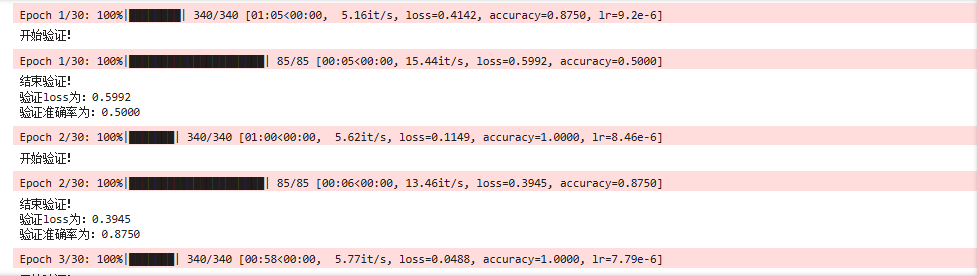
    print('开始验证!')

    with tqdm(total=val_total, desc=f'Epoch {epoch + 1}/{epochs}',mininterval=0.3,ncols=100) as pbar:

        for image,label in val_ds:

            history = model.test_on_batch(image,label)

            val_loss = history[0]
            val_accuracy = history[1]

            pbar.set_postfix({"loss": "%.4f"%val_loss,
                              "accuracy":"%.4f"%val_accuracy})
            pbar.update(1)
        history_val_loss.append(val_loss)
        history_val_accuracy.append(val_accuracy)

    print('结束验证!')
    print("验证loss为:%.4f"%val_loss)
    print("验证准确率为:%.4f"%val_accuracy)
模型评估
from datetime import datetime
current_time = datetime.now() # 获取当前时间

epochs_range = range(epochs)

plt.figure(figsize=(12, 4))
plt.subplot(1, 2, 1)

plt.plot(epochs_range, history_train_accuracy, label='Training Accuracy')
plt.plot(epochs_range, history_val_accuracy, label='Validation Accuracy')
plt.legend(loc='lower right')
plt.title('Training and Validation Accuracy')
plt.xlabel(current_time)

plt.subplot(1, 2, 2)
plt.plot(epochs_range, history_train_loss, label='Training Loss')
plt.plot(epochs_range, history_val_loss, label='Validation Loss')
plt.legend(loc='upper right')
plt.title('Training and Validation Loss')
plt.show()
预测
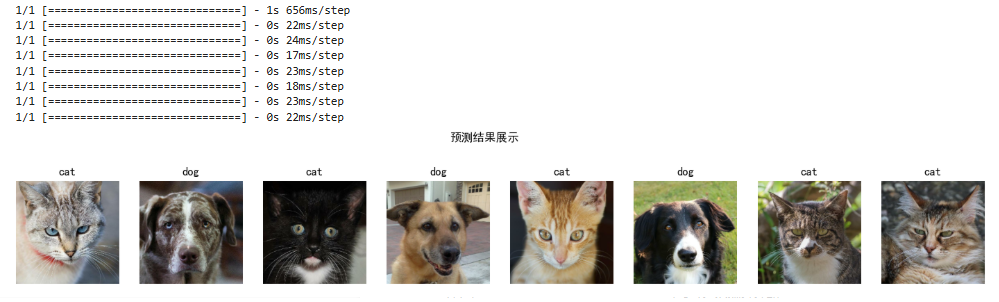
import numpy as np

# 采用加载的模型(new_model)来看预测结果
plt.figure(figsize=(18, 3))  # 图形的宽为18高为5
plt.suptitle("预测结果展示")

for images, labels in val_ds.take(1):
    for i in range(8):
        ax = plt.subplot(1,8, i + 1)

        # 显示图片
        plt.imshow(images[i].numpy())

        # 需要给图片增加一个维度
        img_array = tf.expand_dims(images[i], 0)

        # 使用模型预测图片中的人物
        predictions = model.predict(img_array)
        plt.title(class_names[np.argmax(predictions)])

        plt.axis("off")
学习总结
-
知道了可以通过
model.train_on_batch()与tqdm的配合使用来自定义训练循环。不同于fit()函数,train_on_batch()允许我在每一个 Batch 迭代中精准控制梯度更新,并实时获取当前的 Loss 和准确率。配合tqdm进度条,能直观的看到通过set_postfix实时监控学习率衰减对收敛的影响,从而能即时分析模型训练情况。 -
为了缓解 VGG-16 庞大参数量带来的过拟合问题,我在全连接层中加入了
Dropout(0.5),通过随机失活神经元迫使模型学习更具泛化性的特征,而非死记硬背像素。 -
可能的BUG:
train_on_batch返回的是当前这个 batch的 loss 和 accuracy。一个 epoch 包含 N 个 batches,每个 batch 的指标都不同。正确的 epoch 指标应该是所有 batches 的平均值,而不是最后一个 batch 的值。而原代码在 epoch 结束后直接执行history_train_loss.append(train_loss),由于train_loss在 batch 循环中不断被新值覆盖,最终存入历史记录的仅仅是最后一个 batch 的数值,而非整个 epoch 的平均表现。这导致生成的 loss 曲线波动剧烈且无法代表真实的收敛趋势。

AtomGit 是由开放原子开源基金会联合 CSDN 等生态伙伴共同推出的新一代开源与人工智能协作平台。平台坚持“开放、中立、公益”的理念,把代码托管、模型共享、数据集托管、智能体开发体验和算力服务整合在一起,为开发者提供从开发、训练到部署的一站式体验。
更多推荐

 7
7 0
0- 0


 已为社区贡献4条内容

所有评论(0)