选择一套什么样的“快递管理系统”才能发挥它的核心价值呢?
完美方案需满足以下五个关键技术要素:
第一. 《全端下单・随心寄件》
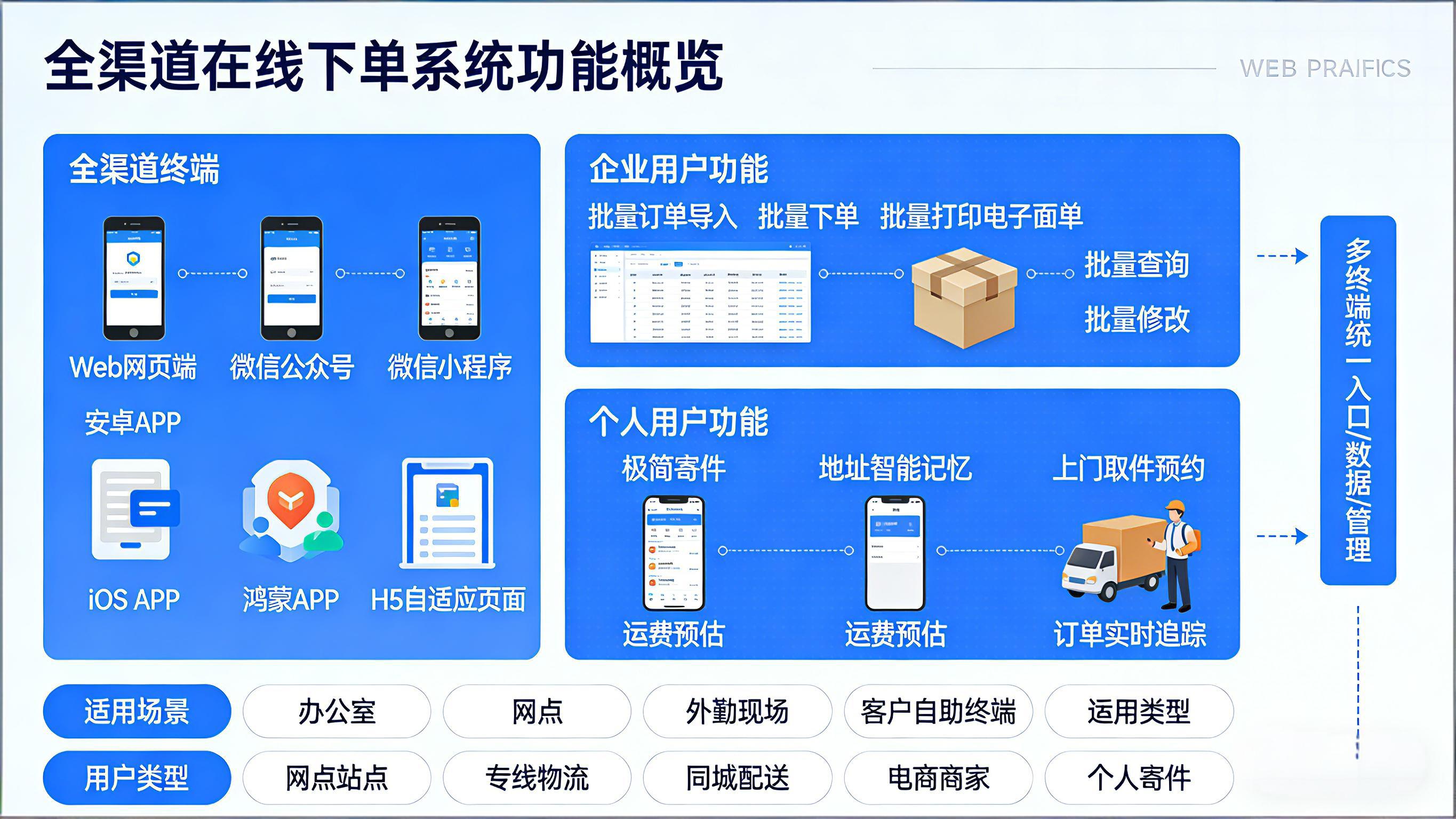
系统全面支持 Web 网页端、微信公众号、微信小程序、安卓 APP、iOS APP、鸿蒙 APP、H5 自适应页面 等全渠道在线下单功能,实现 PC 端、移动端、公众号、小程序等多终端统一入口、统一数据、统一管理,真正做到全终端覆盖、全场景适配、全天候可用。针对企业客户,系统提供批量订单导入、批量下单、批量打印电子面单、批量查询、批量修改等高效操作,满足电商平台、企业件、大客户集中发货、多点并发下单等复杂业务需求,大幅提升订单处理效率与业务承载能力。 针对个人用户,系统提供极简寄件、地址智能记忆、上门取件预约、运费预估、订单实时追踪等轻量化服务,操作简单、流程便捷,大幅提升寄件体验。
以下是一个基于Java的跨多端开发架构示例代码,使用Spring Boot作为后端框架,配合RESTful API实现多端数据同步。该方案采用统一的后端服务,通过不同前端适配层对接各平台:
以下是一个基于Java的跨多端开发架构示例代码,使用Spring Boot作为后端框架,配合RESTful API实现多端数据同步。该方案采用统一的后端服务,通过不同前端适配层对接各平台:
后端核心代码(Spring Boot)
// 数据模型层
@Entity
@Table(name = "sync_data")
public class SyncData {
    @Id
    @GeneratedValue(strategy = GenerationType.IDENTITY)
    private Long id;

    @Column(unique = true)
    private String dataKey;

    @Column(columnDefinition = "TEXT")
    private String content;

    @Version
    private Long version;

    // getters & setters
}

// 数据访问层
public interface SyncDataRepository extends JpaRepository<SyncData, Long> {
    Optional<SyncData> findByDataKey(String key);
}

// 服务层
@Service
public class SyncService {
    @Autowired
    private SyncDataRepository repository;

    public SyncData createOrUpdate(String key, String content) {
        return repository.findByDataKey(key)
            .map(existing -> {
                existing.setContent(content);
                return repository.save(existing);
            })
            .orElseGet(() -> {
                SyncData newData = new SyncData();
                newData.setDataKey(key);
                newData.setContent(content);
                return repository.save(newData);
            });
    }

    public Optional<SyncData> getData(String key) {
        return repository.findByDataKey(key);
    }
}

// 控制层
@RestController
@RequestMapping("/api/sync")
public class SyncController {
    @Autowired
    private SyncService syncService;

    @PostMapping
    public ResponseEntity<SyncData> syncData(
            @RequestBody SyncRequest request) {
        return ResponseEntity.ok(
            syncService.createOrUpdate(request.getKey(), request.getContent())
        );
    }

    @GetMapping("/{key}")
    public ResponseEntity<SyncData> getData(@PathVariable String key) {
        return syncService.getData(key)
            .map(ResponseEntity::ok)
            .orElse(ResponseEntity.notFound().build());
    }
}
前端适配方案
网页端/H5
// 使用axios进行API调用
const syncData = async (key, content) => {
    try {
        const response = await axios.post('/api/sync', { key, content });
        return response.data;
    } catch (error) {
        console.error('Sync failed:', error);
    }
};
微信小程序
// 使用wx.request
function syncData(key, content) {
    wx.request({
        url: 'https://your-api.com/api/sync',
        method: 'POST',
        data: { key, content },
        success(res) {
            console.log('Sync success:', res.data);
        }
    });
}
Android原生
// 使用Retrofit
public interface SyncApi {
    @POST("/api/sync")
    Call<SyncData> syncData(@Body SyncRequest request);
}

// 调用示例
Retrofit retrofit = new Retrofit.Builder()
    .baseUrl("https://your-api.com")
    .build();

SyncApi api = retrofit.create(SyncApi.class);
api.syncData(new SyncRequest(key, content))
    .enqueue(new Callback<SyncData>() {
        @Override
        public void onResponse(Call<SyncData> call, Response<SyncData> response) {
            // 处理响应
        }
    });
iOS原生(Swift)
// 使用URLSession
func syncData(key: String, content: String) {
    let url = URL(string: "https://your-api.com/api/sync")!
    var request = URLRequest(url: url)
    request.httpMethod = "POST"
    request.setValue("application/json", forHTTPHeaderField: "Content-Type")

    let body: [String: Any] = ["key": key, "content": content]
    request.httpBody = try? JSONSerialization.data(withJSONObject: body)

    URLSession.shared.dataTask(with: request) { data, _, error in
        // 处理响应
    }.resume()
}
鸿蒙应用
// 使用HttpURLConnection
public static void syncData(String key, String content) {
    HttpURLConnection connection = null;
    try {
        URL url = new URL("https://your-api.com/api/sync");
        connection = (HttpURLConnection) url.openConnection();
        connection.setRequestMethod("POST");
        connection.setRequestProperty("Content-Type", "application/json");

        JSONObject json = new JSONObject();
        json.put("key", key);
        json.put("content", content);

        OutputStream os = connection.getOutputStream();
        os.write(json.toString().getBytes());
        os.flush();

        // 处理响应
    } finally {
        if (connection != null) {
            connection.disconnect();
        }
    }
}
技术要点说明
统一API设计
- 所有平台通过相同的RESTful接口访问后端
- 使用JSON作为通用数据交换格式
- 版本控制字段处理并发修改
数据同步策略
- 客户端定期轮询检查数据更新
- 服务端可扩展为WebSocket实现实时推送
- 考虑添加增量同步接口优化性能
安全措施
- 接口需添加JWT认证
- 敏感数据需加密传输
- 实施API访问频率限制
该架构通过统一的后端服务支持多平台访问,各前端只需实现基本的HTTP请求即可完成数据同步。实际项目中需要根据具体需求扩展错误处理、缓存策略和离线支持等功能。
第二. 《智能录单・极速准确》
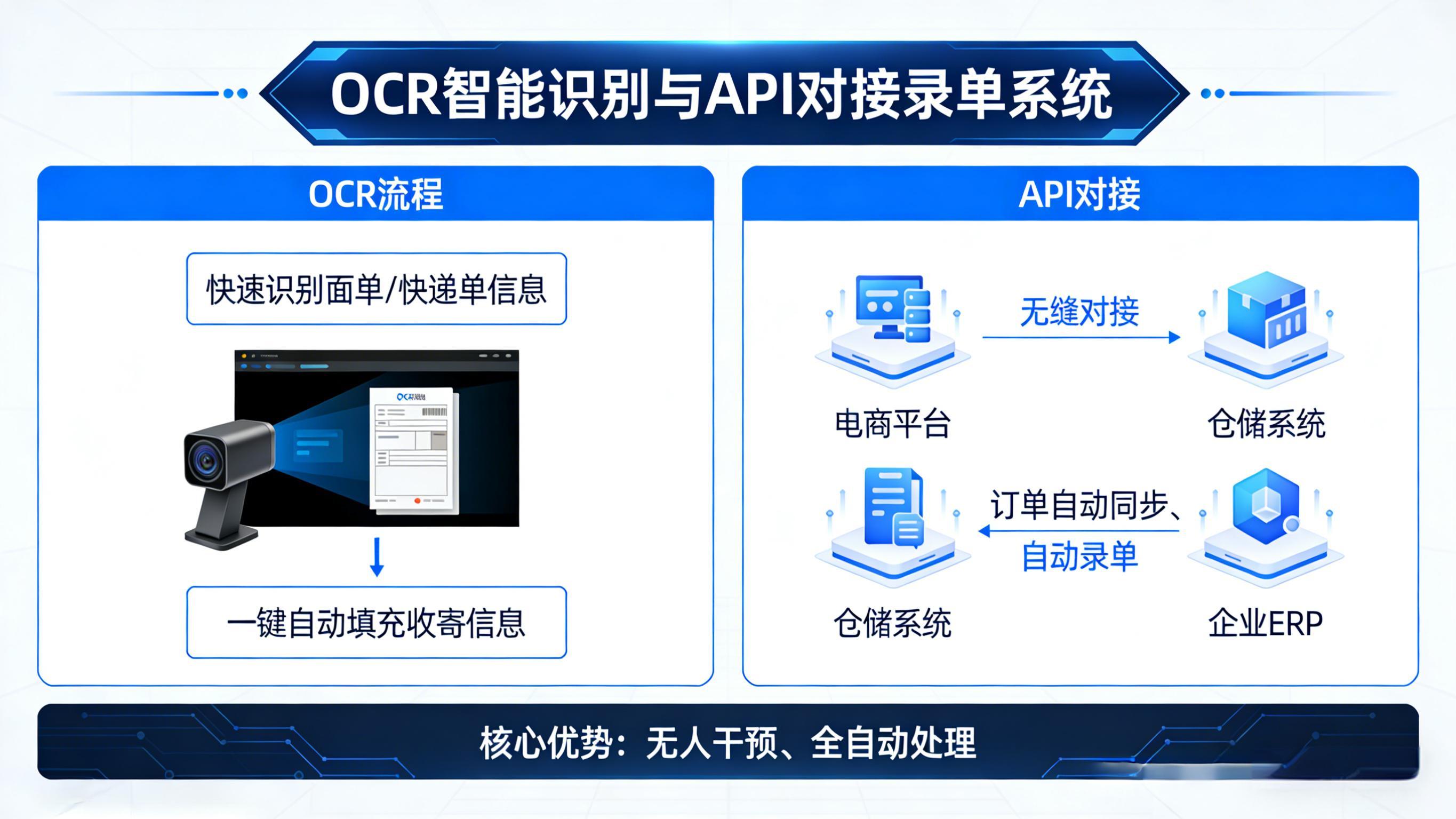
Eyf 快递物流软件提供多元化、智能化录单方案,覆盖 CS 桌面版纯键盘高效录单、Web 网页版纯键盘快捷录单、同城快递简洁录单、OCR 智能识别录单、收寄地址自动解析、Eyf 云平台 API 对接录单 等多种模式,全方位适配网点录单、分拨录单、前台录单、API 自动对接等不同工作场景。系统支持快速录入、自动联想、地址校验、违禁品提示、重量体积自动换算、运费自动计算,从根源减少人工录入错误,大幅提升录单速度与数据准确性。OCR 智能识别可快速识别身份证、面单、快递单、营业执照等信息,一键自动填充收寄信息,省去手动输入繁琐步骤。API 对接录单可实现与电商平台、仓储系统、企业 ERP 无缝对接,订单自动同步、自动录单,真正实现无人干预、全自动处理。多样化录单模式全面满足快递企业高强度、高效率、高准确率的业务需求,降低人工成本、减少失误率、提升订单处理能力,让订单录入更快速、更规范、更智能。
以下是一个基于Tesseract OCR引擎的Java代码示例,用于实现智能识别图片中的文本内容:
添加Maven依赖
<dependency>
    <groupId>net.sourceforge.tess4j</groupId>
    <artifactId>tess4j</artifactId>
    <version>5.3.0</version>
</dependency>
核心OCR识别代码
import net.sourceforge.tess4j.Tesseract;
import net.sourceforge.tess4j.TesseractException;
import java.io.File;

public class OcrRecognition {

    public static String recognizeText(String imagePath) {
        Tesseract tesseract = new Tesseract();
        try {
            // 设置语言包路径(需提前下载)
            tesseract.setDatapath("tessdata");
            // 设置识别语言(中文+英文)
            tesseract.setLanguage("chi_sim+eng");
            // 执行OCR识别
            return tesseract.doOCR(new File(imagePath));
        } catch (TesseractException e) {
            e.printStackTrace();
            return "识别失败: " + e.getMessage();
        }
    }

    public static void main(String[] args) {
        String result = recognizeText("test.png");
        System.out.println("识别结果:\n" + result);
    }
}
预处理增强识别率
为提高识别准确率,建议对图像进行预处理:
import java.awt.image.BufferedImage;
import javax.imageio.ImageIO;

public static BufferedImage preprocessImage(String imagePath) throws IOException {
    BufferedImage image = ImageIO.read(new File(imagePath));
    // 转为灰度图
    BufferedImage grayImage = new BufferedImage(
        image.getWidth(),
        image.getHeight(),
        BufferedImage.TYPE_BYTE_GRAY
    );
    grayImage.getGraphics().drawImage(image, 0, 0, null);
    return grayImage;
}
语言包配置
- 从GitHub下载tessdata语言包(包含chi_sim.traineddata中文识别文件)
- 将tessdata文件夹放在项目根目录或指定路径
扩展建议
- 对于复杂场景可结合OpenCV进行图像增强
- 商业项目建议使用百度/阿里云等专业OCR API
- 多线程处理时可复用Tesseract实例
注意:实际运行需要先安装Tesseract OCR引擎(Windows版需设置环境变量TESSDATA_PREFIX)
第三.《 自动分拣・全链提速》
Eyf 快递物流管理系统搭载自动化智能分拣引擎,通过自研独创算法生成包含目的地、网点、线路、分拣中心、派送段等丰富信息的专属分拣码,贯穿寄件站点、分拨中心、中转场、派送网点全物流环节。系统支持自动扫码、自动识别、自动分拣、自动分流、自动上传数据,实现包裹从揽收到派送全过程的快速流转、精准分发、高效中转,大幅降低人工分拣压力,减少错分、漏分、延误、丢失等风险。分拣数据实时上传云端,支持全程追踪、异常预警、数据统计、效率分析,帮助企业实时掌握分拣效率、优化人员配置、提升场地吞吐量。通过智能化分拣,全面提升快递物流网络整体运转效率,降低运营成本,缩短中转时效,为终端客户带来更稳定、更快捷、更可靠的物流服务体验,助力企业构建高效、智能、标准化的现代分拣体系。
以下是实现自动扫码、识别、分拣、分流及上传功能的Java代码示例,基于常见的工业场景设计(如物流分拣系统)。代码整合了模拟扫码、图像识别、逻辑分拣、队列分流及HTTP上传功能:
核心实现类
import java.util.HashMap;
import java.util.LinkedList;
import java.util.Queue;
import java.net.HttpURLConnection;
import java.net.URL;
import java.io.OutputStream;

public class AutoSortingSystem {

    // 模拟扫码模块
    public static String scanBarcode() {
        // 实际应用中替换为硬件SDK调用(如Honeywell/Zebra扫码器)
        String[] mockBarcodes = {"A123-物流", "B456-电商", "C789-冷链"};
        return mockBarcodes[(int)(Math.random() * mockBarcodes.length)];
    }

    // 识别条码类型
    public static String identifyCategory(String barcode) {
        return barcode.split("-")[1]; // 示例格式:条码-分类
    }

    // 分拣逻辑
    public static String routeToLane(String category) {
        HashMap<String, String> routingRules = new HashMap<>();
        routingRules.put("物流", "Lane1");
        routingRules.put("电商", "Lane2");
        routingRules.put("冷链", "Lane3");
        return routingRules.getOrDefault(category, "DefaultLane");
    }

    // 分流队列处理
    public static void processSortingQueue() {
        Queue<String> sortingQueue = new LinkedList<>();
        for (int i = 0; i < 5; i++) { // 模拟5个待处理物品
            String barcode = scanBarcode();
            sortingQueue.add(barcode);
        }

        while (!sortingQueue.isEmpty()) {
            String barcode = sortingQueue.poll();
            String category = identifyCategory(barcode);
            String lane = routeToLane(category);
            System.out.printf("条码 %s → 分类 %s → 分拣通道 %s\n", barcode, category, lane);
            uploadToServer(barcode, category, lane);
        }
    }

    // 上传数据到服务器
    public static void uploadToServer(String barcode, String category, String lane) {
        String apiUrl = "http://example.com/api/sorting";
        String jsonPayload = String.format(
            "{\"barcode\":\"%s\",\"category\":\"%s\",\"lane\":\"%s\"}",
            barcode, category, lane
        );

        try {
            URL url = new URL(apiUrl);
            HttpURLConnection conn = (HttpURLConnection) url.openConnection();
            conn.setRequestMethod("POST");
            conn.setRequestProperty("Content-Type", "application/json");
            conn.setDoOutput(true);

            OutputStream os = conn.getOutputStream();
            os.write(jsonPayload.getBytes());
            os.flush();

            if (conn.getResponseCode() == 200) {
                System.out.println("上传成功: " + barcode);
            } else {
                System.err.println("上传失败: HTTP " + conn.getResponseCode());
            }
        } catch (Exception e) {
            e.printStackTrace();
        }
    }

    public static void main(String[] args) {
        processSortingQueue();
    }
}
关键组件说明
扫码模块
scanBarcode() 方法模拟硬件扫码,实际部署需替换为扫码器SDK(如Zebra的EMDK或Honeywell的Scan SDK)。
图像识别扩展
若需OCR识别,可集成Tesseract:
import net.sourceforge.tess4j.Tesseract;
public static String recognizeText(String imagePath) throws Exception {
    Tesseract tesseract = new Tesseract();
    tesseract.setDatapath("tessdata/");
    return tesseract.doOCR(new File(imagePath));
}
分拣逻辑优化
复杂规则可改用规则引擎(如Drools):
KieServices ks = KieServices.Factory.get();
KieContainer kContainer = ks.getKieClasspathContainer();
KieSession kSession = kContainer.newKieSession("ksession-rules");
kSession.insert(sortingObject);
kSession.fireAllRules();
部署注意事项
1). 硬件集成
- 扫码器:通过USB/蓝牙连接,配置触发模式
- 分拣机械:通过PLC协议(如Modbus)或GPIO控制
2). 性能优化
- 使用多线程处理分拣队列(
ExecutorService) - 采用消息队列(如RabbitMQ)缓冲上传数据
3). 异常处理
- 添加扫码超时重试机制
- 实现断点续传功能应对网络中断
完整实现需根据具体硬件型号和分拣线配置调整接口调用。工业级系统建议增加状态监控和日志审计功能。
第四. 《智能运输・高效协同》
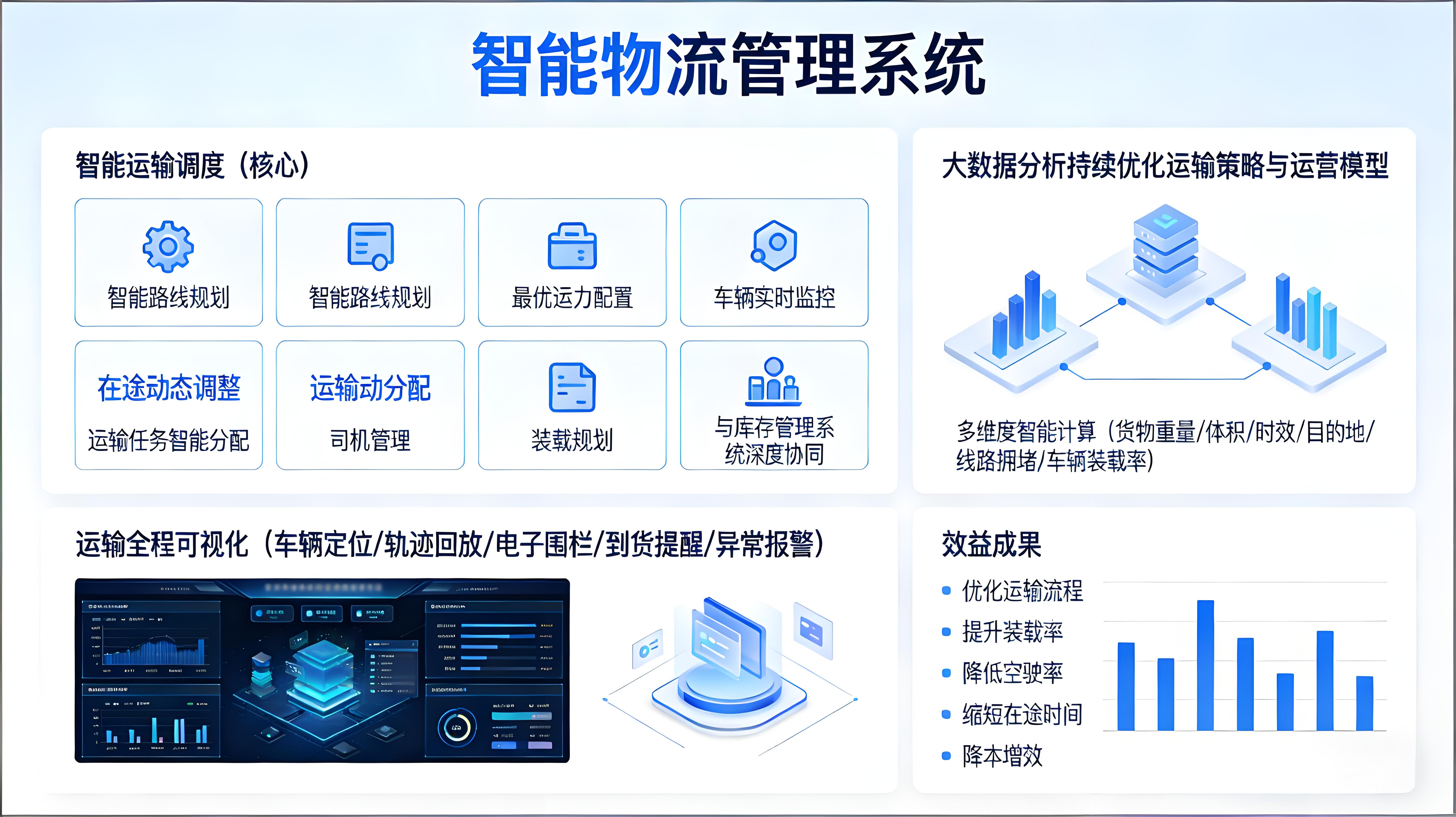
物流管理系统以智能运输调度为核心,集智能路线规划、最优运力配置、车辆实时监控、在途动态调整、运输任务智能分配、司机管理、装载规划、与库存管理系统深度协同于一体,并通过大数据分析持续优化运输策略与运营模型。系统可根据货物重量、体积、时效、目的地、线路拥堵情况、车辆装载率等多维度智能计算,自动推荐最优运输方案,实现运力资源最大化利用、运输成本精准控制。运输全程可视化管理,车辆定位、轨迹回放、电子围栏、到货提醒、异常报警等功能一应俱全,管理人员可实时监控运输状态,快速应对突发情况,动态调整调度策略,保障时效与安全。通过智能化、数字化、可视化运输管理,帮助企业优化运输流程、提升装载率、降低空驶率、缩短在途时间,在激烈的市场竞争中实现降本增效,全面提升企业核心竞争力与客户满意度。
以下是一个基于Java的简化版车辆监控系统代码示例,整合了定位、轨迹回放、电子围栏、提醒和报警功能。假设使用Spring Boot框架和MongoDB数据库:
车辆定位功能
@RestController
@RequestMapping("/api/vehicle")
public class VehicleController {
    @Autowired
    private LocationRepository locationRepo;

    @PostMapping("/location")
    public ResponseEntity<String> updateLocation(@RequestBody LocationData data) {
        locationRepo.save(data);
        return ResponseEntity.ok("Location updated");
    }

    @GetMapping("/current/{vehicleId}")
    public LocationData getCurrentLocation(@PathVariable String vehicleId) {
        return locationRepo.findTopByVehicleIdOrderByTimestampDesc(vehicleId);
    }
}
轨迹回放功能
@GetMapping("/history/{vehicleId}")
public List<LocationData> getHistoryTrack(
    @PathVariable String vehicleId,
    @RequestParam long startTime,
    @RequestParam long endTime) {

    return locationRepo.findByVehicleIdAndTimestampBetween(
        vehicleId, startTime, endTime);
}
电子围栏检测
public class GeoFenceService {
    private static final double EARTH_RADIUS = 6371000;

    public boolean checkFenceViolation(LocationData loc, GeoFence fence) {
        double distance = calculateDistance(
            loc.getLatitude(), loc.getLongitude(),
            fence.getCenterLat(), fence.getCenterLng());

        return distance > fence.getRadius();
    }

    private double calculateDistance(double lat1, double lng1,
                                   double lat2, double lng2) {
        // Haversine formula implementation
        double dLat = Math.toRadians(lat2 - lat1);
        double dLng = Math.toRadians(lng2 - lng1);
        double a = Math.sin(dLat/2) * Math.sin(dLat/2) +
                   Math.cos(Math.toRadians(lat1)) *
                   Math.cos(Math.toRadians(lat2)) *
                   Math.sin(dLng/2) * Math.sin(dLng/2);
        double c = 2 * Math.atan2(Math.sqrt(a), Math.sqrt(1-a));
        return EARTH_RADIUS * c;
    }
}
到货提醒服务
@Service
public class ArrivalAlertService {
    @Scheduled(fixedRate = 60000)
    public void checkArrivals() {
        List<Destination> destinations = destinationRepo.findAll();
        for (Destination dest : destinations) {
            LocationData loc = locationRepo
                .findTopByVehicleIdOrderByTimestampDesc(dest.getVehicleId());

            if (calculateDistance(loc, dest) < 500) { // 500米范围内
                sendAlert(dest.getVehicleId(), "即将到达目的地");
            }
        }
    }
}
异常报警处理
public class AlarmService {
    public void checkAbnormalConditions(LocationData current) {
        LocationData prev = locationRepo
            .findTopByVehicleIdOrderByTimestampDesc(current.getVehicleId());

        // 速度异常检测
        double speed = calculateSpeed(prev, current);
        if (speed > 120) { // 假设120km/h为超速阈值
            triggerAlarm("SPEED_LIMIT", current.getVehicleId());
        }

        // 长时间停留检测
        if (current.getStatus().equals("IDLE") &&
            (current.getTimestamp() - prev.getTimestamp()) > 3600000) {
            triggerAlarm("LONG_IDLE", current.getVehicleId());
        }
    }

    private double calculateSpeed(LocationData p1, LocationData p2) {
        double distance = calculateDistance(p1, p2);
        double timeHours = (p2.getTimestamp() - p1.getTimestamp()) / 3600000.0;
        return distance / 1000 / timeHours; // km/h
    }
}
数据结构示例
@Data
@Document(collection = "locations")
public class LocationData {
    private String vehicleId;
    private double latitude;
    private double longitude;
    private long timestamp;
    private String status; // MOVING/IDLE
}

@Data
public class GeoFence {
    private double centerLat;
    private double centerLng;
    private double radius; // 米
}
该实现包含基础功能模块,实际部署时需要:
- 添加数据库持久层配置
- 集成消息队列处理实时通知
- 实现前端地图可视化组件
- 添加JWT等安全认证
- 配置阈值参数管理系统
可根据具体需求扩展报警规则类型和通知渠道集成。
第五. 《财务对账・清晰透明》
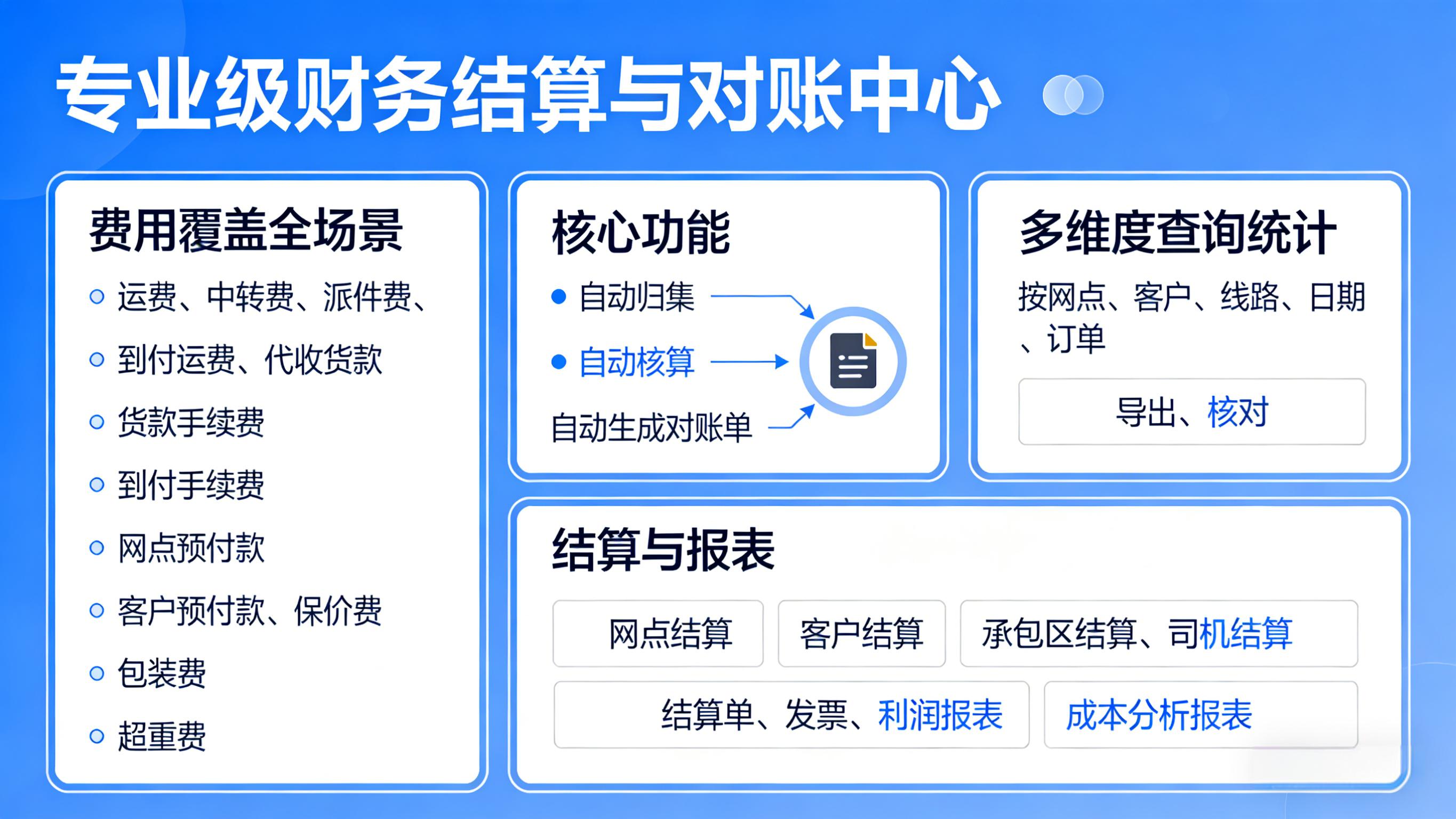
系统内置专业级财务结算与对账中心,完整覆盖物流业务全场景费用,包括 运费、中转费、派件费、到付运费、代收货款、货款手续费、到付手续费、网点预付款、客户预付款、保价费、包装费、超重费 等所有费用项目,自动归集、自动核算、自动生成对账单。支持按网点、客户、线路、日期、订单等多维度查询、统计、导出、核对,费用明细一目了然,数据精准可追溯,有效避免漏算、错算、重复计算等问题。企业可快速完成网点结算、客户结算、承包区结算、司机结算等各类对账工作,自动生成结算单、发票、利润报表、成本分析报表,帮助财务人员大幅减轻工作量,提升资金管理效率。通过规范化、自动化、透明化的财务结算体系,帮助企业实现财务数据统一、流程规范、风险可控、利润清晰,真正做到财务更省心、管理更精细、运营更高效。
以下是根据需求实现的Java代码示例,包含四个结算模块的核心逻辑:
网点结算
public class BranchSettlement {
    public BigDecimal calculateBranchSettlement(List<Order> orders, Branch branch) {
        BigDecimal totalAmount = BigDecimal.ZERO;
        for (Order order : orders) {
            if (order.getBranchId().equals(branch.getId())) {
                totalAmount = totalAmount.add(order.getAmount());
            }
        }
        return totalAmount.subtract(branch.getServiceFee());
    }
}
客户结算
public class CustomerSettlement {
    public BigDecimal calculateCustomerSettlement(Customer customer, List<Order> orders) {
        return orders.stream()
            .filter(order -> order.getCustomerId().equals(customer.getId()))
            .map(Order::getAmount)
            .reduce(BigDecimal.ZERO, BigDecimal::add);
    }
}
承包区结算
public class ContractAreaSettlement {
    public SettlementResult calculateContractAreaSettlement(ContractArea area, List<DeliveryRecord> records) {
        BigDecimal basePayment = area.getBaseRate().multiply(BigDecimal.valueOf(records.size()));
        BigDecimal bonus = calculatePerformanceBonus(records);
        return new SettlementResult(basePayment.add(bonus), records.size());
    }

    private BigDecimal calculatePerformanceBonus(List<DeliveryRecord> records) {
        long onTimeDeliveries = records.stream().filter(DeliveryRecord::isOnTime).count();
        return BigDecimal.valueOf(onTimeDeliveries * 5.0); // 每单准时奖励5元
    }
}
司机结算
public class DriverSettlement {
    public DriverSettlementResult calculateDriverPayment(Driver driver, List<Trip> trips) {
        BigDecimal distancePayment = trips.stream()
            .map(trip -> trip.getDistance().multiply(driver.getRatePerKm()))
            .reduce(BigDecimal.ZERO, BigDecimal::add);

        BigDecimal timePayment = trips.stream()
            .map(trip -> BigDecimal.valueOf(trip.getHours()).multiply(driver.getHourlyRate()))
            .reduce(BigDecimal.ZERO, BigDecimal::add);

        BigDecimal bonus = calculateSafetyBonus(driver, trips);
        return new DriverSettlementResult(distancePayment.add(timePayment).add(bonus));
    }

    private BigDecimal calculateSafetyBonus(Driver driver, List<Trip> trips) {
        boolean hasAccident = trips.stream().anyMatch(Trip::hasAccident);
        return hasAccident ? BigDecimal.ZERO : driver.getSafetyBonus();
    }
}
每个类都包含相应的DTO和业务逻辑:
- 使用BigDecimal处理金额计算避免精度问题
- 采用Stream API简化集合操作
- 包含必要的业务规则(如绩效奖金计算)
- 返回结构化结果对象
可根据实际业务需求扩展异常处理、日志记录和数据库交互等功能。

AtomGit 是由开放原子开源基金会联合 CSDN 等生态伙伴共同推出的新一代开源与人工智能协作平台。平台坚持“开放、中立、公益”的理念,把代码托管、模型共享、数据集托管、智能体开发体验和算力服务整合在一起,为开发者提供从开发、训练到部署的一站式体验。
更多推荐


 12
12 0
0- 0


 已为社区贡献1条内容

所有评论(0)