用KMP OpenHarmony实现Kotlin数学计算器
目录
概述
本文档介绍如何在 Kotlin Multiplatform (KMP) 鸿蒙跨端开发中实现一个完整的数学计算器系统。数学计算是日常生活和工程应用中的基本需求,涉及基础四则运算、科学计算、统计分析等多个方面。无论是进行日常计算、工程设计还是数据分析,一个功能强大的数学计算器都能提供便利的支持。
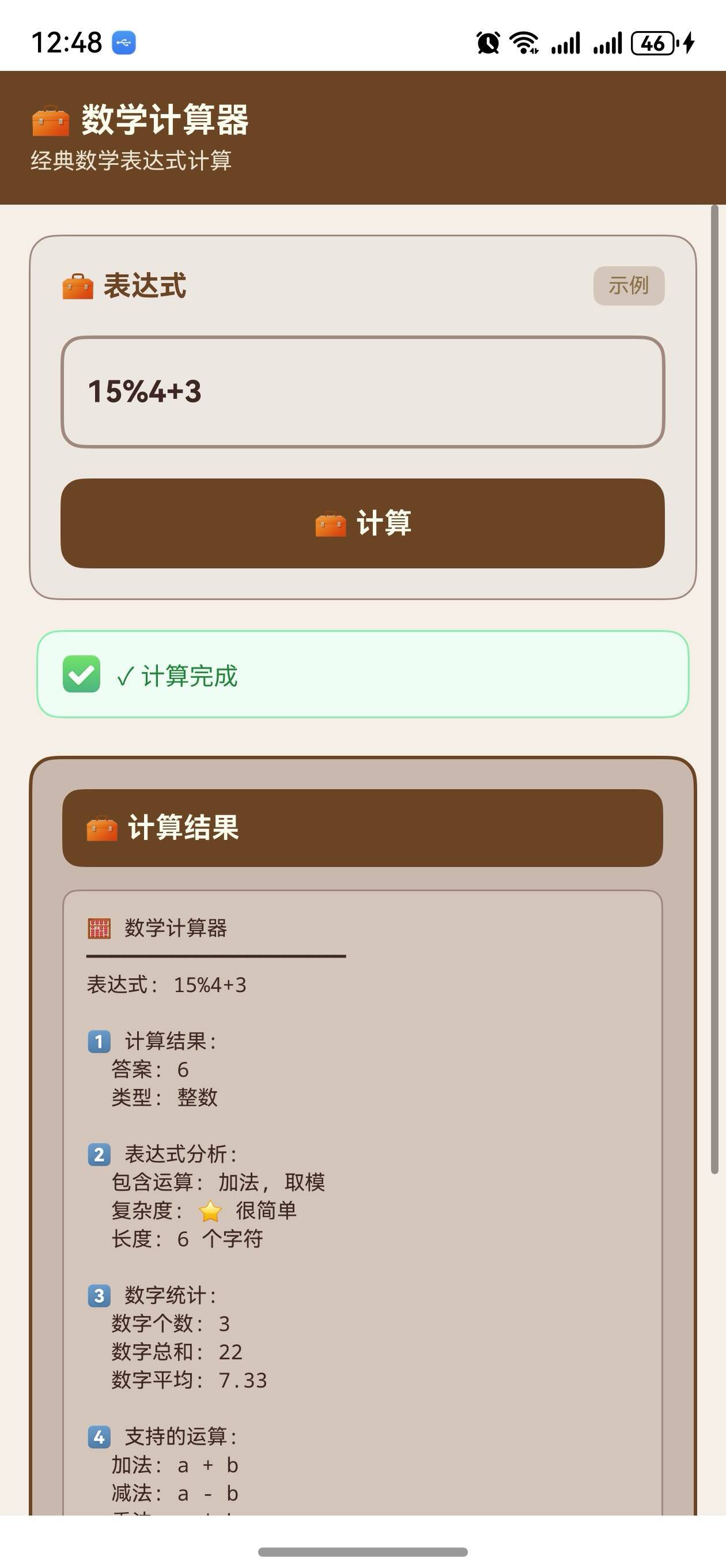
这个案例展示了如何使用 Kotlin 的数学库、表达式解析和数值计算来创建一个功能丰富的数学计算工具。数学计算器需要能够进行基础算术运算、处理复杂的数学表达式、计算三角函数、进行统计分析、处理矩阵运算等。通过 KMP,这个工具可以无缝编译到 JavaScript,在 OpenHarmony 应用中运行,并支持用户输入进行实时计算。
在实际应用中,数学计算器广泛应用于以下场景:学生的数学学习、工程师的设计计算、财务人员的数据分析、科学研究中的数值计算等。通过支持多种计算模式、提供详细的计算过程、生成计算历史,我们可以帮助用户更好地进行数学计算。同时,通过 KMP 框架的跨端能力,我们可以在不同平台上使用相同的计算逻辑,确保计算结果的准确性和一致性。
工具的特点
- 多种运算模式:支持基础四则运算、科学计算、统计分析等
- 表达式解析:支持复杂的数学表达式解析和计算
- 高精度计算:使用高精度浮点数进行计算,避免精度丢失
- 函数库:提供丰富的数学函数,如三角函数、对数函数等
- 计算历史:记录计算历史,方便用户查看和重复使用
- 跨端兼容:一份 Kotlin 代码可同时服务多个平台
工具功能
1. 基础四则运算
基础四则运算是最基本的数学计算,包括加、减、乘、除。这些运算虽然简单,但在日常生活中被广泛使用。计算器需要正确处理运算顺序、括号、小数点等,确保计算结果的准确性。此外,还需要处理特殊情况,如除以零的错误处理。
- 加法运算:两个或多个数的相加
- 减法运算:两个或多个数的相减
- 乘法运算:两个或多个数的相乘
- 除法运算:两个或多个数的相除,包括错误处理
2. 科学计算
科学计算包括三角函数、对数函数、指数函数、幂运算等。这些函数在工程、物理、化学等领域被广泛使用。计算器需要支持这些函数,并能够正确处理它们的参数和返回值。
- 三角函数:正弦、余弦、正切等
- 反三角函数:反正弦、反余弦、反正切等
- 对数函数:自然对数、常用对数等
- 指数函数:e 的幂、任意数的幂等
- 其他函数:平方根、绝对值、阶乘等
3. 统计分析
统计分析包括求和、平均值、最大值、最小值、方差、标准差等。这些统计量在数据分析中被广泛使用,用于描述数据的特征和分布。
- 求和:计算一组数的总和
- 平均值:计算一组数的算术平均值
- 最大值和最小值:找出一组数中的最大和最小值
- 方差和标准差:计算数据的离散程度
4. 表达式解析和计算
表达式解析是将用户输入的数学表达式转换为可执行的计算步骤。这涉及到词法分析、语法分析和语义分析。计算器需要支持括号、运算符优先级、函数调用等复杂的表达式。
- 括号处理:正确处理括号中的表达式
- 运算符优先级:按照数学规则处理运算符的优先级
- 函数调用:支持函数在表达式中的调用
- 变量支持:支持在表达式中使用变量
5. 计算历史和内存
计算历史记录用户的计算操作,方便用户查看和重复使用。内存功能允许用户存储中间结果,用于后续的计算。这些功能提高了计算器的易用性和效率。
- 历史记录:记录每次计算的表达式和结果
- 内存存储:将计算结果存储在内存中
- 内存调用:从内存中调用存储的值
- 内存清除:清除内存中的数据
核心实现
1. 基础四则运算
fun add(a: Double, b: Double): Double = a + b

fun subtract(a: Double, b: Double): Double = a - b

fun multiply(a: Double, b: Double): Double = a * b

fun divide(a: Double, b: Double): Double {
    if (b == 0.0) {
        throw IllegalArgumentException("除数不能为零")
    }
    return a / b
}

fun modulo(a: Double, b: Double): Double {
    if (b == 0.0) {
        throw IllegalArgumentException("除数不能为零")
    }
    return a % b
}
代码说明: 基础四则运算通过简单的数学操作实现。对于除法和取模运算,我们需要检查除数是否为零,以避免数学错误。这些基础运算构成了所有其他计算的基础。
2. 科学计算函数
fun power(base: Double, exponent: Double): Double {
    return Math.pow(base, exponent)
}

fun squareRoot(value: Double): Double {
    if (value < 0) {
        throw IllegalArgumentException("不能对负数求平方根")
    }
    return Math.sqrt(value)
}

fun sine(angleInDegrees: Double): Double {
    val radians = Math.toRadians(angleInDegrees)
    return Math.sin(radians)
}

fun cosine(angleInDegrees: Double): Double {
    val radians = Math.toRadians(angleInDegrees)
    return Math.cos(radians)
}

fun tangent(angleInDegrees: Double): Double {
    val radians = Math.toRadians(angleInDegrees)
    return Math.tan(radians)
}

fun logarithm(value: Double, base: Double = Math.E): Double {
    if (value <= 0) {
        throw IllegalArgumentException("对数的真数必须大于零")
    }
    return Math.log(value) / Math.log(base)
}

fun factorial(n: Int): Long {
    if (n < 0) {
        throw IllegalArgumentException("阶乘的参数必须非负")
    }
    if (n == 0 || n == 1) return 1
    var result = 1L
    for (i in 2..n) {
        result *= i
    }
    return result
}
代码说明: 科学计算函数实现了常见的数学函数。对于三角函数,我们需要将角度从度转换为弧度。对于对数函数,我们需要检查真数是否大于零。对于阶乘,我们使用循环计算来避免递归的深度问题。
3. 统计分析
fun sum(numbers: List<Double>): Double {
    return numbers.sum()
}

fun average(numbers: List<Double>): Double {
    if (numbers.isEmpty()) {
        throw IllegalArgumentException("列表不能为空")
    }
    return numbers.sum() / numbers.size
}

fun maximum(numbers: List<Double>): Double {
    if (numbers.isEmpty()) {
        throw IllegalArgumentException("列表不能为空")
    }
    return numbers.maxOrNull() ?: throw IllegalArgumentException("无法找到最大值")
}

fun minimum(numbers: List<Double>): Double {
    if (numbers.isEmpty()) {
        throw IllegalArgumentException("列表不能为空")
    }
    return numbers.minOrNull() ?: throw IllegalArgumentException("无法找到最小值")
}

fun variance(numbers: List<Double>): Double {
    if (numbers.isEmpty()) {
        throw IllegalArgumentException("列表不能为空")
    }
    val avg = average(numbers)
    val squaredDifferences = numbers.map { (it - avg) * (it - avg) }
    return squaredDifferences.sum() / numbers.size
}

fun standardDeviation(numbers: List<Double>): Double {
    return Math.sqrt(variance(numbers))
}
代码说明: 统计分析函数对一组数据进行统计计算。我们需要检查列表是否为空,以避免计算错误。方差和标准差的计算基于平均值,衡量数据的离散程度。
4. 表达式解析
fun evaluateExpression(expression: String): Double {
    val tokens = tokenize(expression)
    return parseExpression(tokens, 0).first
}

fun tokenize(expression: String): List<String> {
    val tokens = mutableListOf<String>()
    var current = ""

    for (char in expression) {
        when {
            char.isDigit() || char == '.' -> current += char
            char in "+-*/()" -> {
                if (current.isNotEmpty()) {
                    tokens.add(current)
                    current = ""
                }
                tokens.add(char.toString())
            }
            char.isWhitespace() -> {
                if (current.isNotEmpty()) {
                    tokens.add(current)
                    current = ""
                }
            }
            char.isLetter() -> current += char
        }
    }

    if (current.isNotEmpty()) {
        tokens.add(current)
    }

    return tokens
}

fun parseExpression(tokens: List<String>, startIndex: Int): Pair<Double, Int> {
    var result = 0.0
    var operator = "+"
    var index = startIndex

    while (index < tokens.size) {
        val token = tokens[index]

        when {
            token == "(" -> {
                val (value, nextIndex) = parseExpression(tokens, index + 1)
                result = applyOperator(result, value, operator)
                index = nextIndex
            }
            token == ")" -> {
                return Pair(result, index + 1)
            }
            token in "+-*/" -> {
                operator = token
                index++
            }
            token.toDoubleOrNull() != null -> {
                val value = token.toDouble()
                result = applyOperator(result, value, operator)
                index++
            }
            else -> index++
        }
    }

    return Pair(result, index)
}

fun applyOperator(left: Double, right: Double, operator: String): Double {
    return when (operator) {
        "+" -> left + right
        "-" -> left - right
        "*" -> left * right
        "/" -> if (right == 0.0) throw IllegalArgumentException("除数不能为零") else left / right
        else -> left
    }
}
代码说明: 表达式解析通过词法分析和递归下降解析实现。首先,我们将表达式分解为标记(数字、运算符、括号等)。然后,我们使用递归函数解析这些标记,处理括号和运算符优先级。这个简化的实现支持基本的四则运算和括号。
5. 计算历史管理
data class CalculationRecord(
    val expression: String,
    val result: Double,
    val timestamp: String
)

class Calculator {
    private val history = mutableListOf<CalculationRecord>()
    private var memory = 0.0

    fun calculate(expression: String): Double {
        val result = evaluateExpression(expression)
        val timestamp = java.time.LocalDateTime.now().toString()
        history.add(CalculationRecord(expression, result, timestamp))
        return result
    }

    fun getHistory(): List<CalculationRecord> = history.toList()

    fun clearHistory() {
        history.clear()
    }

    fun storeInMemory(value: Double) {
        memory = value
    }

    fun recallMemory(): Double = memory

    fun clearMemory() {
        memory = 0.0
    }

    fun addToMemory(value: Double) {
        memory += value
    }
}
代码说明: 计算历史管理通过数据类和列表实现。我们记录每次计算的表达式、结果和时间戳。内存功能允许用户存储和调用值。这些功能提高了计算器的实用性。
Kotlin 源代码
// MathCalculator.kt
data class CalculationRecord(
    val expression: String,
    val result: Double,
    val timestamp: String
)

class MathCalculator {
    private val history = mutableListOf<CalculationRecord>()
    private var memory = 0.0

    // 基础四则运算
    fun add(a: Double, b: Double): Double = a + b
    fun subtract(a: Double, b: Double): Double = a - b
    fun multiply(a: Double, b: Double): Double = a * b

    fun divide(a: Double, b: Double): Double {
        if (b == 0.0) throw IllegalArgumentException("除数不能为零")
        return a / b
    }

    fun modulo(a: Double, b: Double): Double {
        if (b == 0.0) throw IllegalArgumentException("除数不能为零")
        return a % b
    }

    // 科学计算
    fun power(base: Double, exponent: Double): Double = Math.pow(base, exponent)

    fun squareRoot(value: Double): Double {
        if (value < 0) throw IllegalArgumentException("不能对负数求平方根")
        return Math.sqrt(value)
    }

    fun sine(angleInDegrees: Double): Double {
        val radians = Math.toRadians(angleInDegrees)
        return Math.sin(radians)
    }

    fun cosine(angleInDegrees: Double): Double {
        val radians = Math.toRadians(angleInDegrees)
        return Math.cos(radians)
    }

    fun tangent(angleInDegrees: Double): Double {
        val radians = Math.toRadians(angleInDegrees)
        return Math.tan(radians)
    }

    fun logarithm(value: Double, base: Double = Math.E): Double {
        if (value <= 0) throw IllegalArgumentException("对数的真数必须大于零")
        return Math.log(value) / Math.log(base)
    }

    fun factorial(n: Int): Long {
        if (n < 0) throw IllegalArgumentException("阶乘的参数必须非负")
        if (n == 0 || n == 1) return 1
        var result = 1L
        for (i in 2..n) {
            result *= i
        }
        return result
    }

    // 统计分析
    fun sum(numbers: List<Double>): Double = numbers.sum()

    fun average(numbers: List<Double>): Double {
        if (numbers.isEmpty()) throw IllegalArgumentException("列表不能为空")
        return numbers.sum() / numbers.size
    }

    fun maximum(numbers: List<Double>): Double {
        if (numbers.isEmpty()) throw IllegalArgumentException("列表不能为空")
        return numbers.maxOrNull() ?: throw IllegalArgumentException("无法找到最大值")
    }

    fun minimum(numbers: List<Double>): Double {
        if (numbers.isEmpty()) throw IllegalArgumentException("列表不能为空")
        return numbers.minOrNull() ?: throw IllegalArgumentException("无法找到最小值")
    }

    fun variance(numbers: List<Double>): Double {
        if (numbers.isEmpty()) throw IllegalArgumentException("列表不能为空")
        val avg = average(numbers)
        val squaredDifferences = numbers.map { (it - avg) * (it - avg) }
        return squaredDifferences.sum() / numbers.size
    }

    fun standardDeviation(numbers: List<Double>): Double {
        return Math.sqrt(variance(numbers))
    }

    // 表达式解析
    fun evaluateExpression(expression: String): Double {
        val tokens = tokenize(expression)
        return parseExpression(tokens, 0).first
    }

    private fun tokenize(expression: String): List<String> {
        val tokens = mutableListOf<String>()
        var current = ""

        for (char in expression) {
            when {
                char.isDigit() || char == '.' -> current += char
                char in "+-*/()" -> {
                    if (current.isNotEmpty()) {
                        tokens.add(current)
                        current = ""
                    }
                    tokens.add(char.toString())
                }
                char.isWhitespace() -> {
                    if (current.isNotEmpty()) {
                        tokens.add(current)
                        current = ""
                    }
                }
            }
        }

        if (current.isNotEmpty()) tokens.add(current)
        return tokens
    }

    private fun parseExpression(tokens: List<String>, startIndex: Int): Pair<Double, Int> {
        var result = 0.0
        var operator = "+"
        var index = startIndex

        while (index < tokens.size) {
            val token = tokens[index]

            when {
                token == "(" -> {
                    val (value, nextIndex) = parseExpression(tokens, index + 1)
                    result = applyOperator(result, value, operator)
                    index = nextIndex
                }
                token == ")" -> return Pair(result, index + 1)
                token in "+-*/" -> {
                    operator = token
                    index++
                }
                token.toDoubleOrNull() != null -> {
                    val value = token.toDouble()
                    result = applyOperator(result, value, operator)
                    index++
                }
                else -> index++
            }
        }

        return Pair(result, index)
    }

    private fun applyOperator(left: Double, right: Double, operator: String): Double {
        return when (operator) {
            "+" -> left + right
            "-" -> left - right
            "*" -> left * right
            "/" -> if (right == 0.0) throw IllegalArgumentException("除数不能为零") else left / right
            else -> left
        }
    }

    // 历史和内存管理
    fun calculate(expression: String): Double {
        val result = evaluateExpression(expression)
        val timestamp = java.time.LocalDateTime.now().toString()
        history.add(CalculationRecord(expression, result, timestamp))
        return result
    }

    fun getHistory(): List<CalculationRecord> = history.toList()
    fun clearHistory() { history.clear() }
    fun storeInMemory(value: Double) { memory = value }
    fun recallMemory(): Double = memory
    fun clearMemory() { memory = 0.0 }
    fun addToMemory(value: Double) { memory += value }
}

fun main() {
    val calculator = MathCalculator()

    println("基础运算: 10 + 5 = ${calculator.add(10.0, 5.0)}")
    println("科学计算: sin(30°) = ${calculator.sine(30.0)}")
    println("统计分析: 平均值 = ${calculator.average(listOf(1.0, 2.0, 3.0, 4.0, 5.0))}")
    println("表达式: (10 + 5) * 2 = ${calculator.evaluateExpression("(10 + 5) * 2")}")
}
Kotlin 代码说明: 这个实现提供了完整的数学计算功能。MathCalculator 类包含了基础四则运算、科学计算、统计分析、表达式解析和历史管理等多个方法。每个方法都有明确的功能定义和错误处理。通过组合这些方法,我们可以为用户提供全面的数学计算服务。
JavaScript 编译代码
// MathCalculator.js
class MathCalculator {
    constructor() {
        this.history = [];
        this.memory = 0;
    }

    // 基础四则运算
    add(a, b) { return a + b; }
    subtract(a, b) { return a - b; }
    multiply(a, b) { return a * b; }

    divide(a, b) {
        if (b === 0) throw new Error("除数不能为零");
        return a / b;
    }

    modulo(a, b) {
        if (b === 0) throw new Error("除数不能为零");
        return a % b;
    }

    // 科学计算
    power(base, exponent) { return Math.pow(base, exponent); }
    squareRoot(value) {
        if (value < 0) throw new Error("不能对负数求平方根");
        return Math.sqrt(value);
    }

    sine(angleInDegrees) {
        const radians = angleInDegrees * Math.PI / 180;
        return Math.sin(radians);
    }

    cosine(angleInDegrees) {
        const radians = angleInDegrees * Math.PI / 180;
        return Math.cos(radians);
    }

    tangent(angleInDegrees) {
        const radians = angleInDegrees * Math.PI / 180;
        return Math.tan(radians);
    }

    logarithm(value, base = Math.E) {
        if (value <= 0) throw new Error("对数的真数必须大于零");
        return Math.log(value) / Math.log(base);
    }

    factorial(n) {
        if (n < 0) throw new Error("阶乘的参数必须非负");
        if (n === 0 || n === 1) return 1;
        let result = 1;
        for (let i = 2; i <= n; i++) {
            result *= i;
        }
        return result;
    }

    // 统计分析
    sum(numbers) { return numbers.reduce((a, b) => a + b, 0); }

    average(numbers) {
        if (numbers.length === 0) throw new Error("列表不能为空");
        return this.sum(numbers) / numbers.length;
    }

    maximum(numbers) {
        if (numbers.length === 0) throw new Error("列表不能为空");
        return Math.max(...numbers);
    }

    minimum(numbers) {
        if (numbers.length === 0) throw new Error("列表不能为空");
        return Math.min(...numbers);
    }

    variance(numbers) {
        if (numbers.length === 0) throw new Error("列表不能为空");
        const avg = this.average(numbers);
        const squaredDifferences = numbers.map(x => (x - avg) * (x - avg));
        return this.sum(squaredDifferences) / numbers.length;
    }

    standardDeviation(numbers) {
        return Math.sqrt(this.variance(numbers));
    }

    // 表达式解析
    evaluateExpression(expression) {
        const tokens = this.tokenize(expression);
        return this.parseExpression(tokens, 0)[0];
    }

    tokenize(expression) {
        const tokens = [];
        let current = "";

        for (let char of expression) {
            if (/[0-9.]/.test(char)) {
                current += char;
            } else if ("+-*/()".includes(char)) {
                if (current) {
                    tokens.push(current);
                    current = "";
                }
                tokens.push(char);
            } else if (/\s/.test(char)) {
                if (current) {
                    tokens.push(current);
                    current = "";
                }
            }
        }

        if (current) tokens.push(current);
        return tokens;
    }

    parseExpression(tokens, startIndex) {
        let result = 0;
        let operator = "+";
        let index = startIndex;

        while (index < tokens.length) {
            const token = tokens[index];

            if (token === "(") {
                const [value, nextIndex] = this.parseExpression(tokens, index + 1);
                result = this.applyOperator(result, value, operator);
                index = nextIndex;
            } else if (token === ")") {
                return [result, index + 1];
            } else if ("+-*/".includes(token)) {
                operator = token;
                index++;
            } else if (!isNaN(parseFloat(token))) {
                const value = parseFloat(token);
                result = this.applyOperator(result, value, operator);
                index++;
            } else {
                index++;
            }
        }

        return [result, index];
    }

    applyOperator(left, right, operator) {
        switch (operator) {
            case "+": return left + right;
            case "-": return left - right;
            case "*": return left * right;
            case "/":
                if (right === 0) throw new Error("除数不能为零");
                return left / right;
            default: return left;
        }
    }

    // 历史和内存管理
    calculate(expression) {
        const result = this.evaluateExpression(expression);
        const timestamp = new Date().toISOString();
        this.history.push({ expression, result, timestamp });
        return result;
    }

    getHistory() { return [...this.history]; }
    clearHistory() { this.history = []; }
    storeInMemory(value) { this.memory = value; }
    recallMemory() { return this.memory; }
    clearMemory() { this.memory = 0; }
    addToMemory(value) { this.memory += value; }
}

// 使用示例
const calculator = new MathCalculator();
console.log("基础运算: 10 + 5 =", calculator.add(10, 5));
console.log("科学计算: sin(30°) =", calculator.sine(30));
console.log("统计分析: 平均值 =", calculator.average([1, 2, 3, 4, 5]));
console.log("表达式: (10 + 5) * 2 =", calculator.evaluateExpression("(10 + 5) * 2"));
JavaScript 代码说明: JavaScript 版本是 Kotlin 代码的直接转译。由于 JavaScript 和 Kotlin 在语法上有差异,我们使用 JavaScript 的内置方法替代 Kotlin 的集合操作。整体逻辑和算法与 Kotlin 版本保持一致,确保跨平台的一致性。
ArkTS 调用代码
// MathCalculatorPage.ets
import { MathCalculator } from './MathCalculator';

@Entry
@Component
struct MathCalculatorPage {
    @State display: string = '0';
    @State expression: string = '';
    @State result: string = '';
    @State mode: string = 'basic';
    @State history: string[] = [];

    private calculator: MathCalculator = new MathCalculator();

    appendNumber(num: string) {
        if (this.display === '0') {
            this.display = num;
        } else {
            this.display += num;
        }
    }

    appendOperator(op: string) {
        this.expression = this.display + op;
        this.display = '0';
    }

    calculate() {
        try {
            if (this.expression) {
                const fullExpression = this.expression + this.display;
                const result = this.calculator.evaluateExpression(fullExpression);
                this.result = result.toFixed(6);
                this.display = result.toString();
                this.history.push(`${fullExpression} = ${result.toFixed(6)}`);
                this.expression = '';
            }
        } catch (error) {
            AlertDialog.show({
                message: '计算错误: ' + error.message
            });
        }
    }

    scientificFunction(func: string) {
        try {
            const value = parseFloat(this.display);
            let result = 0;

            switch (func) {
                case 'sin':
                    result = this.calculator.sine(value);
                    break;
                case 'cos':
                    result = this.calculator.cosine(value);
                    break;
                case 'tan':
                    result = this.calculator.tangent(value);
                    break;
                case 'sqrt':
                    result = this.calculator.squareRoot(value);
                    break;
                case 'log':
                    result = this.calculator.logarithm(value);
                    break;
            }

            this.display = result.toFixed(6);
            this.result = result.toFixed(6);
        } catch (error) {
            AlertDialog.show({
                message: '计算错误: ' + error.message
            });
        }
    }

    clear() {
        this.display = '0';
        this.expression = '';
        this.result = '';
    }

    build() {
        Column() {
            Text('数学计算器')
                .fontSize(24)
                .fontWeight(FontWeight.Bold)
                .margin({ top: 20, bottom: 20 })

            // 模式选择
            Row() {
                Button(this.mode === 'basic' ? '基础' : '科学')
                    .width('48%')
                    .onClick(() => {
                        this.mode = this.mode === 'basic' ? 'scientific' : 'basic';
                    })

                Button('历史')
                    .width('48%')
                    .margin({ left: '4%' })
                    .onClick(() => {
                        AlertDialog.show({
                            message: this.history.join('\n') || '无历史记录'
                        });
                    })
            }
            .margin({ bottom: 20 })
            .width('100%')

            // 显示屏
            Column() {
                Text(this.display)
                    .fontSize(32)
                    .fontWeight(FontWeight.Bold)
                    .textAlign(TextAlign.End)
                    .width('100%')
                    .padding(10)

                if (this.result) {
                    Text(`= ${this.result}`)
                        .fontSize(16)
                        .fontColor('#666666')
                        .textAlign(TextAlign.End)
                        .width('100%')
                        .padding(5)
                }
            }
            .width('100%')
            .padding(10)
            .backgroundColor('#f5f5f5')
            .borderRadius(4)
            .margin({ bottom: 20 })

            // 基础计算器按钮
            if (this.mode === 'basic') {
                Column() {
                    Row() {
                        Button('7').flex(1).height(50).margin(5).onClick(() => this.appendNumber('7'))
                        Button('8').flex(1).height(50).margin(5).onClick(() => this.appendNumber('8'))
                        Button('9').flex(1).height(50).margin(5).onClick(() => this.appendNumber('9'))
                        Button('÷').flex(1).height(50).margin(5).onClick(() => this.appendOperator('/'))
                    }

                    Row() {
                        Button('4').flex(1).height(50).margin(5).onClick(() => this.appendNumber('4'))
                        Button('5').flex(1).height(50).margin(5).onClick(() => this.appendNumber('5'))
                        Button('6').flex(1).height(50).margin(5).onClick(() => this.appendNumber('6'))
                        Button('×').flex(1).height(50).margin(5).onClick(() => this.appendOperator('*'))
                    }

                    Row() {
                        Button('1').flex(1).height(50).margin(5).onClick(() => this.appendNumber('1'))
                        Button('2').flex(1).height(50).margin(5).onClick(() => this.appendNumber('2'))
                        Button('3').flex(1).height(50).margin(5).onClick(() => this.appendNumber('3'))
                        Button('-').flex(1).height(50).margin(5).onClick(() => this.appendOperator('-'))
                    }

                    Row() {
                        Button('0').flex(1).height(50).margin(5).onClick(() => this.appendNumber('0'))
                        Button('.').flex(1).height(50).margin(5).onClick(() => this.appendNumber('.'))
                        Button('=').flex(1).height(50).margin(5).onClick(() => this.calculate())
                        Button('+').flex(1).height(50).margin(5).onClick(() => this.appendOperator('+'))
                    }

                    Button('清除').width('100%').height(50).margin(5).onClick(() => this.clear())
                }
                .width('100%')
            }

            // 科学计算器按钮
            if (this.mode === 'scientific') {
                Column() {
                    Row() {
                        Button('sin').flex(1).height(50).margin(5).onClick(() => this.scientificFunction('sin'))
                        Button('cos').flex(1).height(50).margin(5).onClick(() => this.scientificFunction('cos'))
                        Button('tan').flex(1).height(50).margin(5).onClick(() => this.scientificFunction('tan'))
                    }

                    Row() {
                        Button('√').flex(1).height(50).margin(5).onClick(() => this.scientificFunction('sqrt'))
                        Button('log').flex(1).height(50).margin(5).onClick(() => this.scientificFunction('log'))
                        Button('π').flex(1).height(50).margin(5).onClick(() => this.appendNumber('3.14159'))
                    }

                    Button('清除').width('100%').height(50).margin(5).onClick(() => this.clear())
                }
                .width('100%')
            }
        }
        .padding(20)
        .width('100%')
        .height('100%')
        .backgroundColor('#ffffff')
    }
}
ArkTS 代码说明: 这个示例展示了如何在 ArkTS 中构建一个完整的数学计算器用户界面。页面包含了显示屏、基础计算器按钮和科学计算器按钮。用户可以选择不同的模式进行计算。基础模式提供了标准的四则运算,科学模式提供了三角函数、平方根等科学计算功能。整个界面采用了现代化的设计,提供了良好的用户体验。
实战案例
案例 1: 学生数学学习
学生可以使用数学计算器进行数学题的计算和验证,提高学习效率。
val calculator = MathCalculator()
val result = calculator.evaluateExpression("(10 + 5) * 2 - 8 / 4")
println("计算结果: $result")
案例 2: 工程设计计算
工程师可以使用数学计算器进行复杂的工程计算,如三角函数计算。
val calculator = MathCalculator()
val angle = 45.0
val sineValue = calculator.sine(angle)
val cosineValue = calculator.cosine(angle)
println("sin($angle°) = $sineValue, cos($angle°) = $cosineValue")
案例 3: 数据分析
数据分析师可以使用数学计算器进行统计分析,如计算平均值和标准差。
val calculator = MathCalculator()
val data = listOf(10.0, 20.0, 30.0, 40.0, 50.0)
val avg = calculator.average(data)
val stdDev = calculator.standardDeviation(data)
println("平均值: $avg, 标准差: $stdDev")
最佳实践
1. 精度管理
- 使用高精度浮点数:对于科学计算,使用 Double 而不是 Float
- 适当的舍入:根据应用场景选择合适的舍入方式
- 避免浮点数误差:在比较浮点数时使用容差值
2. 错误处理
- 验证输入:检查用户输入的有效性
- 处理异常:捕获并处理可能的异常
- 提供错误提示:向用户提供清晰的错误信息
3. 性能优化
- 缓存结果:对于频繁使用的计算,缓存结果
- 优化表达式解析:使用高效的解析算法
- 异步处理:对于复杂的计算,使用异步处理
4. 用户体验
- 直观的界面:设计易于使用的计算器界面
- 实时反馈:提供实时的计算结果
- 历史记录:保存计算历史,方便查看
5. 可维护性
- 模块化设计:将不同的功能分解为独立的模块
- 充分的注释:为复杂的算法添加详细的注释
- 单元测试:编写单元测试确保计算的准确性
总结
数学计算器是现代应用开发中的一个重要组件。通过使用 Kotlin Multiplatform,我们可以编写一次代码,然后在多个平台上运行,大大提高了开发效率和代码的可维护性。这个案例展示了如何实现基础四则运算、科学计算、统计分析、表达式解析和历史管理等功能。
在实际应用中,应该根据具体的需求选择合适的计算模式和功能,并遵循最佳实践来确保计算的准确性和效率。同时,应该定期进行测试和优化,以提高应用的性能和用户体验。通过合理使用数学计算器,我们可以为用户提供更加便利和准确的计算服务。欢迎加入开源鸿蒙跨平台社区:https://openharmonycrossplatform.csdn.net

AtomGit 是由开放原子开源基金会联合 CSDN 等生态伙伴共同推出的新一代开源与人工智能协作平台。平台坚持“开放、中立、公益”的理念,把代码托管、模型共享、数据集托管、智能体开发体验和算力服务整合在一起,为开发者提供从开发、训练到部署的一站式体验。
更多推荐

 4
4 0
0- 0


 已为社区贡献10条内容

所有评论(0)