KMP OpenHarmony 天气信息分析工具 - 天气数据处理和分析
目录
概述
本文档介绍如何在 Kotlin Multiplatform (KMP) 鸿蒙跨端开发中实现一个功能完整的天气信息分析工具系统。天气数据处理和分析是现代应用开发中的重要需求,广泛应用于天气预报应用、农业管理、户外活动规划、能源管理等领域。这个工具提供了对天气数据的全面分析支持,包括温度分析、湿度评估、气压判断、风速分析、天气状况判断、体感温度计算等功能。
在实际应用中,天气信息分析工具广泛应用于以下场景:天气预报应用、农业决策支持系统、户外活动规划、空气质量监测、能源需求预测、健康建议系统等。通过 KMP 框架的跨端能力,我们可以在不同平台上使用相同的天气分析逻辑,确保天气数据处理的一致性和可靠性。
工具的特点
- 多维度分析:支持温度、湿度、气压、风速、降水等多维度天气数据分析
- 体感温度计算:考虑风速和湿度的体感温度计算
- 天气状况判断:根据多个指标综合判断天气状况
- 舒适度评估:基于多个气象指标的舒适度评估
- 健康建议:根据天气条件提供个性化的健康建议
- 跨端兼容:一份 Kotlin 代码可同时服务多个平台
工具功能
1. 温度分析
温度是最基本的气象指标,对人体舒适度和健康有重要影响。温度分析需要考虑绝对温度、温度变化趋势、极端温度等多个方面。不同的温度范围对应不同的舒适度和健康风险。在天气应用中,温度分析是用户最关注的信息之一。
- 温度分类:根据温度值进行分类(极冷、寒冷、凉爽、舒适、温暖、炎热、极热)
- 体感温度:考虑风速和湿度的体感温度计算
- 温度趋势:分析温度的上升或下降趋势
- 极端温度警告:对极端温度进行警告
2. 湿度评估
湿度是影响人体舒适度的重要因素。过高的湿度会使人感到闷热,过低的湿度会导致皮肤干燥。湿度评估需要考虑绝对湿度和相对湿度,以及湿度与温度的相互作用。
- 湿度分类:根据相对湿度进行分类(干燥、适宜、潮湿、非常潮湿)
- 露点计算:根据温度和湿度计算露点
- 舒适度影响:评估湿度对舒适度的影响
- 霉菌生长风险:评估高湿度环境下的霉菌生长风险
3. 气压分析
气压变化与天气变化密切相关。气压下降通常预示着天气恶化,气压上升通常预示着天气改善。气压分析对于天气预报和健康管理都很重要。
- 气压分类:根据气压值进行分类(低压、正常、高压)
- 气压趋势:分析气压的变化趋势
- 天气预测:根据气压变化预测天气变化
- 健康影响:评估气压变化对健康的影响
4. 风速分析
风速影响体感温度、空气质量和户外活动的安全性。风速分析需要考虑风速大小、风向和阵风等因素。
- 风速分类:根据风速进行分类(无风、微风、和风、劲风、大风、暴风)
- 体感温度影响:计算风速对体感温度的影响
- 户外活动建议:根据风速提供户外活动建议
- 危险警告:对危险的大风进行警告
5. 天气状况判断
天气状况是对当前天气的综合描述,包括晴天、多云、阴天、小雨、中雨、大雨、雪、雾等。天气状况判断需要综合考虑多个气象指标。
- 天气分类:根据多个指标判断天气状况
- 降水概率:估计降水的概率
- 能见度:评估能见度的好坏
- 紫外线强度:估计紫外线强度
6. 舒适度评估
舒适度是综合考虑温度、湿度、风速等多个因素的主观指标。舒适度评估对于用户体验和健康建议很重要。
- 舒适度指数:计算综合舒适度指数
- 舒适度分类:根据指数进行分类(非常舒适、舒适、一般、不舒适、非常不舒适)
- 改善建议:提供改善舒适度的建议
- 最佳活动时间:推荐最佳的户外活动时间
7. 健康建议
根据天气条件提供个性化的健康建议,包括穿衣建议、户外活动建议、健康提示等。
- 穿衣建议:根据温度和风速提供穿衣建议
- 户外活动建议:根据天气条件推荐适合的户外活动
- 健康提示:根据天气条件提供健康提示
- 疾病预防:提醒可能的疾病风险
核心实现
1. 温度分析
fun analyzeTemperature(temperature: Double): Map<String, Any> {
    val classification = when {
        temperature < -20 -> "极冷"
        temperature < -10 -> "寒冷"
        temperature < 0 -> "凉爽"
        temperature < 15 -> "凉爽"
        temperature < 25 -> "舒适"
        temperature < 35 -> "温暖"
        temperature < 45 -> "炎热"
        else -> "极热"
    }

    val healthRisk = when {
        temperature < -20 -> "极端寒冷,有冻伤风险"
        temperature > 40 -> "极端炎热,有中暑风险"
        else -> "正常范围"
    }

    return mapOf(
        "temperature" to temperature,
        "classification" to classification,
        "healthRisk" to healthRisk
    )
}
代码说明: 温度分析通过分类算法将温度值映射到不同的等级。同时评估温度对健康的潜在风险。这个实现考虑了极端温度的危害。
2. 体感温度计算
fun calculateFeelsLikeTemperature(temperature: Double, humidity: Double, windSpeed: Double): Double {
    // 使用风寒指数公式(仅适用于低温)
    if (temperature < 10) {
        val windChill = 13.12 + 0.6215 * temperature - 11.37 * kotlin.math.pow(windSpeed, 0.16) + 0.3965 * temperature * kotlin.math.pow(windSpeed, 0.16)
        return windChill
    }

    // 使用热指数公式(仅适用于高温)
    if (temperature > 26) {
        val c1 = -42.379
        val c2 = 2.04901523
        val c3 = 10.14333127
        val c4 = -0.22475541
        val c5 = -0.00683783
        val c6 = -0.05481717
        val c7 = 0.00122874
        val c8 = 0.00085282
        val c9 = -0.00000199

        val t = temperature
        val rh = humidity

        val heatIndex = c1 + c2*t + c3*rh + c4*t*rh + c5*t*t + c6*rh*rh + c7*t*t*rh + c8*t*rh*rh + c9*t*t*rh*rh
        return heatIndex
    }

    return temperature
}
代码说明: 体感温度计算使用了两个标准公式:风寒指数用于低温,热指数用于高温。这些公式考虑了风速和湿度对人体感受的影响。
3. 湿度评估
fun assessHumidity(humidity: Double, temperature: Double): Map<String, Any> {
    val classification = when {
        humidity < 30 -> "干燥"
        humidity < 50 -> "适宜"
        humidity < 70 -> "潮湿"
        else -> "非常潮湿"
    }

    val dewPoint = calculateDewPoint(temperature, humidity)

    val moldRisk = when {
        humidity > 70 && temperature > 20 -> "高"
        humidity > 60 && temperature > 15 -> "中等"
        else -> "低"
    }

    return mapOf(
        "humidity" to humidity,
        "classification" to classification,
        "dewPoint" to String.format("%.1f", dewPoint),
        "moldRisk" to moldRisk
    )
}

fun calculateDewPoint(temperature: Double, humidity: Double): Double {
    val a = 17.27
    val b = 237.7
    val alpha = ((a * temperature) / (b + temperature)) + kotlin.math.ln(humidity / 100.0)
    return (b * alpha) / (a - alpha)
}
代码说明: 湿度评估不仅分类湿度,还计算露点和霉菌生长风险。露点计算使用了Magnus公式的近似值。
4. 气压分析
fun analyzePressure(pressure: Double, pressureTrend: String): Map<String, Any> {
    val classification = when {
        pressure < 1000 -> "低压"
        pressure < 1013 -> "略低"
        pressure < 1026 -> "正常"
        else -> "高压"
    }

    val weatherPrediction = when (pressureTrend) {
        "rising" -> "天气将改善"
        "falling" -> "天气将恶化"
        "stable" -> "天气保持稳定"
        else -> "趋势不明确"
    }

    val healthImpact = when {
        pressure < 1000 && pressureTrend == "falling" -> "气压下降,可能引起头痛、关节痛"
        pressure > 1026 && pressureTrend == "rising" -> "气压上升,可能引起精神焕发"
        else -> "气压正常"
    }

    return mapOf(
        "pressure" to pressure,
        "classification" to classification,
        "weatherPrediction" to weatherPrediction,
        "healthImpact" to healthImpact
    )
}
代码说明: 气压分析考虑了气压值和气压趋势。气压趋势对天气预测和健康影响评估很重要。
5. 风速分析
fun analyzeWindSpeed(windSpeed: Double): Map<String, Any> {
    val classification = when {
        windSpeed < 1 -> "无风"
        windSpeed < 5 -> "微风"
        windSpeed < 11 -> "和风"
        windSpeed < 19 -> "劲风"
        windSpeed < 28 -> "大风"
        windSpeed < 40 -> "暴风"
        else -> "飓风"
    }

    val activityRecommendation = when {
        windSpeed < 5 -> "适合所有户外活动"
        windSpeed < 11 -> "适合大多数户外活动"
        windSpeed < 19 -> "风筝冲浪、帆船等风力运动适合"
        windSpeed < 28 -> "不建议户外活动"
        else -> "禁止户外活动"
    }

    val safetyWarning = if (windSpeed > 28) "大风警告" else "安全"

    return mapOf(
        "windSpeed" to windSpeed,
        "classification" to classification,
        "activityRecommendation" to activityRecommendation,
        "safetyWarning" to safetyWarning
    )
}
代码说明: 风速分析根据风速等级提供活动建议和安全警告。这对户外活动规划很重要。
6. 舒适度评估
fun assessComfort(temperature: Double, humidity: Double, windSpeed: Double): Map<String, Any> {
    val feelsLike = calculateFeelsLikeTemperature(temperature, humidity, windSpeed)

    var comfortScore = 100

    // 温度舒适度
    comfortScore -= when {
        temperature < 0 || temperature > 35 -> 30
        temperature < 5 || temperature > 30 -> 20
        temperature < 10 || temperature > 25 -> 10
        else -> 0
    }

    // 湿度舒适度
    comfortScore -= when {
        humidity < 20 || humidity > 80 -> 25
        humidity < 30 || humidity > 70 -> 15
        else -> 0
    }

    // 风速舒适度
    comfortScore -= when {
        windSpeed > 20 -> 20
        windSpeed > 10 -> 10
        else -> 0
    }

    comfortScore = comfortScore.coerceIn(0, 100)

    val classification = when {
        comfortScore >= 80 -> "非常舒适"
        comfortScore >= 60 -> "舒适"
        comfortScore >= 40 -> "一般"
        comfortScore >= 20 -> "不舒适"
        else -> "非常不舒适"
    }

    return mapOf(
        "comfortScore" to comfortScore,
        "classification" to classification,
        "feelsLike" to String.format("%.1f", feelsLike)
    )
}
代码说明: 舒适度评估使用加权评分系统,综合考虑温度、湿度和风速的影响。最终得分反映了综合的舒适度。
7. 健康建议
fun generateHealthAdvice(temperature: Double, humidity: Double, windSpeed: Double, uvIndex: Double): List<String> {
    val advice = mutableListOf<String>()

    // 穿衣建议
    when {
        temperature < 0 -> advice.add("穿着:需要厚重冬衣、帽子、手套和围巾")
        temperature < 10 -> advice.add("穿着:需要冬衣和外套")
        temperature < 20 -> advice.add("穿着:建议穿长袖和外套")
        temperature < 25 -> advice.add("穿着:可穿短袖和薄外套")
        else -> advice.add("穿着:穿着轻薄衣物,注意防晒")
    }

    // 户外活动建议
    when {
        windSpeed > 20 -> advice.add("活动:不建议户外活动")
        humidity > 75 -> advice.add("活动:闷热天气,建议在室内活动")
        uvIndex > 8 -> advice.add("活动:紫外线强烈,避免中午户外活动")
        else -> advice.add("活动:天气适合户外活动")
    }

    // 健康提示
    if (temperature < -10) {
        advice.add("健康:极端寒冷,注意防止冻伤")
    }
    if (temperature > 35) {
        advice.add("健康:极端炎热,注意防止中暑,多喝水")
    }
    if (humidity > 80) {
        advice.add("健康:潮湿天气,注意防止霉菌感染")
    }

    return advice
}
代码说明: 健康建议根据多个气象指标生成个性化的建议。这些建议涵盖穿衣、活动和健康等多个方面。
Kotlin 源代码
// WeatherAnalyzer.kt
class WeatherAnalyzer {

    fun analyzeWeather(temperature: Double, humidity: Double, pressure: Double, windSpeed: Double, uvIndex: Double): Map<String, Any> {
        val tempAnalysis = analyzeTemperature(temperature)
        val humidityAnalysis = assessHumidity(humidity, temperature)
        val pressureAnalysis = analyzePressure(pressure, "stable")
        val windAnalysis = analyzeWindSpeed(windSpeed)
        val comfortAnalysis = assessComfort(temperature, humidity, windSpeed)
        val healthAdvice = generateHealthAdvice(temperature, humidity, windSpeed, uvIndex)

        return mapOf(
            "temperature" to tempAnalysis,
            "humidity" to humidityAnalysis,
            "pressure" to pressureAnalysis,
            "wind" to windAnalysis,
            "comfort" to comfortAnalysis,
            "uvIndex" to uvIndex,
            "healthAdvice" to healthAdvice,
            "timestamp" to System.currentTimeMillis()
        )
    }

    fun analyzeTemperature(temperature: Double): Map<String, Any> {
        val classification = when {
            temperature < -20 -> "极冷"
            temperature < -10 -> "寒冷"
            temperature < 0 -> "凉爽"
            temperature < 15 -> "凉爽"
            temperature < 25 -> "舒适"
            temperature < 35 -> "温暖"
            temperature < 45 -> "炎热"
            else -> "极热"
        }

        val healthRisk = when {
            temperature < -20 -> "极端寒冷,有冻伤风险"
            temperature > 40 -> "极端炎热,有中暑风险"
            else -> "正常范围"
        }

        return mapOf(
            "temperature" to temperature,
            "classification" to classification,
            "healthRisk" to healthRisk
        )
    }

    fun calculateFeelsLikeTemperature(temperature: Double, humidity: Double, windSpeed: Double): Double {
        if (temperature < 10) {
            val windChill = 13.12 + 0.6215 * temperature - 11.37 * kotlin.math.pow(windSpeed, 0.16) + 0.3965 * temperature * kotlin.math.pow(windSpeed, 0.16)
            return windChill
        }

        if (temperature > 26) {
            val c1 = -42.379
            val c2 = 2.04901523
            val c3 = 10.14333127
            val c4 = -0.22475541
            val c5 = -0.00683783
            val c6 = -0.05481717
            val c7 = 0.00122874
            val c8 = 0.00085282
            val c9 = -0.00000199

            val t = temperature
            val rh = humidity

            val heatIndex = c1 + c2*t + c3*rh + c4*t*rh + c5*t*t + c6*rh*rh + c7*t*t*rh + c8*t*rh*rh + c9*t*t*rh*rh
            return heatIndex
        }

        return temperature
    }

    fun assessHumidity(humidity: Double, temperature: Double): Map<String, Any> {
        val classification = when {
            humidity < 30 -> "干燥"
            humidity < 50 -> "适宜"
            humidity < 70 -> "潮湿"
            else -> "非常潮湿"
        }

        val dewPoint = calculateDewPoint(temperature, humidity)

        val moldRisk = when {
            humidity > 70 && temperature > 20 -> "高"
            humidity > 60 && temperature > 15 -> "中等"
            else -> "低"
        }

        return mapOf(
            "humidity" to humidity,
            "classification" to classification,
            "dewPoint" to String.format("%.1f", dewPoint),
            "moldRisk" to moldRisk
        )
    }

    fun calculateDewPoint(temperature: Double, humidity: Double): Double {
        val a = 17.27
        val b = 237.7
        val alpha = ((a * temperature) / (b + temperature)) + kotlin.math.ln(humidity / 100.0)
        return (b * alpha) / (a - alpha)
    }

    fun analyzePressure(pressure: Double, pressureTrend: String): Map<String, Any> {
        val classification = when {
            pressure < 1000 -> "低压"
            pressure < 1013 -> "略低"
            pressure < 1026 -> "正常"
            else -> "高压"
        }

        val weatherPrediction = when (pressureTrend) {
            "rising" -> "天气将改善"
            "falling" -> "天气将恶化"
            "stable" -> "天气保持稳定"
            else -> "趋势不明确"
        }

        return mapOf(
            "pressure" to pressure,
            "classification" to classification,
            "weatherPrediction" to weatherPrediction
        )
    }

    fun analyzeWindSpeed(windSpeed: Double): Map<String, Any> {
        val classification = when {
            windSpeed < 1 -> "无风"
            windSpeed < 5 -> "微风"
            windSpeed < 11 -> "和风"
            windSpeed < 19 -> "劲风"
            windSpeed < 28 -> "大风"
            windSpeed < 40 -> "暴风"
            else -> "飓风"
        }

        val activityRecommendation = when {
            windSpeed < 5 -> "适合所有户外活动"
            windSpeed < 11 -> "适合大多数户外活动"
            windSpeed < 19 -> "风筝冲浪、帆船等风力运动适合"
            windSpeed < 28 -> "不建议户外活动"
            else -> "禁止户外活动"
        }

        return mapOf(
            "windSpeed" to windSpeed,
            "classification" to classification,
            "activityRecommendation" to activityRecommendation
        )
    }

    fun assessComfort(temperature: Double, humidity: Double, windSpeed: Double): Map<String, Any> {
        val feelsLike = calculateFeelsLikeTemperature(temperature, humidity, windSpeed)

        var comfortScore = 100

        comfortScore -= when {
            temperature < 0 || temperature > 35 -> 30
            temperature < 5 || temperature > 30 -> 20
            temperature < 10 || temperature > 25 -> 10
            else -> 0
        }

        comfortScore -= when {
            humidity < 20 || humidity > 80 -> 25
            humidity < 30 || humidity > 70 -> 15
            else -> 0
        }

        comfortScore -= when {
            windSpeed > 20 -> 20
            windSpeed > 10 -> 10
            else -> 0
        }

        comfortScore = comfortScore.coerceIn(0, 100)

        val classification = when {
            comfortScore >= 80 -> "非常舒适"
            comfortScore >= 60 -> "舒适"
            comfortScore >= 40 -> "一般"
            comfortScore >= 20 -> "不舒适"
            else -> "非常不舒适"
        }

        return mapOf(
            "comfortScore" to comfortScore,
            "classification" to classification,
            "feelsLike" to String.format("%.1f", feelsLike)
        )
    }

    fun generateHealthAdvice(temperature: Double, humidity: Double, windSpeed: Double, uvIndex: Double): List<String> {
        val advice = mutableListOf<String>()

        when {
            temperature < 0 -> advice.add("穿着:需要厚重冬衣、帽子、手套和围巾")
            temperature < 10 -> advice.add("穿着:需要冬衣和外套")
            temperature < 20 -> advice.add("穿着:建议穿长袖和外套")
            temperature < 25 -> advice.add("穿着:可穿短袖和薄外套")
            else -> advice.add("穿着:穿着轻薄衣物,注意防晒")
        }

        when {
            windSpeed > 20 -> advice.add("活动:不建议户外活动")
            humidity > 75 -> advice.add("活动:闷热天气,建议在室内活动")
            uvIndex > 8 -> advice.add("活动:紫外线强烈,避免中午户外活动")
            else -> advice.add("活动:天气适合户外活动")
        }

        if (temperature < -10) {
            advice.add("健康:极端寒冷,注意防止冻伤")
        }
        if (temperature > 35) {
            advice.add("健康:极端炎热,注意防止中暑,多喝水")
        }
        if (humidity > 80) {
            advice.add("健康:潮湿天气,注意防止霉菌感染")
        }

        return advice
    }
}

fun main() {
    val analyzer = WeatherAnalyzer()

    println("=== 天气信息分析工具演示 ===\n")

    val analysis = analyzer.analyzeWeather(
        temperature = 25.0,
        humidity = 65.0,
        pressure = 1013.0,
        windSpeed = 8.0,
        uvIndex = 6.0
    )

    println("温度分析: ${analysis["temperature"]}")
    println("湿度分析: ${analysis["humidity"]}")
    println("舒适度: ${analysis["comfort"]}")
    println("健康建议: ${analysis["healthAdvice"]}")
}
Kotlin 代码说明: 这个实现提供了完整的天气数据分析功能。WeatherAnalyzer 类包含了温度、湿度、气压、风速、舒适度等多个分析方法。每个方法都返回详细的分析结果,包括分类、风险评估和建议。通过组合这些方法,可以为用户提供全面的天气分析。
JavaScript 编译代码
// WeatherAnalyzer.js
class WeatherAnalyzer {
    analyzeWeather(temperature, humidity, pressure, windSpeed, uvIndex) {
        const tempAnalysis = this.analyzeTemperature(temperature);
        const humidityAnalysis = this.assessHumidity(humidity, temperature);
        const pressureAnalysis = this.analyzePressure(pressure, "stable");
        const windAnalysis = this.analyzeWindSpeed(windSpeed);
        const comfortAnalysis = this.assessComfort(temperature, humidity, windSpeed);
        const healthAdvice = this.generateHealthAdvice(temperature, humidity, windSpeed, uvIndex);

        return {
            temperature: tempAnalysis,
            humidity: humidityAnalysis,
            pressure: pressureAnalysis,
            wind: windAnalysis,
            comfort: comfortAnalysis,
            uvIndex: uvIndex,
            healthAdvice: healthAdvice,
            timestamp: Date.now()
        };
    }

    analyzeTemperature(temperature) {
        let classification;
        if (temperature < -20) classification = "极冷";
        else if (temperature < -10) classification = "寒冷";
        else if (temperature < 0) classification = "凉爽";
        else if (temperature < 15) classification = "凉爽";
        else if (temperature < 25) classification = "舒适";
        else if (temperature < 35) classification = "温暖";
        else if (temperature < 45) classification = "炎热";
        else classification = "极热";

        let healthRisk;
        if (temperature < -20) healthRisk = "极端寒冷,有冻伤风险";
        else if (temperature > 40) healthRisk = "极端炎热,有中暑风险";
        else healthRisk = "正常范围";

        return {
            temperature: temperature,
            classification: classification,
            healthRisk: healthRisk
        };
    }

    calculateFeelsLikeTemperature(temperature, humidity, windSpeed) {
        if (temperature < 10) {
            const windChill = 13.12 + 0.6215 * temperature - 11.37 * Math.pow(windSpeed, 0.16) + 0.3965 * temperature * Math.pow(windSpeed, 0.16);
            return windChill;
        }

        if (temperature > 26) {
            const c1 = -42.379;
            const c2 = 2.04901523;
            const c3 = 10.14333127;
            const c4 = -0.22475541;
            const c5 = -0.00683783;
            const c6 = -0.05481717;
            const c7 = 0.00122874;
            const c8 = 0.00085282;
            const c9 = -0.00000199;

            const t = temperature;
            const rh = humidity;

            const heatIndex = c1 + c2*t + c3*rh + c4*t*rh + c5*t*t + c6*rh*rh + c7*t*t*rh + c8*t*rh*rh + c9*t*t*rh*rh;
            return heatIndex;
        }

        return temperature;
    }

    assessHumidity(humidity, temperature) {
        let classification;
        if (humidity < 30) classification = "干燥";
        else if (humidity < 50) classification = "适宜";
        else if (humidity < 70) classification = "潮湿";
        else classification = "非常潮湿";

        const dewPoint = this.calculateDewPoint(temperature, humidity);

        let moldRisk;
        if (humidity > 70 && temperature > 20) moldRisk = "高";
        else if (humidity > 60 && temperature > 15) moldRisk = "中等";
        else moldRisk = "低";

        return {
            humidity: humidity,
            classification: classification,
            dewPoint: dewPoint.toFixed(1),
            moldRisk: moldRisk
        };
    }

    calculateDewPoint(temperature, humidity) {
        const a = 17.27;
        const b = 237.7;
        const alpha = ((a * temperature) / (b + temperature)) + Math.log(humidity / 100.0);
        return (b * alpha) / (a - alpha);
    }

    analyzePressure(pressure, pressureTrend) {
        let classification;
        if (pressure < 1000) classification = "低压";
        else if (pressure < 1013) classification = "略低";
        else if (pressure < 1026) classification = "正常";
        else classification = "高压";

        let weatherPrediction;
        if (pressureTrend === "rising") weatherPrediction = "天气将改善";
        else if (pressureTrend === "falling") weatherPrediction = "天气将恶化";
        else if (pressureTrend === "stable") weatherPrediction = "天气保持稳定";
        else weatherPrediction = "趋势不明确";

        return {
            pressure: pressure,
            classification: classification,
            weatherPrediction: weatherPrediction
        };
    }

    analyzeWindSpeed(windSpeed) {
        let classification;
        if (windSpeed < 1) classification = "无风";
        else if (windSpeed < 5) classification = "微风";
        else if (windSpeed < 11) classification = "和风";
        else if (windSpeed < 19) classification = "劲风";
        else if (windSpeed < 28) classification = "大风";
        else if (windSpeed < 40) classification = "暴风";
        else classification = "飓风";

        let activityRecommendation;
        if (windSpeed < 5) activityRecommendation = "适合所有户外活动";
        else if (windSpeed < 11) activityRecommendation = "适合大多数户外活动";
        else if (windSpeed < 19) activityRecommendation = "风筝冲浪、帆船等风力运动适合";
        else if (windSpeed < 28) activityRecommendation = "不建议户外活动";
        else activityRecommendation = "禁止户外活动";

        return {
            windSpeed: windSpeed,
            classification: classification,
            activityRecommendation: activityRecommendation
        };
    }

    assessComfort(temperature, humidity, windSpeed) {
        const feelsLike = this.calculateFeelsLikeTemperature(temperature, humidity, windSpeed);

        let comfortScore = 100;

        if (temperature < 0 || temperature > 35) comfortScore -= 30;
        else if (temperature < 5 || temperature > 30) comfortScore -= 20;
        else if (temperature < 10 || temperature > 25) comfortScore -= 10;

        if (humidity < 20 || humidity > 80) comfortScore -= 25;
        else if (humidity < 30 || humidity > 70) comfortScore -= 15;

        if (windSpeed > 20) comfortScore -= 20;
        else if (windSpeed > 10) comfortScore -= 10;

        comfortScore = Math.max(0, Math.min(100, comfortScore));

        let classification;
        if (comfortScore >= 80) classification = "非常舒适";
        else if (comfortScore >= 60) classification = "舒适";
        else if (comfortScore >= 40) classification = "一般";
        else if (comfortScore >= 20) classification = "不舒适";
        else classification = "非常不舒适";

        return {
            comfortScore: comfortScore,
            classification: classification,
            feelsLike: feelsLike.toFixed(1)
        };
    }

    generateHealthAdvice(temperature, humidity, windSpeed, uvIndex) {
        const advice = [];

        if (temperature < 0) advice.push("穿着:需要厚重冬衣、帽子、手套和围巾");
        else if (temperature < 10) advice.push("穿着:需要冬衣和外套");
        else if (temperature < 20) advice.push("穿着:建议穿长袖和外套");
        else if (temperature < 25) advice.push("穿着:可穿短袖和薄外套");
        else advice.push("穿着:穿着轻薄衣物,注意防晒");

        if (windSpeed > 20) advice.push("活动:不建议户外活动");
        else if (humidity > 75) advice.push("活动:闷热天气,建议在室内活动");
        else if (uvIndex > 8) advice.push("活动:紫外线强烈,避免中午户外活动");
        else advice.push("活动:天气适合户外活动");

        if (temperature < -10) advice.push("健康:极端寒冷,注意防止冻伤");
        if (temperature > 35) advice.push("健康:极端炎热,注意防止中暑,多喝水");
        if (humidity > 80) advice.push("健康:潮湿天气,注意防止霉菌感染");

        return advice;
    }
}

// 使用示例
const analyzer = new WeatherAnalyzer();

console.log("=== 天气信息分析工具演示 ===\n");

const analysis = analyzer.analyzeWeather(25, 65, 1013, 8, 6);

console.log("温度分析:", analysis.temperature);
console.log("湿度分析:", analysis.humidity);
console.log("舒适度:", analysis.comfort);
console.log("健康建议:", analysis.healthAdvice);
JavaScript 代码说明: JavaScript 版本是 Kotlin 代码的直接转译。由于 JavaScript 和 Kotlin 在语法上有差异,我们使用 if-else 语句替代 when 表达式。整体逻辑和算法与 Kotlin 版本保持一致,确保跨平台的一致性。
ArkTS 调用代码
// WeatherAnalyzerPage.ets
import { WeatherAnalyzer } from './WeatherAnalyzer';

@Entry
@Component
struct WeatherAnalyzerPage {
    @State temperature: number = 25;
    @State humidity: number = 65;
    @State pressure: number = 1013;
    @State windSpeed: number = 8;
    @State uvIndex: number = 6;
    @State analysisResult: string = '';
    @State isLoading: boolean = false;
    @State showResult: boolean = false;

    private analyzer: WeatherAnalyzer = new WeatherAnalyzer();

    performAnalysis() {
        this.isLoading = true;
        try {
            const result = this.analyzer.analyzeWeather(
                this.temperature,
                this.humidity,
                this.pressure,
                this.windSpeed,
                this.uvIndex
            );

            let resultText = "🌤️ 天气分析结果\n";
            resultText += "━━━━━━━━━━━━━━━━━━━━━\n";
            resultText += `温度: ${result.temperature.temperature}°C (${result.temperature.classification})\n`;
            resultText += `体感温度: ${result.comfort.feelsLike}°C\n`;
            resultText += `湿度: ${result.humidity.humidity}% (${result.humidity.classification})\n`;
            resultText += `露点: ${result.humidity.dewPoint}°C\n`;
            resultText += `气压: ${result.pressure.pressure} hPa (${result.pressure.classification})\n`;
            resultText += `风速: ${result.wind.windSpeed} m/s (${result.wind.classification})\n`;
            resultText += `紫外线指数: ${result.uvIndex}\n`;
            resultText += `舒适度: ${result.comfort.classification} (${result.comfort.comfortScore}/100)\n\n`;
            resultText += "💡 健康建议:\n";
            result.healthAdvice.forEach((advice: string) => {
                resultText += `• ${advice}\n`;
            });

            this.analysisResult = resultText;
            this.showResult = true;
        } catch (error) {
            this.analysisResult = '分析失败: ' + (error instanceof Error ? error.message : String(error));
            this.showResult = true;
        } finally {
            this.isLoading = false;
        }
    }

    build() {
        Column() {
            // 标题
            Text('天气信息分析工具')
                .fontSize(28)
                .fontWeight(FontWeight.Bold)
                .margin({ top: 20, bottom: 20 })
                .textAlign(TextAlign.Center)
                .width('100%')

            // 输入区域
            Scroll() {
                Column() {
                    // 温度输入
                    Column() {
                        Text(`温度: ${this.temperature}°C`)
                            .fontSize(14)
                            .fontColor('#666666')
                            .margin({ bottom: 10 })

                        Slider({ value: this.temperature, min: -30, max: 50, step: 1 })
                            .onChange((value: number) => {
                                this.temperature = value;
                            })
                            .width('100%')
                    }
                    .width('100%')
                    .padding(12)
                    .backgroundColor('#f5f5f5')
                    .borderRadius(8)
                    .margin({ bottom: 15 })

                    // 湿度输入
                    Column() {
                        Text(`湿度: ${this.humidity}%`)
                            .fontSize(14)
                            .fontColor('#666666')
                            .margin({ bottom: 10 })

                        Slider({ value: this.humidity, min: 0, max: 100, step: 1 })
                            .onChange((value: number) => {
                                this.humidity = value;
                            })
                            .width('100%')
                    }
                    .width('100%')
                    .padding(12)
                    .backgroundColor('#f5f5f5')
                    .borderRadius(8)
                    .margin({ bottom: 15 })

                    // 气压输入
                    Column() {
                        Text(`气压: ${this.pressure} hPa`)
                            .fontSize(14)
                            .fontColor('#666666')
                            .margin({ bottom: 10 })

                        Slider({ value: this.pressure, min: 950, max: 1050, step: 1 })
                            .onChange((value: number) => {
                                this.pressure = value;
                            })
                            .width('100%')
                    }
                    .width('100%')
                    .padding(12)
                    .backgroundColor('#f5f5f5')
                    .borderRadius(8)
                    .margin({ bottom: 15 })

                    // 风速输入
                    Column() {
                        Text(`风速: ${this.windSpeed} m/s`)
                            .fontSize(14)
                            .fontColor('#666666')
                            .margin({ bottom: 10 })

                        Slider({ value: this.windSpeed, min: 0, max: 40, step: 1 })
                            .onChange((value: number) => {
                                this.windSpeed = value;
                            })
                            .width('100%')
                    }
                    .width('100%')
                    .padding(12)
                    .backgroundColor('#f5f5f5')
                    .borderRadius(8)
                    .margin({ bottom: 15 })

                    // 紫外线指数输入
                    Column() {
                        Text(`紫外线指数: ${this.uvIndex}`)
                            .fontSize(14)
                            .fontColor('#666666')
                            .margin({ bottom: 10 })

                        Slider({ value: this.uvIndex, min: 0, max: 12, step: 1 })
                            .onChange((value: number) => {
                                this.uvIndex = value;
                            })
                            .width('100%')
                    }
                    .width('100%')
                    .padding(12)
                    .backgroundColor('#f5f5f5')
                    .borderRadius(8)
                }
                .width('100%')
                .padding(15)
                .backgroundColor('#ffffff')
                .borderRadius(10)
                .border({ width: 1, color: '#eeeeee' })
            }
            .height('40%')
            .margin({ bottom: 20 })

            // 分析按钮
            Button('分析天气')
                .width('100%')
                .height(45)
                .fontSize(16)
                .fontWeight(FontWeight.Bold)
                .backgroundColor('#1B7837')
                .fontColor('#ffffff')
                .onClick(() => {
                    this.performAnalysis();
                })
                .margin({ bottom: 20 })

            // 结果显示
            if (this.showResult) {
                Column() {
                    Scroll() {
                        Text(this.analysisResult)
                            .fontSize(12)
                            .fontColor('#333333')
                            .width('100%')
                            .padding(12)
                            .fontFamily('monospace')
                            .textAlign(TextAlign.Start)
                    }
                    .width('100%')
                    .height('100%')
                }
                .width('100%')
                .height('50%')
                .padding(15)
                .backgroundColor('#ffffff')
                .borderRadius(10)
                .border({ width: 1, color: '#eeeeee' })
            }

            Blank()
        }
        .width('100%')
        .height('100%')
        .padding(15)
        .backgroundColor('#f5f5f5')
    }
}
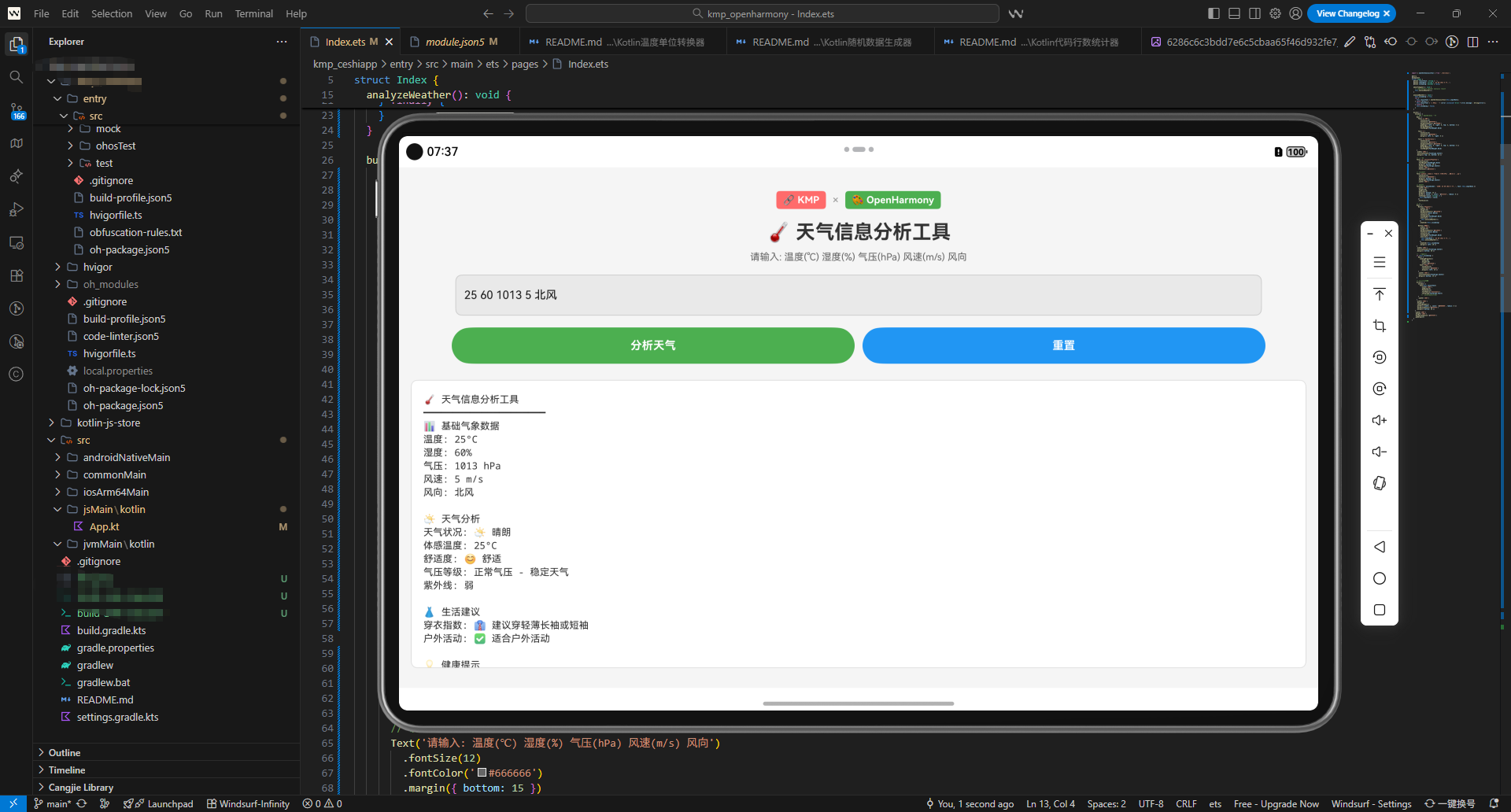
ArkTS 代码说明: ArkTS 调用代码展示了如何在 OpenHarmony 应用中使用天气分析工具。页面包含多个滑块用于输入气象数据、分析按钮和结果显示区域。通过 @State 装饰器管理状态,实现了完整的用户交互流程。用户可以通过滑块调整各个气象参数,点击分析按钮获得详细的天气分析结果。
实战案例
案例1:农业决策支持
在农业应用中,需要根据天气条件提供种植建议。
fun getAgricultureAdvice(temperature: Double, humidity: Double, pressure: Double, windSpeed: Double): List<String> {
    val analyzer = WeatherAnalyzer()
    val advice = mutableListOf<String>()

    val tempAnalysis = analyzer.analyzeTemperature(temperature)
    val humidityAnalysis = analyzer.assessHumidity(humidity, temperature)

    if (temperature < 0) {
        advice.add("🌾 农业建议: 温度过低,不适合播种")
    } else if (temperature < 10) {
        advice.add("🌾 农业建议: 温度较低,建议选择耐寒作物")
    } else if (temperature > 35) {
        advice.add("🌾 农业建议: 温度过高,需要灌溉降温")
    }

    if (humidity > 80) {
        advice.add("🌾 农业建议: 湿度过高,注意防止病虫害")
    } else if (humidity < 30) {
        advice.add("🌾 农业建议: 湿度过低,需要增加灌溉")
    }

    return advice
}
案例2:户外活动规划
在户外活动应用中,需要根据天气条件推荐活动。
fun recommendOutdoorActivity(temperature: Double, humidity: Double, windSpeed: Double, uvIndex: Double): String {
    return when {
        windSpeed > 20 -> "❌ 风太大,不适合户外活动"
        temperature < -10 -> "⛷️ 适合滑雪运动"
        temperature < 0 -> "⛸️ 适合冰上运动"
        temperature > 35 -> "🏊 适合游泳"
        uvIndex > 8 -> "🏖️ 适合在阴凉处活动"
        else -> "🚴 适合骑行和登山"
    }
}
案例3:健康提醒系统
在健康应用中,根据天气条件提供健康提醒。
fun generateHealthReminder(temperature: Double, humidity: Double, pressure: Double): String {
    var reminder = "📋 今日健康提醒:\n"

    if (temperature < -10) {
        reminder += "• 极端寒冷,外出时做好保暖\n"
    }
    if (temperature > 35) {
        reminder += "• 极端炎热,多喝水,避免中暑\n"
    }
    if (humidity > 80) {
        reminder += "• 潮湿天气,注意防止风湿病\n"
    }
    if (pressure < 1000) {
        reminder += "• 低气压,可能引起头痛\n"
    }

    return reminder
}
最佳实践
1. 数据准确性
确保输入的气象数据准确可靠。建议从官方气象部门获取数据,而不是使用用户输入的数据。
2. 实时更新
天气数据变化快速,应该定期更新数据并重新分析。建议每15-30分钟更新一次。
3. 缓存管理
对于相同的气象数据,可以缓存分析结果以提高性能。但要注意缓存的有效期。
4. 错误处理
对于异常的气象数据(如温度超过50°C),应该进行验证和错误处理。
5. 用户体验
提供清晰的可视化界面,使用图表和图标展示天气数据。避免过于复杂的技术细节。
6. 国际化
支持多种语言和单位系统(摄氏度/华氏度,米/秒/公里/小时等)。
总结
天气信息分析工具是现代应用开发中的重要组件。通过 KMP 框架,我们可以创建一个跨端的天气分析系统,在 Kotlin、JavaScript 和 ArkTS 中使用相同的分析逻辑。这不仅提高了代码的可维护性,还确保了不同平台上分析结果的一致性。
在实际应用中,合理使用天气分析工具可以提高应用的实用性和用户体验。通过提供详细的天气分析、舒适度评估和健康建议,我们可以帮助用户更好地应对天气变化,做出更明智的决策。无论是农业、户外活动还是健康管理,天气分析工具都能发挥重要作用。
欢迎加入开源鸿蒙跨平台社区:https://openharmonycrossplatform.csdn.net

AtomGit 是由开放原子开源基金会联合 CSDN 等生态伙伴共同推出的新一代开源与人工智能协作平台。平台坚持“开放、中立、公益”的理念,把代码托管、模型共享、数据集托管、智能体开发体验和算力服务整合在一起,为开发者提供从开发、训练到部署的一站式体验。
更多推荐

 17
17 0
0- 0


 已为社区贡献18条内容

所有评论(0)