React Native for OpenHarmony 实战:井字棋实现
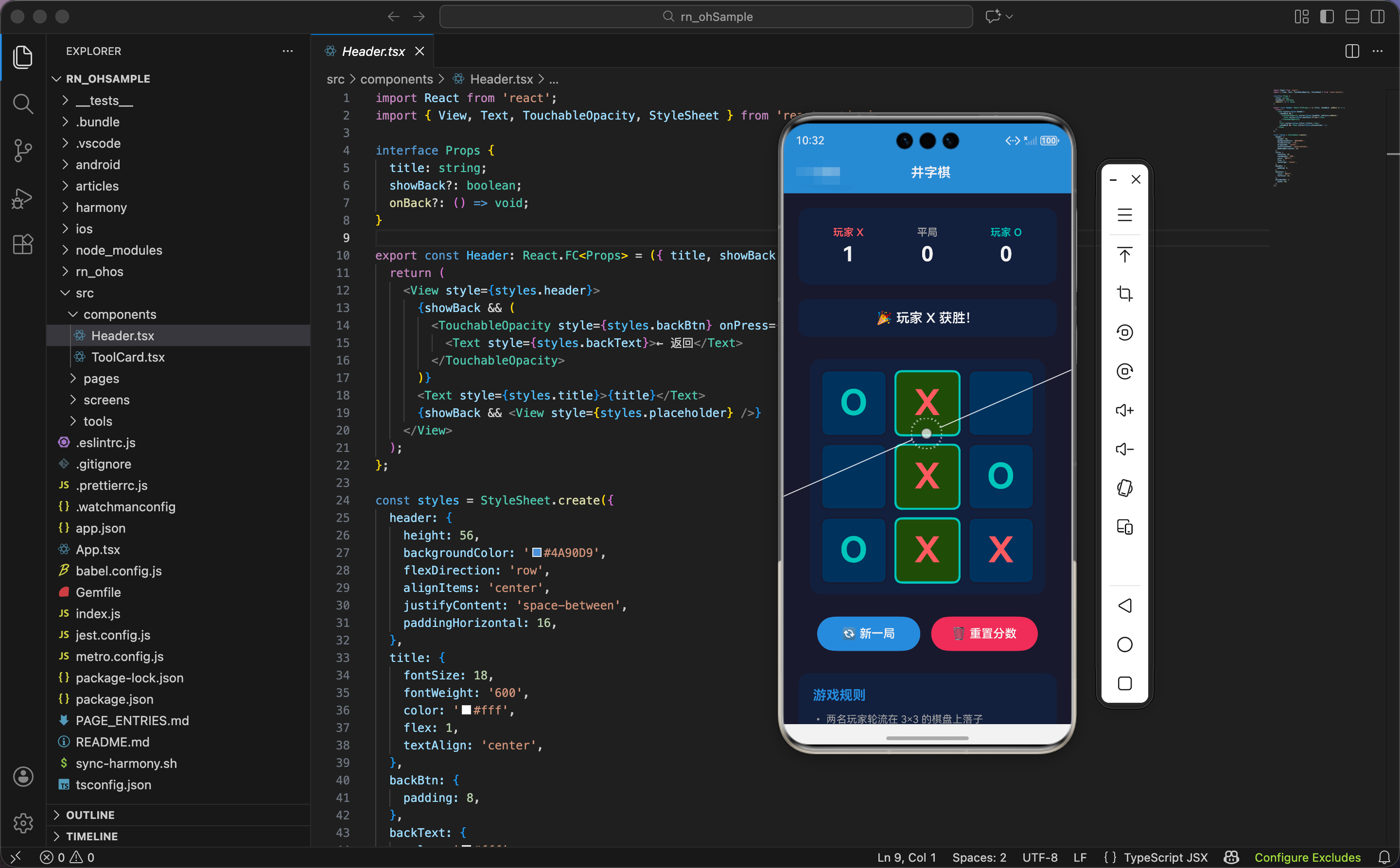
今天我们用 React Native 实现一个井字棋游戏,支持双人对战、胜负判断、计分统计。
状态和类型定义
import React, { useState, useRef, useEffect } from 'react';
import { View, Text, TouchableOpacity, StyleSheet, Animated } from 'react-native';

type Player = 'X' | 'O' | null;

export const TicTacToe: React.FC = () => {
  const [board, setBoard] = useState<Player[]>(Array(9).fill(null));
  const [isXNext, setIsXNext] = useState(true);
  const [scores, setScores] = useState({ X: 0, O: 0, draw: 0 });
  const [winLine, setWinLine] = useState<number[] | null>(null);
  const cellAnims = useRef(Array(9).fill(0).map(() => new Animated.Value(0))).current;
  const winAnim = useRef(new Animated.Value(0)).current;
  const shakeAnim = useRef(new Animated.Value(0)).current;
状态设计包含棋盘、当前玩家、计分、获胜线。
玩家类型:Player 是 'X'、'O' 或 null。null 表示空格子。
棋盘状态:board 是长度为 9 的数组,每个元素是一个格子的状态。索引 0-8 对应 3×3 棋盘的 9 个格子。
当前玩家:isXNext 是布尔值,true 表示轮到 X,false 表示轮到 O。
计分:scores 对象存储 X 的胜场、O 的胜场、平局次数。
获胜线:winLine 是包含 3 个索引的数组,表示获胜的 3 个格子。比如 [0, 1, 2] 表示第一行获胜。
动画值:
cellAnims:9 个格子的缩放动画,每个格子独立winAnim:获胜格子的闪烁动画shakeAnim:平局时棋盘的抖动动画
为什么用数组存储棋盘?因为数组是最简单的数据结构,索引对应格子位置。如果用二维数组 [[null, null, null], ...],访问格子需要两个索引 board[row][col],更复杂。一维数组只需要一个索引 board[index],更简洁。
获胜线定义和判断
  const lines = [[0, 1, 2], [3, 4, 5], [6, 7, 8], [0, 3, 6], [1, 4, 7], [2, 5, 8], [0, 4, 8], [2, 4, 6]];

  const checkWinner = (squares: Player[]): { winner: Player; line: number[] | null } => {
    for (const [a, b, c] of lines) {
      if (squares[a] && squares[a] === squares[b] && squares[a] === squares[c]) {
        return { winner: squares[a], line: [a, b, c] };
      }
    }
    return { winner: null, line: null };
  };

  const { winner, line } = checkWinner(board);
  const isDraw = !winner && board.every(cell => cell !== null);
获胜线定义了 8 种获胜组合:3 行、3 列、2 条对角线。
获胜线数组:
[0, 1, 2]:第一行[3, 4, 5]:第二行[6, 7, 8]:第三行[0, 3, 6]:第一列[1, 4, 7]:第二列[2, 5, 8]:第三列[0, 4, 8]:主对角线(左上到右下)[2, 4, 6]:副对角线(右上到左下)
判断逻辑:遍历 8 种获胜线,检查每条线的 3 个格子是否相同且非空。
条件判断:
squares[a]:第一个格子非空(不是null)squares[a] === squares[b]:第一个和第二个格子相同squares[a] === squares[c]:第一个和第三个格子相同
如果三个条件都满足,说明这条线获胜,返回获胜者和获胜线。
为什么先判断 squares[a]?因为如果第一个格子是 null,后面的比较没有意义。null === null 是 true,但 3 个空格子不算获胜。先判断非空,避免误判。
平局判断:没有获胜者,且所有格子都非空,就是平局。board.every(cell => cell !== null) 检查是否所有格子都有棋子。
获胜动画
  useEffect(() => {
    if (winner) {
      setWinLine(line);
      Animated.loop(
        Animated.sequence([
          Animated.timing(winAnim, { toValue: 1, duration: 500, useNativeDriver: true }),
          Animated.timing(winAnim, { toValue: 0, duration: 500, useNativeDriver: true }),
        ]),
        { iterations: 3 }
      ).start();
    }
  }, [winner]);
当有获胜者时,启动获胜格子的闪烁动画。
设置获胜线:setWinLine(line) 保存获胜线的索引,用于高亮显示。
循环动画:Animated.loop 让动画重复 3 次。内部是序列动画,从 0 到 1(500ms),再从 1 到 0(500ms),总共 1 秒一个周期。
为什么重复 3 次?因为 3 次刚好,既能让用户注意到获胜格子,又不会太多导致等待时间过长。3 秒后动画停止,用户可以开始新一局。
为什么用 useEffect?因为 winner 变化时才需要启动动画。如果在渲染函数中直接调用 Animated.loop,每次渲染都会启动新动画,导致动画重复。useEffect 确保动画只在 winner 变化时启动一次。
落子逻辑
  const handlePress = (index: number) => {
    if (board[index] || winner) return;

    // 动画
    Animated.spring(cellAnims[index], {
      toValue: 1,
      friction: 3,
      tension: 100,
      useNativeDriver: true,
    }).start();

    const newBoard = [...board];
    newBoard[index] = isXNext ? 'X' : 'O';
    setBoard(newBoard);
    setIsXNext(!isXNext);
落子函数处理格子点击,包含动画、状态更新、胜负判断。
防重复落子:如果格子已有棋子(board[index] 非空)或游戏已结束(winner 存在),直接返回,不处理点击。
落子动画:弹簧动画让格子从 0 缩放到 1,friction: 3 让弹簧有明显的回弹效果,tension: 100 控制弹簧的张力(弹性强度)。
更新棋盘:
[...board]:复制棋盘数组,避免直接修改原数组newBoard[index] = isXNext ? 'X' : 'O':在点击的格子放置当前玩家的棋子setBoard(newBoard):更新棋盘状态
切换玩家:setIsXNext(!isXNext) 切换到下一个玩家。
为什么要复制数组?因为 React 的状态更新需要新对象。如果直接修改 board[index],React 检测不到变化,不会重新渲染。复制数组后修改,React 能检测到新数组,触发重新渲染。
胜负判断和计分
    const result = checkWinner(newBoard);
    if (result.winner) {
      setScores({ ...scores, [result.winner]: scores[result.winner as 'X' | 'O'] + 1 });
    } else if (newBoard.every(cell => cell !== null)) {
      setScores({ ...scores, draw: scores.draw + 1 });
      // 平局抖动
      Animated.sequence([
        Animated.timing(shakeAnim, { toValue: 10, duration: 50, useNativeDriver: true }),
        Animated.timing(shakeAnim, { toValue: -10, duration: 50, useNativeDriver: true }),
        Animated.timing(shakeAnim, { toValue: 10, duration: 50, useNativeDriver: true }),
        Animated.timing(shakeAnim, { toValue: 0, duration: 50, useNativeDriver: true }),
      ]).start();
    }
  };
落子后检查胜负,更新计分。
检查获胜:用新棋盘调用 checkWinner,得到获胜者和获胜线。
更新胜场:如果有获胜者,对应玩家的胜场加 1。[result.winner] 是动态属性名,根据获胜者(‘X’ 或 ‘O’)更新对应的计分。
检查平局:如果没有获胜者,且所有格子都有棋子,就是平局。平局次数加 1。
平局动画:序列动画让棋盘左右抖动。从 0 到 10(向右)、到 -10(向左)、到 10(向右)、回到 0,总共 200ms。抖动 3 次,给用户"平局"的视觉反馈。
为什么平局要抖动?因为平局没有获胜格子可以高亮,需要其他方式提示用户。抖动是一种常见的"失败"或"无效"反馈,让用户知道游戏结束了。
重置函数
  const reset = () => {
    setBoard(Array(9).fill(null));
    setIsXNext(true);
    setWinLine(null);
    winAnim.setValue(0);
    cellAnims.forEach(anim => anim.setValue(0));
  };

  const resetAll = () => {
    reset();
    setScores({ X: 0, O: 0, draw: 0 });
  };
两个重置函数:reset 重置棋盘,resetAll 重置棋盘和计分。
重置棋盘:
- 棋盘清空,所有格子设为
null - 重置为 X 先手
- 清除获胜线
- 重置所有动画值为 0
重置计分:调用 reset 重置棋盘,再把计分清零。
为什么分两个函数?因为用户可能想开始新一局(保留计分),也可能想完全重新开始(清除计分)。两个函数提供不同的重置选项。
格子渲染
  const renderCell = (index: number) => {
    const cell = board[index];
    const isWinCell = winLine?.includes(index);
    const scale = cellAnims[index].interpolate({
      inputRange: [0, 1],
      outputRange: [0.3, 1],
    });
    const winScale = winAnim.interpolate({
      inputRange: [0, 1],
      outputRange: [1, 1.2],
    });

    return (
      <TouchableOpacity
        key={index}
        style={[styles.cell, isWinCell && styles.cellWin]}
        onPress={() => handlePress(index)}
        activeOpacity={0.7}
      >
        {cell && (
          <Animated.View
            style={[
              styles.cellContent,
              { transform: [{ scale }, ...(isWinCell ? [{ scale: winScale }] : [])] },
            ]}
          >
            <Text style={[styles.cellText, cell === 'X' ? styles.cellX : styles.cellO]}>
              {cell}
            </Text>
          </Animated.View>
        )}
        {!cell && (
          <View style={styles.cellHint}>
            <Text style={styles.cellHintText}>{isXNext ? 'X' : 'O'}</Text>
          </View>
        )}
      </TouchableOpacity>
    );
  };
格子渲染函数包含动画插值、条件样式、提示显示。
获取格子状态:board[index] 得到格子的棋子(‘X’、‘O’ 或 null)。
判断获胜格子:winLine?.includes(index) 检查当前格子是否在获胜线中。?. 是可选链操作符,如果 winLine 是 null,返回 undefined,不会报错。
缩放插值:
scale:格子的缩放动画,从 0.3 到 1。棋子从小到大出现,有"弹出"效果winScale:获胜格子的闪烁动画,从 1 到 1.2。获胜格子放大 20%,再缩回,循环 3 次
条件样式:如果是获胜格子,应用 cellWin 样式(绿色背景、青色边框、发光效果)。
棋子显示:
- 如果格子有棋子,显示棋子文字(‘X’ 或 ‘O’)
- 应用两个缩放动画:落子动画和获胜动画(如果是获胜格子)
- X 用红色,O 用青色
提示显示:
- 如果格子是空的,显示半透明的提示文字
- 提示文字是当前玩家的符号(X 或 O),告诉用户"点击这里会放置什么棋子"
为什么提示文字透明度很低?因为提示文字只是辅助信息,不应该抢眼。透明度 0.1(10%)让提示文字若隐若现,用户能看到但不会干扰视觉。
界面渲染:计分板
  return (
    <View style={styles.container}>
      <View style={styles.scoreBoard}>
        <View style={[styles.scoreItem, !isXNext && !winner && styles.scoreItemActive]}>
          <Text style={[styles.scorePlayer, styles.playerX]}>X</Text>
          <Text style={styles.scoreValue}>{scores.X}</Text>
        </View>
        <View style={styles.scoreItem}>
          <Text style={styles.scorePlayer}>平</Text>
          <Text style={styles.scoreValue}>{scores.draw}</Text>
        </View>
        <View style={[styles.scoreItem, isXNext && !winner && styles.scoreItemActive]}>
          <Text style={[styles.scorePlayer, styles.playerO]}>O</Text>
          <Text style={styles.scoreValue}>{scores.O}</Text>
        </View>
      </View>
计分板显示 X 的胜场、平局次数、O 的胜场。
三个计分项:
- X 的胜场:左边,红色
- 平局次数:中间,灰色
- O 的胜场:右边,青色
激活状态:
- 如果轮到 O(
!isXNext)且游戏未结束(!winner),X 的计分项高亮 - 如果轮到 X(
isXNext)且游戏未结束,O 的计分项高亮 - 高亮样式是半透明白色背景
为什么轮到 O 时高亮 X?因为计分板显示的是"上一个玩家"的状态。轮到 O 说明 X 刚下完,所以高亮 X。这让用户知道"刚才是谁下的"。
状态显示和棋盘
      <View style={styles.statusContainer}>
        <Text style={styles.status}>
          {winner ? `🎉 ${winner} 获胜!` : isDraw ? '🤝 平局!' : `轮到 ${isXNext ? 'X' : 'O'}`}
        </Text>
      </View>

      <Animated.View style={[styles.board, { transform: [{ translateX: shakeAnim }] }]}>
        <View style={styles.boardInner}>
          {board.map((_, i) => renderCell(i))}
        </View>
        <View style={styles.boardGlow} />
      </Animated.View>
状态文字:
- 如果有获胜者:🎉 X 获胜! 或 🎉 O 获胜!
- 如果平局:🤝 平局!
- 否则:轮到 X 或 轮到 O
棋盘容器:应用抖动动画(translateX: shakeAnim),平局时左右抖动。
棋盘内容:
boardInner:3×3 网格,包含 9 个格子boardGlow:发光边框,绝对定位在棋盘外围,青色边框,半透明
为什么发光边框用绝对定位?因为发光边框不占据布局空间,不影响棋盘的大小和位置。绝对定位让边框"浮"在棋盘上方,营造发光效果。
按钮
      <View style={styles.btnRow}>
        <TouchableOpacity style={styles.btn} onPress={reset}>
          <Text style={styles.btnText}>🔄 新一局</Text>
        </TouchableOpacity>
        <TouchableOpacity style={[styles.btn, styles.btnSecondary]} onPress={resetAll}>
          <Text style={styles.btnText}>🗑️ 重置</Text>
        </TouchableOpacity>
      </View>
    </View>
  );
};
两个按钮:新一局(保留计分)、重置(清除计分)。
新一局按钮:蓝色背景,点击调用 reset,重置棋盘但保留计分。
重置按钮:灰色背景(btnSecondary),点击调用 resetAll,重置棋盘和计分。
为什么用不同颜色?因为颜色能传达按钮的重要性。蓝色是主要操作(新一局),灰色是次要操作(重置)。用户通常只需要"新一局","重置"是偶尔使用的功能。
鸿蒙 ArkTS 对比:游戏逻辑
@State board: (string | null)[] = Array(9).fill(null)
@State isXNext: boolean = true
@State scores: { X: number, O: number, draw: number } = { X: 0, O: 0, draw: 0 }
@State winLine: number[] | null = null

lines: number[][] = [[0,1,2], [3,4,5], [6,7,8], [0,3,6], [1,4,7], [2,5,8], [0,4,8], [2,4,6]]

checkWinner(squares: (string | null)[]): { winner: string | null, line: number[] | null } {
  for (const [a, b, c] of this.lines) {
    if (squares[a] && squares[a] === squares[b] && squares[a] === squares[c]) {
      return { winner: squares[a], line: [a, b, c] }
    }
  }
  return { winner: null, line: null }
}

handlePress(index: number) {
  if (this.board[index] || this.winner) return

  const newBoard = [...this.board]
  newBoard[index] = this.isXNext ? 'X' : 'O'
  this.board = newBoard
  this.isXNext = !this.isXNext

  const result = this.checkWinner(newBoard)
  if (result.winner) {
    this.scores[result.winner] += 1
    this.winLine = result.line
  } else if (newBoard.every(cell => cell !== null)) {
    this.scores.draw += 1
  }
}
ArkTS 中的游戏逻辑完全一样,核心是数组操作和条件判断。获胜线定义、胜负判断、落子逻辑都是纯 JavaScript,跨平台通用。
样式定义:容器和计分板
const styles = StyleSheet.create({
  container: { flex: 1, backgroundColor: '#0f0f23', padding: 20, alignItems: 'center' },
  scoreBoard: {
    flexDirection: 'row',
    marginBottom: 20,
    backgroundColor: '#1a1a3e',
    borderRadius: 20,
    padding: 10,
  },
  scoreItem: {
    alignItems: 'center',
    paddingHorizontal: 25,
    paddingVertical: 10,
    borderRadius: 15,
  },
  scoreItemActive: { backgroundColor: 'rgba(255,255,255,0.1)' },
  scorePlayer: { color: '#888', fontSize: 20, fontWeight: '600' },
  playerX: { color: '#ff6b6b' },
  playerO: { color: '#4ecdc4' },
  scoreValue: { color: '#fff', fontSize: 32, fontWeight: '700' },
容器用深蓝黑色背景(#0f0f23),营造深色主题。
计分板:深蓝色背景(#1a1a3e),圆角 20,水平排列。
计分项:
- 水平内边距 25,垂直内边距 10
- 激活状态用半透明白色背景
玩家符号:
- 默认灰色(#888)
- X 用红色(#ff6b6b)
- O 用青色(#4ecdc4)
计分数字:白色,字号 32,粗体 700,醒目。
样式定义:棋盘和格子
  statusContainer: {
    backgroundColor: '#1a1a3e',
    paddingVertical: 12,
    paddingHorizontal: 30,
    borderRadius: 25,
    marginBottom: 30,
  },
  status: { color: '#fff', fontSize: 20, fontWeight: '600' },
  board: { marginBottom: 30 },
  boardInner: {
    width: 300,
    height: 300,
    flexDirection: 'row',
    flexWrap: 'wrap',
    backgroundColor: '#1a1a3e',
    borderRadius: 20,
    padding: 10,
    shadowColor: '#4A90D9',
    shadowOffset: { width: 0, height: 0 },
    shadowOpacity: 0.3,
    shadowRadius: 20,
    elevation: 10,
  },
  boardGlow: {
    position: 'absolute',
    top: -2,
    left: -2,
    right: -2,
    bottom: -2,
    borderRadius: 22,
    borderWidth: 2,
    borderColor: '#4A90D9',
    opacity: 0.5,
  },
状态容器用深蓝色背景,大圆角(25),像"胶囊"。
棋盘:
- 正方形(300×300)
- 深蓝色背景,圆角 20
- 蓝色阴影,向外扩散(
shadowOffset: { width: 0, height: 0 }) flexWrap: 'wrap':格子自动换行,3 个一行
发光边框:
- 绝对定位,比棋盘大 4 像素(上下左右各 2 像素)
- 青色边框,半透明(透明度 0.5)
- 圆角 22,比棋盘的圆角 20 大 2,确保边框完全包裹棋盘
样式定义:格子和按钮
  cell: {
    width: 90,
    height: 90,
    margin: 3,
    backgroundColor: '#252550',
    borderRadius: 15,
    justifyContent: 'center',
    alignItems: 'center',
    borderWidth: 2,
    borderColor: '#3a3a6a',
  },
  cellWin: {
    backgroundColor: '#2a4a2a',
    borderColor: '#4ecdc4',
    shadowColor: '#4ecdc4',
    shadowOffset: { width: 0, height: 0 },
    shadowOpacity: 0.5,
    shadowRadius: 10,
  },
  cellContent: {},
  cellText: { fontSize: 48, fontWeight: '800' },
  cellX: { color: '#ff6b6b', textShadowColor: '#ff6b6b', textShadowOffset: { width: 0, height: 0 }, textShadowRadius: 10 },
  cellO: { color: '#4ecdc4', textShadowColor: '#4ecdc4', textShadowOffset: { width: 0, height: 0 }, textShadowRadius: 10 },
  cellHint: { opacity: 0.1 },
  cellHintText: { fontSize: 48, fontWeight: '800', color: '#fff' },
  btnRow: { flexDirection: 'row' },
  btn: {
    backgroundColor: '#4A90D9',
    paddingVertical: 14,
    paddingHorizontal: 24,
    borderRadius: 25,
    marginHorizontal: 8,
    shadowColor: '#4A90D9',
    shadowOffset: { width: 0, height: 4 },
    shadowOpacity: 0.4,
    shadowRadius: 10,
  },
  btnSecondary: { backgroundColor: '#666' },
  btnText: { color: '#fff', fontSize: 16, fontWeight: '600' },
});
格子:
- 正方形(90×90),外边距 3
- 深蓝色背景(#252550),圆角 15,边框
获胜格子:
- 深绿色背景(#2a4a2a)
- 青色边框和阴影(#4ecdc4)
- 阴影向外扩散,营造"发光"效果
棋子文字:
- 字号 48,粗体 800,醒目
- X 用红色,O 用青色
- 文字阴影和文字颜色一致,向外扩散,营造"发光"效果
提示文字:透明度 0.1,若隐若现。
按钮:
- 主按钮:蓝色背景,蓝色阴影
- 次按钮:灰色背景(#666)
- 圆角 25,像"胶囊"
小结
这个井字棋游戏展示了游戏逻辑和动画的结合。获胜线定义和判断是核心算法,落子动画、获胜闪烁、平局抖动营造丰富的交互反馈。计分统计让用户看到长期的对战结果。
欢迎加入开源鸿蒙跨平台社区:https://openharmonycrossplatform.csdn.net

AtomGit 是由开放原子开源基金会联合 CSDN 等生态伙伴共同推出的新一代开源与人工智能协作平台。平台坚持“开放、中立、公益”的理念,把代码托管、模型共享、数据集托管、智能体开发体验和算力服务整合在一起,为开发者提供从开发、训练到部署的一站式体验。
更多推荐

 16
16 0
0- 0


 已为社区贡献20条内容

所有评论(0)