时间线Timeline Flutter & OpenHarmony PC
案例概述
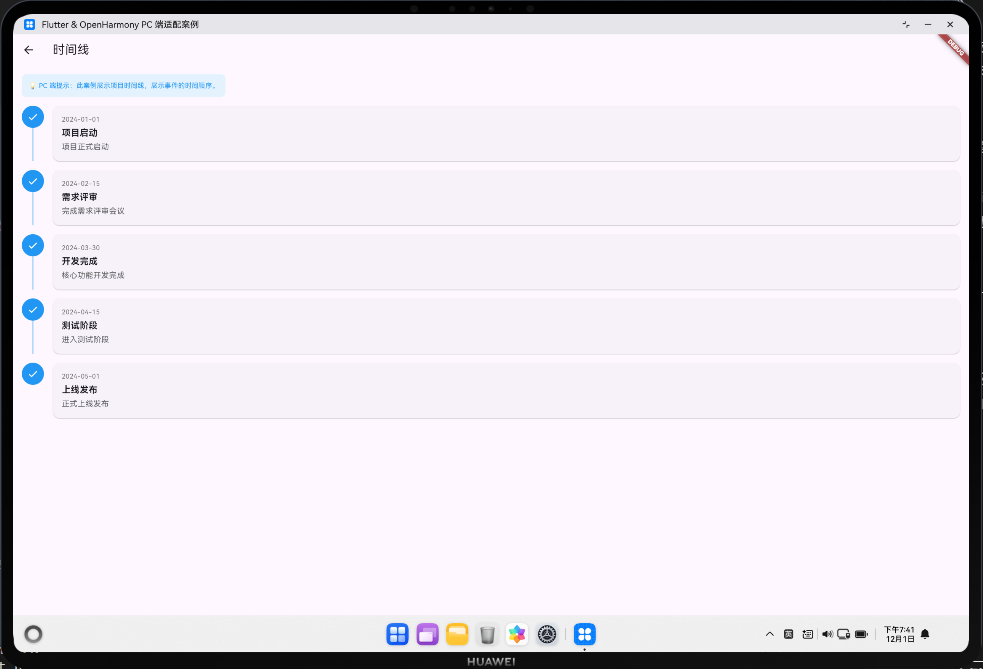
本案例展示如何创建功能完整的项目时间线组件,用于展示事件的时间顺序和发展过程。时间线是展示历史事件、项目进度、版本更新、里程碑等信息的有效方式。通过将事件按时间顺序排列,用户可以清晰地了解整个发展过程和关键节点。
时间线在企业应用中广泛应用于项目管理、工作流展示、版本管理、用户活动记录等场景。一个完整的时间线系统需要处理事件排序、状态指示、响应式布局、性能优化等问题。此外,还应支持过滤、搜索、详情展示、数据导出等功能,以满足不同的业务需求。
在 PC 端应用中,时间线需要充分利用屏幕空间,支持键盘导航、鼠标交互、无障碍访问等特性,确保用户体验的一致性和高效性。
核心概念
1. 时间线结构与组成
时间线由以下主要元素组成:
-
竖直线条(Timeline Line):连接各事件的视觉线索,通常为竖直方向,表示时间流向。线条颜色可根据事件状态变化,如完成事件为绿色,进行中的事件为蓝色,待做事件为灰色。
-
事件标记点(Event Marker):通常为圆形或其他几何形状,标记事件在时间线上的位置。标记点的大小、颜色和图标可表示事件的重要性、类型和状态。
-
事件卡片(Event Card):展示事件的详细信息,包括日期、标题、描述、参与者等。卡片可以左右交替排列,也可以全部在一侧。
-
时间标签(Time Label):显示事件发生的具体时间,可以是日期、时间戳或相对时间(如"2小时前")。
2. 事件数据模型
一个完整的事件数据模型应包含以下字段:
class TimelineEvent {
  final String id;           // 事件唯一标识
  final DateTime dateTime;   // 事件发生时间
  final String title;        // 事件标题
  final String description;  // 事件描述
  final String status;       // 事件状态(completed, in_progress, pending)
  final int priority;        // 优先级(1-5)
  final String category;     // 事件分类
  final String? icon;        // 事件图标
  final String? author;      // 事件发起人
  final List<String>? tags;  // 事件标签
  final Map<String, dynamic>? metadata; // 额外元数据
}
3. 视觉设计原则
- 颜色编码:使用不同颜色表示事件状态和优先级,提高信息识别效率
- 空间布局:合理利用屏幕空间,在 PC 端可采用左右交替或双列布局
- 视觉层次:通过大小、粗细、颜色等视觉属性区分重要信息
- 响应式适配:在不同屏幕尺寸下自动调整布局和样式
- 交互反馈:提供悬停、点击等交互反馈,增强用户体验
代码详解
1. 基础时间线实现
创建一个基础的时间线需要使用 ListView.builder 来动态构建事件列表,并通过 Row 和 Column 组合来实现竖直线条和事件标记的布局。以下是一个完整的基础时间线实现:
class TimelineWidget extends StatefulWidget {
final List<TimelineEvent> events;
const TimelineWidget({required this.events});
State<TimelineWidget> createState() => _TimelineWidgetState();
}
class _TimelineWidgetState extends State<TimelineWidget> {
Widget build(BuildContext context) {
return ListView.builder(
padding: EdgeInsets.symmetric(vertical: 16, horizontal: 24),
itemCount: widget.events.length,
itemBuilder: (context, index) {
final event = widget.events[index];
final isLast = index == widget.events.length - 1;
final isFirst = index == 0;
return Row(
crossAxisAlignment: CrossAxisAlignment.start,
children: [
// 时间线竖直线条和标记点
Column(
children: [
// 上方线条(第一个事件不显示)
if (!isFirst)
Container(
width: 2,
height: 30,
color: _getLineColor(widget.events[index - 1].status),
),
// 事件标记点
Container(
width: 40,
height: 40,
decoration: BoxDecoration(
color: _getMarkerColor(event.status),
shape: BoxShape.circle,
border: Border.all(color: Colors.white, width: 3),
boxShadow: [
BoxShadow(
color: Colors.black.withOpacity(0.1),
blurRadius: 4,
offset: Offset(0, 2),
),
],
),
child: Center(
child: Icon(
_getEventIcon(event.category),
color: Colors.white,
size: 20,
),
),
),
// 下方线条(最后一个事件不显示)
if (!isLast)
Container(
width: 2,
height: 30,
color: _getLineColor(event.status),
),
],
),
SizedBox(width: 24),
// 事件卡片
Expanded(
child: _buildEventCard(event, index),
),
],
);
},
);
}
Color _getMarkerColor(String status) {
switch (status) {
case 'completed':
return Colors.green;
case 'in_progress':
return Colors.blue;
case 'pending':
return Colors.grey;
default:
return Colors.blue;
}
}
Color _getLineColor(String status) {
switch (status) {
case 'completed':
return Colors.green.shade200;
case 'in_progress':
return Colors.blue.shade200;
case 'pending':
return Colors.grey.shade200;
default:
return Colors.grey.shade200;
}
}
IconData _getEventIcon(String category) {
switch (category) {
case 'milestone':
return Icons.flag;
case 'release':
return Icons.rocket;
case 'bug_fix':
return Icons.bug_report;
case 'feature':
return Icons.lightbulb;
default:
return Icons.circle;
}
}
Widget _buildEventCard(TimelineEvent event, int index) {
return Card(
elevation: 2,
margin: EdgeInsets.symmetric(vertical: 8),
child: Padding(
padding: EdgeInsets.all(16),
child: Column(
crossAxisAlignment: CrossAxisAlignment.start,
children: [
// 时间和状态
Row(
mainAxisAlignment: MainAxisAlignment.spaceBetween,
children: [
Text(
_formatDateTime(event.dateTime),
style: TextStyle(
fontSize: 12,
color: Colors.grey.shade600,
fontWeight: FontWeight.w500,
),
),
_buildStatusBadge(event.status),
],
),
SizedBox(height: 8),
// 标题
Text(
event.title,
style: TextStyle(
fontSize: 16,
fontWeight: FontWeight.bold,
color: Colors.black87,
),
),
SizedBox(height: 8),
// 描述
Text(
event.description,
style: TextStyle(
fontSize: 14,
color: Colors.grey.shade700,
),
maxLines: 3,
overflow: TextOverflow.ellipsis,
),
if (event.tags != null && event.tags!.isNotEmpty) ...[
SizedBox(height: 12),
Wrap(
spacing: 8,
children: event.tags!
.map((tag) => Chip(
label: Text(tag, style: TextStyle(fontSize: 12)),
backgroundColor: Colors.blue.shade50,
labelStyle: TextStyle(color: Colors.blue.shade700),
))
.toList(),
),
],
],
),
),
);
}
Widget _buildStatusBadge(String status) {
final statusMap = {
'completed': ('已完成', Colors.green),
'in_progress': ('进行中', Colors.blue),
'pending': ('待做', Colors.grey),
};
final (label, color) = statusMap[status] ?? ('未知', Colors.grey);
return Container(
padding: EdgeInsets.symmetric(horizontal: 12, vertical: 4),
decoration: BoxDecoration(
color: color.withOpacity(0.1),
borderRadius: BorderRadius.circular(12),
border: Border.all(color: color, width: 0.5),
),
child: Text(
label,
style: TextStyle(
fontSize: 12,
color: color,
fontWeight: FontWeight.w600,
),
),
);
}
String _formatDateTime(DateTime dateTime) {
return '${dateTime.year}-${dateTime.month.toString().padLeft(2, '0')}-${dateTime.day.toString().padLeft(2, '0')} '
'${dateTime.hour.toString().padLeft(2, '0')}:${dateTime.minute.toString().padLeft(2, '0')}';
}
}
这个实现展示了时间线的基本结构,包括竖直线条、事件标记点和事件卡片。每个事件都有颜色编码的状态指示和详细信息展示。
2. 响应式时间线设计
在 PC 端应用中,需要根据屏幕宽度调整时间线的布局。以下是一个支持响应式设计的时间线实现:
class ResponsiveTimelineWidget extends StatefulWidget {
final List<TimelineEvent> events;
const ResponsiveTimelineWidget({required this.events});
State<ResponsiveTimelineWidget> createState() => _ResponsiveTimelineWidgetState();
}
class _ResponsiveTimelineWidgetState extends State<ResponsiveTimelineWidget> {
Widget build(BuildContext context) {
final screenWidth = MediaQuery.of(context).size.width;
// 根据屏幕宽度选择不同的布局
if (screenWidth < 600) {
return _buildMobileTimeline();
} else if (screenWidth < 1200) {
return _buildTabletTimeline();
} else {
return _buildDesktopTimeline();
}
}
Widget _buildMobileTimeline() {
// 移动端:单列布局,时间线在左侧
return ListView.builder(
padding: EdgeInsets.symmetric(vertical: 16, horizontal: 16),
itemCount: widget.events.length,
itemBuilder: (context, index) {
return _buildTimelineItem(widget.events[index], index, false);
},
);
}
Widget _buildTabletTimeline() {
// 平板端:单列布局,但卡片更宽
return ListView.builder(
padding: EdgeInsets.symmetric(vertical: 16, horizontal: 32),
itemCount: widget.events.length,
itemBuilder: (context, index) {
return _buildTimelineItem(widget.events[index], index, false);
},
);
}
Widget _buildDesktopTimeline() {
// PC 端:左右交替布局,充分利用屏幕空间
return ListView.builder(
padding: EdgeInsets.symmetric(vertical: 16, horizontal: 48),
itemCount: widget.events.length,
itemBuilder: (context, index) {
final isLeftSide = index % 2 == 0;
return _buildAlternatingTimelineItem(
widget.events[index],
index,
isLeftSide,
);
},
);
}
Widget _buildTimelineItem(TimelineEvent event, int index, bool isAlternating) {
// 基础时间线项实现
return Padding(
padding: EdgeInsets.symmetric(vertical: 12),
child: Row(
crossAxisAlignment: CrossAxisAlignment.start,
children: [
_buildTimelineMarker(event),
SizedBox(width: 16),
Expanded(child: _buildEventCard(event)),
],
),
);
}
Widget _buildAlternatingTimelineItem(
TimelineEvent event,
int index,
bool isLeftSide,
) {
// 左右交替的时间线项
final cardWidget = Expanded(child: _buildEventCard(event));
final markerWidget = _buildTimelineMarker(event);
if (isLeftSide) {
return Padding(
padding: EdgeInsets.symmetric(vertical: 12),
child: Row(
crossAxisAlignment: CrossAxisAlignment.start,
children: [
cardWidget,
SizedBox(width: 16),
markerWidget,
SizedBox(width: 16),
Expanded(child: SizedBox()),
],
),
);
} else {
return Padding(
padding: EdgeInsets.symmetric(vertical: 12),
child: Row(
crossAxisAlignment: CrossAxisAlignment.start,
children: [
Expanded(child: SizedBox()),
SizedBox(width: 16),
markerWidget,
SizedBox(width: 16),
cardWidget,
],
),
);
}
}
Widget _buildTimelineMarker(TimelineEvent event) {
return Container(
width: 40,
height: 40,
decoration: BoxDecoration(
color: _getMarkerColor(event.status),
shape: BoxShape.circle,
border: Border.all(color: Colors.white, width: 3),
boxShadow: [
BoxShadow(
color: Colors.black.withOpacity(0.1),
blurRadius: 4,
),
],
),
child: Center(
child: Icon(
_getEventIcon(event.category),
color: Colors.white,
size: 20,
),
),
);
}
Widget _buildEventCard(TimelineEvent event) {
return Card(
elevation: 2,
child: Padding(
padding: EdgeInsets.all(16),
child: Column(
crossAxisAlignment: CrossAxisAlignment.start,
children: [
Row(
mainAxisAlignment: MainAxisAlignment.spaceBetween,
children: [
Text(
_formatDateTime(event.dateTime),
style: TextStyle(fontSize: 12, color: Colors.grey.shade600),
),
_buildStatusBadge(event.status),
],
),
SizedBox(height: 8),
Text(
event.title,
style: TextStyle(fontSize: 16, fontWeight: FontWeight.bold),
),
SizedBox(height: 8),
Text(
event.description,
style: TextStyle(fontSize: 14, color: Colors.grey.shade700),
maxLines: 3,
overflow: TextOverflow.ellipsis,
),
],
),
),
);
}
Color _getMarkerColor(String status) {
switch (status) {
case 'completed':
return Colors.green;
case 'in_progress':
return Colors.blue;
case 'pending':
return Colors.grey;
default:
return Colors.blue;
}
}
IconData _getEventIcon(String category) {
switch (category) {
case 'milestone':
return Icons.flag;
case 'release':
return Icons.rocket;
case 'bug_fix':
return Icons.bug_report;
case 'feature':
return Icons.lightbulb;
default:
return Icons.circle;
}
}
Widget _buildStatusBadge(String status) {
final statusMap = {
'completed': ('已完成', Colors.green),
'in_progress': ('进行中', Colors.blue),
'pending': ('待做', Colors.grey),
};
final (label, color) = statusMap[status] ?? ('未知', Colors.grey);
return Container(
padding: EdgeInsets.symmetric(horizontal: 12, vertical: 4),
decoration: BoxDecoration(
color: color.withOpacity(0.1),
borderRadius: BorderRadius.circular(12),
border: Border.all(color: color, width: 0.5),
),
child: Text(
label,
style: TextStyle(fontSize: 12, color: color, fontWeight: FontWeight.w600),
),
);
}
String _formatDateTime(DateTime dateTime) {
return '${dateTime.year}-${dateTime.month.toString().padLeft(2, '0')}-${dateTime.day.toString().padLeft(2, '0')}';
}
}
这个实现展示了如何根据屏幕宽度动态调整时间线的布局,在 PC 端采用左右交替布局以充分利用屏幕空间。
高级话题:时间线的企业级应用
1. 动态/响应式设计与多屏幕适配
在企业应用中,时间线需要在不同设备上提供一致的体验。这包括根据屏幕宽度动态调整布局、字体大小、间距等。
class ResponsiveTimelineManager {
  static const double MOBILE_WIDTH = 600;
  static const double TABLET_WIDTH = 1200;

  static DeviceType getDeviceType(BuildContext context) {
    final width = MediaQuery.of(context).size.width;
    if (width < MOBILE_WIDTH) return DeviceType.mobile;
    if (width < TABLET_WIDTH) return DeviceType.tablet;
    return DeviceType.desktop;
  }

  static EdgeInsets getPadding(BuildContext context) {
    final deviceType = getDeviceType(context);
    switch (deviceType) {
      case DeviceType.mobile:
        return EdgeInsets.symmetric(horizontal: 16, vertical: 12);
      case DeviceType.tablet:
        return EdgeInsets.symmetric(horizontal: 32, vertical: 16);
      case DeviceType.desktop:
        return EdgeInsets.symmetric(horizontal: 48, vertical: 20);
    }
  }

  static double getMarkerSize(BuildContext context) {
    final deviceType = getDeviceType(context);
    switch (deviceType) {
      case DeviceType.mobile:
        return 32;
      case DeviceType.tablet:
        return 36;
      case DeviceType.desktop:
        return 40;
    }
  }

  static double getLineHeight(BuildContext context) {
    final deviceType = getDeviceType(context);
    switch (deviceType) {
      case DeviceType.mobile:
        return 40;
      case DeviceType.tablet:
        return 50;
      case DeviceType.desktop:
        return 60;
    }
  }
}

enum DeviceType { mobile, tablet, desktop }
2. 动画与过渡效果
为时间线添加动画可以提升用户体验。常见的动画包括事件卡片的淡入、缩放、滑动等。
class AnimatedTimelineWidget extends StatefulWidget {
final List<TimelineEvent> events;
const AnimatedTimelineWidget({required this.events});
State<AnimatedTimelineWidget> createState() => _AnimatedTimelineWidgetState();
}
class _AnimatedTimelineWidgetState extends State<AnimatedTimelineWidget>
with TickerProviderStateMixin {
late List<AnimationController> _controllers;
void initState() {
super.initState();
_controllers = List.generate(
widget.events.length,
(index) => AnimationController(
duration: Duration(milliseconds: 500 + (index * 100)),
vsync: this,
),
);
// 依次播放动画
for (var i = 0; i < _controllers.length; i++) {
Future.delayed(Duration(milliseconds: i * 100), () {
if (mounted) _controllers[i].forward();
});
}
}
void dispose() {
for (var controller in _controllers) {
controller.dispose();
}
super.dispose();
}
Widget build(BuildContext context) {
return ListView.builder(
itemCount: widget.events.length,
itemBuilder: (context, index) {
return ScaleTransition(
scale: Tween<double>(begin: 0.8, end: 1.0).animate(
CurvedAnimation(parent: _controllers[index], curve: Curves.easeOut),
),
child: FadeTransition(
opacity: Tween<double>(begin: 0, end: 1).animate(
CurvedAnimation(parent: _controllers[index], curve: Curves.easeIn),
),
child: _buildTimelineItem(widget.events[index], index),
),
);
},
);
}
Widget _buildTimelineItem(TimelineEvent event, int index) {
// 时间线项的构建逻辑
return Card(
child: Padding(
padding: EdgeInsets.all(16),
child: Column(
crossAxisAlignment: CrossAxisAlignment.start,
children: [
Text(event.title, style: TextStyle(fontSize: 16, fontWeight: FontWeight.bold)),
SizedBox(height: 8),
Text(event.description),
],
),
),
);
}
}
3. 搜索/过滤/排序功能
企业应用中通常需要对时间线进行搜索、过滤和排序,以便用户快速找到所需信息。
class TimelineFilterManager {
  List<TimelineEvent> _allEvents;
  List<TimelineEvent> _filteredEvents;

  String _searchQuery = '';
  String _selectedStatus = '';
  String _selectedCategory = '';
  String _sortBy = 'date'; // date, priority, title
  bool _sortAscending = false;

  TimelineFilterManager(this._allEvents) : _filteredEvents = _allEvents;

  void setSearchQuery(String query) {
    _searchQuery = query;
    _applyFilters();
  }

  void setStatusFilter(String status) {
    _selectedStatus = status;
    _applyFilters();
  }

  void setCategoryFilter(String category) {
    _selectedCategory = category;
    _applyFilters();
  }

  void setSortBy(String sortBy, bool ascending) {
    _sortBy = sortBy;
    _sortAscending = ascending;
    _applyFilters();
  }

  void _applyFilters() {
    _filteredEvents = _allEvents.where((event) {
      // 搜索过滤
      final matchesSearch = _searchQuery.isEmpty ||
          event.title.toLowerCase().contains(_searchQuery.toLowerCase()) ||
          event.description.toLowerCase().contains(_searchQuery.toLowerCase());

      // 状态过滤
      final matchesStatus = _selectedStatus.isEmpty || event.status == _selectedStatus;

      // 分类过滤
      final matchesCategory = _selectedCategory.isEmpty || event.category == _selectedCategory;

      return matchesSearch && matchesStatus && matchesCategory;
    }).toList();

    // 排序
    _filteredEvents.sort((a, b) {
      int comparison = 0;
      switch (_sortBy) {
        case 'date':
          comparison = a.dateTime.compareTo(b.dateTime);
          break;
        case 'priority':
          comparison = a.priority.compareTo(b.priority);
          break;
        case 'title':
          comparison = a.title.compareTo(b.title);
          break;
      }
      return _sortAscending ? comparison : -comparison;
    });
  }

  List<TimelineEvent> get filteredEvents => _filteredEvents;

  List<String> get availableStatuses => _allEvents.map((e) => e.status).toSet().toList();
  List<String> get availableCategories => _allEvents.map((e) => e.category).toSet().toList();
}
4. 选择与批量操作
支持多选事件并进行批量操作(如删除、导出、更改状态等)。
class SelectableTimelineWidget extends StatefulWidget {
final List<TimelineEvent> events;
final Function(List<TimelineEvent>) onBatchAction;
const SelectableTimelineWidget({
required this.events,
required this.onBatchAction,
});
State<SelectableTimelineWidget> createState() => _SelectableTimelineWidgetState();
}
class _SelectableTimelineWidgetState extends State<SelectableTimelineWidget> {
final Set<String> _selectedEventIds = {};
void _toggleSelection(String eventId) {
setState(() {
if (_selectedEventIds.contains(eventId)) {
_selectedEventIds.remove(eventId);
} else {
_selectedEventIds.add(eventId);
}
});
}
void _selectAll() {
setState(() {
_selectedEventIds.addAll(widget.events.map((e) => e.id));
});
}
void _clearSelection() {
setState(() {
_selectedEventIds.clear();
});
}
Widget build(BuildContext context) {
return Column(
children: [
if (_selectedEventIds.isNotEmpty)
Container(
padding: EdgeInsets.all(16),
color: Colors.blue.shade50,
child: Row(
mainAxisAlignment: MainAxisAlignment.spaceBetween,
children: [
Text('已选择 ${_selectedEventIds.length} 项'),
Row(
children: [
TextButton(
onPressed: _clearSelection,
child: Text('取消选择'),
),
SizedBox(width: 8),
ElevatedButton(
onPressed: () {
final selectedEvents = widget.events
.where((e) => _selectedEventIds.contains(e.id))
.toList();
widget.onBatchAction(selectedEvents);
},
child: Text('批量操作'),
),
],
),
],
),
),
Expanded(
child: ListView.builder(
itemCount: widget.events.length,
itemBuilder: (context, index) {
final event = widget.events[index];
final isSelected = _selectedEventIds.contains(event.id);
return CheckboxListTile(
value: isSelected,
onChanged: (_) => _toggleSelection(event.id),
title: Text(event.title),
subtitle: Text(event.description),
);
},
),
),
],
);
}
}
5. 加载与缓存策略
对于大数据集,需要实现分页加载和缓存策略以提高性能。
class TimelineDataManager {
  final int pageSize = 20;
  int _currentPage = 0;
  List<TimelineEvent> _cachedEvents = [];
  bool _hasMore = true;

  Future<List<TimelineEvent>> loadMoreEvents() async {
    if (!_hasMore) return [];

    // 模拟网络请求
    await Future.delayed(Duration(milliseconds: 500));

    final newEvents = _generateMockEvents(_currentPage * pageSize, pageSize);
    _cachedEvents.addAll(newEvents);
    _currentPage++;

    if (newEvents.length < pageSize) {
      _hasMore = false;
    }

    return newEvents;
  }

  List<TimelineEvent> _generateMockEvents(int start, int count) {
    return List.generate(count, (index) {
      return TimelineEvent(
        id: 'event_${start + index}',
        dateTime: DateTime.now().subtract(Duration(days: start + index)),
        title: '事件 ${start + index}',
        description: '这是第 ${start + index} 个事件的描述',
        status: ['completed', 'in_progress', 'pending'][index % 3],
        priority: (index % 5) + 1,
        category: ['milestone', 'release', 'bug_fix', 'feature'][index % 4],
      );
    });
  }

  List<TimelineEvent> get cachedEvents => _cachedEvents;
  bool get hasMore => _hasMore;
}
6. 键盘导航与快捷键
为 PC 端应用提供键盘导航支持,提高用户效率。
class KeyboardNavigableTimeline extends StatefulWidget {
final List<TimelineEvent> events;
const KeyboardNavigableTimeline({required this.events});
State<KeyboardNavigableTimeline> createState() => _KeyboardNavigableTimelineState();
}
class _KeyboardNavigableTimelineState extends State<KeyboardNavigableTimeline> {
int _focusedIndex = 0;
late FocusNode _focusNode;
void initState() {
super.initState();
_focusNode = FocusNode();
}
void dispose() {
_focusNode.dispose();
super.dispose();
}
void _handleKeyEvent(RawKeyEvent event) {
if (event.isKeyPressed(LogicalKeyboardKey.arrowDown)) {
setState(() {
_focusedIndex = (_focusedIndex + 1) % widget.events.length;
});
} else if (event.isKeyPressed(LogicalKeyboardKey.arrowUp)) {
setState(() {
_focusedIndex = (_focusedIndex - 1 + widget.events.length) % widget.events.length;
});
} else if (event.isKeyPressed(LogicalKeyboardKey.enter)) {
_handleEventSelection(widget.events[_focusedIndex]);
}
}
void _handleEventSelection(TimelineEvent event) {
// 处理事件选择
print('选择事件: ${event.title}');
}
Widget build(BuildContext context) {
return RawKeyboardListener(
focusNode: _focusNode,
onKey: _handleKeyEvent,
child: ListView.builder(
itemCount: widget.events.length,
itemBuilder: (context, index) {
final event = widget.events[index];
final isFocused = index == _focusedIndex;
return Container(
decoration: BoxDecoration(
border: isFocused
? Border.all(color: Colors.blue, width: 2)
: null,
),
child: Card(
child: Padding(
padding: EdgeInsets.all(16),
child: Column(
crossAxisAlignment: CrossAxisAlignment.start,
children: [
Text(event.title, style: TextStyle(fontSize: 16, fontWeight: FontWeight.bold)),
SizedBox(height: 8),
Text(event.description),
],
),
),
),
);
},
),
);
}
}
7. 无障碍支持与屏幕阅读器
确保时间线对屏幕阅读器和无障碍工具友好。
class AccessibleTimelineWidget extends StatelessWidget {
final List<TimelineEvent> events;
const AccessibleTimelineWidget({required this.events});
Widget build(BuildContext context) {
return ListView.builder(
itemCount: events.length,
itemBuilder: (context, index) {
final event = events[index];
return Semantics(
label: '事件 ${index + 1} 共 ${events.length}',
button: true,
enabled: true,
onTap: () => print('选择事件: ${event.title}'),
child: Card(
child: Padding(
padding: EdgeInsets.all(16),
child: Column(
crossAxisAlignment: CrossAxisAlignment.start,
children: [
Semantics(
label: '事件标题',
child: Text(
event.title,
style: TextStyle(fontSize: 16, fontWeight: FontWeight.bold),
),
),
SizedBox(height: 8),
Semantics(
label: '事件描述',
child: Text(event.description),
),
SizedBox(height: 8),
Semantics(
label: '事件状态: ${_getStatusLabel(event.status)}',
child: Text(
_getStatusLabel(event.status),
style: TextStyle(color: Colors.grey),
),
),
],
),
),
),
);
},
);
}
String _getStatusLabel(String status) {
switch (status) {
case 'completed':
return '已完成';
case 'in_progress':
return '进行中';
case 'pending':
return '待做';
default:
return '未知';
}
}
}
8. 样式自定义与主题适配
支持自定义样式和主题切换。
class TimelineTheme {
final Color markerColor;
final Color lineColor;
final Color cardBackgroundColor;
final Color textColor;
final Color accentColor;
final double markerSize;
final double lineWidth;
final double cardElevation;
const TimelineTheme({
this.markerColor = Colors.blue,
this.lineColor = Colors.blue,
this.cardBackgroundColor = Colors.white,
this.textColor = Colors.black87,
this.accentColor = Colors.blue,
this.markerSize = 40,
this.lineWidth = 2,
this.cardElevation = 2,
});
static TimelineTheme light() {
return TimelineTheme(
markerColor: Colors.blue,
lineColor: Colors.blue.shade200,
cardBackgroundColor: Colors.white,
textColor: Colors.black87,
accentColor: Colors.blue,
);
}
static TimelineTheme dark() {
return TimelineTheme(
markerColor: Colors.blue.shade300,
lineColor: Colors.blue.shade700,
cardBackgroundColor: Colors.grey.shade900,
textColor: Colors.white,
accentColor: Colors.blue.shade300,
);
}
}
class ThemedTimelineWidget extends StatelessWidget {
final List<TimelineEvent> events;
final TimelineTheme theme;
const ThemedTimelineWidget({
required this.events,
required this.theme,
});
Widget build(BuildContext context) {
return ListView.builder(
itemCount: events.length,
itemBuilder: (context, index) {
final event = events[index];
return Card(
elevation: theme.cardElevation,
color: theme.cardBackgroundColor,
child: Padding(
padding: EdgeInsets.all(16),
child: Column(
crossAxisAlignment: CrossAxisAlignment.start,
children: [
Text(
event.title,
style: TextStyle(
fontSize: 16,
fontWeight: FontWeight.bold,
color: theme.textColor,
),
),
SizedBox(height: 8),
Text(
event.description,
style: TextStyle(color: theme.textColor),
),
],
),
),
);
},
);
}
}
9. 数据持久化与导出
支持将时间线数据导出为不同格式(CSV、JSON、PDF 等)。
class TimelineExporter {
  static String exportToCSV(List<TimelineEvent> events) {
    final buffer = StringBuffer();
    buffer.writeln('ID,日期,标题,描述,状态,优先级,分类');

    for (var event in events) {
      buffer.writeln(
        '${event.id},'
        '${event.dateTime},'
        '"${event.title}",'
        '"${event.description}",'
        '${event.status},'
        '${event.priority},'
        '${event.category}',
      );
    }

    return buffer.toString();
  }

  static String exportToJSON(List<TimelineEvent> events) {
    final jsonList = events.map((e) => {
      'id': e.id,
      'dateTime': e.dateTime.toIso8601String(),
      'title': e.title,
      'description': e.description,
      'status': e.status,
      'priority': e.priority,
      'category': e.category,
    }).toList();

    return jsonEncode(jsonList);
  }

  static Future<void> saveToFile(String filename, String content) async {
    final directory = await getApplicationDocumentsDirectory();
    final file = File('${directory.path}/$filename');
    await file.writeAsString(content);
  }
}
10. 单元测试与集成测试
为时间线功能编写全面的测试。
void main() {
  group('Timeline Tests', () {
    test('时间线事件排序', () {
      final events = [
        TimelineEvent(
          id: '1',
          dateTime: DateTime(2024, 1, 3),
          title: '事件3',
          description: '描述3',
          status: 'completed',
          priority: 1,
          category: 'milestone',
        ),
        TimelineEvent(
          id: '2',
          dateTime: DateTime(2024, 1, 1),
          title: '事件1',
          description: '描述1',
          status: 'completed',
          priority: 1,
          category: 'milestone',
        ),
      ];

      events.sort((a, b) => a.dateTime.compareTo(b.dateTime));

      expect(events[0].title, '事件1');
      expect(events[1].title, '事件3');
    });

    test('时间线过滤功能', () {
      final events = [
        TimelineEvent(
          id: '1',
          dateTime: DateTime.now(),
          title: '事件1',
          description: '描述1',
          status: 'completed',
          priority: 1,
          category: 'milestone',
        ),
        TimelineEvent(
          id: '2',
          dateTime: DateTime.now(),
          title: '事件2',
          description: '描述2',
          status: 'pending',
          priority: 2,
          category: 'feature',
        ),
      ];

      final filtered = events.where((e) => e.status == 'completed').toList();

      expect(filtered.length, 1);
      expect(filtered[0].title, '事件1');
    });
  });

  testWidgets('Timeline Widget 集成测试', (WidgetTester tester) async {
    final events = [
      TimelineEvent(
        id: '1',
        dateTime: DateTime.now(),
        title: '测试事件',
        description: '测试描述',
        status: 'completed',
        priority: 1,
        category: 'milestone',
      ),
    ];

    await tester.pumpWidget(
      MaterialApp(
        home: Scaffold(
          body: TimelineWidget(events: events),
        ),
      ),
    );

    expect(find.text('测试事件'), findsOneWidget);
    expect(find.text('测试描述'), findsOneWidget);
  });
}
OpenHarmony PC 端适配要点
- 屏幕宽度检测:使用
MediaQuery.of(context).size.width检测屏幕宽度,根据不同范围应用不同布局 - 响应式布局:在 PC 端采用左右交替布局,充分利用屏幕空间
- 最大宽度限制:PC 端通常限制内容最大宽度在 900-1200px
- 鼠标交互:使用
MouseRegion提供悬停效果和光标反馈 - 键盘导航:支持方向键、Enter、Delete 等快捷键操作
- 无障碍支持:使用
Semantics提供屏幕阅读器支持
实际应用场景
- 项目管理:展示项目的各个阶段和里程碑
- 版本管理:显示软件的版本发布历史
- 工作流:展示业务流程的各个步骤
- 用户活动:记录用户的操作历史
- 系统日志:展示系统事件和警告
扩展建议
- 添加事件详情弹窗或侧边栏
- 支持事件编辑和删除功能
- 实现事件搜索和高级过滤
- 添加事件统计和分析
- 支持事件导出和打印
- 实现实时更新和通知
总结
时间线是展示事件序列的强大工具。通过合理的设计和实现,可以创建出功能完整、用户体验良好的时间线系统。在 PC 端应用中,充分利用屏幕空间、提供键盘导航和无障碍支持是关键。通过本案例的学习,你可以掌握时间线的设计原则和实现技巧,并将其应用到实际项目中。
欢迎加入开源鸿蒙跨平台社区:https://openharmonycrossplatform.csdn.net

AtomGit 是由开放原子开源基金会联合 CSDN 等生态伙伴共同推出的新一代开源与人工智能协作平台。平台坚持“开放、中立、公益”的理念,把代码托管、模型共享、数据集托管、智能体开发体验和算力服务整合在一起,为开发者提供从开发、训练到部署的一站式体验。
更多推荐
 21
21 0
0- 0


 已为社区贡献18条内容

所有评论(0)