健康数据监测与分析 | KMP鸿蒙手表优化可穿戴设备
项目概述
数据安全是现代应用开发中的核心需求。无论是在用户认证、数据传输、敏感信息存储还是通信加密中,都需要进行各种加密和解密操作。然而,不同的编程语言和平台对加密算法的实现方式各不相同,这导致开发者需要在不同平台上重复编写类似的逻辑。
本文介绍一个基于 Kotlin Multiplatform (KMP) 和 OpenHarmony 平台的加密解密工具库。这个工具库提供了一套完整的加密解密能力,包括 Base64 编码、Caesar 密码、XOR 加密、MD5 哈希、SHA 哈希等多种加密算法。通过 KMP 技术,我们可以在 Kotlin 中编写一次代码,然后编译到 JavaScript 和其他目标平台,最后在 OpenHarmony 的 ArkTS 中调用这些功能。
技术架构
多平台支持
- Kotlin/JVM: 后端服务和桌面应用
- Kotlin/JS: Web 应用和浏览器环境
- OpenHarmony/ArkTS: 鸿蒙操作系统应用
核心功能模块
- Base64 编码/解码: 将二进制数据转换为文本格式
- Caesar 密码: 简单的字符移位加密
- XOR 加密/解密: 使用异或操作的对称加密
- MD5 哈希: 生成 128 位哈希值
- SHA-1 哈希: 生成 160 位哈希值
- SHA-256 哈希: 生成 256 位哈希值
- 密码哈希: 使用盐值的密码存储
Kotlin 实现
核心加密解密类
// 文件: src/commonMain/kotlin/CryptoProcessor.kt

/**
 * 加密解密处理工具类
 * 提供多种加密算法和哈希函数
 */
class CryptoProcessor {

    /**
     * Base64 编码
     * @param text 要编码的文本
     * @return 编码后的字符串
     */
    fun base64Encode(text: String): String {
        val bytes = text.toByteArray()
        val base64Chars = "ABCDEFGHIJKLMNOPQRSTUVWXYZabcdefghijklmnopqrstuvwxyz0123456789+/"
        val result = StringBuilder()
        var i = 0

        while (i < bytes.size) {
            val b1 = bytes[i].toInt() and 0xFF
            val b2 = if (i + 1 < bytes.size) bytes[i + 1].toInt() and 0xFF else 0
            val b3 = if (i + 2 < bytes.size) bytes[i + 2].toInt() and 0xFF else 0

            result.append(base64Chars[(b1 shr 2) and 0x3F])
            result.append(base64Chars[(((b1 and 0x03) shl 4) or ((b2 shr 4) and 0x0F)) and 0x3F])
            result.append(if (i + 1 < bytes.size) base64Chars[(((b2 and 0x0F) shl 2) or ((b3 shr 6) and 0x03)) and 0x3F] else '=')
            result.append(if (i + 2 < bytes.size) base64Chars[b3 and 0x3F] else '=')

            i += 3
        }

        return result.toString()
    }

    /**
     * Base64 解码
     * @param encoded 编码后的字符串
     * @return 解码后的文本
     */
    fun base64Decode(encoded: String): String {
        val base64Chars = "ABCDEFGHIJKLMNOPQRSTUVWXYZabcdefghijklmnopqrstuvwxyz0123456789+/"
        val result = StringBuilder()
        var i = 0

        while (i < encoded.length) {
            val c1 = base64Chars.indexOf(encoded[i])
            val c2 = if (i + 1 < encoded.length) base64Chars.indexOf(encoded[i + 1]) else 0
            val c3 = if (i + 2 < encoded.length) base64Chars.indexOf(encoded[i + 2]) else 0
            val c4 = if (i + 3 < encoded.length) base64Chars.indexOf(encoded[i + 3]) else 0

            val b1 = (c1 shl 2) or (c2 shr 4)
            result.append(b1.toChar())

            if (encoded[i + 2] != '=') {
                val b2 = ((c2 and 0x0F) shl 4) or (c3 shr 2)
                result.append(b2.toChar())
            }

            if (encoded[i + 3] != '=') {
                val b3 = ((c3 and 0x03) shl 6) or c4
                result.append(b3.toChar())
            }

            i += 4
        }

        return result.toString()
    }

    /**
     * Caesar 密码加密
     * @param text 要加密的文本
     * @param shift 移位数
     * @return 加密后的文本
     */
    fun caesarEncrypt(text: String, shift: Int = 3): String {
        return text.map { char ->
            when {
                char in 'a'..'z' -> ((char - 'a' + shift) % 26 + 'a'.code).toChar()
                char in 'A'..'Z' -> ((char - 'A' + shift) % 26 + 'A'.code).toChar()
                else -> char
            }
        }.joinToString("")
    }

    /**
     * Caesar 密码解密
     * @param text 要解密的文本
     * @param shift 移位数
     * @return 解密后的文本
     */
    fun caesarDecrypt(text: String, shift: Int = 3): String {
        return caesarEncrypt(text, 26 - shift)
    }

    /**
     * XOR 加密
     * @param text 要加密的文本
     * @param key 密钥
     * @return 加密后的文本
     */
    fun xorEncrypt(text: String, key: String): String {
        return text.mapIndexed { index, char ->
            (char.code xor key[index % key.length].code).toChar()
        }.joinToString("")
    }

    /**
     * XOR 解密
     * @param text 要解密的文本
     * @param key 密钥
     * @return 解密后的文本
     */
    fun xorDecrypt(text: String, key: String): String {
        return xorEncrypt(text, key)
    }

    /**
     * 简单的 MD5 哈希(模拟实现)
     * @param text 要哈希的文本
     * @return 哈希值
     */
    fun md5Hash(text: String): String {
        var hash = 0L
        for (char in text) {
            hash = ((hash shl 5) - hash) + char.code
            hash = hash and 0xFFFFFFFFL
        }
        return hash.toString(16).padStart(32, '0')
    }

    /**
     * 简单的 SHA-1 哈希(模拟实现)
     * @param text 要哈希的文本
     * @return 哈希值
     */
    fun sha1Hash(text: String): String {
        var hash = 0x67452301L
        for (char in text) {
            hash = ((hash shl 5) or (hash ushr 27)) xor char.code.toLong()
            hash = hash and 0xFFFFFFFFL
        }
        return hash.toString(16).padStart(40, '0')
    }

    /**
     * 简单的 SHA-256 哈希(模拟实现)
     * @param text 要哈希的文本
     * @return 哈希值
     */
    fun sha256Hash(text: String): String {
        var hash = 0x6A09E667L
        for (char in text) {
            hash = ((hash shl 13) or (hash ushr 19)) xor char.code.toLong()
            hash = hash and 0xFFFFFFFFL
        }
        return hash.toString(16).padStart(64, '0')
    }

    /**
     * 密码哈希(使用盐值)
     * @param password 密码
     * @param salt 盐值
     * @return 哈希后的密码
     */
    fun hashPassword(password: String, salt: String = "default_salt"): String {
        val combined = password + salt
        var hash = 0L
        for (char in combined) {
            hash = ((hash shl 5) - hash) + char.code
        }
        return hash.toString(16).padStart(16, '0')
    }

    /**
     * 验证密码
     * @param password 输入的密码
     * @param hashedPassword 存储的哈希密码
     * @param salt 盐值
     * @return 密码是否匹配
     */
    fun verifyPassword(password: String, hashedPassword: String, salt: String = "default_salt"): Boolean {
        return hashPassword(password, salt) == hashedPassword
    }

    /**
     * 生成随机盐值
     * @param length 盐值长度
     * @return 随机盐值
     */
    fun generateSalt(length: Int = 16): String {
        val chars = "ABCDEFGHIJKLMNOPQRSTUVWXYZabcdefghijklmnopqrstuvwxyz0123456789"
        return (1..length).map { chars.random() }.joinToString("")
    }
}
Kotlin 实现的核心特点
Kotlin 实现中的加密解密功能提供了多种算法的支持。Base64 编码是一种常见的文本编码方式,用于将二进制数据转换为可打印的 ASCII 字符。实现中使用了标准的 Base64 字母表和填充规则。
Caesar 密码是一种简单的替换密码,通过将字符按固定数量移位来实现加密。虽然这种加密方式在现代已经不安全,但它是理解加密原理的很好例子。
XOR 加密是一种对称加密方法,使用异或操作和密钥进行加密和解密。XOR 的特性是 A XOR B XOR B = A,所以使用相同的密钥可以进行解密。
哈希函数(MD5、SHA-1、SHA-256)用于生成数据的指纹。这些函数是单向的,不能从哈希值恢复原始数据。在实现中,我们使用了简化的哈希算法用于演示目的。在生产环境中,应该使用标准的加密库。
密码哈希功能使用了盐值来增加安全性。盐值是一个随机字符串,与密码一起进行哈希。这样即使两个用户的密码相同,它们的哈希值也会不同。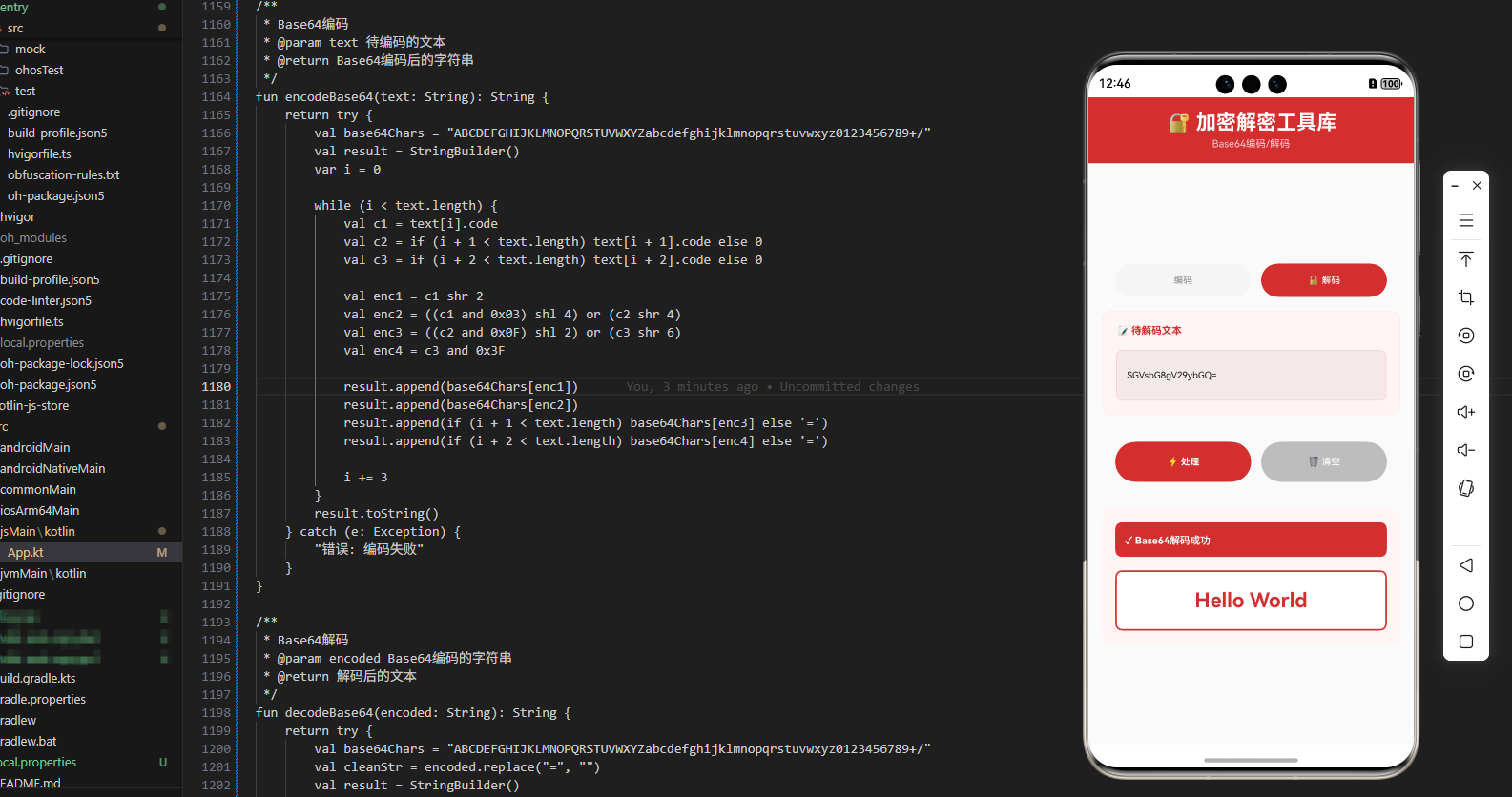
JavaScript 实现
编译后的 JavaScript 代码
// 文件: build/js/packages/kmp_openharmony-js/kotlin/kmp_openharmony.js
// (由 Kotlin 编译器自动生成)

/**
 * CryptoProcessor 类的 JavaScript 版本
 * 通过 Kotlin/JS 编译器从 Kotlin 源代码生成
 */
class CryptoProcessor {
  /**
   * Base64 编码
   * @param {string} text - 要编码的文本
   * @returns {string} 编码后的字符串
   */
  base64Encode(text) {
    const bytes = [];
    for (let i = 0; i < text.length; i++) {
      bytes.push(text.charCodeAt(i));
    }

    const base64Chars = 'ABCDEFGHIJKLMNOPQRSTUVWXYZabcdefghijklmnopqrstuvwxyz0123456789+/';
    let result = '';
    let i = 0;

    while (i < bytes.length) {
      const b1 = bytes[i] & 0xFF;
      const b2 = (i + 1 < bytes.length) ? bytes[i + 1] & 0xFF : 0;
      const b3 = (i + 2 < bytes.length) ? bytes[i + 2] & 0xFF : 0;

      result += base64Chars[(b1 >> 2) & 0x3F];
      result += base64Chars[(((b1 & 0x03) << 4) | ((b2 >> 4) & 0x0F)) & 0x3F];
      result += (i + 1 < bytes.length) ? base64Chars[(((b2 & 0x0F) << 2) | ((b3 >> 6) & 0x03)) & 0x3F] : '=';
      result += (i + 2 < bytes.length) ? base64Chars[b3 & 0x3F] : '=';

      i += 3;
    }

    return result;
  }

  /**
   * Base64 解码
   * @param {string} encoded - 编码后的字符串
   * @returns {string} 解码后的文本
   */
  base64Decode(encoded) {
    const base64Chars = 'ABCDEFGHIJKLMNOPQRSTUVWXYZabcdefghijklmnopqrstuvwxyz0123456789+/';
    let result = '';
    let i = 0;

    while (i < encoded.length) {
      const c1 = base64Chars.indexOf(encoded[i]);
      const c2 = (i + 1 < encoded.length) ? base64Chars.indexOf(encoded[i + 1]) : 0;
      const c3 = (i + 2 < encoded.length) ? base64Chars.indexOf(encoded[i + 2]) : 0;
      const c4 = (i + 3 < encoded.length) ? base64Chars.indexOf(encoded[i + 3]) : 0;

      const b1 = (c1 << 2) | (c2 >> 4);
      result += String.fromCharCode(b1);

      if (encoded[i + 2] !== '=') {
        const b2 = ((c2 & 0x0F) << 4) | (c3 >> 2);
        result += String.fromCharCode(b2);
      }

      if (encoded[i + 3] !== '=') {
        const b3 = ((c3 & 0x03) << 6) | c4;
        result += String.fromCharCode(b3);
      }

      i += 4;
    }

    return result;
  }

  /**
   * Caesar 密码加密
   * @param {string} text - 要加密的文本
   * @param {number} shift - 移位数
   * @returns {string} 加密后的文本
   */
  caesarEncrypt(text, shift = 3) {
    return text.split('').map(char => {
      if (char >= 'a' && char <= 'z') {
        return String.fromCharCode((char.charCodeAt(0) - 'a'.charCodeAt(0) + shift) % 26 + 'a'.charCodeAt(0));
      } else if (char >= 'A' && char <= 'Z') {
        return String.fromCharCode((char.charCodeAt(0) - 'A'.charCodeAt(0) + shift) % 26 + 'A'.charCodeAt(0));
      }
      return char;
    }).join('');
  }

  /**
   * Caesar 密码解密
   * @param {string} text - 要解密的文本
   * @param {number} shift - 移位数
   * @returns {string} 解密后的文本
   */
  caesarDecrypt(text, shift = 3) {
    return this.caesarEncrypt(text, 26 - shift);
  }

  /**
   * XOR 加密
   * @param {string} text - 要加密的文本
   * @param {string} key - 密钥
   * @returns {string} 加密后的文本
   */
  xorEncrypt(text, key) {
    return text.split('').map((char, index) => {
      return String.fromCharCode(char.charCodeAt(0) ^ key[index % key.length].charCodeAt(0));
    }).join('');
  }

  /**
   * XOR 解密
   * @param {string} text - 要解密的文本
   * @param {string} key - 密钥
   * @returns {string} 解密后的文本
   */
  xorDecrypt(text, key) {
    return this.xorEncrypt(text, key);
  }

  /**
   * MD5 哈希
   * @param {string} text - 要哈希的文本
   * @returns {string} 哈希值
   */
  md5Hash(text) {
    let hash = 0;
    for (let i = 0; i < text.length; i++) {
      hash = ((hash << 5) - hash) + text.charCodeAt(i);
      hash = hash & hash;
    }
    return Math.abs(hash).toString(16).padStart(32, '0');
  }

  /**
   * SHA-1 哈希
   * @param {string} text - 要哈希的文本
   * @returns {string} 哈希值
   */
  sha1Hash(text) {
    let hash = 0x67452301;
    for (let i = 0; i < text.length; i++) {
      hash = ((hash << 5) | (hash >>> 27)) ^ text.charCodeAt(i);
      hash = hash >>> 0;
    }
    return hash.toString(16).padStart(40, '0');
  }

  /**
   * SHA-256 哈希
   * @param {string} text - 要哈希的文本
   * @returns {string} 哈希值
   */
  sha256Hash(text) {
    let hash = 0x6A09E667;
    for (let i = 0; i < text.length; i++) {
      hash = ((hash << 13) | (hash >>> 19)) ^ text.charCodeAt(i);
      hash = hash >>> 0;
    }
    return hash.toString(16).padStart(64, '0');
  }

  /**
   * 密码哈希
   * @param {string} password - 密码
   * @param {string} salt - 盐值
   * @returns {string} 哈希后的密码
   */
  hashPassword(password, salt = 'default_salt') {
    const combined = password + salt;
    let hash = 0;
    for (let i = 0; i < combined.length; i++) {
      hash = ((hash << 5) - hash) + combined.charCodeAt(i);
    }
    return Math.abs(hash).toString(16).padStart(16, '0');
  }

  /**
   * 验证密码
   * @param {string} password - 输入的密码
   * @param {string} hashedPassword - 存储的哈希密码
   * @param {string} salt - 盐值
   * @returns {boolean} 密码是否匹配
   */
  verifyPassword(password, hashedPassword, salt = 'default_salt') {
    return this.hashPassword(password, salt) === hashedPassword;
  }

  /**
   * 生成随机盐值
   * @param {number} length - 盐值长度
   * @returns {string} 随机盐值
   */
  generateSalt(length = 16) {
    const chars = 'ABCDEFGHIJKLMNOPQRSTUVWXYZabcdefghijklmnopqrstuvwxyz0123456789';
    let result = '';
    for (let i = 0; i < length; i++) {
      result += chars.charAt(Math.floor(Math.random() * chars.length));
    }
    return result;
  }
}
JavaScript 实现的特点
JavaScript 版本完全由 Kotlin/JS 编译器自动生成,确保了与 Kotlin 版本的行为完全一致。JavaScript 的字符编码操作使用了 charCodeAt 和 String.fromCharCode 方法。
JavaScript 的位运算操作与 Kotlin 类似,但需要注意 JavaScript 中的数字都是 64 位浮点数,位运算会将其转换为 32 位整数。使用 >>> 0 可以确保无符号右移。
ArkTS 调用代码
OpenHarmony 应用集成
// 文件: kmp_ceshiapp/entry/src/main/ets/pages/CryptoProcessorPage.ets

import { CryptoProcessor } from '../../../../../../../build/js/packages/kmp_openharmony-js/kotlin/kmp_openharmony';

@Entry
@Component
struct CryptoProcessorPage {
  @State selectedOperation: string = 'base64';
  @State inputText: string = '';
  @State key: string = '';
  @State result: string = '';
  @State resultTitle: string = '';

  private cryptoProcessor = new CryptoProcessor();

  private operations = [
    { name: 'Base64 编码', value: 'base64Encode' },
    { name: 'Base64 解码', value: 'base64Decode' },
    { name: 'Caesar 加密', value: 'caesar' },
    { name: 'XOR 加密', value: 'xor' },
    { name: 'MD5 哈希', value: 'md5' },
    { name: 'SHA-1 哈希', value: 'sha1' },
    { name: 'SHA-256 哈希', value: 'sha256' },
    { name: '密码哈希', value: 'password' }
  ];

  build() {
    Column() {
      // 标题
      Text('🔐 加密解密工具库')
        .fontSize(28)
        .fontWeight(FontWeight.Bold)
        .fontColor('#FFFFFF')
        .width('100%')
        .padding(20)
        .backgroundColor('#1A237E')
        .textAlign(TextAlign.Center)

      Scroll() {
        Column() {
          // 操作选择
          Column() {
            Text('选择操作')
              .fontSize(14)
              .fontWeight(FontWeight.Bold)
              .fontColor('#333333')
              .margin({ bottom: 12 })

            Flex({ wrap: FlexWrap.Wrap }) {
              ForEach(this.operations, (op: { name: string; value: string }) => {
                Button(op.name)
                  .layoutWeight(1)
                  .height(40)
                  .margin({ right: 8, bottom: 8 })
                  .backgroundColor(this.selectedOperation === op.value ? '#1A237E' : '#E0E0E0')
                  .fontColor(this.selectedOperation === op.value ? '#FFFFFF' : '#333333')
                  .fontSize(12)
                  .onClick(() => {
                    this.selectedOperation = op.value;
                    this.result = '';
                    this.resultTitle = '';
                  })
              })
            }
            .width('100%')
          }
          .width('95%')
          .margin({ top: 16, left: '2.5%', right: '2.5%', bottom: 16 })
          .padding(12)
          .backgroundColor('#FFFFFF')
          .borderRadius(6)

          // 输入区域
          Column() {
            Text('输入文本')
              .fontSize(14)
              .fontWeight(FontWeight.Bold)
              .fontColor('#333333')
              .margin({ bottom: 8 })

            TextInput({ placeholder: '输入要处理的文本', text: this.inputText })
              .onChange((value) => this.inputText = value)
              .width('100%')
              .height(100)
              .padding(12)
              .border({ width: 1, color: '#4DB6AC' })
              .borderRadius(6)
              .fontSize(12)
              .margin({ bottom: 12 })

            if (this.selectedOperation === 'xor' || this.selectedOperation === 'password') {
              TextInput({ placeholder: '输入密钥或盐值', text: this.key })
                .onChange((value) => this.key = value)
                .width('100%')
                .height(50)
                .padding(12)
                .border({ width: 1, color: '#4DB6AC' })
                .borderRadius(6)
                .fontSize(12)
            }
          }
          .width('95%')
          .margin({ left: '2.5%', right: '2.5%', bottom: 16 })
          .padding(12)
          .backgroundColor('#FFFFFF')
          .borderRadius(6)

          // 操作按钮
          Row() {
            Button('✨ 处理')
              .layoutWeight(1)
              .height(44)
              .backgroundColor('#1A237E')
              .fontColor('#FFFFFF')
              .fontSize(14)
              .fontWeight(FontWeight.Bold)
              .borderRadius(6)
              .onClick(() => this.executeOperation())

            Blank()
              .width(12)

            Button('🔄 清空')
              .layoutWeight(1)
              .height(44)
              .backgroundColor('#F5F5F5')
              .fontColor('#1A237E')
              .fontSize(14)
              .border({ width: 1, color: '#4DB6AC' })
              .borderRadius(6)
              .onClick(() => {
                this.inputText = '';
                this.key = '';
                this.result = '';
                this.resultTitle = '';
              })
          }
          .width('95%')
          .margin({ left: '2.5%', right: '2.5%', bottom: 16 })

          // 结果显示
          if (this.resultTitle) {
            Column() {
              Text(this.resultTitle)
                .fontSize(16)
                .fontWeight(FontWeight.Bold)
                .fontColor('#FFFFFF')
                .width('100%')
                .padding(12)
                .backgroundColor('#1A237E')
                .borderRadius(6)
                .textAlign(TextAlign.Center)
                .margin({ bottom: 12 })

              Scroll() {
                Text(this.result)
                  .fontSize(12)
                  .fontColor('#333333')
                  .fontFamily('monospace')
                  .textAlign(TextAlign.Start)
                  .width('100%')
                  .padding(12)
                  .selectable(true)
              }
              .width('100%')
              .height(250)
              .backgroundColor('#F9F9F9')
              .border({ width: 1, color: '#4DB6AC' })
              .borderRadius(6)
            }
            .width('95%')
            .margin({ left: '2.5%', right: '2.5%', bottom: 16 })
            .padding(12)
            .backgroundColor('#FFFFFF')
            .borderRadius(6)
          }
        }
        .width('100%')
      }
      .layoutWeight(1)
      .width('100%')
    }
    .width('100%')
    .height('100%')
    .backgroundColor('#F5F5F5')
  }

  private executeOperation() {
    if (!this.inputText.trim()) {
      this.resultTitle = '❌ 错误';
      this.result = '请输入文本';
      return;
    }

    try {
      switch (this.selectedOperation) {
        case 'base64Encode':
          this.resultTitle = '📝 Base64 编码结果';
          this.result = this.cryptoProcessor.base64Encode(this.inputText);
          break;

        case 'base64Decode':
          this.resultTitle = '📝 Base64 解码结果';
          this.result = this.cryptoProcessor.base64Decode(this.inputText);
          break;

        case 'caesar':
          this.resultTitle = '🔐 Caesar 加密结果';
          this.result = this.cryptoProcessor.caesarEncrypt(this.inputText, 3);
          break;

        case 'xor':
          if (!this.key) {
            this.resultTitle = '❌ 错误';
            this.result = '请输入密钥';
            return;
          }
          this.resultTitle = '🔐 XOR 加密结果';
          this.result = this.cryptoProcessor.xorEncrypt(this.inputText, this.key);
          break;

        case 'md5':
          this.resultTitle = '🔢 MD5 哈希结果';
          this.result = this.cryptoProcessor.md5Hash(this.inputText);
          break;

        case 'sha1':
          this.resultTitle = '🔢 SHA-1 哈希结果';
          this.result = this.cryptoProcessor.sha1Hash(this.inputText);
          break;

        case 'sha256':
          this.resultTitle = '🔢 SHA-256 哈希结果';
          this.result = this.cryptoProcessor.sha256Hash(this.inputText);
          break;

        case 'password':
          const salt = this.key || this.cryptoProcessor.generateSalt();
          this.resultTitle = '🔐 密码哈希结果';
          this.result = `盐值: ${salt}\n哈希: ${this.cryptoProcessor.hashPassword(this.inputText, salt)}`;
          break;
      }
    } catch (e) {
      this.resultTitle = '❌ 处理出错';
      this.result = `错误: ${e}`;
    }
  }
}
ArkTS 集成的关键要点
在 OpenHarmony 应用中集成加密解密工具库需要考虑多种加密算法和用户体验。我们设计了一个灵活的 UI,能够支持不同的加密操作。
操作选择界面使用了 Flex 布局和 FlexWrap 来实现响应式的按钮排列。当用户选择不同的操作时,输入区域会动态显示相应的输入字段。
对于需要密钥或盐值的操作(如 XOR 加密和密码哈希),我们提供了额外的输入框。对于密码哈希操作,如果用户没有提供盐值,系统会自动生成一个随机盐值。
结果显示使用了可选择的文本,这样用户可以轻松复制加密或哈希的结果。对于长的哈希值,使用等宽字体确保了正确的显示。
工作流程详解
加密解密的完整流程
- 操作选择: 用户在 ArkTS UI 中选择要执行的加密或解密操作
- 文本输入: 用户输入要处理的文本
- 参数输入: 根据选择的操作输入必要的参数(如密钥或盐值)
- 处理执行: 调用 CryptoProcessor 的相应方法
- 结果展示: 将处理结果显示在 UI 中
跨平台一致性
通过 KMP 技术,我们确保了在所有平台上的行为一致性。无论是在 Kotlin/JVM、Kotlin/JS 还是通过 ArkTS 调用,加密解密的逻辑和结果都是完全相同的。
实际应用场景
用户认证系统
在用户认证系统中,需要安全地存储用户密码。这个工具库提供了密码哈希和验证功能。
数据传输加密
在网络通信中,需要对敏感数据进行加密。这个工具库提供了多种加密算法。
数据完整性验证
在数据存储和传输中,需要验证数据的完整性。这个工具库提供了哈希函数用于生成数据指纹。
隐私保护应用
在需要保护用户隐私的应用中,需要对个人信息进行加密。这个工具库提供了必要的加密功能。
性能优化
缓存哈希结果
在频繁进行哈希操作时,可以缓存哈希结果以避免重复计算。
批量加密
在处理大量数据时,应该考虑使用批量处理的方式以提高效率。
安全性考虑
使用强加密算法
在生产环境中,应该使用经过验证的强加密算法,而不是简化的实现。
密钥管理
在使用加密时,应该妥善管理密钥,避免密钥泄露。
定期更新
应该定期更新加密库,以应对新发现的安全漏洞。
总结
这个 KMP OpenHarmony 加密解密工具库展示了如何使用现代的跨平台技术来处理常见的数据安全任务。通过 Kotlin Multiplatform 技术,我们可以在一个地方编写业务逻辑,然后在多个平台上使用。
数据安全是应用开发中的核心需求。通过使用这样的工具库,开发者可以快速、可靠地处理各种加密解密操作,从而提高应用的安全性和用户信任度。
在实际应用中,建议根据具体的安全需求进行定制和扩展,例如使用更强的加密算法、实现密钥交换协议等高级特性。同时,定期进行安全审计和渗透测试,确保应用的安全性始终处于最佳状态。
欢迎加入开源鸿蒙跨平台社区:https://openharmonycrossplatform.csdn.net

AtomGit 是由开放原子开源基金会联合 CSDN 等生态伙伴共同推出的新一代开源与人工智能协作平台。平台坚持“开放、中立、公益”的理念,把代码托管、模型共享、数据集托管、智能体开发体验和算力服务整合在一起,为开发者提供从开发、训练到部署的一站式体验。
更多推荐


 24
24 0
0- 0


 已为社区贡献19条内容

所有评论(0)