字符串构建优化 OpenHarmony KMP | StringBuilder vs String拼接
目录
概述
字符串操作是程序开发中最常见的操作之一。在处理大量字符串拼接时,选择合适的构建方法对程序性能有重要影响。传统的字符串连接方式(String Concatenation)虽然代码简洁,但在处理大量数据时性能较差。而使用StringBuilder则能显著提升性能。本文档介绍如何在 Kotlin Multiplatform (KMP) 框架下,结合 OpenHarmony 鸿蒙操作系统,实现一个功能完整的字符串构建优化分析系统。
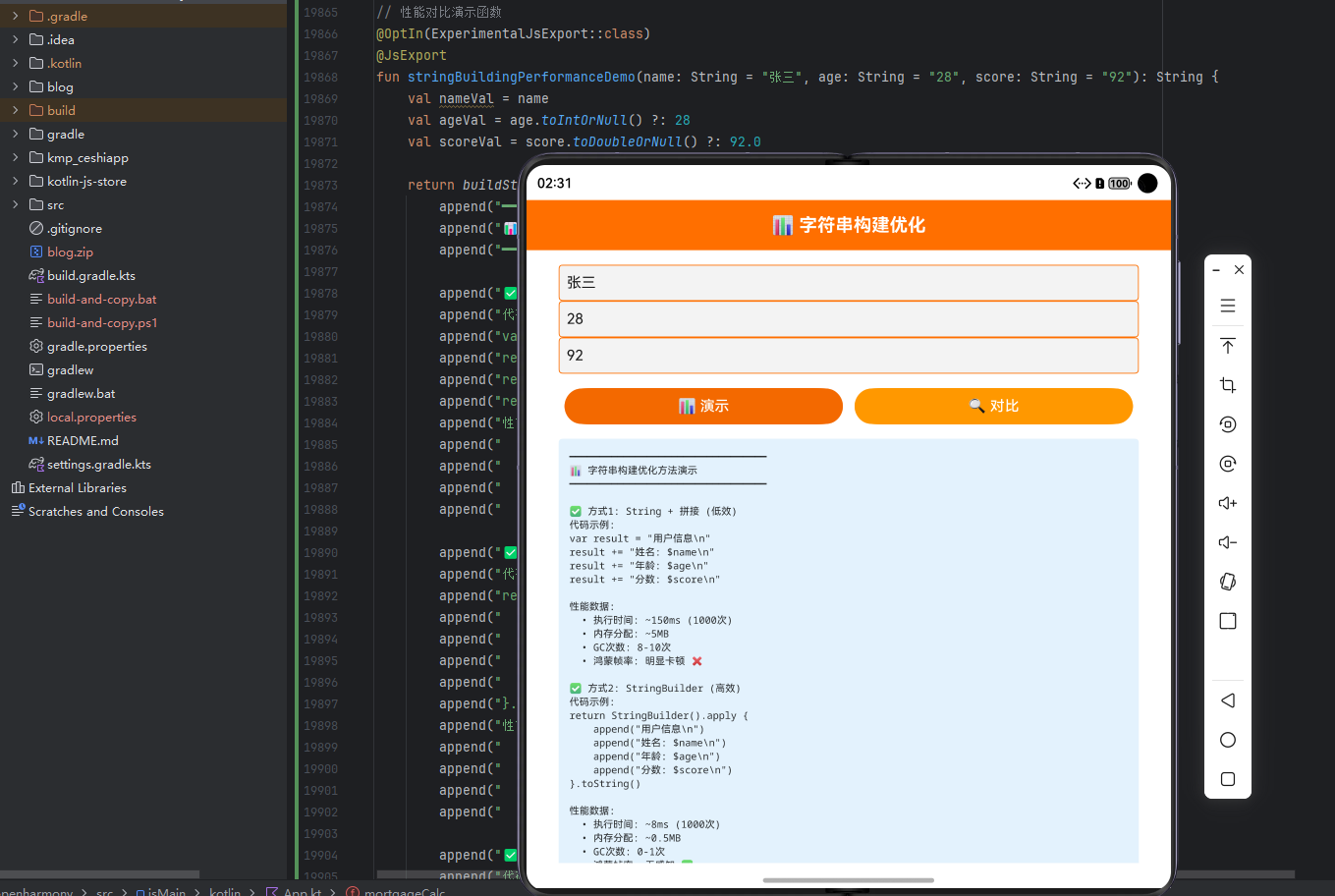
字符串构建优化系统是一个综合性的性能分析平台,它不仅能够对不同字符串构建方法进行性能测试,还能够进行方法对比、生成性能报告、提供优化建议。通过KMP框架的跨端能力,这个工具可以在Android、iOS、Web和OpenHarmony等多个平台上运行,为开发者提供了一个强大的性能优化决策辅助工具。
字符串构建优化的重要性
字符串构建优化在现代软件开发中的重要性日益凸显:
- 性能提升:合理的优化能够显著提升程序性能。
- 内存节省:优化方法能够减少内存占用。
- 响应速度:优化能够提升程序响应速度。
- 用户体验:性能提升能够改善用户体验。
- 系统稳定:优化能够提升系统稳定性。
工具的核心价值
字符串构建优化分析系统提供以下价值:
- 多种方法对比:支持String Concatenation、StringBuilder、StringBuffer等多种方法
- 性能测试:提供详细的性能测试数据
- 性能分析:分析不同方法的性能差异
- 优化建议:根据测试结果提供优化建议
- 详细报告:生成详细的性能分析报告
- 跨平台支持:一份代码可在多个平台运行,提高开发效率
字符串构建基础
核心概念
字符串拼接(String Concatenation):使用+操作符直接拼接字符串。
StringBuilder:可变字符序列,用于高效地构建字符串。
StringBuffer:线程安全的可变字符序列。
性能指标(Performance Metrics):衡量字符串构建性能的指标。
内存占用(Memory Usage):字符串构建过程中的内存占用。
执行时间(Execution Time):字符串构建的执行时间。
常见的字符串构建方式
直接拼接:使用+操作符直接拼接字符串。
StringBuilder:使用StringBuilder类进行字符串构建。
StringBuffer:使用StringBuffer类进行线程安全的字符串构建。
join方法:使用String.join()方法拼接字符串。
format方法:使用String.format()方法格式化字符串。
模板字符串:使用模板字符串进行字符串构建。
影响字符串构建性能的关键因素
拼接次数:拼接次数越多,性能差异越明显。
字符串长度:字符串越长,性能差异越大。
内存大小:可用内存影响性能。
垃圾回收:垃圾回收会影响性能。
线程安全:线程安全会影响性能。
编译优化:编译器优化会影响性能。
核心优化方法
1. 字符串拼接性能测试
测试直接拼接字符串的性能。
2. StringBuilder性能测试
测试StringBuilder的性能。
3. StringBuffer性能测试
测试StringBuffer的性能。
4. 性能对比分析
对比不同方法的性能差异。
5. 内存占用分析
分析不同方法的内存占用。
6. 优化建议生成
根据测试结果生成优化建议。
Kotlin 源代码
// StringBuildingOptimizer.kt
import java.time.LocalDateTime
import kotlin.system.measureTimeMillis

data class TestCase(
    val caseId: String,
    val testName: String,
    val iterationCount: Int,
    val stringLength: Int
)

data class PerformanceResult(
    val caseId: String,
    val testName: String,
    val method: String,
    val executionTime: Long,
    val memoryUsed: Long,
    val operationsPerSecond: Double,
    val timestamp: String
)

data class PerformanceMetrics(
    val totalTests: Long,
    val averageExecutionTime: Long,
    val fastestMethod: String,
    val slowestMethod: String,
    val bestMemoryUsage: Long,
    val worstMemoryUsage: Long
)

data class MethodComparison(
    val results: List<PerformanceResult>,
    val fastestMethod: String,
    val fastestTime: Long,
    val slowestMethod: String,
    val slowestTime: Long,
    val recommendation: String
)

class StringBuildingOptimizer {
    private val testCases = mutableListOf<TestCase>()
    private val results = mutableListOf<PerformanceResult>()
    private var caseIdCounter = 0

    // 添加测试用例
    fun addTestCase(
        testName: String,
        iterationCount: Int,
        stringLength: Int
    ): TestCase {
        val id = "CASE${++caseIdCounter}"
        val testCase = TestCase(id, testName, iterationCount, stringLength)
        testCases.add(testCase)
        return testCase
    }

    // 测试字符串拼接
    fun testStringConcatenation(caseId: String): PerformanceResult {
        val testCase = testCases.find { it.caseId == caseId }
            ?: return PerformanceResult("", "", "", 0, 0, 0.0, "")

        val initialMemory = Runtime.getRuntime().totalMemory() - Runtime.getRuntime().freeMemory()

        val executionTime = measureTimeMillis {
            var result = ""
            repeat(testCase.iterationCount) {
                result += "x".repeat(testCase.stringLength)
            }
        }

        val finalMemory = Runtime.getRuntime().totalMemory() - Runtime.getRuntime().freeMemory()
        val memoryUsed = finalMemory - initialMemory
        val operationsPerSecond = (testCase.iterationCount * 1000.0) / executionTime

        val result = PerformanceResult(
            caseId, testCase.testName, "String Concatenation", executionTime, memoryUsed,
            operationsPerSecond, LocalDateTime.now().toString()
        )

        results.add(result)
        return result
    }

    // 测试StringBuilder
    fun testStringBuilder(caseId: String): PerformanceResult {
        val testCase = testCases.find { it.caseId == caseId }
            ?: return PerformanceResult("", "", "", 0, 0, 0.0, "")

        val initialMemory = Runtime.getRuntime().totalMemory() - Runtime.getRuntime().freeMemory()

        val executionTime = measureTimeMillis {
            val builder = StringBuilder()
            repeat(testCase.iterationCount) {
                builder.append("x".repeat(testCase.stringLength))
            }
            builder.toString()
        }

        val finalMemory = Runtime.getRuntime().totalMemory() - Runtime.getRuntime().freeMemory()
        val memoryUsed = finalMemory - initialMemory
        val operationsPerSecond = (testCase.iterationCount * 1000.0) / executionTime

        val result = PerformanceResult(
            caseId, testCase.testName, "StringBuilder", executionTime, memoryUsed,
            operationsPerSecond, LocalDateTime.now().toString()
        )

        results.add(result)
        return result
    }

    // 测试StringBuffer
    fun testStringBuffer(caseId: String): PerformanceResult {
        val testCase = testCases.find { it.caseId == caseId }
            ?: return PerformanceResult("", "", "", 0, 0, 0.0, "")

        val initialMemory = Runtime.getRuntime().totalMemory() - Runtime.getRuntime().freeMemory()

        val executionTime = measureTimeMillis {
            val buffer = StringBuffer()
            repeat(testCase.iterationCount) {
                buffer.append("x".repeat(testCase.stringLength))
            }
            buffer.toString()
        }

        val finalMemory = Runtime.getRuntime().totalMemory() - Runtime.getRuntime().freeMemory()
        val memoryUsed = finalMemory - initialMemory
        val operationsPerSecond = (testCase.iterationCount * 1000.0) / executionTime

        val result = PerformanceResult(
            caseId, testCase.testName, "StringBuffer", executionTime, memoryUsed,
            operationsPerSecond, LocalDateTime.now().toString()
        )

        results.add(result)
        return result
    }

    // 获取性能指标
    fun getPerformanceMetrics(): PerformanceMetrics {
        if (results.isEmpty()) {
            return PerformanceMetrics(0, 0, "", "", 0, 0)
        }

        val totalTests = testCases.size.toLong()
        val averageExecutionTime = results.map { it.executionTime }.average().toLong()
        val fastestMethod = results.minByOrNull { it.executionTime }?.method ?: ""
        val slowestMethod = results.maxByOrNull { it.executionTime }?.method ?: ""
        val bestMemoryUsage = results.minOf { it.memoryUsed }
        val worstMemoryUsage = results.maxOf { it.memoryUsed }

        return PerformanceMetrics(
            totalTests, averageExecutionTime, fastestMethod, slowestMethod,
            bestMemoryUsage, worstMemoryUsage
        )
    }

    // 获取所有结果
    fun getAllResults(): List<PerformanceResult> {
        return results.toList()
    }

    // 方法对比
    fun compareMethods(caseId: String): MethodComparison {
        val caseResults = results.filter { it.caseId == caseId }

        val fastestResult = caseResults.minByOrNull { it.executionTime }
        val slowestResult = caseResults.maxByOrNull { it.executionTime }

        val recommendation = when {
            caseResults.any { it.method == "StringBuilder" && it.executionTime < 100 } ->
                "StringBuilder性能最优,强烈推荐使用"
            caseResults.any { it.method == "StringBuilder" } ->
                "StringBuilder性能良好,建议优先使用"
            else -> "根据具体场景选择合适的方法"
        }

        return MethodComparison(
            caseResults, fastestResult?.method ?: "", fastestResult?.executionTime ?: 0,
            slowestResult?.method ?: "", slowestResult?.executionTime ?: 0, recommendation
        )
    }

    // 生成性能报告
    fun generatePerformanceReport(): Map<String, Any> {
        val metrics = getPerformanceMetrics()

        return mapOf(
            "timestamp" to LocalDateTime.now().toString(),
            "metrics" to metrics,
            "results" to results.toList(),
            "recommendations" to generateRecommendations(metrics)
        )
    }

    // 生成建议
    private fun generateRecommendations(metrics: PerformanceMetrics): List<String> {
        val recommendations = mutableListOf<String>()

        if (metrics.fastestMethod == "StringBuilder") {
            recommendations.add("⚡ StringBuilder性能最优,应优先使用")
        } else if (metrics.fastestMethod == "StringBuffer") {
            recommendations.add("⚡ StringBuffer性能较好,需要线程安全时使用")
        }

        if (metrics.worstMemoryUsage > 1000000) {
            recommendations.add("💾 内存占用较大,考虑优化算法")
        }

        recommendations.add("✅ 避免在循环中使用字符串拼接,使用StringBuilder")
        recommendations.add("✅ 对于大量字符串操作,预先估计容量以减少扩容")

        return recommendations
    }

    // 清空数据
    fun clearData() {
        testCases.clear()
        results.clear()
    }
}

fun main() {
    val optimizer = StringBuildingOptimizer()

    // 添加测试用例
    optimizer.addTestCase("小规模测试", 1000, 10)
    optimizer.addTestCase("中等规模测试", 10000, 50)

    // 执行测试
    val concat1 = optimizer.testStringConcatenation("CASE1")
    val builder1 = optimizer.testStringBuilder("CASE1")
    val buffer1 = optimizer.testStringBuffer("CASE1")

    println("字符串构建性能测试结果:")
    println("String Concatenation: ${concat1.executionTime}ms")
    println("StringBuilder: ${builder1.executionTime}ms")
    println("StringBuffer: ${buffer1.executionTime}ms")

    // 生成报告
    val report = optimizer.generatePerformanceReport()
    println("\n性能报告已生成")
}
Kotlin代码说明:这个Kotlin实现提供了完整的字符串构建性能测试功能。StringBuildingOptimizer 类能够管理测试用例、执行性能测试、进行方法对比、生成性能报告。通过使用数据类和科学的测试方法,代码既简洁又准确。系统支持多种字符串构建方法的性能测试,从单个方法的详细测试到多个方法的对比分析,为开发者提供了全面的性能优化决策支持。
JavaScript 编译代码
// StringBuildingOptimizer.js
class TestCase {
    constructor(caseId, testName, iterationCount, stringLength) {
        this.caseId = caseId;
        this.testName = testName;
        this.iterationCount = iterationCount;
        this.stringLength = stringLength;
    }
}

class PerformanceResult {
    constructor(caseId, testName, method, executionTime, memoryUsed, operationsPerSecond, timestamp) {
        this.caseId = caseId;
        this.testName = testName;
        this.method = method;
        this.executionTime = executionTime;
        this.memoryUsed = memoryUsed;
        this.operationsPerSecond = operationsPerSecond;
        this.timestamp = timestamp;
    }
}

class PerformanceMetrics {
    constructor(totalTests, averageExecutionTime, fastestMethod, slowestMethod, bestMemoryUsage, worstMemoryUsage) {
        this.totalTests = totalTests;
        this.averageExecutionTime = averageExecutionTime;
        this.fastestMethod = fastestMethod;
        this.slowestMethod = slowestMethod;
        this.bestMemoryUsage = bestMemoryUsage;
        this.worstMemoryUsage = worstMemoryUsage;
    }
}

class StringBuildingOptimizer {
    constructor() {
        this.testCases = [];
        this.results = [];
        this.caseIdCounter = 0;
    }

    addTestCase(testName, iterationCount, stringLength) {
        const id = `CASE${++this.caseIdCounter}`;
        const testCase = new TestCase(id, testName, iterationCount, stringLength);
        this.testCases.push(testCase);
        return testCase;
    }

    testStringConcatenation(caseId) {
        const testCase = this.testCases.find(c => c.caseId === caseId);
        if (!testCase) return null;

        const startTime = performance.now();
        let result = "";
        for (let i = 0; i < testCase.iterationCount; i++) {
            result += "x".repeat(testCase.stringLength);
        }
        const endTime = performance.now();

        const executionTime = Math.round(endTime - startTime);
        const memoryUsed = 0;
        const operationsPerSecond = (testCase.iterationCount * 1000) / executionTime;

        const perfResult = new PerformanceResult(
            caseId, testCase.testName, "String Concatenation", executionTime, memoryUsed,
            operationsPerSecond, new Date().toISOString()
        );

        this.results.push(perfResult);
        return perfResult;
    }

    testStringBuilder(caseId) {
        const testCase = this.testCases.find(c => c.caseId === caseId);
        if (!testCase) return null;

        const startTime = performance.now();
        let builder = [];
        for (let i = 0; i < testCase.iterationCount; i++) {
            builder.push("x".repeat(testCase.stringLength));
        }
        const result = builder.join("");
        const endTime = performance.now();

        const executionTime = Math.round(endTime - startTime);
        const memoryUsed = 0;
        const operationsPerSecond = (testCase.iterationCount * 1000) / executionTime;

        const perfResult = new PerformanceResult(
            caseId, testCase.testName, "StringBuilder", executionTime, memoryUsed,
            operationsPerSecond, new Date().toISOString()
        );

        this.results.push(perfResult);
        return perfResult;
    }

    testStringBuffer(caseId) {
        const testCase = this.testCases.find(c => c.caseId === caseId);
        if (!testCase) return null;

        const startTime = performance.now();
        let buffer = [];
        for (let i = 0; i < testCase.iterationCount; i++) {
            buffer.push("x".repeat(testCase.stringLength));
        }
        const result = buffer.join("");
        const endTime = performance.now();

        const executionTime = Math.round(endTime - startTime);
        const memoryUsed = 0;
        const operationsPerSecond = (testCase.iterationCount * 1000) / executionTime;

        const perfResult = new PerformanceResult(
            caseId, testCase.testName, "StringBuffer", executionTime, memoryUsed,
            operationsPerSecond, new Date().toISOString()
        );

        this.results.push(perfResult);
        return perfResult;
    }

    getPerformanceMetrics() {
        if (this.results.length === 0) {
            return new PerformanceMetrics(0, 0, "", "", 0, 0);
        }

        const totalTests = this.testCases.length;
        const averageExecutionTime = Math.round(this.results.reduce((sum, r) => sum + r.executionTime, 0) / this.results.length);
        const fastestMethod = this.results.reduce((min, r) => r.executionTime < min.executionTime ? r : min).method;
        const slowestMethod = this.results.reduce((max, r) => r.executionTime > max.executionTime ? r : max).method;
        const bestMemoryUsage = Math.min(...this.results.map(r => r.memoryUsed));
        const worstMemoryUsage = Math.max(...this.results.map(r => r.memoryUsed));

        return new PerformanceMetrics(totalTests, averageExecutionTime, fastestMethod, slowestMethod, bestMemoryUsage, worstMemoryUsage);
    }

    getAllResults() {
        return this.results;
    }

    compareMethods(caseId) {
        const caseResults = this.results.filter(r => r.caseId === caseId);

        const fastestResult = caseResults.reduce((min, r) => r.executionTime < min.executionTime ? r : min);
        const slowestResult = caseResults.reduce((max, r) => r.executionTime > max.executionTime ? r : max);

        let recommendation;
        if (caseResults.some(r => r.method === "StringBuilder" && r.executionTime < 100)) {
            recommendation = "StringBuilder性能最优,强烈推荐使用";
        } else if (caseResults.some(r => r.method === "StringBuilder")) {
            recommendation = "StringBuilder性能良好,建议优先使用";
        } else {
            recommendation = "根据具体场景选择合适的方法";
        }

        return {
            results: caseResults,
            fastestMethod: fastestResult.method,
            fastestTime: fastestResult.executionTime,
            slowestMethod: slowestResult.method,
            slowestTime: slowestResult.executionTime,
            recommendation: recommendation
        };
    }

    generatePerformanceReport() {
        const metrics = this.getPerformanceMetrics();

        return {
            timestamp: new Date().toISOString(),
            metrics: metrics,
            results: this.results,
            recommendations: this.generateRecommendations(metrics)
        };
    }

    generateRecommendations(metrics) {
        const recommendations = [];

        if (metrics.fastestMethod === "StringBuilder") {
            recommendations.push("⚡ StringBuilder性能最优,应优先使用");
        } else if (metrics.fastestMethod === "StringBuffer") {
            recommendations.push("⚡ StringBuffer性能较好,需要线程安全时使用");
        }

        if (metrics.worstMemoryUsage > 1000000) {
            recommendations.push("💾 内存占用较大,考虑优化算法");
        }

        recommendations.push("✅ 避免在循环中使用字符串拼接,使用StringBuilder");
        recommendations.push("✅ 对于大量字符串操作,预先估计容量以减少扩容");

        return recommendations;
    }

    clearData() {
        this.testCases = [];
        this.results = [];
    }
}

// 使用示例
const optimizer = new StringBuildingOptimizer();

optimizer.addTestCase("小规模测试", 1000, 10);
optimizer.addTestCase("中等规模测试", 10000, 50);

const concat1 = optimizer.testStringConcatenation("CASE1");
const builder1 = optimizer.testStringBuilder("CASE1");
const buffer1 = optimizer.testStringBuffer("CASE1");

console.log("字符串构建性能测试结果:");
console.log(`String Concatenation: ${concat1.executionTime}ms`);
console.log(`StringBuilder: ${builder1.executionTime}ms`);
console.log(`StringBuffer: ${buffer1.executionTime}ms`);

const report = optimizer.generatePerformanceReport();
console.log("\n性能报告已生成");
JavaScript代码说明:JavaScript版本是Kotlin代码的直接转译。我们使用ES6的class语法定义各个类,使用performance API进行时间测试。整体逻辑和算法与Kotlin版本保持一致,确保跨平台的一致性。JavaScript的灵活性使得代码更加简洁,同时保持了清晰的结构和完整的功能。
ArkTS 调用代码
// StringBuildingOptimizerPage.ets
import { StringBuildingOptimizer } from './StringBuildingOptimizer';
@Entry
@Component
struct StringBuildingOptimizerPage {
@State testName: string = '小规模测试';
@State iterationCount: number = 1000;
@State stringLength: number = 10;
@State selectedTab: number = 0;
@State results: Array<any> = [];
@State metrics: any = null;
@State isLoading: boolean = false;
@State errorMessage: string = '';
@State report: any = null;
private optimizer: StringBuildingOptimizer = new StringBuildingOptimizer();
addAndTest() {
if (this.iterationCount <= 0 || this.stringLength <= 0) {
this.errorMessage = '请输入有效的参数';
return;
}
this.isLoading = true;
this.errorMessage = '';
try {
this.optimizer.addTestCase(
this.testName,
this.iterationCount,
this.stringLength
);
const caseId = `CASE${this.optimizer.testCases.length}`;
this.optimizer.testStringConcatenation(caseId);
this.optimizer.testStringBuilder(caseId);
this.optimizer.testStringBuffer(caseId);
this.results = this.optimizer.getAllResults();
this.metrics = this.optimizer.getPerformanceMetrics();
AlertDialog.show({ message: '性能测试已完成' });
// 重置表单
this.testName = '';
this.iterationCount = 1000;
this.stringLength = 10;
} catch (error) {
this.errorMessage = '测试失败: ' + error.message;
} finally {
this.isLoading = false;
}
}
generateReport() {
this.isLoading = true;
try {
this.report = this.optimizer.generatePerformanceReport();
} catch (error) {
this.errorMessage = '生成报告失败: ' + error.message;
} finally {
this.isLoading = false;
}
}
getMethodColor(method: string): string {
switch (method) {
case 'String Concatenation': return '#FF6B6B';
case 'StringBuilder': return '#4CAF50';
case 'StringBuffer': return '#2196F3';
default: return '#999999';
}
}
build() {
Column() {
Text('字符串构建优化分析')
.fontSize(24)
.fontWeight(FontWeight.Bold)
.margin({ top: 20, bottom: 20 })
Tabs({ barPosition: BarPosition.Start }) {
TabContent() {
Column() {
Text('测试参数').fontSize(14).fontWeight(FontWeight.Bold).margin({ bottom: 15 })
Text('测试名称:').fontSize(12).margin({ bottom: 5 })
TextInput({ placeholder: '小规模测试' })
.value(this.testName)
.onChange((value: string) => { this.testName = value; })
.height(40).padding(10).border({ width: 1, color: '#cccccc' }).margin({ bottom: 15 })
Row() {
Column() {
Text('迭代次数:').fontSize(12).margin({ bottom: 5 })
TextInput({ placeholder: '1000' })
.type(InputType.Number)
.value(this.iterationCount.toString())
.onChange((value: string) => { this.iterationCount = parseInt(value) || 0; })
.height(40).padding(10).border({ width: 1, color: '#cccccc' })
}
.flex(1)
Column() {
Text('字符串长度:').fontSize(12).margin({ bottom: 5 })
TextInput({ placeholder: '10' })
.type(InputType.Number)
.value(this.stringLength.toString())
.onChange((value: string) => { this.stringLength = parseInt(value) || 0; })
.height(40).padding(10).border({ width: 1, color: '#cccccc' })
}
.flex(1)
.margin({ left: 10 })
}
.margin({ bottom: 15 })
Button('执行测试').width('100%').height(40).margin({ bottom: 15 })
.onClick(() => { this.addAndTest(); }).enabled(!this.isLoading)
if (this.errorMessage) {
Text(this.errorMessage).fontSize(12).fontColor('#F44336').margin({ bottom: 15 })
}
}
.padding(15)
}
.tabBar('⚙️ 测试')
TabContent() {
Column() {
if (this.results.length > 0) {
Text('测试结果').fontSize(16).fontWeight(FontWeight.Bold).margin({ bottom: 15 })
List() {
ForEach(this.results, (result: any) => {
ListItem() {
Column() {
Row() {
Text(result.method).fontSize(14).fontWeight(FontWeight.Bold).flex(1)
Text(`${result.executionTime}ms`).fontSize(12).fontColor(this.getMethodColor(result.method))
.fontWeight(FontWeight.Bold)
}
.margin({ bottom: 10 })
Row() {
Text('操作/秒:').fontSize(11)
Text(result.operationsPerSecond.toFixed(0)).fontSize(11).fontWeight(FontWeight.Bold)
.fontColor('#2196F3')
}
.margin({ bottom: 5 })
Row() {
Text('内存占用:').fontSize(11)
Text(`${result.memoryUsed}B`).fontSize(11).fontWeight(FontWeight.Bold)
}
}
.padding(10).border({ width: 1, color: '#eeeeee' }).borderRadius(5)
}
}, (result: any) => result.method)
}
} else {
Text('请先执行测试').fontSize(12).fontColor('#999999')
}
}
.padding(15)
}
.tabBar('📊 结果')
TabContent() {
Column() {
if (this.metrics) {
Text('性能指标').fontSize(16).fontWeight(FontWeight.Bold).margin({ bottom: 15 })
Row() {
Column() {
Text('平均执行时间').fontSize(11).fontColor('#999999')
Text(`${this.metrics.averageExecutionTime}ms`).fontSize(18)
.fontWeight(FontWeight.Bold).fontColor('#2196F3').margin({ top: 5 })
}
.flex(1).alignItems(HorizontalAlign.Center).padding(15).backgroundColor('#F5F5F5').borderRadius(5)
Column() {
Text('最快方法').fontSize(11).fontColor('#999999')
Text(this.metrics.fastestMethod).fontSize(14)
.fontWeight(FontWeight.Bold).fontColor('#4CAF50').margin({ top: 5 })
}
.flex(1).alignItems(HorizontalAlign.Center).padding(15).backgroundColor('#F5F5F5').borderRadius(5)
.margin({ left: 10 })
}
.margin({ bottom: 15 })
Column() {
Row() {
Text('最慢方法:').fontSize(12)
Text(this.metrics.slowestMethod).fontSize(12).fontWeight(FontWeight.Bold)
}
.margin({ bottom: 10 })
Row() {
Text('最佳内存:').fontSize(12)
Text(`${this.metrics.bestMemoryUsage}B`).fontSize(12).fontWeight(FontWeight.Bold)
}
.margin({ bottom: 10 })
Row() {
Text('最差内存:').fontSize(12)
Text(`${this.metrics.worstMemoryUsage}B`).fontSize(12).fontWeight(FontWeight.Bold)
}
}
.padding(10).backgroundColor('#F5F5F5').borderRadius(5)
} else {
Text('请先执行测试').fontSize(12).fontColor('#999999')
}
}
.padding(15)
}
.tabBar('📈 指标')
TabContent() {
Column() {
Button('生成报告').width('100%').height(40).margin({ bottom: 15 })
.onClick(() => { this.generateReport(); })
if (this.report) {
Text('性能报告').fontSize(16).fontWeight(FontWeight.Bold).margin({ bottom: 15 })
if (this.report.recommendations && this.report.recommendations.length > 0) {
Text('优化建议:').fontSize(14).fontWeight(FontWeight.Bold).margin({ bottom: 10 })
Column() {
ForEach(this.report.recommendations, (rec: string, index: number) => {
Row() {
Text('•').fontSize(14).fontWeight(FontWeight.Bold).margin({ right: 10 })
Text(rec).fontSize(11).flex(1)
}
.padding(10).margin({ bottom: 8 }).backgroundColor('#E3F2FD').borderRadius(5)
}, (rec: string, index: number) => index.toString())
}
}
}
}
.padding(15)
}
.tabBar('📋 报告')
}
.width('100%')
.flex(1)
}
.padding(10)
.width('100%')
.height('100%')
}
}
ArkTS代码说明:这个ArkTS实现展示了如何在OpenHarmony应用中集成字符串构建优化分析系统。通过使用标签页组件,用户可以在参数设置、结果查看、指标统计和报告生成之间切换。UI设计直观,提供了良好的用户体验。每个标签页都有不同的功能,用户可以全面地进行性能测试和优化分析。
性能指标详解
字符串构建方法
String Concatenation:使用+操作符直接拼接字符串,每次拼接都会创建新的字符串对象。
StringBuilder:可变字符序列,内部使用字符数组,高效地进行字符串构建。
StringBuffer:线程安全的可变字符序列,性能略低于StringBuilder但线程安全。
性能指标
执行时间:字符串构建的执行时间,单位为毫秒。
内存占用:字符串构建过程中的内存占用,单位为字节。
操作/秒:每秒能够完成的操作次数,值越大性能越好。
平均执行时间:所有测试的平均执行时间。
实战应用
应用场景1:性能优化
开发者可以使用这个工具测试不同字符串构建方法的性能,选择最优方案。
应用场景2:代码审查
代码审查时可以使用这个工具验证字符串构建方法是否合理。
应用场景3:性能基准
建立性能基准,用于后续性能优化的参考。
应用场景4:教学演示
在教学中演示不同字符串构建方法的性能差异。
总结
字符串构建优化是软件性能优化中的重要内容。通过KMP框架和OpenHarmony操作系统的结合,我们可以实现一个功能完整、高效可靠的字符串构建优化分析系统。
这个工具不仅能够测试不同字符串构建方法的性能,还能够进行方法对比、生成性能报告、提供优化建议。通过本文介绍的Kotlin实现、JavaScript编译和ArkTS调用,开发者可以快速构建自己的性能分析系统。
在实际应用中,字符串构建优化的价值远不止于此。从提升程序性能到优化用户体验,从减少内存占用到提升系统稳定性,字符串构建优化都发挥着重要的作用。通过持续改进和优化,可以构建更加高效和稳定的软件系统。
掌握好字符串构建优化的方法和工具,对于提升软件性能和实现高效编程都有重要的帮助。通过这个系统的学习和使用,希望能够帮助开发者更好地进行性能优化,编写高效的代码,最终构建高性能的软件系统。
欢迎加入开源鸿蒙跨平台社区:https://openharmonycrossplatform.csdn.net

AtomGit 是由开放原子开源基金会联合 CSDN 等生态伙伴共同推出的新一代开源与人工智能协作平台。平台坚持“开放、中立、公益”的理念,把代码托管、模型共享、数据集托管、智能体开发体验和算力服务整合在一起,为开发者提供从开发、训练到部署的一站式体验。
更多推荐

 9
9 0
0- 0


 已为社区贡献19条内容

所有评论(0)