评论讨论 Cordova 与 OpenHarmony 混合开发实战
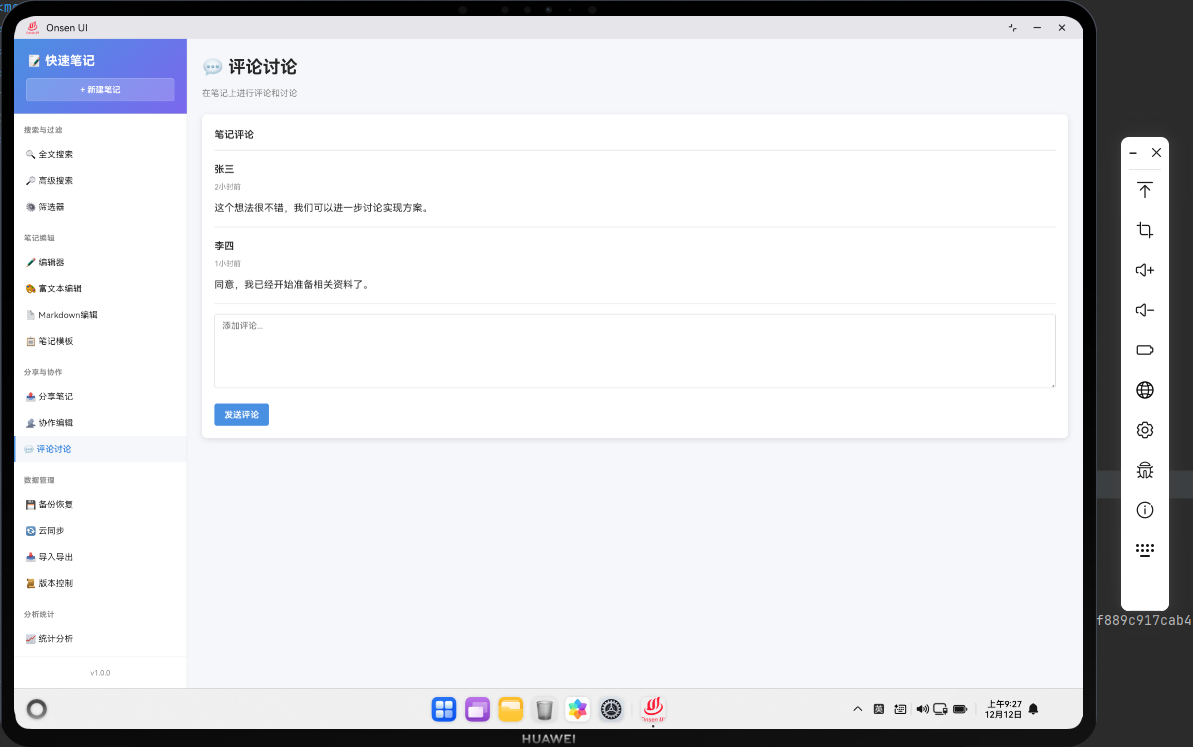
📌 模块概述
评论讨论功能允许用户在笔记上添加评论和进行讨论。通过评论,用户可以对笔记的内容进行反馈和讨论。评论功能增强了笔记的交互性和协作性。
🔗 完整流程
第一步:添加评论
用户可以在笔记上添加评论。评论包含评论者的名称、内容和时间戳。
第二步:回复评论
用户可以对其他用户的评论进行回复,形成讨论线程。
第三步:管理评论
笔记所有者可以删除不适当的评论,或者标记评论为已解决。
🔧 Web代码实现
第一步:加载评论列表
const comments = await noteDB.getComments(noteId);
从数据库获取笔记的所有评论。
第二步:渲染评论项
${comments.map(comment => `
  <div class="comment-item">
    <strong>${comment.author}</strong>
    <span>${Utils.formatDate(comment.createdAt)}</span>
    <div>${Utils.escapeHtml(comment.content)}</div>
  </div>
`).join('')}
显示评论作者、时间和内容。
第三步:添加评论操作按钮
<button class="btn btn-sm" onclick="app.showReplyForm(${comment.id})">回复</button>
<button class="btn btn-sm btn-danger" onclick="app.deleteComment(${comment.id})">删除</button>
为每条评论提供回复和删除按钮。
第四步:创建评论对象
const comment = {
  id: Date.now(),
  noteId: noteId,
  author: 'Anonymous',
  content: content,
  createdAt: new Date().toISOString(),
  replies: []
};
await noteDB.addComment(comment);
创建评论对象并保存到数据库。
第五步:删除评论
if (confirm('确定要删除这条评论吗?')) {
  await noteDB.deleteComment(commentId);
  Utils.showToast('评论已删除', 'success');
}
删除前显示确认对话框,防止误操作。
🔌 OpenHarmony 原生代码
第一步:导入模块
import { webview } from '@kit.ArkWeb';
import { common } from '@kit.AbilityKit';
import { fileIo } from '@kit.CoreFileKit';
导入必要的HarmonyOS库。
第二步:定义CommentsPlugin类
@NativeComponent
export class CommentsPlugin {
  private context: common.UIAbilityContext;
}
使用@NativeComponent装饰器标记为原生组件。
第三步:初始化JavaScript代理
public init(webviewController: webview.WebviewController): void {
  webviewController.registerJavaScriptProxy(
    new CommentsJSProxy(this),
    'commentsPlugin',
    ['getComments', 'addComment', 'deleteComment']
  );
}
注册JavaScript代理。
第四步:获取评论列表
const commentsPath = this.context.cacheDir + '/comments.json';
const comments = JSON.parse(fileIo.readTextSync(commentsPath));
const noteComments = comments.filter((c: any) => c.noteId === noteId);
从文件系统加载评论并筛选指定笔记的评论。
第五步:添加评论
comments.push({
  id: Date.now(),
  noteId: noteId,
  author: author,
  content: content,
  createdAt: new Date().toISOString(),
  replies: []
});
fileIo.writeTextSync(commentsPath, JSON.stringify(comments, null, 2));
创建评论对象并保存到文件。
第六步:删除评论
comments = comments.filter((c: any) => c.id !== commentId);
fileIo.writeTextSync(commentsPath, JSON.stringify(comments, null, 2));
删除指定的评论并更新文件。
Web-Native 通信
第一步:获取评论
cordova.exec(
  function(comments) {
    console.log('Comments loaded:', comments.length);
  },
  function(error) {
    console.error('Failed to get comments:', error);
  },
  'CommentsPlugin',
  'getComments',
  [noteId]
);
调用原生方法获取评论列表。
第二步:添加评论
cordova.exec(
  function(success) {
    Utils.showToast('评论已发送', 'success');
  },
  function(error) {
    Utils.showToast('发送失败', 'error');
  },
  'CommentsPlugin',
  'addComment',
  [noteId, author, content]
);
调用原生方法添加评论。
第三步:删除评论
cordova.exec(
  function(success) {
    Utils.showToast('评论已删除', 'success');
  },
  function(error) {
    Utils.showToast('删除失败', 'error');
  },
  'CommentsPlugin',
  'deleteComment',
  [commentId]
);
调用原生方法删除评论。
📝 总结
评论讨论功能展示了如何在Cordova与OpenHarmony混合开发中实现一个社交互动工具。通过评论和讨论,我们为用户提供了一个交互式的笔记平台。
欢迎加入开源鸿蒙跨平台社区:https://openharmonycrossplatform.csdn.net

AtomGit 是由开放原子开源基金会联合 CSDN 等生态伙伴共同推出的新一代开源与人工智能协作平台。平台坚持“开放、中立、公益”的理念,把代码托管、模型共享、数据集托管、智能体开发体验和算力服务整合在一起,为开发者提供从开发、训练到部署的一站式体验。
更多推荐

 4
4 0
0- 0


 已为社区贡献24条内容

所有评论(0)