React Native 鸿蒙跨平台开发:渐变进度条与遮罩效果的完美结合
·
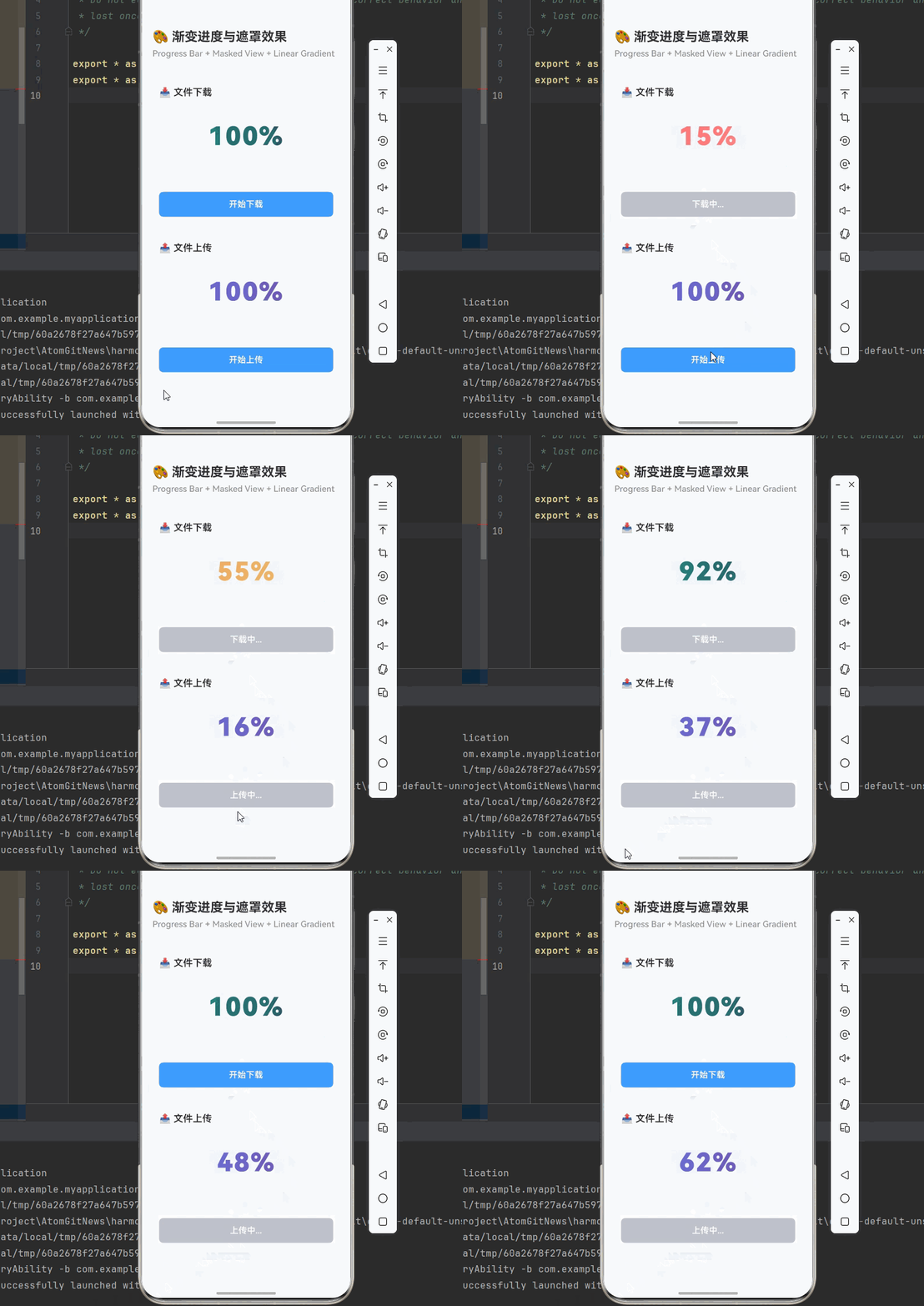
欢迎加入开源鸿蒙跨平台社区:https://openharmonycrossplatform.csdn.net
一、核心知识点
在 React Native 鸿蒙跨平台开发中,@react-native-ohos/progress-bar-android、@react-native-masked-view/masked-view 和 react-native-linear-gradient 三个库的组合使用,可以实现丰富的视觉效果和交互体验。本文将深入讲解如何将这些库完美结合,创建出具有渐变效果和遮罩特效的进度条组件。
1.1 三个核心库的功能定位
| 库名称 | 主要功能 | 适用场景 | 鸿蒙支持 |
|---|---|---|---|
@react-native-ohos/progress-bar-android |
进度条显示 | 文件下载、视频播放、任务进度 | ✅ 完整支持 |
@react-native-masked-view/masked-view |
遮罩效果 | 文字渐变、图标遮罩、形状裁剪 | ✅ 完整支持 |
react-native-linear-gradient |
渐变效果 | 背景渐变、文字渐变、进度渐变 | ✅ 完整支持 |
1.2 技术实现流程
1.3 核心技术特性
- 渐变进度条:使用 LinearGradient 创建平滑的色彩过渡
- 遮罩文字:使用 MaskedView 实现文字渐变填充效果
- 动态颜色:根据进度值动态调整渐变颜色
- 性能优化:基于原生组件实现,性能优异
- 跨平台兼容:三端统一 API,无缝切换
二、实战核心代码深度解析
2.1 渐变进度条组件
import React, { useState, useEffect } from 'react';
import { View, Text, StyleSheet, TouchableOpacity } from 'react-native';
import { ProgressBar } from '@react-native-community/progress-bar-android';
import MaskedView from '@react-native-masked-view/masked-view';
import { LinearGradient } from 'react-native-linear-gradient';

interface GradientProgressBarProps {
  progress: number; // 0-100
  colors: string[];
  style?: any;
}

const GradientProgressBar = ({ progress, colors, style }: GradientProgressBarProps) => {
  return (
    <View style={[styles.progressBarContainer, style]}>
      {/* 遮罩层:显示进度百分比文字 */}
      <MaskedView
        style={styles.maskedView}
        maskElement={
          <View style={styles.maskContainer}>
            <Text style={styles.progressText}>
              {Math.round(progress)}%
            </Text>
          </View>
        }
      >
        {/* 渐变背景 */}
        <LinearGradient
          colors={colors}
          start={{ x: 0, y: 0 }}
          end={{ x: 1, y: 0 }}
          style={styles.gradient}
        />
      </MaskedView>

      {/* 底部进度条 */}
      <ProgressBar
        styleAttr="Horizontal"
        indeterminate={false}
        progress={progress / 100}
        animating={true}
        color={colors[0]}
      />
    </View>
  );
};

const styles = StyleSheet.create({
  progressBarContainer: {
    backgroundColor: '#F5F7FA',
    borderRadius: 12,
    padding: 16,
    marginBottom: 16,
  },
  maskedView: {
    height: 60,
    marginBottom: 12,
  },
  maskContainer: {
    backgroundColor: 'transparent',
    alignItems: 'center',
    justifyContent: 'center',
    height: '100%',
  },
  progressText: {
    fontSize: 36,
    fontWeight: 'bold',
    color: '#000000',
  },
  gradient: {
    flex: 1,
  },
});
技术深度解析:
- MaskedView 工作原理:使用文字作为遮罩,渐变背景只在文字区域显示
- 颜色动态变化:根据进度值选择不同的颜色组合
- 双层进度显示:文字遮罩 + 底部进度条,双重视觉反馈
- 性能优化:MaskedView 基于原生实现,渲染性能优异
2.2 多色渐变进度条
const MultiColorProgressBar = () => {
  const [progress, setProgress] = useState(0);
  const [downloading, setDownloading] = useState(false);

  // 根据进度获取颜色
  const getProgressColors = (p: number): string[] => {
    if (p < 30) return ['#FF6B6B', '#FF8E8E']; // 红色:刚开始
    if (p < 70) return ['#F4A261', '#E9C46A']; // 橙色:进行中
    return ['#2A9D8F', '#264653']; // 绿色:即将完成
  };

  const startDownload = () => {
    setDownloading(true);
    setProgress(0);

    let currentProgress = 0;
    const interval = setInterval(() => {
      currentProgress += Math.random() * 8;
      if (currentProgress >= 100) {
        currentProgress = 100;
        clearInterval(interval);
        setDownloading(false);
      }
      setProgress(currentProgress);
    }, 200);

    return () => clearInterval(interval);
  };

  return (
    <View style={styles.card}>
      <Text style={styles.cardTitle}>📥 多色渐变下载进度</Text>

      <GradientProgressBar
        progress={progress}
        colors={getProgressColors(progress)}
      />

      <TouchableOpacity
        style={[styles.button, downloading && styles.buttonDisabled]}
        onPress={startDownload}
        disabled={downloading}
      >
        <Text style={styles.buttonText}>
          {downloading ? '下载中...' : '开始下载'}
        </Text>
      </TouchableOpacity>
    </View>
  );
};
技术深度解析:
- 颜色状态机:根据进度值切换不同的颜色组合
- 视觉心理学:红色表示警告,橙色表示进行中,绿色表示成功
- 平滑过渡:LinearGradient 提供平滑的颜色过渡效果
- 实时更新:进度变化时颜色自动更新
2.3 彩虹渐变进度条
const RainbowProgressBar = () => {
  const [progress, setProgress] = useState(0);
  const [animating, setAnimating] = useState(false);

  const rainbowColors = [
    '#FF0000', '#FF7F00', '#FFFF00', '#00FF00',
    '#0000FF', '#4B0082', '#9400D3'
  ];

  const animateProgress = () => {
    setAnimating(true);
    setProgress(0);

    let currentProgress = 0;
    const interval = setInterval(() => {
      currentProgress += 1;
      if (currentProgress >= 100) {
        currentProgress = 100;
        clearInterval(interval);
        setAnimating(false);
      }
      setProgress(currentProgress);
    }, 50);

    return () => clearInterval(interval);
  };

  return (
    <View style={styles.card}>
      <Text style={styles.cardTitle}>🌈 彩虹渐变进度条</Text>

      <GradientProgressBar
        progress={progress}
        colors={rainbowColors}
      />

      <TouchableOpacity
        style={[styles.button, animating && styles.buttonDisabled]}
        onPress={animateProgress}
        disabled={animating}
      >
        <Text style={styles.buttonText}>
          {animating ? '运行中...' : '开始动画'}
        </Text>
      </TouchableOpacity>
    </View>
  );
};
技术深度解析:
- 彩虹色渐变:使用七种颜色创建炫酷的彩虹效果
- 均匀分布:颜色在进度条上均匀分布
- 视觉冲击:鲜艳的色彩组合带来强烈的视觉冲击
- 品牌定制:可根据品牌色定制专属渐变
2.4 图标遮罩进度条
const IconMaskedProgressBar = () => {
  const [progress, setProgress] = useState(50);

  return (
    <View style={styles.card}>
      <Text style={styles.cardTitle}>⭐ 图标遮罩进度条</Text>

      <View style={styles.iconContainer}>
        <MaskedView
          style={styles.iconMaskedView}
          maskElement={
            <View style={styles.iconMaskContainer}>
              <Text style={styles.iconMaskedText}>★</Text>
            </View>
          }
        >
          <LinearGradient
            colors={['#FFD700', '#FFA500']}
            start={{ x: 0, y: 0 }}
            end={{ x: 1, y: 1 }}
            style={styles.gradient}
          />
        </MaskedView>

        <Text style={styles.progressLabel}>
          评分: {progress}%
        </Text>
      </View>

      <ProgressBar
        styleAttr="Horizontal"
        indeterminate={false}
        progress={progress / 100}
        animating={true}
        color="#FFD700"
      />

      <View style={styles.sliderButtons}>
        {[10, 20, 30, 40, 50, 60, 70, 80, 90, 100].map((value) => (
          <TouchableOpacity
            key={value}
            style={styles.sliderButton}
            onPress={() => setProgress(value)}
          >
            <Text style={styles.sliderButtonText}>{value}%</Text>
          </TouchableOpacity>
        ))}
      </View>
    </View>
  );
};
技术深度解析:
- 图标遮罩:使用图标作为遮罩元素
- 渐变填充:LinearGradient 为图标填充渐变色彩
- 交互控制:提供多个快捷按钮调整进度
- 视觉反馈:图标颜色随进度值变化
三、实战完整版:综合渐变进度系统
import React, { useState, useEffect, useRef } from 'react';
import {
  View,
  Text,
  TouchableOpacity,
  StyleSheet,
  SafeAreaView,
  ScrollView,
  StatusBar,
} from 'react-native';
import { ProgressBar } from '@react-native-community/progress-bar-android';
import MaskedView from '@react-native-masked-view/masked-view';
import { LinearGradient } from 'react-native-linear-gradient';

const GradientProgressScreen = () => {
  // 下载进度状态
  const [downloadProgress, setDownloadProgress] = useState(0);
  const [downloading, setDownloading] = useState(false);

  // 上传进度状态
  const [uploadProgress, setUploadProgress] = useState(0);
  const [uploading, setUploading] = useState(false);

  // 处理进度状态
  const [processProgress, setProcessProgress] = useState(0);
  const [processing, setProcessing] = useState(false);

  // 开始下载
  const startDownload = () => {
    setDownloading(true);
    setDownloadProgress(0);

    let progress = 0;
    const interval = setInterval(() => {
      progress += Math.random() * 10;
      if (progress >= 100) {
        progress = 100;
        clearInterval(interval);
        setDownloading(false);
      }
      setDownloadProgress(progress);
    }, 300);
  };

  // 开始上传
  const startUpload = () => {
    setUploading(true);
    setUploadProgress(0);

    let progress = 0;
    const interval = setInterval(() => {
      progress += Math.random() * 8;
      if (progress >= 100) {
        progress = 100;
        clearInterval(interval);
        setUploading(false);
      }
      setUploadProgress(progress);
    }, 400);
  };

  // 开始处理
  const startProcess = () => {
    setProcessing(true);
    setProcessProgress(0);

    let progress = 0;
    const interval = setInterval(() => {
      progress += Math.random() * 5;
      if (progress >= 100) {
        progress = 100;
        clearInterval(interval);
        setProcessing(false);
      }
      setProcessProgress(progress);
    }, 500);
  };

  // 获取进度颜色
  const getProgressColors = (progress: number): string[] => {
    if (progress < 30) return ['#FF6B6B', '#FF8E8E'];
    if (progress < 70) return ['#F4A261', '#E9C46A'];
    return ['#2A9D8F', '#264653'];
  };

  return (
    <SafeAreaView style={styles.container}>
      <StatusBar barStyle="dark-content" backgroundColor="#ffffff" />

      <View style={styles.header}>
        <Text style={styles.headerTitle}>🎨 渐变进度与遮罩效果</Text>
        <Text style={styles.headerSubtitle}>
          Progress Bar + Masked View + Linear Gradient
        </Text>
      </View>

      <ScrollView style={styles.content}>
        {/* 下载进度 */}
        <View style={styles.card}>
          <Text style={styles.cardTitle}>📥 文件下载</Text>

          <View style={styles.progressBarContainer}>
            <MaskedView
              style={styles.maskedView}
              maskElement={
                <View style={styles.maskContainer}>
                  <Text style={styles.progressText}>
                    {Math.round(downloadProgress)}%
                  </Text>
                </View>
              }
            >
              <LinearGradient
                colors={getProgressColors(downloadProgress)}
                start={{ x: 0, y: 0 }}
                end={{ x: 1, y: 0 }}
                style={styles.gradient}
              />
            </MaskedView>

            <ProgressBar
              styleAttr="Horizontal"
              indeterminate={false}
              progress={downloadProgress / 100}
              animating={true}
              color={getProgressColors(downloadProgress)[0]}
            />
          </View>

          <TouchableOpacity
            style={[styles.button, downloading && styles.buttonDisabled]}
            onPress={startDownload}
            disabled={downloading}
          >
            <Text style={styles.buttonText}>
              {downloading ? '下载中...' : '开始下载'}
            </Text>
          </TouchableOpacity>
        </View>

        {/* 上传进度 */}
        <View style={styles.card}>
          <Text style={styles.cardTitle}>📤 文件上传</Text>

          <View style={styles.progressBarContainer}>
            <MaskedView
              style={styles.maskedView}
              maskElement={
                <View style={styles.maskContainer}>
                  <Text style={styles.progressText}>
                    {Math.round(uploadProgress)}%
                  </Text>
                </View>
              }
            >
              <LinearGradient
                colors={['#667eea', '#764ba2']}
                start={{ x: 0, y: 0 }}
                end={{ x: 1, y: 0 }}
                style={styles.gradient}
              />
            </MaskedView>

            <ProgressBar
              styleAttr="Horizontal"
              indeterminate={false}
              progress={uploadProgress / 100}
              animating={true}
              color="#667eea"
            />
          </View>

          <TouchableOpacity
            style={[styles.button, uploading && styles.buttonDisabled]}
            onPress={startUpload}
            disabled={uploading}
          >
            <Text style={styles.buttonText}>
              {uploading ? '上传中...' : '开始上传'}
            </Text>
          </TouchableOpacity>
        </View>

        {/* 数据处理进度 */}
        <View style={styles.card}>
          <Text style={styles.cardTitle}>⚙️ 数据处理</Text>

          <View style={styles.progressBarContainer}>
            <MaskedView
              style={styles.maskedView}
              maskElement={
                <View style={styles.maskContainer}>
                  <Text style={styles.progressText}>
                    {Math.round(processProgress)}%
                  </Text>
                </View>
              }
            >
              <LinearGradient
                colors={['#f093fb', '#f5576c']}
                start={{ x: 0, y: 0 }}
                end={{ x: 1, y: 0 }}
                style={styles.gradient}
              />
            </MaskedView>

            <ProgressBar
              styleAttr="Horizontal"
              indeterminate={false}
              progress={processProgress / 100}
              animating={true}
              color="#f5576c"
            />
          </View>

          <TouchableOpacity
            style={[styles.button, processing && styles.buttonDisabled]}
            onPress={startProcess}
            disabled={processing}
          >
            <Text style={styles.buttonText}>
              {processing ? '处理中...' : '开始处理'}
            </Text>
          </TouchableOpacity>
        </View>

        {/* 使用说明 */}
        <View style={styles.card}>
          <Text style={styles.cardTitle}>💡 技术要点</Text>

          <Text style={styles.instructionText}>
            • MaskedView: 使用文字/图标作为遮罩,实现渐变填充效果
          </Text>
          <Text style={styles.instructionText}>
            • LinearGradient: 提供平滑的色彩过渡,支持多色渐变
          </Text>
          <Text style={styles.instructionText}>
            • ProgressBar: 原生进度条组件,性能优异
          </Text>
          <Text style={styles.instructionText}>
            • 动态颜色: 根据进度值自动切换颜色方案
          </Text>
          <Text style={styles.instructionText}>
            • 双层显示: 遮罩文字 + 底部进度条,双重视觉反馈
          </Text>

          <View style={styles.tipBox}>
            <Text style={[styles.instructionText, styles.tipText]}>
              💡 提示: 鸿蒙端完美支持所有特性,性能优异
            </Text>
          </View>
        </View>
      </ScrollView>
    </SafeAreaView>
  );
};

const styles = StyleSheet.create({
  container: {
    flex: 1,
    backgroundColor: '#F5F7FA',
  },
  header: {
    padding: 20,
    backgroundColor: '#FFFFFF',
    borderBottomWidth: 1,
    borderBottomColor: '#EBEEF5',
  },
  headerTitle: {
    fontSize: 24,
    fontWeight: '700',
    color: '#303133',
    marginBottom: 8,
  },
  headerSubtitle: {
    fontSize: 16,
    fontWeight: '500',
    color: '#909399',
  },
  content: {
    flex: 1,
    padding: 16,
  },
  card: {
    backgroundColor: '#FFFFFF',
    borderRadius: 12,
    marginBottom: 16,
    padding: 16,
    shadowColor: '#000000',
    shadowOffset: { width: 0, height: 2 },
    shadowOpacity: 0.08,
    shadowRadius: 8,
    elevation: 4,
  },
  cardTitle: {
    fontSize: 18,
    fontWeight: '600',
    color: '#303133',
    marginBottom: 16,
  },
  progressBarContainer: {
    backgroundColor: '#F5F7FA',
    borderRadius: 12,
    padding: 16,
    marginBottom: 16,
  },
  maskedView: {
    height: 80,
    marginBottom: 16,
  },
  maskContainer: {
    backgroundColor: 'transparent',
    alignItems: 'center',
    justifyContent: 'center',
    height: '100%',
  },
  progressText: {
    fontSize: 48,
    fontWeight: '900',
    color: '#000000',
    letterSpacing: 2,
  },
  gradient: {
    flex: 1,
  },
  button: {
    backgroundColor: '#409EFF',
    borderRadius: 8,
    padding: 14,
    alignItems: 'center',
  },
  buttonDisabled: {
    backgroundColor: '#C0C4CC',
  },
  buttonText: {
    fontSize: 16,
    color: '#FFFFFF',
    fontWeight: '600',
  },
  instructionText: {
    fontSize: 14,
    lineHeight: 24,
    marginBottom: 8,
    color: '#606266',
  },
  tipBox: {
    backgroundColor: '#ECF5FF',
    borderRadius: 8,
    padding: 12,
    marginTop: 12,
  },
  tipText: {
    color: '#409EFF',
    fontWeight: '600',
  },
});

export default GradientProgressScreen;
四、高级应用场景
4.1 分段式渐变进度条
const SegmentProgressBar = () => {
  const segments = [
    { name: '上传', progress: 100, colors: ['#2A9D8F', '#264653'] },
    { name: '处理', progress: 60, colors: ['#E9C46A', '#F4A261'] },
    { name: '下载', progress: 0, colors: ['#E5E5E5', '#E5E5E5'] },
  ];

  return (
    <View>
      {segments.map((segment, index) => (
        <View key={index} style={styles.segmentContainer}>
          <Text style={styles.segmentLabel}>
            {segment.name}: {segment.progress}%
          </Text>

          <MaskedView
            style={styles.segmentMaskedView}
            maskElement={
              <View style={styles.segmentMaskContainer}>
                <Text style={styles.segmentProgressText}>
                  {segment.progress}%
                </Text>
              </View>
            }
          >
            <LinearGradient
              colors={segment.colors}
              start={{ x: 0, y: 0 }}
              end={{ x: 1, y: 0 }}
              style={styles.gradient}
            />
          </MaskedView>

          <ProgressBar
            styleAttr="Horizontal"
            indeterminate={false}
            progress={segment.progress / 100}
            animating={true}
            color={segment.colors[0]}
          />
        </View>
      ))}
    </View>
  );
};
4.2 圆形渐变进度指示器
const CircularProgressIndicator = ({ progress, colors }: any) => {
  return (
    <View style={styles.circularContainer}>
      <MaskedView
        style={styles.circularMaskedView}
        maskElement={
          <View style={styles.circularMaskContainer}>
            <Text style={styles.circularText}>
              {Math.round(progress)}%
            </Text>
          </View>
        }
      >
        <LinearGradient
          colors={colors}
          start={{ x: 0, y: 0 }}
          end={{ x: 1, y: 1 }}
          style={styles.gradient}
        />
      </MaskedView>
    </View>
  );
};
4.3 渐变卡片效果
const GradientCard = ({ title, progress, colors }: any) => {
  return (
    <View style={styles.gradientCard}>
      <MaskedView
        style={styles.cardMaskedView}
        maskElement={
          <View style={styles.cardMaskContainer}>
            <Text style={styles.cardTitleText}>{title}</Text>
            <Text style={styles.cardProgressText}>
              {Math.round(progress)}%
            </Text>
          </View>
        }
      >
        <LinearGradient
          colors={colors}
          start={{ x: 0, y: 0 }}
          end={{ x: 1, y: 1 }}
          style={styles.gradient}
        />
      </MaskedView>
    </View>
  );
};
五、总结
本文深入讲解了如何结合 @react-native-ohos/progress-bar-android、@react-native-masked-view/masked-view 和 react-native-linear-gradient 三个库,创建出具有渐变效果和遮罩特效的进度条组件。
核心技术要点:
| 技术点 | 实现方式 | 应用场景 |
|---|---|---|
| 遮罩文字渐变 | MaskedView + LinearGradient | 品牌标题、特殊文字效果 |
| 进度条显示 | ProgressBar | 文件传输、任务进度 |
| 动态颜色切换 | 根据进度值选择颜色 | 状态指示、视觉反馈 |
| 多色渐变 | LinearGradient 多色配置 | 品牌定制、炫酷效果 |
| 双层显示 | 遮罩层 + 进度条 | 双重视觉反馈 |
最佳实践:
- 性能优化:使用原生组件,避免频繁重新渲染
- 颜色选择:根据场景选择合适的颜色方案
- 用户体验:提供清晰的视觉反馈和状态提示
- 代码复用:封装可复用的组件,提高开发效率
- 跨平台兼容:确保三端表现一致
通过本文的学习,你应该能够:
- 理解三个库的核心功能和使用场景
- 实现渐变进度条和遮罩效果
- 创建具有品牌特色的进度组件
- 优化性能和用户体验
- 掌握跨平台开发技巧
在鸿蒙平台上,这三个库提供了完整的支持,与 iOS/Android 平台保持一致的 API,让开发者可以轻松实现跨平台的渐变进度和遮罩效果。

AtomGit 是由开放原子开源基金会联合 CSDN 等生态伙伴共同推出的新一代开源与人工智能协作平台。平台坚持“开放、中立、公益”的理念,把代码托管、模型共享、数据集托管、智能体开发体验和算力服务整合在一起,为开发者提供从开发、训练到部署的一站式体验。
更多推荐
 8
8 0
0- 0


 已为社区贡献51条内容

所有评论(0)