Flutter for OpenHarmony 个人理财管理App实战 - 关于我们页面
·
关于我们页面是展示App信息的窗口,包括应用介绍、版本信息、技术栈、开源协议等内容。本篇将实现一个信息丰富的关于页面,同时支持检查更新、查看开源协议等功能。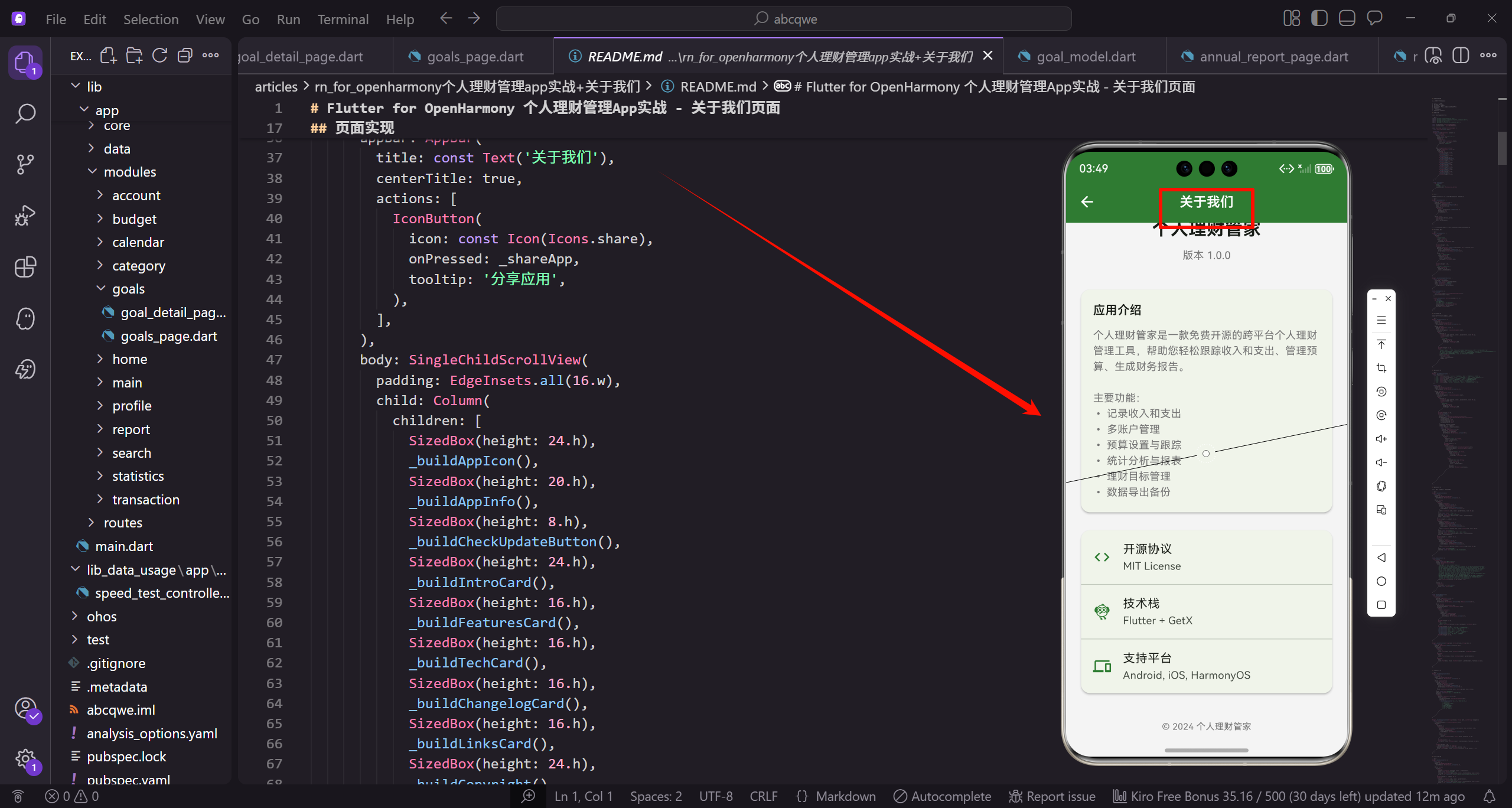
页面内容规划
关于页面包含以下信息:
- 应用图标和名称
- 版本号和构建信息
- 应用介绍和主要功能
- 技术信息(开源协议、技术栈、支持平台)
- 更新日志
- 开发团队信息
- 版权信息和法律声明
页面实现
创建 about_page.dart:
import 'package:flutter/material.dart';
import 'package:flutter_screenutil/flutter_screenutil.dart';
import 'package:get/get.dart';
import 'package:url_launcher/url_launcher.dart';
const _primaryColor = Color(0xFF2E7D32);
const _textSecondary = Color(0xFF757575);
class AboutPage extends StatelessWidget {
const AboutPage({super.key});
Widget build(BuildContext context) {
return Scaffold(
appBar: AppBar(
title: const Text('关于我们'),
centerTitle: true,
actions: [
IconButton(
icon: const Icon(Icons.share),
onPressed: _shareApp,
tooltip: '分享应用',
),
],
),
body: SingleChildScrollView(
padding: EdgeInsets.all(16.w),
child: Column(
children: [
SizedBox(height: 24.h),
_buildAppIcon(),
SizedBox(height: 20.h),
_buildAppInfo(),
SizedBox(height: 8.h),
_buildCheckUpdateButton(),
SizedBox(height: 24.h),
_buildIntroCard(),
SizedBox(height: 16.h),
_buildFeaturesCard(),
SizedBox(height: 16.h),
_buildTechCard(),
SizedBox(height: 16.h),
_buildChangelogCard(),
SizedBox(height: 16.h),
_buildLinksCard(),
SizedBox(height: 24.h),
_buildCopyright(),
SizedBox(height: 16.h),
],
),
),
);
}
void _shareApp() {
Get.snackbar(
'分享',
'分享功能开发中',
snackPosition: SnackPosition.BOTTOM,
);
}
}
应用图标
页面顶部展示应用图标,使用圆形容器包裹,添加阴影效果:
Widget _buildAppIcon() {
  return Container(
    padding: EdgeInsets.all(24.w),
    decoration: BoxDecoration(
      color: _primaryColor.withOpacity(0.1),
      shape: BoxShape.circle,
      boxShadow: [
        BoxShadow(
          color: _primaryColor.withOpacity(0.2),
          blurRadius: 20,
          spreadRadius: 5,
        ),
      ],
    ),
    child: Icon(
      Icons.account_balance_wallet,
      size: 64.sp,
      color: _primaryColor,
    ),
  );
}
图标使用半透明的主题色作为背景,配合阴影效果,视觉上更有层次感。
应用名称和版本
Widget _buildAppInfo() {
  return Column(
    children: [
      Text(
        '个人理财管家',
        style: TextStyle(
          fontSize: 24.sp,
          fontWeight: FontWeight.bold,
        ),
      ),
      SizedBox(height: 8.h),
      Container(
        padding: EdgeInsets.symmetric(horizontal: 12.w, vertical: 4.h),
        decoration: BoxDecoration(
          color: _primaryColor.withOpacity(0.1),
          borderRadius: BorderRadius.circular(12.r),
        ),
        child: Text(
          'v1.0.0 (Build 100)',
          style: TextStyle(
            fontSize: 12.sp,
            color: _primaryColor,
            fontWeight: FontWeight.w500,
          ),
        ),
      ),
      SizedBox(height: 8.h),
      Text(
        '发布日期: 2024-01-15',
        style: TextStyle(
          fontSize: 12.sp,
          color: _textSecondary,
        ),
      ),
    ],
  );
}

Widget _buildCheckUpdateButton() {
  return TextButton.icon(
    onPressed: _checkUpdate,
    icon: const Icon(Icons.system_update),
    label: const Text('检查更新'),
    style: TextButton.styleFrom(
      foregroundColor: _primaryColor,
    ),
  );
}

void _checkUpdate() {
  Get.dialog(
    const Center(child: CircularProgressIndicator()),
    barrierDismissible: false,
  );

  Future.delayed(const Duration(seconds: 2), () {
    Get.back();
    Get.snackbar(
      '已是最新版本',
      '当前版本 v1.0.0 已是最新版本',
      snackPosition: SnackPosition.BOTTOM,
      backgroundColor: _primaryColor,
      colorText: Colors.white,
    );
  });
}
应用介绍卡片
介绍卡片详细说明应用的功能和特点:
Widget _buildIntroCard() {
  return Card(
    elevation: 1,
    shape: RoundedRectangleBorder(
      borderRadius: BorderRadius.circular(12.r),
    ),
    child: Padding(
      padding: EdgeInsets.all(16.w),
      child: Column(
        crossAxisAlignment: CrossAxisAlignment.start,
        children: [
          Row(
            children: [
              Icon(Icons.info_outline, color: _primaryColor, size: 20.sp),
              SizedBox(width: 8.w),
              Text(
                '应用介绍',
                style: TextStyle(
                  fontSize: 16.sp,
                  fontWeight: FontWeight.w600,
                ),
              ),
            ],
          ),
          SizedBox(height: 12.h),
          Text(
            '个人理财管家是一款免费开源的跨平台个人理财管理工具,专为注重财务健康的用户设计。'
            '无论您是想要养成记账习惯的新手,还是需要专业财务分析的理财达人,这款应用都能满足您的需求。\n\n'
            '我们致力于帮助用户建立良好的理财习惯,通过直观的数据可视化和智能分析,'
            '让您对自己的财务状况了如指掌,从而做出更明智的财务决策。',
            style: TextStyle(
              fontSize: 14.sp,
              color: _textSecondary,
              height: 1.6,
            ),
          ),
        ],
      ),
    ),
  );
}
功能特点卡片
Widget _buildFeaturesCard() {
  final features = [
    {'icon': Icons.edit_note, 'title': '便捷记账', 'desc': '快速记录每一笔收支'},
    {'icon': Icons.account_balance, 'title': '多账户管理', 'desc': '支持多种账户类型'},
    {'icon': Icons.pie_chart, 'title': '智能分析', 'desc': '可视化统计报表'},
    {'icon': Icons.savings, 'title': '预算管理', 'desc': '设置并跟踪预算'},
    {'icon': Icons.flag, 'title': '理财目标', 'desc': '制定并追踪目标'},
    {'icon': Icons.backup, 'title': '数据安全', 'desc': '本地存储,支持备份'},
  ];

  return Card(
    elevation: 1,
    shape: RoundedRectangleBorder(
      borderRadius: BorderRadius.circular(12.r),
    ),
    child: Padding(
      padding: EdgeInsets.all(16.w),
      child: Column(
        crossAxisAlignment: CrossAxisAlignment.start,
        children: [
          Row(
            children: [
              Icon(Icons.star_outline, color: _primaryColor, size: 20.sp),
              SizedBox(width: 8.w),
              Text(
                '功能特点',
                style: TextStyle(
                  fontSize: 16.sp,
                  fontWeight: FontWeight.w600,
                ),
              ),
            ],
          ),
          SizedBox(height: 16.h),
          GridView.builder(
            shrinkWrap: true,
            physics: const NeverScrollableScrollPhysics(),
            gridDelegate: SliverGridDelegateWithFixedCrossAxisCount(
              crossAxisCount: 2,
              mainAxisSpacing: 12.h,
              crossAxisSpacing: 12.w,
              childAspectRatio: 2.5,
            ),
            itemCount: features.length,
            itemBuilder: (_, index) {
              final feature = features[index];
              return Container(
                padding: EdgeInsets.all(8.w),
                decoration: BoxDecoration(
                  color: Colors.grey[50],
                  borderRadius: BorderRadius.circular(8.r),
                ),
                child: Row(
                  children: [
                    Icon(
                      feature['icon'] as IconData,
                      color: _primaryColor,
                      size: 20.sp,
                    ),
                    SizedBox(width: 8.w),
                    Expanded(
                      child: Column(
                        crossAxisAlignment: CrossAxisAlignment.start,
                        mainAxisAlignment: MainAxisAlignment.center,
                        children: [
                          Text(
                            feature['title'] as String,
                            style: TextStyle(
                              fontSize: 12.sp,
                              fontWeight: FontWeight.w500,
                            ),
                          ),
                          Text(
                            feature['desc'] as String,
                            style: TextStyle(
                              fontSize: 10.sp,
                              color: _textSecondary,
                            ),
                            maxLines: 1,
                            overflow: TextOverflow.ellipsis,
                          ),
                        ],
                      ),
                    ),
                  ],
                ),
              );
            },
          ),
        ],
      ),
    ),
  );
}
技术信息卡片
展示开源协议、技术栈和支持平台:
Widget _buildTechCard() {
  return Card(
    elevation: 1,
    shape: RoundedRectangleBorder(
      borderRadius: BorderRadius.circular(12.r),
    ),
    child: Column(
      children: [
        ListTile(
          leading: Container(
            padding: EdgeInsets.all(8.w),
            decoration: BoxDecoration(
              color: _primaryColor.withOpacity(0.1),
              borderRadius: BorderRadius.circular(8.r),
            ),
            child: Icon(Icons.code, color: _primaryColor, size: 20.sp),
          ),
          title: const Text('开源协议'),
          subtitle: const Text('MIT License'),
          trailing: Icon(Icons.chevron_right, color: _textSecondary),
          onTap: _showLicense,
        ),
        Divider(height: 1, indent: 72.w),
        ListTile(
          leading: Container(
            padding: EdgeInsets.all(8.w),
            decoration: BoxDecoration(
              color: Colors.blue.withOpacity(0.1),
              borderRadius: BorderRadius.circular(8.r),
            ),
            child: Icon(Icons.flutter_dash, color: Colors.blue, size: 20.sp),
          ),
          title: const Text('技术栈'),
          subtitle: const Text('Flutter 3.16 + GetX 4.6'),
          trailing: Icon(Icons.chevron_right, color: _textSecondary),
          onTap: _showTechDetails,
        ),
        Divider(height: 1, indent: 72.w),
        ListTile(
          leading: Container(
            padding: EdgeInsets.all(8.w),
            decoration: BoxDecoration(
              color: Colors.orange.withOpacity(0.1),
              borderRadius: BorderRadius.circular(8.r),
            ),
            child: Icon(Icons.devices, color: Colors.orange, size: 20.sp),
          ),
          title: const Text('支持平台'),
          subtitle: const Text('Android, iOS, HarmonyOS'),
        ),
      ],
    ),
  );
}

void _showLicense() {
  Get.dialog(
    AlertDialog(
      title: const Text('MIT License'),
      content: SingleChildScrollView(
        child: Text(
          'Copyright (c) 2024 个人理财管家\n\n'
          'Permission is hereby granted, free of charge, to any person obtaining a copy '
          'of this software and associated documentation files (the "Software"), to deal '
          'in the Software without restriction, including without limitation the rights '
          'to use, copy, modify, merge, publish, distribute, sublicense, and/or sell '
          'copies of the Software, and to permit persons to whom the Software is '
          'furnished to do so, subject to the following conditions:\n\n'
          'The above copyright notice and this permission notice shall be included in all '
          'copies or substantial portions of the Software.\n\n'
          'THE SOFTWARE IS PROVIDED "AS IS", WITHOUT WARRANTY OF ANY KIND, EXPRESS OR '
          'IMPLIED, INCLUDING BUT NOT LIMITED TO THE WARRANTIES OF MERCHANTABILITY, '
          'FITNESS FOR A PARTICULAR PURPOSE AND NONINFRINGEMENT.',
          style: TextStyle(fontSize: 12.sp, height: 1.5),
        ),
      ),
      actions: [
        TextButton(
          onPressed: () => Get.back(),
          child: const Text('关闭'),
        ),
      ],
    ),
  );
}

void _showTechDetails() {
  Get.bottomSheet(
    Container(
      padding: EdgeInsets.all(16.w),
      decoration: BoxDecoration(
        color: Colors.white,
        borderRadius: BorderRadius.vertical(top: Radius.circular(16.r)),
      ),
      child: Column(
        mainAxisSize: MainAxisSize.min,
        crossAxisAlignment: CrossAxisAlignment.start,
        children: [
          Center(
            child: Container(
              width: 40.w,
              height: 4.h,
              decoration: BoxDecoration(
                color: Colors.grey[300],
                borderRadius: BorderRadius.circular(2.r),
              ),
            ),
          ),
          SizedBox(height: 16.h),
          Text(
            '技术栈详情',
            style: TextStyle(fontSize: 18.sp, fontWeight: FontWeight.bold),
          ),
          SizedBox(height: 16.h),
          _buildTechItem('Flutter', '3.16.0', '跨平台UI框架'),
          _buildTechItem('Dart', '3.2.0', '编程语言'),
          _buildTechItem('GetX', '4.6.6', '状态管理'),
          _buildTechItem('GetStorage', '2.1.1', '本地存储'),
          _buildTechItem('fl_chart', '0.65.0', '图表库'),
          _buildTechItem('intl', '0.18.1', '国际化'),
          SizedBox(height: 16.h),
        ],
      ),
    ),
  );
}

Widget _buildTechItem(String name, String version, String desc) {
  return Padding(
    padding: EdgeInsets.symmetric(vertical: 8.h),
    child: Row(
      children: [
        Expanded(
          flex: 2,
          child: Text(name, style: TextStyle(fontWeight: FontWeight.w500)),
        ),
        Expanded(
          flex: 1,
          child: Text(version, style: TextStyle(color: _primaryColor)),
        ),
        Expanded(
          flex: 2,
          child: Text(desc, style: TextStyle(color: _textSecondary, fontSize: 12.sp)),
        ),
      ],
    ),
  );
}
更新日志卡片
Widget _buildChangelogCard() {
  return Card(
    elevation: 1,
    shape: RoundedRectangleBorder(
      borderRadius: BorderRadius.circular(12.r),
    ),
    child: ExpansionTile(
      leading: Container(
        padding: EdgeInsets.all(8.w),
        decoration: BoxDecoration(
          color: Colors.purple.withOpacity(0.1),
          borderRadius: BorderRadius.circular(8.r),
        ),
        child: Icon(Icons.history, color: Colors.purple, size: 20.sp),
      ),
      title: const Text('更新日志'),
      subtitle: const Text('v1.0.0 - 2024-01-15'),
      children: [
        Padding(
          padding: EdgeInsets.all(16.w),
          child: Column(
            crossAxisAlignment: CrossAxisAlignment.start,
            children: [
              _buildChangelogItem('v1.0.0', '2024-01-15', [
                '🎉 首次发布',
                '✨ 支持收入支出记录',
                '✨ 多账户管理',
                '✨ 预算设置与跟踪',
                '✨ 统计分析报表',
                '✨ 理财目标管理',
              ]),
            ],
          ),
        ),
      ],
    ),
  );
}

Widget _buildChangelogItem(String version, String date, List<String> changes) {
  return Column(
    crossAxisAlignment: CrossAxisAlignment.start,
    children: [
      Row(
        children: [
          Container(
            padding: EdgeInsets.symmetric(horizontal: 8.w, vertical: 2.h),
            decoration: BoxDecoration(
              color: _primaryColor,
              borderRadius: BorderRadius.circular(4.r),
            ),
            child: Text(
              version,
              style: TextStyle(color: Colors.white, fontSize: 12.sp),
            ),
          ),
          SizedBox(width: 8.w),
          Text(date, style: TextStyle(color: _textSecondary, fontSize: 12.sp)),
        ],
      ),
      SizedBox(height: 8.h),
      ...changes.map((change) => Padding(
        padding: EdgeInsets.only(left: 8.w, bottom: 4.h),
        child: Text(change, style: TextStyle(fontSize: 13.sp, height: 1.5)),
      )),
    ],
  );
}
相关链接卡片
Widget _buildLinksCard() {
  return Card(
    elevation: 1,
    shape: RoundedRectangleBorder(
      borderRadius: BorderRadius.circular(12.r),
    ),
    child: Column(
      children: [
        ListTile(
          leading: Icon(Icons.language, color: _primaryColor),
          title: const Text('官方网站'),
          trailing: Icon(Icons.open_in_new, color: _textSecondary, size: 18.sp),
          onTap: () => _launchUrl('https://openharmonycrossplatform.csdn.net'),
        ),
        Divider(height: 1, indent: 56.w),
        ListTile(
          leading: Icon(Icons.code, color: _primaryColor),
          title: const Text('GitHub 仓库'),
          trailing: Icon(Icons.open_in_new, color: _textSecondary, size: 18.sp),
          onTap: () => _launchUrl('https://github.com'),
        ),
        Divider(height: 1, indent: 56.w),
        ListTile(
          leading: Icon(Icons.description, color: _primaryColor),
          title: const Text('用户协议'),
          trailing: Icon(Icons.chevron_right, color: _textSecondary),
          onTap: () => Get.toNamed('/terms'),
        ),
        Divider(height: 1, indent: 56.w),
        ListTile(
          leading: Icon(Icons.privacy_tip, color: _primaryColor),
          title: const Text('隐私政策'),
          trailing: Icon(Icons.chevron_right, color: _textSecondary),
          onTap: () => Get.toNamed('/privacy'),
        ),
      ],
    ),
  );
}

void _launchUrl(String url) async {
  final uri = Uri.parse(url);
  if (await canLaunchUrl(uri)) {
    await launchUrl(uri, mode: LaunchMode.externalApplication);
  }
}
版权信息
页面底部显示版权声明:
Widget _buildCopyright() {
  return Column(
    children: [
      Text(
        '© 2024 个人理财管家',
        style: TextStyle(fontSize: 12.sp, color: _textSecondary),
      ),
      SizedBox(height: 4.h),
      Text(
        'Made with ❤️ by OpenHarmony Community',
        style: TextStyle(fontSize: 11.sp, color: _textSecondary.withOpacity(0.7)),
      ),
    ],
  );
}
设计要点
关于页面的设计考虑:
- 信息层次分明,从图标到详情逐步展开
- 使用卡片分组,视觉上更清晰
- 文字大小和颜色有区分,重要信息突出
- 可展开的更新日志,节省空间
- 支持检查更新,提升用户体验
- 提供相关链接,方便用户了解更多
小结
关于页面虽然功能简单,但是展示应用形象的重要窗口。通过精心设计的布局和丰富的信息展示,让用户对应用有更全面的了解。下一篇将实现意见反馈页面。
欢迎加入 OpenHarmony 跨平台开发社区,获取更多技术资源和交流机会:
https://openharmonycrossplatform.csdn.net

AtomGit 是由开放原子开源基金会联合 CSDN 等生态伙伴共同推出的新一代开源与人工智能协作平台。平台坚持“开放、中立、公益”的理念,把代码托管、模型共享、数据集托管、智能体开发体验和算力服务整合在一起,为开发者提供从开发、训练到部署的一站式体验。
更多推荐

 6
6 0
0- 0


 已为社区贡献21条内容

所有评论(0)