备份恢复 Cordova 与 OpenHarmony 混合开发实战
·
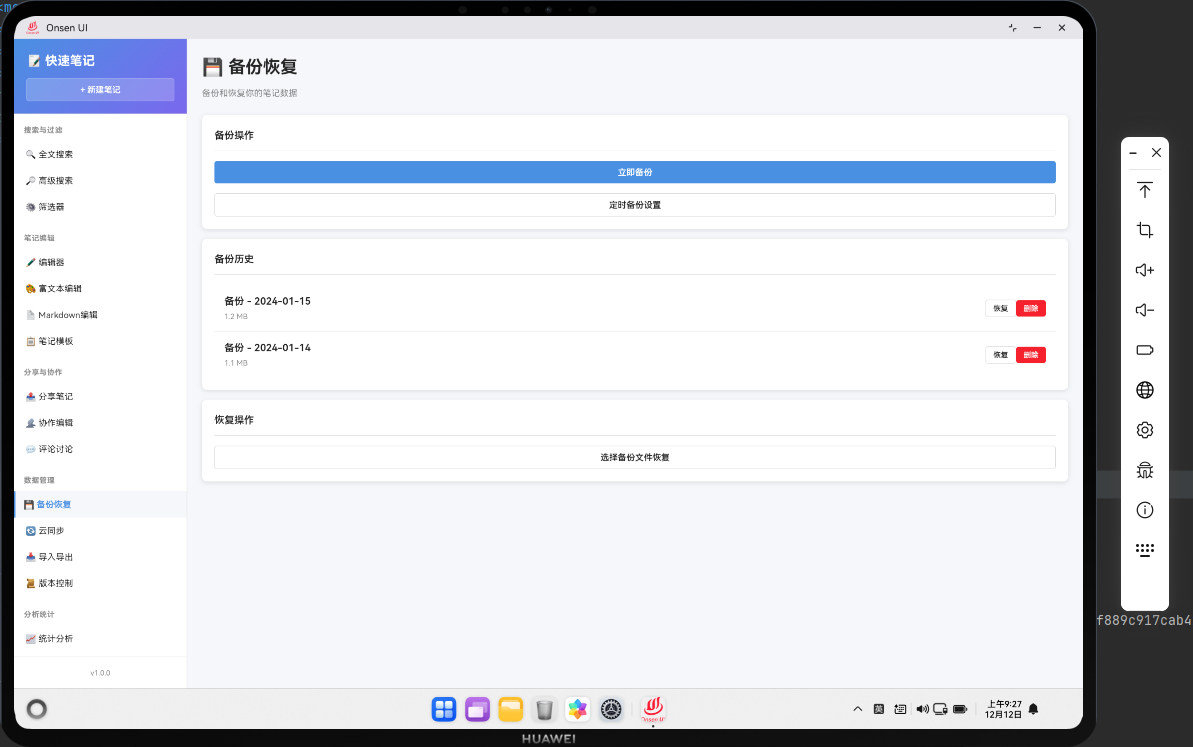
📌 模块概述
备份恢复功能允许用户备份笔记数据,并在需要时恢复备份。备份是数据安全的重要保障,用户可以定期备份笔记,防止数据丢失。
🔗 完整流程
第一步:创建备份
用户可以手动创建备份,或者设置自动备份。备份包含所有笔记、分类、标签等数据。
第二步:管理备份
用户可以查看备份列表,选择要恢复的备份,或者删除旧备份。
第三步:恢复备份
用户可以选择一个备份来恢复数据。恢复时需要确认操作,防止误操作。
🔧 Web代码实现
// 备份恢复页面
async renderBackup() {
  const backups = await noteDB.getAllBackups();

  return `
    <div class="page active">
      <div class="page-header">
        <h1 class="page-title">💾 备份恢复</h1>
        <button class="btn btn-primary" onclick="app.createBackup()">创建备份</button>
      </div>
      <div class="backups-list">
        ${backups.map(backup => `
          <div class="backup-item">
            <div class="backup-info">
              <h3>${Utils.formatDate(backup.createdAt)}</h3>
              <p>笔记数: ${backup.noteCount}</p>
              <p>大小: ${(backup.size / 1024).toFixed(2)} KB</p>
            </div>
            <div class="backup-actions">
              <button class="btn btn-sm btn-success" onclick="app.restoreBackup(${backup.id})">恢复</button>
              <button class="btn btn-sm btn-danger" onclick="app.deleteBackup(${backup.id})">删除</button>
            </div>
          </div>
        `).join('')}
      </div>
    </div>
  `;
}

// 创建备份
async createBackup() {
  try {
    const allNotes = await noteDB.getAllNotes();
    const backup = {
      id: Date.now(),
      noteCount: allNotes.length,
      size: JSON.stringify(allNotes).length,
      data: allNotes,
      createdAt: new Date().toISOString()
    };

    await noteDB.addBackup(backup);
    Utils.showToast('备份已创建', 'success');
    await this.renderBackup();
  } catch (error) {
    console.error('创建备份失败:', error);
    Utils.showToast('操作失败,请重试', 'error');
  }
}

// 恢复备份
async restoreBackup(backupId) {
  try {
    if (!confirm('确定要恢复这个备份吗?当前数据将被覆盖。')) {
      return;
    }

    const backup = await noteDB.getBackup(backupId);
    if (!backup) {
      Utils.showToast('备份不存在', 'error');
      return;
    }

    // 清空当前数据并恢复备份
    await noteDB.clearAllNotes();
    for (const note of backup.data) {
      await noteDB.addNote(note);
    }

    Utils.showToast('备份已恢复', 'success');
    await this.renderDashboard();
  } catch (error) {
    console.error('恢复备份失败:', error);
    Utils.showToast('操作失败,请重试', 'error');
  }
}
🔌 OpenHarmony 原生代码
// BackupPlugin.ets - 备份插件
import { webview } from '@kit.ArkWeb';
import { common } from '@kit.AbilityKit';
import { fileIo } from '@kit.CoreFileKit';

@NativeComponent
export class BackupPlugin {
  private context: common.UIAbilityContext;

  constructor(context: common.UIAbilityContext) {
    this.context = context;
  }

  // 初始化插件
  public init(webviewController: webview.WebviewController): void {
    webviewController.registerJavaScriptProxy(
      new BackupJSProxy(this),
      'backupPlugin',
      ['createBackup', 'restoreBackup', 'getBackups']
    );
  }

  // 创建备份
  public createBackup(): Promise<boolean> {
    return new Promise((resolve) => {
      try {
        const notesPath = this.context.cacheDir + '/notes.json';
        const content = fileIo.readTextSync(notesPath);
        const notes = JSON.parse(content);

        const backupPath = this.context.cacheDir + `/backup_${Date.now()}.json`;
        fileIo.writeTextSync(backupPath, content);

        // 记录备份信息
        const backupsPath = this.context.cacheDir + '/backups.json';
        let backups: Array<any> = [];
        try {
          const backupsContent = fileIo.readTextSync(backupsPath);
          backups = JSON.parse(backupsContent);
        } catch {
          backups = [];
        }

        backups.push({
          id: Date.now(),
          path: backupPath,
          noteCount: notes.length,
          size: content.length,
          createdAt: new Date().toISOString()
        });

        fileIo.writeTextSync(backupsPath, JSON.stringify(backups, null, 2));
        resolve(true);
      } catch (error) {
        console.error('Failed to create backup:', error);
        resolve(false);
      }
    });
  }

  // 恢复备份
  public restoreBackup(backupPath: string): Promise<boolean> {
    return new Promise((resolve) => {
      try {
        const backupContent = fileIo.readTextSync(backupPath);
        const notesPath = this.context.cacheDir + '/notes.json';
        fileIo.writeTextSync(notesPath, backupContent);
        resolve(true);
      } catch (error) {
        console.error('Failed to restore backup:', error);
        resolve(false);
      }
    });
  }

  // 获取备份列表
  public getBackups(): Promise<Array<any>> {
    return new Promise((resolve) => {
      try {
        const backupsPath = this.context.cacheDir + '/backups.json';
        const content = fileIo.readTextSync(backupsPath);
        const backups = JSON.parse(content);
        resolve(backups);
      } catch (error) {
        console.error('Failed to get backups:', error);
        resolve([]);
      }
    });
  }
}

// BackupJSProxy.ets - JavaScript代理类
class BackupJSProxy {
  private plugin: BackupPlugin;

  constructor(plugin: BackupPlugin) {
    this.plugin = plugin;
  }

  createBackup(): void {
    this.plugin.createBackup().then(success => {
      console.log('Backup created:', success);
    });
  }

  restoreBackup(backupPath: string): void {
    this.plugin.restoreBackup(backupPath).then(success => {
      console.log('Backup restored:', success);
    });
  }

  getBackups(): void {
    this.plugin.getBackups().then(backups => {
      console.log('Backups:', backups.length);
    });
  }
}
📝 总结
备份恢复功能展示了如何在Cordova与OpenHarmony混合开发中实现一个数据安全工具。通过定期备份和快速恢复,我们为用户提供了数据保护的保障。
欢迎加入开源鸿蒙跨平台社区:https://openharmonycrossplatform.csdn.net

AtomGit 是由开放原子开源基金会联合 CSDN 等生态伙伴共同推出的新一代开源与人工智能协作平台。平台坚持“开放、中立、公益”的理念,把代码托管、模型共享、数据集托管、智能体开发体验和算力服务整合在一起,为开发者提供从开发、训练到部署的一站式体验。
更多推荐


 3
3 0
0- 0


 已为社区贡献24条内容

所有评论(0)