Flutter for OpenHarmony 口腔护理App实战:常见问答功能实现
前言
常见问答(FAQ)是帮助用户快速获取口腔护理知识的重要功能。通过整理用户最关心的问题和专业解答,可以有效解决用户的疑惑,提升应用的实用价值。在口腔护理领域,用户经常会遇到各种疑问,比如"每天应该刷几次牙"、"电动牙刷好还是手动牙刷好"等。一个设计良好的问答页面可以让用户快速找到答案,避免盲目搜索的困扰。
本文将介绍如何在 Flutter 中使用 ExpansionTile 组件实现一个交互友好的常见问答页面。我们将详细讲解从数据结构设计、页面布局、交互动画到功能扩展的完整实现过程,帮助开发者掌握问答类页面的开发技巧。
功能设计与用户体验
常见问答页面需要实现以下核心功能:
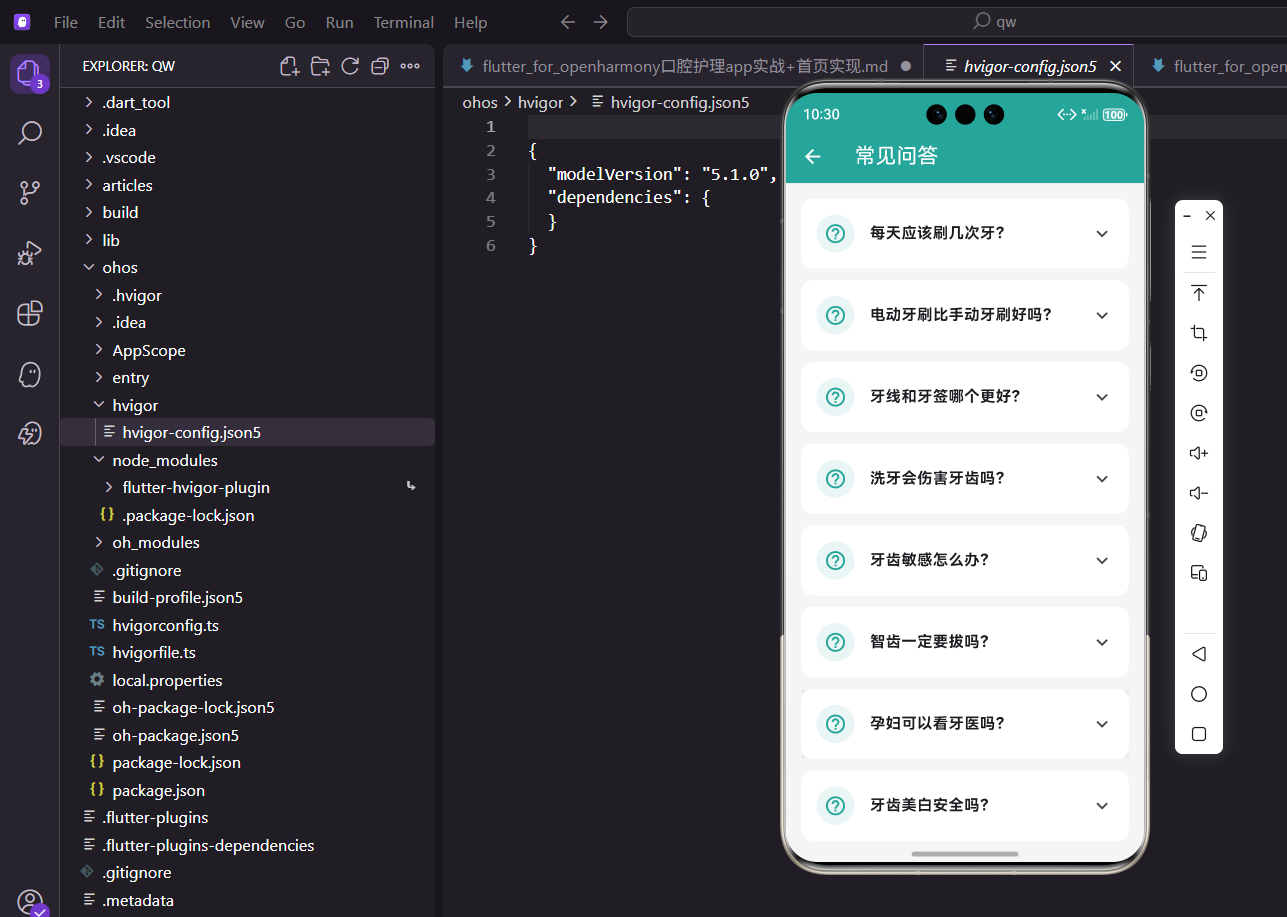
问答列表展示:以清晰的列表形式展示所有常见问题,每个问题都是一个可展开的卡片。用户可以一眼看到所有问题标题,快速定位到自己关心的内容。
展开收起交互:点击问题可以展开查看详细答案,再次点击可以收起。这种交互方式节省屏幕空间,让用户可以专注于当前关注的问题。展开和收起都有流畅的动画效果,提升用户体验。
视觉层次设计:使用图标、卡片和颜色来美化界面,让问答内容更加易读。问号图标放在每个问题前面,强化问答的属性。卡片设计让每个问答独立呈现,避免内容混杂。
分类筛选功能:将问答按主题分类,用户可以选择特定分类查看相关问题。这对于问答数量较多的情况特别有用,可以大大提高查找效率。
搜索功能:支持关键词搜索,在问题和答案中查找匹配内容。当用户有明确的疑问时,可以直接搜索而不用逐个浏览。
反馈机制:用户可以对答案的有用性进行评价,帮助我们优化内容质量。同时提供"没找到答案"的反馈入口,收集用户的新问题。
页面基础结构
常见问答页面使用 StatelessWidget 实现,因为问答数据是静态的:
class FaqPage extends StatelessWidget {
const FaqPage({super.key});
Widget build(BuildContext context) {
final faqs = [
{
'question': '每天应该刷几次牙?',
'answer': '建议每天刷牙2-3次,早晚各一次是必须的。如果条件允许,午餐后也可以刷牙。每次刷牙时间应该在2-3分钟,确保彻底清洁牙齿表面和牙缝。使用正确的刷牙方法比刷牙次数更重要,要采用巴氏刷牙法,以45度角轻柔地刷牙。'
},
{
'question': '电动牙刷比手动牙刷好吗?',
'answer': '电动牙刷和手动牙刷各有优势。电动牙刷清洁效率更高,震动频率可达每分钟数万次,能更有效地去除牙菌斑,特别适合手部灵活性较差的人群。手动牙刷更灵活,价格便宜,携带方便。关键是掌握正确的刷牙方法,无论使用哪种牙刷,正确的技巧都是保证清洁效果的前提。'
},
我们使用 Map 列表存储问答数据,每个条目包含问题和答案两个字段。这种数据结构简单直观,便于维护。在实际项目中,这些数据通常从服务器获取,可以动态更新内容。问题文字简洁明了,答案详细专业,既有理论知识又有实用建议。每个答案都经过精心编写,确保信息的准确性和实用性。
继续添加更多问答数据:
      {
        'question': '牙线和牙签哪个更好?',
        'answer': '牙线更好。牙签可能会损伤牙龈,导致牙龈萎缩和牙缝变大。而牙线可以深入牙缝清洁,不会伤害牙龈组织。建议每天至少使用一次牙线,最好在睡前使用。使用牙线时要轻柔,避免用力过猛伤到牙龈。对于牙缝较大的人,可以使用牙间刷作为补充。'
      },
      {
        'question': '洗牙会伤害牙齿吗?',
        'answer': '正规的洗牙不会伤害牙齿。洗牙是去除牙结石和牙菌斑的有效方法,使用超声波震动去除附着在牙齿表面的硬化物质。有些人洗牙后会感觉牙齿敏感或牙缝变大,这是因为去除了牙结石后暴露了原本被覆盖的牙齿表面,这种感觉通常会在几天内消失。建议每半年到一年洗一次牙,保持口腔健康。'
      },
      {
        'question': '牙齿敏感怎么办?',
        'answer': '牙齿敏感可能是牙釉质磨损或牙龈萎缩导致的。建议使用抗敏感牙膏,这类牙膏含有特殊成分可以封闭牙本质小管,减轻敏感症状。避免过冷过热的食物,减少对牙齿的刺激。不要用力刷牙,选择软毛牙刷。如果敏感症状持续或加重,应该及时就医检查,可能需要进行脱敏治疗或其他专业处理。'
      },
      {
        'question': '智齿一定要拔吗?',
        'answer': '不一定。如果智齿位置正常、不影响其他牙齿、没有发炎,可以保留。但如果智齿经常发炎、位置不正、顶坏邻牙或影响咬合,建议拔除。阻生智齿(横着长或斜着长)通常需要拔除,因为很难清洁,容易引发炎症和龋齿。是否拔除智齿应该由专业牙医根据X光片和口腔检查结果来判断。'
      },
      {
        'question': '孕妇可以看牙医吗?',
        'answer': '可以,但最好在孕中期(4-6个月)进行。孕早期胎儿器官正在形成,孕晚期容易早产,都应避免复杂的牙科治疗。建议在备孕期就做好口腔检查,处理好牙齿问题。孕期如果出现急性牙痛或牙龈炎症,应该及时就医,医生会根据情况选择安全的治疗方案。孕期要特别注意口腔卫生,因为激素变化会增加牙龈炎的风险。'
      },
      {
        'question': '牙齿美白安全吗?',
        'answer': '正规的牙齿美白是安全的。专业美白使用的药剂浓度和操作流程都经过严格控制,不会损害牙齿结构。但过度美白可能导致牙齿敏感,牙釉质变薄。建议在专业医生指导下进行,不要频繁使用美白产品。美白效果因人而异,取决于牙齿的原始颜色和着色程度。美白后要注意避免深色食物和饮料,保持效果。'
      },
    ];
问答内容涵盖了刷牙、牙线、洗牙、牙齿敏感、智齿、孕期口腔护理、牙齿美白等常见话题。每个答案都包含了专业知识、实用建议和注意事项,力求全面解答用户疑问。答案长度适中,既不会太简短导致信息不足,也不会太冗长让用户失去耐心。我们在答案中使用了通俗易懂的语言,避免过多专业术语,让普通用户也能理解。
列表构建与布局
使用 ListView.builder 构建问答列表,这是处理列表数据的最佳实践:
    return Scaffold(
      appBar: AppBar(
        title: const Text('常见问答'),
        actions: [
          IconButton(
            icon: const Icon(Icons.search),
            onPressed: () {
              // 打开搜索页面
            },
          ),
        ],
      ),
      body: ListView.builder(
        padding: const EdgeInsets.all(16),
        itemCount: faqs.length,
        itemBuilder: (context, index) {
          final faq = faqs[index];
          return Container(
            margin: const EdgeInsets.only(bottom: 12),
            decoration: BoxDecoration(
              color: Colors.white,
              borderRadius: BorderRadius.circular(12),
              boxShadow: [
                BoxShadow(
                  color: Colors.grey.withOpacity(0.1),
                  spreadRadius: 1,
                  blurRadius: 3,
                  offset: const Offset(0, 2),
                ),
              ],
            ),
ListView.builder 采用懒加载机制,只构建屏幕上可见的列表项,对于长列表来说性能优异。我们在 AppBar 右侧添加了搜索按钮,方便用户快速查找问题。每个问答项使用白色圆角卡片包裹,添加轻微阴影效果,让卡片有浮起的视觉层次感。卡片之间保持 12 像素的间距,既不会太拥挤也不会太稀疏,视觉上很舒适。整个列表设置了 16 像素的内边距,让内容与屏幕边缘保持适当距离。
ExpansionTile 组件详解
使用 ExpansionTile 实现展开收起效果,这是 Flutter 提供的专门用于可展开列表项的组件:
            child: ExpansionTile(
              tilePadding: const EdgeInsets.symmetric(horizontal: 16, vertical: 8),
              childrenPadding: const EdgeInsets.fromLTRB(16, 0, 16, 16),
              leading: Container(
                padding: const EdgeInsets.all(8),
                decoration: BoxDecoration(
                  color: const Color(0xFF26A69A).withOpacity(0.1),
                  shape: BoxShape.circle,
                ),
                child: const Icon(
                  Icons.help_outline,
                  color: Color(0xFF26A69A),
                  size: 24,
                ),
              ),
ExpansionTile 是一个非常实用的组件,它内置了展开收起的动画效果和状态管理。tilePadding 设置标题区域的内边距,水平 16 像素、垂直 8 像素,确保内容不会紧贴边缘。childrenPadding 设置展开内容的内边距,使用 fromLTRB 方法可以精确控制四个方向的边距,这里顶部不设边距,其他三边都是 16 像素。leading 属性用于设置标题前面的图标,我们使用问号图标放在圆形浅色容器中,主题色的设计让图标既醒目又不突兀。圆形容器的直径通过 padding 控制,8 像素的内边距加上 24 像素的图标,总直径约为 40 像素。
问题标题和答案内容的实现:
              title: Text(
                faq['question']!,
                style: const TextStyle(
                  fontWeight: FontWeight.bold,
                  fontSize: 15,
                  color: Colors.black87,
                ),
              ),
              trailing: const Icon(
                Icons.keyboard_arrow_down,
                color: Colors.grey,
              ),
              children: [
                Container(
                  padding: const EdgeInsets.all(12),
                  decoration: BoxDecoration(
                    color: Colors.grey.shade50,
                    borderRadius: BorderRadius.circular(8),
                  ),
                  child: Text(
                    faq['answer']!,
                    style: TextStyle(
                      color: Colors.grey.shade700,
                      height: 1.6,
                      fontSize: 14,
                    ),
                  ),
                ),
              ],
            ),
          );
        },
      ),
    );
  }
}
问题标题使用加粗字体和 15 号字号,让问题清晰醒目。trailing 属性显示一个向下的箭头图标,提示用户可以展开。当展开时,这个箭头会自动旋转 180 度变成向上,这是 ExpansionTile 的内置动画效果。答案内容放在 children 数组中,使用浅灰色背景的圆角容器包裹,与白色卡片形成对比,让答案区域更加突出。答案文字使用深灰色而不是纯黑色,1.6 倍行高提供舒适的阅读体验。答案容器有 12 像素的内边距,确保文字不会紧贴边缘。
数据模型设计
为了更好地管理问答数据,我们定义一个数据模型类:
class FaqItem {
  final String id;
  final String question;
  final String answer;
  final String category;
  final int viewCount;
  final int helpfulCount;
  final int unhelpfulCount;
  final DateTime createTime;
  final List<String> tags;

  FaqItem({
    String? id,
    required this.question,
    required this.answer,
    required this.category,
    this.viewCount = 0,
    this.helpfulCount = 0,
    this.unhelpfulCount = 0,
    DateTime? createTime,
    this.tags = const [],
  }) : id = id ?? DateTime.now().millisecondsSinceEpoch.toString(),
       createTime = createTime ?? DateTime.now();

  // 从 JSON 创建对象
  factory FaqItem.fromJson(Map<String, dynamic> json) {
    return FaqItem(
      id: json['id'],
      question: json['question'],
      answer: json['answer'],
      category: json['category'],
      viewCount: json['viewCount'] ?? 0,
      helpfulCount: json['helpfulCount'] ?? 0,
      unhelpfulCount: json['unhelpfulCount'] ?? 0,
      createTime: DateTime.parse(json['createTime']),
      tags: List<String>.from(json['tags'] ?? []),
    );
  }

  // 转换为 JSON
  Map<String, dynamic> toJson() {
    return {
      'id': id,
      'question': question,
      'answer': answer,
      'category': category,
      'viewCount': viewCount,
      'helpfulCount': helpfulCount,
      'unhelpfulCount': unhelpfulCount,
      'createTime': createTime.toIso8601String(),
      'tags': tags,
    };
  }

  // 计算有用性比例
  double get helpfulRate {
    final total = helpfulCount + unhelpfulCount;
    if (total == 0) return 0;
    return helpfulCount / total;
  }
}
数据模型类封装了问答的所有属性,包括问题、答案、分类、查看次数、有用评价、无用评价、创建时间和标签。使用类来管理数据提供了类型安全和代码提示,大大提升开发效率。viewCount 记录问题被查看的次数,可以用来统计热门问题。helpfulCount 和 unhelpfulCount 记录用户对答案的评价,帮助我们了解内容质量。tags 字段可以为问答添加多个标签,方便分类和搜索。我们提供了 fromJson 和 toJson 方法,方便与服务器进行数据交互。helpfulRate 是一个计算属性,返回有用评价的比例,可以用来排序显示最有帮助的问答。
分类筛选功能
添加分类筛选,让用户可以按主题查看问答:
class FaqPageWithFilter extends StatefulWidget {
const FaqPageWithFilter({super.key});
State<FaqPageWithFilter> createState() => _FaqPageWithFilterState();
}
class _FaqPageWithFilterState extends State<FaqPageWithFilter> {
String _selectedCategory = '全部';
final categories = ['全部', '日常护理', '口腔疾病', '治疗相关', '特殊人群'];
Widget build(BuildContext context) {
return Scaffold(
appBar: AppBar(
title: const Text('常见问答'),
),
body: Column(
children: [
// 分类筛选栏
SingleChildScrollView(
scrollDirection: Axis.horizontal,
padding: const EdgeInsets.symmetric(horizontal: 16, vertical: 8),
child: Row(
children: categories.map((category) => Padding(
padding: const EdgeInsets.only(right: 8),
child: FilterChip(
label: Text(category),
selected: _selectedCategory == category,
onSelected: (selected) {
setState(() => _selectedCategory = category);
},
selectedColor: const Color(0xFF26A69A).withOpacity(0.2),
checkmarkColor: const Color(0xFF26A69A),
labelStyle: TextStyle(
color: _selectedCategory == category
? const Color(0xFF26A69A)
: Colors.grey.shade700,
fontWeight: _selectedCategory == category
? FontWeight.bold
: FontWeight.normal,
),
),
)).toList(),
),
),
const Divider(height: 1),
// 问答列表
Expanded(
child: _buildFaqList(),
),
],
),
);
}
Widget _buildFaqList() {
// 根据选中的分类过滤问答
final filteredFaqs = _selectedCategory == '全部'
? allFaqs
: allFaqs.where((faq) => faq.category == _selectedCategory).toList();
if (filteredFaqs.isEmpty) {
return Center(
child: Column(
mainAxisAlignment: MainAxisAlignment.center,
children: [
Icon(Icons.inbox, size: 64, color: Colors.grey.shade300),
const SizedBox(height: 16),
Text(
'该分类暂无问答',
style: TextStyle(color: Colors.grey.shade500, fontSize: 16),
),
],
),
);
}
return ListView.builder(
padding: const EdgeInsets.all(16),
itemCount: filteredFaqs.length,
itemBuilder: (context, index) {
return _buildFaqCard(filteredFaqs[index]);
},
);
}
}
分类筛选功能使用 StatefulWidget 实现,因为需要管理选中状态。筛选栏使用水平滚动的 FilterChip 组件,这是 Flutter 提供的专门用于筛选的芯片组件。FilterChip 有选中和未选中两种状态,选中时会显示对勾图标和高亮颜色。我们将筛选栏放在页面顶部,用户可以快速切换分类。当选择某个分类时,列表会自动过滤显示该分类下的问答。如果某个分类下没有问答,会显示友好的空状态提示。分类包括"全部"、“日常护理”、“口腔疾病”、“治疗相关”、"特殊人群"五个选项,覆盖了口腔护理的主要方面。
搜索功能实现
添加搜索功能,支持在问题和答案中查找关键词:
class FaqSearchDelegate extends SearchDelegate<FaqItem?> {
final List<FaqItem> allFaqs;
FaqSearchDelegate(this.allFaqs);
String get searchFieldLabel => '搜索问题或答案';
List<Widget> buildActions(BuildContext context) {
return [
IconButton(
icon: const Icon(Icons.clear),
onPressed: () {
query = '';
},
),
];
}
Widget buildLeading(BuildContext context) {
return IconButton(
icon: const Icon(Icons.arrow_back),
onPressed: () {
close(context, null);
},
);
}
Widget buildResults(BuildContext context) {
return _buildSearchResults();
}
Widget buildSuggestions(BuildContext context) {
return _buildSearchResults();
}
Widget _buildSearchResults() {
if (query.isEmpty) {
return _buildSearchHistory();
}
final results = allFaqs.where((faq) {
return faq.question.contains(query) || faq.answer.contains(query);
}).toList();
if (results.isEmpty) {
return Center(
child: Column(
mainAxisAlignment: MainAxisAlignment.center,
children: [
Icon(Icons.search_off, size: 64, color: Colors.grey.shade300),
const SizedBox(height: 16),
Text(
'没有找到相关问答',
style: TextStyle(color: Colors.grey.shade500, fontSize: 16),
),
const SizedBox(height: 8),
Text(
'试试其他关键词',
style: TextStyle(color: Colors.grey.shade400, fontSize: 14),
),
],
),
);
}
return ListView.builder(
padding: const EdgeInsets.all(16),
itemCount: results.length,
itemBuilder: (context, index) {
final faq = results[index];
return Card(
margin: const EdgeInsets.only(bottom: 12),
child: ListTile(
leading: Container(
width: 40,
height: 40,
decoration: BoxDecoration(
color: const Color(0xFF26A69A).withOpacity(0.1),
borderRadius: BorderRadius.circular(8),
),
child: const Icon(
Icons.help_outline,
color: Color(0xFF26A69A),
),
),
title: Text(
faq.question,
style: const TextStyle(fontWeight: FontWeight.bold),
maxLines: 2,
overflow: TextOverflow.ellipsis,
),
subtitle: Text(
faq.answer,
style: TextStyle(color: Colors.grey.shade600, fontSize: 12),
maxLines: 2,
overflow: TextOverflow.ellipsis,
),
trailing: const Icon(Icons.chevron_right),
onTap: () {
close(context, faq);
},
),
);
},
);
}
Widget _buildSearchHistory() {
return Padding(
padding: const EdgeInsets.all(16),
child: Column(
crossAxisAlignment: CrossAxisAlignment.start,
children: [
Row(
mainAxisAlignment: MainAxisAlignment.spaceBetween,
children: [
const Text(
'搜索历史',
style: TextStyle(fontSize: 16, fontWeight: FontWeight.bold),
),
TextButton(
onPressed: () {
// 清空搜索历史
},
child: const Text('清空'),
),
],
),
const SizedBox(height: 12),
Wrap(
spacing: 8,
runSpacing: 8,
children: ['刷牙', '牙线', '洗牙', '智齿'].map((keyword) {
return ActionChip(
label: Text(keyword),
onPressed: () {
query = keyword;
showResults(context);
},
);
}).toList(),
),
const SizedBox(height: 24),
const Text(
'热门问题',
style: TextStyle(fontSize: 16, fontWeight: FontWeight.bold),
),
const SizedBox(height: 12),
...allFaqs.take(5).map((faq) {
return ListTile(
leading: const Icon(Icons.trending_up, color: Colors.orange),
title: Text(
faq.question,
maxLines: 1,
overflow: TextOverflow.ellipsis,
),
trailing: Text(
'${faq.viewCount}次查看',
style: TextStyle(color: Colors.grey.shade600, fontSize: 12),
),
onTap: () {
close(context, faq);
},
);
}),
],
),
);
}
}
搜索功能使用 SearchDelegate 实现,这是 Flutter 提供的专门用于搜索的委托类。它提供了完整的搜索界面,包括搜索框、清除按钮、返回按钮等。我们重写了四个关键方法:buildActions 构建搜索框右侧的操作按钮,buildLeading 构建左侧的返回按钮,buildResults 构建搜索结果页面,buildSuggestions 构建搜索建议页面。搜索逻辑在 _buildSearchResults 方法中实现,同时搜索问题和答案两个字段。搜索历史功能可以帮助用户快速重复之前的搜索,使用 ActionChip 展示历史关键词。我们还添加了热门问题展示,根据查看次数排序,引导用户浏览热门内容。
答案有用性反馈
添加答案有用性反馈功能,收集用户对内容质量的评价:
Widget _buildFaqCardWithFeedback(FaqItem faq) {
  return Container(
    margin: const EdgeInsets.only(bottom: 12),
    decoration: BoxDecoration(
      color: Colors.white,
      borderRadius: BorderRadius.circular(12),
      boxShadow: [
        BoxShadow(
          color: Colors.grey.withOpacity(0.1),
          spreadRadius: 1,
          blurRadius: 3,
          offset: const Offset(0, 2),
        ),
      ],
    ),
    child: ExpansionTile(
      tilePadding: const EdgeInsets.symmetric(horizontal: 16, vertical: 8),
      childrenPadding: const EdgeInsets.fromLTRB(16, 0, 16, 16),
      leading: Container(
        padding: const EdgeInsets.all(8),
        decoration: BoxDecoration(
          color: const Color(0xFF26A69A).withOpacity(0.1),
          shape: BoxShape.circle,
        ),
        child: const Icon(
          Icons.help_outline,
          color: Color(0xFF26A69A),
          size: 24,
        ),
      ),
      title: Text(
        faq.question,
        style: const TextStyle(
          fontWeight: FontWeight.bold,
          fontSize: 15,
        ),
      ),
      children: [
        Container(
          padding: const EdgeInsets.all(12),
          decoration: BoxDecoration(
            color: Colors.grey.shade50,
            borderRadius: BorderRadius.circular(8),
          ),
          child: Column(
            crossAxisAlignment: CrossAxisAlignment.start,
            children: [
              Text(
                faq.answer,
                style: TextStyle(
                  color: Colors.grey.shade700,
                  height: 1.6,
                  fontSize: 14,
                ),
              ),
              const SizedBox(height: 16),
              const Divider(height: 1),
              const SizedBox(height: 12),
              Row(
                children: [
                  Text(
                    '这个回答有帮助吗?',
                    style: TextStyle(
                      fontSize: 12,
                      color: Colors.grey.shade600,
                    ),
                  ),
                  const Spacer(),
                  TextButton.icon(
                    onPressed: () {
                      // 标记为有用
                      _markAsHelpful(faq.id);
                    },
                    icon: const Icon(Icons.thumb_up_outlined, size: 18),
                    label: Text('有用 (${faq.helpfulCount})'),
                    style: TextButton.styleFrom(
                      foregroundColor: Colors.green,
                      padding: const EdgeInsets.symmetric(horizontal: 8),
                    ),
                  ),
                  const SizedBox(width: 8),
                  TextButton.icon(
                    onPressed: () {
                      // 标记为无用
                      _markAsUnhelpful(faq.id);
                    },
                    icon: const Icon(Icons.thumb_down_outlined, size: 18),
                    label: Text('无用 (${faq.unhelpfulCount})'),
                    style: TextButton.styleFrom(
                      foregroundColor: Colors.red,
                      padding: const EdgeInsets.symmetric(horizontal: 8),
                    ),
                  ),
                ],
              ),
            ],
          ),
        ),
      ],
    ),
  );
}

void _markAsHelpful(String faqId) {
  // 更新有用计数
  setState(() {
    final faq = allFaqs.firstWhere((f) => f.id == faqId);
    faq.helpfulCount++;
  });

  // 显示感谢提示
  ScaffoldMessenger.of(context).showSnackBar(
    const SnackBar(
      content: Text('感谢您的反馈!'),
      duration: Duration(seconds: 2),
    ),
  );
}

void _markAsUnhelpful(String faqId) {
  // 更新无用计数
  setState(() {
    final faq = allFaqs.firstWhere((f) => f.id == faqId);
    faq.unhelpfulCount++;
  });

  // 显示反馈入口
  ScaffoldMessenger.of(context).showSnackBar(
    SnackBar(
      content: const Text('感谢反馈,我们会改进内容'),
      action: SnackBarAction(
        label: '提建议',
        onPressed: () {
          // 打开反馈页面
        },
      ),
      duration: const Duration(seconds: 3),
    ),
  );
}
答案有用性反馈功能让用户可以对答案质量进行评价。我们在每个答案下方添加了"有用"和"无用"两个按钮,使用绿色和红色分别表示正面和负面评价。按钮旁边显示当前的评价数量,让用户了解其他人的看法。当用户点击"有用"时,计数增加并显示感谢提示。当用户点击"无用"时,除了增加计数,还提供"提建议"的入口,引导用户提供更详细的反馈。这些反馈数据可以帮助我们了解哪些答案质量高,哪些需要改进。我们可以根据有用性比例对问答进行排序,让最有帮助的内容排在前面。
问题反馈入口
在页面底部添加问题反馈入口,收集用户的新问题:
Widget _buildFeedbackPrompt() {
  return Container(
    padding: const EdgeInsets.all(16),
    margin: const EdgeInsets.all(16),
    decoration: BoxDecoration(
      color: Colors.amber.shade50,
      borderRadius: BorderRadius.circular(12),
      border: Border.all(color: Colors.amber.shade200),
    ),
    child: Row(
      children: [
        Icon(Icons.lightbulb, color: Colors.amber.shade700, size: 32),
        const SizedBox(width: 12),
        const Expanded(
          child: Column(
            crossAxisAlignment: CrossAxisAlignment.start,
            children: [
              Text(
                '没有找到想要的答案?',
                style: TextStyle(fontWeight: FontWeight.bold, fontSize: 15),
              ),
              SizedBox(height: 4),
              Text(
                '告诉我们您的问题,我们会尽快添加',
                style: TextStyle(fontSize: 12, color: Colors.black54),
              ),
            ],
          ),
        ),
        ElevatedButton(
          onPressed: () {
            _showFeedbackDialog();
          },
          style: ElevatedButton.styleFrom(
            backgroundColor: Colors.amber.shade700,
            foregroundColor: Colors.white,
            padding: const EdgeInsets.symmetric(horizontal: 16, vertical: 8),
          ),
          child: const Text('提问'),
        ),
      ],
    ),
  );
}

void _showFeedbackDialog() {
  final questionController = TextEditingController();

  showDialog(
    context: context,
    builder: (context) => AlertDialog(
      title: const Text('提出新问题'),
      content: Column(
        mainAxisSize: MainAxisSize.min,
        children: [
          TextField(
            controller: questionController,
            maxLines: 3,
            maxLength: 200,
            decoration: const InputDecoration(
              hintText: '请描述您的问题...',
              border: OutlineInputBorder(),
            ),
          ),
          const SizedBox(height: 12),
          Text(
            '我们会尽快为您解答并添加到常见问答中',
            style: TextStyle(
              fontSize: 12,
              color: Colors.grey.shade600,
            ),
          ),
        ],
      ),
      actions: [
        TextButton(
          onPressed: () => Navigator.pop(context),
          child: const Text('取消'),
        ),
        ElevatedButton(
          onPressed: () {
            if (questionController.text.isNotEmpty) {
              // 提交问题
              _submitQuestion(questionController.text);
              Navigator.pop(context);
              ScaffoldMessenger.of(context).showSnackBar(
                const SnackBar(content: Text('问题已提交,感谢您的反馈!')),
              );
            }
          },
          child: const Text('提交'),
        ),
      ],
    ),
  );
}

void _submitQuestion(String question) {
  // 将问题提交到服务器
  // 可以保存到数据库,等待管理员回答
}
问题反馈入口使用醒目的琥珀色卡片设计,配合灯泡图标,吸引用户注意。卡片内容简洁明了,告诉用户可以提出新问题。点击"提问"按钮会弹出对话框,用户可以输入问题描述。我们限制了输入长度为 200 字符,避免用户输入过长内容。对话框底部有提示文字,告知用户问题会被添加到常见问答中,增加用户的参与感。提交成功后显示感谢提示,让用户知道操作已完成。这些用户提交的问题可以帮助我们不断完善问答内容,真正做到以用户需求为导向。
性能优化与最佳实践
在实际开发中,还需要注意以下优化点:
展开状态管理:如果需要控制同时只能展开一个问答,可以使用 ExpansionPanelList 组件,或者自己管理展开状态。
数据缓存:问答数据应该缓存到本地,避免每次打开页面都从服务器获取,提升加载速度。
搜索防抖:搜索功能应该添加防抖处理,避免用户每输入一个字符就触发搜索,减少不必要的计算。
分页加载:如果问答数量很多,应该实现分页加载,每次只加载一部分数据,提升性能。
动画优化:ExpansionTile 的展开动画可以自定义,通过 expansionAnimationStyle 属性调整动画时长和曲线。
无障碍支持:为图标和按钮添加语义标签,支持屏幕阅读器,让视障用户也能使用。
总结
本文详细介绍了口腔护理 App 中常见问答功能的完整实现方案。我们从功能设计、页面布局、交互逻辑到功能扩展进行了全面讲解。核心技术点包括:
使用 ExpansionTile 组件实现展开收起效果,通过 tilePadding 和 childrenPadding 精确控制内边距,使用 FilterChip 实现分类筛选功能,通过 SearchDelegate 实现完整的搜索功能,添加答案有用性反馈机制收集用户评价,提供问题反馈入口收集用户新问题,使用数据模型类管理问答数据,注重性能优化和用户体验。
常见问答是帮助用户快速获取知识的重要功能,良好的设计和实现可以大大提升应用的实用价值。希望本文的详细讲解能够帮助你掌握问答类页面的开发技巧,在实际项目中灵活运用。
欢迎加入开源鸿蒙跨平台社区:https://openharmonycrossplatform.csdn.net

AtomGit 是由开放原子开源基金会联合 CSDN 等生态伙伴共同推出的新一代开源与人工智能协作平台。平台坚持“开放、中立、公益”的理念,把代码托管、模型共享、数据集托管、智能体开发体验和算力服务整合在一起,为开发者提供从开发、训练到部署的一站式体验。
更多推荐
 23
23 0
0- 0


 已为社区贡献20条内容

所有评论(0)