Flutter框架跨平台鸿蒙开发——Text组件基础使用
·
一、Text组件简介
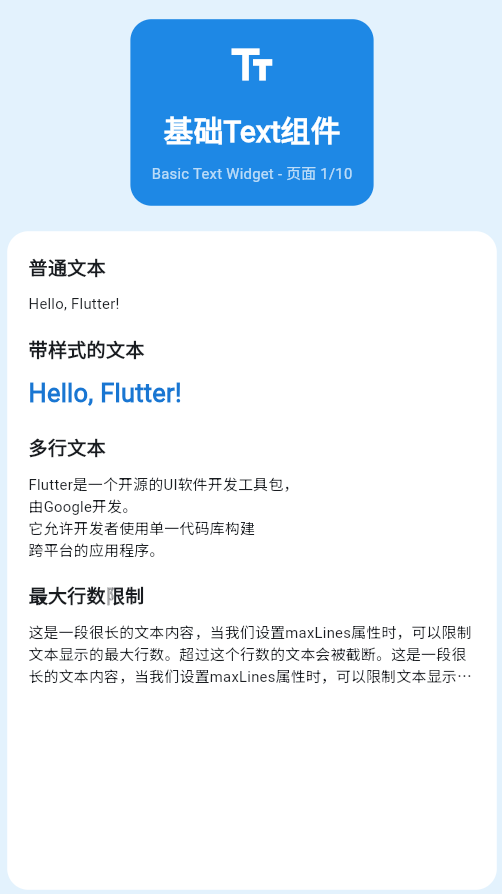
Text是Flutter中最基础、最常用的组件,用于显示文本内容。了解Text组件是掌握Flutter UI开发的第一步。
Text组件的基本结构
| 属性 | 说明 | 必需 | 默认值 |
|---|---|---|---|
| data | 要显示的文本字符串 | 是 | 无 |
| style | 文本样式 | 否 | 默认样式 |
| textAlign | 文本对齐方式 | 否 | TextAlign.start |
| maxLines | 最大行数 | 否 | 无限制 |
| overflow | 溢出处理方式 | 否 | TextOverflow.clip |
二、创建简单文本
最基本的Text组件
Text('Hello, Flutter!')
添加样式的Text
Text(
  'Hello, Flutter!',
  style: TextStyle(
    fontSize: 24,
    fontWeight: FontWeight.bold,
    color: Colors.blue,
  ),
)
带颜色和背景的Text
Container(
  padding: EdgeInsets.all(16),
  color: Colors.yellow.shade100,
  child: Text(
    '带背景的文本',
    style: TextStyle(
      fontSize: 20,
      color: Colors.blue.shade800,
    ),
  ),
)
三、文本样式属性
TextStyle核心属性
常用样式示例
// 大标题
Text(
  '大标题文本',
  style: TextStyle(
    fontSize: 32,
    fontWeight: FontWeight.bold,
    color: Colors.black87,
  ),
)

// 小标题
Text(
  '小标题文本',
  style: TextStyle(
    fontSize: 20,
    fontWeight: FontWeight.w600,
    color: Colors.black54,
  ),
)

// 正文
Text(
  '这是一段正文文本,使用默认字体大小和颜色。',
  style: TextStyle(
    fontSize: 14,
    color: Colors.black87,
  ),
)

// 辅助文本
Text(
  '辅助说明文本',
  style: TextStyle(
    fontSize: 12,
    color: Colors.grey.shade600,
  ),
)
四、文本装饰
下划线、删除线等装饰
Column(
  children: [
    // 下划线
    Text(
      '带下划线的文本',
      style: TextStyle(
        decoration: TextDecoration.underline,
        decorationColor: Colors.blue,
      ),
    ),

    // 删除线
    Text(
      '带删除线的文本',
      style: TextStyle(
        decoration: TextDecoration.lineThrough,
        decorationColor: Colors.red,
      ),
    ),

    // 上划线
    Text(
      '带上划线的文本',
      style: TextStyle(
        decoration: TextDecoration.overline,
        decorationColor: Colors.green,
      ),
    ),
  ],
)
装饰样式
Text(
  '双下划线',
  style: TextStyle(
    decoration: TextDecoration.underline,
    decorationStyle: TextDecorationStyle.double,
    decorationColor: Colors.blue,
    decorationThickness: 2,
  ),
)
五、完整示例
class BasicTextExample extends StatelessWidget {
const BasicTextExample({super.key});
Widget build(BuildContext context) {
return Scaffold(
appBar: AppBar(title: Text('基础Text组件')),
body: Padding(
padding: EdgeInsets.all(16),
child: Column(
crossAxisAlignment: CrossAxisAlignment.start,
children: [
// 简单文本
Text('Hello, Flutter!',
style: TextStyle(fontSize: 24, color: Colors.blue)),
SizedBox(height: 16),
// 大标题
Text('这是大标题',
style: TextStyle(
fontSize: 32,
fontWeight: FontWeight.bold,
color: Colors.black87)),
SizedBox(height: 8),
// 小标题
Text('这是小标题',
style: TextStyle(
fontSize: 20,
fontWeight: FontWeight.w600,
color: Colors.black54)),
SizedBox(height: 8),
// 正文
Text('这是正文文本,展示了基本的文本显示功能。',
style: TextStyle(fontSize: 14, color: Colors.black87)),
SizedBox(height: 16),
// 带装饰的文本
Text('带下划线的文本',
style: TextStyle(
decoration: TextDecoration.underline,
decorationColor: Colors.blue)),
SizedBox(height: 8),
Text('带删除线的文本',
style: TextStyle(
decoration: TextDecoration.lineThrough,
decorationColor: Colors.red)),
],
),
),
);
}
}
六、最佳实践
| 实践 | 说明 | 效果 |
|---|---|---|
| 使用const | 避免不必要的重建 | 提升性能 |
| 合理设置字号 | 层次分明 | 提升可读性 |
| 使用语义化颜色 | 考虑主题一致性 | 便于主题切换 |
| 提取样式常量 | 复用样式 | 代码简洁 |
欢迎加入开源鸿蒙跨平台社区:https://openharmonycrossplatform.csdn.net

AtomGit 是由开放原子开源基金会联合 CSDN 等生态伙伴共同推出的新一代开源与人工智能协作平台。平台坚持“开放、中立、公益”的理念,把代码托管、模型共享、数据集托管、智能体开发体验和算力服务整合在一起,为开发者提供从开发、训练到部署的一站式体验。
更多推荐

 15
15 0
0- 0


 已为社区贡献30条内容

所有评论(0)