基于 ArkTS 的 OpenHarmony 开发完整指南(一)网络请求
一、ArkTS 新项目创建
1.1 新建项目
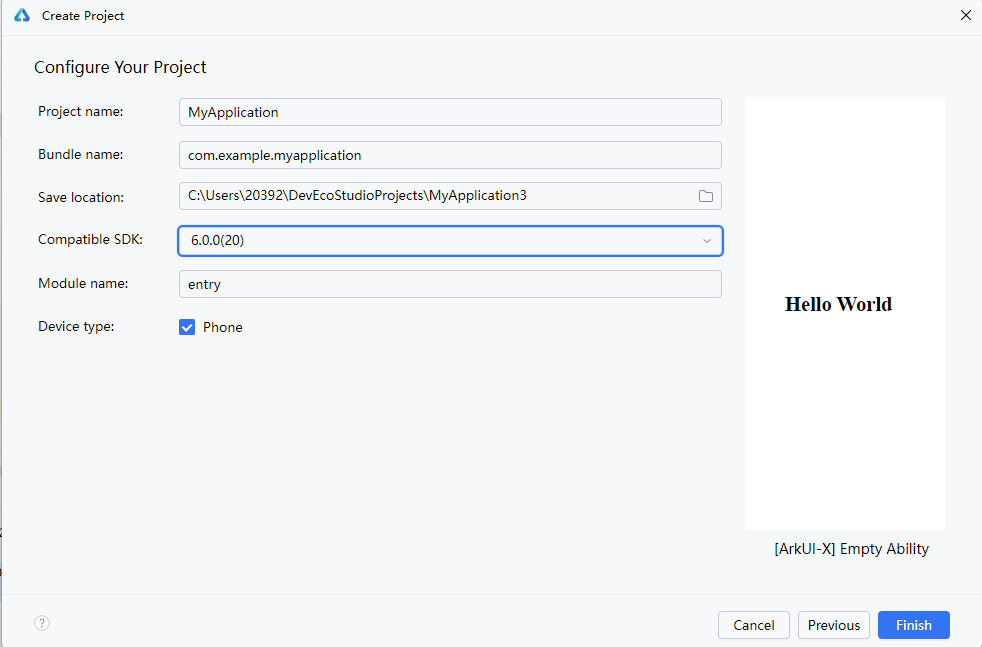
- 点击
Create Project,选择[ArkUI-X] Empty Ability - 这里有点小bug,如果还提示缺少SDK就再点进去选择一下
- 设置好项目名,包名,保存路径等项目信息
- 点击确定
1.2 配置虚拟机
-
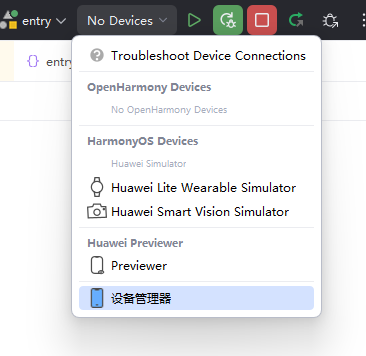
新建项目后点击上方
设备选择框->设备管理器
-
提示发现新镜像,点击
是即可。 -
弹出窗口内。无特殊需求直接点击下一步、完成即可。
-
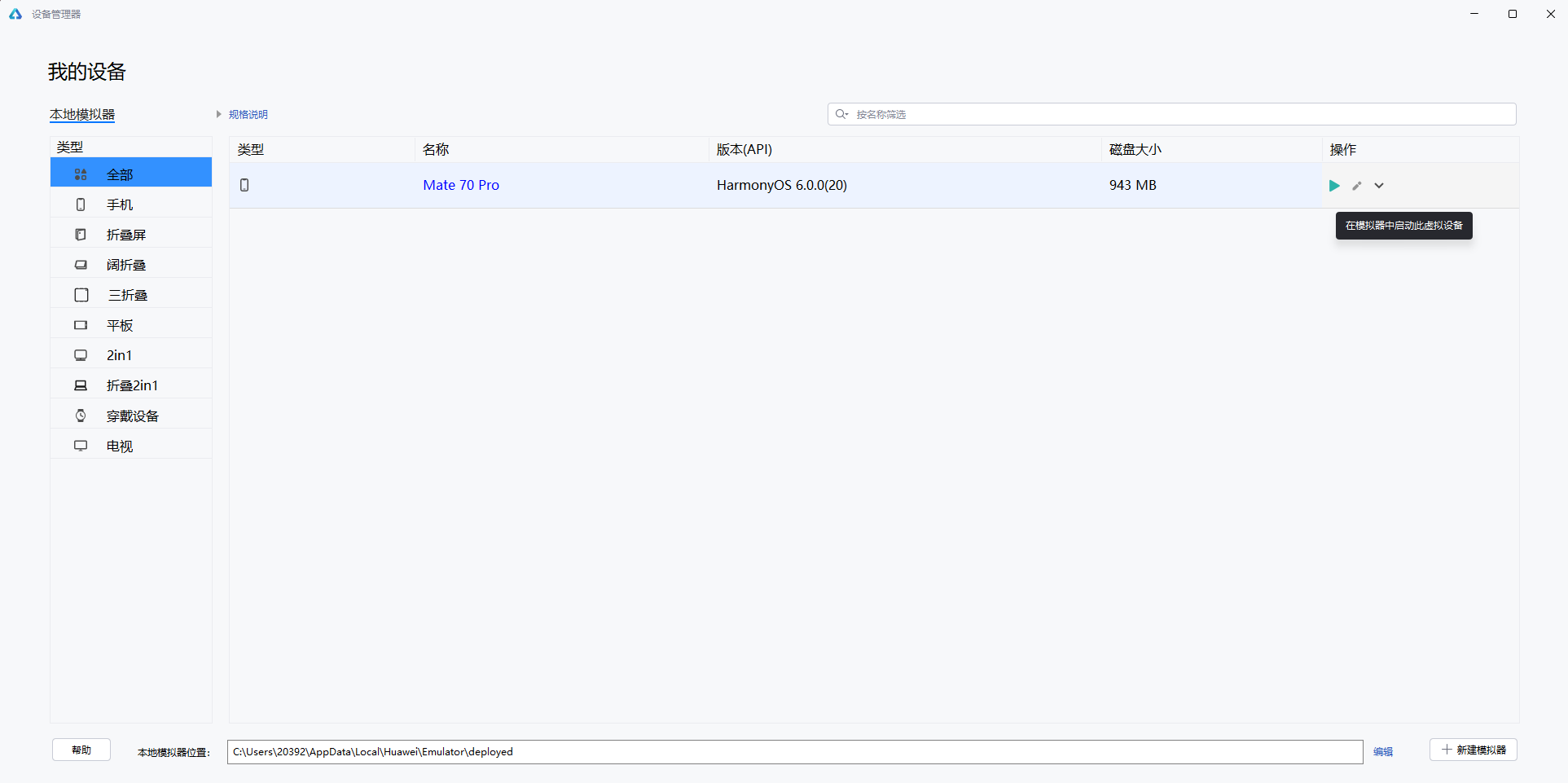
设备管理器内显示新创建的设备,点击右侧小三角即可启动虚拟机(之后可关闭设备管理器页面)
-
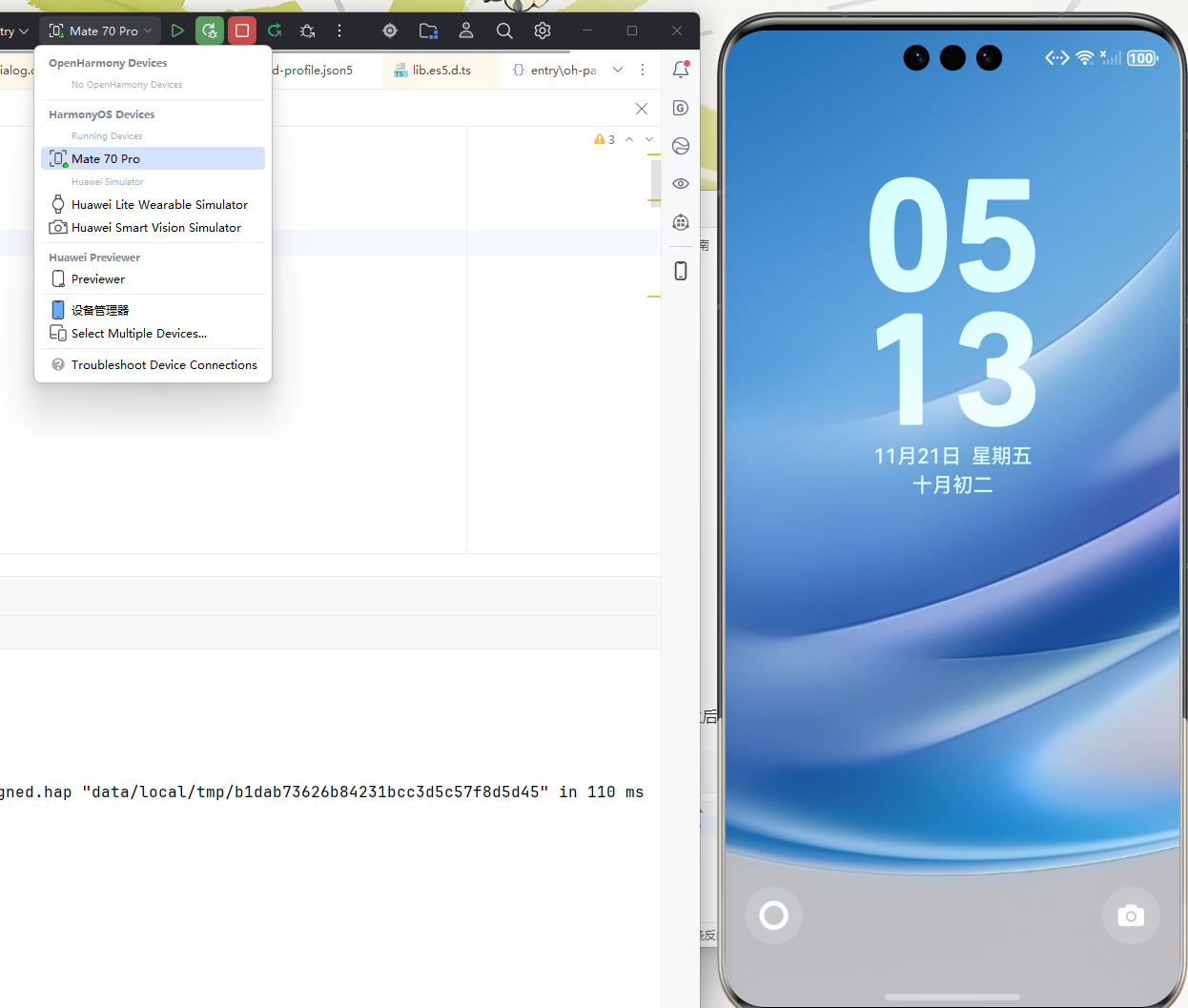
待虚拟器启动完成后,点击上方设备栏,即可看到已启动的虚拟机
-
选中虚拟机即可
一、ArkTS X UI
其实原理上和安卓中的 Jetpack Compose 差不多,组件做成了可组合函数模块,可以按需嵌套和拼接,然后通过注解进行渲染等设置
详细组件使用教程可参见
基本语法概述-学习UI范式基本语法-UI开发 (ArkTS声明式开发范式)-ArkUI(方舟UI框架)-应用框架 - 华为HarmonyOS开发者
进入项目后首先找到entry/src/main/ets/pages/index.ets,然后找到build(),其中的内容即是页面元素与布局
将其中内容清空然后开始填写我们自己的内容。
首先添加一个列布局,
build() {
  Column({ space: 10 }) {
	}
}
然后放置两个输入框用于输入搜索关键字和 api-token
build() {
  Column({ space: 10 }) {
    // 搜索输入区
    TextInput({ placeholder: '输入搜索关键字' })
      .width('90%')
      .height(40)
      .onChange((value: string) => this.searchKeyword = value)

    TextInput({ placeholder: '输入API访问令牌' })
      .width('90%')
      .height(40)
      .type(InputType.Password)
      .onChange((value: string) => this.accessToken = value)
}
添加一个按钮用于提交搜索
build() {
  Column({ space: 10 }) {
    // 搜索输入区
    TextInput({ placeholder: '输入搜索关键字' })
      .width('90%')
      .height(40)
      .onChange((value: string) => this.searchKeyword = value)

    TextInput({ placeholder: '输入API访问令牌' })
      .width('90%')
      .height(40)
      .type(InputType.Password)
      .onChange((value: string) => this.accessToken = value)

    Button('搜索用户', { type: ButtonType.Capsule })
      .width('50%')
      .margin(10)
      .onClick(() => this.fetchUsers())
}
最后添加一个列表用于显示搜索回来的结果
build() {
  Column({ space: 10 }) {
    // 搜索输入区
    TextInput({ placeholder: '输入搜索关键字' })
      .width('90%')
      .height(40)
      .onChange((value: string) => this.searchKeyword = value)

    TextInput({ placeholder: '输入API访问令牌' })
      .width('90%')
      .height(40)
      .type(InputType.Password)
      .onChange((value: string) => this.accessToken = value)

    Button('搜索用户', { type: ButtonType.Capsule })
      .width('50%')
      .margin(10)
      .onClick(() => this.fetchUsers())

    // 用户列表
    if (this.userList.length > 0 || this.isLoading) {
      List({ space: 10 }) {
        ForEach(this.userList, (user: User) => {
          ListItem() {
            Row({ space: 10 }) {
              Column({ space: 5 }) {
                Text(user.login)
                  .fontSize(16)
                  .fontWeight(FontWeight.Bold)
                Text(user.id)
                  .fontSize(12)
                  .fontColor(Color.Gray)
              }
            }            .padding(10)
          }
        }, (user: User) => user.id.toString())
      }
      .width('100%')
      .layoutWeight(1)
    }
  }  .width('100%')
  .height(400)
  .padding(10)
}
二、UI 变化时自动刷新
声明式UI开发的通病是底层数据更新后并不能自动的更新组件显示,需要通过将组件和数据绑定来触发状态更新
因此我们需要将相关变量设定为UI组件的状态,以便在数据变化时自动触发UI更新
@State searchKeyword: string = '';
@State accessToken: string = '';
@State userList: Array<User> = [];
@State isLoading: boolean = false;
三、网络请求
要通过OpenHarmony发送网络请求,我们首先要导入 http 相关的库组件
import { http } from '@kit.NetworkKit';
然后创建并初始化网络请求
const httpRequest = http.createHttp();
const response = await httpRequest.request(
  `https://api.gitcode.com/api/v5/search/users?q=${this.searchKeyword}` +
    `&access_token=${this.accessToken}`,
  {
    method: http.RequestMethod.GET,
    header: { 'Content-Type': 'application/json' }
  });
由于网络请求不是必然成功的,因此加上异常处理以防应用崩溃
try {
  const httpRequest = http.createHttp();
  const response = await httpRequest.request(
    `https://api.gitcode.com/api/v5/search/users?q=${this.searchKeyword}` +
      `&access_token=${this.accessToken}`,
    {
      method: http.RequestMethod.GET,
      header: { 'Content-Type': 'application/json' }
    }  );
}
catch (e) {
  AlertDialog.show({
    message: 'API请求失败,请检查网络',
    confirm: {
      value: '确定',
      action: () => {
      }    }  });
}
finally {
  this.isLoading = false;
}
}
最后加上请求正常通过后的处理代码。
四、数据解析
要解析数据首先我们要知道数据的正确结构,为此我们打开任一调试工具,(例如ApiPost)构建一个正确的请求发送过去
通过 API 介绍页面我们可以获知相关信息
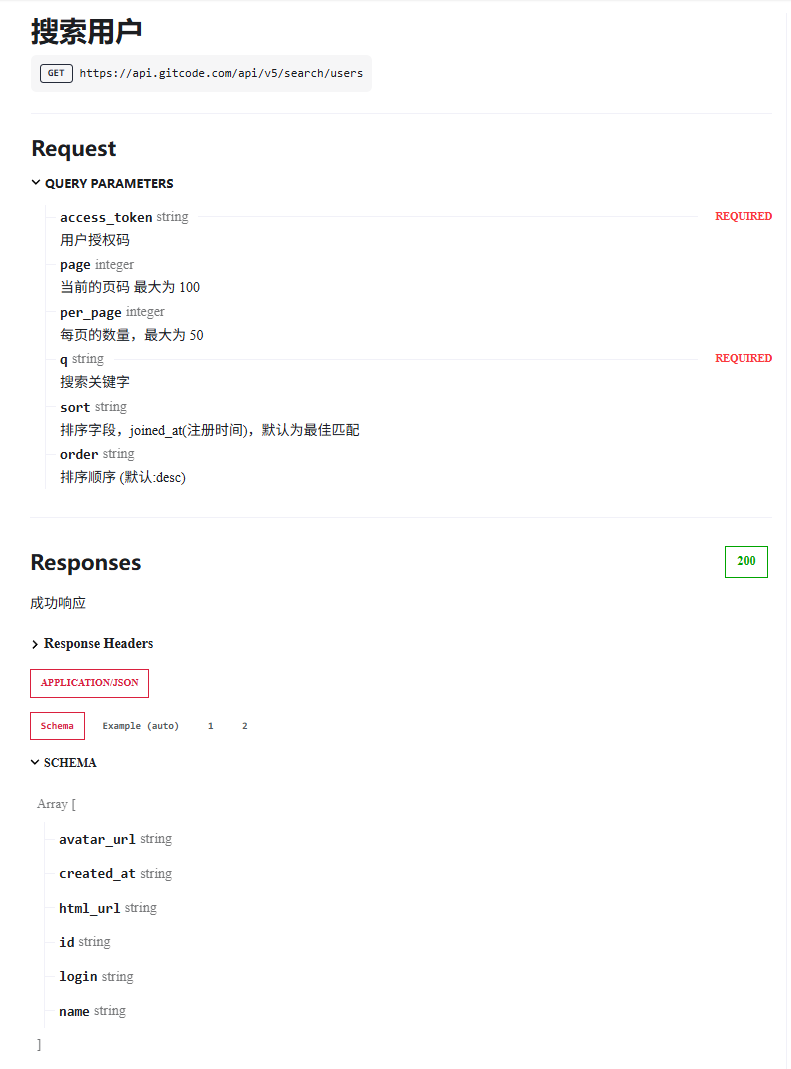
首先这是一个 GET 请求,请求链接是## https://api.gitcode.com/api/v5/search/users,它有两个必须提供的参数,分别是搜索关键字q和用户授权码access_token,当成功响应请求时,它会返回状态码200并返回一个数组。
我们将这些信息填写到 ApiPost 并点击发送,就在下面得到了返回的原始数据。
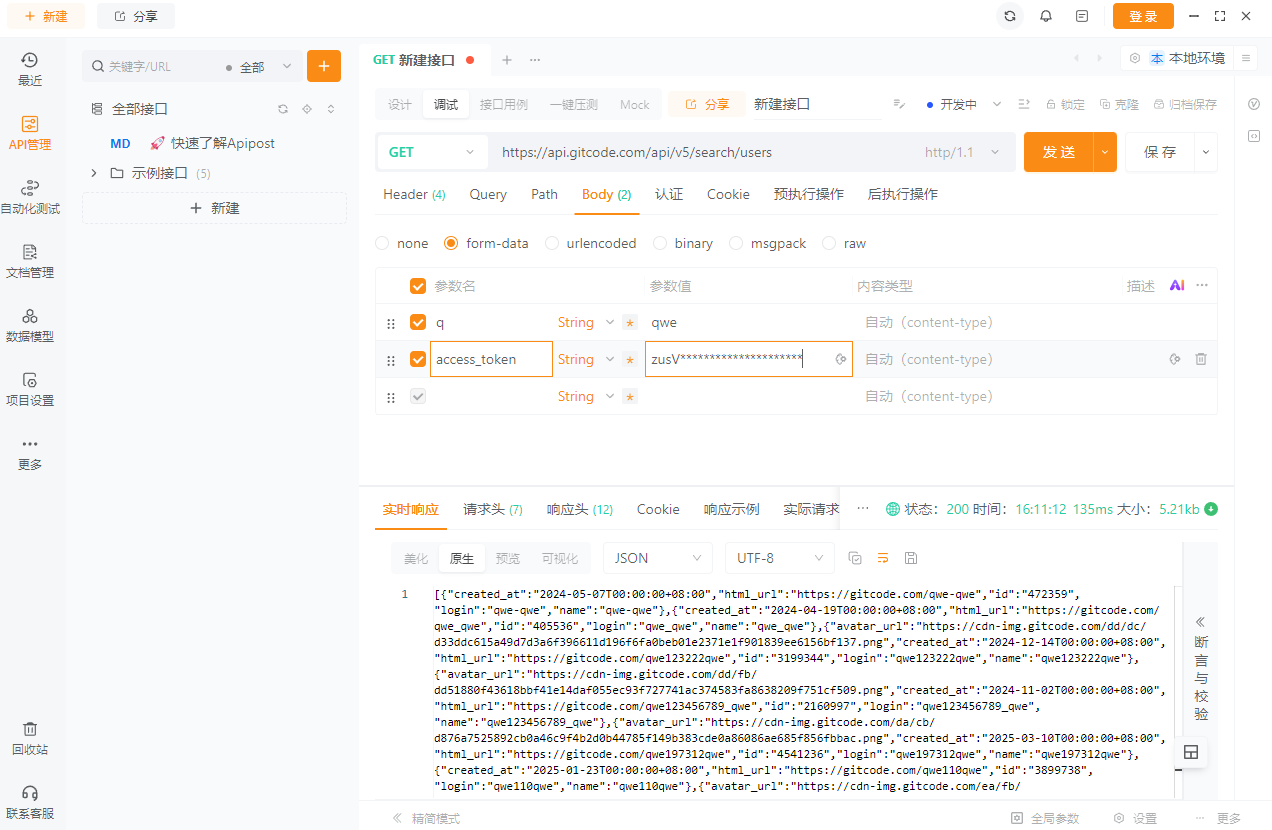
分析格式,我选择简单的显示id和登录名完事。
interface ApiUser {
  id?: number | string;
  login?: string;
}


if (response.responseCode == 200) {
  const result = JSON.parse(response.result as string) as ApiResponse;
  if (Array.isArray(result)) {
    this.userList = [...result.map((item: ApiUser): User => ({
      id: item.id?.toString() || '',
      login: item.login || '',
    }))];
  }
}
将收到的 JSON 字符串 转换为 JSON 对象然后遍历更新到用户列表,触发ui自动更新。
(完成)
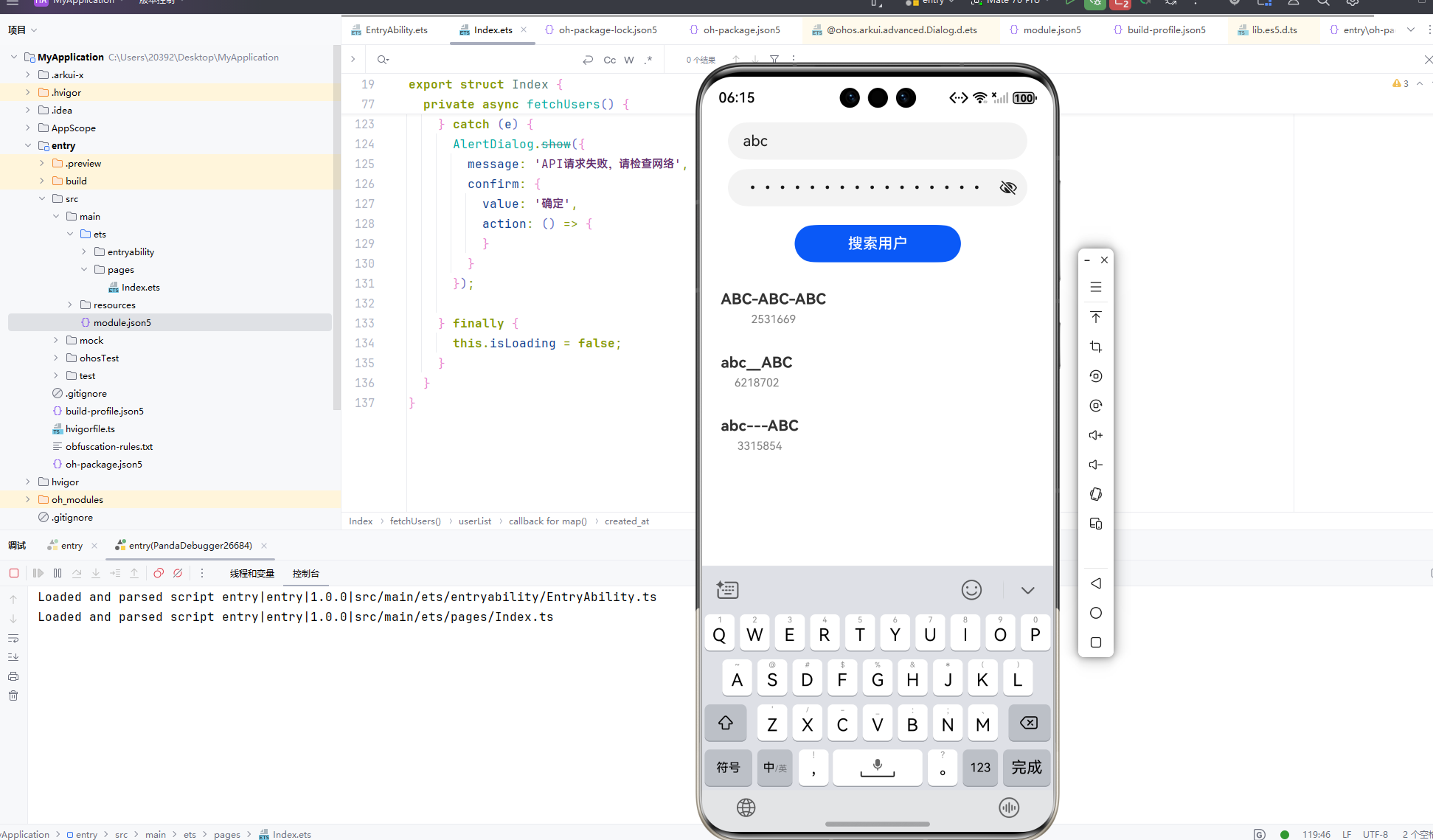

AtomGit 是由开放原子开源基金会联合 CSDN 等生态伙伴共同推出的新一代开源与人工智能协作平台。平台坚持“开放、中立、公益”的理念,把代码托管、模型共享、数据集托管、智能体开发体验和算力服务整合在一起,为开发者提供从开发、训练到部署的一站式体验。
更多推荐



 21
21 0
0- 0


 已为社区贡献2条内容

所有评论(0)