Flutter 框架跨平台鸿蒙开发 ——Platform View机制
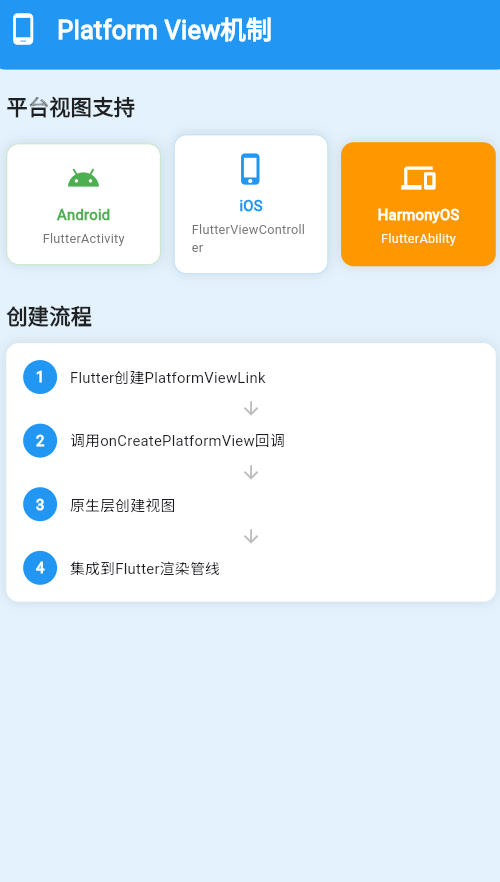
Platform View是Flutter中嵌入原生视图的重要机制,它允许在Flutter UI中集成Android、iOS、HarmonyOS等平台的原生组件。
一、Platform View概述
Platform View通过将原生视图的渲染结果以纹理的形式嵌入到Flutter的渲染管线中,实现了Flutter与原生视图的无缝集成。
// Platform View基础使用
class PlatformViewExample extends StatelessWidget {
Widget build(BuildContext context) {
return PlatformViewLink(
viewType: 'platform_view_type',
surfaceFactory: (context, controller) {
return AndroidViewSurface(
controller: controller as AndroidViewController,
gestureRecognizers: const <Factory<OneSequenceGestureRecognizer>>{},
);
},
onCreatePlatformView: (params) {
// 创建平台视图控制器
return initAndroidPlatformView(params);
},
);
}
}
二、Platform View的创建流程
Platform View的创建涉及多个步骤,从Flutter侧发起请求到原生侧创建实际视图。
创建流程图
创建参数说明
| 参数 | 类型 | 说明 |
|---|---|---|
| viewType | String | 平台视图的唯一标识符 |
| surfaceFactory | Function | 创建Flutter Surface的工厂方法 |
| onCreatePlatformView | Function | 创建平台视图的回调 |
| onDisposePlatformView | Function | 销毁平台视图的回调 |
三、Android Platform View实现
在Android平台上,Platform View通过AndroidView实现。
AndroidView使用方式
// AndroidView示例
AndroidView(
  viewType: 'com.example.myview',
  creationParams: <String, dynamic>{
    'text': 'Hello from Android',
  },
  creationParamsCodec: const StandardMessageCodec(),
  onPlatformViewCreated: (int id) {
    // 视图创建完成回调
    print('Platform view created with id: $id');
  },
)
Android视图注册
// 原生侧注册视图
class MainActivity : FlutterActivity() {
    override fun configureFlutterEngine(flutterEngine: FlutterEngine) {
        super.configureFlutterEngine(flutterEngine)
        flutterEngine
            .platformViewsController
            .registry
            .registerViewFactory(
                "com.example.myview",
                MyViewFactory()
            )
    }
}

class MyViewFactory : PlatformViewFactory(StandardMessageCodec.INSTANCE) {
    override fun create(context: Context, viewId: Int, args: Any?): PlatformView {
        return MyPlatformView(context, viewId, args as Map<String, Any>?)
    }
}
四、iOS Platform View实现
iOS平台上,Platform View通过UiKitView实现。
UiKitView使用方式
// UiKitView示例
UiKitView(
  viewType: 'com.example.myview',
  creationParams: <String, dynamic>{
    'text': 'Hello from iOS',
  },
  creationParamsCodec: const StandardMessageCodec(),
  onPlatformViewCreated: (int id) {
    print('Platform view created with id: $id');
  },
)
iOS视图注册
// 原生侧注册视图
class MyViewFactory: NSObject, FlutterPlatformViewFactory {
    func create(withFrame frame: CGRect, viewIdentifier viewId: Int64, arguments args: Any?) -> FlutterPlatformView {
        return MyPlatformView(frame, viewId: viewId, args: args as? [String: Any])
    }
}

@main
@objc class AppDelegate: FlutterAppDelegate {
    override func application(_ application: UIApplication, didFinishLaunchingWithOptions launchOptions: [UIApplication.LaunchOptionsKey: Any]?) -> Bool {
        let controller = window?.rootViewController as? FlutterViewController
        let registry = controller?.engine?.platformViewsController?.registry
        registry?.register(
            MyViewFactory(messenger: controller?.binaryMessenger),
            withId: "com.example.myview"
        )
        return super.application(application, didFinishLaunchingWithOptions: launchOptions)
    }
}
五、HarmonyOS Platform View实现
HarmonyOS平台上,Platform View通过HarmonyOS View实现。
HarmonyOS View使用方式
// HarmonyOS View示例
HarmonyOSView(
  viewType: 'com.example.myview',
  creationParams: <String, dynamic>{
    'text': 'Hello from HarmonyOS',
  },
  creationParamsCodec: const StandardMessageCodec(),
  onPlatformViewCreated: (int id) {
    print('Platform view created with id: $id');
  },
)
HarmonyOS视图注册
// 原生侧注册视图
import { PlatformViewFactory } from '@ohos/flutter_ohos';

class MyViewFactory implements PlatformViewFactory {
    create(context: Context, viewId: number, args: Object): PlatformView {
        return new MyPlatformView(context, viewId, args as Record<string, Object>);
    }
}

// 在Ability中注册
export default class EntryAbility extends FlutterAbility {
    onEngineCreate(): void {
        this.engine.getPlatformViewRegistry().registerViewFactory(
            'com.example.myview',
            new MyViewFactory()
        );
    }
}
六、Platform View的渲染模式
Platform View支持两种渲染模式:虚拟显示模式和混合合成模式。
渲染模式对比
| 特性 | 虚拟显示模式 | 混合合成模式 |
|---|---|---|
| 性能 | 较好 | 较差 |
| 兼容性 | 低 | 高 |
| 复杂度 | 高 | 低 |
| 推荐场景 | 复杂动画 | 简单交互 |
模式选择建议
// 根据场景选择渲染模式
class PlatformViewModeSelector {
  static PlatformViewMode selectMode(PlatformViewInfo info) {
    // 如果需要高性能动画,使用虚拟显示模式
    if (info.requiresAnimation) {
      return PlatformViewMode.virtualDisplay;
    }

    // 如果需要更好的兼容性,使用混合合成模式
    if (info.requiresHighCompatibility) {
      return PlatformViewMode.hybridComposition;
    }

    // 默认使用虚拟显示模式
    return PlatformViewMode.virtualDisplay;
  }
}
七、Platform View的事件处理
Platform View需要正确处理触摸事件和焦点事件。
触摸事件处理
// Platform View手势识别器
class PlatformViewGestureHandler {
  final Set<Factory<OneSequenceGestureRecognizer>> _recognizers;

  void addRecognizer(Factory<OneSequenceGestureRecognizer> recognizer) {
    _recognizers.add(recognizer);
  }

  void handlePointerEvent(PointerEvent event) {
    // 分发事件到原生视图
    for (var recognizer in _recognizers) {
      recognizer().addPointer(event);
    }
  }
}
焦点管理
// 焦点管理器
class FocusManager {
  void requestFocus(int viewId) {
    // 请求焦点到指定视图
  }

  void releaseFocus(int viewId) {
    // 释放视图焦点
  }

  int? getFocusedView() {
    // 获取当前焦点视图
  }
}
八、Platform View的性能优化
Platform View的性能优化是提升应用流畅度的关键。
优化策略
| 优化方向 | 具体措施 | 效果 |
|---|---|---|
| 视图复用 | 使用视图池 | 减少创建开销 |
| 延迟加载 | 按需加载视图 | 加快启动速度 |
| 纹理缓存 | 缓存渲染结果 | 提升渲染性能 |
| 事件批处理 | 批量处理事件 | 降低调度开销 |
视图池实现
// Platform View池
class PlatformViewPool {
  final Map<String, Queue<PlatformViewController>> _pool = {};

  Future<PlatformViewController> obtain(String viewType) async {
    var queue = _pool[viewType];
    if (queue != null && queue.isNotEmpty) {
      return queue.removeFirst();
    }
    return _createView(viewType);
  }

  void release(String viewType, PlatformViewController controller) {
    if (!_pool.containsKey(viewType)) {
      _pool[viewType] = Queue();
    }
    _pool[viewType]!.add(controller);
  }
}
九、Platform View的常见问题
Platform View使用过程中可能遇到的问题及解决方案。
问题1:触摸事件冲突
问题:Platform View和Flutter Widget同时响应触摸事件。
解决方案:设置正确的手势识别器优先级。
PlatformViewLink(
  gestureRecognizers: <Factory<OneSequenceGestureRecognizer>>{
    Factory<OneSequenceGestureRecognizer>(
      () => EagerGestureRecognizer(),
    ),
  },
  // ...
)
问题2:渲染闪烁
问题:Platform View在滚动时出现闪烁。
解决方案:使用纹理缓存或调整渲染模式。
AndroidView(
  creationParamsCodec: const StandardMessageCodec(),
  // 使用虚拟显示模式减少闪烁
  layoutDirection: TextDirection.ltr,
  // ...
)
问题3:内存泄漏
问题:Platform View未正确释放导致内存泄漏。
解决方案:在onDispose中正确清理资源。
void dispose() {
_platformViewController?.dispose();
super.dispose();
}
十、Platform View的最佳实践
使用Platform View时应该遵循的最佳实践。
实践1:合理使用Platform View
- 仅在必要时使用:优先使用Flutter原生Widget
- 控制视图数量:避免过多Platform View导致性能问题
- 正确销毁视图:及时释放不用的Platform View
实践2:优化性能
- 使用视图复用:相同类型的视图可以复用
- 延迟创建视图:按需创建Platform View
- 避免频繁更新:减少Platform View的重绘次数
实践3:处理兼容性
- 测试多平台:确保在各平台上表现一致
- 降级处理:提供Flutter原生实现作为备选
- 版本适配:处理不同系统版本之间的差异
欢迎加入开源鸿蒙跨平台社区:https://openharmonycrossplatform.csdn.net

AtomGit 是由开放原子开源基金会联合 CSDN 等生态伙伴共同推出的新一代开源与人工智能协作平台。平台坚持“开放、中立、公益”的理念,把代码托管、模型共享、数据集托管、智能体开发体验和算力服务整合在一起,为开发者提供从开发、训练到部署的一站式体验。
更多推荐
 8
8 0
0- 0



 已为社区贡献24条内容

所有评论(0)