Flutter for OpenHarmony:从零搭建今日资讯App(二十四)API服务封装的完整实践
网络请求是几乎所有应用都要做的事情。但如果每个页面都自己写网络请求代码,很快就会变成一团乱麻:重复代码到处都是,错误处理各不相同,想改个接口地址要改好几个地方。
今天这篇文章,咱们就来聊聊怎么把API服务封装好,让网络请求变得简单、统一、易维护。
为什么要封装API服务
先看看不封装会怎样。假设在首页要获取新闻列表:
// 首页
Future<void> _loadNews() async {
  final response = await http.get(Uri.parse('https://api.example.com/news'));
  if (response.statusCode == 200) {
    final data = json.decode(response.body);
    // 处理数据...
  }
}
然后在搜索页也要请求:
// 搜索页
Future<void> _searchNews(String query) async {
  final response = await http.get(Uri.parse('https://api.example.com/news?search=$query'));
  if (response.statusCode == 200) {
    final data = json.decode(response.body);
    // 处理数据...
  }
}
问题来了:
接口地址重复:https://api.example.com写了好几遍,要改的话得改好几个地方。
错误处理不统一:有的地方处理了异常,有的地方没处理,出问题时行为不一致。
代码重复:JSON解析、状态码判断这些逻辑到处都是。
难以测试:网络请求散落在各个页面,想写单元测试很困难。
封装API服务就是为了解决这些问题。
ApiService的基本结构
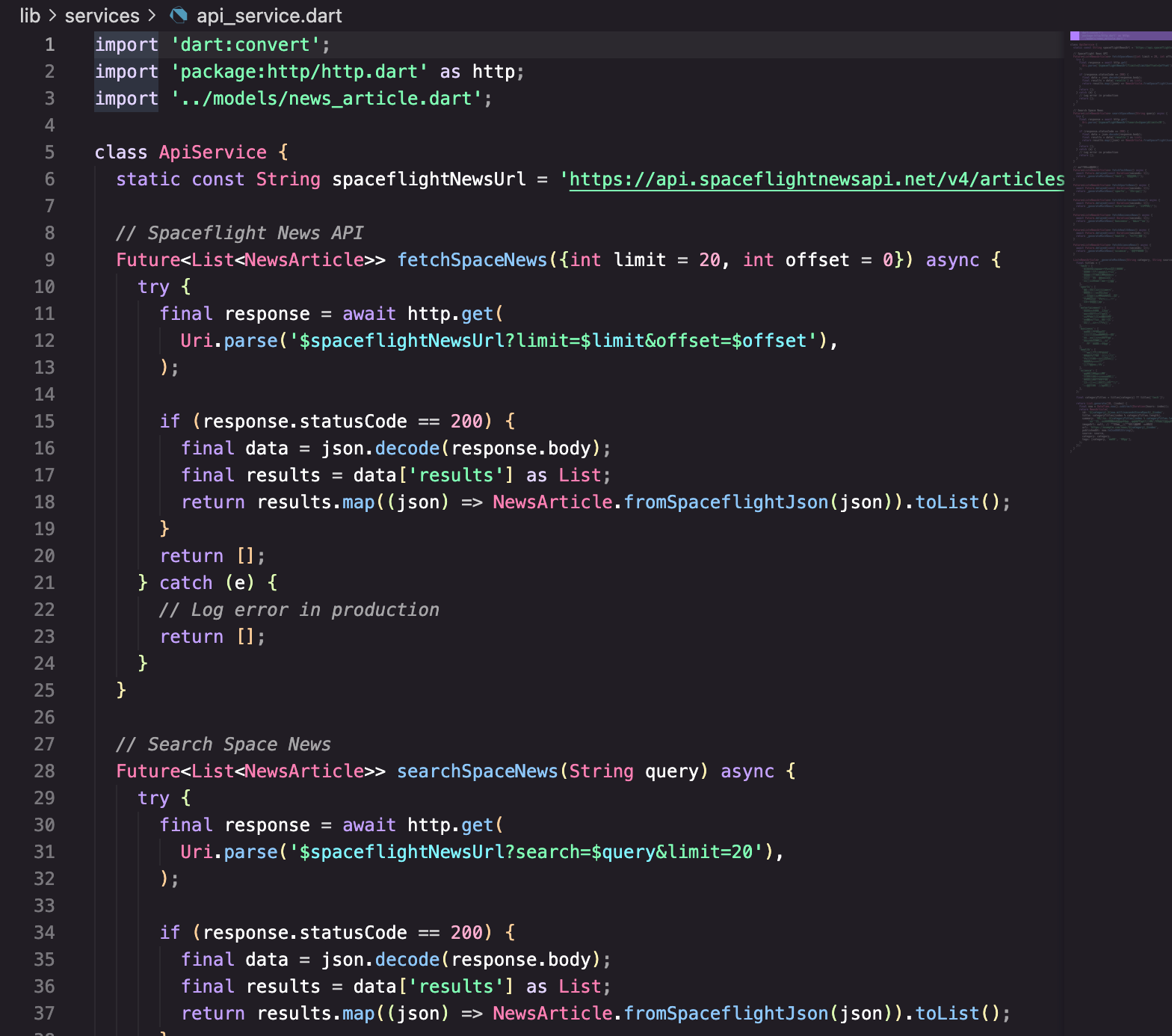
来看看项目里的API服务是怎么封装的:
import 'dart:convert';
import 'package:http/http.dart' as http;
import '../models/news_article.dart';

class ApiService {
  static const String spaceflightNewsUrl = 'https://api.spaceflightnewsapi.net/v4/articles';
首先导入必要的包:dart:convert用于JSON编解码,http包用于发送HTTP请求,还有数据模型。
接口地址用常量定义:static const表示这是一个编译时常量,不会变。把接口地址集中定义,要改的时候只改一个地方。
获取新闻列表
Future<List<NewsArticle>> fetchSpaceNews({int limit = 20, int offset = 0}) async {
  try {
    final response = await http.get(
      Uri.parse('$spaceflightNewsUrl?limit=$limit&offset=$offset'),
    );

    if (response.statusCode == 200) {
      final data = json.decode(response.body);
      final results = data['results'] as List;
      return results.map((json) => NewsArticle.fromSpaceflightJson(json)).toList();
    }
    return [];
  } catch (e) {
    return [];
  }
}
来拆解一下这段代码:
返回类型是Future<List<NewsArticle>>:异步方法返回Future,里面是新闻文章列表。调用方拿到的是类型安全的对象列表,不是原始JSON。
参数有默认值:limit = 20和offset = 0,调用时可以不传,用默认值;也可以传自定义值,实现分页。
用try-catch包裹:网络请求可能失败(网络断开、服务器错误、超时等),用try-catch捕获异常,避免应用崩溃。
检查状态码:只有200才处理数据,其他状态码返回空列表。实际项目中可能需要更细致的处理。
JSON转模型:results.map((json) => NewsArticle.fromSpaceflightJson(json)).toList()把JSON数组转成模型对象列表。
搜索新闻
Future<List<NewsArticle>> searchSpaceNews(String query) async {
  try {
    final response = await http.get(
      Uri.parse('$spaceflightNewsUrl?search=$query&limit=20'),
    );

    if (response.statusCode == 200) {
      final data = json.decode(response.body);
      final results = data['results'] as List;
      return results.map((json) => NewsArticle.fromSpaceflightJson(json)).toList();
    }
    return [];
  } catch (e) {
    return [];
  }
}
搜索接口和列表接口结构类似,只是URL参数不同。search=$query把用户输入的关键词传给后端。
你可能注意到了,这两个方法有很多重复代码。后面会讲怎么优化。
模拟数据的实现
开发阶段,后端接口可能还没准备好,或者想避免频繁请求真实接口。这时候可以用模拟数据:
Future<List<NewsArticle>> fetchTechNews() async {
  await Future.delayed(const Duration(seconds: 1));
  return _generateMockNews('tech', '科技资讯');
}
Future.delayed模拟网络延迟:真实网络请求需要时间,模拟数据也加个延迟,让UI表现更接近真实情况。如果模拟数据瞬间返回,可能会掩盖一些加载状态的bug。
生成模拟数据
List<NewsArticle> _generateMockNews(String category, String source) {
  final titles = {
    'tech': [
      'AI突破:新模型超越人类表现',
      '量子计算达到新里程碑',
      '科技巨头宣布重大合作',
      '革命性电池技术发布',
      '网络安全威胁持续上升',
    ],
    'sports': [
      '冠军决赛:惊险获胜',
      '田径赛场打破纪录',
      '转会新闻:重要球员转会',
      '奥运会筹备工作进行中',
      '体育科技创新',
    ],
    // ... 其他分类
  };

  final categoryTitles = titles[category] ?? titles['tech']!;

  return List.generate(10, (index) {
    final now = DateTime.now().subtract(Duration(hours: index));
    return NewsArticle(
      id: '${category}_${now.millisecondsSinceEpoch}_$index',
      title: categoryTitles[index % categoryTitles.length],
      summary: '这是关于${categoryTitles[index % categoryTitles.length].toLowerCase()}的详细摘要。'
          '通过我们专家团队的最新更新和深度分析,让您随时了解最新资讯。',
      imageUrl: null,
      url: 'https://example.com/news/${category}_$index',
      publishedAt: now.toIso8601String(),
      source: source,
      category: category,
      tags: [category, '热门', '推荐'],
    );
  });
}
这段代码做了几件事:
预定义标题库:每个分类有一组预设的标题,模拟数据从中循环取用。
生成唯一ID:用分类、时间戳、索引组合成ID,确保每条数据的ID都不同。
模拟时间递减:每条新闻的发布时间比上一条早1小时,模拟真实的新闻流。
方法名以下划线开头:_generateMockNews是私有方法,只在类内部使用,外部调用不到。
在Provider中使用API服务
API服务封装好了,怎么在应用里使用呢?看看NewsProvider:
class NewsProvider extends ChangeNotifier {
  final ApiService _apiService = ApiService();

  final Map<String, List<NewsArticle>> _newsCache = {};
  bool _isLoading = false;
  String? _error;
创建ApiService实例:Provider持有一个ApiService实例,所有网络请求都通过它发出。
缓存机制:_newsCache是一个Map,key是分类名,value是该分类的新闻列表。请求过的数据会缓存起来,避免重复请求。
加载状态和错误信息:_isLoading和_error用于UI展示加载中和错误状态。
获取新闻的方法
Future<void> fetchNews(String category) async {
  // 如果缓存中有数据,直接返回
  if (_newsCache.containsKey(category) && _newsCache[category]!.isNotEmpty) {
    return;
  }

  _isLoading = true;
  _error = null;
  notifyListeners();

  try {
    List<NewsArticle> articles;

    switch (category) {
      case 'space':
        articles = await _apiService.fetchSpaceNews();
        break;
      case 'tech':
        articles = await _apiService.fetchTechNews();
        break;
      case 'sports':
        articles = await _apiService.fetchSportsNews();
        break;
      // ... 其他分类
      default:
        articles = await _apiService.fetchSpaceNews();
    }

    _newsCache[category] = articles;
  } catch (e) {
    _error = e.toString();
  } finally {
    _isLoading = false;
    notifyListeners();
  }
}
缓存检查:先检查缓存,有数据就直接返回,不发请求。这样用户切换分类时,已加载过的分类不会重新请求。
状态更新:请求前设置_isLoading = true,请求后设置_isLoading = false。每次状态变化都调用notifyListeners()通知UI刷新。
switch分发:根据分类调用不同的API方法。这里用switch是因为不同分类可能调用不同的接口。
finally确保状态恢复:无论成功还是失败,都要把_isLoading设回false。用finally确保这段代码一定会执行。
刷新新闻
Future<void> refreshNews(String category) async {
  _newsCache.remove(category);
  await fetchNews(category);
}
刷新就是清除缓存后重新请求。先remove删除缓存,再调用fetchNews。因为缓存被清了,fetchNews里的缓存检查会失败,就会发起新请求。
优化:提取公共请求方法
前面说过,fetchSpaceNews和searchSpaceNews有很多重复代码。可以提取一个公共方法:
class ApiService {
  static const String _baseUrl = 'https://api.spaceflightnewsapi.net/v4';

  Future<List<NewsArticle>> _fetchArticles(String endpoint) async {
    try {
      final response = await http.get(Uri.parse('$_baseUrl$endpoint'));

      if (response.statusCode == 200) {
        final data = json.decode(response.body);
        final results = data['results'] as List;
        return results.map((json) => NewsArticle.fromSpaceflightJson(json)).toList();
      }
      return [];
    } catch (e) {
      return [];
    }
  }

  Future<List<NewsArticle>> fetchSpaceNews({int limit = 20, int offset = 0}) {
    return _fetchArticles('/articles?limit=$limit&offset=$offset');
  }

  Future<List<NewsArticle>> searchSpaceNews(String query) {
    return _fetchArticles('/articles?search=$query&limit=20');
  }
}
_fetchArticles是私有方法,封装了HTTP请求、JSON解析、错误处理的通用逻辑。公开方法只需要传入不同的endpoint。
优化:更完善的错误处理
返回空列表虽然简单,但调用方不知道是真的没数据,还是请求失败了。可以用自定义异常或Result类型:
方案一:抛出异常
class ApiException implements Exception {
final String message;
final int? statusCode;
ApiException(this.message, {this.statusCode});
String toString() => 'ApiException: $message (status: $statusCode)';
}
Future<List<NewsArticle>> fetchSpaceNews({int limit = 20, int offset = 0}) async {
try {
final response = await http.get(
Uri.parse('$spaceflightNewsUrl?limit=$limit&offset=$offset'),
);
if (response.statusCode == 200) {
final data = json.decode(response.body);
final results = data['results'] as List;
return results.map((json) => NewsArticle.fromSpaceflightJson(json)).toList();
} else if (response.statusCode == 404) {
throw ApiException('资源不存在', statusCode: 404);
} else if (response.statusCode == 500) {
throw ApiException('服务器错误', statusCode: 500);
} else {
throw ApiException('请求失败', statusCode: response.statusCode);
}
} on SocketException {
throw ApiException('网络连接失败,请检查网络');
} on TimeoutException {
throw ApiException('请求超时,请稍后重试');
} on FormatException {
throw ApiException('数据格式错误');
}
}
调用方用try-catch处理:
try {
  final articles = await _apiService.fetchSpaceNews();
  // 处理数据
} on ApiException catch (e) {
  // 显示错误信息
  showError(e.message);
}
方案二:Result类型
class Result<T> {
  final T? data;
  final String? error;

  Result.success(this.data) : error = null;
  Result.failure(this.error) : data = null;

  bool get isSuccess => error == null;
  bool get isFailure => error != null;
}

Future<Result<List<NewsArticle>>> fetchSpaceNews({int limit = 20, int offset = 0}) async {
  try {
    final response = await http.get(
      Uri.parse('$spaceflightNewsUrl?limit=$limit&offset=$offset'),
    );

    if (response.statusCode == 200) {
      final data = json.decode(response.body);
      final results = data['results'] as List;
      final articles = results.map((json) => NewsArticle.fromSpaceflightJson(json)).toList();
      return Result.success(articles);
    }
    return Result.failure('请求失败:${response.statusCode}');
  } catch (e) {
    return Result.failure('网络错误:$e');
  }
}
调用方判断结果:
final result = await _apiService.fetchSpaceNews();
if (result.isSuccess) {
  // 处理 result.data
} else {
  // 显示 result.error
}
Result类型的好处是不用try-catch,代码更清晰。缺点是每次都要判断成功失败。
优化:添加请求超时
网络请求可能卡住很久,需要设置超时:
Future<List<NewsArticle>> fetchSpaceNews({int limit = 20, int offset = 0}) async {
  try {
    final response = await http.get(
      Uri.parse('$spaceflightNewsUrl?limit=$limit&offset=$offset'),
    ).timeout(const Duration(seconds: 10));

    // ...
  } on TimeoutException {
    // 超时处理
    return [];
  }
}
.timeout(Duration)设置超时时间,超过这个时间没响应就抛出TimeoutException。
优化:添加请求重试
网络不稳定时,自动重试几次可能就成功了:
Future<http.Response> _getWithRetry(String url, {int maxRetries = 3}) async {
  int retries = 0;

  while (retries < maxRetries) {
    try {
      final response = await http.get(Uri.parse(url))
          .timeout(const Duration(seconds: 10));

      if (response.statusCode == 200) {
        return response;
      }

      // 5xx错误可以重试,4xx错误不重试
      if (response.statusCode >= 500) {
        retries++;
        await Future.delayed(Duration(seconds: retries));  // 递增延迟
        continue;
      }

      return response;
    } on TimeoutException {
      retries++;
      if (retries >= maxRetries) rethrow;
      await Future.delayed(Duration(seconds: retries));
    } on SocketException {
      retries++;
      if (retries >= maxRetries) rethrow;
      await Future.delayed(Duration(seconds: retries));
    }
  }

  throw Exception('请求失败,已重试$maxRetries次');
}
递增延迟:每次重试前等待的时间递增(1秒、2秒、3秒),避免短时间内大量请求。
只重试可恢复的错误:超时、网络断开、服务器错误可以重试;404、403这种客户端错误重试也没用。
优化:请求取消
用户快速切换页面时,之前的请求可能还没完成。这些请求的结果已经不需要了,应该取消掉:
import 'package:http/http.dart' as http;

class ApiService {
  http.Client? _client;

  void cancelRequests() {
    _client?.close();
    _client = null;
  }

  Future<List<NewsArticle>> fetchSpaceNews({int limit = 20, int offset = 0}) async {
    _client?.close();
    _client = http.Client();

    try {
      final response = await _client!.get(
        Uri.parse('$spaceflightNewsUrl?limit=$limit&offset=$offset'),
      );
      // ...
    } finally {
      _client?.close();
      _client = null;
    }
  }
}
每次请求前关闭之前的client,创建新的client。这样之前的请求就会被取消。
在页面dispose时调用cancelRequests():
void dispose() {
_apiService.cancelRequests();
super.dispose();
}
优化:添加请求日志
调试时需要知道请求了什么、返回了什么:
class ApiService {
  final bool _enableLogging = true;  // 生产环境设为false

  void _log(String message) {
    if (_enableLogging) {
      print('[ApiService] $message');
    }
  }

  Future<List<NewsArticle>> fetchSpaceNews({int limit = 20, int offset = 0}) async {
    final url = '$spaceflightNewsUrl?limit=$limit&offset=$offset';
    _log('GET $url');

    final stopwatch = Stopwatch()..start();

    try {
      final response = await http.get(Uri.parse(url));

      stopwatch.stop();
      _log('Response: ${response.statusCode} (${stopwatch.elapsedMilliseconds}ms)');

      if (response.statusCode == 200) {
        final data = json.decode(response.body);
        final results = data['results'] as List;
        _log('Parsed ${results.length} articles');
        return results.map((json) => NewsArticle.fromSpaceflightJson(json)).toList();
      }
      return [];
    } catch (e) {
      stopwatch.stop();
      _log('Error: $e (${stopwatch.elapsedMilliseconds}ms)');
      return [];
    }
  }
}
日志包含:请求URL、响应状态码、耗时、解析结果数量、错误信息。这些信息对调试非常有帮助。
优化:使用拦截器模式
如果有很多通用逻辑(日志、认证、错误处理),可以用拦截器模式:
abstract class Interceptor {
Future<http.Request> onRequest(http.Request request);
Future<http.Response> onResponse(http.Response response);
Future<void> onError(dynamic error);
}
class LoggingInterceptor implements Interceptor {
Future<http.Request> onRequest(http.Request request) async {
print('[Request] ${request.method} ${request.url}');
return request;
}
Future<http.Response> onResponse(http.Response response) async {
print('[Response] ${response.statusCode}');
return response;
}
Future<void> onError(dynamic error) async {
print('[Error] $error');
}
}
class AuthInterceptor implements Interceptor {
final String token;
AuthInterceptor(this.token);
Future<http.Request> onRequest(http.Request request) async {
request.headers['Authorization'] = 'Bearer $token';
return request;
}
Future<http.Response> onResponse(http.Response response) async {
return response;
}
Future<void> onError(dynamic error) async {}
}
实际项目中,可以考虑使用dio包,它内置了拦截器支持。
使用dio替代http
dio是一个功能更强大的HTTP客户端,支持拦截器、取消请求、文件上传下载等:
import 'package:dio/dio.dart';

class ApiService {
  late final Dio _dio;

  ApiService() {
    _dio = Dio(BaseOptions(
      baseUrl: 'https://api.spaceflightnewsapi.net/v4',
      connectTimeout: const Duration(seconds: 10),
      receiveTimeout: const Duration(seconds: 10),
    ));

    // 添加日志拦截器
    _dio.interceptors.add(LogInterceptor(
      requestBody: true,
      responseBody: true,
    ));
  }

  Future<List<NewsArticle>> fetchSpaceNews({int limit = 20, int offset = 0}) async {
    try {
      final response = await _dio.get(
        '/articles',
        queryParameters: {'limit': limit, 'offset': offset},
      );

      final results = response.data['results'] as List;
      return results.map((json) => NewsArticle.fromSpaceflightJson(json)).toList();
    } on DioException catch (e) {
      if (e.type == DioExceptionType.connectionTimeout) {
        throw ApiException('连接超时');
      } else if (e.type == DioExceptionType.receiveTimeout) {
        throw ApiException('接收超时');
      } else {
        throw ApiException('网络错误:${e.message}');
      }
    }
  }
}
dio的优势:
BaseOptions:统一配置baseUrl、超时时间等。
queryParameters:自动处理URL参数编码。
拦截器:内置LogInterceptor,也可以自定义。
异常类型:DioException包含详细的错误类型,方便针对性处理。
单例模式
API服务通常全局只需要一个实例:
class ApiService {
  static final ApiService _instance = ApiService._internal();

  factory ApiService() => _instance;

  ApiService._internal() {
    // 初始化代码
  }
}
这样无论在哪里ApiService(),拿到的都是同一个实例。
或者用Provider/GetIt等依赖注入方案管理实例。
环境配置
开发环境和生产环境的接口地址可能不同:
class ApiConfig {
  static const bool isProduction = bool.fromEnvironment('dart.vm.product');

  static String get baseUrl {
    if (isProduction) {
      return 'https://api.example.com';
    } else {
      return 'https://dev-api.example.com';
    }
  }
}

class ApiService {
  final String _baseUrl = ApiConfig.baseUrl;
  // ...
}
bool.fromEnvironment('dart.vm.product')在release模式下是true,debug模式下是false。
常见问题排查
问题一:请求一直loading
检查是否正确调用了notifyListeners()。检查是否在finally里把_isLoading设回false。
问题二:数据不更新
检查缓存逻辑。可能是缓存没清除,一直返回旧数据。
问题三:跨域错误(Web平台)
Flutter Web运行在浏览器里,受同源策略限制。需要后端配置CORS,或者用代理。
问题四:证书错误
开发环境可能用自签名证书,需要配置信任。生产环境一定要用正规证书。
写在最后
API服务封装看起来简单,但要做好需要考虑很多细节。
从架构角度,要把网络请求集中管理,和业务逻辑分离。调用方只关心"获取新闻列表",不关心HTTP细节。
从健壮性角度,要处理各种异常情况:网络断开、超时、服务器错误、数据格式错误。用户看到的应该是友好的错误提示,而不是应用崩溃。
从性能角度,要考虑缓存、取消无用请求、避免重复请求。
从可维护性角度,要有日志、要能方便地切换环境、要便于测试。
好的API服务封装是应用稳定运行的基础。花时间把它做好,后面的开发会顺畅很多。
欢迎加入开源鸿蒙跨平台社区:https://openharmonycrossplatform.csdn.net
在这里你可以找到更多Flutter开发资源,与其他开发者交流经验,共同进步。

AtomGit 是由开放原子开源基金会联合 CSDN 等生态伙伴共同推出的新一代开源与人工智能协作平台。平台坚持“开放、中立、公益”的理念,把代码托管、模型共享、数据集托管、智能体开发体验和算力服务整合在一起,为开发者提供从开发、训练到部署的一站式体验。
更多推荐

 11
11 0
0- 0


 已为社区贡献29条内容

所有评论(0)