【开源鸿蒙Flutter跨平台开发学习笔记 】DAY09: Flutter开发之路由与导航
虽然学的慢了点,但是感觉最近收获满满,小鱼今天要开始二级页面啦😂。这就不得不说路由与导航,Flutter 通过 Route 定义页面,通过 Navigator 管理页面栈,实现类似 Android/iOS 的页面导航机制,Route(路由):页面的抽象表示,创建界面内容,接收传递的参数,响应导航器的操作;Navigator(导航器):路由栈的管理者,维护路由的入栈(打开)和出栈(关闭),提供丰富的路由管理方法。
PS: 文章以新创建的router项目为例
一、基础导航
使用 Navigator.push() 和 Navigator.pop()
1、基础用法
// 页面跳转
Navigator.of(context).push(
  MaterialPageRoute(
    builder: (context) => SecondPage(),
  ),
);

// 返回上一页
Navigator.of(context).pop();

// 带参数返回
Navigator.of(context).pop('返回值');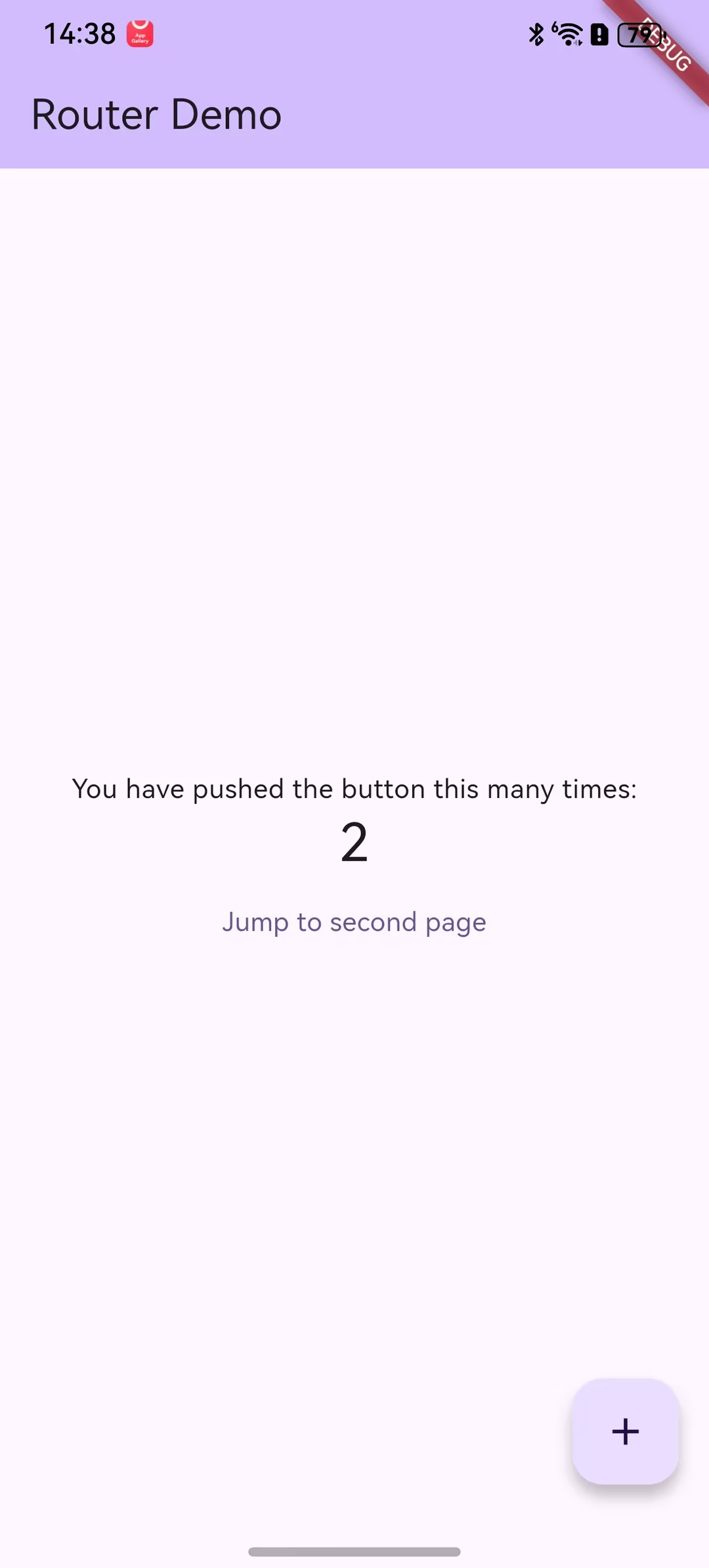
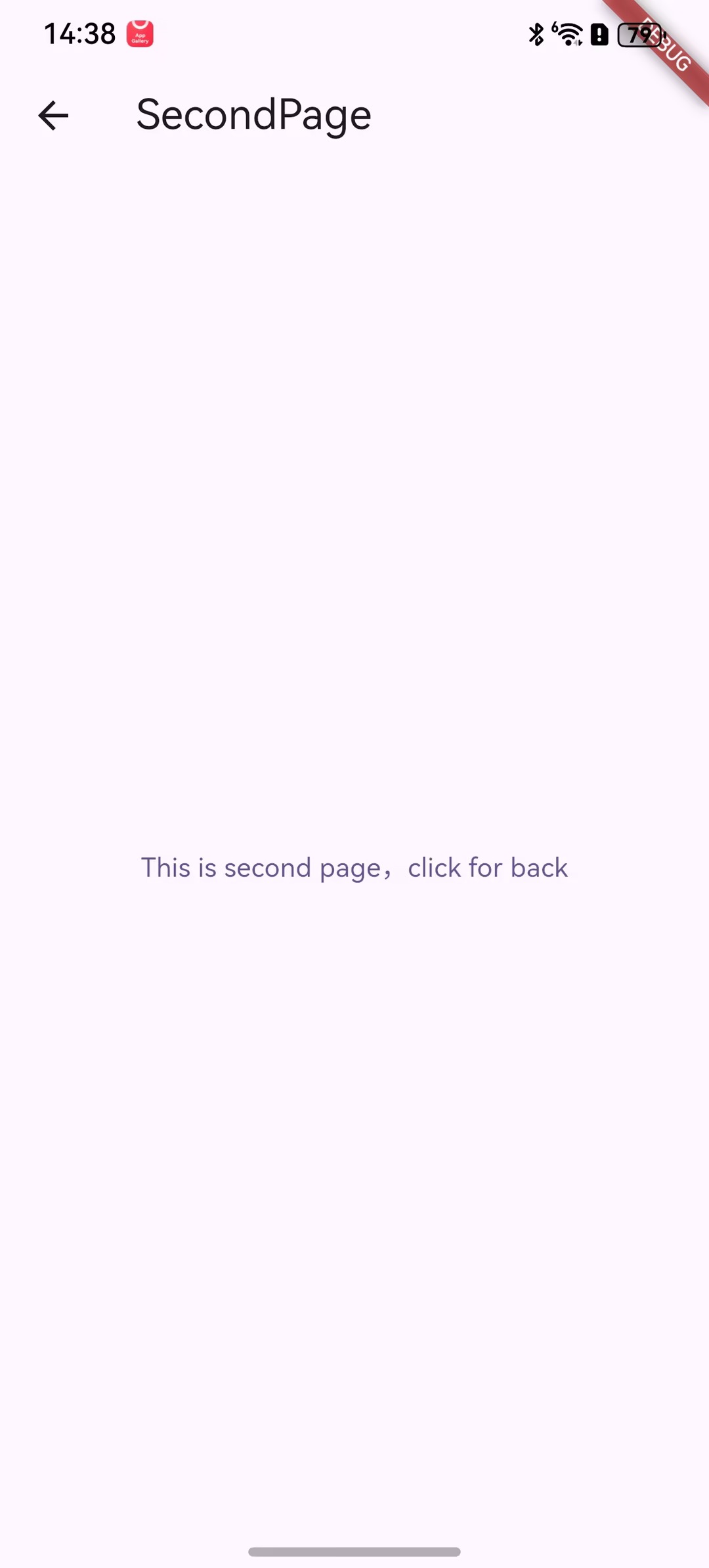
main.dart
import 'package:flutter/material.dart';

import 'SecondPage.dart';

void main() {
  runApp(const MyApp());
}

class MyApp extends StatelessWidget {
  const MyApp({super.key});

  // This widget is the root of your application.
  @override
  Widget build(BuildContext context) {
    return MaterialApp(
      title: 'Router Demo',
      theme: ThemeData(
        colorScheme: ColorScheme.fromSeed(seedColor: Colors.deepPurple),
      ),
      home: const MyHomePage(title: 'Router Demo'),
    );
  }
}

class MyHomePage extends StatefulWidget {
  const MyHomePage({super.key, required this.title});

  final String title;

  @override
  State<MyHomePage> createState() => _MyHomePageState();
}

class _MyHomePageState extends State<MyHomePage> {
  int _counter = 0;

  void _incrementCounter() {
    setState(() {
      // This call to setState tells the Flutter framework that something has
      // changed in this State, which causes it to rerun the build method below
      // so that the display can reflect the updated values. If we changed
      // _counter without calling setState(), then the build method would not be
      // called again, and so nothing would appear to happen.
      _counter++;
    });
  }

  @override
  Widget build(BuildContext context) {
    // This method is rerun every time setState is called, for instance as done
    // by the _incrementCounter method above.
    //
    // The Flutter framework has been optimized to make rerunning build methods
    // fast, so that you can just rebuild anything that needs updating rather
    // than having to individually change instances of widgets.
    return Scaffold(
      appBar: AppBar(
        backgroundColor: Theme.of(context).colorScheme.inversePrimary,
        title: Text(widget.title),
      ),
      body: Center(
        child: Column(
          mainAxisAlignment: MainAxisAlignment.center,
          children: <Widget>[
            const Text('You have pushed the button this many times:'),
            Text(
              '$_counter',
              style: Theme.of(context).textTheme.headlineMedium,
            ),

            TextButton(
              child: Text("Jump to second page"),
              onPressed: () {
                //导航到新路由
                Navigator.push(
                  context,
                  MaterialPageRoute(
                    builder: (context) {
                      return SecondPage();
                    },
                  ),
                );
              },
            ),
          ],
        ),
      ),
      floatingActionButton: FloatingActionButton(
        onPressed: _incrementCounter,
        tooltip: 'Increment',
        child: const Icon(Icons.add),
      ), // This trailing comma makes auto-formatting nicer for build methods.
    );
  }
}
import 'package:flutter/material.dart';

class SecondPage extends StatelessWidget {
  const SecondPage({super.key});

  @override
  Widget build(BuildContext context) {
    return Scaffold(
      appBar: AppBar(title: Text("SecondPage")),
      body: Center(
        child: TextButton(
          onPressed: () {
            Navigator.pop(context);
          },
          child: Text("This is second page,click for back"),
        ),
      ),
    );
  }
}
2、相关类详解
1)MaterialPageRoute
MaterialPageRoute继承自PageRoute类,PageRoute类是一个抽象类,表示占有整个屏幕空间的一个模态路由页面,并且定义了路由构建及切换时过渡动画的相关接口及属性。
MaterialPageRoute 是 Material组件库提供的组件,它可以针对不同平台,实现与平台页面切换动画风格一致的路由切换动画:
- 对于 Android,当打开新页面时,新的页面会从屏幕底部滑动到屏幕顶部;当关闭页面时,当前页面会从屏幕顶部滑动到屏幕底部后消失,同时上一个页面会显示到屏幕上。
- 对于 iOS,当打开页面时,新的页面会从屏幕右侧边缘一直滑动到屏幕左边,直到新页面全部显示到屏幕上,而上一个页面则会从当前屏幕滑动到屏幕左侧而消失;当关闭页面时,正好相反,当前页面会从屏幕右侧滑出,同时上一个页面会从屏幕左侧滑入。
class MaterialPageRoute<T> extends PageRoute<T> with MaterialRouteTransitionMixin<T> {
  /// Construct a MaterialPageRoute whose contents are defined by [builder].
  MaterialPageRoute({
    required this.builder,
    super.settings,
    super.requestFocus,
    this.maintainState = true,
    super.fullscreenDialog,
    super.allowSnapshotting = true,
    super.barrierDismissible = false,
    super.traversalEdgeBehavior,
    super.directionalTraversalEdgeBehavior,
  }) {
    assert(opaque);
  }

...
}
builder 是一个WidgetBuilder类型的回调函数,它的作用是构建路由页面的具体内容,返回值是一个widget。我们通常要实现此回调,返回新路由的实例。
settings 包含路由的配置信息,如路由名称、是否初始路由(首页)。
maintainState:默认情况下,当入栈一个新路由时,原来的路由仍然会被保存在内存中,如果想在路由没用的时候释放其所占用的所有资源,可以设置maintainState为 false。
fullscreenDialog表示新的路由页面是否是一个全屏的模态对话框,在 iOS 中,如果fullscreenDialog为true,新页面将会从屏幕底部滑入(而不是水平方向)。
2)Navigator
Navigator是一个路由管理的组件,它提供了打开和退出路由页方法。Navigator通过一个栈来管理活动路由集合。通常当前屏幕显示的页面就是栈顶的路由。Navigator提供了一系列方法来管理路由栈
Future push(BuildContext context, Route route)
将给定的路由入栈(即打开新的页面),返回值是一个Future对象,用以接收新路由出栈(即关闭)时的返回数据。
bool pop(BuildContext context, [ result ])
将栈顶路由出栈,result 为页面关闭时返回给上一个页面的数据。
Navigator 还有很多其他方法,如Navigator.replace、Navigator.popUntil等如下示例
2、常用导航方法
// 1. push - 跳转到新页面
Navigator.push(context, MaterialPageRoute(builder: (_) => DetailPage()));

// 2. pop - 返回
Navigator.pop(context);

// 3. pushReplacement - 替换当前页面
Navigator.pushReplacement(
  context,
  MaterialPageRoute(builder: (_) => NewHomePage()),
);

// 4. pushAndRemoveUntil - 跳转并移除之前所有页面
Navigator.pushAndRemoveUntil(
  context,
  MaterialPageRoute(builder: (_) => LoginPage()),
  (route) => false, // 移除所有路由
);

// 5. popUntil - 返回到指定页面
Navigator.popUntil(context, ModalRoute.withName('/home'));
二、命名路由
在 MaterialApp 中配置,便于管理
1、基本配置
MaterialApp(
  title: '路由示例',
  initialRoute: '/',
  routes: {
    '/': (context) => HomePage(),
    '/details': (context) => DetailsPage(),
    '/settings': (context) => SettingsPage(),
    '/profile': (context) => ProfilePage(),
  },
)
2、使用命名路由
// 跳转到命名路由
Navigator.pushNamed(context, '/details');

// 带参数跳转
Navigator.pushNamed(
  context,
  '/details',
  arguments: {'id': 123, 'name': '示例'},
);

// 替换当前路由
Navigator.pushReplacementNamed(context, '/details');

// 跳转并清除所有路由
Navigator.pushNamedAndRemoveUntil(
  context,
  '/login',
  (route) => false,
);三、参数传递通过构造函数或 arguments 传递
1、传递参数
// 传递简单参数
Navigator.push(
  context,
  MaterialPageRoute(
    builder: (context) => DetailPage(
      id: 123,
      title: '示例标题',
    ),
  ),
);

// 传递复杂对象
class User {
  final String name;
  final int age;

  User(this.name, this.age);
}

Navigator.push(
  context,
  MaterialPageRoute(
    builder: (context) => ProfilePage(user: User('张三', 25)),
  ),
);
2、接收参数
// 在命名路由中接收参数
class DetailsPage extends StatelessWidget {
  @override
  Widget build(BuildContext context) {
    // 从 arguments 获取参数
    final args = ModalRoute.of(context)!.settings.arguments as Map<String, dynamic>;
    final id = args['id'];
    final name = args['name'];

    return Scaffold(
      appBar: AppBar(title: Text('详情页')),
      body: Center(
        child: Text('ID: $id, Name: $name'),
      ),
    );
  }
}

// 在构造函数中接收参数
class ProfilePage extends StatelessWidget {
  final User user;

  const ProfilePage({super.key, required this.user});

  @override
  Widget build(BuildContext context) {
    return Scaffold(
      appBar: AppBar(title: Text('用户资料')),
      body: Center(
        child: Column(
          mainAxisAlignment: MainAxisAlignment.center,
          children: [
            Text('姓名: ${user.name}'),
            Text('年龄: ${user.age}'),
          ],
        ),
      ),
    );
  }
}
四、路由生成器
1、onGenerateRoute
MaterialApp(
  initialRoute: '/',
  onGenerateRoute: (settings) {
    // 处理动态路由
    switch (settings.name) {
      case '/':
        return MaterialPageRoute(builder: (_) => HomePage());
      case '/details':
        final args = settings.arguments as Map<String, dynamic>;
        return MaterialPageRoute(
          builder: (_) => DetailsPage(id: args['id']),
        );
      case '/user':
        final userId = settings.arguments as String;
        return MaterialPageRoute(
          builder: (_) => UserPage(userId: userId),
        );
      default:
        return MaterialPageRoute(
          builder: (_) => NotFoundPage(routeName: settings.name!),
        );
    }
  },
)
2、onUnknownRoute
MaterialApp(
  onUnknownRoute: (settings) {
    return MaterialPageRoute(
      builder: (_) => NotFoundPage(routeName: settings.name!),
    );
  },
)
3、路由拦截
class RouteGuard {
  static bool isAuthenticated = false;

  static Route<dynamic>? generateRoute(RouteSettings settings) {
    // 需要认证的路由
    final protectedRoutes = ['/profile', '/settings', '/dashboard'];

    if (protectedRoutes.contains(settings.name)) {
      if (!isAuthenticated) {
        // 未认证,跳转到登录页
        return MaterialPageRoute(
          builder: (_) => LoginPage(),
        );
      }
    }

    // 正常路由
    switch (settings.name) {
      case '/':
        return MaterialPageRoute(builder: (_) => HomePage());
      case '/login':
        return MaterialPageRoute(builder: (_) => LoginPage());
      case '/profile':
        return MaterialPageRoute(builder: (_) => ProfilePage());
      default:
        return MaterialPageRoute(
          builder: (_) => NotFoundPage(routeName: settings.name!),
        );
    }
  }
}
五、路由嵌套
1、Tab导航
class MainTabPage extends StatefulWidget {
  @override
  _MainTabPageState createState() => _MainTabPageState();
}

class _MainTabPageState extends State<MainTabPage> {
  int _currentIndex = 0;

  final List<Widget> _pages = [
    HomeTabPage(),
    DiscoverTabPage(),
    MessageTabPage(),
    ProfileTabPage(),
  ];

  @override
  Widget build(BuildContext context) {
    return Scaffold(
      body: _pages[_currentIndex],
      bottomNavigationBar: BottomNavigationBar(
        currentIndex: _currentIndex,
        onTap: (index) {
          setState(() {
            _currentIndex = index;
          });
        },
        items: [
          BottomNavigationBarItem(icon: Icon(Icons.home), label: '首页'),
          BottomNavigationBarItem(icon: Icon(Icons.explore), label: '发现'),
          BottomNavigationBarItem(icon: Icon(Icons.message), label: '消息'),
          BottomNavigationBarItem(icon: Icon(Icons.person), label: '我的'),
        ],
      ),
    );
  }
}
2、Drawer 导航
class MainDrawerPage extends StatelessWidget {
  @override
  Widget build(BuildContext context) {
    return Scaffold(
      appBar: AppBar(title: Text('主页面')),
      drawer: Drawer(
        child: ListView(
          padding: EdgeInsets.zero,
          children: [
            DrawerHeader(
              decoration: BoxDecoration(color: Colors.blue),
              child: Text('导航菜单', style: TextStyle(color: Colors.white, fontSize: 24)),
            ),
            ListTile(
              leading: Icon(Icons.home),
              title: Text('首页'),
              onTap: () {
                Navigator.pop(context);
                Navigator.pushNamed(context, '/home');
              },
            ),
            ListTile(
              leading: Icon(Icons.settings),
              title: Text('设置'),
              onTap: () {
                Navigator.pop(context);
                Navigator.pushNamed(context, '/settings');
              },
            ),
            ListTile(
              leading: Icon(Icons.help),
              title: Text('帮助'),
              onTap: () {
                Navigator.pop(context);
                Navigator.pushNamed(context, '/help');
              },
            ),
          ],
        ),
      ),
      body: Center(child: Text('主要内容')),
    );
  }
}
六、路由动画
1、自定义动画
// 淡入淡出动画
Navigator.push(
  context,
  PageRouteBuilder(
    pageBuilder: (context, animation, secondaryAnimation) => DetailPage(),
    transitionsBuilder: (context, animation, secondaryAnimation, child) {
      return FadeTransition(
        opacity: animation,
        child: child,
      );
    },
    transitionDuration: Duration(milliseconds: 300),
  ),
);

// 滑动动画
Navigator.push(
  context,
  PageRouteBuilder(
    pageBuilder: (context, animation, secondaryAnimation) => DetailPage(),
    transitionsBuilder: (context, animation, secondaryAnimation, child) {
      const begin = Offset(1.0, 0.0);
      const end = Offset.zero;
      const curve = Curves.ease;

      var tween = Tween(begin: begin, end: end).chain(CurveTween(curve: curve));
      var offsetAnimation = animation.drive(tween);

      return SlideTransition(
        position: offsetAnimation,
        child: child,
      );
    },
    transitionDuration: Duration(milliseconds: 400),
  ),
);
2、自定义路由类
class SlideRightRoute extends PageRouteBuilder {
final Widget page;
SlideRightRoute({required this.page})
: super(
pageBuilder: (
BuildContext context,
Animation<double> animation,
Animation<double> secondaryAnimation,
) =>
page,
transitionsBuilder: (
BuildContext context,
Animation<double> animation,
Animation<double> secondaryAnimation,
Widget child,
) =>
SlideTransition(
position: Tween<Offset>(
begin: const Offset(-1, 0),
end: Offset.zero,
).animate(animation),
child: child,
),
);
}
// 使用自定义路由
Navigator.push(context, SlideRightRoute(page: DetailPage())); 今天到此为止,下篇见!

AtomGit 是由开放原子开源基金会联合 CSDN 等生态伙伴共同推出的新一代开源与人工智能协作平台。平台坚持“开放、中立、公益”的理念,把代码托管、模型共享、数据集托管、智能体开发体验和算力服务整合在一起,为开发者提供从开发、训练到部署的一站式体验。
更多推荐
 18
18 0
0- 0


 已为社区贡献11条内容

所有评论(0)