DevUI Gantt 甘特图组件:使用示例与代码详解
·
甘特图(Gantt)是项目管理中常用的可视化工具,用于展示任务的时间安排、进度和依赖关系。DevUI 为 Angular 应用提供了功能丰富、交互灵活的甘特图组件,支持基本时间轴展示、任务条拖拽调整、与 DataTable 集成等高级功能。本文将基于官方示例详细解析其用法和实现。
1. 环境与依赖
确保你的项目满足以下条件:
- Angular 版本 ^18.0.0
- 已安装 DevUI 组件库及相关主题样式
- 在模块中导入
GanttModule、FullscreenModule、DataTableModule(如与表格结合使用)
2. 基本甘特图用法
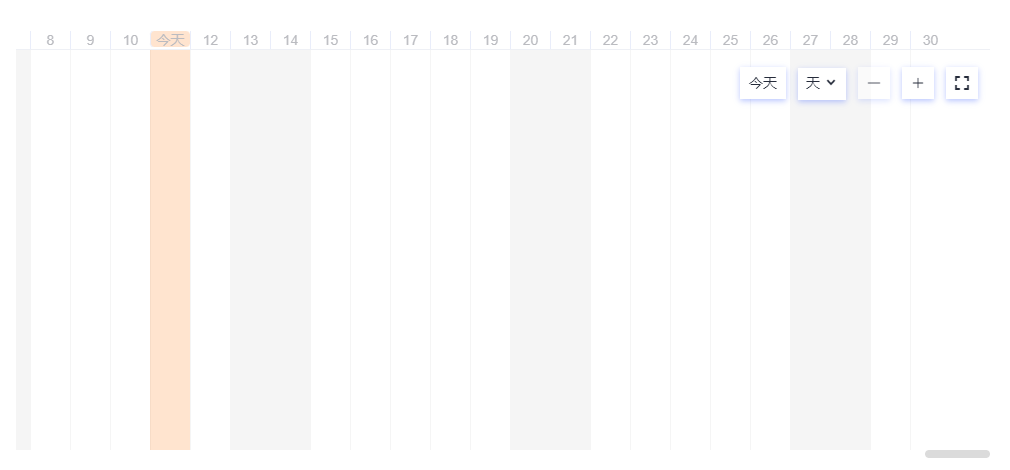
2.1 核心结构
基本甘特图由以下部分组成:
- 时间轴容器 (
d-gantt-scale):显示时间刻度(日、周、月等) - 任务条容器 (
d-gantt-bar):展示单个任务的时间范围和进度 - 外层容器:用于滚动和全屏控制
基本用法:
- d-gantt-scale(时间轴)容器作为时间轴标线的定位父级元素,须设置position或者是table、td、th、body元素。
- d-gantt-scale(时间轴)容器和d-gantt-bar(时间条)容器宽度须通过GanttService提供的方法根据起止时间计算后设置,初始化之后还须订阅ganttScaleConfigChange动态设置。
- 时间条move、resize事件会改变该时间条起止时间和时间轴的起止时间,订阅时间条resize、move事件和ganttScaleConfigChange来记录变化。
- 响应时间条move、resize事件调整最外层容器的滚动以获得更好的体验。
2.2 代码示例与说明
<d-fullscreen [zIndex]="1080" (fullscreenLaunch)="launchFullscreen($event)">
  <div #ganttContainer class="gantt-container" fullscreen-target>
    <!-- 时间轴头部 -->
    <div class="header" [style.width]="ganttScaleWidth">
      <d-gantt-scale
        [ganttBarContainerElement]="ganttBody"
        [scrollElement]="ganttContainer"
        [showDaySplitLine]="true">
      </d-gantt-scale>
    </div>

    <!-- 工具栏(缩放、切换视图、今日按钮等) -->
    <d-gantt-tools
      [currentUnit]="unit"
      [isFullScreen]="isFullScreen"
      (goToday)="goToday()"
      (increaseUnit)="onIncreaseUnit()"
      (reduceUnit)="onReduceUnit()"
      (switchView)="onSwitchView($event)">
      <d-button bsStyle="text" fullscreen-launch class="tool">
        <i class="icon" [ngClass]="{
          'icon-frame-contract': isFullScreen,
          'icon-frame-expand': !isFullScreen
        }"></i>
      </d-button>
    </d-gantt-tools>

    <!-- 任务条区域 -->
    <div #ganttBody class="body" [style.width]="ganttScaleWidth">
      <div class="item" *ngFor="let item of list">
        <d-gantt-bar
          [startDate]="item?.startDate"
          [endDate]="item?.endDate"
          [id]="item?.id"
          [title]="item?.title"
          [progressRate]="item?.progressRate"
          [scrollElement]="ganttContainer"
          [status]="item?.status"
          [data]="item"
          [showTitle]="true"
          (barMoveEndEvent)="onGanttBarMoveEnd($event)"
          (barResizeEndEvent)="onGanttBarResize($event)"
          (barProgressEvent)="onBarProgressEvent($event)">
          <!-- 自定义提示模板 -->
          <ng-template #tipTemplate let-ganttInstance="ganttInstance" let-data="data">
            <div class="title">{{ data?.title }}</div>
            <div class="content">
              <div>Duration: {{ ganttInstance?.duration }}</div>
              <div>ProgressRate: {{ (ganttInstance?.progressRate || 0) + '%' }}</div>
              <div>startDate: {{ ganttInstance?.startDate | i18nDate: 'short' }}</div>
              <div>endDate: {{ ganttInstance?.endDate | i18nDate: 'short' }}</div>
            </div>
          </ng-template>

          <!-- 自定义标题模板(如显示逾期标签) -->
          <ng-template #titleTemplate let-data="data">
            <d-tag *ngIf="data?.overdueTime > 0 && data?.status !== 'done'"
                   class="delay-tag"
                   [tag]="'overdue ' + data?.overdueTime + ' days'"
                   [labelStyle]="'pink-w98'">
            </d-tag>
          </ng-template>
        </d-gantt-bar>
      </div>
    </div>
  </div>
</d-fullscreen>
ts代码
import { AfterViewInit, Component, ElementRef, OnDestroy, OnInit, ViewChild } from '@angular/core';
import { GanttScaleUnit, GanttService, GanttTaskInfo } from 'ng-devui/gantt';
import { Subscription } from 'rxjs';
import { basicData, curYear } from './../mock-data';

@Component({
  selector: 'd-basic',
  templateUrl: './basic.component.html',
  styleUrls: ['./basic.component.scss'],
  providers: [GanttService],
})
export class BasicComponent implements OnInit, AfterViewInit, OnDestroy {
  @ViewChild('ganttContainer', { static: true }) ganttContainer: ElementRef;
  curYear = curYear;
  list = basicData;
  ganttStartDate: Date;
  ganttEndDate: Date;
  unit = GanttScaleUnit.day;
  ganttScaleWidth: string;
  ganttSacleConfigHandler: Subscription;
  originOffsetLeft = 0;
  scrollElement: HTMLElement;
  startMove = false;
  startMoveX = 0;
  isFullScreen = false;
  scaleStep = 50;
  private mouseDownHandler: Subscription | null;
  private mouseMoveHandler: Subscription | null;
  private mouseEndHandler: Subscription | null;

  constructor(private ganttService: GanttService, private ele: ElementRef) {}

  ngOnInit() {
    this.ganttStartDate = new Date(curYear, 0, 1);
    this.ganttEndDate = new Date(curYear, 11, 31);
    this.ganttService.setScaleConfig({
      startDate: this.ganttStartDate,
      endDate: this.ganttEndDate,
      unit: this.unit,
    });
    this.ganttScaleWidth = this.ganttService.getDurationWidth(this.ganttStartDate, this.ganttEndDate) + 'px';
    this.ganttSacleConfigHandler = this.ganttService.ganttScaleConfigChange.subscribe((config) => {
      if (config.startDate) {
        this.ganttStartDate = config.startDate;
      }
      if (config.endDate) {
        this.ganttEndDate = config.endDate;
      }
      if (config.startDate || config.endDate) {
        this.ganttScaleWidth = this.ganttService.getDurationWidth(this.ganttStartDate, this.ganttEndDate) + 'px';
      }
    });
    this.list.forEach(item => this.updateBarData(item));
  }

  updateBarData(item) {
    item.overdueTime = this.getOverdueTime(item.endDate, new Date());
    if (item.overdueTime > 0 && item.status !== 'done') {
      item.status = 'overdue';
    } else if(item.overdueTime <= 0 && item.status !== 'done') {
      item.status = 'normal';
    }
  }

  updateBarItemStatus(item) {
    const barData = this.list.find(data => data.id === item.id);
    if (barData) {
      this.updateBarData(barData);
    }
  }

  getOverdueTime(startDate: Date, endDate: Date): number {
    if (startDate && endDate) {
      const timeOffset = endDate.getTime() - startDate.getTime();
      const duration = timeOffset / GanttService.DAY_DURATION;
      return Math.floor(duration);
    }
  }

  goToday() {
    const today = new Date();
    const offset = this.ganttService.getDatePostionOffset(today) - this.ganttService.getScaleUnitPixel() * 3;
    if (this.scrollElement) {
      this.scrollElement.scrollTo(offset, this.scrollElement.scrollTop);
    }
  }

  onIncreaseUnit() {
    if (this.unit === GanttScaleUnit.month) {
      return;
    }
    if (this.unit === GanttScaleUnit.week) {
      this.unit = GanttScaleUnit.month;
    }
    if (this.unit === GanttScaleUnit.day) {
      this.unit = GanttScaleUnit.week;
    }
    this.ganttService.setScaleConfig({ unit: this.unit });
    this.ganttScaleWidth = this.ganttService.getDurationWidth(this.ganttStartDate, this.ganttEndDate) + 'px';
  }

  onReduceUnit() {
    if (this.unit === GanttScaleUnit.day) {
      return;
    }
    if (this.unit === GanttScaleUnit.week) {
      this.unit = GanttScaleUnit.day;
    }
    if (this.unit === GanttScaleUnit.month) {
      this.unit = GanttScaleUnit.week;
    }
    this.ganttService.setScaleConfig({ unit: this.unit });
    this.ganttScaleWidth = this.ganttService.getDurationWidth(this.ganttStartDate, this.ganttEndDate) + 'px';
  }

  onSwitchView(unit) {
    this.unit = unit;
    this.ganttService.setScaleConfig({ unit });
    this.ganttScaleWidth = this.ganttService.getDurationWidth(this.ganttStartDate, this.ganttEndDate) + 'px';
  }

  launchFullscreen({ isFullscreen }) {
    this.isFullScreen = isFullscreen;
    this.ganttService.setScaleConfig({viewChange: true});
  }

  ngAfterViewInit() {
    this.scrollElement = this.ganttContainer.nativeElement;
    this.ganttService.registContainerEvents(this.scrollElement);
    this.mouseDownHandler = this.ganttService.mouseDownListener.subscribe(this.onMousedown.bind(this));
    this.mouseMoveHandler = this.ganttService.mouseMoveListener.subscribe(this.onMouseMove.bind(this));
    this.mouseEndHandler = this.ganttService.mouseEndListener.subscribe(this.onMouseEnd.bind(this));
    this.goToday();
  }

  onGanttBarMoveEnd (info: GanttTaskInfo) {
    this.updateData(info);
    this.updateBarItemStatus(info);
  }

  onMousedown(pageX) {
    this.startMove = true;
    this.originOffsetLeft = this.scrollElement.scrollLeft;
    this.startMoveX = pageX;
  }

  onMouseMove(pageX) {
    if (this.startMove) {
      const moveOffset = this.startMoveX - pageX;
      this.scrollElement.scrollTo(this.originOffsetLeft + moveOffset, this.scrollElement.scrollTop);
    }
  }

  onMouseEnd() {
    this.startMove = false;
  }

  onGanttBarMoveStart() {
    this.originOffsetLeft = this.scrollElement.scrollLeft;
  }

  onGanttBarMoving(info: GanttTaskInfo) {
    this.adjustScrollView(info);
  }

  onGanttBarResizeStart() {
    this.originOffsetLeft = this.scrollElement.scrollLeft;
  }

  onGanttBarResizing(info: GanttTaskInfo) {
    this.adjustScrollView(info);
  }

  adjustScrollView(info: GanttTaskInfo) {
    if (info.left + info.width > this.scrollElement.scrollLeft + this.scrollElement.clientWidth) {
      this.scrollElement.scrollTo(this.scrollElement.scrollLeft + this.scaleStep, this.scrollElement.scrollTop);
    }
    if (info.left < this.scrollElement.scrollLeft) {
      this.scrollElement.scrollTo(this.scrollElement.scrollLeft - this.scaleStep, this.scrollElement.scrollTop);
    }
  }

  onGanttBarMove(info: GanttTaskInfo) {
    this.updateData(info);
  }

  onGanttBarResize(info: GanttTaskInfo) {
    this.updateData(info);
    this.updateBarItemStatus(info);
  }

  updateData(info: GanttTaskInfo) {
    const index = this.list.findIndex((data) => {
      return data.id === info.id;
    });
    if (index > -1) {
      this.list[index].startDate = info.startDate;
      this.list[index].endDate = info.endDate;
    }
  }

  onBarProgressEvent(progress: number) {
    console.log(progress);
  }

  ngOnDestroy() {
    if (this.ganttSacleConfigHandler) {
      this.ganttSacleConfigHandler.unsubscribe();
      this.ganttSacleConfigHandler = null;
    }
    this.mouseDownHandler.unsubscribe();
    this.mouseMoveHandler.unsubscribe();
    this.mouseEndHandler.unsubscribe();
  }
}
css代码
@import '~ng-devui/styles-var/devui-var.scss';

.gantt-container {
  overflow: scroll;

  .header {
    position: relative;
    border-bottom: 1px solid $devui-dividing-line;
  }

  .body {
    position: relative;
    min-height: 400px;
    height: 100%;

    .item {
      height: 40px;
      padding-top: 8px;
    }
  }
}

.tool {
  display: inline-flex;
  align-items: center;
  justify-content: center;
  height: 32px;
  margin-left: 12px;
  background-color: $devui-base-bg;
  box-shadow: $devui-shadow-length-base rgba(81, 112, 255, 0.4);
  cursor: pointer;

  span {
    border: 0 !important;
  }
}

.delay-tag {
  position: relative;
  width: max-content;
  margin-top: 4px;
}

::ng-deep .devui-gantt-tips {
  & .title {
    font-size: $devui-font-size-card-title;
    color: $devui-text;
    line-height: 24px;
    font-weight: bold;
    margin-bottom: 16px;
  }

  & .content {
    font-size: $devui-font-size;
    color: $devui-text;
    line-height: 24px;
  }
}

:host ::ng-deep {
  .devui-btn {
    height: 32px !important;
    color: $devui-text !important;
    padding: 0 8px !important;
  }
}
2.3 关键点说明
- 容器宽度计算:
ganttScaleWidth需通过GanttService根据起止时间动态计算,并在初始化后订阅ganttScaleConfigChange更新。 - 时间轴定位:
d-gantt-scale的父容器须设置position属性(或为table、td、th、body元素)。 - 事件响应:任务条的
move、resize事件会改变时间数据,需订阅这些事件及ganttScaleConfigChange以同步状态。
3. 与 DataTable 结合的甘特图
3.1 应用场景
在项目管理中,常需左侧表格展示任务详情,右侧甘特图展示时间计划。DevUI 支持将甘特图嵌入 d-data-table 表头,实现联动滚动。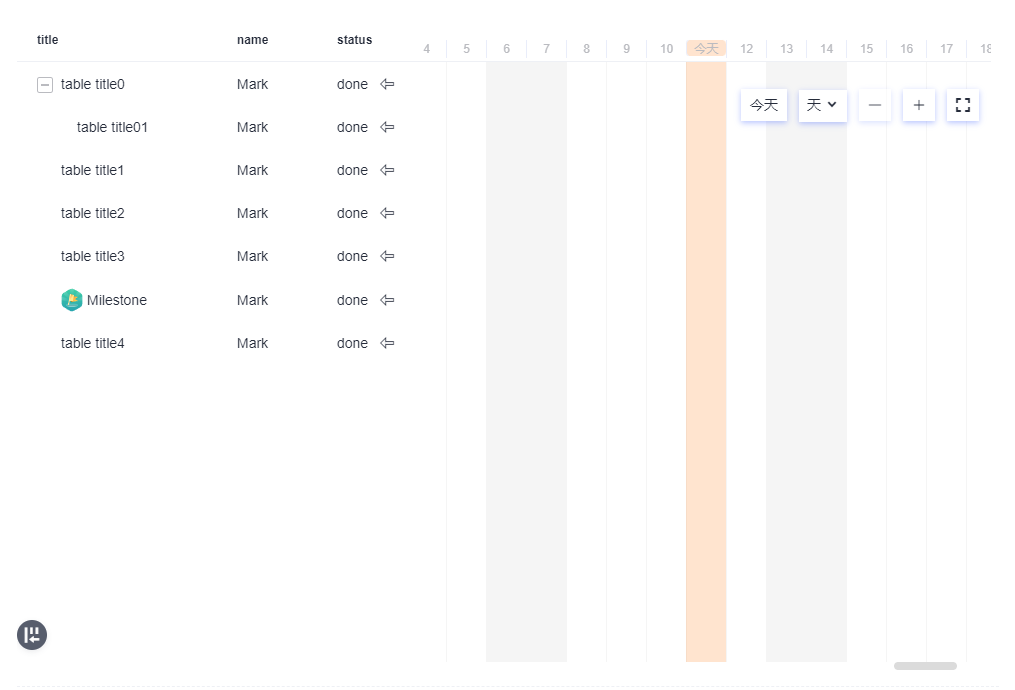
3.2 代码示例(简化结构)
<d-fullscreen [zIndex]="1080" (fullscreenLaunch)="launchFullscreen($event)">
  <section fullscreen-target class="overflow">
    <d-gantt-tools ... ></d-gantt-tools>

    <d-data-table
      #datatable
      [dataSource]="basicDataSource"
      [scrollable]="true"
      [fixHeader]="true"
      (tableScrollEvent)="onTableScroll($event)">

      <thead dTableHead>
        <tr dTableRow>
          <th dHeadCell [fixedLeft]="'0'">title</th>
          <th dHeadCell [fixedLeft]="'200px'">name</th>
          <th dHeadCell style="padding-left: 20px">
            <!-- 甘特图时间轴作为表头 -->
            <d-gantt-scale
              [scrollElement]="scrollView"
              [milestoneList]="milestoneList"
              [ganttBarContainerElement]="ganttBarContainerElement"
              [showDaySplitLine]="true">
            </d-gantt-scale>
          </th>
        </tr>
      </thead>

      <tbody dTableBody>
        <ng-template let-rowItem="rowItem">
          <tr dTableRow>
            <td dTableCell [fixedLeft]="'0'">{{ rowItem.title }}</td>
            <td dTableCell [fixedLeft]="'200px'">{{ rowItem.name }}</td>
            <td dTableCell>
              <!-- 根据任务类型渲染进度条或里程碑 -->
              <div *ngIf="rowItem.ganttType === 'progress'">
                <d-gantt-bar ... ></d-gantt-bar>
              </div>
              <div *ngIf="rowItem.ganttType === 'milestone'" class="devui-gantt-milestone">
                <!-- 里程碑图标(SVG) -->
              </div>
            </td>
          </tr>
        </ng-template>
      </tbody>
    </d-data-table>
  </section>
</d-fullscreen>
3.3 联动实现要点
- 滚动同步:通过
(tableScrollEvent)监听表格滚动,调整甘特图时间轴的横向滚动位置。 - 里程碑集成:
[milestoneList]可在时间轴上标记关键节点。 - 自适应布局:利用
[fixedLeft]固定左侧列,确保甘特图区域可横向滚动。
4. 核心特性与事件处理
4.1 任务条交互事件
| 事件名 | 触发时机 | 典型处理 |
|---|---|---|
barMoveStartEvent |
开始拖拽移动时 | 显示临时位置提示 |
barMovingEvent |
拖拽移动过程中 | 实时更新预览位置 |
barMoveEndEvent |
拖拽移动结束时 | 保存新日期,更新后端数据 |
barResizeStartEvent |
开始调整任务条长度时 | 初始化调整状态 |
barResizingEvent |
调整过程中 | 实时更新任务时长预览 |
barResizeEndEvent |
调整结束时 | 保存新起止时间,重新计算宽度 |
barProgressEvent |
进度更改时 | 更新进度值,同步到数据源 |
4.2 时间轴控制
- 单位切换:通过
d-gantt-tools的(switchView)切换日、周、月视图。 - 回到今日:
(goToday)事件可快速滚动至当前日期。 - 缩放控制:
(increaseUnit)和(reduceUnit)调整时间密度。
4.3 全屏支持
使用 d-fullscreen 包裹甘特图容器,通过 fullscreen-launch 触发全屏切换,提升大屏浏览体验。
5. 最佳实践与注意事项
5.1 性能优化
- 虚拟滚动:当任务数量较大(> 500 条)时,建议结合
cdk-virtual-scroll-viewport只渲染可见区域的任务条。 - 防抖处理:对
barMovingEvent、barResizingEvent等高频事件进行防抖,避免频繁计算。 - 按需更新:仅在
barMoveEndEvent、barResizeEndEvent时更新数据源,减少不必要的重绘。
5.2 样式自定义
- 通过
::ng-deep覆盖默认样式(如时间条颜色、刻度线样式)。 - 使用
[tipTemplateRef]、[titleTemplateRef]完全自定义提示内容和标题区域。
5.3 常见问题
- 宽度计算错误:确保在时间范围变化后重新调用
GanttService的方法计算ganttScaleWidth。 - 滚动不同步:检查
[scrollElement]是否指向正确的滚动容器,并在容器尺寸变化时手动触发更新。 - 事件未触发:确认任务条数据中的
startDate、endDate为有效的Date对象。
6. 总结
DevUI (Gantt 组件)为 Angular 应用提供了企业级的甘特图解决方案,通过声明式配置和丰富的事件体系,可快速实现:
- 基本时间轴与任务条展示
- 拖拽调整任务时间与进度
- 与 DataTable 深度集成
- 全屏模式与视图缩放
参考文档
MateChat :https://gitcode.com/DevCloudFE/MateChat
MateChat 官网 :https://matechat.gitcode.com
DevUI官网:https://devui.design/home

AtomGit 是由开放原子开源基金会联合 CSDN 等生态伙伴共同推出的新一代开源与人工智能协作平台。平台坚持“开放、中立、公益”的理念,把代码托管、模型共享、数据集托管、智能体开发体验和算力服务整合在一起,为开发者提供从开发、训练到部署的一站式体验。
更多推荐



 23
23 0
0- 0


 已为社区贡献2条内容

所有评论(0)