【前瞻创想】Kurator·云原生实战派:分布式云原生基础设施的统一治理之道
【前瞻创想】Kurator·云原生实战派:分布式云原生基础设施的统一治理之道
【前瞻创想】Kurator·云原生实战派:分布式云原生基础设施的统一治理之道

摘要
在云原生技术迅猛发展的今天,企业面临着多云、混合云、边缘计算等复杂场景下的基础设施管理挑战。Kurator作为一款开源的分布式云原生平台,站在Kubernetes、Istio、Prometheus、FluxCD、KubeEdge、Volcano、Karmada、Kyverno等优秀开源项目的肩膀上,为企业提供了统一的云原生基础设施管理能力。本文将深入剖析Kurator的核心架构与创新价值,通过实战案例展示其在多集群管理、边缘计算集成、GitOps实践、服务治理等方面的强大能力,并对分布式云原生技术的未来发展方向提出前瞻性思考。文章不仅包含技术原理分析,还提供了丰富的实践代码和配置示例,帮助读者从理论到实践全面掌握Kurator平台的应用。
1. Kurator:分布式云原生的统一治理平台
1.1 云原生演进与多云挑战
随着企业数字化转型的深入,单一云环境已无法满足业务需求。多云、混合云、边缘计算等场景带来了资源分散、管理复杂、运维困难等挑战。传统的云原生技术栈虽然强大,但缺乏统一的治理框架,导致企业需要投入大量精力进行集成和定制。
1.2 Kurator的定位与核心价值
Kurator作为一个开源的分布式云原生平台,旨在帮助企业构建自己的分布式云原生基础设施。它不是简单的技术堆砌,而是通过深度集成与创新设计,提供了一套完整的解决方案。Kurator的核心价值在于:
- 统一管理:将分散的云原生能力整合到统一平台
- 简化运维:通过声明式API和自动化流程降低运维复杂度
- 灵活扩展:模块化架构支持按需集成不同能力
- 开放生态:基于开源技术构建,避免厂商锁定
1.3 Kurator的技术架构概览
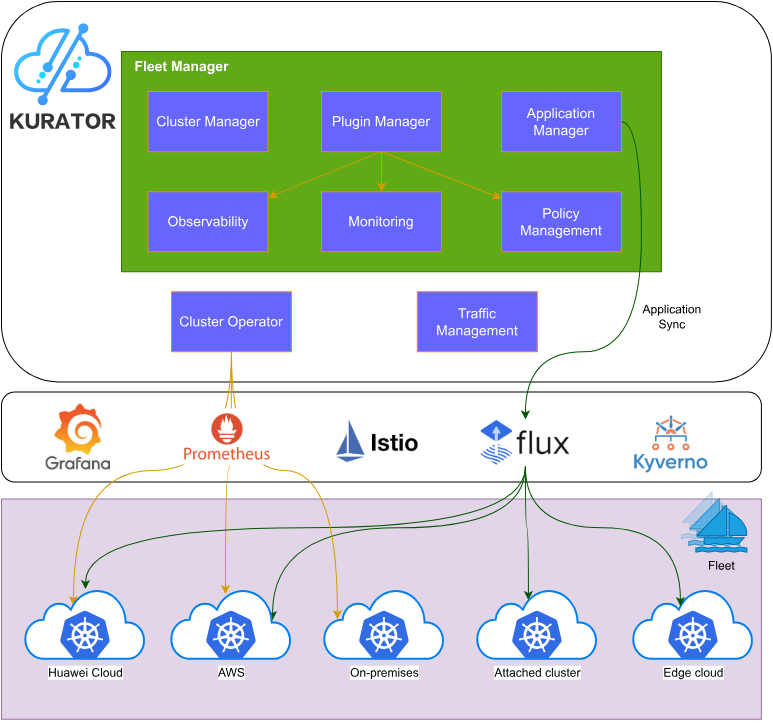
Kurator的技术架构分为几个核心层次:基础设施层、集群管理层、应用管理层和服务治理层。这种分层设计使得Kurator能够灵活适应不同规模和复杂度的部署场景,同时保持各层之间的解耦和可扩展性。
2. 环境搭建与Kurator安装实战
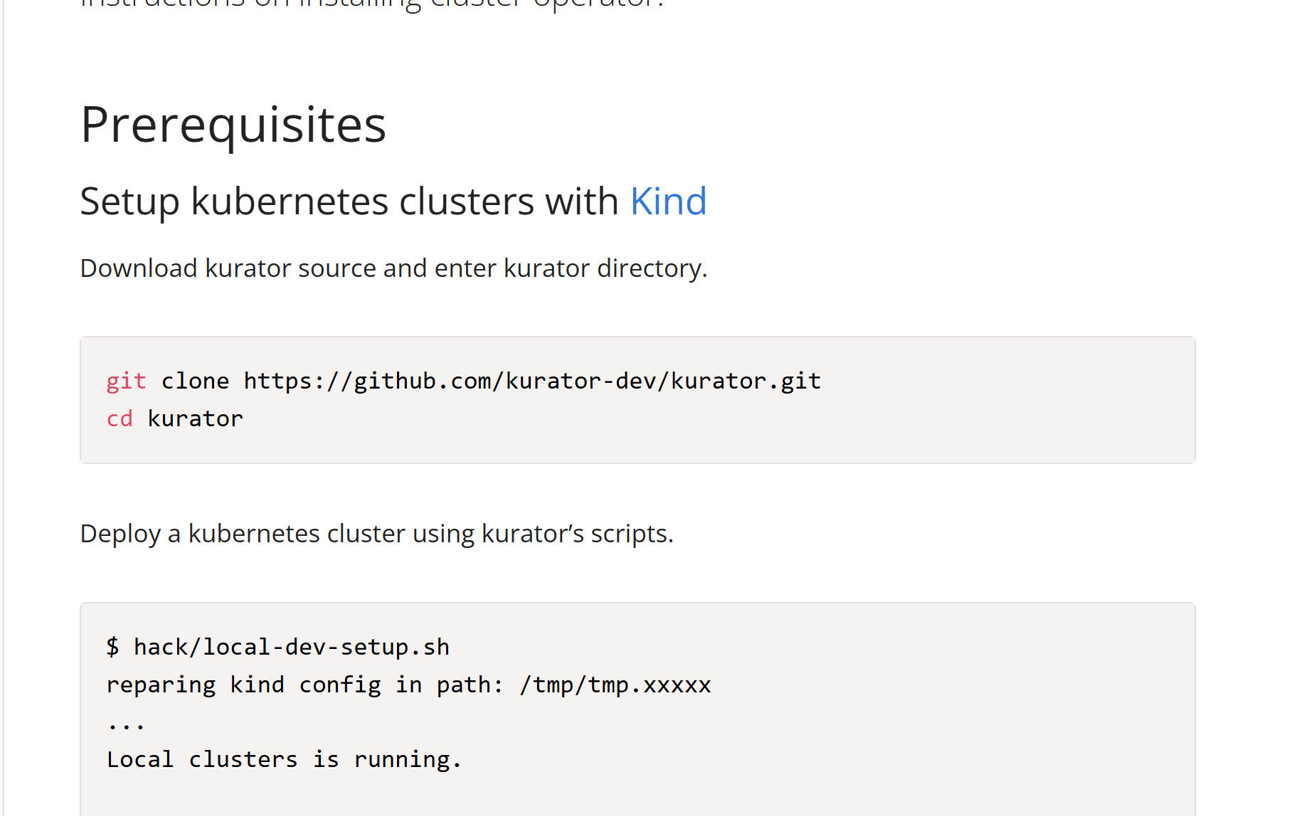
2.1 环境准备与依赖检查
在开始安装Kurator之前,需要准备合适的环境。推荐使用Linux或macOS系统,确保已安装以下工具:
- kubectl (v1.20+)
- helm (v3.8+)
- kind (v0.14+) 或其他Kubernetes集群
# 检查依赖版本
kubectl version --client --short
helm version --short
kind --version
2.2 源码获取与初始化
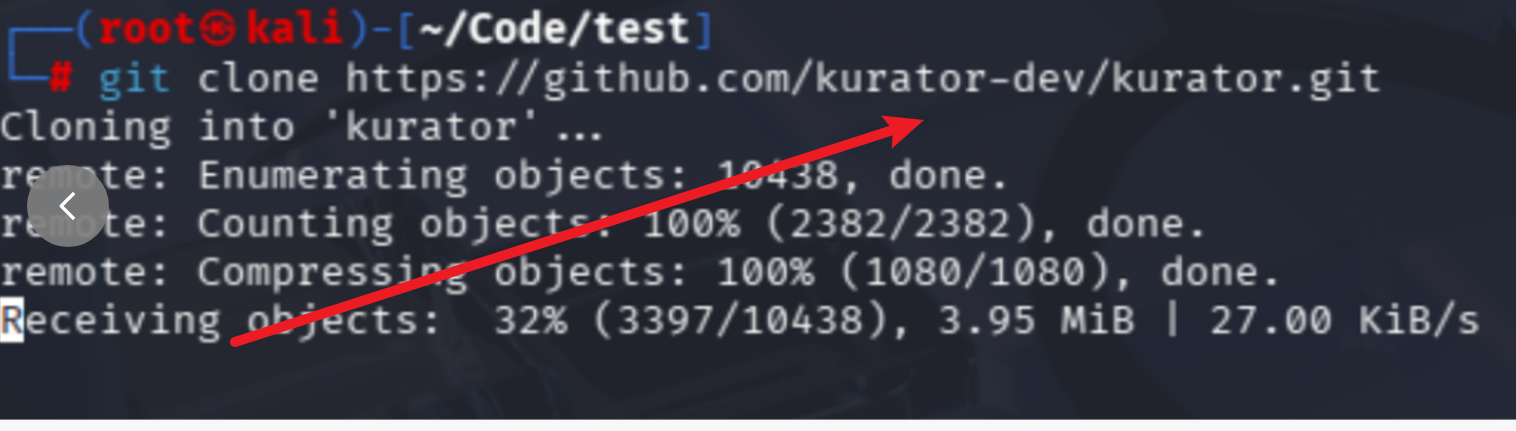
Kurator的安装从获取源码开始,使用官方GitHub仓库:
# 克隆Kurator源码仓库
git clone https://github.com/kurator-dev/kurator.git
cd kurator

# 查看目录结构
tree -L 2
.
├── CONTRIBUTING.md
├── LICENSE
├── README.md
├── charts
├── cmd
├── deploy
├── docs
├── examples
├── hack
├── manifests
├── pkg
├── scripts
└── test
2.3 一键安装与验证
Kurator提供了便捷的一键安装脚本,简化了部署过程:
# 使用脚本安装Kurator
./scripts/install-kurator.sh

# 验证安装结果
kubectl get pods -n kurator-system
NAME                                           READY   STATUS    RESTARTS   AGE
kurator-controller-manager-0                   2/2     Running   0          2m
kurator-fleet-controller-0                    1/1     Running   0          2m
kurator-karmada-controller-0                  1/1     Running   0          2m
kurator-kubeedge-controller-0                 1/1     Running   0          2m
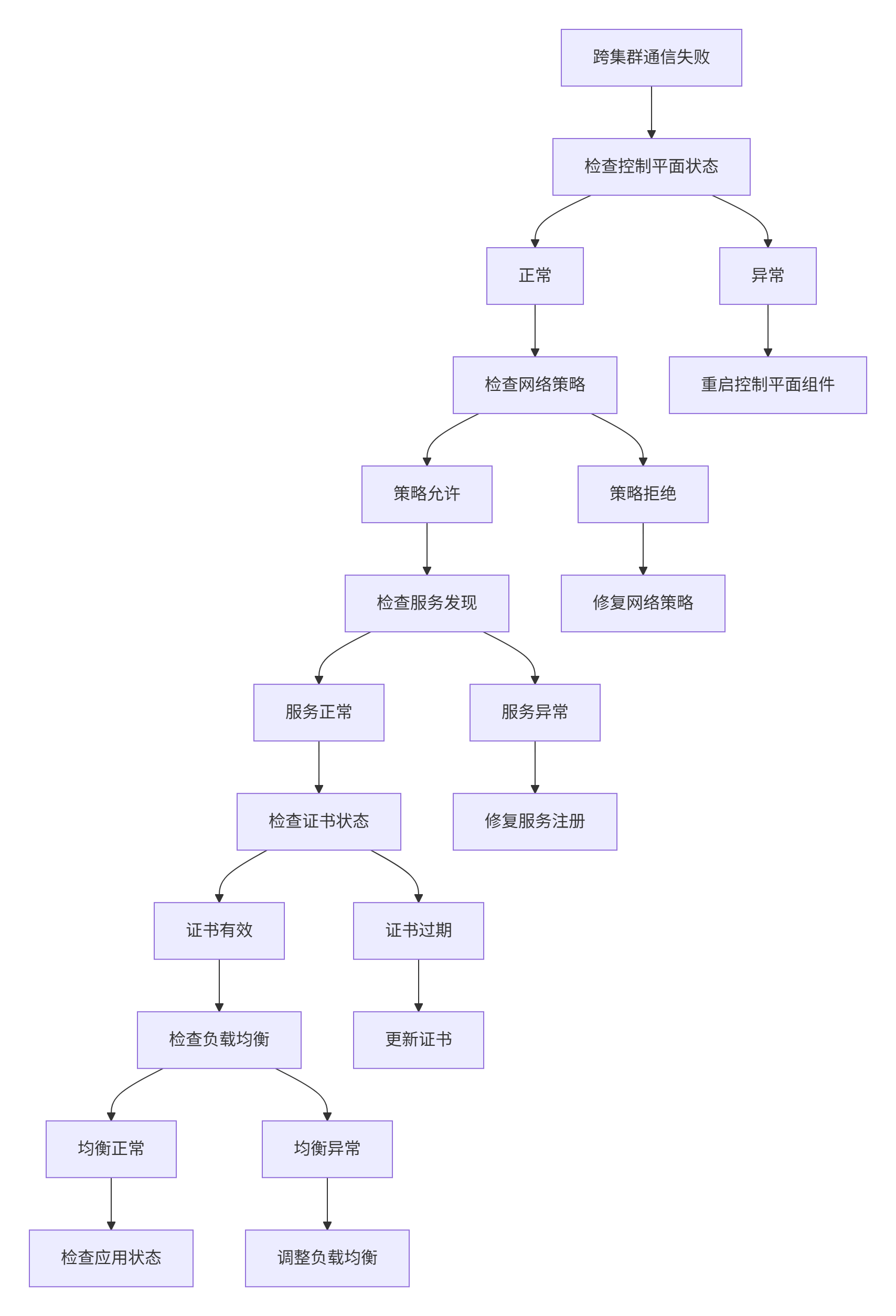
2.4 故障排查与网络连通性验证
安装过程中可能会遇到网络问题,特别是跨集群通信场景。以下是一些常用排查命令:
# 检查集群间网络连通性
kubectl exec -n kurator-system kurator-controller-manager-0 -- curl -v http://member-cluster-api-server

# 隧道状态检查
kubectl get tunnels -A
kubectl describe tunnel <tunnel-name>

# 日志分析
kubectl logs -n kurator-system kurator-controller-manager-0 -c manager
3. Fleet:Kurator的多集群管理核心
3.1 Fleet架构设计与工作原理
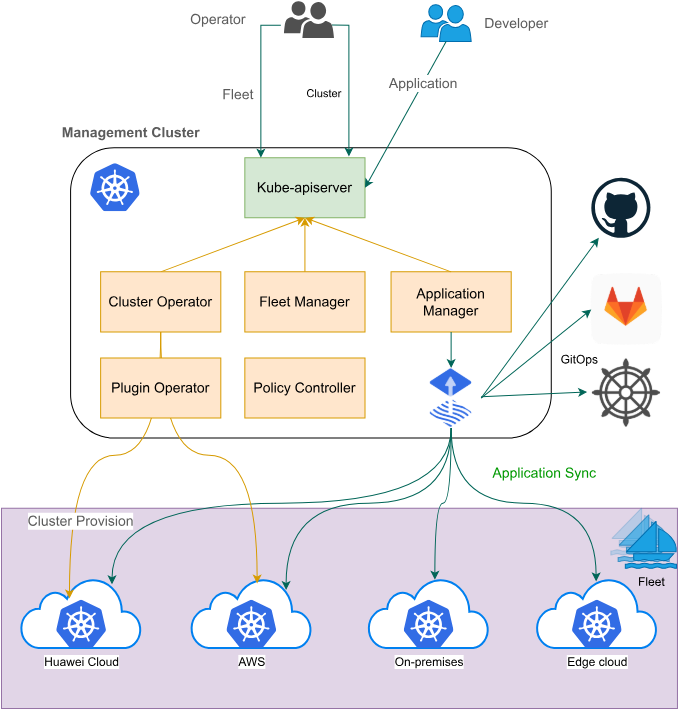
Fleet是Kurator多集群管理的核心概念,它将多个Kubernetes集群组织成一个逻辑单元,实现统一管理。Fleet架构包含三个关键组件:
- Fleet Controller:负责Fleet生命周期管理
- Cluster Registration:处理集群注册和注销
- Resource Sync:同步配置和应用到成员集群
3.2 集群注册与Fleet创建
通过Kurator CLI,可以轻松将现有集群注册到Fleet:
# fleet.yaml
apiVersion: fleet.kurator.dev/v1alpha1
kind: Fleet
meta
  name: production-fleet
spec:
  clusters:
  - name: cluster-1
    kubeconfigSecretRef:
      name: cluster-1-kubeconfig
  - name: cluster-2
    kubeconfigSecretRef:
      name: cluster-2-kubeconfig
# 创建Fleet
kubectl apply -f fleet.yaml

# 验证Fleet状态
kubectl get fleet production-fleet
NAME                READY   CLUSTERS-READY   AGE
production-fleet   True    2/2              5m
3.3 跨集群服务发现与通信
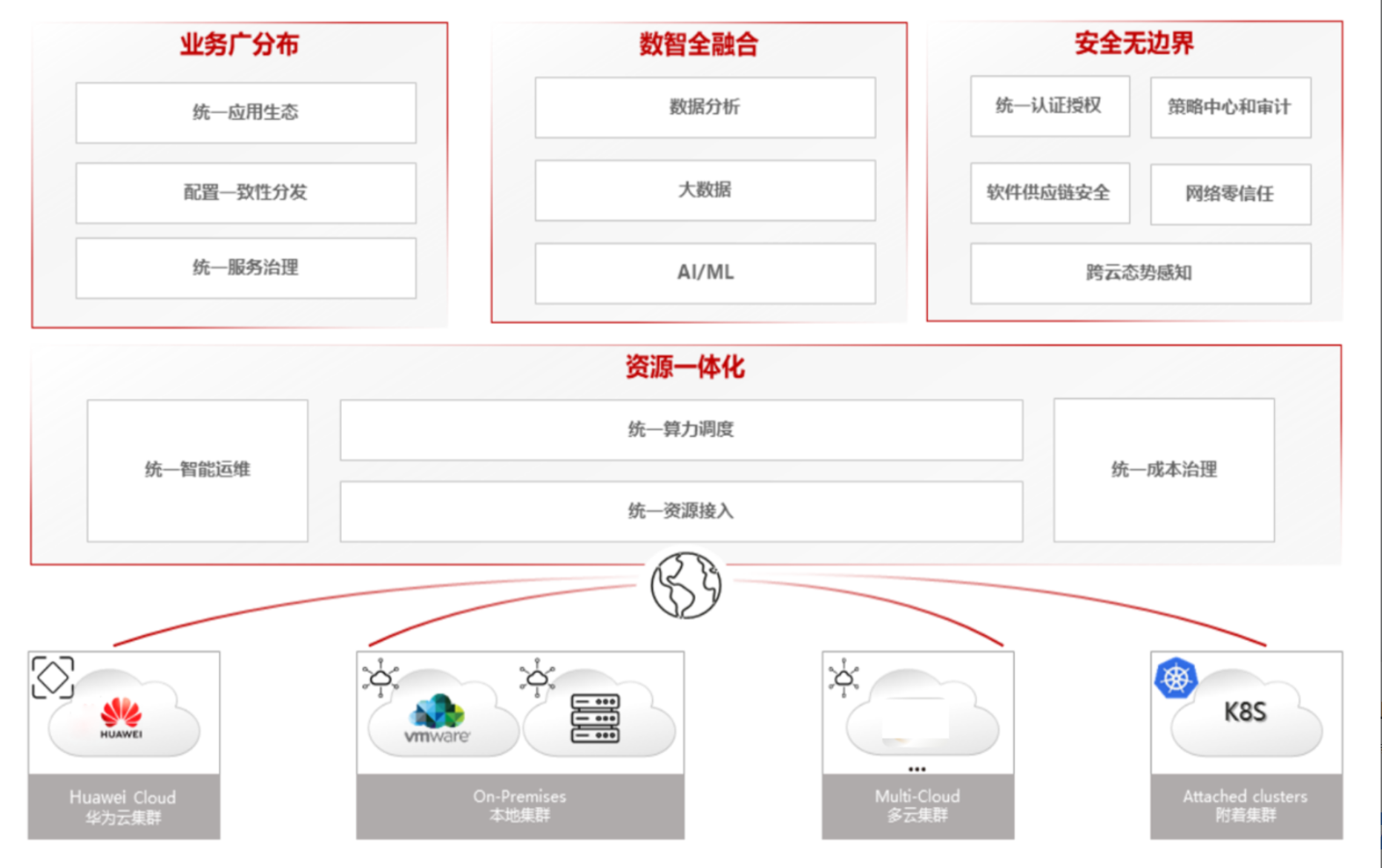
Kurator提供了强大的跨集群服务发现能力,使应用能够无缝访问分布在不同集群中的服务:
# serviceexport.yaml
apiVersion: multicluster.x-k8s.io/v1alpha1
kind: ServiceExport
meta
  name: frontend
  namespace: default
# serviceimport.yaml
apiVersion: multicluster.x-k8s.io/v1alpha1
kind: ServiceImport
meta
  name: frontend
  namespace: default
spec:
  type: ClusterSetIP
  ips:
  - 10.100.1.100
3.4 Fleet策略管理与一致性保障
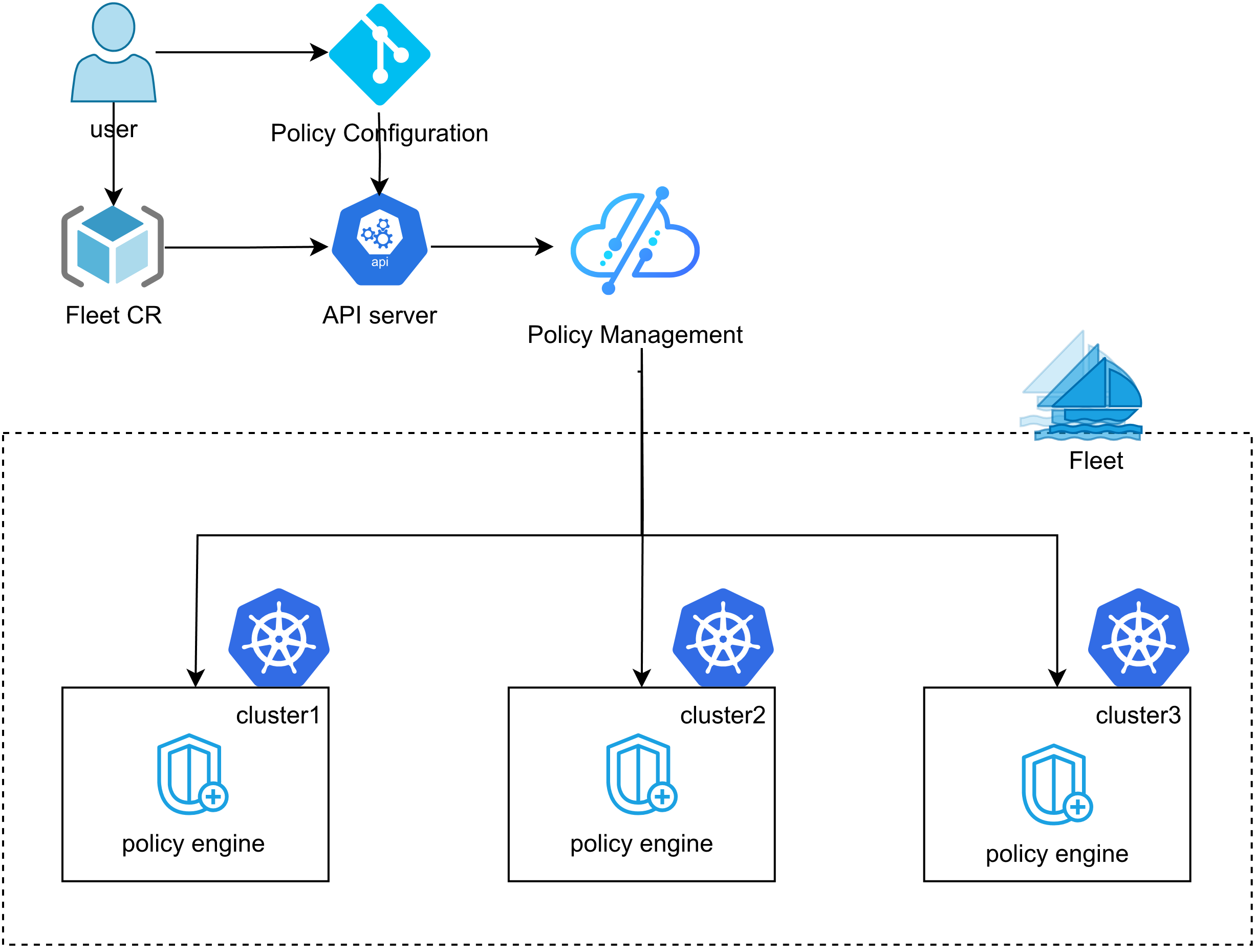
通过Kurator的策略引擎,可以确保所有集群中的配置保持一致:
# policy.yaml
apiVersion: policies.kurator.dev/v1alpha1
kind: ClusterPolicy
metadata:
  name: security-policy
spec:
  rules:
  - name: require-pod-security
    match:
      resources:
        kinds: ["Pod"]
    validate:
      message: "Pod must have security context"
      pattern:
        spec:
          securityContext:
            runAsNonRoot: true
4. Karmada集成与跨集群调度实践
4.1 Karmada架构与Kurator集成点
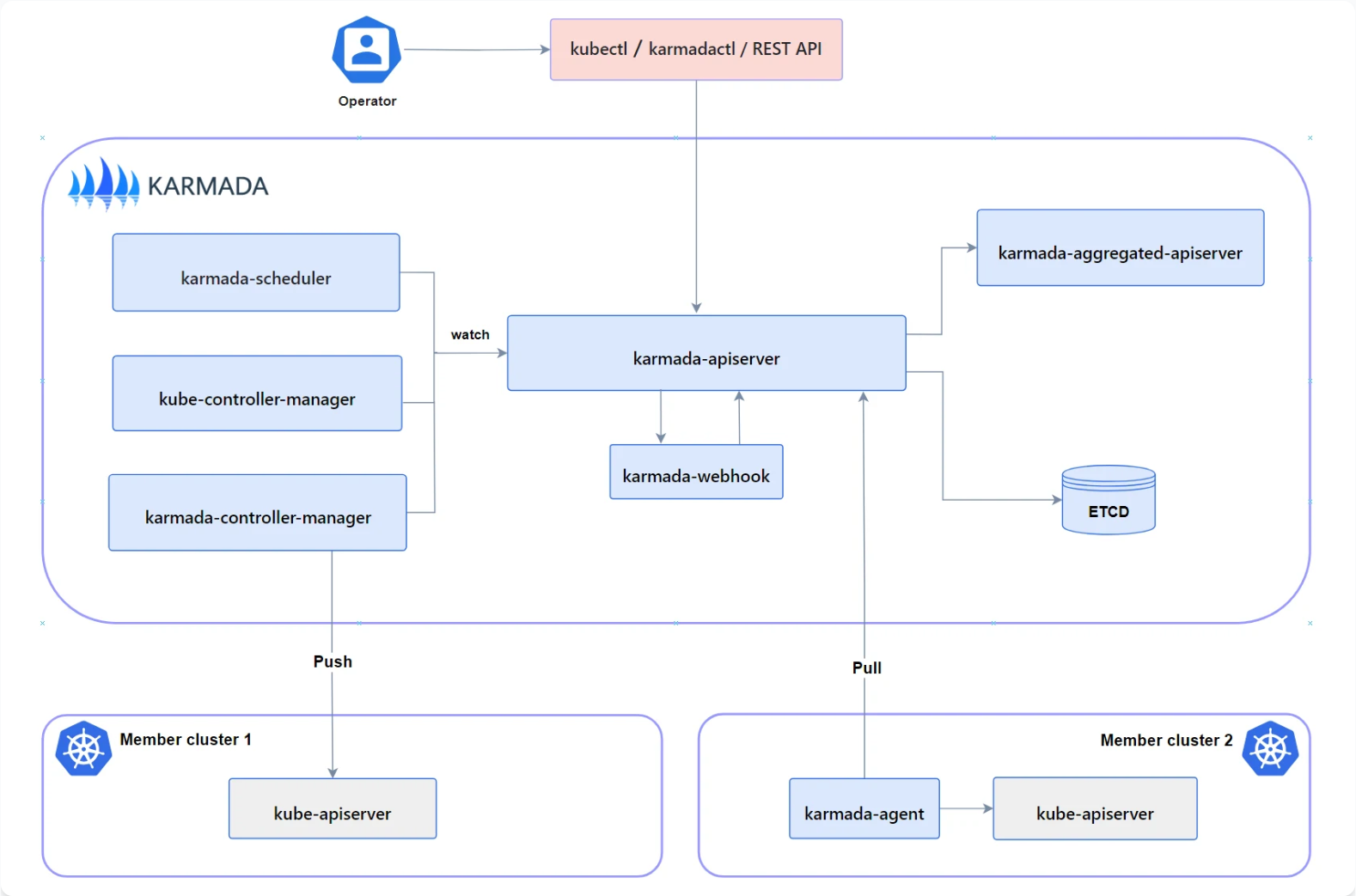
Karmada是Kurator集成的多集群调度核心组件,负责工作负载的跨集群分发。Kurator对Karmada进行了深度集成,提供了更友好的用户体验和扩展能力。
Karmada的核心组件包括:
- karmada-controller-manager:核心控制器
- karmada-scheduler:资源调度器
- karmada-agent:成员集群代理
- karmada-webhook:准入控制
4.2 PropagationPolicy配置实践
通过PropagationPolicy,可以精确控制工作负载如何分发到成员集群:
# propagationpolicy.yaml
apiVersion: policy.karmada.io/v1alpha1
kind: PropagationPolicy
metadata:
  name: nginx-propagation
  namespace: default
spec:
  resourceSelectors:
    - apiVersion: apps/v1
      kind: Deployment
      name: nginx
  placement:
    clusterAffinity:
      clusterNames:
        - cluster-1
        - cluster-2
    replicaScheduling:
      replicaDivisionPreference: Weighted
      replicaSchedulingType: Divided
      weightPreference:
        staticWeightList:
          - targetCluster:
              clusterNames:
                - cluster-1
            weight: 70
          - targetCluster:
              clusterNames:
                - cluster-2
            weight: 30
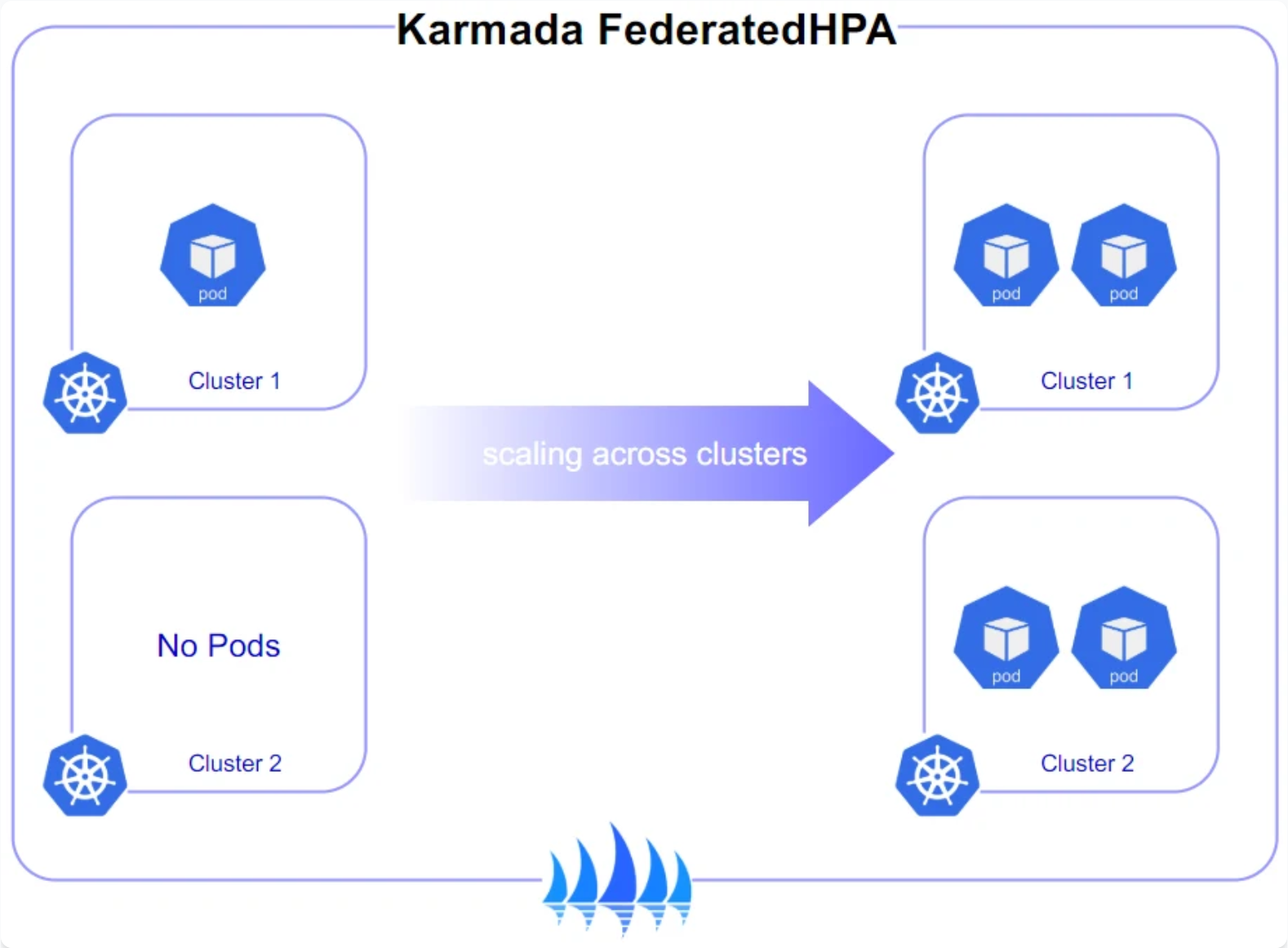
4.3 跨集群弹性伸缩实现
Kurator结合Karmada实现了智能的跨集群弹性伸缩:
# clusteroverridepolicy.yaml
apiVersion: policy.karmada.io/v1alpha1
kind: ClusterOverridePolicy
meta
  name: nginx-override
  namespace: default
spec:
  targetCluster:
    clusterNames:
      - cluster-1
  overriders:
    plaintext:
      - path: /spec/replicas
        operator: replace
        value: 5
      - path: /spec/template/spec/containers/0/resources/requests/cpu
        operator: replace
        value: "500m"
4.4 调度策略优化与故障转移
在生产环境中,合理的调度策略至关重要。以下是一个包含故障转移能力的高级配置示例:
# advanced-propagation.yaml
apiVersion: policy.karmada.io/v1alpha1
kind: PropagationPolicy
meta
  name: critical-app-policy
spec:
  resourceSelectors:
    - apiVersion: apps/v1
      kind: Deployment
      name: critical-app
  placement:
    clusterAffinity:
      clusterNames:
        - primary-cluster
        - backup-cluster
    spreadConstraints:
      - spreadByField: cluster
        maxGroups: 1
    tolerations:
      - key: cluster-type
        value: production
        effect: NoSchedule
    replicaScheduling:
      replicaSchedulingType: Duplicated
    clusterTolerations:
      - key: cluster-health
        value: degraded
        effect: NoExecute
        tolerationSeconds: 300
5. GitOps与应用交付流水线
5.1 Kurator的GitOps架构设计
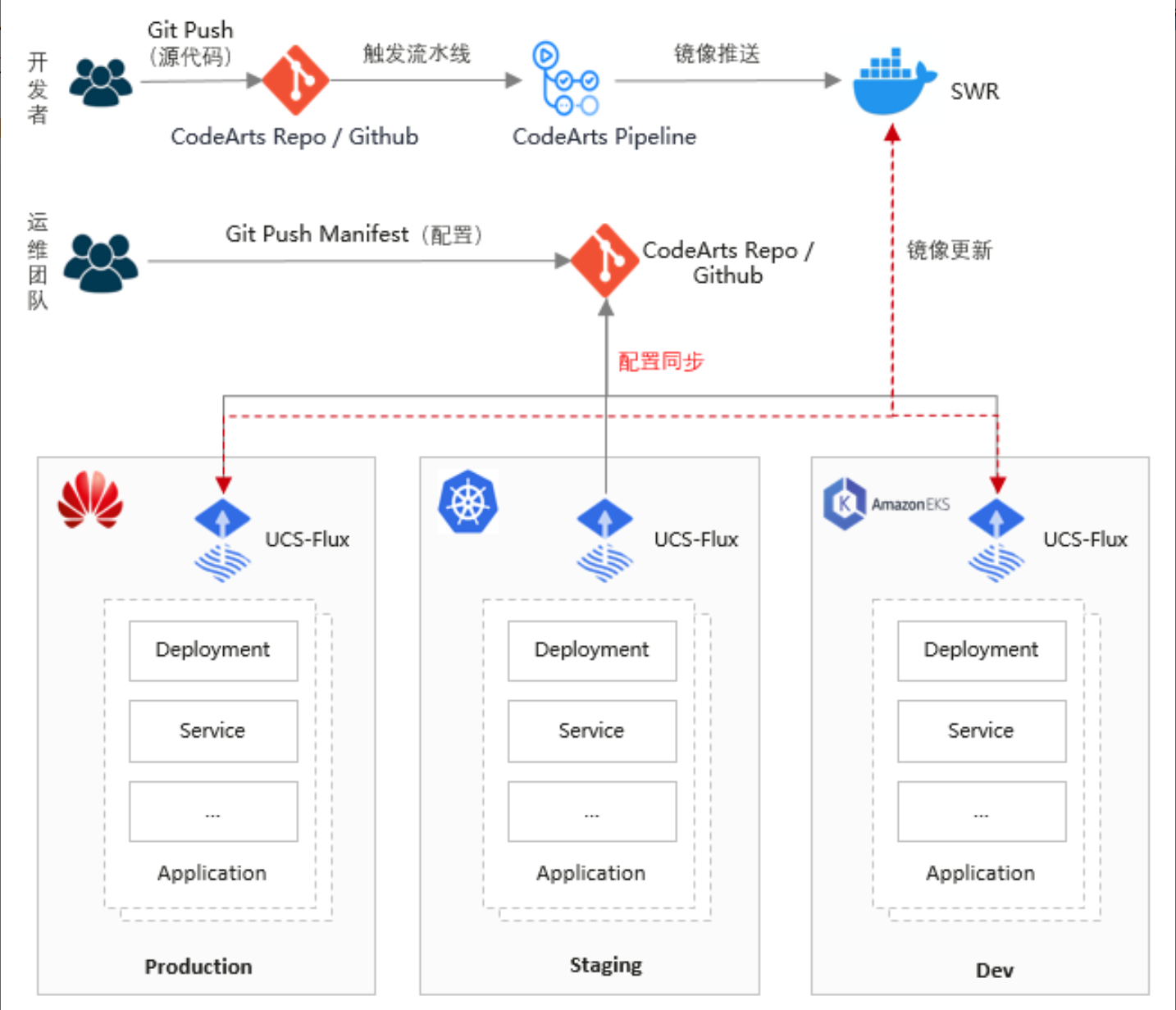
Kurator集成了FluxCD作为GitOps引擎,提供了完整的声明式应用交付能力。其架构包含:
- Source Controller:管理Git仓库、Helm仓库等源
- Kustomize Controller:处理Kustomize配置
- Helm Controller:管理Helm发布
- Notification Controller:事件通知
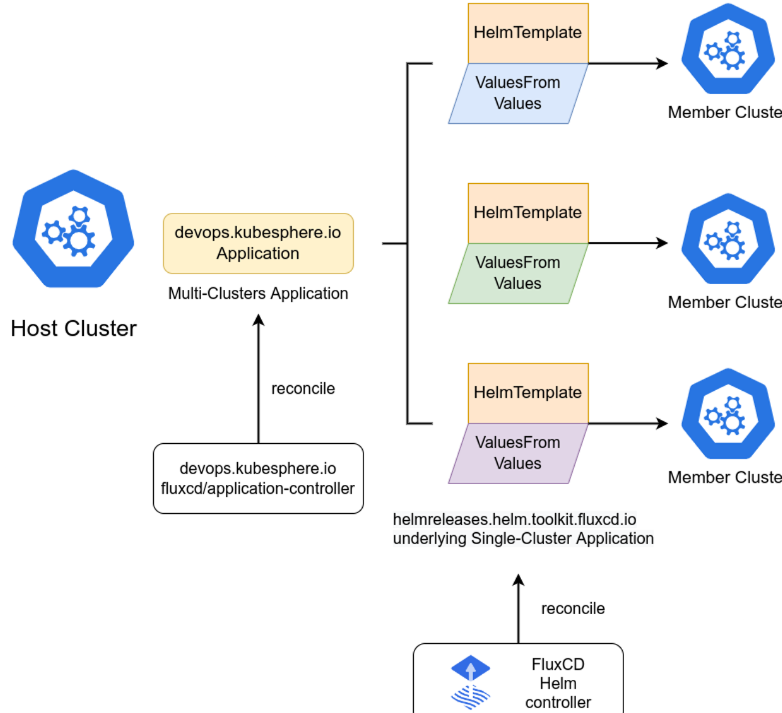
5.2 FluxCD Helm应用分发示例
以下是一个使用FluxCD分发Helm应用的完整示例:
# gitrepository.yaml
apiVersion: source.toolkit.fluxcd.io/v1beta2
kind: GitRepository
meta
  name: app-repo
  namespace: flux-system
spec:
  url: https://github.com/example/app-manifests
  ref:
    branch: main
  interval: 1m
# helmrelease.yaml
apiVersion: helm.toolkit.fluxcd.io/v2beta1
kind: HelmRelease
metadata:
  name: nginx-app
  namespace: default
spec:
  chart:
    spec:
      chart: nginx
      version: "4.0.18"
      sourceRef:
        kind: HelmRepository
        name: bitnami
        namespace: flux-system
  interval: 5m
  targetNamespace: production
  values:
    replicaCount: 3
    service:
      type: ClusterIP
    resources:
      requests:
        cpu: 100m
        memory: 128Mi
    nodeSelector:
      kubernetes.io/os: linux
5.3 Kurator CI/CD流水线构建
Kurator提供了完整的CI/CD能力,结合Tekton等工具构建现代化流水线:
# pipeline.yaml
apiVersion: tekton.dev/v1beta1
kind: Pipeline
meta
  name: app-deploy-pipeline
spec:
  tasks:
  - name: fetch-code
    taskRef:
      name: git-clone
    workspaces:
    - name: source
      workspace: shared-workspace
  - name: build-image
    taskRef:
      name: kaniko-build
    runAfter: [fetch-code]
    workspaces:
    - name: source
      workspace: shared-workspace
  - name: deploy-to-staging
    taskRef:
      name: kurator-deploy
    runAfter: [build-image]
    params:
    - name: environment
      value: staging
  - name: run-tests
    taskRef:
      name: integration-tests
    runAfter: [deploy-to-staging]
  - name: deploy-to-production
    taskRef:
      name: kurator-deploy
    runAfter: [run-tests]
    when:
    - input: "$(tasks.run-tests.results.passed)"
      operator: in
      values: ["true"]
    params:
    - name: environment
      value: production
6. KubeEdge:边缘计算集成实践
6.1 KubeEdge架构与核心组件
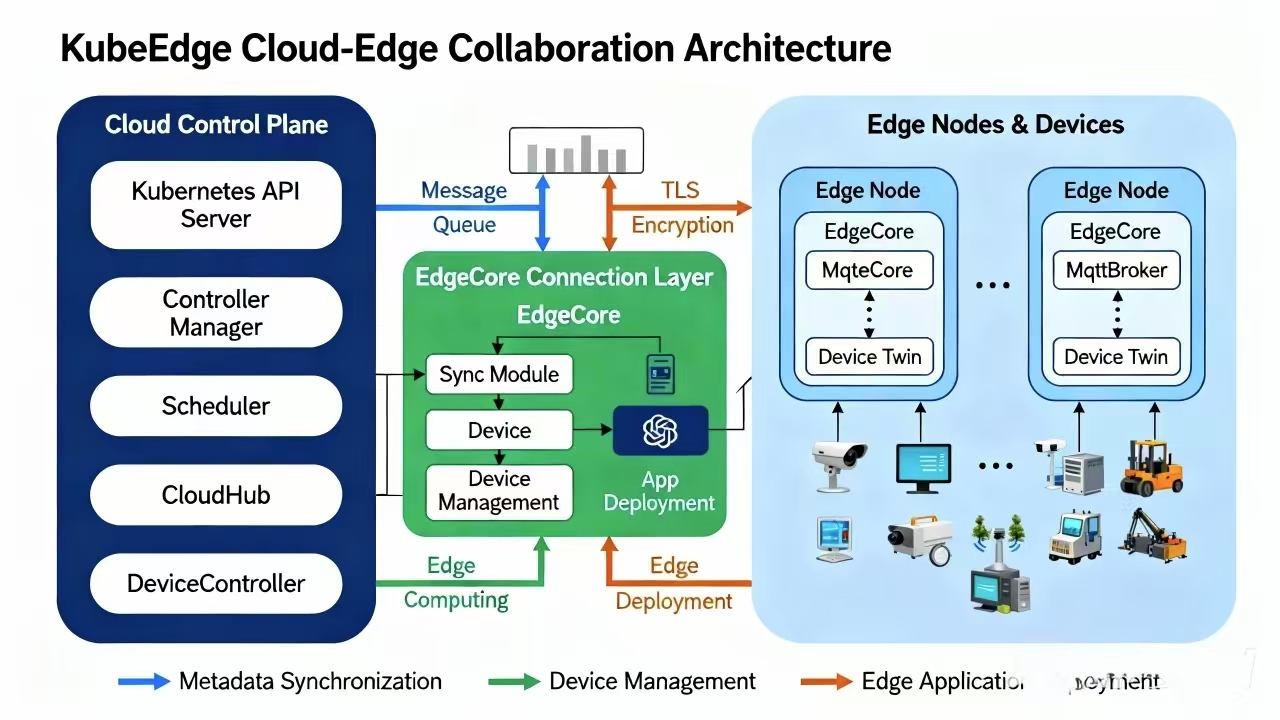
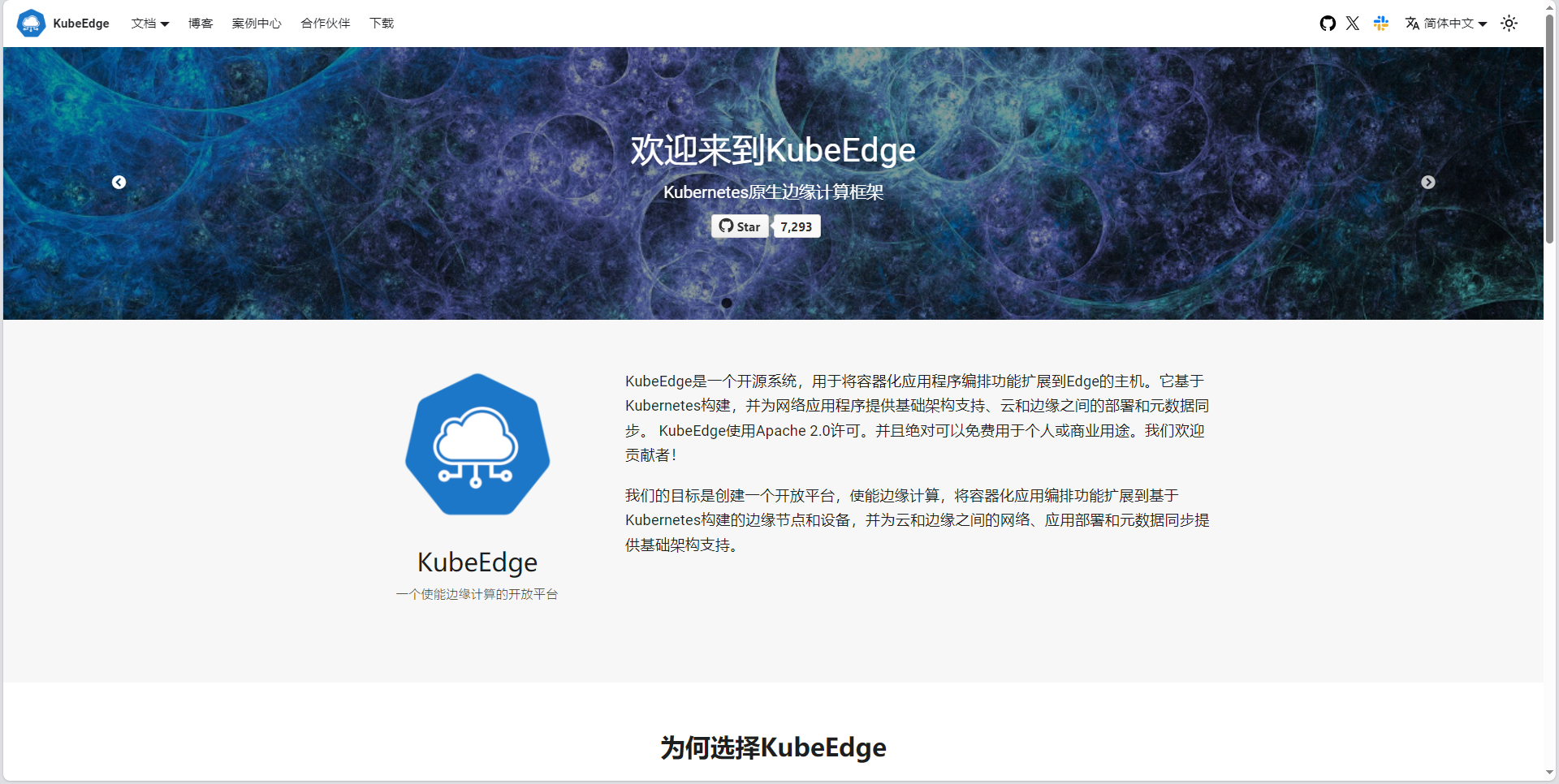
KubeEdge是Kurator集成的边缘计算解决方案,其架构包括云端和边缘端组件:
云端组件:
- CloudCore:云边通信枢纽
- EdgeController:边缘节点管理
- DeviceController:设备管理
边缘端组件:
- EdgeCore:边缘核心
- EdgeMesh:边缘服务发现
- EventBus:事件总线
- MetaManager:元数据管理
6.2 边缘节点注册与管理
通过Kurator,边缘节点注册变得简单:
# edgecluster.yaml
apiVersion: edge.kurator.dev/v1alpha1
kind: EdgeCluster
meta
  name: factory-edge
spec:
  cloudCoreAddress: edge-cloudcore.kurator-system.svc.cluster.local:10000
  edgeNodes:
  - name: edge-node-1
    attributes:
      zone: factory-zone-a
      rack: rack-1
  - name: edge-node-2
    attributes:
      zone: factory-zone-b
      rack: rack-2
6.3 边云协同调度策略
Kurator结合Karmada和KubeEdge,实现了智能的边云协同调度:
# edge-policy.yaml
apiVersion: policy.karmada.io/v1alpha1
kind: PropagationPolicy
meta
  name: edge-app-policy
spec:
  resourceSelectors:
    - apiVersion: apps/v1
      kind: Deployment
      name: edge-app
  placement:
    clusterAffinity:
      labelSelector:
        matchLabels:
          cluster-type: edge
    replicaScheduling:
      replicaSchedulingType: Divided
    requiredNodeSelectorTerms:
    - matchExpressions:
      - key: node-role.kubernetes.io/edge
        operator: In
        values: ["true"]
6.4 边缘应用离线运行能力
在边缘计算场景中,网络不稳定是常态。Kurator通过KubeEdge提供了强大的离线运行能力:
# edge-app.yaml
apiVersion: apps/v1
kind: Deployment
meta
  name: offline-capable-app
  namespace: edge
  annotations:
    kubeedge.io/offline: "true"
    kubeedge.io/sync-interval: "60s"
spec:
  replicas: 3
  selector:
    matchLabels:
      app: offline-capable-app
  template:
    meta
      labels:
        app: offline-capable-app
    spec:
      containers:
      - name: app
        image: edge-app:latest
        volumeMounts:
        - name: edge-cache
          mountPath: /cache
      volumes:
      - name: edge-cache
        hostPath:
          path: /var/lib/edge/cache
          type: DirectoryOrCreate
      tolerations:
      - key: "node.kubernetes.io/unreachable"
        operator: "Exists"
        effect: "NoExecute"
        tolerationSeconds: 300
7. 服务治理与流量管理
7.1 Istio集成与服务网格架构
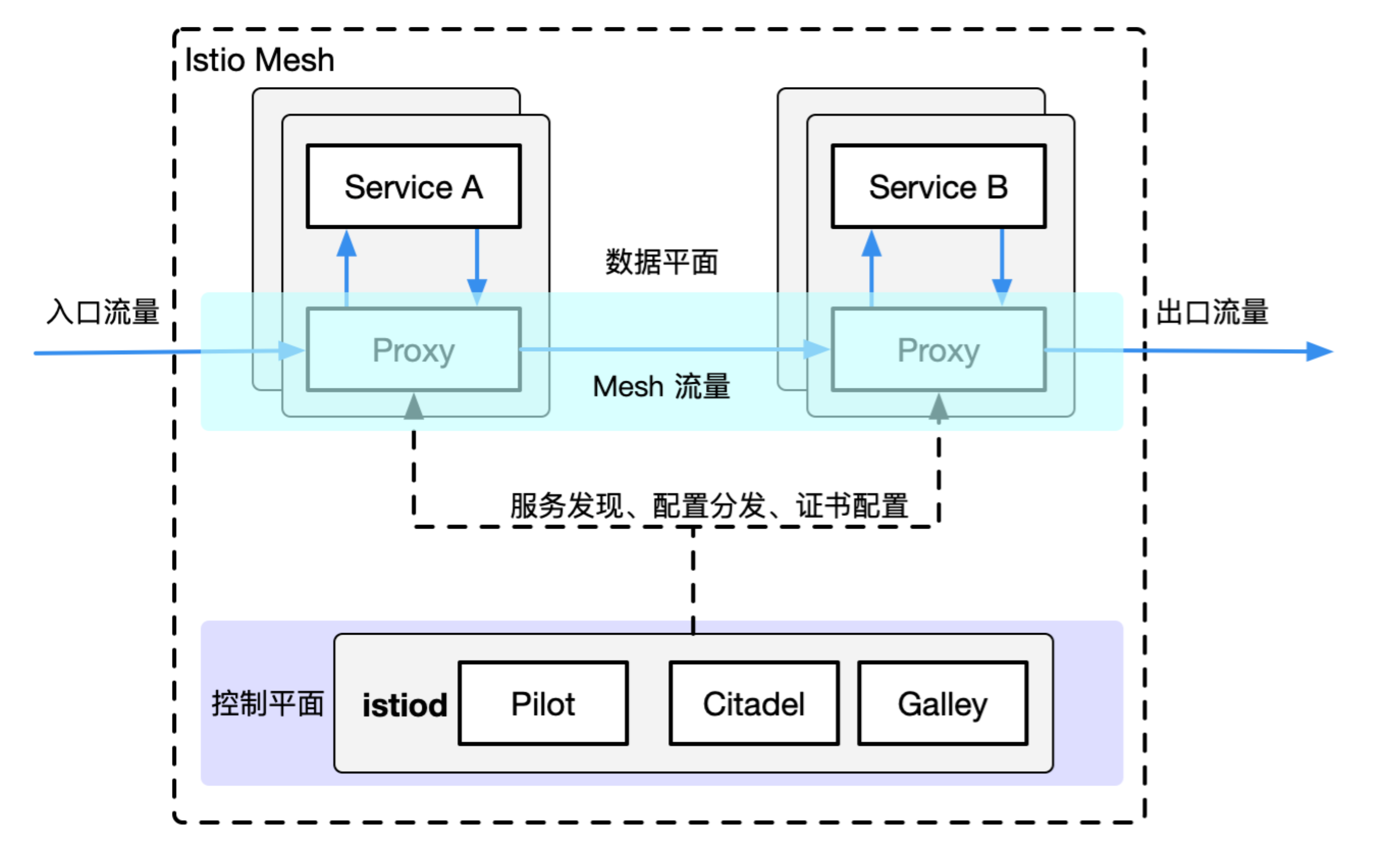
Kurator深度集成了Istio,提供完整的服务网格能力。在多集群环境下,Istio的控制平面可以部署在中心集群,数据平面分布在各成员集群:
# istio-fleet.yaml
apiVersion: install.istio.io/v1alpha1
kind: IstioOperator
meta
  name: kurator-istio
spec:
  profile: demo
  components:
    pilot:
      k8s:
        replicaCount: 2
    ingressGateways:
    - name: ingressgateway
      enabled: true
      k8s:
        service:
          type: LoadBalancer
  values:
    global:
      meshID: kurator-mesh
      multiCluster:
        clusterName: central-cluster
      network: network1
7.2 跨集群服务访问配置
通过Istio的ServiceEntry和DestinationRule,可以实现跨集群服务访问:
# serviceentry.yaml
apiVersion: networking.istio.io/v1alpha3
kind: ServiceEntry
meta
  name: remote-service
spec:
  hosts:
  - remote-service.default.svc.cluster.local
  location: MESH_INTERNAL
  ports:
  - number: 80
    name: http
    protocol: HTTP
  resolution: DNS
  endpoints:
  - address: cluster-2-gateway.example.com
    ports:
      http: 80
7.3 A/B测试与流量切分实现
Kurator结合Istio和Flagger,提供了强大的A/B测试能力:
# abtest.yaml
apiVersion: networking.istio.io/v1alpha3
kind: VirtualService
metadata:
  name: frontend-abtest
spec:
  hosts:
  - frontend.example.com
  gateways:
  - istio-system/ingress-gateway
  http:
  - match:
    - headers:
        user-agent:
          regex: ".*Chrome.*"
    route:
    - destination:
        host: frontend-v2
      weight: 100
    - destination:
        host: frontend-v1
      weight: 0
  - route:
    - destination:
        host: frontend-v1
      weight: 100
结语
Kurator作为分布式云原生平台的创新者,正在重新定义企业构建云原生基础设施的方式。通过统一管理多集群、边缘节点和云服务,Kurator降低了分布式系统的复杂性,提升了运维效率。本文从实践角度深入剖析了Kurator的核心能力,包括环境搭建、Fleet管理、Karmada集成、KubeEdge边缘计算、GitOps实践、服务治理等关键领域。
随着云原生技术的持续演进,分布式架构将成为企业数字化转型的主流选择。Kurator及其社区将持续推动技术创新,为企业提供更强大、更易用的云原生基础设施。作为技术从业者,我们应当积极参与到这一变革中,共同塑造云原生的未来。
技术的发展永无止境,Kurator的故事才刚刚开始。让我们携手共建,推动分布式云原生技术的创新与普及,为企业数字化转型提供坚实的技术支撑。

AtomGit 是由开放原子开源基金会联合 CSDN 等生态伙伴共同推出的新一代开源与人工智能协作平台。平台坚持“开放、中立、公益”的理念,把代码托管、模型共享、数据集托管、智能体开发体验和算力服务整合在一起,为开发者提供从开发、训练到部署的一站式体验。
更多推荐
 24
24 0
0- 0


 已为社区贡献17条内容

所有评论(0)