Linux C ftruncate 函数清空文件注意事项(要使用 lseek 重置偏移量)
 免费下载资源
之前有个要把打开的文件清空,然后重新写入的需求,但是使用 ftruncate(fd, 0)后,并没有达到效果,反而文件头部有了'\0',长度比预想的大了。究其原因是没有使用 lseek 重置文件偏移量,是我太天真了,以为清空文件就会从头开始写入。
------------------------------------- 我是解释分割线 --------------------------------------
首先 man ftruncate 看下帮助手册
NAME
truncate, ftruncate - truncate a file to a specified length
SYNOPSIS
int truncate(const char *path, off_t length);
int ftruncate(int fd, off_t length);
DESCRIPTION
The truncate() and ftruncate() functions cause the regular file named by path or referenced by fd to be truncated to a size of precisely length bytes.
If the file previously was larger than this size, the extra data is lost. If the file previously was shorter, it is extended, and the extended part reads as null bytes ('\0').
The file offset is not changed.
If the size changed, then the st_ctime and st_mtime fields (respectively, time of last status change and time of last modification; see stat(2)) for the file are updated, and the set-user-ID and
set-group-ID permission bits may be cleared.
With ftruncate(), the file must be open for writing; with truncate(), the file must be writable.
之前就是因为没有看到红色那行字,导致我产生了文件开头的错误,都说了文件偏移量是不会改变的!
实验如下:
#include <stdio.h>
#include <string.h>
#include <unistd.h>
#include <sys/types.h>
#include <sys/stat.h>
#include <fcntl.h>

int main(void)
{
	int fd;

	const char *s1 = "0123456789";
	const char *s2 = "abcde";

	fd = open("test.txt", O_CREAT | O_WRONLY | O_TRUNC, 0666);
	/* if error */

	write(fd, s1, strlen(s1));

	ftruncate(fd, 0);
	// lseek(fd, 0, SEEK_SET);

	write(fd, s2, strlen(s2));

	close(fd);

	return 0;
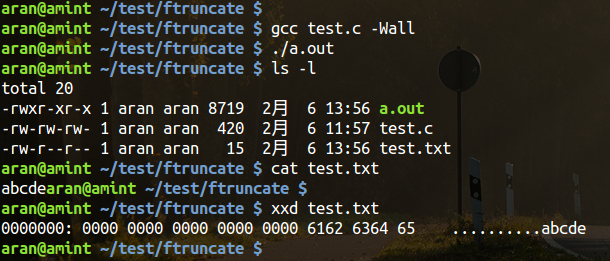
}
去掉 lseek(fd, 0, SEEK_SET); 的注释后,效果如下:
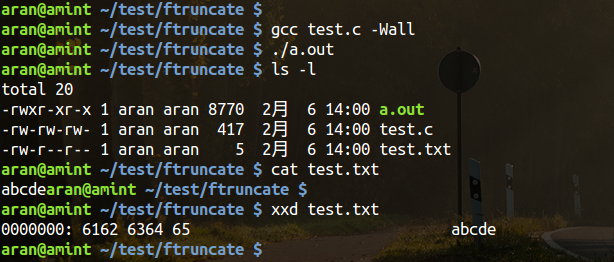
结论:
从以上两张图中,可以看出,不用 lseek 的文件大小为15,用 xxd 查看16进制格式看到 文件头有10个 '\0' 填充。
而重置文件偏移量后,文件大小为5,内容也正确。
因此,在用 ftruncate 函数时,再次写入一定要重新设置文件偏移量(在 ftruncate 之前或之后都行,用 lseek 或 rewind 都可以)。
 GitHub 加速计划 / li / linux-dash
 13
13
 2
下载
2
下载

AtomGit 是由开放原子开源基金会联合 CSDN 等生态伙伴共同推出的新一代开源与人工智能协作平台。平台坚持“开放、中立、公益”的理念,把代码托管、模型共享、数据集托管、智能体开发体验和算力服务整合在一起,为开发者提供从开发、训练到部署的一站式体验。
更多推荐


 7
7 0
0- 0


 已为社区贡献14条内容

所有评论(0)