Windows 通过 SecureCRT 8.x 上传文件到Linux服务器
linux-dash
A beautiful web dashboard for Linux
项目地址:https://gitcode.com/gh_mirrors/li/linux-dash
 免费下载资源
·
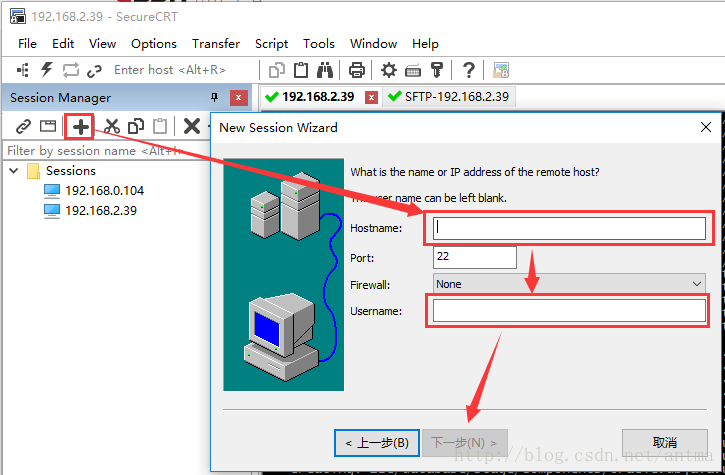
1、SecureCRT 连接 Linux 服务器,这一步操作简单:
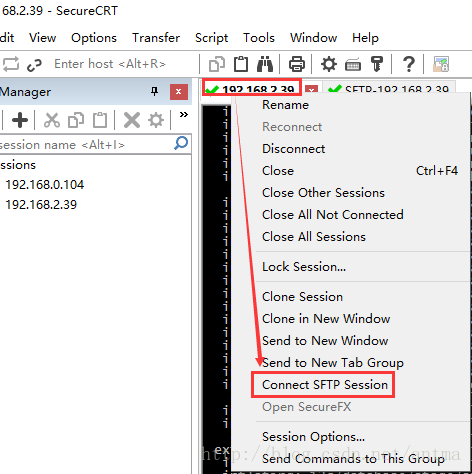
2、连接并登录成功后,直接在连接成功的页签上 右键 -> Connect SFTP Session 打开SFTP窗口:
3、在新的SFTP页签中,切换windows本地和Linux服务器的目录:
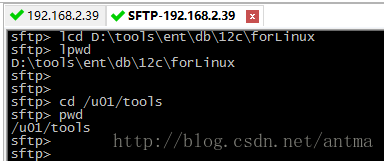
sftp> lcd D:\tools\ent\db\12c\forLinux
sftp> lpwd
D:\tools\ent\db\12c\forLinux
sftp>
sftp>
sftp> cd /u01/tools
sftp> pwd
/u01/tools切换本地目录: lcd D:\tools\ent\db\12c\forLinux
查看本地切换的目录: lpwd
切换服务器目录: cd /u01/tools
查看服务器切换的目录: pwd
4、用 put 命令将需要上传的文件传至Linux服务器
sftp> put linuxamd64_12102_database_1of2.zip
Uploading linuxamd64_12102_database_1of2.zip to /u01/tools/linuxamd64_12102_database_1of2.zip
  100% 1634321KB   9338KB/s 00:02:55
D:\tools\ent\db\12c\forLinux\linuxamd64_12102_database_1of2.zip: 1673544724 bytes transferred in 175 seconds (9338 KB/s)
5、用 get 命令将Linux服务器上的文件下载到本地
sftp> get 1.txt
Downloading 1.txt from /u01/tools/1.txt
  100% 2 bytes      2 bytes/s 00:00:00
/u01/tools/1.txt: 2 bytes transferred in 0 seconds (2 bytes/s)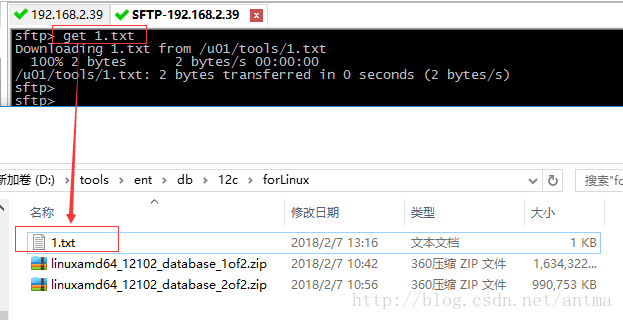
 GitHub 加速计划 / li / linux-dash
 13
13
 2
下载
2
下载
A beautiful web dashboard for Linux
最近提交(Master分支:4 个月前 )
186a802e
added ecosystem file for PM2 5 年前
5def40a3
Add host customization support for the NodeJS version 5 年前

AtomGit 是由开放原子开源基金会联合 CSDN 等生态伙伴共同推出的新一代开源与人工智能协作平台。平台坚持“开放、中立、公益”的理念,把代码托管、模型共享、数据集托管、智能体开发体验和算力服务整合在一起,为开发者提供从开发、训练到部署的一站式体验。
更多推荐


 6
6 0
0- 0


 已为社区贡献5条内容

所有评论(0)