maven项目在eclipse中常见错误汇总
maven
Maven: Apache Maven是一个开源的项目管理和构建工具,主要用于Java项目。适合需要自动化项目构建和依赖管理的开发者。特点包括约定优于配置、易于使用和社区驱动。
项目地址:https://gitcode.com/gh_mirrors/ma/maven
 免费下载资源
·
maven项目在eclipse中常见错误汇总
1.maven-resources-plugin prior to 2.4 is not supported by m2e.
解决方案:
将你的
<artifactId>maven-resources-plugin</artifactId>
                <version>2.3</version>

                修改为
                <version>2.5</version>
2.maven-dependency-plugin (goals "copy-dependencies", "unpack") is not supported by m2e
在plungins之前添加如下代码:
<build>
<pluginManagement>
            <plugins>
                <plugin>
                    <groupId>org.eclipse.m2e</groupId>
                    <artifactId>lifecycle-mapping</artifactId>
                    <version>1.0.0</version>
                    <configuration>
                        <lifecycleMappingMetadata>
                            <pluginExecutions>
                                <pluginExecution>
                                    <pluginExecutionFilter>
                                        <groupId>org.apache.maven.plugins</groupId>
                                        <artifactId>maven-dependency-plugin</artifactId>
                                        <versionRange>[2.0,)</versionRange>
                                        <goals>
                                            <goal>copy-dependencies</goal>
                                        </goals>
                                    </pluginExecutionFilter>
                                    <action>
                                        <ignore />
                                    </action>
                                </pluginExecution>
                            </pluginExecutions>
                        </lifecycleMappingMetadata>
                    </configuration>
                </plugin>
            </plugins>
        </pluginManagement>
<plugins>
<plugin>
                <groupId>org.apache.maven.plugins</groupId>
                <artifactId>maven-dependency-plugin</artifactId>
                <executions>
                    <execution>
                    <id>copy</id>
                    <phase>package</phase>
                    <goals>
                        <goal>copy-dependencies</goal>
                    </goals>
                    <configuration>
                        <outputDirectory>
                            ${project.build.directory}/lib
                        </outputDirectory>
                    </configuration>
                    </execution>
                </executions>
            </plugin>
<pre name="code" class="html"></plugins> 3.eclipse通过svn check out项目(maven构建的项目)
往往我们的项目都是通过svn进行团队开发的,所以对于maven构建的项目我们需要通过svn进行共享和检出,下面就是eclipse检出maven构建的项目;
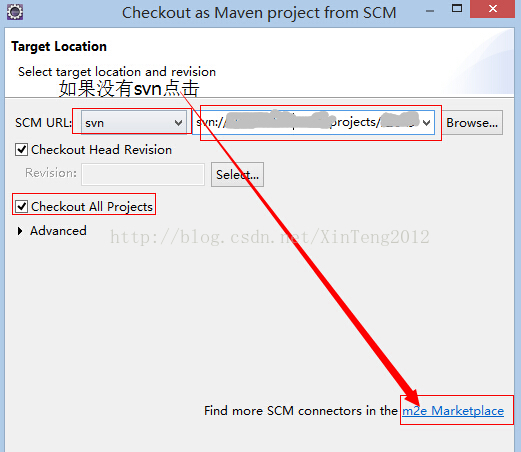
第一步:需要右键选择import,找到maven目录看到下图中的红框:

第二步:看到SCM URL,点击右边的下拉框,如果没有svn选项,请按照箭头点击右下角的超链接,会展示出scm插件,
然后选择其中的进行在线下载安装,这个过程需要重启eclipse,
我选择安装的是:

第三步:项目就开始正常的checkout,如果出现SVN: 'Checkout As' operation finished with error Selected resource is not checked out.等错误,
可以试着重启下eclipse,然后再重新check out对应项目:

 GitHub 加速计划 / ma / maven
 36
36
 3
下载
3
下载
Maven: Apache Maven是一个开源的项目管理和构建工具,主要用于Java项目。适合需要自动化项目构建和依赖管理的开发者。特点包括约定优于配置、易于使用和社区驱动。
最近提交(Master分支:3 个月前 )
fb619297
Bumps [org.apache:apache](https://github.com/apache/maven-apache-parent) from 36 to 37.
- [Release notes](https://github.com/apache/maven-apache-parent/releases)
- [Commits](https://github.com/apache/maven-apache-parent/commits)
---
updated-dependencies:
- dependency-name: org.apache:apache
dependency-version: '37'
dependency-type: direct:production
update-type: version-update:semver-major
...
Signed-off-by: dependabot[bot] <support@github.com>
Co-authored-by: dependabot[bot] <49699333+dependabot[bot]@users.noreply.github.com> 1 天前
f3fa4751
Signed-off-by: 高春晖 <18220699480@163.com> 2 天前

AtomGit 是由开放原子开源基金会联合 CSDN 等生态伙伴共同推出的新一代开源与人工智能协作平台。平台坚持“开放、中立、公益”的理念,把代码托管、模型共享、数据集托管、智能体开发体验和算力服务整合在一起,为开发者提供从开发、训练到部署的一站式体验。
更多推荐


 0
0 0
0- 0


 已为社区贡献4条内容

所有评论(0)