win10+VS 2017 安装 CUDA10(Visual Studio Integration失败)
integration
HACS gives you a powerful UI to handle downloads of all your custom needs.
项目地址:https://gitcode.com/gh_mirrors/in/integration
 免费下载资源
·
安装参考:windows 10系统nvidia的cuda软件的安装
windows 安装 CUDA可能遇到这个问题:选择自定义安装,但是失败,如下图所示,Visual Studio Integration 一项显示 failed。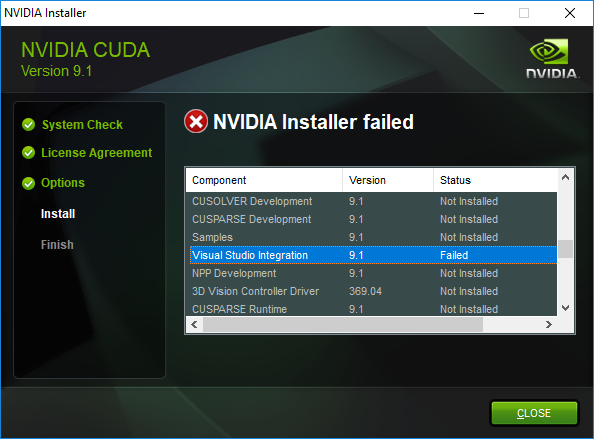
解决方法:
- 安装时选择自定义安装,点击第一项 CUDA ,取消勾选 VS integration,等待安装
- 右击 CUDA 的 exe 文件,选择解压
- 在解压后的文件中找这个路径\CUDAVisualStudioIntegration\extras\visual_studio_integration\MSBuildExtensions
复制里面的所有文件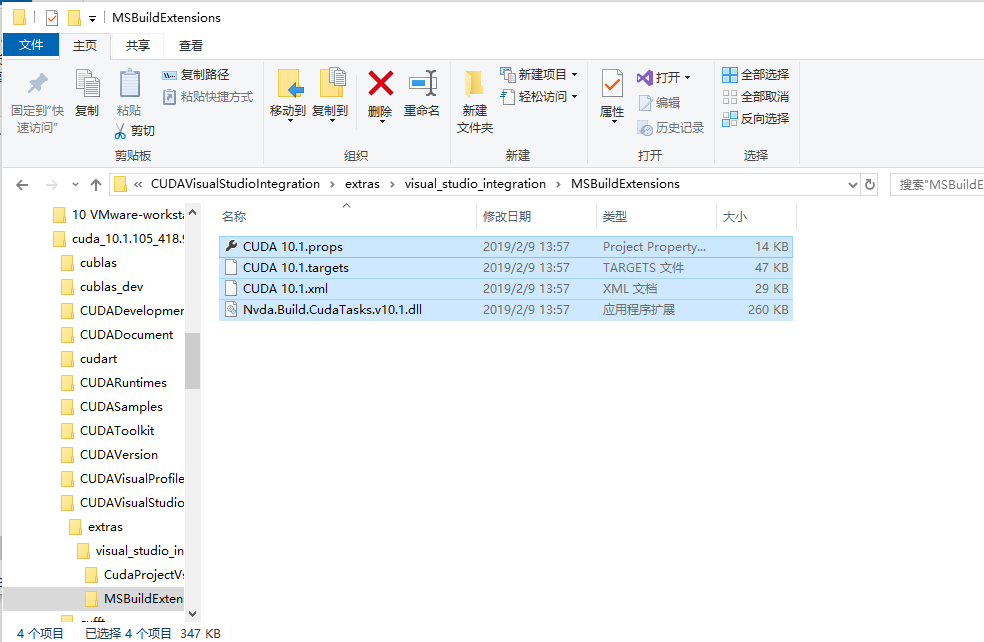
- 找到 VS 的安装目录,比如 C:\Program Files (x86)\Microsoft Visual Studio\2017\Community\Common7\IDE\VC\VCTargets\BuildCustomizations,把
上一步选中的文件复制进来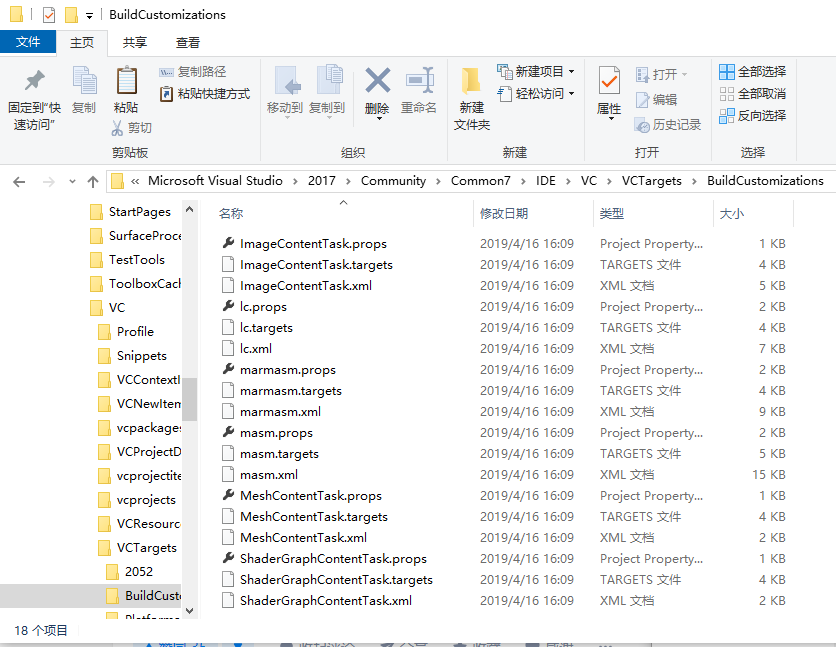
参考:
https://www.zhihu.com/question/276491276
 GitHub 加速计划 / in / integration
 32
32
 1
下载
1
下载
HACS gives you a powerful UI to handle downloads of all your custom needs.
最近提交(Master分支:4 个月前 )
b001e3dd
Bumps [awscli](https://github.com/aws/aws-cli) from 1.44.18 to 1.44.20.
- [Release notes](https://github.com/aws/aws-cli/releases)
- [Commits](https://github.com/aws/aws-cli/compare/1.44.18...1.44.20)
---
updated-dependencies:
- dependency-name: awscli
dependency-version: 1.44.20
dependency-type: direct:production
update-type: version-update:semver-patch
...
Signed-off-by: dependabot[bot] <support@github.com>
Co-authored-by: dependabot[bot] <49699333+dependabot[bot]@users.noreply.github.com>
Co-authored-by: Joakim Sørensen <joasoe@proton.me> 6 天前
cf2a9432
Bumps [ruff](https://github.com/astral-sh/ruff) from 0.14.11 to 0.14.13.
- [Release notes](https://github.com/astral-sh/ruff/releases)
- [Changelog](https://github.com/astral-sh/ruff/blob/main/CHANGELOG.md)
- [Commits](https://github.com/astral-sh/ruff/compare/0.14.11...0.14.13)
---
updated-dependencies:
- dependency-name: ruff
dependency-version: 0.14.13
dependency-type: direct:production
update-type: version-update:semver-patch
...
Signed-off-by: dependabot[bot] <support@github.com>
Co-authored-by: dependabot[bot] <49699333+dependabot[bot]@users.noreply.github.com> 6 天前

AtomGit 是由开放原子开源基金会联合 CSDN 等生态伙伴共同推出的新一代开源与人工智能协作平台。平台坚持“开放、中立、公益”的理念,把代码托管、模型共享、数据集托管、智能体开发体验和算力服务整合在一起,为开发者提供从开发、训练到部署的一站式体验。
更多推荐


 9
9 0
0- 0


 已为社区贡献4条内容

所有评论(0)