Linux下安装任意版本的tensorflow命令
·
终端或命令行下输入:
sudo pip install \
  -i https://pypi.tuna.tsinghua.edu.cn/simple/ \
  https://mirrors.tuna.tsinghua.edu.cn/tensorflow/linux/gpu/tensorflow_gpu-1.4.0-cp27-none-linux_x86_64.whl
上述只是一个样例,安装任意版本的tensorflow,只需修改相应的版本号,比如,我现在想下载tensorflow-1.0.0版本的:
sudo pip install \
  -i https://pypi.tuna.tsinghua.edu.cn/simple/ \
  https://mirrors.tuna.tsinghua.edu.cn/tensorflow/linux/gpu/tensorflow_gpu-1.0.0-cp27-none-linux_x86_64.whl
如下:
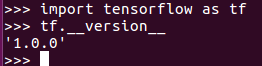
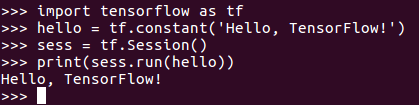
测试是否安装成功:
>>> import tensorflow as tf
>>> hello = tf.constant('Hello, TensorFlow!')
>>> sess = tf.Session()
>>> print(sess.run(hello))

AtomGit 是由开放原子开源基金会联合 CSDN 等生态伙伴共同推出的新一代开源与人工智能协作平台。平台坚持“开放、中立、公益”的理念,把代码托管、模型共享、数据集托管、智能体开发体验和算力服务整合在一起,为开发者提供从开发、训练到部署的一站式体验。
更多推荐


 1
1 0
0- 0


 已为社区贡献4条内容

所有评论(0)