EasyExcel导出-自定义转换器,将某个字段值转换成字符串
easyexcel
快速、简洁、解决大文件内存溢出的java处理Excel工具
项目地址:https://gitcode.com/gh_mirrors/ea/easyexcel
 免费下载资源
·
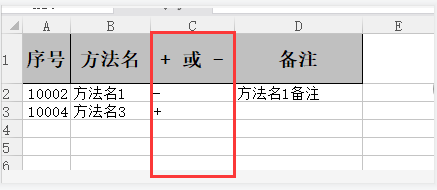
示例如下:
将红框列的 + 号 - 号转成字符串
实现:
1、先创建一个转换类并实现Converter 接口,转换类内容如下:
import com.alibaba.excel.converters.Converter;
import com.alibaba.excel.enums.CellDataTypeEnum;
import com.alibaba.excel.metadata.CellData;
import com.alibaba.excel.metadata.GlobalConfiguration;
import com.alibaba.excel.metadata.property.ExcelContentProperty;

public class AddOrDelConverter implements Converter<String> {
    @Override
    public Class supportJavaTypeKey() {
        return null;
    }

    @Override
    public CellDataTypeEnum supportExcelTypeKey() {
        return null;
    }

    @Override
    public String convertToJavaData(CellData cellData, ExcelContentProperty contentProperty, GlobalConfiguration globalConfiguration) throws Exception {
        return null;
    }

    @Override
    public CellData convertToExcelData(String value, ExcelContentProperty contentProperty, GlobalConfiguration globalConfiguration) throws Exception {
        return null;
    }
}
2、在convertToExcelData()方法里面写将数据库字段转换成EXCEL显示字段的逻辑,例如:
@Override
public CellData convertToExcelData(String value, ExcelContentProperty contentProperty, GlobalConfiguration globalConfiguration) throws Exception {
if( value == "+" ){
return new CellData("添加");
}else {
return new CellData("删除");
}
}
3、然后在实体类上使用:
	@TableField("add_or_del")
	@ExcelProperty(value = "添加或删除",converter = AddOrDelConverter.class)
	private java.lang.String addOrDel;
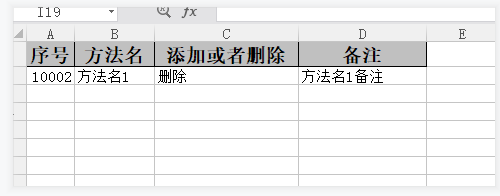
转换后效果如下:
 GitHub 加速计划 / ea / easyexcel
 26
26
 5
下载
5
下载
快速、简洁、解决大文件内存溢出的java处理Excel工具
最近提交(Master分支:4 个月前 )
c42183df
Bugfix 1 年前
efa7dff6 * 重新加回 `commons-io`
1 年前

AtomGit 是由开放原子开源基金会联合 CSDN 等生态伙伴共同推出的新一代开源与人工智能协作平台。平台坚持“开放、中立、公益”的理念,把代码托管、模型共享、数据集托管、智能体开发体验和算力服务整合在一起,为开发者提供从开发、训练到部署的一站式体验。
更多推荐


 6
6 0
0- 0


 已为社区贡献1条内容

所有评论(0)