Ant Design Vue时间轴不生效问题
vue
vuejs/vue: 是一个用于构建用户界面的 JavaScript 框架,具有简洁的语法和丰富的组件库,可以用于开发单页面应用程序和多页面应用程序。
项目地址:https://gitcode.com/gh_mirrors/vu/vue
 免费下载资源
·
官网代码演示:
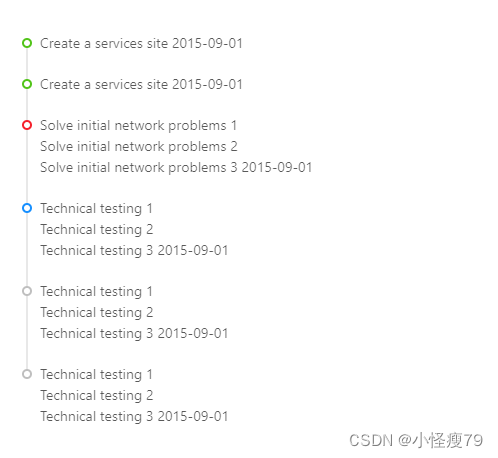
<template>
  <a-timeline>
    <a-timeline-item color="green">
      Create a services site 2015-09-01
    </a-timeline-item>
    <a-timeline-item color="green">
      Create a services site 2015-09-01
    </a-timeline-item>
    <a-timeline-item color="red">
      <p>Solve initial network problems 1</p>
      <p>Solve initial network problems 2</p>
      <p>Solve initial network problems 3 2015-09-01</p>
    </a-timeline-item>
    <a-timeline-item>
      <p>Technical testing 1</p>
      <p>Technical testing 2</p>
      <p>Technical testing 3 2015-09-01</p>
    </a-timeline-item>
    <a-timeline-item color="gray">
      <p>Technical testing 1</p>
      <p>Technical testing 2</p>
      <p>Technical testing 3 2015-09-01</p>
    </a-timeline-item>
    <a-timeline-item color="gray">
      <p>Technical testing 1</p>
      <p>Technical testing 2</p>
      <p>Technical testing 3 2015-09-01</p>
    </a-timeline-item>
  </a-timeline>
</template>
将代码copy到项目中只显示文本内容,不显示时间轴
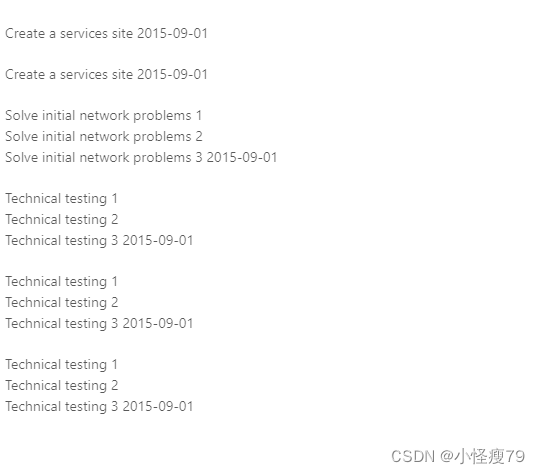
需要引入依赖,且将标签修改为 timeline 和 timeline-item
<template>
        <timeline-item color="green">
          Create a services site 2015-09-01
        </timeline-item>
        <timeline-item color="green">
          Create a services site 2015-09-01
        </timeline-item>
        <timeline-item color="red">
          <p>Solve initial network problems 1</p>
          <p>Solve initial network problems 2</p>
          <p>Solve initial network problems 3 2015-09-01</p>
        </timeline-item>
        <timeline-item>
          <p>Technical testing 1</p>
          <p>Technical testing 2</p>
          <p>Technical testing 3 2015-09-01</p>
        </timeline-item>
        <timeline-item color="gray">
          <p>Technical testing 1</p>
          <p>Technical testing 2</p>
          <p>Technical testing 3 2015-09-01</p>
        </timeline-item>
        <timeline-item color="gray">
          <p>Technical testing 1</p>
          <p>Technical testing 2</p>
          <p>Technical testing 3 2015-09-01</p>
        </timeline-item>
</template>
<script lang="ts" setup>
  //引入时间轴
  import { Timeline, TimelineItem } from 'ant-design-vue';
</script> GitHub 加速计划 / vu / vue
 109
109
 19
下载
19
下载
vuejs/vue: 是一个用于构建用户界面的 JavaScript 框架,具有简洁的语法和丰富的组件库,可以用于开发单页面应用程序和多页面应用程序。
最近提交(Master分支:4 个月前 )
9e887079
[skip ci] 1 年前
73486cb5
* chore: fix link broken
Signed-off-by: snoppy <michaleli@foxmail.com>
* Update packages/template-compiler/README.md [skip ci]
---------
Signed-off-by: snoppy <michaleli@foxmail.com>
Co-authored-by: Eduardo San Martin Morote <posva@users.noreply.github.com> 1 年前

AtomGit 是由开放原子开源基金会联合 CSDN 等生态伙伴共同推出的新一代开源与人工智能协作平台。平台坚持“开放、中立、公益”的理念,把代码托管、模型共享、数据集托管、智能体开发体验和算力服务整合在一起,为开发者提供从开发、训练到部署的一站式体验。
更多推荐



 9
9 0
0- 0


 已为社区贡献2条内容

所有评论(0)