vue3表格使用拖拽排序
vue
vuejs/vue: 是一个用于构建用户界面的 JavaScript 框架,具有简洁的语法和丰富的组件库,可以用于开发单页面应用程序和多页面应用程序。
项目地址:https://gitcode.com/gh_mirrors/vu/vue
 免费下载资源
·
拖拽排序
实现效果
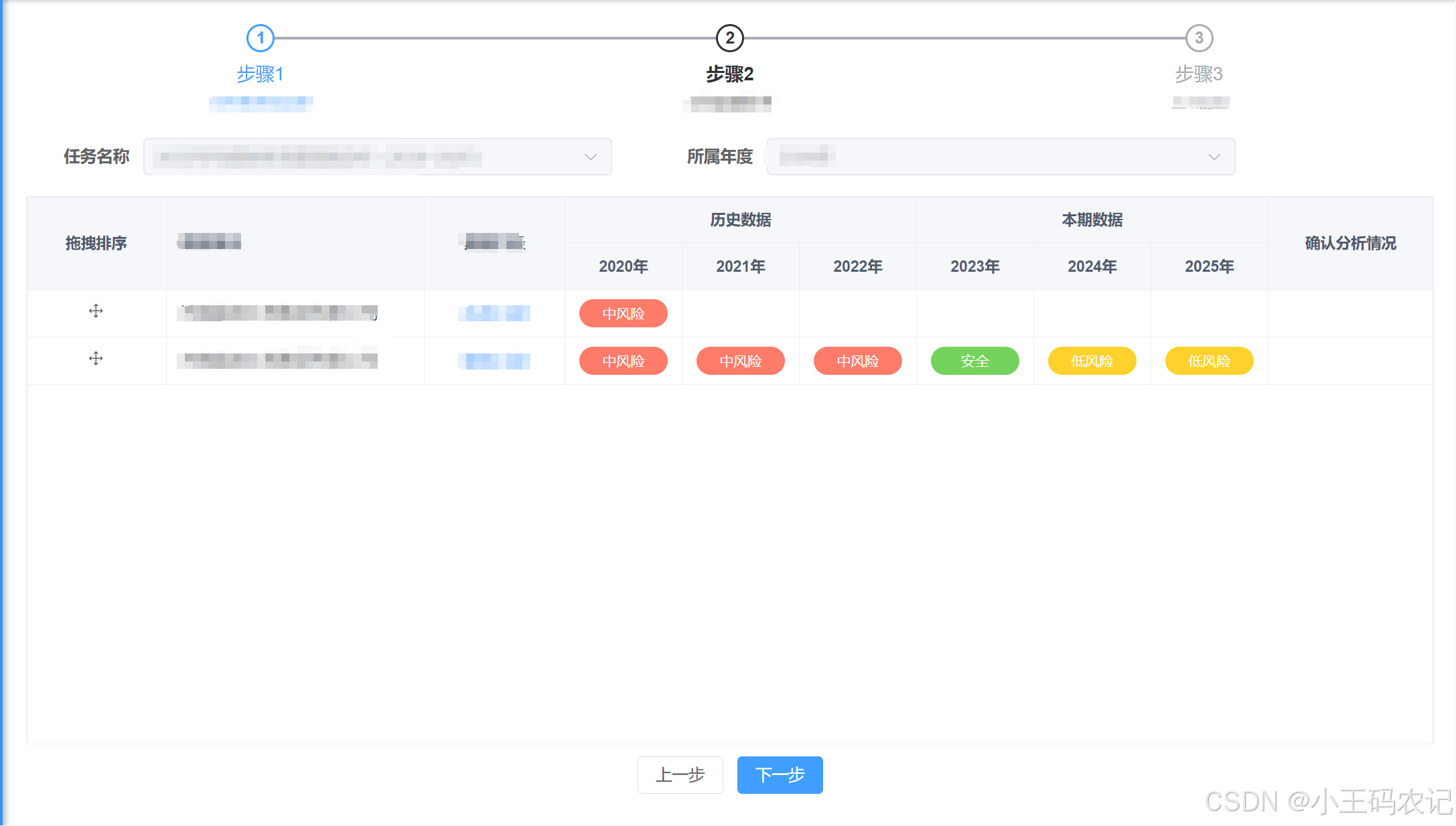
实现步骤
- 先
安装sortable.js库- 使用的vue文件中
引入import Sortablejs from ‘sortablejs’- 在进入页面后创建sortable
实例- 在提交后端时可获取到
排序后的最新table列表数据
拖拽排序功能的完整代码
<template>
  <div style="height: 100%">
    <!-- ...省略其他代码... -->
    <div class="table-box" style="height: 100%;">
      <el-table class="sort-el-table" row-key="id" v-loading="loading" :data="tableList"
                style="flex: 1;margin-bottom: 20px;" height="100%">
                <!-- table中拖拽排序列 -->
        <el-table-column label="拖拽排序" fixed width="120px" align="center">
          <template #default="scope">
            <el-icon class="sort-icon" style="cursor: pointer">
              <Rank/>
            </el-icon>
          </template>
        </el-table-column>
        <el-table-column
            label="XXX"
            align="left"
            prop="deptName"
            width="220"
            show-overflow-tooltip
            fixed
        >
        </el-table-column>
        <el-table-column
            label="XXX"
            align="center"
            prop="dataAperture"
            width="120"
            fixed
        >
          <template #default="scope">
            <el-link type="primary" @click="handleDetail(scope.row)">
              <dict-tag :options="task_data_aperture" :value="scope.row.dataAperture"/>
            </el-link>
          </template>
        </el-table-column>
        <!-- 合并表头的效果 -->
        <el-table-column label="历史数据" align="center">
          <el-table-column
              v-for="(item, index) in historyRiskResultVOList"
              :key="index"
              :prop="'dataYear'"
              :label="item"
              align="center"
              width="100"
          >
            <template #header>
              <span>{{ item }}</span>
            </template>
            <template #default="scope">
              <dict-tag
                  :canClick="false"
                  :options="risk_model_result_level"
                  :value="getTableColumnData(scope.row, index)"
              />
            </template>
          </el-table-column>
        </el-table-column>
        <el-table-column label="本期数据" align="center">
          <el-table-column
              v-for="(item, index) in forecastRiskResultVOList"
              :key="index"
              :prop="'dataYear'"
              :label="item"
              align="center"
              width="100"
          >
            <template #header>
              <span>{{ item }}</span>
            </template>
            <template #default="scope">
              <dict-tag
                  :canClick="false"
                  :options="risk_model_result_level"
                  :value="getTableColumnData2(scope.row, index)"
              />
            </template>
          </el-table-column>
        </el-table-column>
        <el-table-column
            label="确认分析情况"
            align="center"
            prop="confirmDesc"
            show-overflow-tooltip
        />
      </el-table>
    </div>
    <div class="foot-btn">
      <el-button @click="backTo">上一步</el-button>
      <el-button type="primary" @click="nextStep">下一步</el-button>
    </div>
  </div>
</template>

<script setup>
import Sortablejs from 'sortablejs' //使用前先安装库

const {proxy} = getCurrentInstance();
const {task_data_aperture, risk_model_result_level} =
    proxy.useDict("task_data_aperture", "risk_model_result_level"); // 字典项
const emit = defineEmits(["backTo", "nextStep"]);

const historyRiskResultVOList = ref([])
const forecastRiskResultVOList = ref([])

const props = defineProps({
  taskObj: {
    type: Object,
    default: () => {
      return {}
    }
  },
  // 判断是否是编辑
  flag: {
    type: Boolean,
    default: false
  }
})

const loading = ref(false);
const tableList = ref([])

watch(() => props.taskObj, (v) => {
  // ...省略其他代码...
  nextTick(() => {
      // 进入页面后就开启表格拖拽排序
      const el = document.querySelector('.sort-el-table .el-table__body-wrapper  table tbody'); //  querySelector 方法选取页面上指定的元素。这里的选择器 '.sort-el-table .el-table__body-wrapper  table tbody' 定位到一个表格的 tbody 部分

      // 创建了一个 Sortable.js 实例,将 el 作为容器,用于拖拽排序
      Sortablejs.create(el, {
        animation: 150,
        ghostClass: 'blue-background-class',
        handle: '.sort-icon', // 指定了拖拽手柄的类名,如果需要点击某个图标拖拽的话需要吧那个图标的class写在这里
        onEnd: function (evt) { // 拖拽动作结束时触发
          let newIndex = evt.newIndex  // 排序后的索引位置
          let oldIndex = evt.oldIndex  // 排序前的索引位置
          if (newIndex !== oldIndex) { // 如果 newIndex 和 oldIndex 不相等,说明元素的位置发生了变化
            let currRow = tableList.value.splice(oldIndex, 1)[0]; // 从数组中移除原来位置的元素,并返回被移除的元素obj
            console.log("currRow:", currRow);
            tableList.value.splice(newIndex, 0, currRow); // 将被移除的该元素插入到新的位置
          }
        }
      })
    })
}, {immediate: true})


// 提交表格数据(根据表格顺序加index属性)
function nextStep() {
  tableList.value.forEach((item, index) => {
    item.index = index
  })
  console.log("当前的tableList:", tableList.value);
  return;
  emit('sortVal', tableList.value)
}
</script>
 GitHub 加速计划 / vu / vue
 109
109
 19
下载
19
下载
vuejs/vue: 是一个用于构建用户界面的 JavaScript 框架,具有简洁的语法和丰富的组件库,可以用于开发单页面应用程序和多页面应用程序。
最近提交(Master分支:4 个月前 )
9e887079
[skip ci] 1 年前
73486cb5
* chore: fix link broken
Signed-off-by: snoppy <michaleli@foxmail.com>
* Update packages/template-compiler/README.md [skip ci]
---------
Signed-off-by: snoppy <michaleli@foxmail.com>
Co-authored-by: Eduardo San Martin Morote <posva@users.noreply.github.com> 1 年前

AtomGit 是由开放原子开源基金会联合 CSDN 等生态伙伴共同推出的新一代开源与人工智能协作平台。平台坚持“开放、中立、公益”的理念,把代码托管、模型共享、数据集托管、智能体开发体验和算力服务整合在一起,为开发者提供从开发、训练到部署的一站式体验。
更多推荐


 2
2 0
0- 0


 已为社区贡献10条内容

所有评论(0)