ES8 查询报错:jakarta.json.JsonException: Jackson exception (JSON path: _source) (line no=1.......
·
报错内容
co.elastic.clients.json.JsonpMappingException: Error deserializing co.elastic.clients.elasticsearch.core.GetResponse: jakarta.json.JsonException: Jackson exception (JSON path: _source) (line no=1, column no=105, offset=-1)
。。。
代码:
        //用JSONObject接收,正常
        GetResponse<JSONObject> response = client.get(s -> s
                        .index("test")
                        .id("1")
                ,
                JSONObject.class
        );
        JSONObject source = response.source();
        //用实体类接收,这里报错
        GetResponse<EsDemo> response2 = client.get(s -> s
                        .index("test")
                        .id("1")
                ,
                EsDemo.class
        );
原因:
新增数据时使用了 Spring Data Elasticsearch,会多出_class,但实体类并没有这个属性
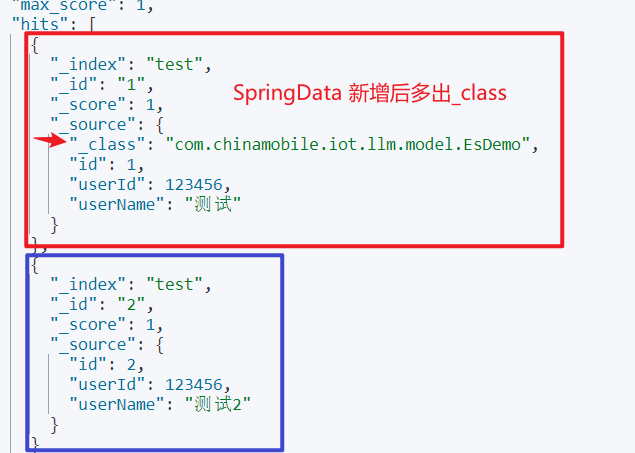
两种解决方案:
1. 接受的实体类加入注解 @JsonIgnoreProperties(ignoreUnknown = true)
import lombok.Data;
import org.springframework.data.annotation.Id;
import org.springframework.data.elasticsearch.annotations.Document;
import org.springframework.data.elasticsearch.annotations.Field;
import org.springframework.data.elasticsearch.annotations.FieldType;

@Data
@JsonIgnoreProperties(ignoreUnknown = true)
@Document(indexName = "test")
public class EsDemo {

    @Id()
    private Long id;
    @Field(type = FieldType.Integer)
    private Integer userId;
    @Field(type = FieldType.Text)
    private String userName;

}
2. 新增时不使用 Spring Data Elasticsearch,使用 Elasticsearch 官方提供的高级客户端库 - Elasticsearch Api Client
        //Spring Data Elasticsearch 新增方式
        EsDemo esDemo = new EsDemo();
        esDemo.setId(2l);
        esDemo.setUserId(123456);
        esDemo.setUserName("测试2");
        EsDemo save = EsDemoRepository.save(esDemo);
        //Elasticsearch Api Client 新增方式
        IndexResponse test = client.index(i -> i.index("test")
                        .id("2")
                        .document(esDemo));

AtomGit 是由开放原子开源基金会联合 CSDN 等生态伙伴共同推出的新一代开源与人工智能协作平台。平台坚持“开放、中立、公益”的理念,把代码托管、模型共享、数据集托管、智能体开发体验和算力服务整合在一起,为开发者提供从开发、训练到部署的一站式体验。
更多推荐


 11
11 0
0- 0


 已为社区贡献1条内容

所有评论(0)