Vue2+ElementUI实现el-table表格的自动滚动播放
element
A Vue.js 2.0 UI Toolkit for Web
项目地址:https://gitcode.com/gh_mirrors/eleme/element
 免费下载资源
·
这个是我实验室横向项目中的一个需求,我们做的是一个数字化大屏,就需要该功能以实现数字化自动化。类似下面这种:官网给的示例,现在要实现自动播放功能。即:鼠标不划过时自动播放,鼠标悬停时暂停播放且还能手动滑动。
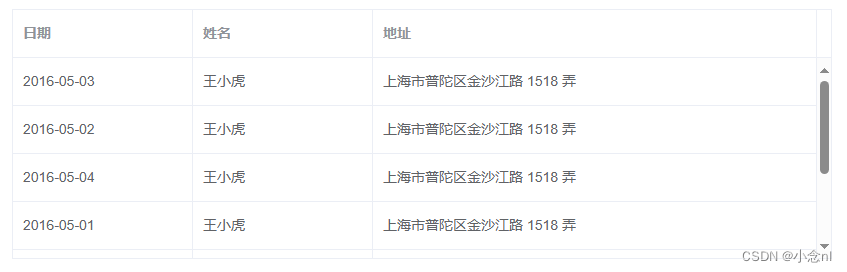
直接上代码
template:
<el-table :data="userInfo" style="width: 100%" height="250" ref="scrollTable" @mouseenter.native="autoScroll(true)" @mouseleave.native="autoScroll(false)">
    <el-table-column type="index" label="序号" width="80" align="center">
    </el-table-column>
    <el-table-column prop="name" label="姓名" width="200" align="center">
    </el-table-column>
    </el-table-column>
    <el-table-column prop="className" label="班级" align="center" :formatter="formatClassName">
    </el-table-column>
</el-table>
script:
data() {
  return {
    // 党员信息(调用接口为userInfo赋值,这里不再展示)
    userInfo: [],
    // 自动滚动的定时任务
    scrolltimer: "",
  }
},
// 设置table自动滚动
autoScroll(stop) {
var table = this.$refs.scrollTable
var div = table.$refs.bodyWrapper
// 拿到元素后,对元素进行定时增加距离顶部距离,实现滚动效果(此配置为每100毫秒移动1像素)
if (stop) {
//再通过事件监听,监听到 组件销毁 后,再执行关闭计时器。
window.clearInterval(this.scrolltimer)
} else {
this.scrolltimer = window.setInterval(() => {
// 元素自增距离顶部1像素
div.scrollTop += 1
// 判断元素是否滚动到底部(可视高度+距离顶部=整个高度)
if (div.clientHeight + div.scrollTop >= div.scrollHeight) {
// 重置table距离顶部距离
div.scrollTop = 0
}
}, 50) // 滚动速度
}
},mounted() {
this.autoScroll()
},
beforeDestroy() {
this.autoScroll(true)
}, GitHub 加速计划 / eleme / element
 15
15
 2
下载
2
下载
A Vue.js 2.0 UI Toolkit for Web
最近提交(Master分支:2 个月前 )
c345bb45
1 年前
a07f3a59
* Update transition.md
* Update table.md
* Update transition.md
* Update table.md
* Update transition.md
* Update table.md
* Update table.md
* Update transition.md
* Update popover.md 1 年前

AtomGit 是由开放原子开源基金会联合 CSDN 等生态伙伴共同推出的新一代开源与人工智能协作平台。平台坚持“开放、中立、公益”的理念,把代码托管、模型共享、数据集托管、智能体开发体验和算力服务整合在一起,为开发者提供从开发、训练到部署的一站式体验。
更多推荐



 9
9 0
0- 0


 已为社区贡献3条内容

所有评论(0)