Windows Terminal新版终端 美化设置背景图片和标题
·
Windows Terminal
是微软在 2019 年 5 月的 Build Developer 会议上宣布并于 6 月份推出的一款开源终端应用程序。
Windows Terminal 包含命令提示符和 PowerShell 的所有优点,其主要功能之一是能够打开多个选项卡,每个选项卡都支持自己的 shell。
在 Windows Terminal 中,可以运行 PowerShell、命令提示符和 Linux 终端(如 Ubuntu),只需一个点击就可以在它们之间切换。它还支持自定义主题、样式、Unicode 等。
安装
在应用商店直接搜索 Windows Terminal
自定义选项卡标题
默认的Tab很长,不好看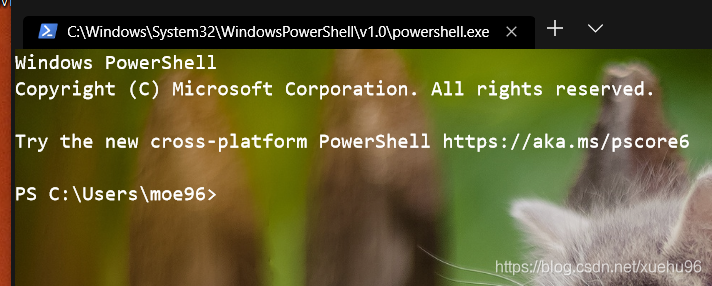
可以通过修改"tabTitle" : "Powershell"修改Tab的名称(修改的方法在后面),修改结果如下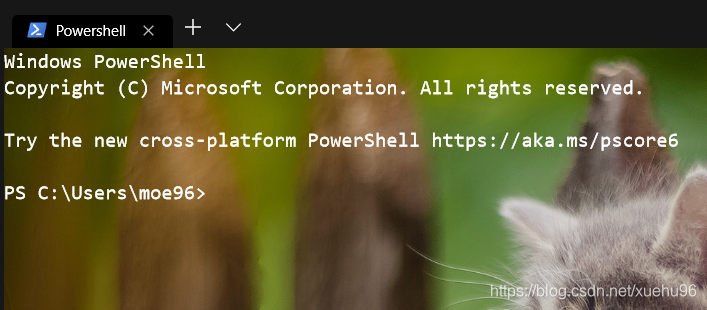
自定义背景图片和颜色
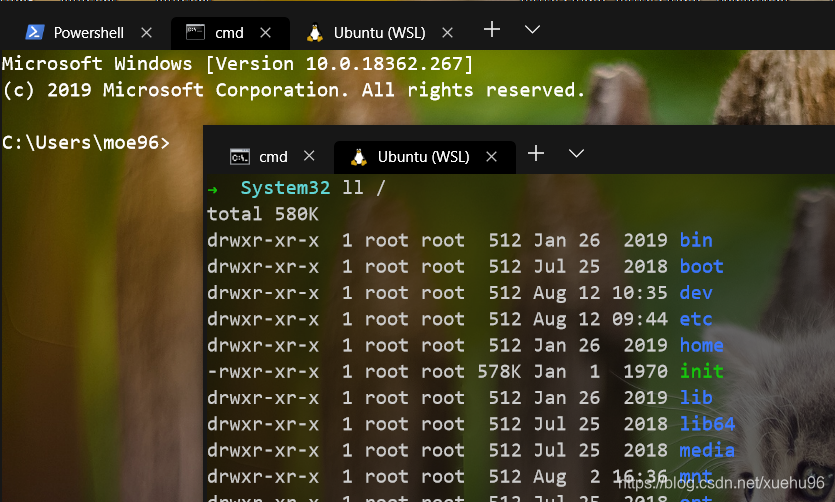
            "backgroundImage" : "T://2.jpg",  # 背景图片地址
            "backgroundImageOpacity" : 0.9  #透明度
配置修改方法
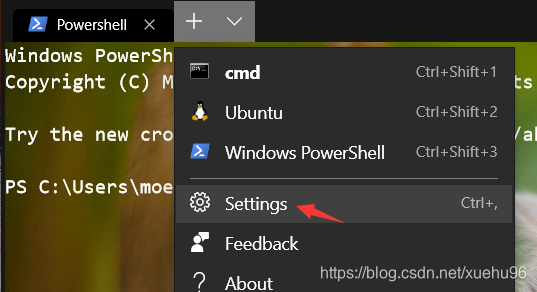
点击设置,用vscode或者其他编辑器打开json配置文件
1.修改cmd
#开头的是注释,不要复制进去,配置文件不带注释!!
也不要全文复制,guid可能每台电脑都不一样
        {
            "acrylicOpacity" : 0.75,
            "backgroundImage" : "T://2.jpg", # 图片地址
            "backgroundImageOpacity" : 0.9,
            "closeOnExit" : true,
            "colorScheme" : "CMD",# 配色方案
            "commandline" : "cmd.exe",
            "cursorColor" : "#FFFFFF",
            "cursorShape" : "bar",
            "fontFace" : "Consolas",
            "fontSize" : 12,  #字体大小
            "guid" : "{0caa0dad-35be-5f56-a8ff-afceeeaa6101}", #这个不要复制
            "historySize" : 9001,
            "icon" : "ms-appx:///ProfileIcons/{0caa0dad-35be-5f56-a8ff-afceeeaa6101}.png",
            "name" : "cmd",
            "padding" : "0, 0, 0, 0",
            "snapOnInput" : true,
            "startingDirectory" : "%USERPROFILE%",
            "tabTitle" : "cmd",
            "useAcrylic" : false  # 毛玻璃 关掉
        },
2.修改ubuntu
        {
            "acrylicOpacity" : 0.5,
            "backgroundImage" : "T://2.jpg", # 图片地址
            "backgroundImageOpacity" : 0.4, # 透明度
            "closeOnExit" : true,
            "colorScheme" : "Campbell",
            "commandline" : "wsl.exe -d Ubuntu",
            "cursorColor" : "#FFFFFF",
            "cursorShape" : "bar",
            "fontFace" : "Consolas",
            "fontSize" : 12,
            "guid" : "{2c4de342-38b7-51cf-b940-2309a097f518}",
            "historySize" : 9001,
            "icon" : "ms-appx:///ProfileIcons/{9acb9455-ca41-5af7-950f-6bca1bc9722f}.png",
            "name" : "Ubuntu",
            "padding" : "0, 0, 0, 0",
            "snapOnInput" : true,
            "tabTitle" : "Ubuntu (WSL)",
            "useAcrylic" : false
        },
3.修改powershell
        {
            "acrylicOpacity" : 0.5,
            "background" : "#000000",  # 背景颜色 因为ps默认是蓝底,这个和cmd ubuntu不一样
            "backgroundImage" : "T://2.jpg", # 图片地址
            "backgroundImageOpacity" : 0.9,  # 透明度
            "closeOnExit" : true,
            "colorScheme" : "CMD",  # 配色方案
            "commandline" : "powershell.exe",
            "cursorColor" : "#FFFFFF",
            "cursorShape" : "bar",
            "fontFace" : "Consolas",
            "fontSize" : 12,
            "guid" : "{61c54bbd-c2c6-5271-96e7-009a87ff44bf}", #这个不要复制
            "historySize" : 9001,
            "icon" : "ms-appx:///ProfileIcons/{61c54bbd-c2c6-5271-96e7-009a87ff44bf}.png",
            "name" : "Windows PowerShell",
            "padding" : "0, 0, 0, 0",
            "snapOnInput" : true,
            "startingDirectory" : "%USERPROFILE%",
            "tabTitle" : "Powershell",  #tab名称
            "useAcrylic" : false  # 毛玻璃 关掉
        }
4.修改schemes
        {
            "background" : "#000000",  #背景纯黑色
            "black" : "#0C0C0C",
            "blue" : "#0037DA",
            "brightBlack" : "#767676",
            "brightBlue" : "#3B78FF",
            "brightCyan" : "#61D6D6",
            "brightGreen" : "#16C60C",
            "brightPurple" : "#B4009E",
            "brightRed" : "#E74856",
            "brightWhite" : "#F2F2F2",
            "brightYellow" : "#F9F1A5",
            "cyan" : "#3A96DD",
            "foreground" : "#FFFFFF",  # 字体纯白色
            "green" : "#13A10E",
            "name" : "CMD",            #配置的名字
            "purple" : "#881798",
            "red" : "#C50F1F",
            "white" : "#CCCCCC",
            "yellow" : "#C19C00"
        },
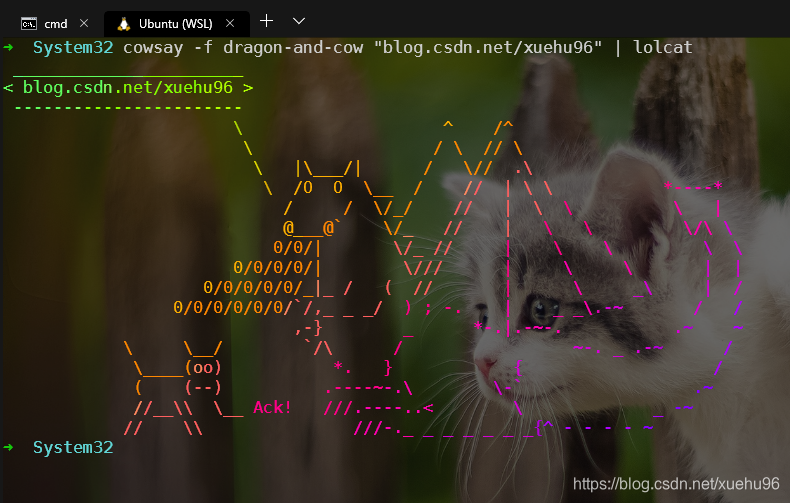
最后效果

AtomGit 是由开放原子开源基金会联合 CSDN 等生态伙伴共同推出的新一代开源与人工智能协作平台。平台坚持“开放、中立、公益”的理念,把代码托管、模型共享、数据集托管、智能体开发体验和算力服务整合在一起,为开发者提供从开发、训练到部署的一站式体验。
更多推荐


 21
21 0
0- 0


 已为社区贡献6条内容

所有评论(0)