vue3自定义插件(如何将弹窗组件挂载全局)使用
vue
vuejs/vue: 是一个用于构建用户界面的 JavaScript 框架,具有简洁的语法和丰富的组件库,可以用于开发单页面应用程序和多页面应用程序。
项目地址:https://gitcode.com/gh_mirrors/vu/vue
 免费下载资源
·
#实现功能:自定义一个提示语弹窗,挂载在vue实例上全局使用
#效果图如下:
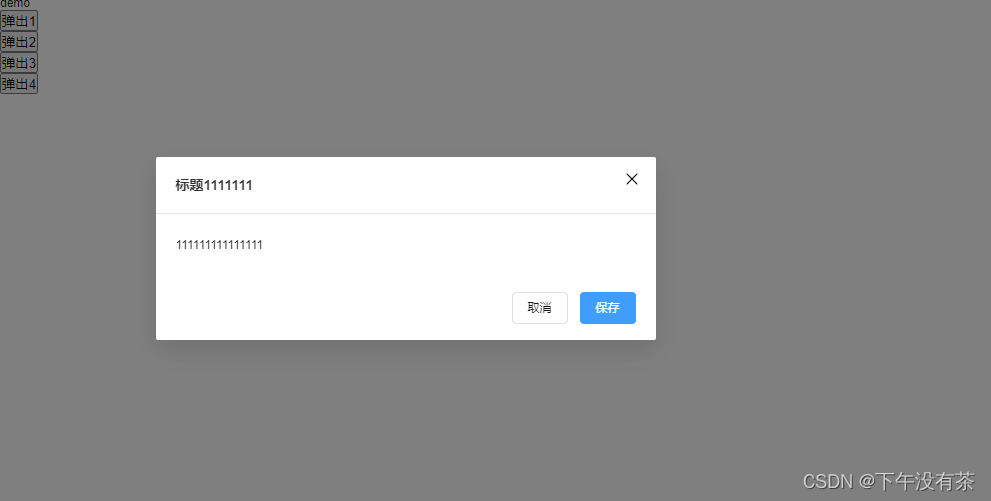
实现步骤:
1.先创建一个confirm.vue文件,这是我们的弹窗组件
<script setup lang="ts">
const props = withDefaults(
  defineProps<{
    message: string; // 提示信息
    title: string; // 标题
    show: boolean; // 是否显示
    onConfirm: Function; // 确认按钮回调
    onCancel: Function; // 取消按钮回调
  }>(),
  {
    title: '提示', //定义默认值
    show: false,
  },
);
const emit = defineEmits(['update:modelValue', 'onConfirm', 'onCancel']);

const show_ = computed({
  get: () => props.show,
  set: (val) => {
    emit('update:modelValue', val);
  },
});

const onConfirm = () => {
  props.onConfirm();
};
const onCancel = () => {
  props.onCancel.();
  show_.value = false;
};

</script>
<template>
  <!-- 这是自己封装的一个弹窗组件 ,就放放上来了,下面注释的el-dialog一样可以实现 -->
  <ft-dialog
    :title="title"
    v-model="show_"
    @on-close="onCancel"
    @on-confirm="onConfirm"
  >
    <p>{{ message }}</p>
  </ft-dialog>

  <!-- <el-dialog v-model="show_" :title="title" width="500" @close="onCancel">
    <div>{{ message }}</div>
    <template #footer>
      <el-button @click="onCancel">取消</el-button>
      <el-button type="primary" @click="onConfirm">确认</el-button>
    </template>
  </el-dialog> -->
</template>

<style scoped lang="scss"></style>
2.创建一个confirmInstall.ts
import type { App, } from 'vue'
import { render, createVNode, } from 'vue'
import confirm from '@/views/demo/confirm.vue'

interface DialogOptions {
    title?: string;
    message: string;
    onConfirm?: Function;
    onCancel?: Function;
}

export default {
    install: (app: App) => {
        // 添加全局方法 $ftConfirm
        app.config.globalProperties.$ftConfirm = (options: DialogOptions) => {
            const show = ref(true)
            const wrapper = document.createElement('div')
            wrapper.id = 'ft-confirm'; // 创建一个id=ft-confirm的容器
            let vnode = createVNode(confirm); // 创建一个vnode
            const close = () => {
                // 关闭弹窗移除标签
                document.body.removeChild(document.getElementById('ft-confirm') as HTMLDivElement);
            }
            const dialogProps = reactive({
                onConfirm: options.onConfirm ? () => { options.onConfirm?.(); close() } : close,
                onCancel: close,
                title: options.title,
                message: options.message,
                show: show.value,
            });
            vnode = createVNode(confirm, dialogProps);
            render(vnode, wrapper); // 渲染组件
            document.body.appendChild(wrapper); // 添加到body
        };
    }
}3.main.ts
//$ftConfirm声明 放置报错 和 智能提示
declare module '@vue/runtime-core' {
    export interface ComponentCustomProperties {
        $ftConfirm: any;
    }
}

import confirm from '@/views/demo/confirmInstall';
const app = createApp(App);
app.use(confirm);
app.mount('#app');
4. 使用方法
<script setup lang="ts">
import { getCurrentInstance } from 'vue';
const instance = getCurrentInstance()?.appContext.config.globalProperties; // 获取全局属性

const open = () => {
  instance?.$ftConfirm({
    title: '这是我的标题',
    message: '哈哈哈哈哈哈哈哈',
    onConfirm: () => {
      console.log('confirm---open11');
    },
  });
};
const open2 = () => {
  instance?.$ftConfirm({
    message: '笑笑笑笑笑了一下',
    onConfirm: () => {
      console.log('confirm---open2');
    },
  });
};
</script>
<template>
  <div>demo</div>
  <button @click="open">弹出1</button>
  <br />
  <button @click="open2">弹出2</button>
  <br />
</template>

<style scoped lang="scss"></style>
 GitHub 加速计划 / vu / vue
 109
109
 19
下载
19
下载
vuejs/vue: 是一个用于构建用户界面的 JavaScript 框架,具有简洁的语法和丰富的组件库,可以用于开发单页面应用程序和多页面应用程序。
最近提交(Master分支:4 个月前 )
9e887079
[skip ci] 1 年前
73486cb5
* chore: fix link broken
Signed-off-by: snoppy <michaleli@foxmail.com>
* Update packages/template-compiler/README.md [skip ci]
---------
Signed-off-by: snoppy <michaleli@foxmail.com>
Co-authored-by: Eduardo San Martin Morote <posva@users.noreply.github.com> 1 年前

AtomGit 是由开放原子开源基金会联合 CSDN 等生态伙伴共同推出的新一代开源与人工智能协作平台。平台坚持“开放、中立、公益”的理念,把代码托管、模型共享、数据集托管、智能体开发体验和算力服务整合在一起,为开发者提供从开发、训练到部署的一站式体验。
更多推荐


 6
6 0
0- 0


 已为社区贡献3条内容

所有评论(0)